EMJM2CG01DYNEX WIRELESS OPTICAL MOUSE
Primax Electronics Ltd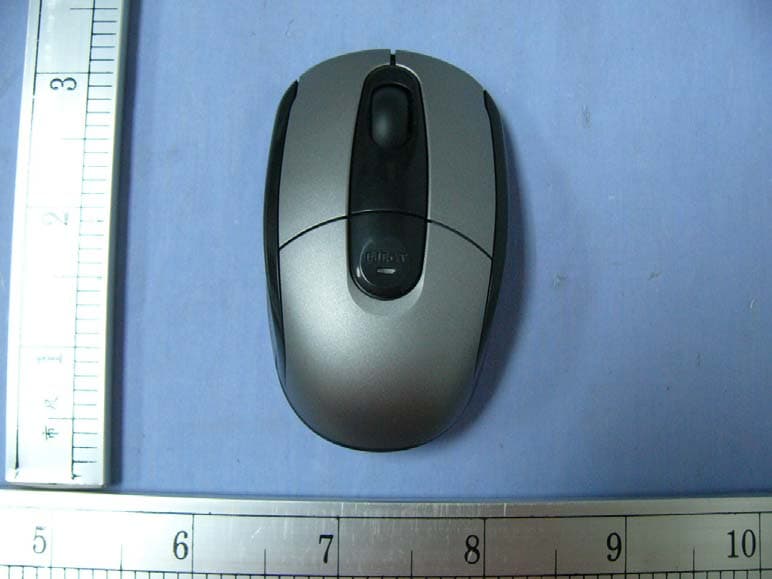
Click to zoom
Application Details
- Equipment Class
- DXX - Part 15 Low Power Communication Device Transmitter
- Date of Grant
- Nov 19, 2007
- Application Purpose
- Original Equipment
- Date of Application
- Nov 18, 2007
- Equipment Note
- DYNEX WIRELESS OPTICAL MOUSE
- Frequency Range
- 27.04500000 - 27.04500000
- Company
- Primax Electronics Ltd
- Country
- Taiwan
Documents & Files
Document Text
Text extracted from the exhibit documents filed with the FCC. Open a document above to read the original.
Users Manual
Dynex Wireless Mouse User Manual Version 1.0 Mouse User Manual Table of Contents Preface ................................................................1 About This Manual....................................................1 Safety ..................................................................1 Introducing your Mouse ............................................2 System Requirements................................................2 Features ...............................................................2 Package Contents ....................................................2 Product Views.........................................................3 Setting Up your Mouse .............................................4 Connecting your Mouse ............................................5 Using your Mouse....................................................6 Troubleshooting .....................................................6 Specifications ........................................................7 Legal notices .........................................................7 FCC Statement........................................................7 Canada ICES-003 Statement ........................................8 Copyright ..............................................................8 1 Mouse User Manual Preface Thank you for your purchase of this wireless mouse. Read this manual carefully and keep it in a safe place for future reference. About This Manual Every effort has been made to ensure that the contents of this manual are correct and up to date. However, no guarantee is made regarding the accuracy of the contents, and the manufacturer reserves the right to make changes without notice. Safety Before getting started, read these instructions and save them for future reference. • Do not drop or hit your mouse. • Do not use your mouse in a location that is subject to strong vibrations because vibration may damage your mouse. • Do not disassemble or modify the product in any way. Dis- assembly or modification may void your warranty and could damage your mouse leading to a fire or electric shock. • Do not use or store your mouse in damp locations. Liquid entering the product may cause damage or lead to fires or electric shock. • Do not insert metal objects, such as coins or paper clips, into your mouse. • Your mouse is for general computer use. Do not use your mouse with a computer that requires exceptional reliabil- ity, especially if a breakdown or malfunction of might jeopardize life or health, such as aerospace equipment, atomic power control systems, traffic-related equipment, transportation equipment, industrial robotics, combustion equipment, safety devices, and life-support systems. Mouse User Manual 2 Introducing your Mouse Read this section to learn about the features and functions of your wireless mouse. This chapter also covers system requirements, package contents, and front and rear views. System Requirements Your computer must meet these requirements: • Pentium 133 MHz processor or higher • 1 free USB port • Windows 2000 / XP / Vista operating system • 64MB of RAM recommended Features • Wireless USB receiver • Advanced scroll wheel for added functionality • Supports USB 1.1 and 2.0 specification Package Contents All the following items should be present when you receive your mouse combo package. If any item is missing or appears damaged, contact your dealer immediately. Wireless MouseUser Manual 3 Mouse User Manual Product Views 1Left mouse button 2Right mouse button 3Scroll wheel 4Battery/USB receiver compartment eject button & power LED 5Battery/USB receiver compartment 6Optical sensor 7Power button 8Connect button 2 3 4 1 5 6 7 8 Front ViewBack View Mouse User Manual 4 Setting Up your Mouse Your mouse uses two AAA batteries. Do the following to insert the batteries and set up your mouse: 1. Push the battery/USB receiver compartment eject button down to open the compartment cover. 2. Insert two AAA batteries, observing the correct polarity. 3. Close the battery/USB receiver com- partment. 5 Mouse User Manual Connecting your Mouse Do the following to connect your mouse: 1. Push the battery/USB receiver compartment eject button down to open the compartment cover. 2. Pull out the USB receiver. 3. Connect the USB receiver to a free USB port on your notebook as shown below. 4. Turn over the mouse and switch the power button to the ON position. The computer will automatically detect the mouse. Note: If your mouse does not connect automatically, press and hold the CONNECT button on the bottom of the mouse to establish a connection with the receiver. 1 2 Mouse User Manual 6 Using your Mouse Press the left and right mouse buttons to perform standard left and right button functions. Use the scroll wheel to scroll up and down the screen. You can also press and hold the scroll button inwards, then move the mouse up and down to scroll up and down the screen. Troubleshooting If you have any problems with your mouse, please check the following: • Check the system requirements to make sure that your sys- tem is compatible. • Check to see if the USB receiver is securely connected to your PC via a USB port. A loose connection may cause a malfunction in the connection. • If the mouse fails to work, check the USB mouse function in your system’s BIOS. The function should be enabled for normal use. • If your PC BIOS setup has mouse options, make sure they are set to default settings. If you are not familiar with the BIOS, refer to your PC’s manual for more information. • Only use the mouse on a clean, flat, non-slippery surface in order to ensure smooth and accurate cursor action. For further assistance with any other questions you may have, please contact your dealer for technical support. 7 Mouse User Manual Specifications Legal notices FCC Statement This equipment has been tested and found to comply with the limits for a Class B digital device, pursuant to part 15 of the FCC Rules. These limits are des…
Text truncated - open the document above for the full version.
Test Report
Reference No.: Report No.: SZ071115B03 -RP FCC ID : EMJM2CG01 Page 1 / 19 FCC TEST REPORT for Dynex Wireless Optical Mouse MODEL: MORFCGUO/DX-PWLMSE Test Report Number: SZ071029B10 -RP Issued for PRIMAX Electronics Ltd No. 669, Ruey Kuang Road, Neihu 114, Taipei, Taiwan. R.O.C. Issued by: COMPLIANCE CERTIFICATION SERVICES (SHENZHEN) INC. (aka Compliance Engineering Service (China)) NO. 5, JINAO INDUSTRIAL PARK, NO. 35 JUKENG ROAD, DASHUIKENG VILLAGE, GUANLAN TOWN, BAOAN DISTRICT, SHENZHEN, CHINA TEL: 86-755-28055000 FAX: 86-755-28055221 Issued Date: November 05, 2007 Note: This report shall not be reproduced except in full, without the written approval of Compliance Certification Services Inc. This document may be altered or revised by Compliance Certification Services Inc. personnel only, and shall be noted in the revision section of the document. The client should not use it to claim product endorsement by TAF, A2LA, NVLAP, NIST or any government agencies. The test results in the report only apply to the tested sample. Reference No.: Report No.: SZ071115B03 -RP FCC ID : EMJM2CG01 Page 2 This report shall not be reproduced except in full, without the written approval of Compliance Certification Services. Revision History Rev. Issue Date Revisions Effect Page Revised By 00 November 10, 2007 Initial Issue ALL Clinton Kao Reference No.: Report No.: SZ071115B03 -RP FCC ID : EMJM2CG01 Page 3 This report shall not be reproduced except in full, without the written approval of Compliance Certification Services. TABLE OF CONTENTS 1 TEST CERTIFICATION ............................................................................................................... 4 2 EUT DESCRIPTION .................................................................................................................... 5 3 TEST RESULT SUMMARY ......................................................................................................... 5 4 TEST METHODOLOGY .............................................................................................................. 6 4.1. EUT EXERCISE ...................................................................................................................6 4.2. FCC PART 15.205 RESTRICTED BANDS OF OPERATIONS........................................... 6 4.3. DESCRIPTION OF TEST MODES ...................................................................................... 6 5 INSTRUMENT CALIBRATION.................................................................................................... 7 6 SETUP OF EQUIPMENT UNDER TEST..................................................................................... 7 6.1. DESCRIPTION OF SUPPORT UNITS................................................................................. 7 6.2. CONFIGURATION OF SYSTEM UNDER TEST ................................................................. 7 7 FACILITIES AND ACCREDITATIONS........................................................................................ 8 7.1. FACILITIES.......................................................................................................................... 8 7.2. ACCREDITATIONS ............................................................................................................. 8 7.3. MEASUREMENT UNCERTAINTY ...................................................................................... 8 8 FCC PART 15.227 REQUIREMENTS ......................................................................................... 9 8.1. 26 DB BANDWIDTH ............................................................................................................ 9 8.1.1. LIMIT ............................................................................................................................ 9 8.1.2. MEASUREMENT EQUIPMENT USED ........................................................................ 9 8.1.3. TEST CONFIGURATION ............................................................................................. 9 8.1.4. TEST PROCEDURE .................................................................................................... 9 8.1.5. TEST RESULTS........................................................................................................... 9 8.2. POWER LINE CONDUCTED EMISSIONS MEASUREMENT .......................................... 11 8.2.1. LIMITS OF CONDUCTED EMISSIONS MEASUREMENT........................................ 11 8.2.2. TEST INSTRUMENTS ............................................................................................... 11 8.2.3. TEST PROCEDURES (PLEASE REFER TO MEASUREMENT STANDARD) ......... 12 8.2.4. TEST SETUP ............................................................................................................. 12 8.2.5. DATA SAMPLE: ......................................................................................................... 13 8.2.6. TEST RESULTS......................................................................................................... 13 8.3. RADIATED EMISSIONS.................................................................................................... 14 8.3.1. LIMITS OF RADIATED EMISSIONS MEASUREMENT ............................................ 14 8.3.2. TEST INSTRUMENTS ............................................................................................... 15 8.3.3. TEST PROCEDURE (PLEASE REFER TO MEASUREMENT STANDARD) ........... 15 8.3.4. TEST SETUP ............................................................................................................. 16 8.3.5. DATA SAMPLE: ......................................................................................................... 17 8.3.6. TEST RESULTS......................................................................................................... 18 Reference No.: Report No.: SZ071115B03 -RP FCC ID : EMJM2CG01 Page 4 This report shall not be reproduced except in full, …
Text truncated - open the document above for the full version.
Test Setup Photos
Reference No.: Report No.: SZ071029B10 -RP FCC ID : EMJM2CG01 Page 19 This report shall not be reproduced except in full, without the written approval of Compliance Certification Services. APPENDIX II PHOTOGRAPHS OF THE TEST CONFIGURATION Radiated Emissions Setup Photos Below 30MHz Below 1GHz
Contact Information
Applicant
Nelson Chou(Manager)
Test Firm
Compliance Certification Services (Shenzhen) Inc.Clinton Kao
Technical Specifications
| # | Rule Parts | Frequency Range | Power Output |
|---|---|---|---|
| 1 | 15C | 27.045 MHz - 27.045 MHz | - |
Other Applications from Primax Electronics Ltd
EMJ-BHS2705
Aug 28, 2026Wireless Headset
Equipment Class
DTS - Digital Transmission SystemEMJMMOBTN5O
Aug 22, 2024wegear MW1 Creator Mouse
Equipment Class
DTS - Digital Transmission SystemEMJDDGRFN5
Aug 22, 2024wegear MW1 2.4G Dongle
Equipment Class
DXX - Part 15 Low Power Communication Device Transmitter
EMJDTPA-P002D
Jan 14, 2024Dongle
Equipment Class
DXX - Part 15 Low Power Communication Device Transmitter
EMJOH1
Oct 29, 2023Level Bridge
Equipment Class
DTS - Digital Transmission System