EMJM2PR01Elecom PALVO 27MHz RF Mouse
Primax Electronics Ltd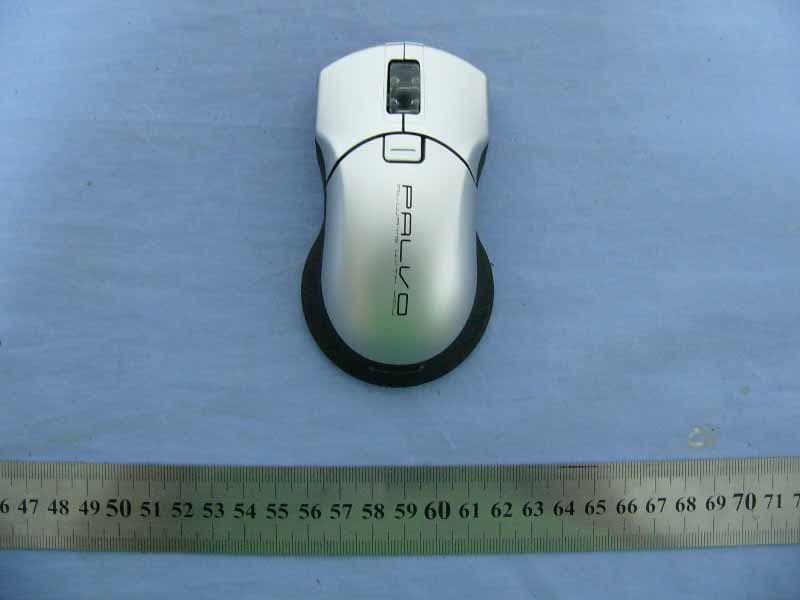
Click to zoom
Application Details
- Equipment Class
- DXX - Part 15 Low Power Communication Device Transmitter
- Date of Grant
- Aug 17, 2006
- Application Purpose
- Original Equipment
- Date of Application
- Aug 17, 2006
- Equipment Note
- Elecom PALVO 27MHz RF Mouse
- Frequency Range
- 27.04500000 - 27.04500000
- Company
- Primax Electronics Ltd
- Country
- Taiwan
Documents & Files
Document Text
Text extracted from the exhibit documents filed with the FCC. Open a document above to read the original.
Users Manual
Optical Wireless MouseUser’s Manual ContentsWelcome!...................................................................... 1-1Optical Wireless Mouse Installation....................................... 1-2ID Mode Settings........................................................... 1-3Using the Optical Wireless Mouse.................... ................... 1-4Mouse Care and Troubleshoo ting........................................... 1-5 Federal Communication Commission Interference Statement 1-6 1-1 Welcome!Congratulations on your purchase of your new Optical Wireless Mo use. This manual contains information that will assist you in i nstalling, operating, and caring for your Optical Wireless Mouse. Product Description:The Optical Wireless Mouse was designed to give you freedom of movement and an enjoyable experience while working or gaming. It s sleek, comfortable design makes ordinary tasks easier and help s offer a new level of comfort to your PC computing experience. The mouse is supported by Microsoft Windows 95, Windows 98, Windows Me, Windows NT Workstation, Windows 2000 and Windows XP. Note: If you are connecting the mouse to a notebook that has an onboard pointing device or if you are using a keyboard with an onboard pointing device, you may need to disable that device before installing and using the mouse. The package contains: • Optical Wireless Mouse • RF receiver with USB connector • USB to PS/2 Adapter • CD-ROM containing driver software for the Optical Wireless Mouse • Optical Wireless Mouse User’s Manual • Warranty Information • 2 AA Batteries Welcome! 1-1 Optical Wireless Mouse Installation Your Optical Wireless Mouse installation is fast and easy. It can be completed in 3 simple steps. Note: After installing the dr iver software on your computer you will need to shut down and reboot your system. Make sure that all work is saved and all prog rams are closed before installing this device. Step 1 - Battery Installation:1. Locate the two AA sized 1.5 Volt batteries that came in your Optical Wireless Mouse package.2. Remove the battery cover from the compartmen t at the back of your Optical Wireless Mouse. 3. Install the two batteries into the compartment paying close attention to proper polarities.4. Replace the batter y compartment cover. Step 2 - Connecting the Receiver:PS/2 Installation1. Make sure your computer is turned off.2. Locate the round 6-pin (PS/2) connector at the end of receiver cable.3. Connect this to an available round 6-pin (PS/2) port at the back of your computer.4. Turn your computer on.USB Installation (Note: If you have Microsoft Windows 95 or Windows NT Workstation, these operating systems do not support USB.) 1. Make sure that your computer is turned on.2. Remove the USB to PS/2 adapter at the base of the cord and locate a rectangular USB port on your computer or USB hub.3. Plug the USB (rectangular) connector into the USB port and follow the on-screen instructions.Step 3 - Software Installation:Included in your package is a CD-ROM containing driver software for the Optical Wireless Mouse. Note: If you are installing thi s device running Windows 2000 or Windows XP, you may encounter a message stating “Digita l Signature Not Found” or this device h as not passed the Windows XP logo testing. Select Yes to continue the installation running Windows 2000 or click Continue Anyway to complete the installation running Windows XP. 1. Insert the Mouse Suite CD-ROM into your CD-ROM drive and then follow the setup program instructions on your screen. Note: If the setup program does not appear, please refer to steps 2-5 listed below. 2. Click the Start button at the left hand corner of the computer screen.3. Click Run. Type <drive>:\setup. For example, if your CD-ROM drive letter is (E:), type e:\setup.4. Click OK.5. Follow the onscreen instructions to complete the Mouse Suite software installation.Once the Mouse Suite software installation is completed, you can start using your Optical Wireless Mouse. 1-2 Optical Wireless Mouse Installation Optical Wireless Mouse Installation 1-2 1-3 ID Settings z Default Mode Receive r: *Press the button located on the top of the re ceiver over 3 sec; the red led of the r eceiver will dim after release the button. When the led is dimmed, Default mode is set. *The product is default mode when ex-factory. Mouse: *The mouse will be set Default Mode automatically via replace batteries every time. z ID Mode Step 1. Press the button located on the top of the receiver then the 'Red" LED is on Step 2. Press the rubber button located on the bottom of the mous e; then the Red LED of the rece iver is off afte r releasing the rubber button, When the Red LED is off, ID-Mode is set. To return to Default Mode from ID Mode , the user have to implement the Default Mode procedure. z Advantage and Disadvantage for Two Modes * ID mode : Suggested working environment - Office area Advantage : Less interference chance (1/4096) in compare with Logitech (1/256). Is able to reset ID when interfere with ot her mouse near by. Disadvantage : User has to set ID every time when change/input batteries.(Method of setting ID mode is same as above.) * Default mode : Suggested working environment - home or soho office Advantage : User do not need to set ID by themselves (even when changing batteries) Disadvantage : will interfere with other same products within 2m ID Mode Settings 1-3 Using the Optical Wireless MouseThe Optical Wireless Mouse has multiple functions and features su ch as Zoom and Auto-scrolling, which helps you to increase you r productivity. You can also assign frequently used functions and/or shortcuts to the mouse buttons by using the tabs in the Mo use Suite software.To launch the Mouse Suite software, click Start , click Settings , and click on the Control Panel . In the Control Panel , double-click on the Mouse icon. (If you have already enabled Show Mouse Icon in the system tray option in the Mouse Suite properties of the Control Panel …
Text truncated - open the document above for the full version.
Cover Letter(s)
PRIMAX ELECTRONICS LTD _ NO.669, RUEYKUANG ROAD, NEIHU 114, TAIPEI, TAIWAN, R.O.C Date: 18 August 2006 Compliance Certification Services Certification Division 561F Monterey Road Morgan Hill, CA 95037 To whom it may concern: We, the undersigned, hereby authorize the Shenzhen office of Compliance Engineering Services, Inc., d.b.a. Compliance Certification Services and hereafter referred to as CCS SZ, to act on our behalf in all manners relating to application for equipment authorization, including signing of all documents relating to these matters. Any and all acts carried out by CCS SZ on our behalf shall have the same effect as acts of our own. We, the undersigned, hereby certify that we are not subject to a denial of federal benefits, that includes FCC benefits, pursuant to Section 5301 of the Anti-Drug Abuse Act of 1988, 21 U.S.C. 853(a). In authorizing CCS SZ as our agent, we still recognize that we are responsible to: a) comply with the relevant provisions of the certification program; b) make all necessary arrangements for the conduct of the evaluation, including provision for examining documentation and access to all areas, records (including internal audit reports) and personnel for the purposes of evaluation (e.g. testing, inspection, assessment, surveillance, reassessment) and resolution of complaints; c) make claims regarding certification only in respect of the scope for which certification has been granted; d) do not use our product certification in such a manner as to bring the Certification Division into disrepute and not make any statement regarding our product certification which the Certification Division may consider misleading or unauthorized; e) upon suspension or cancellation of certification, discontinue use of all advertising matter that contains any reference thereto and return any certification documents as required by the Certification Division; f) use certification only to indicate the products are certified as being in conformity with specified standards; g) endeavor to ensure that no certificate or report nor any part thereof is used in a misleading manner; h) ensure that any reference to our product certification in communication media such as documents, brochures or advertising, complies with the requirements of the Certification Division; i) keep a record of all complaints made known to the us relating to the product’s compliance with requirements of the relevant standard and to make these records available to the Certification Division when requested; j) take appropriate action with respect to such complaints and any deficiencies found in products or services that affect compliance with the requirements for certification; k) document the actions taken. This authorization is valid until further written notice from the applicant. Sincerely Yours, Keen Chiang PRIMAX ELECTRONICS LTD. REMARK: 1. This authorization letter will be sent along with your application when filing with the Certification Division. 2. Please follow the format and type it on company letterhead and send original to us.
Cover Letter(s)
Dongguan Primax Electronics Ltd._______________________________________________ Industrial Zone Yuhong, Mingzhu west Rd. Shek Kit Town East zone, Dong Guan City, Guang Dong, China Tel: +86-769-86633120 FAX: +86-769-86316141 Federal Communications Commission 7435 Oakland Mills Road Columbia MD 21046 Subject: Request for Confidentiality FCC ID: EMJM2PR01 To Whom It May Concern: Pursuant to the provisions of Sections 0.457 and 0.459 of the Commission’s rules (47 CFR §§ 0.457, 0.459), we are requesting the Commission to withhold the following attachments as confidential document from public disclosure indefinitely. Schematic Diagram Block Diagram Theory of Operation Part List Above mentioned document contains detailed system and equipment description are considered as proprietary information in operation of the equipment. The public disclosure of above documents might be harmful to our company and would give competitor an unfair advantage in the market. Best Regards
Cover Letter(s)
Helen Zhao Subject: FW: FW: Primax Electronics Ltd., FCC ID: EMJM2PR01, Assessment NO.: AN06T6045, Notice#1 8/18/2006 From: eric.wong [mailto:[email protected]] Sent: Thursday, August 17, 2006 9:27 PM To: Helen Zhao Cc: Aven Zhou (E-mail 2); Eric Wong (E-mail) Subject: Re:FW: Primax Electronics Ltd., FCC ID: EMJM2PR01, Assessment NO.: AN06T6045, Notice#1 Hello Helen, Please find the materials meet your requests attached. Thank you!! Eric Wong -----Original Message----- Sent: Friday, August 11, 2006 5:22 PM Subject: Primax Electronics Ltd., FCC ID: EMJM2PR01, Assessment NO.: AN06T6045, Notice#1 Question #1: The Schematic diagram shows 8 channels including 27.045MHz on page 3, please confirm how many channels will be used for this device. The test report indicates one channel only at 27.047MHz. Please update the test report if necessary. (ERIC: Please be advised that the only channel used is 27.045MHz, we have revised the report as attached.) Question #2: The file named "External photos" contains internal photos, the file named "Internal photos" contains external photos. Please rename the files. (ERIC: Please find the updated external photos and internal photos !) Question #3: The block diagram and schematic diagram include receiver portion, which should be removed from the filing, as it will not be covered by this certification. (ERIC: Please find the updated materials attached) Best Regards, Helen Zhao The items indicated above must be submitted before processing can continue on the above referenced application. Failure to provide the requested information within 30 days of the original e-mail date may result in application dismissal and forfeiture of the filing fee. Also, please note that partial responses increase processing time and should not be submitted. Any questions about the content of this correspondence should be directed to the e-mail address listed below the name of the sender.
ID Label/Location Info
C US R LISTED ACCESSARY E134780 2G55 ITE FCC ID: EMJM2PR01FCC ID: EMJM2PR01 MADE IN CHINAMADE IN CHINA C US R LISTED ACCESSARY E134780 2G55 ITE FCC ID: EMJM2PR01FCC ID: EMJM2PR01 MADE IN CHINAMADE IN CHINA C US R LISTED ACCESSARY E134780 2G55 ITE FCC ID: EMJM2PR01FCC ID: EMJM2PR01 MADE IN CHINAMADE IN CHINA C US R LISTED ACCESSARY E134780 2G55 ITE FCC ID: EMJM2PR01FCC ID: EMJM2PR01 MADE IN CHINAMADE IN CHINA C US R LISTED ACCESSARY E134780 2G55 ITE FCC ID: EMJM2PR01FCC ID: EMJM2PR01 MADE IN CHINAMADE IN CHINA C US R LISTED ACCESSARY E134780 2G55 ITE FCC ID: EMJM2PR01FCC ID: EMJM2PR01 MADE IN CHINAMADE IN CHINA C US R LISTED ACCESSARY E134780 2G55 ITE FCC ID: EMJM2PR01FCC ID: EMJM2PR01 MADE IN CHINAMADE IN CHINA C US R LISTED ACCESSARY E134780 2G55 ITE FCC ID: EMJM2PR01FCC ID: EMJM2PR01 MADE IN CHINAMADE IN CHINA C US R LISTED ACCESSARY E134780 2G55 ITE FCC ID: EMJM2PR01FCC ID: EMJM2PR01 MADE IN CHINAMADE IN CHINA C US R LISTED ACCESSARY E134780 2G55 ITE FCC ID: EMJM2PR01FCC ID: EMJM2PR01 MADE IN CHINAMADE IN CHINA C US R LISTED ACCESSARY E134780 2G55 ITE FCC ID: EMJM2PR01FCC ID: EMJM2PR01 MADE IN CHINAMADE IN CHINA C US R LISTED ACCESSARY E134780 2G55 ITE FCC ID: EMJM2PR01FCC ID: EMJM2PR01 MADE IN CHINAMADE IN CHINA C US R LISTED ACCESSARY E134780 2G55 ITE FCC ID: EMJM2PR01FCC ID: EMJM2PR01 MADE IN CHINAMADE IN CHINA C US R LISTED ACCESSARY E134780 2G55 ITE FCC ID: EMJM2PR01FCC ID: EMJM2PR01 MADE IN CHINAMADE IN CHINA LABEL LOCATION LABEL LOCATION
Test Report
Compliance Certification Services (Shenzhen) Inc. Report No.: SZ060802B03-RP FCC ID: EMJM2PR01 Date of Issue: August 10, 2006 Note: This report shall not be reproduced except in full, without the written approval of Compliance Certification Services Inc. This document may be altered or revised by Compliance Certification Services Inc. personnel only, and shall be noted in the revision section of the document. Page 1 Total Page: 17 Rev. 00 FCC 47 CFR PART 15 SUBPART C TEST REPORT For Elecom PALVO 27MHz RF Mouse Model: M-PADUR / M-PADURBK / M-PADURBU / M-PADURDR / M-PADURGN / M-PADURRD / M-PADURSV / M-PADURWH Trade Name: ELECOM Issued to PRIMAX ELECTRONICS LTD. NO.669, RUEYKUANG ROAD, NEIHU 114, TAIPEI, TAIWAN, R.O.C Issued by COMPLIANCE CERTIFICATION SERVICES (SHENZHEN) INC. NO. 5, JINAO INDUSTRIAL PARK, NO. 35 JUKENG ROAD, DASHUIKENG VILLAGE, GUANLAN TOWN, BAOAN DISTRICT, SHENZHEN, CHINA TEL: 86-755-28055000 FAX: 86-755-28055221 LAB CODE:200577-0 Compliance Certification Services (Shenzhen) Inc. Report No.: SZ060802B03-RP FCC ID: EMJM2PR01 Date of Issue: August 10, 2006 Page 2 Rev. 00 TABLE OF CONTENTS 1. TEST RESULT CERTIFICATION............................................................................................. 3 2. EUT DESCRIPTION .................................................................................................................... 4 3. TEST METHODOLOGY ............................................................................................................. 5 3.1 EUT CONFIGURATION.............................................................................................................. 5 3.2 EUT EXERCISE......................................................................................................................... 5 3.3 GENERAL TEST PROCEDURES.................................................................................................. 5 3.4 FCC PART 15.205 RESTRICTED BANDS OF OPERATIONS .............................................. 6 3.5 DESCRIPTION OF TEST MODES................................................................................................. 6 4. INSTRUMENT CALIBRATION................................................................................................. 7 5. FACILITIES AND ACCREDITATIONS ................................................................................... 8 5.1 FACILITIES.............................................................................................................................. 8 5.2 EQUIPMENT............................................................................................................................. 8 5.3 LABORATORY ACCREDITATIONS AND LISTING....................................................................... 8 6. SETUP OF EQUIPMENT UNDER TEST .................................................................................. 9 6.1 SETUP CONFIGURATION OF EUT.............................................................................................. 9 6.2 SUPPORT EQUIPMENT....................................................................................................... 9 7. FCC PART 15.227 REQUIREMENTS...................................................................................... 10 7.1 26 DB BANDWIDTH .......................................................................................................... 10 7.2 RADIATED EMISSIONS........................................................................................................... 12 7.3 POWERLINE CONDUCTED EMISSIONS.................................................................................... 16 APPENDIX 1 PHOTOGRAPHS OF TEST SETUP....................................................................... 17 Compliance Certification Services (Shenzhen) Inc. Report No.: SZ060802B03-RP FCC ID: EMJM2PR01 Date of Issue: August 10, 2006 Page 3 Rev. 00 1. TEST RESULT CERTIFICATION Applicant: PRIMAX ELECTRONICS LTD. NO.669, RUEYKUANG ROAD, NEIHU 114, TAIPEI, TAIWAN, R.O.C Equipment Under Test: Elecom PALVO 27MHz RF Mouse Tr a d e N a m e : ELECOM Model: M-PADUR / M-PADURBK / M-PADURBU / M-PADURDR / M-PADURGN / M-PADURRD / M-PADURSV / M-PADURWH Date of Test: August 02-09, 2006 APPLICABLE STANDARDS STANDARD TEST RESULT FCC 47 CFR Part 15 Subpart C No non-compliance noted We hereby certify that: The above equipment was tested by Compliance Certification Services (Shenzhen) Inc.. The test data, data evaluation, test procedures, and equipment configurations shown in this report were made in accordance with the procedures given in ANSI C63.4 and the energy emitted by the sample tested as described in this report is in compliance with the requirements of FCC Rules Part 15.227. The test results of this report relate only to the tested sample identified in this report. Approved by: Tested By: Henry Ding Reviewed By: Harris Lai / General Manager Eric Wong / Assistant manager COMPLIANCE CERTIFICATION COMPLIANCE CERTIFICATION SERVICES (SHENZHEN) INC. SERVICES (SHENZHEN) INC. Compliance Certification Services (Shenzhen) Inc. Report No.: SZ060802B03-RP FCC ID: EMJM2PR01 Date of Issue: August 10, 2006 Page 4 Rev. 00 2. EUT DESCRIPTION Product Elecom PALVO 27MHz RF Mouse Trade Name ELECOM Model Number M-PADUR / M-PADURBK / M-PADURBU / M-PADURDR / M-PADURGN / M-PADURRD / M-PADURSV / M-PADURWH Model Difference Based on the same products and different appearance color. Power Supply TX: Powered by AAA batteries × 2 (Rating: 2 × 1.5Vdc) Frequency Range 27.045MHz Remark: This submittal(s) (test report) is intended for FCC ID: EMJM2PR01 filing to comply with Section 15.227 of the FCC Part 15, Subpart C Rules. Compliance Certification Services (Shenzhen) Inc. Report No.: SZ060802B03-RP FCC ID: EMJM2PR01 Date of Issue: August 10, 2006 Page 5 Rev. 00 3. TEST METHODOLOGY The tests documented in this report were performed in accordance with ANSI C63.4 and FCC CFR 47 2.1046, 2.1047, 2.1049, 2.1051, 2.1053, 2.1055, 2.1057, an…
Text truncated - open the document above for the full version.
Test Setup Photos
Compliance Certification Services (Shenzhen) Inc. Report No.: SZ060802B03-RP FCC ID: EMJM2PR01 Date of Issue: August 10, 2006 Page 17 Rev. 00 APPENDIX 1 PHOTOGRAPHS OF TEST SETUP RADIATED EMISSION TEST Below 30MHz Below 1GHz
Contact Information
Applicant
Nelson Chou(Manager)
Test Firm
Compliance Certification Services (Shenzhen) Inc.Clinton Kao
Technical Specifications
| # | Rule Parts | Frequency Range | Power Output |
|---|---|---|---|
| 1 | 15C | 27.045 MHz - 27.045 MHz | - |
Other Applications from Primax Electronics Ltd
EMJ-BHS2705
Aug 28, 2026Wireless Headset
Equipment Class
DTS - Digital Transmission SystemEMJMMOBTN5O
Aug 22, 2024wegear MW1 Creator Mouse
Equipment Class
DTS - Digital Transmission SystemEMJDDGRFN5
Aug 22, 2024wegear MW1 2.4G Dongle
Equipment Class
DXX - Part 15 Low Power Communication Device Transmitter
EMJDTPA-P002D
Jan 14, 2024Dongle
Equipment Class
DXX - Part 15 Low Power Communication Device Transmitter
EMJOH1
Oct 29, 2023Level Bridge
Equipment Class
DTS - Digital Transmission System