EMJMMORFGOOWireless Mouse
Primax Electronics Ltd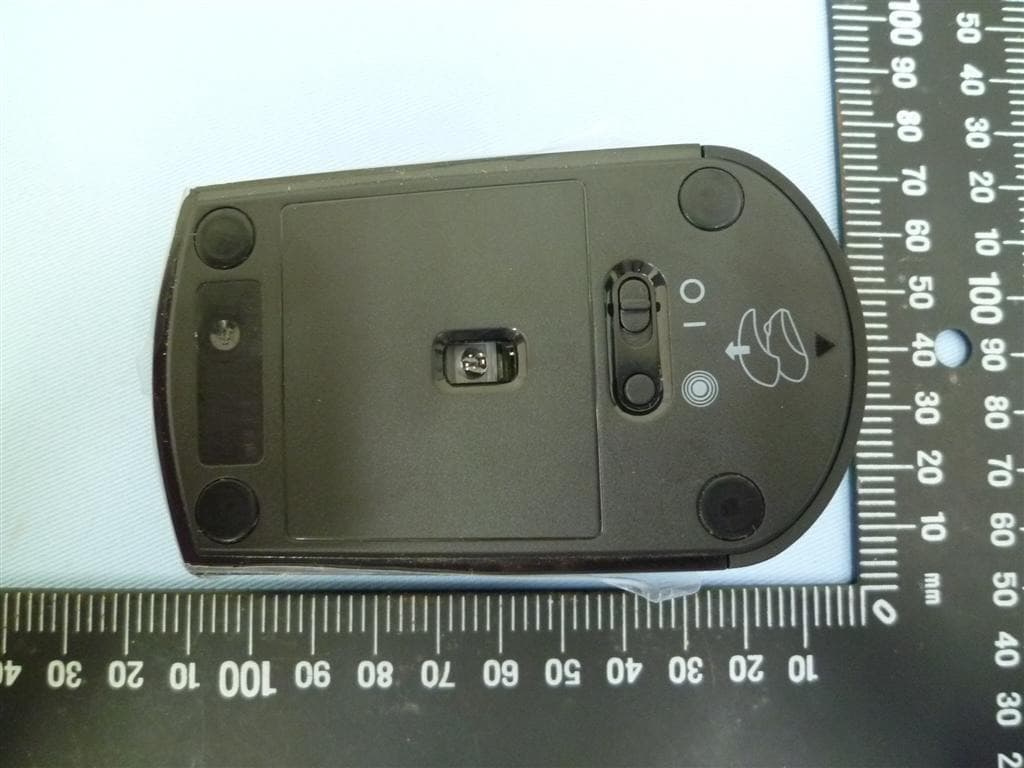
Click to zoom
Application Details
- Equipment Class
- DTS - Digital Transmission System
- Date of Grant
- Feb 27, 2013
- Application Purpose
- Original Equipment
- Date of Application
- Feb 24, 2013
- Equipment Note
- Wireless Mouse
- Frequency Range
- 2402.00000000 - 2479.00000000
- Company
- Primax Electronics Ltd
- Country
- Taiwan
Documents & Files
Document Text
Text extracted from the exhibit documents filed with the FCC. Open a document above to read the original.
Users Manual
Important Information about Lenovo® Optical Wireless Mouse http://www.lenovo.com/safety Note: Note: Note: Note: Before installing the product, be sure to read the warranty information in Appendix B “Lenovo Limited Warranty” Lenovo Precision Wireless Mouse 无线蓝光鼠标 Mouse Model 鼠标型号: MORFFGOO Dongle Model 接收器型号: MORFFHL-D Eighth Edition (November 2011) Eighth Edition (November 2011)Eighth Edition (November 2011) Eighth Edition (November 2011) © Copyright Lenovo 2005, 2011. Copyright Lenovo 2005, 2011.Copyright Lenovo 2005, 2011. Copyright Lenovo 2005, 2011. LIMITED AND RESTRICTED RIGHTS NOTICE: If data or software is delivered pursuant a General Services Administration Important Information about Lenovo® Optical Wireless Mouse “GSA” contract, use, reproduction, or disclosure is subject to restrictions set forth in Contract No. GS-35F-05925. Important Information about Lenovo® Optical Wireless Mouse Product description Product descriptionProduct description Product description The Lenovo Wireless Optical Mouse enable you to control vertical and horizontal scrolling using the tilt wheel. For the other two mice, you can use the scrolling wheel to control vertical scrolling. Note: Note: Note: Note: You need to install the Lenovo Mouse Suite software before using the horizontal scrolling function. Each mouse can be connected to any enabled Universal Serial Bus (USB) connector on your computer. Each mouse is supported on the following operating systems: • Microsoft ® Windows® XP (32-bit) • Microsoft Windows Vista® (32-bit or 64-bit) • Microsoft Windows 7 (32-bit or 64-bit) Each option package includes a mouse and the following: • Software and User Guide CD • Laser Safety Manual • Warranty poster Installing the software Installing the softwareInstalling the software Installing the software The Software and User Guide CD contains the Lenovo Mouse Suite software for the mouse. It is recommended that you install the Lenovo Mouse Suite software to customize advanced settings before you use the mouse. Note: Note: Note: Note: It is recommended that you uninstall any previously installed mouse software before installing the Lenovo Mouse Suite software. To install the Lenovo Mouse Suite software, do the following: 1. Save any open documents and exit all applications. 2. Insert the Software and User Guide CD and do one of the following: • If the CD starts automatically, go to step 3. • If the AutoPlay window opens, click Run start.bat Run start.batRun start.bat Run start.bat. Then, go to step 3. • If the CD does not start automatically, go into My Computer My Computer My Computer My Computer or Computer ComputerComputer Computer, browse the CD/DVD drive, and double-click Start.bat Start.batStart.bat Start.bat. 3. Follow the instructions on the screen. Note: Note: Note: Note: In the Hardware Interface Selection window, select USB (Universal Serial Bus) Interface USB (Universal Serial Bus) InterfaceUSB (Universal Serial Bus) Interface USB (Universal Serial Bus) Interface. 4. When prompted, restart your computer. Installing the mouse Installing the mouseInstalling the mouse Installing the mouse This topic contains information about installing the mouse. Important Information about Lenovo® Optical Wireless Mouse To install the mouse, connect the mouse to an available USB connector on your computer. The New Hardware Found window opens, and the Windows operating system will automatically install the proper device driver for the mouse. Then, the mouse is ready for use. Using the software Using the softwareUsing the software Using the software Each mouse has multiple functions and features such as zooming and auto-scrolling, which help you increase your productivity. You also can assign frequently used functions or shortcuts to the mouse buttons using the Lenovo Mouse Suite software. To use the Lenovo Mouse Suite software, do the following: 1. Click Start Start Start Start ➙ All Programs All Programs All Programs All Programs ➙ Lenovo Mouse Suite Lenovo Mouse Suite Lenovo Mouse Suite Lenovo Mouse Suite ➙ Mouse Suite Mouse SuiteMouse Suite Mouse Suite. 2. The main window opens with several tabs. Click each tab to view related settings. On each tab there are four buttons: • OK OKOK OK: Save your settings and close the window. • Cancel CancelCancel Cancel: Exit the window without saving. • Apply ApplyApply Apply: Have your changes take effect without closing the window. • Help HelpHelp Help: View the help information system. Note: Note: Note: Note: The Lenovo USB Laser Mouse supports the mouse resolution from 400 dots per inch (DPI) to 2000 DPI. By default, the mouse resolution setting is 1600 DPI. The ThinkPad USB Laser Mouse supports the mouse resolution from 400 DPI to 1600 DPI. By default, the mouse resolution setting is 1200 DPI. To change the resolution setting, do the following: 1. Click Start Start Start Start ➙ All Programs All Programs All Programs All Programs ➙ Lenovo Mouse Suite Lenovo Mouse Suite Lenovo Mouse Suite Lenovo Mouse Suite ➙ Mouse Suite Mouse SuiteMouse Suite Mouse Suite. 2. In the Mouse Properties window, click the Lenovo Lenovo Lenovo Lenovo tab. Then, click Advanced Properties Advanced PropertiesAdvanced Properties Advanced Properties. 3. In the Resolution Adjustment Setup Resolution Adjustment Setup Resolution Adjustment Setup Resolution Adjustment Setup area, select the corresponding radio button to set the preferred mouse resolution. 4. To confirm your setting, click Apply ApplyApply Apply. For more information about the setting, click Help HelpHelp Help. Troubleshooting TroubleshootingTroubleshooting Troubleshooting This topic contains troubleshooting information for the mice. If you encounter any of the following problems when using the mice, refer to the corresponding answers. Problem: Problem: Problem: Problem: The mouse is not recognized by the operating system. Solution: Solution: Solution: Solution: To solve the problem, perform one of the following procedures: Procedure A: Proced…
Text truncated - open the document above for the full version.
External Photos
ATTACHMENT Photo Documentation Page 1 of 1 Product: Lenovo Precision Wireless Mouse Type Designation: MORFGOO FCC ID: EMJMMORFGOO
ID Label/Location Info
All Pad Printed icons: Pantone Cool Gray 9C NOTE: we may not need the connect button Lenovo,Einsteinova 21, 851 01 Bratislava, Slovakia KCC-REM-PMX- MMOGOUO Mouse (滑鼠/鼠标) MODEL(型號/型号):MOGOUO Rating(額定/额定):5V 100mA CAN ICES-3 (B)/NMB-3(B) Made in china / 中國製造 / 中国制造 Lenovo,Einsteinova 21, 851 01 Bratislava, Slovakia Wireless MouseUSB Mouse Mouse (滑鼠/鼠标) MODEL(型號/型号):MORFGOO Rating(額定/额定):3V 40mA FCC ID:EMJMMORFGOO IC:4251A-MMORFGOO CMIIT ID: Made in china 中國製造/中国制造 9mm 24mm Raven Black mylar label, recessed (0.3mm) - Icons and text using Pantone Cool Gray 9C - Background Raven Black - Matte Texture 39.5mm 46mm 46mm 39.5mm Increase radius of all 4 corners to: 1.5mm Increase radius of all 4 corners to: 1.5mm ASM P/N:0A36101 FRU P/N:0B47151 Rev:V011210 S/N:4400001 2.1m 2012/10 ASM P/N:0A36101 FRU P/N:0B47151 Rev:V011210 S/N:4400001 ASM P/N:0A36101 FRU P/N:0B47151 Rev:V011210 S/N:4400001 001 Center sticker on center line of feet
Internal Photos
ATTACHMENT Photo Documentation Page 1 of 3 Product: Lenovo Precision Wireless Mouse Type Designation: MORFGOO FCC ID: EMJMMORFGOO ATTACHMENT Photo Documentation Page 2 of 3 Product: Lenovo Precision Wireless Mouse Type Designation: MORFGOO FCC ID: EMJMMORFGOO ATTACHMENT Photo Documentation Page 3 of 3 Product: Lenovo Precision Wireless Mouse Type Designation: MORFGOO FCC ID: EMJMMORFGOO
RF Exposure Info
Produkte Products Prüfbericht - Nr.: Test Report No. 10040239 001 Seite 28 von 31 Page 28 of 31 6. Safety Human exposure 6.1 Radio Frequency Exposure Compliance 6.1.1 Electromagnetic Fields RESULT: Passed Test standard : FCC KDB Publication 447498 D01 v05 The maximum peak output power of the transmitter is 1.24 mW. The separation between hand and antenna is more than 2mm. Hence the EUT is exclueded from SAR evaluation. Please also refer to FCC KDB publication 447498 D01 v05: Mobile Portable RF Exposure.
Test Report
Produkte Products Prüfbericht - Nr.: Test Report No. 10040239 001 Seite 2 von 31 Page 2 of 31 TEST SUMMARY 5.1.1 ANTENNA REQUIREMENT RESULT: Passed 5.1.2 PEAK OUTPUT POWER RESULT: Passed 5.1.3 6DB BANDWIDTH RESULT: Passed 5.1.4 POWER DENSITY RESULT: Passed 5.1.5 CONDUCTED SPURIOUS EMISSIONS AND FREQUENCY BAND EDGE MEASURED IN 100KHZ BANDWIDTH RESULT: Passed 5.1.6 SPURIOUS EMISSION RESULT: Passed 6.1.1 ELECTROMAGNETIC FIELDS RESULT: Passed Produkte Products Prüfbericht - Nr.: Test Report No. 10040239 001 Seite 3 von 31 Page 3 of 31 Contents 1. GENERAL REMARKS ......................................................................................................... 4 1.1 COMPLEMENTARY MATERIALS .......................................................................................... 4 2. T EST SITES ...................................................................................................................... 5 2.1 TEST FACILITIES ............................................................................................................... 5 2.2 LIST OF TEST AND MEASUREMENT INSTRUMENTS ............................................................... 6 2.3 TRACEABILITY .................................................................................................................. 6 2.4 CALIBRATION ................................................................................................................... 7 2.5 M EASUREMENT UNCERTAINTY........................................................................................... 7 3. GENERAL PRODUCT INFORMATION .................................................................................... 8 3.1 PRODUCT FUNCTION AND INTENDED USE ........................................................................... 8 3.2 R ATINGS AND SYSTEM DETAILS ........................................................................................ 8 3.3 I NDEPENDENT OPERATION MODES .................................................................................... 9 3.4 N OISE GENERATING AND NOISE SUPPRESSING PARTS ....................................................... 9 3.5 SUBMITTED DOCUMENTS .................................................................................................. 9 4. TEST SET-UP AND OPERATION MODES ............................................................................ 10 4.1 P RINCIPLE OF CONFIGURATION SELECTION ...................................................................... 10 4.2 T EST OPERATION AND TEST SOFTWARE .......................................................................... 10 4.3 S PECIAL ACCESSORIES AND AUXILIARY EQUIPMENT ........................................................ 10 4.4 COUNTERMEASURES TO ACHIEVE EMC COMPLIANCE ....................................................... 11 4.5 T EST SETUP DIAGRAM .................................................................................................... 11 5. TEST RESULTS ............................................................................................................... 13 5.1 T RANSMITTER REQUIREMENT & TEST SUITES .................................................................. 13 5.1.1 Antenna Requirement ................................................................................................................ 13 5.1.2 Peak Output Power .................................................................................................................... 14 5.1.3 6dB Bandwidth ........................................................................................................................... 17 5.1.4 Power Density ............................................................................................................................ 20 5.1.5 Conducted spurious emissions and Frequency Band Edge measured in 100kHz Bandwidth .. 23 5.1.6 Spurious Emission ..................................................................................................................... 27 6. SAFETY HUMAN EXPOSURE ............................................................................................. 28 6.1 RADIO FREQUENCY EXPOSURE COMPLIANCE ................................................................... 28 6.1.1 Electromagnetic Fields ............................................................................................................... 28 7. PHOTOGRAPHS OF THE TEST SET-UP .............................................................................. 29 8. L IST OF TABLES ............................................................................................................. 31 9. LIST OF PHOTOGRAPHS .................................................................................................. 31 Produkte Products Prüfbericht - Nr.: Test Report No. 10040239 001 Seite 4 von 31 Page 4 of 31 1. General Remarks 1.1 Complementary Materials All attachments are integral parts of this test report. This applies especially to the following appendix: Appendix P: Photo (File:APPENDIX P) Appendix D: Test Result of Radiated Emissions (File:APPENDIX D) Test Specifications The following standards were applied (in bold: product standards, otherwise: basic standards). Table 1: Applied Standard and Test Levels Radio FCC CFR47 Part 15: Subpart C Section 15.247 ANSI C63.10:2009, KDB558074 D01 DTS Meas Guidance v02 Produkte Products Prüfbericht - Nr.: Test Report No. 10040239 001 Seite 5 von 31 Page 5 of 31 2. Test Sites 2.1 Test Facilities TUV Rheinland Taiwan Ltd. 11F. No.758, Sec. 4, Bade Rd., Songshan Dist. Taipei City 105 Taiwan (R.O.C.) FCC Registration No.: 365730 TAF Accredited NCC Test Lab. No.:0759 TAF ISO17025 Certification effective periods: 2010-Jul-1st to 2013-Jun-30th Produkte Products Prüfbericht - Nr.: Test Report No. 10040239 001 Seite 6 von 31 Page 6 of 31 2.2 List of Test and Measurement Instruments Table 2: List of Test and Measurement Equipment Kind of Equipment Manufacturer Type S/N Calibrated …
Text truncated - open the document above for the full version.
Test Report
Test Report No.10040239 001 Appendix D: Radiated Spurious Emission Data (File: 10040239AppendixD) Contents Spurious Emissions, Band Edge, 2.35-2.5G ................................................................................................... 2 Spurious Emissions, TX Mode, 1-18G ........................................................................................................... 6 Spurious Emissions, TX Mode, 18-26G ....................................................................................................... 12 Spurious Emissions, TX Mode, 30M-1G ..................................................................................................... 18 Spurious Emissions, Band Edge, 2.35-2.5G 2 Spurious Emissions, Band Edges, 2.35-2.5G Radiated Bandedge (GFSK) Low Channel (Hor) Spurious Emissions, Band Edge, 2.35-2.5G 3 Low Channel (Ver) Spurious Emissions, Band Edge, 2.35-2.5G 4 Radiated Bandedge (GFSK) High Channel (Hor) Spurious Emissions, Band Edge, 2.35-2.5G 5 High Channel (Ver) Spurious Emissions, TX Mode, 1-18G 6 Spurious Emissions, TX Mode, 1-18G Service No.: 114005073 Test Distance: 3M Test Standard: FCC above 1G PEAK Ant. Polarization: Horizontal Test item: Radiation Emission Test Time: 2013/1/21 AM 09:53:05 Applicant: Lenovo Test Rating: DC 3V Product: Wireless Mouse Temp.(°C °C°C °C)/Hum.(%): 21(°C °C°C °C)/57% Model No.: Test Engineer: Hugo Chang Test Mode: CH2402 Remark: No. Frequency (MHz) Factor (dB/m) Reading (dBuV) Level (dBuV/m) Limit (dBuV/m) Margin (dB) Det. Height (cm) Azimuth (。 。。 。) Remark 1 6698.000 5.18 43.35 48.53 74.00 -25.47 peak 100 360 2 7569.000 7.55 42.51 50.06 74.00 -23.94 peak 100 360 3 5882.000 1.99 44.92 46.91 74.00 -27.09 peak 100 360 Tel:+886-2172-7000 fax:+886-2528-0018 11F., No.758, Sec.4 Bade Road. Songshan Dist, Taipei City 105 TUV Taiwan Spurious Emissions, TX Mode, 1-18G 7 Service No.: 114005073 Test Distance: 3M Test Standard: FCC above 1G PEAK Ant. Polarization: Vertical Test item: Radiation Emission Test Time: 2013/1/21 AM 09:51:22 Applicant: Lenovo Test Rating: DC 3V Product: Wireless Mouse Temp.(°C °C°C °C)/Hum.(%): 21(°C °C°C °C)/57% Model No.: Test Engineer: Hugo Chang Test Mode: CH2402 Remark: No. Frequency (MHz) Factor (dB/m) Reading (dBuV) Level (dBuV/m) Limit (dBuV/m) Margin (dB) Det. Height (cm) Azimuth (。 。。 。) Remark 1 6807.000 5.30 43.58 48.88 74.00 -25.12 peak 100 360 2 6100.000 3.21 45.61 48.82 74.00 -25.18 peak 100 360 3 7569.000 7.55 42.71 50.26 74.00 -23.74 peak 100 360 Tel:+886-2172-7000 fax:+886-2528-0018 11F., No.758, Sec.4 Bade Road. Songshan Dist, Taipei City 105 TUV Taiwan Spurious Emissions, TX Mode, 1-18G 8 Service No.: 114005073 Test Distance: 3M Test Standard: FCC above 1G PEAK Ant. Polarization: Horizontal Test item: Radiation Emission Test Time: 2013/1/21 AM 10:03:21 Applicant: Lenovo Test Rating: DC 3V Product: Wireless Mouse Temp.(°C °C°C °C)/Hum.(%): 21(°C °C°C °C)/57% Model No.: Test Engineer: Hugo Chang Test Mode: CH2441 Remark: No. Frequency (MHz) Factor (dB/m) Reading (dBuV) Level (dBuV/m) Limit (dBuV/m) Margin (dB) Det. Height (cm) Azimuth (。 。。 。) Remark 1 8113.000 7.51 39.97 47.48 74.00 -26.52 peak 100 360 2 8684.000 7.92 40.28 48.20 74.00 -25.80 peak 100 360 3 6889.000 5.41 41.26 46.67 74.00 -27.33 peak 100 360 Tel:+886-2172-7000 fax:+886-2528-0018 11F., No.758, Sec.4 Bade Road. Songshan Dist, Taipei City 105 TUV Taiwan Spurious Emissions, TX Mode, 1-18G 9 Service No.: 114005073 Test Distance: 3M Test Standard: FCC above 1G PEAK Ant. Polarization: Vertical Test item: Radiation Emission Test Time: 2013/1/21 AM 10:03:54 Applicant: Lenovo Test Rating: DC 3V Product: Wireless Mouse Temp.(°C °C°C °C)/Hum.(%): 21(°C °C°C °C)/57% Model No.: Test Engineer: Hugo Chang Test Mode: CH2441 Remark: No. Frequency (MHz) Factor (dB/m) Reading (dBuV) Level (dBuV/m) Limit (dBuV/m) Margin (dB) Det. Height (cm) Azimuth (。 。。 。) Remark 1 7678.000 7.53 42.71 50.24 74.00 -23.76 peak 100 360 2 6998.000 5.53 42.68 48.21 74.00 -25.79 peak 100 360 3 8439.000 7.64 43.85 51.49 74.00 -22.51 peak 100 360 Tel:+886-2172-7000 fax:+886-2528-0018 11F., No.758, Sec.4 Bade Road. Songshan Dist, Taipei City 105 TUV Taiwan Spurious Emissions, TX Mode, 1-18G 10 Service No.: 114005073 Test Distance: 3M Test Standard: FCC above 1G PEAK Ant. Polarization: Horizontal Test item: Radiation Emission Test Time: 2013/1/21 AM 09:43:52 Applicant: Lenovo Test Rating: DC 3V Product: Wireless Mouse Temp.(°C °C°C °C)/Hum.(%): 21(°C °C°C °C)/57% Model No.: Test Engineer: Hugo Chang Test Mode: CH2479 Remark: No. Frequency (MHz) Factor (dB/m) Reading (dBuV) Level (dBuV/m) Limit (dBuV/m) Margin (dB) Det. Height (cm) Azimuth (。 。。 。) Remark 1 6318.000 4.15 44.89 49.04 74.00 -24.96 peak 100 360 2 5746.000 1.08 45.92 47.00 74.00 -27.00 peak 100 360 3 6862.000 5.38 45.04 50.42 74.00 -23.58 peak 100 360 Tel:+886-2172-7000 fax:+886-2528-0018 11F., No.758, Sec.4 Bade Road. Songshan Dist, Taipei City 105 TUV Taiwan Spurious Emissions, TX Mode, 1-18G 11 Service No.: 114005073 Test Distance: 3M Test Standard: FCC above 1G PEAK Ant. Polarization: Vertical Test item: Radiation Emission Test Time: 2013/1/21 AM 09:49:24 Applicant: Lenovo Test Rating: DC 3V Product: Wireless Mouse Temp.(°C °C°C °C)/Hum.(%): 21(°C °C°C °C)/57% Model No.: Test Engineer: Hugo Chang Test Mode: CH2479 Remark: No. Frequency (MHz) Factor (dB/m) Reading (dBuV) Level (dBuV/m) Limit (dBuV/m) Margin (dB) Det. Height (cm) Azimuth (。 。。 。) Remark 1 5964.000 2.55 45.28 47.83 74.00 -26.17 peak 100 360 2 6617.000 5.08 43.44 48.52 74.00 -25.48 peak 100 360 3 7215.000 6.40 43.84 50.24 74.00 -23.76 peak 100 360 Tel:+886-2172-7000 fax:+886-2528-0018 11F., No.758, Sec.4 Bade Road. Songshan Dist, Taipei City 105 TUV Taiwan Spurious Emissions, TX Mode, 18-26G 12 Spurious Emissions, TX Mode, 18-26G Service No.: 114005073 Test Distance: 3M Test Standard: FCC above 1G PEAK Ant. Polarization: Horizontal Test item: Radiation Emission Test Time: 2013/1/21 AM 10:16:57 Applicant: Lenovo Test Rating: DC 3V…
Text truncated - open the document above for the full version.
Test Setup Photos
Produkte Products Prüfbericht - Nr.: Test Report No. 10040239 001 Seite 29 von 31 Page 29 of 31 7. Photographs of the Test Set-Up Photograph 1: Set-up for Spurious Emissions (Front View) Photograph 2: Set-up for Spurious Emissions (Back View 1) Produkte Products Prüfbericht - Nr.: Test Report No. 10040239 001 Seite 30 von 31 Page 30 of 31 Photograph 3: Set-up for Spurious Emissions (Back View 2) Photograph 4: Set-up for Conducted testing
Contact Information
Applicant
Nelson Chou(Manager)
Test Firm
TUV Rheinland Taiwan Ltd.Spring Wang
Technical Specifications
| # | Rule Parts | Frequency Range | Power Output |
|---|---|---|---|
| 1 | 15C | 2.40 GHz - 2.48 GHz | 1.24 mW |
Other Applications from Primax Electronics Ltd
EMJ-BHS2705
Aug 28, 2026Wireless Headset
Equipment Class
DTS - Digital Transmission SystemEMJMMOBTN5O
Aug 22, 2024wegear MW1 Creator Mouse
Equipment Class
DTS - Digital Transmission SystemEMJDDGRFN5
Aug 22, 2024wegear MW1 2.4G Dongle
Equipment Class
DXX - Part 15 Low Power Communication Device Transmitter
EMJDTPA-P002D
Jan 14, 2024Dongle
Equipment Class
DXX - Part 15 Low Power Communication Device Transmitter
EMJOH1
Oct 29, 2023Level Bridge
Equipment Class
DTS - Digital Transmission System