EZSDEI7213One Button 2-way ASK remote
Voxx Electronics Corporation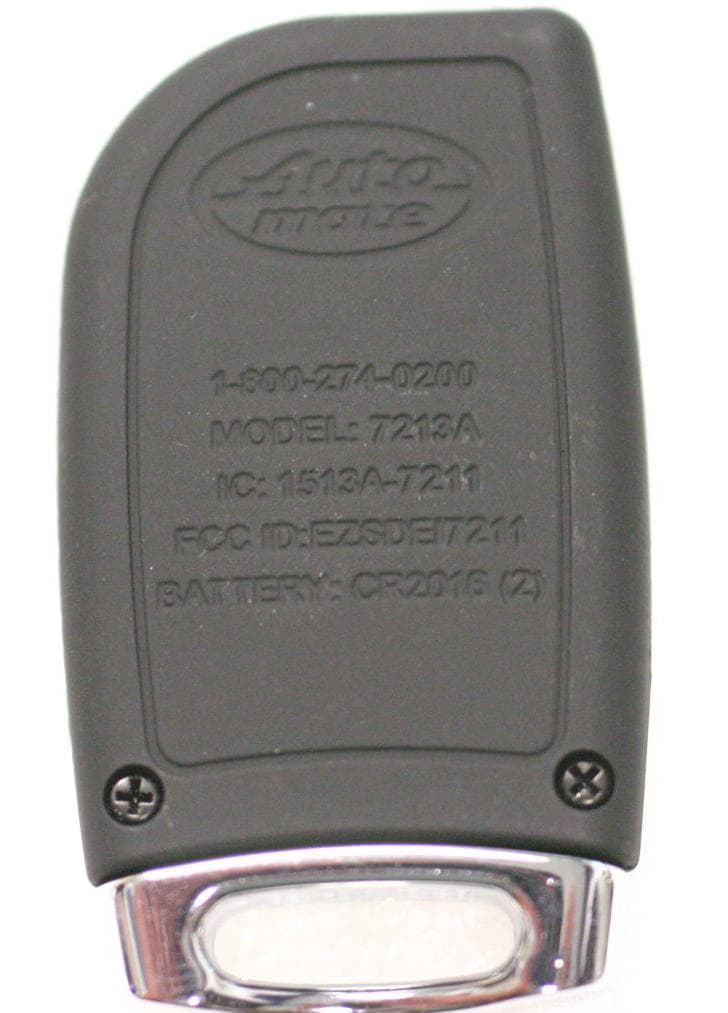
Click to zoom
Application Details
- Equipment Class
- DSR - Part 15 Remote Control/Security Device Transceiver
- Date of Grant
- Aug 29, 2012
- Application Purpose
- Original Equipment
- Date of Application
- Aug 29, 2012
- Equipment Note
- One Button 2-way ASK remote
- Frequency Range
- 433.92000000 - 433.92000000
- Company
- Voxx Electronics Corporation
- Country
- United States
Documents & Files
Document Text
Text extracted from the exhibit documents filed with the FCC. Open a document above to read the original.
Users Manual
Congratulations Congratulations on the purchase of your state-of-the-art remote start and keyless entry system. Reading this Owner’s Guide prior to using your system will help maximize the use of your system and its many features. For more information please visit the following website: http://www.automatecarsecurity.com – For general and addi- tional guide information. For any additional questions please contact your authorized Directed dealer or contact Directed at 1-800-753-0600. (U.S. only). Additional support is also available at: http://support.directed.com. Additional Guide Information Only basic commands, features and essential information are covered in this compact guide. Your product has many advanced features which are not discussed here, please consult the expanded online version for information about these features at www.automatecarsecurity.com. Most sections in this guide also contain additional information which can be found in the expanded online version. What you get Welcome to the best generation of keyless entry with remote start. Your system contains everything you need. • 1- button 2- way and /or 1- button 1- way remote controls • Owners Guide • Your warranty card Important Information Government Regulations and Safety Information Read the "Government Regulations" and "Warning! Safety First" sections of this manual prior to operating this system. Warning! Failure to heed this information can result in death, personal injury or property damage and may also result in the illegal use of the system beyond its intended purpose. Your Warranty Your system comes with a warranty. Make sure that you receive the warranty registration card and proof of purchase from your dealer, indicating the product was installed by an authorized Directed dealer. Please validate it online at www.prodregister.com/automate complete and return the warranty registration card. Replacement remote controls If additional remote controls for 2 way (P/N 7213A) or 1-way (P/N 7113A) are desired, please see your authorized dealer or visit us at www.directedstore.com to order. Contents Using Your System ...........................................................................................4 Commands At a Glance ............................................................................4 Start Engine .............................................................................................4 Unlock Doors ...........................................................................................4 Stop Engine .............................................................................................4 Car Finder ...............................................................................................5 Using Remote Start ............................................................................................5 Key Takeover............................................................................................6 Safety Features .........................................................................................6 Battery Information ............................................................................................7 Government Regulations ....................................................................................8 Limited lifetime consumer warranty ....................................................................11 4 © 2012 Directed. All rights reserved. Using Your System Commands At a Glance System State Press/Release Press/Hold for 3 sec. ENGINE OFFSTART ENGINECAR FINDER ENGINE ONUNLOCK DOORSSTOP ENGINE Note: If a feature cannot be activated when performing a command with the 2-way remote control, a fault tone plays as an alert. Start Engine When the engine is OFF, press and release the remote control button to start the engine.* Unlock Doors When the engine is ON with remote start, press and release the re- mote control button. The doors unlock, the parking lights flash, the horn sounds (if connected) as confirmation. The 7213A (2-way) remote con- trol emits tones. Note: Horn honk may be an optional feature that requires additional parts and labor. Stop Engine When the engine is ON with remote start, press and hold the remote control button until the transmit LED flashes fast. The engine stops run- ning and the parking lights turn off. The 7213A (2-way) remote control emits tones. 5 © 2012 Directed. All rights reserved. Car Finder When the engine is OFF, press and hold the remote control button for three seconds. The horn sounds once and the parking lights flash ten times. The 7213A (2-way) remote control emits a single tone. *For Manual transmission vehicles see “Manual Transmission Vehicles”in the “Remote Start Features” section in the online guide. Using Remote Start Important! (1) Never remotely start the vehicle with the vehicle in gear, and (2) Never remotely start the vehicle with the key in the ignition. Starting the Engine: 1. Press and release the remote control button. 2. The engine will START and the parking lights will turn on. The 7213A (2-way) remote will also emit tones. 3. The parking lights stay on as visual confirmation while the engine is ON. The default runtime is 12 minutes and can be shortened or extended by the installer. If a remote start configuration issue prevents the engine from start- ing, the parking lights flash a Remote Start Fault report to identify the fault. See the online guide for details. If you wish to warm or cool the vehicle interior set the climate controls to the desired temperature prior to starting. 6 © 2012 Directed. All rights reserved. Key Takeover When you are ready to drive the vehicle: 1. Unlock the doors. 2. Enter the vehicle. Do not step on the foot brake. 3. Insert the key into the ignition and turn it to the run (not start) posi- tion. 4. Step on the foot brake. The remote start is disabled and the park- ing lights turn off. 5. Begin driving. Note Some Push-to-start vehicles do not offer the key takeover fun…
Text truncated - open the document above for the full version.
Users Manual
Félicitations Félicitations pour l’achat de votre système de démarrage à distance. La lecture de ce manuel du propriétaire avant l’utilisation de votre système vous aidera à optimiser son utilisation et ses diverses fonc- tionnalités. Pour de plus amples informations, veuillez consulter le site web suivant: http://www.automatecarsecurity.com – Pour de l’information gé- nérale et supplémentaire. Si vous avez des questions supplémentaires, veuillez consulter votre détaillant Directed autorisé au 1-800-361-7271 ou (Canada seule- ment) au 1-800-753-0600 (U.S. seulement). Information supplémentaire Seulement les commandes et fonctionnalités de base, et les in- formations essentielles sont abordées dans ce guide compact. Votre produit possède des fonctionnalités avancées qui ne sont pas abordées ici, veuillez consulter la version complète en ligne à www.automatecarsecuirty.com. Disponible sous Support>Guides La plupart des chapitres dans ce guide contiennent également des informations supplémentaires que l’on peut retrouver dans la version complète en ligne. Ce que vous obtenez • Une,1-bouton bidirectionnel et/ou 1-bouton à 1 voie télécom- mandes • Guide d’utilisation • Carte de garantie Règlementation gouvernementale et consignes de sécurité Lire les sections “Règlementations gouvernementales”et “Avertissement! La sécurité d’abord”de ce manuel avant de faire fonctionner ce système. Avertissement! Le non-respect de ces informations peut entraîner la mort, des blessures ou des dommages maté- riels et peut également découler de l’utilisation illégale du système au-delà de son usage prévu. Votre Garantie Votre système est livré avec une garantie. S’assurer de recevoir la carte d’enregistrement de garantie et une preuve d’achat auprès de votre revendeur indiquant que le produit a été installé par un détaillant Directed autorisé. Vous pouvez la valider en ligne à www.prodregister.com/directed ou remplir et retourner la carte de garantie. Télécommandes de remplacement Si des télécommandes supplémentaires sont requises, veuillez consult- er votre détaillant autorisé ou visitez-nous au www.directedstore.com afin d’en commander. Les numéros de pièce sont: bidirectionnelle est 7213A, et unidirectionnelle d’accompagnement est 7113A. Contenu Utilisation de Votre Système .................................................................................5 Coup d’œil sur les commandes .............................................................5 Démarrer moteur .................................................................................5 Déverrouillage de portières ...................................................................5 Arrêter moteur .....................................................................................5 Recherche de véhicule ..........................................................................6 Utilisation de démarrage à distance ......................................................................6 Prise de contrôle de clé ........................................................................7 Caractéristiques de sécurité ..................................................................7 Information de pile ..............................................................................................8 Remplacement de pile ..........................................................................8 Élimination de la pile ...........................................................................8 Règlementations gouvernementales .......................................................................9 Avertissement! La sécurité d’abord ......................................................................10 Installation ........................................................................................10 Capacité de démarrage à distance ......................................................10 Véhicules à transmission manuelle .......................................................11 Interférence .......................................................................................13 Mise à niveau ...................................................................................13 Résistance à la chaleur et à l’eau .........................................................13 Garantie à vie limitée pour l’utilisateur ................................................................14 5 © 2012 Directed. Tous droits réservés. Utilisation de Votre Système Coup d’œil sur les commandes État du système Appuyer / RelâcherAppuyer / Tenir pendant 3 secondes MOTEUR ARRÊTÉDÉMARRER MOTEURRECHERCHE DE VÉHICULE MOTEUR DÉMARRÉDÉVERROUILLAGE DES PORTIÈRES ARRÊTER MOTEUR Remarque: Si une fonction ne peut pas être activée lorsque vous ef- fectuez une commande avec la télécommande bidirection- nelle, une tonalité par défaut se fera entendre comme alerte. Démarrer moteur Lorsque le moteur est éteint, appuyez et relâchez le bouton de la télécommande pour démarrer le moteur*. Déverrouillage de portières Lorsque le moteur est démarré par le démarreur à distance, appuyez et relâchez le bouton de la télécommande. Les portes se déverrouil- lent, les feux de stationnement clignotent, le klaxon se fait entendre (si branché) à titre de confirmation. La télécommande 7213A (2-voie) émet des tonalités. Remarque: Faire activer le klaxon peut être une caractéristique option- nelle qui nécessite des pièces et main-d’œuvre supplémen- taires. *Pour plus de détails sur les véhicule à transmission manuelle, con- sulter le guide en ligne sur www.directed.com Arrêter moteur Lorsque le moteur est démarré par le démarreur à distance, appuyez et maintenez le bouton de la télécommande jusqu’à ce que les DEL Contenu Utilisation de Votre Système .................................................................................5 Coup d’œil sur les commandes .............................................................5 Démarrer moteur ...............................................................................…
Text truncated - open the document above for the full version.
Cover Letter(s)
August 7, 2012 Nemko Canada Inc 303 River Road Ottawa, Ontario, Canada K1V 1H2 Attn: Director of Certification Re: Request of Confidentiality Pursuant to Sections 0.457(d)(1)(ii) and 0.459 of the Commission’s Rules, the Applicant hereby requests confidential treatment of information accompanying as outlined below: Schematics Block diagram Operational description All the above for EZSDEI7213 The above materials contain trade secrets and proprietary information not customarily released to the public. The public disclosure of these matters might be harmful to the Applicant and provide unjustified benefits to its competitors. The Applicant understands that pursuant to Rule 0.457(d)(1)(ii), disclosure of this Application and all accompanying documentation will not be made before the date of the Grant for this Application. Sincerely, Minas Minassian RF Engineering Manager
Cover Letter(s)
August 7, 2012 Nemko Canada Inc 303 River Road Ottawa, Ontario, Canada K1V 1H2 Attn: Director of Certification FCC ID: EZSDEI7213 Authority to Act as Agent On our behalf, I appoint Alan Laudani of Nemko USA Inc., 2210 Faraday Ave, STE 150, Carlsbad, CA, USA to act as our agent in the preparation of this application for equipment certification. I certify that submitted documents properly describe the device or system for which equipment certification is sought. I also certify that each unit manufactured, imported or marketed, as defined in Federal Communication Commission’s regulations will have affixed to it a label identical to that submitted for approval with this application. For instances where our authorized agent signs the application for certification on our behalf, I acknowledge that all responsibility for complying with the terms and conditions for certification, as specified by Nemko USA Inc, still resides with Minas Minassian, DEI Headquarters,Inc,, 1Viper way, Vista CA 92081, USA. This appointment is in effect until October 1, 2012. Sincerely, Minas Minassian RF Engineering Manager
Internal Photos
Backside and backside with batteries installed Front side
Test Report
Nemko USA, Inc. 2210 Faraday Avenue, Suite 150 Carlsbad, CA 92008 Phone (760) 444-3500 Fax (760) 444-3005 FCC Part 15 Subpart C, 15.231: 29/03/2012 Certification Test Report In Accordance With: FCC Part 15 Subpart C, 15.231 RSS-210 Issue 8, December 2010 Applicant: Directed, Inc. 1 Viper Way Vista, CA 92081 Equipment Under Test (EUT): One Button 2-way ASK remote Model: 7213A FCC ID: EZSDEI7213 IC: 1513A-7213 Tested By: Nemko USA Inc. 2210 Faraday Avenue, Suite 150 Carlsbad, CA 92008 Test Report Number: 2012 08212548 FCCTR Date: August 07, 2012 Project Number 10223091 NEX Number 212548 Total Number of Pages: 25 Nemko USA, Inc. 2210 Faraday Avenue, Suite 150, Carlsbad, CA 92008 Phone (760) 444-3500 Fax (760) 444-3005 Report Number: 2012 08212548 FCCTR IC: 1513A-7213 FCC ID: EZSDEI7213 Specification: FCC Part 15 Subpart C, 15.231 RSS-210 Issue 8, December 2010 Page 1 of 25 Applicant Affirmation Minas Minassian representing Directed, Inc. hereby affirms: a) That he/she has reviewed and concurs that the test shown in this report are reflective of the operational characteristics of the device for which certification is sought; b) That the device in this test report will be representative of production units; c) That all changes (in hardware and software/firmware) to the subject device will be reviewed. d) That any changes impacting the attributes, functionality or operational characteristics documented in this report will be communicated to the body responsible for approving (certifying) the subject equipment. Minas Minassian Printed name of official Signature of official 1 Viper Way August 07, 2012 Address Date 760-598-6200 ext.1231 [email protected] Telephone number Email address of official NOTE—This affirmation must be signed by the responsible party before it is submitted to a regulatory body for approval. Nemko USA, Inc. 2210 Faraday Avenue, Suite 150, Carlsbad, CA 92008 Phone (760) 444-3500 Fax (760) 444-3005 Report Number: 2012 08212548 FCCTR IC: 1513A-7213 FCC ID: EZSDEI7213 Specification: FCC Part 15 Subpart C, 15.231 RSS-210 Issue 8, December 2010 Page 2 of 25 Section 1. Summary of Test Results 1.1 General All measurements are traceable to national standards These tests were conducted on a sample of the equipment for the purpose of demonstrating compliance with Part 15; Subpart C. Radiated tests were conducted is accordance with ANSI C63.4-2003. Radiated emissions are made on an open area test site. A description of the test facility is on file with the FCC. The assessment summary is as follows: Apparatus Assessed: One Button 2-way ASK remote Model: 7213A Specification: FCC Part 15 Subpart C, 15.231 RSS-210 Issue 8, December 2010 Date Received in Laboratory: July 05, 2012 Compliance Status: Complies Exclusions: None Non-compliances: None Nemko USA, Inc. 2210 Faraday Avenue, Suite 150, Carlsbad, CA 92008 Phone (760) 444-3500 Fax (760) 444-3005 Report Number: 2012 08212548 FCCTR IC: 1513A-7213 FCC ID: EZSDEI7213 Specification: FCC Part 15 Subpart C, 15.231 RSS-210 Issue 8, December 2010 Page 3 of 25 1.2 Report Release History REVISION DATE COMMENTS - August 07, 2012 Prepared By: Andreas Gillmeier - August 07, 2012 Initial Release: Alan Laudani Note that the results contained in this report relate only to the items tested and were obtained in the period between the date of initial receipt of samples and the date of issue of the report. This test report has been completed in accordance with the requirements of ISO/IEC 17025. Nemko USA Inc. authorizes the applicant to reproduce this report provided it is reproduced in its entirety and for use by the Company’s employees only. Any use which a third party makes of this report, or any reliance on or decisions to be made based on it, are the responsibility of such third parties. Nemko USA Inc. accepts no responsibility for damages, if any, suffered by any third party as a result of decisions made or actions based on this report. Andreas Gillmeier , Sr. EMC/Wireless Engineer Alan Laudani, EMC/RF Test Engineer Nemko USA, Inc. 2210 Faraday Avenue, Suite 150, Carlsbad, CA 92008 Phone (760) 444-3500 Fax (760) 444-3005 Report Number: 2012 08212548 FCCTR IC: 1513A-7213 FCC ID: EZSDEI7213 Specification: FCC Part 15 Subpart C, 15.231 RSS-210 Issue 8, December 2010 Page 4 of 25 TABLE OF CONTENTS Applicant Affirmation ................................................................................................. 1 Section 1. Summary of Test Results .................................................................... 2 1.1 General ........................................................................................................... 2 1.2 Report Release History ................................................................................... 3 Section 2: Equipment Under Test .............................................................................. 5 2.1 Theory of Operation ........................................................................................ 5 2.2 Technical Specifications of the EUT ............................................................... 5 Section 3: Test Conditions ......................................................................................... 6 3.1 Specifications ................................................................................................. 6 3.2 Deviations From Laboratory Test Procedures ................................................ 6 3.3 Test Environment ........................................................................................... 6 Section 4: Observations ............................................................................................. 7 4.1 Modifications Performed During Assessment ................................................. 7 4.2 Record Of Technical Judgements .................................................................. 7 4.3 EUT Parameters Affecting Compliance .......................................................... 7 4.4 Tes…
Text truncated - open the document above for the full version.
Test Setup Photos
Nemko USA, Inc. 2210 Faraday Avenue, Suite 150 Carlsbad, CA 92008 Phone: (760) 444‐3500 Fax: (760) 444‐3005 1 Radiated Field Strength Spurious Emission Test Setup 2 Occupied Bandwidth Test Setup
Contact Information
Applicant
Joseph A. Santavicca(SVP of Engineering)
Test Firm
Nemko USA, Inc. - San Diego EMC DivisionJan Blomgren
[email protected]760-444-3500
Technical Specifications
| # | Rule Parts | Frequency Range | Power Output |
|---|---|---|---|
| 1 | 15.231 | 433.92 MHz - 433.92 MHz | - |
Other Applications from Voxx Electronics Corporation
EZS2403VD
Jan 08, 2026BT/NFC Reader
Equipment Class
JAB - Part 15 Class B Digital DeviceEZS6214T
Dec 02, 2024Transceiver
Equipment Class
DSR - Part 15 Remote Control/Security Device Transceiver
EZS1412VD
Jul 19, 2024KiB Ekey
Equipment Class
DTS - Digital Transmission System
EZS8812
Dec 10, 20228812
Equipment Class
DTS - Digital Transmission System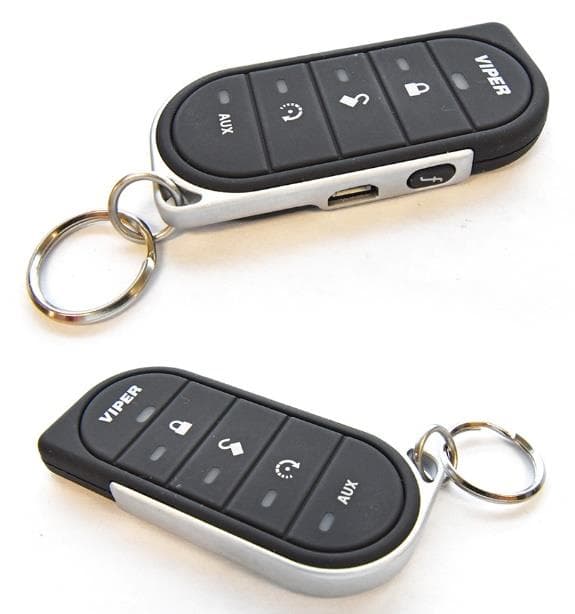
EZSG7857
Mar 22, 2021915MHz Remote Start Handheld Key fob
Equipment Class
DSS - Part 15 Spread Spectrum Transmitter