GMLNSD-3AWDual Band Tri Mode CDMA Cellular Phone
Microsoft Corporation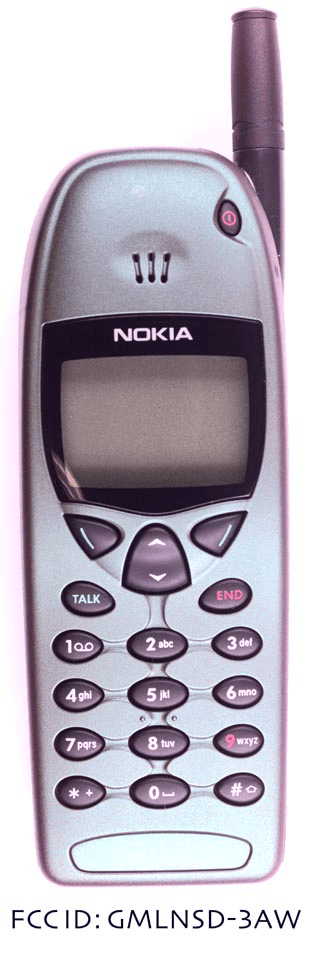
Click to zoom
Application Details
- Equipment Class
- PCE - PCS Licensed Transmitter held to ear
- Date of Grant
- Aug 10, 2000
- Application Purpose
- Original Equipment
- Date of Application
- Mar 07, 2000
- Equipment Note
- Dual Band Tri Mode CDMA Cellular Phone
- Frequency Range
- 1850.00000000 - 1910.00000000
- Company
- Microsoft Corporation
- Country
- United States
Documents & Files
Document Text
Text extracted from the exhibit documents filed with the FCC. Open a document above to read the original.
Users Manual
6185i v1 (Review 1)1 1. Safety At A Glance Read these simple guidelines before using your phone. Failure to comply with these guidelines may be dangerous or illegal. Note: For more detailed safety information, “Important Safety Information” on page97. Road Safety Comes First Don’t use a hand-held phone while driving; park the vehicle first. Switch Off In Hospitals Switch off your phone when near medical equipment. Follow any regulations or rules in force. Switch Off On Aircraft Mobile phones can cause interference. Using them on aircraft is illegal. Switch Off When Refueling Do not use the phone at a refueling point. Do not use near fuels or chemicals. Switch Off Near Blasting Do not use the phone where blasting is in progress. Observe restrictions, and follow any regulations or rules in force. Interference All mobile phones may get interference which could affect performance. Use Sensibly Use only in the normal position (to ear). Avoid unnecessary contact with the antenna when phone is on. Qualified Service Only qualified service personnel may install or repair cellular phone equipment. 6185i v1 (Review 1)2 Accessories and Batteries Use only approved accessories and batteries. Do not connect incompatible products. FCC/Industry Canada Notice Your phone may cause TV or radio interference (for example, when using a telephone in close proximity to receiving equipment). The FCC/Industry Canada can require you to stop using your telephone if such interference can not be eliminated. If you require assistance, contact your local service facility. This device complies with part 15 of the FCC rules. Operation is subject to the condition that this device does not cause harmful interference. Using this Guide The wireless phone described in this guide is approved for use in CDMA/AMPS networks. A number of features included in this guide are called Network Services. They are special services provided by wireless service providers. Before you can take advantage of any of these Network Services, you must subscribe to the service(s) from your home service provider and obtain instructions for their use. Disclaimer It’s possible that you may not be able to activate your phone on all wireless systems. Please see your service provider for details. 6185i v1 (Review 1)3 2. Getting Connected This section will help you understand the ins and outs of charging and using your battery. Attaching your battery Simply place the battery in the grooves on the back of your phone. Then slide the battery upward until it clicks. Note: Use only those batteries approved by the phone manufacturer and recharge your battery only with the chargers approved by the manufacturer. See “Important Battery Information” on page5. Charging your new battery Your phone can be used with either a rechargeable Li-Ion or NiMH battery. Note that a new battery’s full performance is achieved only after two or three complete charge and discharge cycles. With your phone powered on or off, connect the lead from the charger to the bottom of your phone. You can also place your phone on the charging stand (with the stand connected to a standard 120V AC outlet via either the ACP-7U or ACP-9U AC/DC adaptors). When the battery begins charging, your phone will beep once and the battery strength indicator on the right side of the display will begin to scroll after a few seconds. 6185i v1 (Review 1)4 If your phone displays Not charging, charging is suspended. Check that the battery is connected only to an approved charging device. If the battery is very hot or cold, wait for a while; charging will automatically resume after the battery is restored to its normal operating temperature. If charging still fails, contact your dealer. When a charger is not in use, disconnect it from the power source. Do not leave the battery connected to a charger for longer than a week, since overcharging may shorten its life. Important: If left unused, a fully charged battery will discharge itself over time. When is a good time to charge? Actually, you can charge anytime. If you have a NiMH battery, you should allow it to completely discharge once in a while. When your phone beeps once and displays Battery low, you only have a couple of minutes of talk time remaining. The repetition rate of these battery-low warnings depend on the remaining battery capacity and the battery condition. These warnings are more frequent when you’re in a call. Note: The phone will not give you the warning tone under certain conditions. See “Warning and game tones” on page84. Once all the power has drained from your battery, you’ll hear three beeps with the message Recharge battery on your display. At this point, your phone will switch itself off and you’ll need to recharge your battery. When is charging complete? When the charge indicators stop scrolling, your phone is considered fully charged. However, a slight increase in charge may occur if your phone is left connected to the charger for a couple more hours. This is called “trickle charge” or “maintenance charge.” 6185i v1 (Review 1)5 Charging times depend on the type of battery and charger used. For approximate charging and operating times, see “Batteries” on page91. Can you make calls while charging? Yes, you can. But your battery may not charge while a call is in progress (depending on which charger you are using). Charging should resume once you end the call. See "Chargers and Other Accessories" on page 92 for more information. Discharging NiMH batteries A NiMH battery lasts longer and performs better if you fully discharge it from time to time. To discharge the battery, leave your phone switched on until the battery is drained. The phone will display several messages that the battery is low and that you need to recharge it; just ignore them. You can also use the battery discharge feature of any approved accessory available for your phone. Do not attempt to discharge the battery by any means other than those just described. Removing the battery…
Text truncated - open the document above for the full version.
Users Manual
0 Complete Car Kit (CARK-91US/CARK-91H) For use with Nokia 5100 and 6100 Series Wireless Phones CARK-91USANDH07.26.00.fm Page 0 Wednesday, July 26, 2000 1:56 PM 1 Introduction This installation guide has been prepared to provide the basic information necessary to install this car kit. This guide is not intended to be definitive, because different types and models of vehicles will require different installation work. The information given is for general guidance only. The terms of warranty demand that this car kit be installed by an experienced installation facility. An end user should never attempt to install this car kit without professional assistance as the installation requires special tools and knowledge. Please refer to the phone’s Owner’s Manual for instructions on the phone’s operation, care and maintenance, including important safety information. Note: Read the warnings below before beginning the instal- lation procedure. WARNINGS 1) Ensure that the vehicle’s battery is disconnected before you start the installation procedure, and that it remains disconnected during the procedure. 2) Do not smoke or use open flames when working near the vehicle’s fuel system. 3) Ensure that the vehicle’s electrical cables, hydraulic lines, fuel lines and safety equipment are not damaged during installation. 4) Ensure that normal control and operation of the vehicle is not impaired by the installation, particularly the brakes and steering. 5) Electronic and other sophisticated systems (e.g. speed control, abs anti-lock brake, fuel injection, navigation and air bag systems) are relatively immune to malfunction caused by nearby radio transmissions. However, should you experience false operation of these systems or are in any doubt whatsoever as to their functionality, please consult the vehicle’s dealer. CARK-91USANDH07.26.00.fm Page 1 Wednesday, July 26, 2000 1:56 PM 2 6) The car kit is suitable for use only in vehicles with a 11-32 V negative grounding. Use on other supply vol- tages or alternative polarity will damage the equipment. 7) The phone should not be left switched on for extended periods without running the vehicle’s engine. Failure to comply could drain the vehicle’s battery. Unpacking Carefully unpack the equipment and ensure that the follow- ing items are present. Advanced CradleMCC-1 RF AdapterAAC-1 Junction BoxHFU-2 Power CablePCH-4J Mounting PlateMKU-1 Swivel MountHHS-9 MicrophoneHFM-8 External HF SpeakerHFS-12 Options External Audio Handset (included with CARK-91H) HSU-1 CARK-91USANDH07.26.00.fm Page 2 Wednesday, July 26, 2000 1:56 PM 3 Component Parts Advanced Cradle MCC-1 The Advanced Cradle firmly holds the phone in a conve- nient place. The Advanced Cradle is attached to the vehicle’s interior using the swivel mount HHS-9. RF Adapter AAC-1 The RF Adapter converts the FME connector of the MCC-1, Advanced Cradle, into a mini-U connector that attaches to an external antenna. Junction Box HFU-2 The Junction Box enables the phone to operate in hands- free mode. The unit is attached to the vehicle interior using the Mounting Plate MKU-1, or the Swivel Mount HHS-9. A temporary installation can be achieved using cable ties. Power is supplied from the vehicle’s battery via the Power Cable PCH-4J. The Junction Box provides the power supply to the phone via the system connector. The HF Microphone HFM-8, connects to the MIC socket and the External HF Speaker HFS-12, connects to the socket. Mounting Plate MKU-1 and Swivel Mount HHS-9 MKU-1 is a fixed position mounting plate. The HHS-9 is a Swivel Mount which allows for adjustable fixing. Both mounting plates are interchangeable. HF Microphone HFM-8 The HF Microphone connects directly to the socket of the Junction Box HFU-2, marked MIC. HF Speaker HFS-12 The HF Speaker connects directly to the handsfree unit socket. Insert the plug into the socket and twist 90° to lock firmly in place. CARK-91USANDH07.26.00.fm Page 3 Wednesday, July 26, 2000 1:56 PM 4 Power Cable PCH-4J The power cable connects the Junction Box HFU-2, to the vehicle’s power supply. The red wire must be connected to the + voltage on the vehicle’s power supply via the supplied fused connector. The black wire must be attached to a good negative GND connection. The blue ignition sense (IGNS) wire is connected to +12 V voltage controlled by the vehicle’s ignition key via the sup- plied fused connector. (See section “Ignition Sense”.) The yellow wire is used for car radio muting (XCRM). The line goes down to 0 volts during a call. (See section “Car Radio Muting”). The green wire is used for motor antenna (AMC). The vol- tage in this output is +12 V whenever the phone is on. (See section “Antenna Motor Control”). HSU-1 External Audio Handset (included with CARK91H, optional for CARK-91US) The External Audio Handset is a simple handset with no display or keypad. It provides privacy for conversation and comfort in a vehicle’s noisy environment. However, do not use the handset while in motion, as both hands are needed for safe driving. The External Audio Handset (HSU-1) is not included in the Complete Car Kit, (CARK-91US). Handset Operation To make a call with External Audio Handset (HSU-1) 1) Key in the desired number on the keypad of your phone. 2) Press Û (6100) or +&DOO, (5100) and lift the handset. To receive a call with External Audio Handset •Lift the handset or press any key except for the power key, Ù or the volume keys. CARK-91USANDH07.26.00.fm Page 4 Wednesday, July 26, 2000 1:56 PM 5 When you lift the Audio Handset from its holder, the HF-loudspeaker and HF-microphone will be muted and you can speak in privacy. To end a call with External Audio Handset •Replace the handset or press Ù (6100) or # +(QG, (5100). To switch from handsfree (HF) operation to handset operation •Lift the handset To switch from handset operation to handsfree (HF) operation •Press the left Ò 2SWLRQV soft key (6100) or +2SWLRQV, (5100) once and replace the handset in 5 seconds. If you do not press t…
Text truncated - open the document above for the full version.
Users Manual
0 Complete Car Kit (CARK-91US/CARK-91H) For use with Nokia 5100 and 6100 Series Wireless Phones CARK-91USANDH07.26.00.fm Page 0 Wednesday, July 26, 2000 1:56 PM 1 Introduction This installation guide has been prepared to provide the basic information necessary to install this car kit. This guide is not intended to be definitive, because different types and models of vehicles will require different installation work. The information given is for general guidance only. The terms of warranty demand that this car kit be installed by an experienced installation facility. An end user should never attempt to install this car kit without professional assistance as the installation requires special tools and knowledge. Please refer to the phone’s Owner’s Manual for instructions on the phone’s operation, care and maintenance, including important safety information. Note: Read the warnings below before beginning the instal- lation procedure. WARNINGS 1) Ensure that the vehicle’s battery is disconnected before you start the installation procedure, and that it remains disconnected during the procedure. 2) Do not smoke or use open flames when working near the vehicle’s fuel system. 3) Ensure that the vehicle’s electrical cables, hydraulic lines, fuel lines and safety equipment are not damaged during installation. 4) Ensure that normal control and operation of the vehicle is not impaired by the installation, particularly the brakes and steering. 5) Electronic and other sophisticated systems (e.g. speed control, abs anti-lock brake, fuel injection, navigation and air bag systems) are relatively immune to malfunction caused by nearby radio transmissions. However, should you experience false operation of these systems or are in any doubt whatsoever as to their functionality, please consult the vehicle’s dealer. CARK-91USANDH07.26.00.fm Page 1 Wednesday, July 26, 2000 1:56 PM 2 6) The car kit is suitable for use only in vehicles with a 11-32 V negative grounding. Use on other supply vol- tages or alternative polarity will damage the equipment. 7) The phone should not be left switched on for extended periods without running the vehicle’s engine. Failure to comply could drain the vehicle’s battery. Unpacking Carefully unpack the equipment and ensure that the follow- ing items are present. Advanced CradleMCC-1 RF AdapterAAC-1 Junction BoxHFU-2 Power CablePCH-4J Mounting PlateMKU-1 Swivel MountHHS-9 MicrophoneHFM-8 External HF SpeakerHFS-12 Options External Audio Handset (included with CARK-91H) HSU-1 CARK-91USANDH07.26.00.fm Page 2 Wednesday, July 26, 2000 1:56 PM 3 Component Parts Advanced Cradle MCC-1 The Advanced Cradle firmly holds the phone in a conve- nient place. The Advanced Cradle is attached to the vehicle’s interior using the swivel mount HHS-9. RF Adapter AAC-1 The RF Adapter converts the FME connector of the MCC-1, Advanced Cradle, into a mini-U connector that attaches to an external antenna. Junction Box HFU-2 The Junction Box enables the phone to operate in hands- free mode. The unit is attached to the vehicle interior using the Mounting Plate MKU-1, or the Swivel Mount HHS-9. A temporary installation can be achieved using cable ties. Power is supplied from the vehicle’s battery via the Power Cable PCH-4J. The Junction Box provides the power supply to the phone via the system connector. The HF Microphone HFM-8, connects to the MIC socket and the External HF Speaker HFS-12, connects to the socket. Mounting Plate MKU-1 and Swivel Mount HHS-9 MKU-1 is a fixed position mounting plate. The HHS-9 is a Swivel Mount which allows for adjustable fixing. Both mounting plates are interchangeable. HF Microphone HFM-8 The HF Microphone connects directly to the socket of the Junction Box HFU-2, marked MIC. HF Speaker HFS-12 The HF Speaker connects directly to the handsfree unit socket. Insert the plug into the socket and twist 90° to lock firmly in place. CARK-91USANDH07.26.00.fm Page 3 Wednesday, July 26, 2000 1:56 PM 4 Power Cable PCH-4J The power cable connects the Junction Box HFU-2, to the vehicle’s power supply. The red wire must be connected to the + voltage on the vehicle’s power supply via the supplied fused connector. The black wire must be attached to a good negative GND connection. The blue ignition sense (IGNS) wire is connected to +12 V voltage controlled by the vehicle’s ignition key via the sup- plied fused connector. (See section “Ignition Sense”.) The yellow wire is used for car radio muting (XCRM). The line goes down to 0 volts during a call. (See section “Car Radio Muting”). The green wire is used for motor antenna (AMC). The vol- tage in this output is +12 V whenever the phone is on. (See section “Antenna Motor Control”). HSU-1 External Audio Handset (included with CARK91H, optional for CARK-91US) The External Audio Handset is a simple handset with no display or keypad. It provides privacy for conversation and comfort in a vehicle’s noisy environment. However, do not use the handset while in motion, as both hands are needed for safe driving. The External Audio Handset (HSU-1) is not included in the Complete Car Kit, (CARK-91US). Handset Operation To make a call with External Audio Handset (HSU-1) 1) Key in the desired number on the keypad of your phone. 2) Press Û (6100) or +&DOO, (5100) and lift the handset. To receive a call with External Audio Handset •Lift the handset or press any key except for the power key, Ù or the volume keys. CARK-91USANDH07.26.00.fm Page 4 Wednesday, July 26, 2000 1:56 PM 5 When you lift the Audio Handset from its holder, the HF-loudspeaker and HF-microphone will be muted and you can speak in privacy. To end a call with External Audio Handset •Replace the handset or press Ù (6100) or # +(QG, (5100). To switch from handsfree (HF) operation to handset operation •Lift the handset To switch from handset operation to handsfree (HF) operation •Press the left Ò 2SWLRQV soft key (6100) or +2SWLRQV, (5100) once and replace the handset in 5 seconds. If you do not press t…
Text truncated - open the document above for the full version.
Users Manual
We have modified our Nokia 6185i User Guide SAR statement to exclude this addressed non-demonstrated situation as follows: Radio frequency (RF) signals Your wireless handheld portable telephone is a low power radio transmitter and receiver. When it is ON, it receives and also sends out radio frequency (RF) signals. In August, 1996, the Federal Communications Commission (FCC) adopted RF exposure guidelines with safety levels for handheld wireless phones. Those guidelines are consistent with safety standards previously set by both U.S. and international standards bodies: ANSI C95.1 (1992)*, NCRP Report 86 (1986)*, ICNIRP (1996)*. Those standards were based on comprehensive and periodic evaluations of the relevant scientific literature. For example, over 120 scientists, engineers, and physicians from universities, government health agencies and industry reviewed the available body of research to develop the ANSI Standard (C95.1). The design of your phone complies with the FCC guidelines (and those standards). For body worn operation, to maintain compliance with FCC RF exposure guidelines, use only Nokia approved accessories. When carrying the phone while it is on, use the specific Nokia belt-clip that has been tested for compliance. Use of non-Nokia-approved accessories may violate FCC RF exposure guidelines and should be avoided. *American National Standards Institute, National Council on Radiation Protection and Measurements; International Commission on Non-Ionizing Radiation Protection..
Attestation Statements
NOKIA MOBILE PHONES, Inc. 12278 Scripps Summit Drive San Diego, CA 92131 Tel. (858) 831 5000 27 Jan 2000 Federal Communications Commission, Authorization & Evaluation Division, 7435 Oakland Mills Road, Columbia, MD 21046 Attention: Equipment Authorization Branch PER:47 CFR 22.919 RE:FCC ID: GMLNSD-3AW The Electronic Serial Number (ESN) for each transceiver is unique. The ESN host component is permanently attached to a main circuit board of the mobile transmitter and the integrity of the unit’s operating software is not alterable. The ESN is isolated from fraudulent contact and tampering. ! The host component does not contain other information, it is not removable and its electrical connections are not accessible. " The host component does contain other information, and the ESN information is encoded using: ! (1) Multiplication or division by a polynomial. " (2) Cyclic coding. " (3) The spreading of ESN bits over various non-sequential memory locations. The ESN is factory set and is not alterable, transferable, removable, or otherwise able to be manipulated. Cellular mobile equipment is designed such that any attempt to remove, tamper with, or change the ESN chip, its logic system, or firmware originally programmed by the manufacturer will render the mobile transmitter inoperative. NOKIA MOBILE PHONES, Inc. W. Mark de Nes Product Project Manager, Product Development, San Diego NOKIA MOBILE PHONES, Inc. 12278 Scripps Summit Drive San Diego, CA 92131 Tel. (858) 831 5000 27 Jan 2000 Federal Communications Commission, Authorisation & Evaluation Division, 7435 Oakland Mills Road, Columbia, MD 21046 Attention: Equipment Authorisation Branch We hereby certify that the tranceiver FCC ID: GMLNSD-3AW complies with OET Bulletin No. 53 as referenced in Section 22.915 of the Commission’s rules and with TIA/EIA/IS-95-A Mobile Station-Base Station Compatibility Standard for Dual-Mode Wideband Spread Spectrum Cellular System and ANSI J-STD-008-1996 Personal Station-Base Station Compatibility Requirements for 1.8 to 2.0 GHz Code Division Multiple Access (CDMA) Personal Communications Systems. Compliance was determined by testing appropriate parameters according to standards. Extensive field testing has been performed in several locations in the USA to verify the compatibility against different systems. NOKIA MOBILE PHONES, Inc. W. Mark de Nes Product Project Manager, Product Development, San Diego
Cover Letter(s)
NOKIA MOBILE PHONES, Inc. 12278 Scripps Summit Drive San Diego, CA 92131 Tel. (858) 831 5000 27 Jan 2000 Federal Communications Commission, Authorisation & Evaluation Division, 7435 Oakland Mills Road, Columbia, MD 21046 Attention: Equipment Authorisation Branch REQUEST FOR CONFIDENTIALITY Pursuant to Sections 0.457 (d) (l) (ii) and 0.459 of the Commission’s Rules, the Applicant hereby requests confidential treatment of some of the information accompanying this Application of FCC ID:GMLNSD-3AW and as outlined below: - block diagram - schematic diagrams - descriptions of circuitry / theory of operation - list of active devices - tune-up procedures These materials contain trade secrets and proprietary information not customarily released to the public and the public disclosure of these matters might be harmful to the Applicant and provide unjustified benefits to its competitors. The Applicant understands that pursuant to Rule 0.457 (d) (l) (ii) disclosure of this Application and all accompanying documentation will not be made before the date of the Grant for this Application. NOKIA MOBILE PHONES, Inc. W. Mark de Nes Product Project Manager, Product Development, San Diego
Cover Letter(s)
March 15, 2000 RE: NOKIA GMLNSD-3AW EA96989 Form 731 Correction: The Form 731 submitted with this product incorrectly omitted Part 22 and 22.901. William H. Graff M. Flom Associates, Inc.
Cover Letter(s)
March 21, 2000 William H. Graff Director of Engineering M. Flom Associates, Inc
Cover Letter(s)
L:\MFA\FCC letter re Bill Graff.doc May 23, 2000 Federal Communications Commission Gentlemen: Please be advised that William H. (Bill) Graff is no longer employed by M. Flom Associates, Inc. in any capacity nor as a consultant. The only contact person to replace him is Morton Flom, P. Eng., President. Telephone number: 480 926 3100, FAX: 480 926 3598, email: general@mflom. Regards, Morton Flom, P. Eng., President M. Flom Associates, Inc.
ID Label/Location Info
28 JAN 00 FCC ID: GMLNSD-3AW Applicant: Nokia Mobile Phones, Inc.Copyright © 2000 Nokia Mobile Phones, Inc. Type: NSD-3AW MADE IN USA FCC ID: GMLNSD-3AW Model: 6185i Code: 0501121 MY07AJ ESN: XXX/00000000 FFXXXXXX Type: NSD-3AW MADE IN USA FCC ID: GMLNSD-3AW Model: 6185i Code: 0501121 MY07AJ ESN: XXX/00000000 FFXXXXXX 28 JAN 00 FCC ID: GMLNSD-3AW Applicant: Nokia Mobile Phones, Inc.Copyright © 2000 Nokia Mobile Phones, Inc. Type: NSD-3AW MADE IN USA FCC ID: GMLNSD-3AW Model: 6185i Code: 0501121 MY07AJ ESN: XXX/00000000 FFXXXXXX NOKIA MOBILE PHONES, Inc. 12278 Scripps Summit Drive San Diego, CA 92131 Tel (858) 831 5000 27 Jan 2000 Federal Communications Commission, Authorisation & Evaluation Division, 7435 Oakland Mills Road, Columbia, MD 21046 Attention: Equipment Authorisation Branch COMPLIANCE STATEMENT OF NOKIA 6185i, FCC ID: GMLNSD-3AW The compliance statement can be seen in user guide of NOKIA 6185i because the size of the handportable NOKIA 6185i and its identification label are so small that the compliance statement can not be printed visible enough. NOKIA MOBILE PHONES, Inc. W. Mark de Nes Product Project Manager, Product Development, San Diego 6185i v1 (Review 1)2 Accessories and Batteries Use only approved accessories and batteries. Do not connect incompatible products. FCC/Industry Canada Notice Your phone may cause TV or radio interference (for example, when using a telephone in close proximity to receiving equipment). The FCC/Industry Canada can require you to stop using your telephone if such interference can not be eliminated. If you require assistance, contact your local service facility. This device complies with part 15 of the FCC rules. Operation is subject to the condition that this device does not cause harmful interference. Using this Guide The wireless phone described in this guide is approved for use in CDMA/AMPS networks. A number of features included in this guide are called Network Services. They are special services provided by wireless service providers. Before you can take advantage of any of these Network Services, you must subscribe to the service(s) from your home service provider and obtain instructions for their use. Disclaimer It’s possible that you may not be able to activate your phone on all wireless systems. Please see your service provider for details.
RF Exposure Info
NOKIA MOBILE PHONES, Inc. 12278 Scripps Summit Drive San Diego, CA 92131 Tel. (858) 831 5000 28 Feb 2000 Federal Communications Commission, Authorisation & Evaluation Division, 7435 Oakland Mills Road, Columbia, MD 21046 Attention: Equipment Authorisation Branch We hereby certify that the transceiver FCC ID:GMLNSD-3AW complies with ANSI/IEEE C95.1-1992 Standard for Safety Levels with Respect to Human Exposure to Radio Frequency Electromagnetic Fields, 3kHz to 300 GHz. Compliance was determined by testing appropriate parameters according to standard. NOKIA MOBILE PHONES, Inc. W. Mark de Nes Product Project Manager, Product Development, San Diego
RF Exposure Info
NOKIA MOBILE PHONES, Inc. 12278 Scripps Summit Drive San Diego, CA 92131 Tel (858) 831 5000 30 May 2000 Federal Communications Commission, Authorization & Evaluation Division, 7435 Oakland Mills Road, Columbia, MD 21046 Attention: FCC Application Processing Branch RE: FCC ID: GMLNSD-3AW 731 Confirmation number EA96989 Correspondence reference number: 13326 Reply to Correspondence 13326 SAR review question #1 Nokia 6185i FCC ID: GMLNSD-3AW has a provision for body-worn operations with BCH-12U belt clip with either HDC-9 headset or LPS-1 loopset (for hearing impaired customers). As two following tables indicate, Nokia 6185i complies with requirements addressing body- worn SAR. Full test report can be found attached to this document. Body SAR Analog Mode AMPS Meas. # Phone positionFrequency MHz/Channel Power [dBm] SAR (1g)[mW/g] 1Body worn, BCH-12U Belt Clip against flat phantom 836/38326.50.77 2Body worn, Display against flat phantom 836/38326.50.96 FCC ID: GMLNSD-3AW Calculated from measured values to match 26.5 dBm conducted P out FCC LIMIT1.60 mW/g (ANSI/IEEE) Body SAR Digital Mode PCS CDMA Meas # Phone positionFrequency MHz/Channel Power [dBm] SAR (1g)[mW/g] 3Body worn, BCH-12U Belt Clip against flat phantom 1880/60022.50.49 4Body worn, Display against flat phantom 1880/60022.51.01 FCC ID: GMLNSD-3AW Measured values with 22.5 dBm conducted P out FCC LIMIT1.60 mW/g (ANSI/IEEE) Nokia 6185i was also evaluated for SAR in user hand. As following two tables show, Nokia 6185i complies also with these requirements. Test report for hand SAR evaluation is attached to this document. Hand SAR Analog Mode AMPS PositionFrequency MHz/Chann el Power [dBm] Hand SAR (10g)[mW/g] Back side836/38326.50.85 FCC ID: GMLNSD-3AW Calculated from measured values to match 26.5 dBm conducted P out RECOMMENDED LIMIT4.0 mW/g Hand SAR Digital Mode PCS CDMA PositionFrequency MHz/Channel Power [dBm] Hand SAR (10g)[mW/g] Back side1880/60022.52.09 FCC ID: GMLNSD-3AW Measured values with 22.5 dBm conducted P out RECOMMENDED LIMIT4.0 mW/g A new User Manual page with body-worn operation advisory is attached to this document. Following text has been added to User Manual under Radio frequency (RF) signals -topic: "For body worn operation, to maintain compliance with FCC RF exposure guidelines, use only Nokia approved accessories. When carrying the phone while it is on, place the phone in a Nokia approved belt clip, carrying case or holster. Use of non-Nokia-approved accessories may violate FCC RF exposure guidelines." SAR review question #2 Nokia 6185i (FCC ID: GMLNSD-3AW) transceiver, when properly installed with CARK-91US complete car kit and customer provided external antenna, satisfies the criteria to be considered a 'mobile device' as defined in Federal Communications Commission section 47 CFR § 2.1091 titled “Radio frequency radiation exposure evaluation: mobile devices.” CARK-91US car kit includes following set of accessories: CARK-91US car kit does not include external Mobile Antenna due to availability of large commercial mobile antenna model selection for different needs. Nokia recommends customer to consult the dealer to find the most suitable mobile antenna…
Text truncated - open the document above for the full version.
Contact Information
Applicant
Hasnain Syed(Director, EMC, SI and RF Compliance)
Technical Contact
M. Flom Associates, IncWilliam H Graff
[email protected]480 926 3100
3356 N. San Marcos Place · Chandler, Arizona · United States
Non-Technical Contact
M. Flom Associates, Inc.Morton Flom
[email protected]480 926 3100
Technical Specifications
| # | Rule Parts | Frequency Range | Power Output | Emission | Tolerance |
|---|---|---|---|---|---|
| 4 | 24E | 1.85 GHz - 1.91 GHz | 275.00 mW | 1M25F9W | 2.5 ppm |
Other Applications from Microsoft Corporation

GMLRM-88A
Apr 11, 2006GSM 850/900/1800/1900MHz Cellphone w/BT
Equipment Class
JBP - Part 15 Class B Computing Device Peripheral
GMLRM-88
Jan 19, 2006GSM 850/900/1800/1900MHz Cellphone w/BT
Equipment Class
DSS - Part 15 Spread Spectrum Transmitter
GMLNPM-10X
Oct 29, 2003Dual Band Mobile Phone
Equipment Class
PCE - PCS Licensed Transmitter held to ear
GMLRH-25
Sep 10, 2003Tri mode Dual Band Cellular Phone
Equipment Class
PCE - PCS Licensed Transmitter held to ear
GMLRH-42
Aug 27, 2003Nokia 2220 single band cellphone
Equipment Class
TNE - Licensed Non-Broadcast Transmitter Held to Ear