GMLNSW-4DXDual Band Tri-Mode TDMA Cellular Transceiver
Microsoft Corporation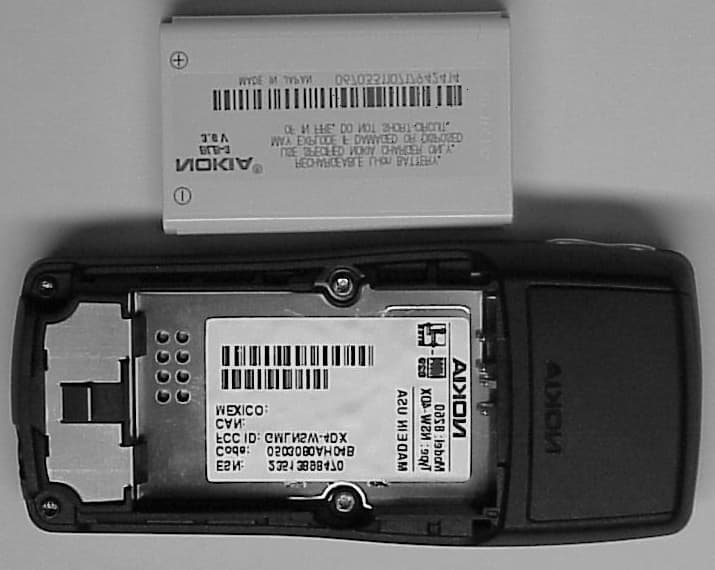
Click to zoom
Application Details
- Equipment Class
- PCE - PCS Licensed Transmitter held to ear
- Date of Grant
- Sep 07, 2000
- Application Purpose
- Original Equipment
- Date of Application
- Mar 18, 2000
- Equipment Note
- Dual Band Tri-Mode TDMA Cellular Transceiver
- Frequency Range
- 1850.00000000 - 1910.00000000
- Company
- Microsoft Corporation
- Country
- United States
Documents & Files
Document Text
Text extracted from the exhibit documents filed with the FCC. Open a document above to read the original.
Users Manual
8260 User Guide version v. 0.06 [ i ]3/6/00 Nokia 8260 User Guide Version 0.06 8260 User Guide version v. 0.06 [ ii ] 3/6/00 Copyright information Part No. 9352523, Issue 1, nn.nnnn © 2000 Nokia Mobile Phones. All rights reserved. Printed in Canada nn/2000. Nokia, Nokia Connecting People, and the Original Accessories logos are trademarks of Nokia Corporation and/or its affiliates. FCC/Industry Canada Notice Your phone may cause TV or radio interference (for example, when using a telephone in close proximity to receiving equipment). The FCC or Industry Canada can require you to stop using your telephone if such interference cannot be eliminated. If you require assistance, contact your local service facility. This device complies with part 15 of the FCC rules. Operation is subject to the condition that this device does not cause harmful interference. 8260 User Guide version v. 0.06 [ iii ]3/6/00 Contents 1. For your safety. . . . . . . . . . . . . . . . . . . . . . . . . . . . . . . . 1 2. Welcome . . . . . . . . . . . . . . . . . . . . . . . . . . . . . . . . . . . . 3 Before you begin . . . . . . . . . . . . . . . . . . . . . . . . . . . . . . 3 Contacting Nokia . . . . . . . . . . . . . . . . . . . . . . . . . . . . . 4 When you need to contact your service provider . . . . 4 3. Prepare your phone for use . . . . . . . . . . . . . . . . . . . . . 5 Install the battery . . . . . . . . . . . . . . . . . . . . . . . . . . . . .5 First, remove the back cover . . . . . . . . . . . . . . . . .5 Next, insert the battery . . . . . . . . . . . . . . . . . . . . . 5 Last, replace the back cover. . . . . . . . . . . . . . . . . . 5 Charge the battery . . . . . . . . . . . . . . . . . . . . . . . . . 6 When you need to remove the battery . . . . . . . . . . . . 6 4. Get to know your phone . . . . . . . . . . . . . . . . . . . . . . . . 7 Keys and screen . . . . . . . . . . . . . . . . . . . . . . . . . . . . . . .7 Navigation keys . . . . . . . . . . . . . . . . . . . . . . . . . . . . . . 10 Indicators and icons . . . . . . . . . . . . . . . . . . . . . . . . . . 11 5. Make and answer calls . . . . . . . . . . . . . . . . . . . . . . . .14 Make a call . . . . . . . . . . . . . . . . . . . . . . . . . . . . . .14 Answer a call. . . . . . . . . . . . . . . . . . . . . . . . . . . . .14 Adjust the earpiece volume . . . . . . . . . . . . . . . . .15 8260 User Guide version v. 0.06 [ iv ]3/6/00 Redial the last-dialed number . . . . . . . . . . . . . . 15 Use caller ID . . . . . . . . . . . . . . . . . . . . . . . . . . . . . 15 Keep calls private . . . . . . . . . . . . . . . . . . . . . . . . . 16 6. Use phone menus . . . . . . . . . . . . . . . . . . . . . . . . . . . . 17 Navigate menus . . . . . . . . . . . . . . . . . . . . . . . . . . . . . 17 Scroll through menus . . . . . . . . . . . . . . . . . . . . . 17 Use a shortcut . . . . . . . . . . . . . . . . . . . . . . . . . . . 17 Change menu levels . . . . . . . . . . . . . . . . . . . . . . . 18 Get help . . . . . . . . . . . . . . . . . . . . . . . . . . . . . . . . 18 List of shortcuts . . . . . . . . . . . . . . . . . . . . . . . . . . . . . 18 7. Enter letters and numbers . . . . . . . . . . . . . . . . . . . . . 22 Enter letters . . . . . . . . . . . . . . . . . . . . . . . . . . . . . . . . 22 Edit names . . . . . . . . . . . . . . . . . . . . . . . . . . . . . . 23 Change from capital (uppercase) letters . . . . . . 23 Use punctuation and special characters . . . . . . 23 Enter numbers. . . . . . . . . . . . . . . . . . . . . . . . . . . . . . . 24 Use special characters in numbers . . . . . . . . . . . 24 List of special characters . . . . . . . . . . . . . . . . . . . 24 8. Use the phone book . . . . . . . . . . . . . . . . . . . . . . . . . . 25 About the phone book . . . . . . . . . . . . . . . . . . . . . . . . 25 Use phone book menus . . . . . . . . . . . . . . . . . . . . . . . 25 Change views . . . . . . . . . . . . . . . . . . . . . . . . . . . . . . . 26 Add names and numbers . . . . . . . . . . . . . . . . . . . . . . 27 Change a stored telephone number . . . . . . . . . . . . . 27 8260 User Guide version v. 0.06 [ v ]3/6/00 Recall and redial numbers . . . . . . . . . . . . . . . . . . . . .28 Erase stored names and numbers . . . . . . . . . . . . . . .29 Erase the entire phone book. . . . . . . . . . . . . . . . . . . .30 Check memory status . . . . . . . . . . . . . . . . . . . . . . . . .30 9. Use voice mail . . . . . . . . . . . . . . . . . . . . . . . . . . . . . . . 31 When you have a message . . . . . . . . . . . . . . . . . . . . . 31 Set up your voice mailbox . . . . . . . . . . . . . . . . . . . . . 31 Set greetings and passwords . . . . . . . . . . . . . . . . . . .32 Listen to your voice messages . . . . . . . . . . . . . . . . . .32 10. Work with the call log . . . . . . . . . . . . . . . . . . . . . . . .33 Check the call log . . . . . . . . . . . . . . . . . . . . . . . . . . . .33 Check missed calls . . . . . . . . . . . . . . . . . . . . . . . .34 Check previously dialed calls . . . . . . . . . . . . . . . .35 Check received calls . . . . . . . . . . . . . . . . . . . . . . .35 Clear call lists . . . . . . . . . . . . . . . . . . . . . . . . . . . .35 Check call timers . . . . . . . . . . . . . . . . . . . . . . . . . . . . .36 Turn on a current call timer . . . . . . . . . . . . . . . . .37 Clear call timers . . . . . . . . . . . . . . . . . . . . . . . . . .37 11. Use advanced calling features . . . . . . . . . . . . . . . . . .38 Set in-call options. . . . . . . . . . . . . . . . . . . . . . . . . . . .38 Use call waiting . . . . . . . . . . . . . . . . . . . . . . . . . . . . . .39 Store the call waiting feature code. . . . . . . . . . .39 Manage calls . . . . . . . . . . . . . . . . . . . . . . . . . . . . .40 Make a conference call . . . . . . . . . . . . . . . . . . . .40 8260 User Guide version v. 0.06 [ vi ]3/6/00 Use call forwarding . . . . . . . . . . . . . . . . . . . . . . . . . . 41 Store the call …
Text truncated - open the document above for the full version.
Users Manual
8260 User Guide version v. 0.06 [ i ]4/21/00 Nokia 8260 User Guide Version 0.06 includes FCC addition (p. 112) plus antenna picture (p. 7) 8260 User Guide version v. 0.06 [ ii ] 4/21/00 Copyright information Part No. 9352523, Issue 1, nn.nnnn © 2000 Nokia Mobile Phones. All rights reserved. Printed in Canada nn/2000. Nokia, Nokia Connecting People, and the Original Accessories logos are trademarks of Nokia Corporation and/or its affiliates. FCC/Industry Canada Notice Your phone may cause TV or radio interference (for example, when using a telephone in close proximity to receiving equipment). The FCC or Industry Canada can require you to stop using your telephone if such interference cannot be eliminated. If you require assistance, contact your local service facility. This device complies with part 15 of the FCC rules. Operation is subject to the condition that this device does not cause harmful interference. 8260 User Guide version v. 0.06 [ iii ]3/6/00 Contents 1. For your safety. . . . . . . . . . . . . . . . . . . . . . . . . . . . . . . . 1 2. Welcome . . . . . . . . . . . . . . . . . . . . . . . . . . . . . . . . . . . . 3 Before you begin . . . . . . . . . . . . . . . . . . . . . . . . . . . . . . 3 Contacting Nokia . . . . . . . . . . . . . . . . . . . . . . . . . . . . . 4 When you need to contact your service provider . . . . 4 3. Prepare your phone for use . . . . . . . . . . . . . . . . . . . . . 5 Install the battery . . . . . . . . . . . . . . . . . . . . . . . . . . . . .5 First, remove the back cover . . . . . . . . . . . . . . . . .5 Next, insert the battery . . . . . . . . . . . . . . . . . . . . . 5 Last, replace the back cover. . . . . . . . . . . . . . . . . . 5 Charge the battery . . . . . . . . . . . . . . . . . . . . . . . . . 6 When you need to remove the battery . . . . . . . . . . . . 6 4. Get to know your phone . . . . . . . . . . . . . . . . . . . . . . . . 7 Keys and screen . . . . . . . . . . . . . . . . . . . . . . . . . . . . . . .7 Navigation keys . . . . . . . . . . . . . . . . . . . . . . . . . . . . . . 10 Indicators and icons . . . . . . . . . . . . . . . . . . . . . . . . . . 11 5. Make and answer calls . . . . . . . . . . . . . . . . . . . . . . . .14 Make a call . . . . . . . . . . . . . . . . . . . . . . . . . . . . . .14 Answer a call. . . . . . . . . . . . . . . . . . . . . . . . . . . . .14 Adjust the earpiece volume . . . . . . . . . . . . . . . . .15 8260 User Guide version v. 0.06 [ iv ]3/6/00 Redial the last-dialed number . . . . . . . . . . . . . . 15 Use caller ID . . . . . . . . . . . . . . . . . . . . . . . . . . . . . 15 Keep calls private . . . . . . . . . . . . . . . . . . . . . . . . . 16 6. Use phone menus . . . . . . . . . . . . . . . . . . . . . . . . . . . . 17 Navigate menus . . . . . . . . . . . . . . . . . . . . . . . . . . . . . 17 Scroll through menus . . . . . . . . . . . . . . . . . . . . . 17 Use a shortcut . . . . . . . . . . . . . . . . . . . . . . . . . . . 17 Change menu levels . . . . . . . . . . . . . . . . . . . . . . . 18 Get help . . . . . . . . . . . . . . . . . . . . . . . . . . . . . . . . 18 List of shortcuts . . . . . . . . . . . . . . . . . . . . . . . . . . . . . 18 7. Enter letters and numbers . . . . . . . . . . . . . . . . . . . . . 22 Enter letters . . . . . . . . . . . . . . . . . . . . . . . . . . . . . . . . 22 Edit names . . . . . . . . . . . . . . . . . . . . . . . . . . . . . . 23 Change from capital (uppercase) letters . . . . . . 23 Use punctuation and special characters . . . . . . 23 Enter numbers. . . . . . . . . . . . . . . . . . . . . . . . . . . . . . . 24 Use special characters in numbers . . . . . . . . . . . 24 List of special characters . . . . . . . . . . . . . . . . . . . 24 8. Use the phone book . . . . . . . . . . . . . . . . . . . . . . . . . . 25 About the phone book . . . . . . . . . . . . . . . . . . . . . . . . 25 Use phone book menus . . . . . . . . . . . . . . . . . . . . . . . 25 Change views . . . . . . . . . . . . . . . . . . . . . . . . . . . . . . . 26 Add names and numbers . . . . . . . . . . . . . . . . . . . . . . 27 Change a stored telephone number . . . . . . . . . . . . . 27 8260 User Guide version v. 0.06 [ v ]3/6/00 Recall and redial numbers . . . . . . . . . . . . . . . . . . . . .28 Erase stored names and numbers . . . . . . . . . . . . . . .29 Erase the entire phone book. . . . . . . . . . . . . . . . . . . .30 Check memory status . . . . . . . . . . . . . . . . . . . . . . . . .30 9. Use voice mail . . . . . . . . . . . . . . . . . . . . . . . . . . . . . . . 31 When you have a message . . . . . . . . . . . . . . . . . . . . . 31 Set up your voice mailbox . . . . . . . . . . . . . . . . . . . . . 31 Set greetings and passwords . . . . . . . . . . . . . . . . . . .32 Listen to your voice messages . . . . . . . . . . . . . . . . . .32 10. Work with the call log . . . . . . . . . . . . . . . . . . . . . . . .33 Check the call log . . . . . . . . . . . . . . . . . . . . . . . . . . . .33 Check missed calls . . . . . . . . . . . . . . . . . . . . . . . .34 Check previously dialed calls . . . . . . . . . . . . . . . .35 Check received calls . . . . . . . . . . . . . . . . . . . . . . .35 Clear call lists . . . . . . . . . . . . . . . . . . . . . . . . . . . .35 Check call timers . . . . . . . . . . . . . . . . . . . . . . . . . . . . .36 Turn on a current call timer . . . . . . . . . . . . . . . . .37 Clear call timers . . . . . . . . . . . . . . . . . . . . . . . . . .37 11. Use advanced calling features . . . . . . . . . . . . . . . . . .38 Set in-call options. . . . . . . . . . . . . . . . . . . . . . . . . . . .38 Use call waiting . . . . . . . . . . . . . . . . . . . . . . . . . . . . . .39 Store the call waiting feature code. . . . . . . . . . .39 Manage calls . . . . . . . . . . . . . . . . . . . . . . . . . . . . .40 Make a conference call . . . . . . . . . . . . . . . . . . . .40 8260 User Guide version v. 0.06 [ vi ]3/6/00 Use call forwarding . . . . .…
Text truncated - open the document above for the full version.
Attestation Statements
Tel: 813-288-3800 Fax: 813-287-0165 Nokia Mobile Phones 6200 Courtney Campbell Causeway Suite 900 Tampa FL 33630 February 7, 2000 Federal Communications Commission Authorization & Evaluation Division 7435 Oakland Mills Rd Columbia MD 21046 Attention: Equipment Authorization Branch PER: 47 CFR 22.919 RE: FCC ID: GMLNSW-4DX The Electronic Serial Number (ESN) for each transceiver is unique. The ESN host component is permanently attached to a main circuit board of the transceiver. The ESN is isolated from fraudulent contact and tampering. The host component does not contain other information, it is not removable and its electrical connections are not accessible. : The host component does contain other information, and the ESN information is encoded using: (1) Multiplication or division by a polynomial : (2) Cyclic Coding : (3) The spreading of ESN bits over various non-sequential memory locations. The ESN is factory set and is not alterable, transferable, removable, or otherwise able to be manipulated. Cellular mobile equipment is designed such that any attempt to remove, tamper with, or change the ESN chip, its logic system, or firmware originally programmed by the manufacturer will render th4e mobile transmitter inoperative. NOKIA MOBILE PHONES Esa Posio Product Program Manager, Product Development, Dallas Tel: 813-288-3800 Fax: 813-287-0165 Nokia Mobile Phones 6200 Courtney Campbell Causeway Suite 900 Tampa FL 33630 February 7, 2000 Federal Communications Commission Authorization & Evaluation Division 7435 Oakland Mills Rd Columbia MD 21046 Attention: Equipment Authorization Branch We hereby certify that the transceiver FCC ID: GMLNSW-4DX complies with OET Bulletin No. 53 as referenced in Section 22.915 of the Commission's rules and with TIA/EIA IS-54B and IS-136A Mobile Station – Land Station Compatibility Standards. Compliance was determined by testing appropriate parameters according to standards. Extensive field testing has been performed in several locations in the USA to verify the compatibility against different systems. NOKIA MOBILE PHONES Esa Posio Product Program Manager, Product Development, Dallas
Cover Letter(s)
Tel: 813-288-3800 Fax: 813-287-0165 Nokia Mobile Phones 6200 Courtney Campbell Causeway Suite 900 Tampa FL 33630 February 7, 2000 Federal Communications Commission Authorization & Evaluation Division 7435 Oakland Mills Rd Columbia MD 21046 Attention: Equipment Authorization Branch REQUEST FOR CONFIDENTIALITY Pursuant to Sections 0.457 (d)(1)(ii) and 0.459 of the Commission's Rules, the Applicant hereby requests confidential treatment of some of the information accompanying this Application of FCC ID: GMLNSW-4DX as outlined below: - Block Diagram - Schematic Diagrams - Theory of Operation - List of Active Devices - Tune-up Procedure These materials contain trade secrets and proprietary information not customarily released to the public and the public disclosure of these matters might be harmful to the Applicant and provide unjustified benefits to its competitors. The Applicant understands that pursuant to Rule 0.457 (d)(1)(ii) disclosure of this Application and all accompanying documentation will not be made before the date of the Grant for this Application. NOKIA MOBILE PHONES Esa Posio Product Program Manager, Product Development, Dallas
Cover Letter(s)
William H. GraffPage 104/24/00 D:\Ready_To_Convert\Doc\97564.DOC Form 731 Corrections: GMLNSW-4DX Please make the following corrections to Form 731 in the Application. 824849.132 Watts ERP40K0F8W 824849.132 Watts ERP40K0F1D 824849.407 Watts ERP30K0DXW 1856.041909.92.437 Watts EIRP30K0DXW Thank You Bill Graff M. Flom Associates, Inc
Cover Letter(s)
L:\MFA\FCC letter re Bill Graff.doc May 23, 2000 Federal Communications Commission Gentlemen: Please be advised that William H. (Bill) Graff is no longer employed by M. Flom Associates, Inc. in any capacity nor as a consultant. The only contact person to replace him is Morton Flom, P. Eng., President. Telephone number: 480 926 3100, FAX: 480 926 3598, email: general@mflom. Regards, Morton Flom, P. Eng., President M. Flom Associates, Inc.
External Photos
GMLNSW-4DX GMLNSW-4DX GMLNSW-4DX GMLNSW-4DX GMLNSW-4DX
ID Label/Location Info
Tel: 813-288-3800 Fax: 813-287-0165 Nokia Mobile Phones 6200 Courtney Campbell Causeway Suite 900 Tampa FL 33630 February 7, 2000 Federal Communications Commission Authorization & Evaluation Division 7435 Oakland Mills Rd Columbia MD 21046 Attention: Equipment Authorization Branch COMPLIANCE STATEMENT OF NOKIA 8260, FCC ID: GMLNSW-4DX The compliance statement can be seen in the User Guide of NOKIA 8260 because the size of the handportable NOKIA 8260 and its identification label are so small that the compliance statement can not be visibly printed. NOKIA MOBILE PHONES Esa Posio Product Program Manager, Product Development, Dallas 8260 User Guide version 0.051 [ ii ]1/18/00 Copyright information Part No. 9352523, Issue 1, nn.nnnn © 2000 Nokia Mobile Phones. All rights reserved. Printed in Canada nn/2000. Nokia, Nokia Connecting People, and the Original Accessories logos are trademarks of Nokia Corporation and/or its affiliates. FCC/Industry Canada Notice Your phone may cause TV or radio interference (for example, when using a telephone in close proximity to receiving equipment). The FCC or Industry Canada can require you to stop using your telephone if such interference cannot be eliminated. If you require assistance, contact your local service facility. This device complies with part 15 of the FCC rules. Operation is subject to the condition that this device does not cause harmful interference.
Internal Photos
GMLNSW-4DX GMLNSW-4DX GMLNSW-4DX GMLNSW-4DX
RF Exposure Info
NOKIA MOBILE PHONES 1 February 23rd, 2000 P.O. Box 86 Joensuunkatu 7E FIN-24101 SALO Finland FEDERAL COMMUNICATIONS COMMISSION Equipment Authorization Branch 7435 Oaklands Mills Road Columbia, MD 21046 SAR TEST REPORT of Nokia 8260 Gentlemen, Please find attached SAR test report of FCC ID: GMLNSW-4DX For and on behalf of Nokia Mobile Phones Ltd. Respectfully, Sami Savela RF Design Engineer Responsible for NMP SAR measurements NOKIA MOBILE PHONES 2 ContentsPage 1.Description of the measurement3 2.Description of calibration by manufacturer4 3.List of standards4 4.Device list5 5.Equipment under test6 5.1Verification and results6 5.2Specification of Liquids6 5.3Specification of position with phone against7 generic twin phantom 5.4The phone position against generic twin 8 phantom 5.5Results of SAR for 1g 9 Appendix 111 Appendix 212 Appendix 313 Appendix 414 Appendix 515 Appendix 616 Appendix 717 Appendix 818 Appendix 919 Appendix 1020 NOKIA MOBILE PHONES 3 1.Description of the measurement This measurements were done by E-field scanning system for dosimetric assessments. It is robot-based system which allows automated E-field scanning in tissue simulating solutions. The measurements are based on the induced specific absorption rate (SAR) definition of relevant ANSI / IEEE standards. The dosimetric assessment system of Nokia Mobile Phones is manufactured by Prof. Niels Kuster at ETH (Schmid & Partner Engineering AG) in Switzerland, Europe. The method used to determine the 1 gram average value of SAR is: Initially a coarse scan is performed over the whole area on a 15 x 15 mm grid. From this coarse scan, the location at which the maximum value is measured is used as the centre for a second, more detailed scan. This second scan is based on a 3 dimensional grid of 4 x 4 x 7 points on a grid of 10 mm for 900 MHz band and grid of 5 x 5 x 7 points on a grid of 8 mm for 1800 MHz band . The average SAR values are computed using the 3D spline inter-polation algorithm. The 3D spline is composed on three one- dimensional splines with the “Not a knot” condition in the x, y and z directions (1), (2). The volume is integrated with the trapezoidal algorithm. 1000 points (10x10x10) are interpolated to calculate the average. All neighbouring volumes are evaluated until no neighbouring volume with a higher average is found. (1) W. Gander, Computermathematik, Birkhauser, Basel, 1992 (2) W. H. Press, S. A Teukolsky, W. T. Vettering and B. P. Flannery, Numerical Recipes in C, The Art of Scientific Computing, second edition, Cambridge University Press, 1992 NOKIA MOBILE PHONES 4 2.Description of calibration by manufacturer The calibration of data acquisition electronics and probe was done by the manufacturer. (Appendix 3 and 7) - the data acquisition unit is calibrated and tested using a FLUKE 702 Process Calibrator - measurement uncertainty is less than ± 20% for various tissues simulating solutions and frequencies: - these calibration parameters were measured using a temperature probe developed by manufacturer - description of the probe calibration and examples of the evaluation are enclosed in Appendix 7 3.List of standards ANSI/IEEE Std C95.1-1992 IEEE Standard for Safety Levels with Respect to Human Exposure to Radio Frequency Electromagnetic Fields, 3 kHz to 300 GHz ANSI/IEEE Std C95.3-1992 IEEE Recommended Practice for the Measurement of Potentially Hazardous Electromagnetic Fields-RF and Microwave NOKIA MOBILE PHONES 5 4.Device list: Automated E-field scanning system for dosimetric assessments System. Calibration due July 2000. Technical data (Appendix 1) Probe ET3DV4, SN: 1105, Recalibrated due July 2000 Technical data (Appendix 2) DASY-dosimetric assessment system, DAE V2, SN: 213, Calibration due July 2000 (Appendix 3) Industrial robot and Control unit, type STÄUBLI CS7 RX 90(CR) NO:595148-01, Technical data (Appendix 4) Generic Twin Phantom Version 3 (Appendix 6). PC COMPAQ 466 laser printer QMS magicolor plus Devices for preparation of the brain tissue simulating liquids -General laboratory equipment for preparation of liquids -Magnetic stirrer with heating plate IKA RET CV, SN:792708 -Scale Mettler Doleto, SN: 2114177678 HP 85070A Dielectric probe system - network analyzer HP 8753B, SN:2716U00762, Calibration due April 2000 - cables - probe stand - dielectric probe kit NO: US33020242 - PC AST PREMMIA 4/66 d - HP-IB 82335B (interface and software) Dipole Validation kit for 900 MHz band, Schmid & Partner Engineering AG, Typ: D900V2, SN: 003, Recalibrated/Verification due July 2001 and Dipole Validation kit for 1800 MHz band, Schmid & Partner Engineering AG, Typ: D1800V2, SN: 207, Recalibrated/Verification due July 2001 - signal generator ROHDE & SCHWARZ, 1038.6002.03 , Calibration due July 2000 - power meter, ROHDE & SCHWARZ, 857.8008.02, Calibration due December 2001 - amplifier ZHL-42 (SMA), 022488-RM:4152 NOKIA MOBILE PHONES 6 5. Equipment under test Unit: NOKIA 8260 FCC-ID: GMLNSW-4DX 5.1Verification and results Validation of the measurement system was made before measurements using the Validation kits. Appendix: 8 and 9 This validation measurements makes sure that the repeatability of SAR measurement value with careful positioning is better than 10 %. On 900 MHz band error was < 2 % compared to the parameter of manufacturer SAR results (0.25W): 2.34 mW/g (1g) and 2.38 mW/g (1g). On 1800 MHz band error was < 9 % compared to the parameter of manufacturer SAR results (0.25W): 9.28 mW/g (1g) and 10.1 mW/g (1g). Appendix: 8 and 9 5.2Specification of Liquid The liquids were done using the “Recipe 900MHz “ and “Recipe 1800MHz” for liquid of brain tissue at 900 MHz and 1800 MHz, respectively, and preparation bases on brochure. Appendix 5 900 MHz liquid was used with the 900 MHz validation kit measurement and 1800 MHz liquid was used with the 1800 MHz validation kit measurement. The parameters were measured by liquid testing of HP85070A Dielectric probe system. The amounts of used liquids were 20 litres. Liq…
Text truncated - open the document above for the full version.
RF Exposure Info
BODY SAR REPORT1 (5) NOKIA MOBILE PHONES2000-4-18 Sami Savela Evaluation of SAR in Body Worn Configurations for Nokia phone 8260, FCC ID: GMLNSW-4DX. Introduction Our approach was to measure the SAR, when a phone is used with body worn accessories or is against the Flat Phantom. Body worn accessory SKB-3 Belt Clip (figure 1) was tested. The measurement test equipment and setup was the same as used and referred in SAR TEST REPORT of NOKIA 8260. Figure 1. Belt Clip SKB-3 Test method Measurements were done with the Dasy 2 dosimetric assessment system DAE V2, SN: 213 and with the generic Twin Phantom version 3 from Schmid & Partner Engineering Ag. The phone was positioned in body worn accessory against Flat Phantom. Additionally, the device was positioned against the Flat Phantom i.e. display and keypad touching the phantom. The point of maximum SAR was searched. Then the SAR was measured with a 3-dimensional cube measurement. The maximum output power in middle channel was used. The method overestimates the SAR, because brain equivalent liquid was used and this has higher conductivity than tissues in the body. Results Graphical presentations of two test position with the highest SAR values are presented in the end of this report. BODY SAR REPORT2 (5) NOKIA MOBILE PHONES2000-4-18 Sami Savela Analog mode AMPS, in Belt Clip BCH-12U meas. nr: Phone position Frequency MHz / channel Power [dBm] SAR (1g)[mW/g] 1 Body Worn, Belt clip against Flat Phantom 836 / 383 22.8 0.83 2 Body Worn, Display against Flat Phantom 836 / 383 22.8 0.93 FCC ID: GMLNSW-4DX MEASURED: 2000-2-19/NMP FCC limit 1.60[mW/g] (ANSI/IEEE ) Digital mode TDMA (Cellular), in Belt Clip BCH-12U meas. nr: Phone position Frequency MHz / channel Power [dBm] SAR (1g)[mW/g] 1 Body Worn, Belt clip against Flat Phantom 836 / 383 26.9 0.83 2 Body Worn, Display against Flat Phantom 836 / 383 26.9 0.93 FCC ID: GMLNSW-4DX MEASURED: 2000-2-19/NMP FCC limit 1.60[mW/g] (ANSI/IEEE ) Digital mode TDMA (PCS), in Belt Clip BCH-12U meas. nr: Phone position Frequency MHz / channel Power [dBm] SAR (1g)[mW/g] 1 Body Worn, Belt clip against Flat Phantom 1880 / 1000 26.0 0.89 2 Body Worn, Display against Flat Phantom 1880 / 1000 26.0 0.47 FCC ID: GMLNSW-4DX MEASURED: 2000-2-19/NMP FCC limit 1.60[mW/g] (ANSI/IEEE ) BODY SAR REPORT3 (5) NOKIA MOBILE PHONES2000-4-18 Sami Savela Summary The SAR values found for the portable cellular phone (FCC ID: GMLNSW-4DX) are below the maximum recommended levels of 1.6 mW/g. BODY SAR REPORT4 (5) NOKIA MOBILE PHONES2000-4-18 Sami Savela BODY SAR REPORT5 (5) NOKIA MOBILE PHONES2000-4-18 Sami Savela
RF Exposure Info
HAND SAR REPORT1 (1) NOKIA RESEARCH CENTER2000-4-19 Sami Savela Evaluation of SAR in user hand for Nokia phone 8260. FCC ID: GMLNSW-4DX Introduction There is no internationally accepted method to measure the SAR-value in user hand, when the phone is used beside the head. The position of the hand is also difficult to determine. Our approach was to measure the maximum SAR, that can occur when hand covers the back of the phone. In practice the situation, however, is different, because the hand is touching the phone in many places and this can change the current distribution. Test method Measurements were done with the Dasy 2 dosimetric assessment system DAE V2, SN:213 and with the generic Twin Phantom version 3 from Schmid & Partner Engineering Ag. The phone was positioned back, i.e. antenna and battery, against the flat part of the phantom. The point of maximum SAR was searched. Then the SAR was measured in 10g mass. The maximum output power level was used. Middle channel on AMPS and TDMA PCS mode was used, because there was not big differencies between SAR-values of different channels originally measured with the head phantom. The method overestimates the SAR: The whole back of the phone, including the antenna area, was scanned for the hand SAR evaluation, even though this is not consistent with the instructions in the user's guide to not touch the antenna unnecessarily. Brain equivalent liquid was used and this has higher conductivity than tissues in the hand. Furthermore a cube for 10g mass was used, which is difficult to realize in practice. Results Side of the phoneMaximum SAR in hand in 10g mass Nokia 8260 (NSW-4DX) Back side (AMPS 836 MHz)0,65 mW/g Back side (TDMA 1880 MHz)0,25 mW/g Summary The hand SAR values found for the portable cellular phone (FCC ID: GMLNSW-4DX) are below the maximum recommended levels of 4 mW/g.
RF Exposure Info
BODY SAR REPORT1 (5) NOKIA MOBILE PHONES2000-4-18 Sami Savela Evaluation of SAR in Body Worn Configurations for Nokia phone 8260, FCC ID: GMLNSW-4DX. Introduction Our approach was to measure the SAR, when a phone is used with body worn accessories or is against the Flat Phantom. Body worn accessory SKB-3 Belt Clip (figure 1) was tested. The measurement test equipment and setup was the same as used and referred in SAR TEST REPORT of NOKIA 8260. Figure 1. Belt Clip SKB-3 Test method Measurements were done with the Dasy 2 dosimetric assessment system DAE V2, SN: 213 and with the generic Twin Phantom version 3 from Schmid & Partner Engineering Ag. The phone was positioned in body worn accessory against Flat Phantom. Additionally, the device was positioned against the Flat Phantom i.e. display and keypad touching the phantom. The point of maximum SAR was searched. Then the SAR was measured with a 3-dimensional cube measurement. The maximum output power in middle channel was used. The method overestimates the SAR, because brain equivalent liquid was used and this has higher conductivity than tissues in the body. Results Graphical presentations of two test position with the highest SAR values are presented in the end of this report. BODY SAR REPORT2 (5) NOKIA MOBILE PHONES2000-4-18 Sami Savela Analog mode AMPS, in Belt Clip SKB-3 meas. nr: Phone position Frequency MHz / channel Power [dBm] SAR (1g)[mW/g] 1 Body Worn, Belt clip against Flat Phantom 836 / 383 22.8 0.83 2 Body Worn, Display against Flat Phantom 836 / 383 22.8 0.93 FCC ID: GMLNSW-4DX MEASURED: 2000-2-19/NMP FCC limit 1.60[mW/g] (ANSI/IEEE ) Digital mode TDMA (Cellular), in Belt Clip SKB-3 meas. nr: Phone position Frequency MHz / channel Power [dBm] SAR (1g)[mW/g] 3 Body Worn, Belt clip against Flat Phantom 836 / 383 26.9 0.76 4 Body Worn, Display against Flat Phantom 836 / 383 26.9 0.83 FCC ID: GMLNSW-4DX MEASURED: 2000-2-19/NMP FCC limit 1.60[mW/g] (ANSI/IE…
Text truncated - open the document above for the full version.
Contact Information
Applicant
Hasnain Syed(Director, EMC, SI and RF Compliance)
Technical Contact
M. Flom Associates, IncWilliam H Graff
[email protected]480 926 3100
3356 N. San Marcos Place · Chandler, Arizona · United States
Non-Technical Contact
M. Flom Associates, Inc.Morton Flom
[email protected]480 926 3100
Test Firm
M. Flom Associates, Inc.Morton Flom
Technical Specifications
| # | Rule Parts | Frequency Range | Power Output | Emission | Tolerance |
|---|---|---|---|---|---|
| 4 | 24E | 1.85 GHz - 1.91 GHz | 437.00 mW | 30K0DXW | 2.5 ppm |
Other Applications from Microsoft Corporation

GMLRM-88A
Apr 11, 2006GSM 850/900/1800/1900MHz Cellphone w/BT
Equipment Class
JBP - Part 15 Class B Computing Device Peripheral
GMLRM-88
Jan 19, 2006GSM 850/900/1800/1900MHz Cellphone w/BT
Equipment Class
DSS - Part 15 Spread Spectrum Transmitter
GMLNPM-10X
Oct 29, 2003Dual Band Mobile Phone
Equipment Class
PCE - PCS Licensed Transmitter held to ear
GMLRH-25
Sep 10, 2003Tri mode Dual Band Cellular Phone
Equipment Class
PCE - PCS Licensed Transmitter held to ear
GMLRH-42
Aug 27, 2003Nokia 2220 single band cellphone
Equipment Class
TNE - Licensed Non-Broadcast Transmitter Held to Ear