GMLRH-21Single Band Cellular Phone
Microsoft Corporation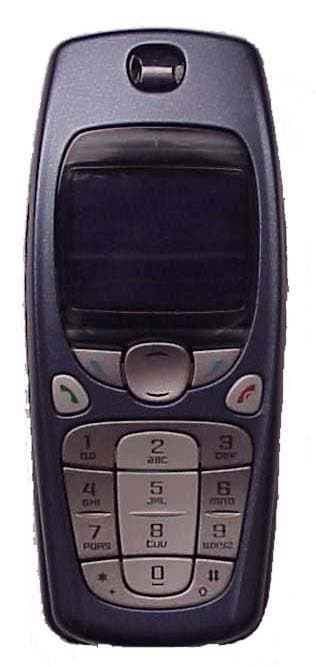
Click to zoom
Application Details
- Equipment Class
- TNE - Licensed Non-Broadcast Transmitter Held to Ear
- Date of Grant
- Apr 02, 2003
- Application Purpose
- Original Equipment
- Date of Application
- Apr 02, 2003
- Equipment Note
- Single Band Cellular Phone
- Frequency Range
- 824.04000000 - 848.97000000
- Company
- Microsoft Corporation
- Country
- United States
Documents & Files
Document Text
Text extracted from the exhibit documents filed with the FCC. Open a document above to read the original.
Users Manual
Nokia 3520/3560 phone at a glance Display screen Selection and Scroll keys End key Talk key Microphone Earphone Power key Keypad Star key Pound key See “Learn the keys” on page 17. 3520_3560.ENv1_9355099.book Page i Wednesday, February 26, 2003 3:31 PM User Guide for Nokia 3520/3560 Phone What information is needed? NumbersWhere is the number? My number Wireless service provider Voice mail number Wireless service provider Wireless provider’s number Wireless service provider Provider’s customer care Wireless service provider Model number Label on back of phone (under battery) Phone type Back of title page Electronic serial number (ESN) Label on back of phone (under battery). See “The phone label” on page 9. 3520_3560.ENv1_9355099.book Page ii Wednesday, February 26, 2003 3:31 PM The wireless phone described in this guide is approved for use in TDMA and AMPS networks. LEGAL INFORMATION Part No. 9355099, Issue No. 1 Copyright © 2003 Nokia. All rights reserved. Nokia, Nokia Connecting People, Nokia 3520, 3560, and the Nokia Original Accessories logos Backgammon, Racket, Sky Diver, Air Glider, Bowling are trademarks or registered trademarks of Nokia Corporation. All other product and company names mentioned herein may be trademarks or tradenames of their respective owners. Printed in Canada 02/2003 US Patent No 5818437 and other pending patents associated with this product’s hardware and software T9 text input software Copyright © 1999-2002. Tegic Communications, Inc. All rights reserved. Includes RSA BSAFE cryptographic or security protocol software from RSA Security. Java is a trademark of Sun Microsystems, Inc. The information in this user guide was written for the Nokia 3520 and 3560 phones. Nokia operates a policy of ongoing development. Nokia reserves the right to make changes and improvements to any of the products described in this document without prior notice. UNDER NO CIRCUMSTANCES SHALL NOKIA BE RESPONSIBLE FOR ANY LOSS OF DATA OR INCOME OR ANY SPECIAL, INCIDENTAL, AND CONSEQUENTIAL OR INDIRECT DAMAGES HOWSOEVER CAUSED. THE CONTENTS OF THIS DOCUMENT ARE PROVIDED “AS IS.” EXCEPT AS REQUIRED BY APPLICABLE LAW, NO WARRANTIES OF ANY KIND, EITHER EXPRESS OR IMPLIED, INCLUDING, BUT NOT LIMITED TO, THE IMPLIED WARRANTIES OF MERCHANTABILITY AND FITNESS FOR A PARTICULAR PURPOSE, ARE MADE IN RELATION TO THE ACCURACY AND RELIABILITY OR CONTENTS OF THIS DOCUMENT. NOKIA RESERVES THE RIGHT TO REVISE THIS DOCUMENT OR WITHDRAW IT AT ANY TIME WITHOUT PRIOR NOTICE. EXPORT CONTROLS This product contains commodities, technology or software exported from the United States in accordance with the Export Administration regulations. Diversion contrary to U.S. law is prohibited. FCC/INDUSTRY CANADA NOTICE Your phone may cause TV or radio interference (for example, when using a telephone in close proximity to receiving equipment). The FCC or Industry Canada can require you to stop using your telephone if such interference cannot be eliminated. If you require assistance, contact your local service facility. This device complies with part 15 of the FCC rules. Operation is subject to the condition that this device does not cause harmful interference. 3520_3560.ENv1_9355099.book Page iii Wednesday, February 26, 2003 3:31 PM NOTES 3520_3560.ENv1_9355099.book Page iv Wednesday, February 26, 2003 3:31 PM [ i ] Contents 1For your safety . . . . . . . . . . . . . . . . . . . . . . . . . . . . . . . . . . 1 Shared memory . . . . . . . . . . . . . . . . . . . . . . . . . . . . . . . . . . . . . . . . 3 2Welcome . . . . . . . . . . . . . . . . . . . . . . . . . . . . . . . . . . . . . . . 4 Get the most out of this guide . . . . . . . . . . . . . . . . . . . . . . . . . . . 4 Quick guide to functions . . . . . . . . . . . . . . . . . . . . . . . . . . . . . . . . 5 Menu Shortcuts . . . . . . . . . . . . . . . . . . . . . . . . . . . . . . . . . . . . . . . 6 Contacts (Phone book) . . . . . . . . . . . . . . . . . . . . . . . . . . . . . . . . . . 6 Contact Nokia . . . . . . . . . . . . . . . . . . . . . . . . . . . . . . . . . . . . . . . . . 8 Contact your service provider . . . . . . . . . . . . . . . . . . . . . . . . . . . . 9 3Review the basics . . . . . . . . . . . . . . . . . . . . . . . . . . . . . . . 10 The antenna . . . . . . . . . . . . . . . . . . . . . . . . . . . . . . . . . . . . . . . . . 10 The battery . . . . . . . . . . . . . . . . . . . . . . . . . . . . . . . . . . . . . . . . . . 10 Remove the battery . . . . . . . . . . . . . . . . . . . . . . . . . . . . . . . . . . . 12 Important battery information . . . . . . . . . . . . . . . . . . . . . . . . . . 12 Switch on your phone . . . . . . . . . . . . . . . . . . . . . . . . . . . . . . . . . 13 Check the start screen . . . . . . . . . . . . . . . . . . . . . . . . . . . . . . . . . 13 4Phone setup . . . . . . . . . . . . . . . . . . . . . . . . . . . . . . . . . . . 15 Adjust the volume. . . . . . . . . . . . . . . . . . . . . . . . . . . . . . . . . . . . . 15 The headset . . . . . . . . . . . . . . . . . . . . . . . . . . . . . . . . . . . . . . . . . . 15 Adjust screen contrast . . . . . . . . . . . . . . . . . . . . . . . . . . . . . . . . . 16 Set equalizer . . . . . . . . . . . . . . . . . . . . . . . . . . . . . . . . . . . . . . . . . 16 Lock keypad (keyguard) . . . . . . . . . . . . . . . . . . . . . . . . . . . . . . . . 16 Learn the keys . . . . . . . . . . . . . . . . . . . . . . . . . . . . . . . . . . . . . . . . 17 Make and answer calls . . . . . . . . . . . . . . . . . . . . . . . . . . . . . . . . . 18 Review phone symbols . . . . . . . . . . . . . . . . . . . . . . . . . . . . . . . . . 19 Use the selection keys . . . . . . . . . . . . . . . . . . . . . . . . . . . . . . . . . 20 Check in-phone help . . . . . . . . . . . . . . . . . . . . . . . . . . . . . . . . . . 21 Browse phone menus . . . . . . . . . . . . . . . . . . . . . . . . . . . . . . . . . . 21 Shortcuts . . . . . . . . . . . . . . . . . . . . . . . . . . . . . . . …
Text truncated - open the document above for the full version.
Users Manual
[ 153 ] Appendix A Message from the CTIA Appendix A Message from the CTIA (Cellular Telecommunications & Internet Association) to all users of mobile phones. © 2001 Cellular Telecommunications & Internet Association. All Rights Reserved.1250 Connecticut Avenue, NW Suite 800, Washington, DC 20036. Phone: (202) 785-0081 3520_3560.ENv1_9355099.book Page 153 Wednesday, February 26, 2003 3:31 PM [ 154 ] Safety is the most important call you will ever make. A Guide to Safe and Responsible Wireless Phone Use Tens of millions of people in the U.S. today take advantage of the unique combination of convenience, safety and value delivered by the wireless telephone. Quite simply, the wireless phone gives people the powerful ability to communicate by voice--almost anywhere, anytime--with the boss, with a client, with the kids, with emergency personnel or even with the police. Each year, Americans make billions of calls from their wireless phones, and the numbers are rapidly growing. But an important responsibility accompanies those benefits, one that every wireless phone user must uphold. When driving a car, driving is your first responsibility. A wireless phone can be an invaluable tool, but good judgment must be exercised at all times while driving a motor vehicle--whether on the phone or not. The basic lessons are ones we all learned as teenagers. Driving requires alertness, caution and courtesy. It requires a heavy dose of basic common sense---keep your head up, keep your eyes on the road, check your mirrors frequently and watch out for other drivers. It requires obeying all traffic signs and signals and staying within the speed limit. It means using seatbelts and requiring other passengers to do the same. But with wireless phone use, driving safely means a little more. This brochure is a call to wireless phone users everywhere to make safety their first priority when behind the wheel of a car. Wireless telecommunications is keeping us in touch, simplifying our lives, protecting us in emergencies and providing opportunities to help others in need. When it comes to the use of wireless phones, safety is your most important call . Wireless Phone "Safety Tips" Below are safety tips to follow while driving and using a wireless phone which should be easy to remember. 1 Get to know your wireless phone and its features such as speed dial and redial. Carefully read your instruction manual and learn to take advantage of valuable features most phones offer, including automatic redial and memory. Also, work to memorize the phone keypad so you can use the speed dial function without taking your attention off the road. 2 When available, use a hands free device. A number of hands free wireless phone enhancements are readily available today. Whether you choose an installed mounted device for your wireless phone or a speaker phone accessory, take advantage of these devices if available to you. 3 Position your wireless phone within easy reach. Make sure you place your wireless phone within easy reach and where you can grab it without removing your eyes from the road. If you get an incoming call at an inconvenient time, if possible, let your voice mail answer it for you. 4 Suspend conversations during hazardous driving conditions or situations. Let the person you are speaking with know you are driving; if necessary, suspend 3520_3560.ENv1_9355099.book Page 154 Wednesday, February 26, 2003 3:31 PM [ 155 ] Appendix A Message from the CTIA the call in heavy traffic or hazardous weather conditions. Rain, sleet, snow and ice can be hazardous, but so is heavy traffic. As a driver, your first responsibility is to pay attention to the road. 5 Do not take notes or look up phone numbers while driving. If you are reading an address book or business card, or writing a "to do" list while driving a car, you are not watching where you are going. It’s common sense. Don’t get caught in a dangerous situation because you are reading or writing and not paying attention to the road or nearby vehicles. 6 Dial sensibly and assess the traffic; if possible, place calls when you are not moving or before pulling into traffic. Try to plan your calls before you begin your trip or attempt to coincide your calls with times you may be stopped at a stop sign, red light or otherwise stationary. But if you need to dial while driving, follow this simple tip--dial only a few numbers, check the road and your mirrors, then continue. 7 Do not engage in stressful or emotional conversations that may be distracting. Stressful or emotional conversations and driving do not mix--they are distracting and even dangerous when you are behind the wheel of a car. Make people you are talking with aware you are driving and if necessary, suspend conversations which have the potential to divert your attention from the road. 8 Use your wireless phone to call for help. Your wireless phone is one of the greatest tools you can own to protect yourself and your family in dangerous situations--with your phone at your side, help is only three numbers away. Dial 9-1-1 or other local emergency number in the case of fire, traffic accident, road hazard or medical emergency. Remember, it is a free call on your wireless phone! 9 Use your wireless phone to help others in emergencies. Your wireless phone provides you a perfect opportunity to be a "Good Samaritan" in your community. If you see an auto accident, crime in progress or other serious emergency where lives are in danger, call 9-1-1 or other local emergency number, as you would want others to do for you. 10 Call roadside assistance or a special wireless non-emergency assistance number when necessary. Certain situations you encounter while driving may require attention, but are not urgent enough to merit a call for emergency services. But you still can use your wireless phone to lend a hand. If you see a broken-down vehicle posing no serious hazard, a broken traffic signal, a minor traffic accident where no one appears injured …
Text truncated - open the document above for the full version.
Users Manual
[ 134 ] • CERTIFICATION INFORMATION (SAR) THIS MODEL PHONE MEETS THE GOVERNMENT'S REQUIREMENTS FOR EXPOSURE TO RADIO WAVES. Your wireless phone is a radio transmitter and receiver. It is designed and manufactured not to exceed the emission limits for exposure to radio frequency (RF) energy set by the Federal Communications Commission of the U.S. Government. These limits are part of comprehensive guidelines and establish permitted levels of RF energy for the general population. The guidelines are based on standards that were developed by independent scientific organizations through periodic and thorough evaluation of scientific studies. The standards include a substantial safety margin designed to assure the safety of all persons, regardless of age and health. The exposure standard for wireless mobile phones employs a unit of measurement known as the Specific Absorption Rate, or SAR. The SAR limit set by the FCC is 1.6W/kg.* Tests for SAR are conducted using standard operating positions accepted by the FCC with the phone transmitting at its highest certified power level in all tested frequency bands. Although the SAR is determined at the highest certified power level, the actual SAR level of the phone while operating can be well below the maximum value. This is because the phone is designed to operate at multiple power levels so as to use only the power required to reach the network. In general, the closer you are to a wireless base station antenna, the lower the power output. Before a phone model is available for sale to the public, it must be tested and certified to the FCC that it does not exceed the limit established by the government-adopted requirement for safe exposure. The tests are performed in positions and locations (for example, at the ear and worn on the body) as required by the FCC for each model. The highest SAR value for this model phone as reported to the FCC when tested for use at the ear is 1.24 W/kg (3560) and 1.18 W/kg (3520), and when worn on the body, as described in this user guide, is 0.75 W/kg (3560) and 0.60 W/kg (3520). (Body-worn measurements differ among phone models, depending upon available enhancements and FCC requirements). [ 135 ] Reference information While there may be differences between the SAR levels of various phones and at various positions, they all meet the government requirement. The FCC has granted an Equipment Authorization for this model phone with all reported SAR levels evaluated as in compliance with the FCC RF exposure guidelines. SAR information on this model phone is on file with the FCC and can be found under the Display Grant section of http://www.fcc.gov/oet/fccid after searching on FCC ID GMLRH-14/ GMLRH-21. For body worn operation, this phone has been tested and meets the FCC RF exposure guidelines for use with an accessory that contains no metal and that positions the handset a minimum of 7/8 inch (2.2 cm) from the body. Use of other enhancements may not ensure compliance with FCC RF exposure guidelines. If you do not use a body-worn accessory and are not holding the phone at the ear, position the handset a minimum of 7/8 inch (2.2 cm) from your body when the phone is switched on. *In the United States and Canada, the SAR limit for mobile phones used by the public is 1.6 watts/kilogram (W/kg) averaged over one gram of tissue. The standard incorporates a substantial margin of safety to give additional protection for the public and to account for any variations in measurements. SAR values may vary depending on national reporting requirements and the network band. For SAR information in other regions please look under product information at www.nokia.com/us.
Cover Letter(s)
American Telecommunications Certification Body Inc. 6731 Whittier Ave, McLean, VA 22101 March 25, 2003 RE: FCC ID: GMLRH-21 Attention: Nerina Walton / Alan Ewing I have a few comments on this Application. 1. Please note that as of Feb 18, 2003 part 22.915 no longer exists. There is no ‘phase’ in period for this, so all devices must now meet the new rules. Please note that the file “2 Compatibility.pdf” refers to a non-existent rule part and should be removed or revised to the appropriate rule part. xxx 2. Please note that the photos on the last page of the internal photo exhibit is too dark and cannot clearly be viewed. Please provide photos that can easily be viewed. xxx 3. Please note that the SAR insert says the maximum SAR levels are 1.24w/kg for Head and 1.18 w/kg for body. However, page 4 of the SAR report says Head is 1.16 w/kg and Body is 0.6 w/kg maximum. Please make all documentation consistent. Please correct the SAR insert to reflect the measured values. xxx 4. On page 14 of the report you incorrectly list part 24 instead of part 22 for the OBW. Please provide occupied bandwidth data as required in 2.1049. xxx 5. Please also note that you have not shown compliance to the bandwidth/bandedge requirements of Part 22. Please show plots/data of the bandwidth requirements using the analyzer settings specified in Part 22.917(b). This applies to both reports. 6. In reference to item 5: You have used a resolution and video bandwidth of 300 Hz for out of band and band edge measurements on page 14. Please use the correct measurement procedure as specified in 22.917 for you analyzer settings. 22.917(b) states, “Compliance with these rules is based on the use of measurement instrumentation employing a resolution bandwidth of 100 kHz or greater. In the 1 MHz bands immediately outside and adjacent to the frequency block a resolution bandwidth of at least one percent of the emission bandwidth of the fundamental emission of the transmitter may be employed. A narrower resolution bandwidth is permitted in all cases to improve measurement accuracy provided the measured power is integrated over the full required measurement bandwidth (i.e. 100 kHz or 1 percent of emission bandwidth, as specified). The emission bandwidth is defined as the width of the signal between two points, one below the carrier center frequency and one above the carrier center frequency, outside of which all emissions are attenuated at least 26 dB below the transmitter power.” This means that for the 1 MHz area around the band edge you can go no lower than 1% of the emissions bandwidth, but for emissions greater than 1MHz away you must use at least 100kHz resolution and video bandwidths on the analyzer. This also means that in order to use less than a 100kHz Resolution and Video bandwidth you must show the occupied bandwidth measurements in order to calculate the smaller resolution BW. ). This applies to both reports 7. You have stated that the necessary bandwidth for this device is 40kHz in your emissions designator. Please provide evidence of this assumption in the form of plots or data (i.e. that the device is compliant to this assumption). ). This applies to both reports 8. Please note that while the new Part 22 rules do not have specific AMPS audio measurement requirements in that rule part, you are still responsible to show compliance to the general rules in Part 2 when audio modulation techniques are used. Please provide the required measurement results specified for audio modulation as specified in 47 CFR 2.1047. xxx Dennis Ward mailto:[email protected] The items indicated above must be submitted before processing can continue on the above referenced application. Failure to provide the requested information may result in application termination. z Page 2 March 25, 2003 Correspondence should be considered part of the permanent submission and may be viewed from the Internet after a Grant of Equipment Authorization is issued. Please do not respond to this correspondence using the email reply button. In order for your response to be processed expeditiously, you must submit your documents through the AmericanTCB.com website. Also, please note that partial responses increase processing time and should not be submitted. Any questions about the content of this correspondence should be directed to the sender.
Cover Letter(s)
RE: GMLRH-21 1 (1) April 1, 2003 Attention: Dennis Ward Reply to comments dated March 25, 2003 1) Please see updated file “2 Declarations.pdf” 2) The PWB Back photo has been lightened via software and is included in the updated internal photos. 3) The User Guide that was submitted for this product is also used for an associated product – GMLRH-14. The SAR values you refer to in this question are the values for the dual band product. GMLRH-21 is a single- band variant, and has it’s own SAR values listed in the UG. See the attached, updated UG excerpt which will be in the final version of the UG. 4) See updated report. 5) See updated report. 6) See updated report. Note that we have used 1% of the emission bandwidth for measurements within 1 MHz of the bandedge. (incorrect, 1%=400Hz not 300) 7) See updated report. 8) See updated report.
External Photos
FCC ID GMLRH-21 Copyright 2003 Nokia, Inc.
ID Label/Location Info
The wireless phone described in this guide is approved for use in TDMA and AMPS networks. LEGAL INFORMATION Part No. 9355099, Issue No. 1 Copyright © 2003 Nokia. All rights reserved. Nokia, Nokia Connecting People, Nokia 3520, 3560, and the Nokia Original Accessories logos Backgammon, Racket, Sky Diver, Air Glider, Bowling are trademarks or registered trademarks of Nokia Corporation. All other product and company names mentioned herein may be trademarks or tradenames of their respective owners. Printed in Canada 02/2003 US Patent No 5818437 and other pending patents associated with this product’s hardware and software T9 text input software Copyright © 1999-2002. Tegic Communications, Inc. All rights reserved. Includes RSA BSAFE cryptographic or security protocol software from RSA Security. Java is a trademark of Sun Microsystems, Inc. The information in this user guide was written for the Nokia 3520 and 3560 phones. Nokia operates a policy of ongoing development. Nokia reserves the right to make changes and improvements to any of the products described in this document without prior notice. UNDER NO CIRCUMSTANCES SHALL NOKIA BE RESPONSIBLE FOR ANY LOSS OF DATA OR INCOME OR ANY SPECIAL, INCIDENTAL, AND CONSEQUENTIAL OR INDIRECT DAMAGES HOWSOEVER CAUSED. THE CONTENTS OF THIS DOCUMENT ARE PROVIDED “AS IS.” EXCEPT AS REQUIRED BY APPLICABLE LAW, NO WARRANTIES OF ANY KIND, EITHER EXPRESS OR IMPLIED, INCLUDING, BUT NOT LIMITED TO, THE IMPLIED WARRANTIES OF MERCHANTABILITY AND FITNESS FOR A PARTICULAR PURPOSE, ARE MADE IN RELATION TO THE ACCURACY AND RELIABILITY OR CONTENTS OF THIS DOCUMENT. NOKIA RESERVES THE RIGHT TO REVISE THIS DOCUMENT OR WITHDRAW IT AT ANY TIME WITHOUT PRIOR NOTICE. EXPORT CONTROLS This product contains commodities, technology or software exported from the United States in accordance with the Export Administration regulations. Diversion contrary to U.S. law is prohibited. FCC/INDUSTRY CANADA NOTICE Your phone may cause TV or radio interference (for example, when using a telephone in close proximity to receiving equipment). The FCC or Industry Canada can require you to stop using your telephone if such interference cannot be eliminated. If you require assistance, contact your local service facility. This device complies with part 15 of the FCC rules. Operation is subject to the condition that this device does not cause harmful interference. 3520_3560.ENv1_9355099.book Page iii Wednesday, February 26, 2003 3:31 PM MADE IN MEXICO FCC ID: Type: Model: RH-21 3520 12345678901 1234567MYDDFL ESN: Code: GMLRH-21 IC: 661N-RH21 MADE IN MEXICO FCC ID: Type: Model: RH-21 3520 12345678901 1234567MYDDFL ESN: Code: GMLRH-21 IC: 661N-RH21 Single Band
Internal Photos
FCC ID GMLRH-21 Copyright 2003 Nokia, Inc. Antenna FCC ID GMLRH-21 Copyright 2003 Nokia, Inc. FCC ID GMLRH-21 Copyright 2003 Nokia, Inc.
Internal Photos
FCC ID GMLRH-21 Copyright 2003 Nokia, Inc. Antenna FCC ID GMLRH-21 Copyright 2003 Nokia, Inc. FCC ID GMLRH-21 Copyright 2003 Nokia, Inc.
RF Exposure Info
TCC FCC ID: GMLRH-21 Test & Certification Center (TCC) - Dallas Test Report #: 02-RF-0230.001 Accredited Laboratory Certificate Number: 1819-01 SAR Compliance Test Report 2 (18) © 2003 Nokia Mobile Phones CONTENTS 1. QUALITY SYSTEM...................................................................................................................................................................... 3 2. SUMMARY FOR SAR TEST REPORT ...................................................................................................................................... 4 2.1 MAXIMUM RESULTS FOUND DURING SAR EVALUATION...........................................................................................................................4 3. DESCRIPTION OF TESTED DEVICE ......................................................................................................................................... 5 3.1 PICTURE OF PHONE....................................................................................................................................................................................5 3.2 DESCRIPTION OF THE ANTENNA..................................................................................................................................................................5 3.3 BATTERY OPTIONS......................................................................................................................................................................................5 3.4 BODY WORN OPERATION...........................................................................................................................................................................6 4. TEST CONDITIONS .................................................................................................................................................................... 6 4.1 A MBIENT C ONDITIONS ...............................................................................................................................................................................6 4.2 RF CHARACTERISTICS OF THE TEST SITE......................................................................................................................................................6 4.3 TEST SIGNAL, FREQUENCIES, AND OUTPUT POWER...................................................................................................................................6 5. DESCRIPTION OF THE TEST EQUIPMENT............................................................................................................................. 7 5.1 SYSTEM ACCURACY VERIFICATION.............................................................................................................................................................8 5.2 TISSUE SIMULANTS.....................................................................................................................................................................................9 5.3 PHANTOMS.............................................................................................................................................................................................. 10 5.4 ISOTROPIC E-FIELD PROBE ET3DV6 ...................................................................................................................................................... 10 6. DESCRIPTION OF THE TEST PROCEDURE ..........................................................................................................................11 6.1 TEST POSITIONS....................................................................................................................................................................................... 11 6.2 SCAN PROCEDURES................................................................................................................................................................................. 13 6.3 SAR AVERAGING METHODS................................................................................................................................................................... 13 7. MEASUREMENT UNCERTAINTY ..........................................................................................................................................14 7.1 DESCRIPTION OF INDIVIDUAL MEASUREMENT UNCERTAINTY................................................................................................................. 14 8. RESULTS....................................................................................................................................................................................15 8.1 HEAD CONFIGURATION........................................................................................................................................................................... 15 8.2 BODY WORN CONFIGURATION................................................................................................................................................................ 16 APPENDIX A: SCOPE OF ACCREDITATION FOR A2LA APPENDIX B: VALIDATION TEST PRINTOUTS APPENDIX C: SAR DISTRIBUTION PRINTOUTS APPENDIX D: CALIBRATION CERTIFICATE (S) TCC FCC ID: GMLRH-21 Test & Certification Center (TCC) - Dallas Test Report #: 02-RF-0230.001 Accredited Laboratory Certificate Number: 1819-01 SAR Compliance Test Report 3 (18) © 2003 Nokia Mobile Phones 1. QUALITY SYSTEM The quality system in place for TCC-Dallas conforms to ISO/IEC 17025 and has been audited to the standard by A2LA (American Association of Laboratory Accreditation). Appendix D of this report contains the scope of accreditation for A2LA. TCC – Dallas has also been audited using the ISO 9000 Quality System, as part of Nokia Mobile Phones, Inc., by ABS (American Bureau of Shipping) Quality Evaluations Inc. TCC-Dallas is a recognized laboratory with the Federal Communications Commission in filing applications for Cert…
Text truncated - open the document above for the full version.
RF Exposure Info
TCC FCC ID: GMLRH-21 Test & Certification Center (TCC) - Dallas Test Report #: 02-RF-0230.001 Accredited Labora…
Text truncated - open the document above for the full version.
Contact Information
Applicant
Hasnain Syed(Director, EMC, SI and RF Compliance)
Technical Contact
Nokia Mobile Phones, Inc.Nerina Walton
[email protected]972-894-4501
6000 Connection Drive, M/S 2:200 · Texas, Texas · United States
Technical Specifications
| # | Rule Parts | Frequency Range | Power Output | Emission | Tolerance |
|---|---|---|---|---|---|
| 3 | 22.901(d) | 824.04 MHz - 848.97 MHz | 851.00 mW | 30K0DXW | 0.01 ppm |
Other Applications from Microsoft Corporation

GMLRM-88A
Apr 11, 2006GSM 850/900/1800/1900MHz Cellphone w/BT
Equipment Class
JBP - Part 15 Class B Computing Device Peripheral
GMLRM-88
Jan 19, 2006GSM 850/900/1800/1900MHz Cellphone w/BT
Equipment Class
DSS - Part 15 Spread Spectrum Transmitter
GMLNPM-10X
Oct 29, 2003Dual Band Mobile Phone
Equipment Class
PCE - PCS Licensed Transmitter held to ear
GMLRH-25
Sep 10, 2003Tri mode Dual Band Cellular Phone
Equipment Class
PCE - PCS Licensed Transmitter held to ear
GMLRH-42
Aug 27, 2003Nokia 2220 single band cellphone
Equipment Class
TNE - Licensed Non-Broadcast Transmitter Held to Ear