HFS-X3001900 MHz GSM / GPRS Cellular Phone
Quanta Computer Inc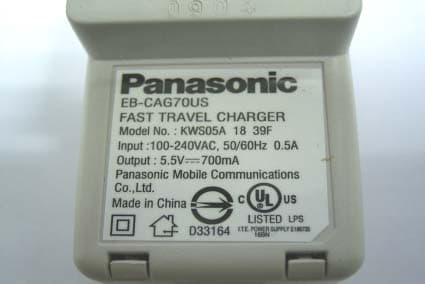
Click to zoom
Application Details
- Equipment Class
- PCE - PCS Licensed Transmitter held to ear
- Date of Grant
- May 12, 2004
- Application Purpose
- Original Equipment
- Date of Application
- May 12, 2004
- Equipment Note
- 1900 MHz GSM / GPRS Cellular Phone
- Frequency Range
- 1850.20000000 - 1909.80000000
- Company
- Quanta Computer Inc
- Country
- Taiwan
Documents & Files
Document Text
Text extracted from the exhibit documents filed with the FCC. Open a document above to read the original.
Users Manual
Contents i Contents Introduction ........................1 Safety Considerations ................ 1 Care and Maintenance .......5 Getting Started ...................6 Your phone................................. 6 Key functions.............................. 7 Displays...................................... 9 Fitting and removing the battery.. 11 Fitting and removing the SIM ... 12 Charging the battery................. 12 Battery level indicator ............... 13 Low battery power warning ...... 13 Symbols used in this manual ... 13 Basic Operations..............14 Switching the phone on/off....... 14 Making a call ............................ 14 Answering a call ....................... 16 In-call operations ...................... 17 Incoming call while on a call..... 19 DTMF ....................................... 21 Text entry ................................. 22 Menu Display ........................... 24 Exploring the Menus ........25 My Phone Menu ................26 My Media.................................. 27 Sounds ..................................... 30 Display ..................................... 32 Language ................................. 35 Alerts ........................................ 35 Profiles ..................................... 36 Auto answer ............................. 40 Any key answer........................ 40 Auto key lock ............................ 40 Shortcuts .................................. 41 Defaults .................................... 41 Contacts Menu..................42 Browsing the Contacts list ........ 43 Creating a Contacts list ............ 46 Groups...................................... 49 SDN .......................................... 49 Information number .................. 50 Memory status .......................... 50 My Numbers ............................. 51 Hotkey dial................................ 52 My Contacts ............................. 52 Games Menu .....................53 Puddleland ............................... 53 Quadball ................................... 54 Exode ....................................... 54 Browser Menu...................55 Server settings ......................... 56 Starting the Browser ................. 57 Bookmarks ............................... 58 Push setting.............................. 59 Connectivity .............................. 60 Camera Menu ....................61 Your camera ............................. 62 Taking a picture ........................ 63 Camera settings ....................... 66 Recording a video clip .............. 70 Messages Menu ................73 MMS settings............................ 74 Creating an MMS message ...... 76 Sending an MMS message ...... 78 Receiving an MMS message.... 78 Viewing an MMS message in the Outbox .......................... 80 SMS settings ............................ 81 Creating an SMS message ...... 82 Receiving an SMS message .... 83 ii Contents Viewing an SMS message in the Outbox .......................... 84 User Messages ........................ 84 Memory status.......................... 85 Connectivity.............................. 85 Cell Broadcast .......................... 85 Phone Menu ..................... 88 Call Service .............................. 89 Call Diverts ............................... 93 Security .................................... 94 Network .................................... 99 Records Menu................ 100 Last dialled/Answered/ Unanswered number ............ 100 Deleting the records ............... 101 Applications Menu......... 102 Games.................................... 103 Calendar................................. 103 Scheduler ............................... 106 Notes ...................................... 108 Clock ...................................... 108 Calculator ............................... 111 Currency................................. 112 Melody composer ................... 113 Phone menu ........................... 114 Troubleshooting ............ 115 Important Error Messages...................... 117 Glossary of Terms ......... 119 Specifications ................ 121 Index ............................... 123 Introduction 1 Introduction Thank you for purchasing this Panasonic digital cellular phone. This phone is designed to operate on GSM networks – GSM900, GSM1800 and GSM1900. It also supports GPRS for packet data connections. Please ensure the battery is fully charged before use. Safety Considerations The following information should be read and understood as it provides details, which will enable you to operate your phone in a manner which is both safe to you and your environment, and conforms to legal requirements regarding the use of cellular phones. This equipment should only be charged with approved charging equipment to ensure optimum performance and avoid damage to your phone. Other usage will invalidate any approval given to this apparatus and may be dangerous. Ensure the voltage rating of the Travel Charger is compatible with the area of use when travelling abroad. A Travel Charger EB-CAG70xx* is supplied with the Main Kit. NOTE*: xx identifies the charger region, e.g. CN, EU, UK, AU, US. Use of another battery pack than that recommended by the manufacturer may result in a safety hazard. Switch off your cellular phone when in an aircraft. The use of cellular phones in an aircraft may be dangerous to the operation of the aircraft, disrupt the cellular network and may be illegal. Failure to observe this instruction may lead to the suspension or denial of cellular phone services to the offender, or legal action or both. Do not incinerate or dispose of the battery as ordinary rubbish. The battery must be disposed of in accordance with local regulations and may be recycled. Power Battery Aircraft Disposing of the Battery 2 Introduction It is advised not to use the equipment at a refuelling point. Users are reminded to observe restrictions on the use of radio equipment in fuel d…
Text truncated - open the document above for the full version.
Users Manual
Messages Menu 79 The following options are available after selecting the message in the received list in the Inbox: Options A View: View the selected MMS message. Delete: Delete the selected MMS message. Delete all: Delete all MMS messages. View@ Reply: Reply to the selected MMS message. Reply all: Reply to all MMS messages. Forward: Forward the selected MMS message. Call: Make a call to the sender of the MMS message. Info: Show the page timing, the type of image, and/ or sound files attached including the message size. Extract media: Save the multimedia data attached to the MMS message. Extract number: Save the phone number embedded in the MMS message. Hyperlink: Jump to the URL embedded in the MMS message. View again: Go back to View. 80 Messages Menu Viewing an MMS message in the Outbox From Messages 1. 4OutboxA(Select) 2. 4MMSA(Select) 3. 4Unsent messages or Sent messagesA(Select) 4. 4 required MMS message A(Options) or @(View) The following options are available after selecting the message in the unsent or sent messages list in the Outbox: Options A View: View the selected MMS message. Delete: Delete the selected MMS message. Delete all: Delete all MMS messages. View@View the selected MMS message Messages Menu 81 SMS settings Message centre From Messages 1. 4SettingsA(Select) 2. 4SMSA(Select) 3. 4Message centreA(Select) 4. Enter your message centre number in the international dialling format A(OK) (see "International dialling" on page 15) You can also change the following settings: Protocol Select the protocol type which specifies the format your SMS message is converted to. Select Standard text, Fax or E-mail. Validity period Set the validity period that the SMS message is stored at the Message centre. Select 1 Hour, 12 Hours, 1 Day, 1 Week or Maximum. Delivery report Choose whether you want to receive a confirmation when your SMS message has been delivered. SMS via GPRS Decide whether or not you want to send your SMS via GPRS. 82 Messages Menu Creating an SMS message From Messages 1. 4CreateA(Select) 2. 4SMSA(Select) 3. Enter your text 4. A(Options) 5. 4 required option A(Select) The following options are available after completing the text entry: Send Send your SMS message. Press A(Options) to recall the Contacts list, then select the recipient. SaveSave your SMS message in the Outbox. Save & sendSave your SMS message, then send the message. Picture & soundAttach sound and/or a picture. Format Edit your SMS message by inserting new lines, changing the font face, and/or font colour. User Messages Select the pre-defined message to insert into your SMS message. Messages Menu 83 Receiving an SMS message From Messages 1. 4InboxA(Select) 2. 4SMSA(Select) 3. 4 required SMS message A(Options) You can select one of the following options when you want to decide how to deal with the incoming SMS message: ViewView the selected SMS message. DeleteDelete the selected SMS message. ReplyReply to the selected SMS messages. ForwardForward the selected SMS message. EditEdit or add text, add pictures, and/or sounds. Delete allDelete all SMS messages. Extract number Save the phone number embedded in the SMS message. HyperlinkJump to the URL embedded in the SMS message. 84 Messages Menu Viewing an SMS message in the Outbox From Messages 1. 4OutboxA(Select) 2. 4SMSA(Select) 3. 4 required SMS message A(Options) Select one of the following options when you want to decide how to deal with the outgoing SMS message: User Messages You can edit the User Messages, then save them for later use. From Messages 1. 4User MessagesA(Select) 2. 4 required message A(Select) 3. Edit the message A(Options) 4. 4Save & Send or SaveA(Select) ViewView the selected SMS message. DeleteDelete the selected SMS message. ForwardForward the selected SMS message. EditEdit or add text, add pictures, and/or sounds. Delete allDelete all SMS message. Extract number Save the phone number embedded in the SMS message. HyperlinkJump to the URL embedded in the SMS message. Messages Menu 85 Memory status From Messages 1. 4Memory statusA(Select) 2. 4MMS or SMSA(Select) Memory status shows the free memory space and the used memory space: - MMS: max. 3 MB - SMS: max. 100 spaces (SIM dependent) Connectivity From Messages 1. 4ConnectivityA(Select) 2. 4CSD settings or GPRS settingsA(Select) 3. 4 required setting A(Select) 4. Edit the required information A(Save) Cell Broadcast You can receive your favourite information regularly from your service provider. You need to specify the “topic(s)” of information and the language in which you wish to receive this information. To receive the broadcasts, “Read Messages” must be on. Auto display In Idle mode, the latest information message is displayed on your phone automatically. From Messages 1. 4Cell BroadcastA(Select) 2. 4Auto displayA(Change) > On/Off NOTE:This function is SIM dependent. 86 Messages Menu Receiving messages To receive messages, you must turn the “Read Messages“ on. From Messages 1. 4Cell BroadcastA(Select) 2. 4Read MessagesA(Change) > On/Off Reading a Cell Broadcast message From Messages 1. 4Cell BroadcastA(Select) 2. 4Message ListA(Select) 3. A(Next) or @(Back) to select the available topic Topic list You can receive messages on specific topics from your network service operator. From Messages 1. 4Cell BroadcastA(Select) 2. 4Topic listA(Select) 3. 4CurrentA(Select) 4. < Add topics > A(Select) 5. 4 required topic A(Select) OR You can delete the required topic in step 5. 1. 4 required topic A(Select) 2. 4DeleteA(Select) NOTE:This function will depend on your network service operator. Messages Menu 87 User defined topic You can add your favourite topics to the user-defined topic list. From Messages 1. 4Cell BroadcastA(Select) 2. 4Topic list A(Select) 3. 4User defined A(Select) 4. 4 < New entry >A(Select) 5. Enter message ID A(OK) 6. Enter name A(OK) Languages You can set the language of the message you receive. From Messages 1. 4Cell BroadcastA(Select) 2. 4LanguagesA(Select) 3. A(Options) 4…
Text truncated - open the document above for the full version.
Users Manual
58 Browser Menu Bookmarks Once you set your favourite page as a bookmark, you can quickly jump to the page. Adding the Bookmark from the Browser menu From Browser 1. 4 Bookmarks A(Select) 2. 4 required empty bookmark A(Options) 3. 4 Edit A(Select) 4. Enter the title and URL A(Save) Adding the Bookmark to the home page 1.4 Start browser A(Select) 2. 4 Bookmarks A(Select) 3. 4 Mark Site A 4. Enter the URL A(Save) To bookmark Panasonic Box: Enter http://wap.panasonicbox.com in step 4, then press A to save. NOTE:Panasonic Box is network dependent. Browser Menu 59 Viewing the Bookmark From Browser 1. 4 Bookmarks A(Select) 2. 4 required bookmark A(Options) 3. 4 Launch A(Select) OR @(Launch) after selecting the required bookmark Push setting You can set the push setting to decide how you want to receive push messages sent by your service provider. From Browser 1.4 Push setting A(Select) 2. 4 Always all, Always none or Always this specific SMS centre A(Select) NOTE:This service is network dependent or may only be available on a subscription basis. 60 Browser Menu Connectivity You must set the data connections (GPRS and CSD settings) before setting the server information. From Browser 1. 4 Connectivity A(Select) 2. 4 CSD settings, GPRS settings or GPRS Info A(Select) 3. 4 required setting A(Select) 4. Edit the required information A(Save) You can edit the following after selecting the required connection setting: CSD settings: - Server name - Call type (ISDN/Analogue) - Dial number - Login name - Password GPRS settings: - Server name - GPRS APN - Login name - Password - Authentication (Activate/ Deactivate) GPRS Info: You can also select the GPRS info in step 2 to view the memory and duration of the GPRS service used. Camera Menu 61 Camera Menu Camera Video Video Preview mode Quality .................................... 70 Default settings....................... 70 Still Picture mode Play......................................... 71 Viewfinder............................... 71 Send via MMS ........................ 71 View videos ............................ 72 Camera Camera Preview mode Self timer ................................ 66 Frame ..................................... 66 Image size .............................. 67 Quality .................................... 67 Brightness............................... 68 Special effects ........................ 68 Twilight ................................... 68 Close up mode ....................... 69 Anti flicker ............................... 69 Default settings....................... 69 Still Picture mode Viewfinder............................... 64 Send via MMS ........................ 64 Set as wallpaper ..................... 65 View pictures .......................... 65 62 Camera Menu Your camera (Left side view)(Right side view: LCD Open) Shutter Key: Press to take a picture or record a video clip. If the Camera Preview mode is not on even with the Lens Cover open, press to turn the Camera Preview mode on. LCD Lens Cover: Slide the cover halfway down to turn the Camera Preview mode on. When the cover is in the uppermost position, the Camera Preview mode is off. When the cover is slid all the way down, the LCD pops open. Camera Lens Self-portrait Mirror Camera Menu 63 Taking a picture You can take pictures with the built-in camera and send them in multimedia (MMS) e-mail messages. You can also use them as wallpaper. Camera Preview mode: In Idle mode or from the Camera menu, slide the Lens Cover halfway down to launch the Camera Preview mode. You can also turn the Camera Preview mode on by pressing the Shutter Key if the Camera Preview mode is not on even with the Lens Cover open. Still Picture mode: In Camera Preview mode, press the Shutter Key to take a picture. The display then turns into the Still Picture mode. In Camera Preview mode Press the Shutter Key to take a picture 64 Camera Menu Key functions in Camera Preview mode Zoom In Camera Preview mode Press 1 to zoom in or 5 to zoom out. Viewfinder In Still Picture mode 1. A(Options) 2. 4 Viewfinder A(Select) ãThe viewfinder brings you back to the Camera Preview mode. Sending the picture via MMS In Still Picture mode 1. A(Options) 2. 4 Send via MMS A(Select) 3.@(Insert) to add multimedia files 4. A(Options) 5. 4 Send via MMS A(Select) 6. Enter the required information A(Options) 7. 4 Send A(Select) Key Function 1 Press to zoom in. 5 Press to zoom out. ! Press to activate the camera function menu. " Press to display the camera function icons. To activate one of the functions, press $ ~ ). Camera Menu 65 Setting the picture as Wallpaper In Still Picture mode 1. A(Options) 2. 4 Set as wallpaper A(Select) Viewing the stored picture In Still Picture mode 1. A(Options) 2. 4 View pictures A(Select) 3. 4 required picture A(Select) 66 Camera Menu Camera settings Self timer The self timer delays shooting for 10 seconds. In Camera Preview mode 1. A(Options) 2. 4 Self timer A(Select) 3. 4 On or Off A(Select) Frame You can take a picture with a frame of your choice. In Camera Preview mode 1.A(Options) 2. 4 Frame A(Select) 3. 4 Off or Frame 1~10 A(Select) Camera Menu 67 Image size You can make your picture larger or smaller. In Camera Preview mode 1.A(Options) 2. 4 Image size A(Select) 3. 4 required image size A(Select) The following image sizes are available: - VGA (640 x 480 pixels) - CIF (352 x 288 pixels) - QVGA (320 x 240 pixels) - QCIF (176 x 144 pixels) - QQVGA (160 x 120 pixels) - Sub-QCIF (128 x 96 pixels) Quality You can choose the image quality of your picture. In Camera Preview mode 1. A(Options) 2. 4 Quality A(Select) 3. 4 Fine (90%), Normal (80%) or Economy (50%) A(Select) ãFine produces a large file with a high resolution, while Economy produces a small file with a low resolution. 68 Camera Menu Brightness You can adjust the brightness in 5 steps. In Camera Preview mode 1.A(Options) 2. 4 Brightness A(Select) 3. 4 Adjust the brightness A(Select) Special effects You can change your picture’s co…
Text truncated - open the document above for the full version.
Cover Letter(s)
POWER OF ATTORNEY Date: April 22, 2004 We, the undersigned, hereby authorize Compliance Certification Services Inc. to act on our behalf in all matters relating to all processes related to FCC & IC applications and communications issue. Any and all acts carried out by Compliance Certification Services Inc. on our behalf shall have the same effects as acts of our own. If you have any questions regarding this authorization, please don’t hesitate to contact us. Thank you. Sincerely yours, May Huang / Specialist Quanta Computer Inc.
Cover Letter(s)
Quanta Computer Incorporation Apr. 22, 2004 Federal Communications Commission Authorization and Evaluation Division FCC ID: HFS-X300 Confidentiality Request Pursuant to Sections 0.457 and 0.459 of the Commission’s Rules, the Applicant hereby requests confidential treatment of information accompanying this Application as outlined below: 1. Schematic RF circuitry diagram 2. Functional block diagram 3. Antenna Specification 4. Tune-up Procedure 5. Part List 6. Operational Description The above materials contain trade secrets and proprietary information not customarily released to the public. The public disclosure of these matters might be harmful to the Applicant and provide unjustified benefits to its competitors. The Applicant understands that pursuant to Rule 0.457, disclosure of this Application and all accompanying documentation will not be made before the date of the Grant for this application. Sincerely, May Huang / Specialist Quanta Computer Inc.
External Photos
Compliance Certification Services Inc. Report No: B40319206 Date of Issue: April 15, 2004 Page 1 of 10 EXTERNAL PHOTO Compliance Certification Services Inc. Report No: B40319206 Date of Issue: April 15, 2004 Page 2 Compliance Certification Services Inc. Report No: B40319206 Date of Issue: April 15, 2004 Page 3
Internal Photos
Compliance Certification Services Inc. Report No: B40319206 Date of Issue: April 15, 2004 Page 4 INTERNAL PHOTO Compliance Certification Services Inc. Report No: B40319206 Date of Issue: April 15, 2004 Page 5 Compliance Certification Services Inc. Report No: B40319206 Date of Issue: April 15, 2004 Page 6 Compliance Certification Services Inc. Report No: B40319206 Date of Issue: April 15, 2004 Page 7 Compliance Certification Services Inc. Report No: B40319206 Date of Issue: April 15, 2004 Page 8 Compliance Certification Services Inc. Report No: B40319206 Date of Issue: April 15, 2004 Page 9 Compliance Certification Services Inc. Report No: B40319206 Date of Issue: April 15, 2004 Page 10
RF Exposure Info
Compliance Certification Services Inc. Report No: B40319206-SF FCC ID: HFS-X300 Date of Issue: April 29, 2004 Note: This report shall not be reproduced except in full, without the written approval of Compliance Certification Services Inc. This document may be altered or revised by Compliance Certification Services Inc. personnel only, and shall be noted in the revision section of the document. Page 1 of 31 ANSI/IEEE Std. C95.1-1992 in accordance with the requirements of FCC Report and Order: ET Docket 93-62, and OET Bulletin 65 Supplement C FCC SAR TEST REPORT For Quanta Computer Inc. GSM900/1800/1900 + GPRS handset Model: EB-X300 Trade Name: Panasonic Model: RA1 Trade Name: Quanta Prepared for Quanta Computer Inc. No. 188, Wen Hwa 2nd RD., Kuei Shan Hsiang, Taoyuan Hsien, Taiwan, R.O.C. Prepared by Compliance Certification Services Inc. No. 81-1, Lane 210, Bade Rd. 2, Luchu Hsiang, Taoyuan Hsien, (338) Taiwan, R.O.C. TEL: 886-3-324-0332 FAX: 886-3-324-5235 Compliance Certification Services Inc. Report No: B40319206-SF Date of Issue: April 29, 2004 Page 2 CERTIFICATE OF COMPLIANCE (SAR EVALUATION) DATES OF TEST: April 06-24, 2004 APPLICANT: Quanta Computer Inc. No. 188, Wen Hwa 2nd Rd., Kuei Shan Hsiang Tao Yuan Hsien, Taiwan, R.O.C. MODEL: EB-X300, RA1 DEVICE CATEGORY: PORTABLE DEVICES EXPOSURE CATEGORY: GENERAL POPULATION/UNCONTROLLED EXPOSURE Test Sample is a: Production unit Modulation type: GSM+GPRS Operating Mode: Maximum continuous output Tx Frequency: GSM1900: 1850.2MHz to 1909.8 MHz Max. O/P Power: (Conducted/Average) GSM:29.07dBm GPRS:29.08dBm Max. SAR (1g): GSM: 0.35 W/kg (Right head touched position) GPRS: 0.305 W/kg (Body 15mm position) Application Type: Certification This wireless portable device has been shown to be capable of compliance for localized specific absorption rate (SAR) for uncontrolled environment/general population exposure limits specified in ANSI/IEEE Std. C95.1- 1992 and had been tested in accordance with the measurement procedures specified in FCC OET 65 Supplement C (released on 6/29/2001 see Test Report). I attest to the accuracy of data. All measurements reported herein were performed by me or were made under my supervision and are correct to the best of my knowledge and belief. I assume full responsibility for the completeness of these measurements and vouch for the qualifications of all persons taking them. Approved by: Reviewed by: Harris. W. Lai James Lee Director of Linkou Laboratory Section Manager Compliance Certification Services Inc. Compliance Certification Services Inc. Compliance Certification Services Inc. Report No: B40319206-SF Date of Issue: April 29, 2004 Page 3 TABLE OF CONTENTS 1. EUT DESCRIPTIONS.......................................................................................................... 4 2. REQUIREMENTS FOR COMPLIANCE TESTING DEFINED BY THE FCC........... 5 3. DOSIMETRIC ASSESSMENT SETUP ............................................................................. 5 3.1. MEASUREMENT SYSTEM DIAGRAM ....................................................................................6 3.2. SYSTEM COMPONENTS ...........................................................................................................7 DASY4 Measurement Server ................................................................................................................7 Data Acquisition Electronics (DAE) .....................................................................................................7 SAM Phantom (V4.0)............................................................................................................................8 Device Holder for SAM Twin Phantom................................................................................................8 System Validation Kits..........................................................................................................................8 4. EVALUATION PROCEDURES ......................................................................................... 9 5. MEASUREMENT UNCERTAINTY ................................................................................ 12 6. EXPOSURE LIMIT ............................................................................................................ 13 7. EUT ARRANGEMENT ..................................................................................................... 14 8. MEASUREMENT RESULTS............................................................................................ 17 8.1. SYSTEM PERFORMANCE CHECK ........................................................................................17 8.2. TEST LIQUIDS CONFIRMATION ...........................................................................................19 8.3. EUT TUNE-UP PROCEDURES ................................................................................................21 8.4. SAR MEASUREMENT RESULTS............................................................................................22 9. EUT PHOTOS .....................................................................................................................28 10. EQUIPMENT LIST & CALIBRATION STATUS.......................................................... 29 11. FACILITIES........................................................................................................................ 30 12. REFERENCES .................................................................................................................... 30 13. ATTACHMENTS................................................................................................................ 31 Compliance Certification Services Inc. Report No: B40319206-SF Date of Issue: April 29, 2004 Page 4 1. EUT DESCRIPTIONS APPLICANT: Quanta Computer Inc. No. 188, Wen Hwa 2nd Rd., Kuei Shan Hsiang Tao Yuan Hsien, Taiwan, R.O.C. MODEL: EB-X300, RA1 DEVICE CATEGORY: PORTABLE DEVICES EXPOSURE CATEGORY: GENERAL POPULATION/UNCONTRO…
Text truncated - open the document above for the full version.
RF Exposure Info
Date/Time: 04/06/04 23:08:51 Test Laboratory: Compliance Certification Services Inc. D1800V2 SN-3 DUT: Dipole 1800 MHz; Type: D1800V2; Serial: 2d057 Communication System: CW1800; Frequency: 1800 MHz;Duty Cycle: 1:1 Medium parameters used: f = 1800 MHz; ı = 1.41 mho/m; İ r = 39.3; ȡ = 1000 kg/m 3 Air Temperature:25.1 deg C;Liquid Temperature:24.1 deg C Phantom section: Flat Section DASY4 Configuration: z Probe: ES3DV2 - SN3023; ConvF(4.9, 4.9, 4.9); Calibrated: 9/23/2003 z Sensor-Surface: 3mm (Mechanical Surface Detection) Sensor-Surface: 0mm (Fix Surface) z Electronics: DAE3 Sn558; Calibrated: 3/7/2003 z Phantom: SAM 34; Type: SAM V4.0; Serial: TP-1150 z Measurement SW: DASY4, V4.2 Build 44; Postprocessing SW: SEMCAD, V1.8 Build 112 Pin=250mW,d=10mm/Area Scan (6x6x1): Measurement grid: dx=15mm, dy=15mm Reference Value = 91.1 V/m; Power Drift = -0.1 dB Maximum value of SAR (measured) = 8.68 mW/g Pin=250mW,d=10mm/Z Scan (1x1x21): Measurement grid: dx=20mm, dy=20mm, dz=5mm Reference Value = 91.1 V/m; Power Drift = -0.1 dB Maximum value of SAR (measured) = 10 mW/g Pin=250mW,d=10mm/Zoom Scan (5x5x7)/Cube 0: Measurement grid: dx=7.5mm, dy=7.5mm, dz=5mm Reference Value = 91.1 V/m; Power Drift = -0.1 dB Maximum value of SAR (measured) = 12.3 mW/g Peak SAR (extrapolated) = 17.5 W/kg SAR(1 g) = 9.82 mW/g; SAR(10 g) = 5.16 mW/g Page1 Page2 Date/Time: 04/24/04 23:16:41 Test Laboratory: Compliance Certification Services Inc. D1800V2 SN-3 DUT: Dipole 1800 MHz; Type: D1800V2; Serial: 2d057 Communication System: CW1800; Frequency: 1800 MHz;Duty Cycle: 1:1 Medium parameters used: f = 1800 MHz; ı = 1.36 mho/m; İ r = 39.9; ȡ = 1000 kg/m 3 Air Temperature:24.3 deg C;Liquid Temperature:23.2 deg C Phantom section: Flat Section DASY4 Configuration: z Probe: ES3DV2 - SN3023; ConvF(4.9, 4.9, 4.9); Calibrated: 9/23/2003 z Sensor-Surface: 3mm (Mechanical Surface Detection) Sensor-Surface: 0mm (Fix Surface) z Electronics: DAE3 Sn427; Calibrated: 3/15/2004 z Phantom: SAM 34; Type: SAM V4.0; Serial: TP-1150 z Measurement SW: DASY4, V4.2 Build 44; Postprocessing SW: SEMCAD, V1.8 Build 112 Pin=250mW,d=10mm/Area Scan (6x6x1): Measurement grid: dx=15mm, dy=15mm Reference Value = 91.2 V/m; Power Drift = -0.0 dB Maximum value of SAR (measured) = 8.67 mW/g Pin=250mW,d=10mm/Z Scan (1x1x21): Measurement grid: dx=20mm, dy=20mm, dz=5mm Reference Value = 91.2 V/m; Power Drift = -0.0 dB Maximum value of SAR (measured) = 10.6 mW/g Pin=250mW,d=10mm/Zoom Scan (5x5x7)/Cube 0: Measurement grid: dx=7.5mm, dy=7.5mm, dz=5mm Reference Value = 91.2 V/m; Power Drift = -0.0 dB Maximum value of SAR (measured) = 12.2 mW/g Peak SAR (extrapolated) = 17 W/kg SAR(1 g) = 9.71 mW/g; SAR(10 g) = 5.15 mW/g Page1 Page2 Date/Time: 04/06/04 17:19:19 Test Laboratory: The name of your organization Left-Head Page1 Date/Time: 04/06/04 17:19:19 Test Laboratory: The name of your organization gsm1900-LEFT DUT: GSM 900/1800/1900 + GPRS Handset; Type: EB- X300,RA1; Serial: 35360800950004/0 Communication System: GSM1900; Frequency: 1850.2 MHz;Duty Cycle: 1:8 Medium parameters used: f = 1850.2 MHz; ı = 1.45 mho/m; İ r = 39.6; ȡ = 1000 kg/m 3 Air Temperature:25.1 deg C;Liquid Temperature:24.1 deg C Phantom section: Left Section DASY4 Configuration: z Probe: ES3DV2 - SN3023; ConvF(4.9, 4.9, 4.9); Calibrated: 9/23/2003 z Sensor-Surface: 4mm (Mechanical Surface Detection) Sensor-Surface: 0mm (Fix Surface) z Electronics: DAE3 Sn558; Calibrated: 3/7/2003 z Phantom: SAM 12; Type: SAM V4.0; Serial: TP-1271 z Measureme…
Text truncated - open the document above for the full version.
Contact Information
Applicant
Joyce Kuo
Test Firm
Compliance Certification Services Inc.Tony Houng
Technical Specifications
| # | Rule Parts | Frequency Range | Power Output | Emission | Tolerance |
|---|---|---|---|---|---|
| 1 | 24E | 1.85 GHz - 1.91 GHz | 706.00 mW | 246KGXW | 2.5000000000 ppm |
Other Applications from Quanta Computer Inc
HFS-C306
Sep 03, 2026Mini
Equipment Class
DTS - Digital Transmission SystemHFS-QV28NRW
Jul 15, 2026Telematics Module
Equipment Class
PCB - PCS Licensed TransmitterHFSCIP
Jun 15, 2026QOCA ecg1202
Equipment Class
DTS - Digital Transmission System
HFS-QV28NUS
Apr 16, 2026Telematics Module
Equipment Class
PCB - PCS Licensed TransmitterHFS-C407
Jul 21, 2024Clover Flex Pocket
Equipment Class
NII - Unlicensed National Information Infrastructure TX