HFSMKXwireless miniPCI Card
Quanta Computer Inc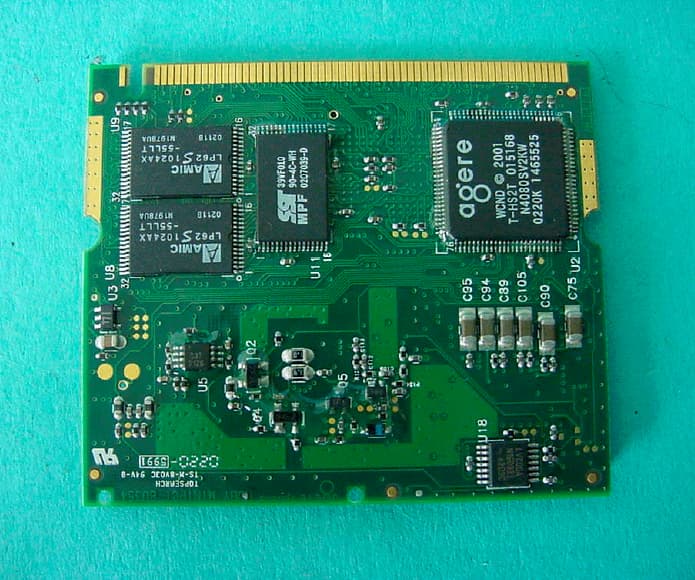
Click to zoom
Application Details
- Equipment Class
- DTS - Digital Transmission System
- Date of Grant
- Sep 26, 2002
- Application Purpose
- Original Equipment
- Date of Application
- Sep 26, 2002
- Equipment Note
- wireless miniPCI Card
- Frequency Range
- 2412.00000000 - 2472.00000000
- Company
- Quanta Computer Inc
- Country
- Taiwan
Documents & Files
Document Text
Text extracted from the exhibit documents filed with the FCC. Open a document above to read the original.
Users Manual
Versa User's Guide Versa User's Guide About Your Online Documentation Should you have any questions or remarks concerning the User's Documentation or the packaging of your computer, and you have a valid Internet connection, please send us an e-mail at the following address: nec.authors@nec -computers.com Please do not use this e-mail address for questions or remarks regarding your computer. If you have a question or remark related to the technical aspects of your computer (e.g. Internet/e-mail access, registration problems, software and hardware problems), please refer to the 'NEC UltraCare Warranty Terms & Conditions Guide' , where you will find a full list of contact addresses and numbers. Web Site www.nec-online.com If you would like to know more about our products or if you need About Your Online Documentation Navigating in this Guide Use one of the means described below to browse through this online documentation. Note : we recommend you to print this documentation. It will then be easily accessible even when your system is shut down. Using Microsoft Æ Internet Explorer Toolbar When reading the guide, a menu bar appears across the top of the window, providing easy access to the following commands. Hide/Show Click Hide to hide the left-tab components (table of contents, index or search results list) in the window. Click Show to display the left-tab components (table of contents, index or search results list) in the window. Back Click Back to display the previously displayed page. Forward Click Forward to display the next page in a previously displayed sequence of pages. Print Click the page you want to print and then click Print in the menu bar. The print dialogue box appears, allowing you to define your print options. To print a pop-up page, right-click inside the pop-up window, and then click Print Topic . Using Hyperlinks The user í s guide contains hyperlinks, which allow you to quickly locate information related to the topic you are viewing. Hyperlinked information usually appears in the form of blue or white underlined text. When you position your cursor over a text or graphic hyperlink, your cursor will change into a hand symbol with a pointed finger. You can select the hyperlink either by clicking or double-clicking on it with the mouse. Finding a Topic To see a list of index entries, click the Index tab in left window and then either type a word or scroll through the list. To search for words or phrases that may be contained in a topic, click the Search tab. Type the word or phrase, then click on List topics . Choose the topic in the list and click on Display . Navigating in this Guide Text Set-up To make this guide as easy to use as possible, the text is laid out as follows. Note : notes give particularly important information about whatever is being described. Caution : cautions indicate situations that can damage the system hardware or software. Warning : warnings alert you to situations that could result in serious personal injury or loss of life. Names of keys are printed as they appear on the keyboard. For example, Ctrl , Alt , or Enter . Text that you must type is printed in bold type. For example, type dir . Window titles, field names, pane names, application names, list box names... are printed in italic type. For example, the Power Options Properties window. Buttons, check box names, tabs, icons, menus, menu choices, key names... are printed in bold type. For example, click Start , and select Programs . Click on this hyperlinked button ( ) for more information on the subject. Text Set-up Basic Care and Handling Tips System Care Follow these guidelines to maintain the condition and performance of your computer. Caution : immediately turn off and unplug the Versa under the following conditions: the power cord is damaged or frayed. liquid spills on or into the Versa. someone drops the system or damages the casing. Precautions for System Use Follow these precautions when using your Versa computer and AC adapter. Avoid dropping or bumping the computer or the AC adapter. Do not stack heavy objects on the computer, the AC adapter, or the battery packs. Protect the computer from extremely low or high temperatures. Let the computer warm (or cool) to room temperature before using it. Keep the computer away from magnetic forces (some airline tray tables are magnetic, do not set your notebook on top of them. Doing so can destroy the data on your hard drive). Keep the computer dry. Do not wash the computer with a wet cloth or pour fluid into it. Protect the computer from being bumped or dropped. Check the computer for condensation. If condensation is present, allow it to evaporate before switching on the computer. Keep the computer away from dust, sand and dirt. Care and Handling Do not place items near the Versa that could block air vents and cause overheating. Avoid moving the Versa during system operation, especially while the hard disk, floppy disk, or optical disc drive is being accessed. When using the AC adapter, make sure the power source falls within the system's compatible range. Never use the AC adapter if the voltage falls outside this range. (Watch for this when travelling to other countries.) Turn computer power off before attaching or removing non-plug and play devices. Disconnect the notebook from the electrical outlet if it is not going to be used for a long time. This will avoid damage by transient over-voltage. Do not attempt to disassemble the computer. Do not push any foreign objects into the Versa bays, connectors or slots. Do not set the computer on top of a magnetised area. Doing so can destroy the data on your hard disk drive. (Some airline tray tables are magnetic.) Avoid using the computer or AC adapter for extended periods in direct sunlight. Do not use the system in humid or dusty environments. Keep liquids and food away from the system. Turn computer power off before cleaning it. Avoid exposing the Versa or AC adapter to extreme changes in temperat…
Text truncated - open the document above for the full version.
Cover Letter(s)
This document was created with Win2PDF available at http://www.daneprairie.com. The unregistered version of Win2PDF is for evaluation or non-commercial use only.
Cover Letter(s)
This document was created with Win2PDF available at http://www.daneprairie.com. The unregistered version of Win2PDF is for evaluation or non-commercial use only.
ID Label/Location Info
Label Label Position Agere MPCI3A-20/R FCC ID: HFSMKX IC: 1787B-MKX Tested to comply with FCC Standards FOR HOME OR OFFICE USE This document was created with Win2PDF available at http://www.daneprairie.com. The unregistered version of Win2PDF is for evaluation or non-commercial use only.
Test Report
CETECOM ICT Services GmbH Radio Satellite Communication Untertürkheimer Straße 6-10 . D-66117 SaarbrückenTelefon: +49 (0)681 598-0Telefax: -9075 RSC11issue test report consist of68 PagesPage 1 (68) Accredited Bluetooth Test Facility (BQTF) Test report no.: 2-2969-01-02/02 FCC Part15.247/CANADA RSS-210 MPCI3A-20/R FCC ID: HFSMKX CETECOM – ICT Services GmbH Untertürkheimerstr. 6-10 66117 Saarbrücken, Germany Telephone: + 49 (0) 681 / 598-0 Fax: + 49 (0) 681 / 9075 TTI-P-G166/98 CETECOM ICT Services GmbH Test report nr.:2-2969-01-02/02Issue date: 2002-09-26Page 2 (68) Table of Contents 1 General information 1.1 Notes 1.2 Testing laboratory 1.3 Details of applicant 1.4 Application details 1.5 Test item 1.6 Test standards 2 Technical test 2.1 Summary of test results 2.2 Test report 1 General information 1.1 Notes The test results of this test report relate exclusively to the test item specified in 1.5. The CETECOM ICT Services GmbH does not assume responsibility for any conclusions and generalisations drawn from the test results with regard to other specimens or samples of the type of the equipment represented by the test item. The test report may only be reproduced or published in full. Reproduction or publication of extracts from the report requires the prior written approval of the CETECOM ICT Services GmbH. 1.2Testing laboratory CETECOM ICT Services GmbH Untertürkheimer Straße 6 - 10 66117 Saarbrücken Germany Telefone: + 49 681 598 - 9100 Telefax : + 49 681 598 - 9075 E-mail: [email protected] Internet: www.cetecom.de Accredited testing laboratory The Test laboratory (area of testing) is accredited according to DIN EN ISO/IEC 17025. DAR registration number: TTI-P-G-166/98 Accredited Bluetooth™ Test Facility (BQTF) BLUETOOTH is a trademark owned by Bluetooth SIG, Inc. and licensed to CETECOM CETECOM ICT Services GmbH Test report no.:2-2969-01-02/02Issue date:2002-09-26Page 3 (68) 1.3Details of applicant Name :Quanta Computer Inc. Street :No. 188, Wen Hwa 2 nd Road, Kuei-Shan Hsiang City :Tao Yuan Shien Country :Taiwan, ROC Telephone:+886 3 327 2345 ext. 5714 Telefax :+886 3 396 1334 Contact :Mrs. Joyce Kuo Telephone:+886 3 327 2345 ext. 5714 1.4Application details Date of receipt of application : 2002-08-01 Date of receipt of test item : 2002-08-01 Date of test : 2002-08-03 - 2002-08-08 1.5Test item Type of equipment : Wireless LAN mini-PCI Card Type designation: Model : MPCI 3A-20/R Manufacturer:Agere Systems NL Street:Zadelstede 1-10 City:3431 JZ Nieuwegein Country:The Netherlands Serial number:MAC:00022D6B5BA2 Additional informations: : Frequency:2400 – 2483.5 MHz (2412 – 2472 MHz) Type of modulation:22M0P7D (DSSS) Ch.Sep. : 5 MHz Number of channels :13 Antenna:Antenna name: MK2 , Typ: patch antenna on PCB, UFL-connector Power supply:3,3 V DC from PC Output power cond.:18.49 dBm / 70.6 mW Type of equipment:Class B Temperature range :0°C - +35°C FCC IDHFSMKX 1.6Test standards: FCC Part 15 §15.247 / CANADA RSS-210 CETECOM ICT Services GmbH Test report no.:2-2969-01-02/02Issue date:2002-09-26Page 4 (68) 2 Technical test 2.1 Summary of test results The radiated measurements were made with a totally shielded PC board (Pentium 300 MHz) and the Mini-PCI-card on a passive extender board connected to the dedicated antenna to show only the spurious of the card. The radiated measurements were performed vertical and horizontal over the whole frequency range. We start at 1 m high with vertical receiving antenna and rotate the dish continuously. During rotation we use the antenna lift system to vary the high from 1 to 4 m. So we find maximum radiation output. At this points we do manual re-measurements. After this we do the same measurements in horizontal position of the receiving antenna. This (horizontal and vertical) is made for all the three planes of the test sample. We use the maximum received results. 150 kHz - 30 MHz: Quasi Peak measurement, 9kHz Bandwidth, passive loop antenna. 30 MHz - 200 MHz: Quasi Peak measurement, 120KHz Bandwidth, biconical antenna 200MHz - 1GHz: Quasi Peak measurement, 120KHz Bandwidth, log periodic antenna 1GHz: Average, RBW 1MHz, VBW 10 MHz, waveguide horn The antenna gain measurement was performed by the difference between conducted and radiated output measurement. All measurement settings are according to FCC 15.35, 15.205, 15.209, 15.247 and the „Measurement guidelines for DSSS systems“. The product fulfills also the requirements for CANADA RSS-210 No deviations from the technical specification(s) were ascertained in the course of the tests performed. Final verdict : PASS Technical responsibility for area of testing : 2002-09-27RSC 8414 Ames.H DateSectionNameSignature Technical responsibility for area of testing : 2002-09-27RSC8412Hausknecht D. DateSectionNameSignature CETECOM ICT Services GmbH Test report no.:2-2969-01-02/02Issue date:2002-09-26Page 5 (68) 2.2Test report TEST REPORT Test report no. : 2-2969-01-02/02 CETECOM ICT Services GmbH Test report no.:2-2969-01-02/02Issue date:2002-09-26Page 6 (68) TEST REPORT REFERENCE LIST OF MEASUREMENTS ParagraphPARAMETER TO BE MEASUREDPAGE Transmitter parameters § 15.247Antenna gain 7 § 15.247 (a)(2)Spectrum bandwidth of a DSSS System8 § 15.247 (b)(1) Maximum peak output power12 § 15.247 (b) (4) RF Exposure calculation19 § 15.247 (d)Power spectral density20 §15.205/247Band edge compliance (conducted and radiated)24 § 15.247 (c)(1)Emission limitations 27 § 15.207Conducted emissions51 Receiver parameters § 15.209Spurious radiation - Radiated52 Test equipment listing58 Photographs of the equipment60 CETECOM ICT Services GmbH Test report nr.:2-2969-01-02/02Issue date: 2002-09-26Page 7 (68) REFERENCE NUMBER(S) OF TEST EQUIPMENT USED (for reference numbers see test equipment listing) 17 – 24, 64 Antenna GainSUBCLAUSE § 15.247 The antenna gain of the complete system is calculated by the difference of conducted power of the module and the radiated power in EIRP. low channelmid channelhigh channel Conducted power18.36 dBm18.…
Text truncated - open the document above for the full version.
Test Setup Photos
CETECOM ICT Services GmbH Test report no.: 2-2969-01-02/02Issue Date: 26.09.2002Page 60 (68) Test site RADIATED EMISSIONS CETECOM ICT Services GmbH Test report no.: 2-2969-01-02/02Issue Date: 26.09.2002Page 61 (68) Test site RADIATED EMISSIONS CETECOM ICT Services GmbH Test report no.: 2-2969-01-02/02Issue Date: 26.09.2002Page 62 (68) Test site RADIATED EMISSIONS CETECOM ICT Services GmbH Test report no.: 2-2969-01-02/02Issue Date: 26.09.2002Page 63 (68) Test site RADIATED EMISSIONS
Contact Information
Applicant
Joyce Kuo
Test Firm
Cetecom ICT Services GmbHRalf Hoehn
Technical Specifications
| # | Rule Parts | Frequency Range | Power Output |
|---|---|---|---|
| 1 | 15C | 2.41 GHz - 2.47 GHz | 70.00 mW |
Other Applications from Quanta Computer Inc
HFS-QV28NRW
Jul 15, 2026Telematics Module
Equipment Class
PCB - PCS Licensed TransmitterHFSCIP
Jun 15, 2026QOCA ecg1202
Equipment Class
DTS - Digital Transmission System
HFS-QV28NUS
Apr 16, 2026Telematics Module
Equipment Class
PCB - PCS Licensed TransmitterHFS-C407
Jul 21, 2024Clover Flex Pocket
Equipment Class
NII - Unlicensed National Information Infrastructure TXHFS-C406
Jul 01, 2024Clover Flex
Equipment Class
DTS - Digital Transmission System