HLETB120BTNFPRugged Tablet Computer
Unitech Electronics Co., Ltd.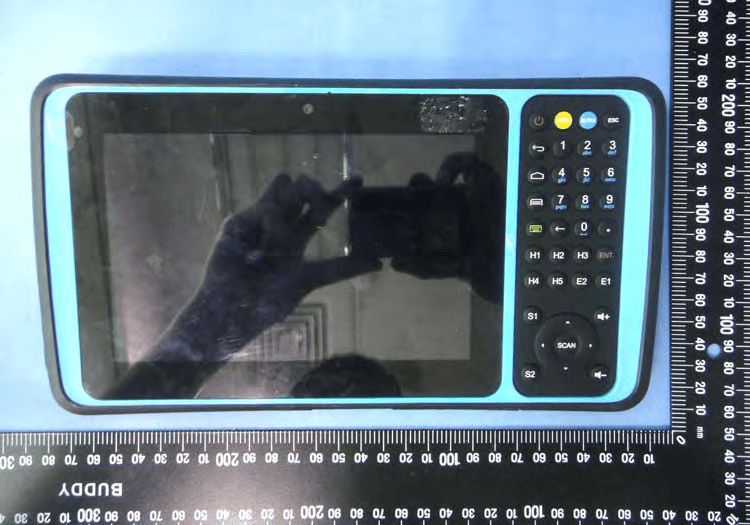
Click to zoom
Application Details
- Equipment Class
- NII - Unlicensed National Information Infrastructure TX
- Date of Grant
- Aug 30, 2015
- Application Purpose
- Original Equipment
- Date of Application
- Aug 29, 2015
- Equipment Note
- Rugged Tablet Computer
- Frequency Range
- 5745.00000000 - 5825.00000000
- Country
- Taiwan
Documents & Files
Document Text
Text extracted from the exhibit documents filed with the FCC. Open a document above to read the original.
Users Manual
© 2015 Unitech Electronics Co., Ltd. All rights reserved. Unitech is a registered trademark of Unitech Electronics Co., Ltd. Rugged Tablet Computer -TB120- User’s Manual 401161G Version 1.0 2 Table of content Table of content........................................................................................................................ 2 1. Package Contents ................................. ............................................................................... 3 2. Getting started...................................................................................................................... 4 2.1 Device overview................................. ............................................................................... 4 Physical keyboard overview .......................... ...................................................................... 6 2.2 Assembly .......................................................................................................................... 7 Accessing battery, Micro SD card and SIM card ....... .......................................................... 7 2.3 Charging the battery ......................................................................................................... 9 2.4 Data Communicating with PC Device ............................................................................. 10 2.5 LED status ...................................... ................................................................................ 10 2.6 To check the battery level and to access the battery usage menu .................................. 11 3. Basic Operation.................................................................................................................. 12 3.1 Accessing and using applications ................................................................................... 12 To open the Application screen ......................................................................................... 12 To browse the Application screen...................................................................................... 12 To create a shortcut to an application on the Home s creen .............................................. 12 To Remove a shortcut of an application on the Home screen ........................................... 12 3.2 Barcode Scanning (For Imager Version only) ...... ........................................................... 13 4. Specification ....................................................................................................................... 15 Regulatory Compliance Statements ..................................................................................... 17 3 1. Package Contents TB120 USB cable (Standard USB to Micro USB) Power adapter Battery Utility DVD Hand Strap 4 2. Getting started Unitech TB120 is an Android platform device. Android platform device has great flexibility that allows you to make customized configurations and enhancements by install and remove Apps. With Android operation system, your device has limitless possibilities to update to latest features and improvements. 2.1 Device overview 1. 7" LCD touchscreen 6. Trigger button 2. 2M pixels front camera 7. LED flashlight 3. LED indicator 8. 5M pixels rear camera with AF 4. Cradle connector 9. Speaker 5. Physical keyboard (37 keys) 10. Mounting screw for battery cover 1. 3. 2. 8. 7. 9. 6. 10. 4. 5. 5 11. Micro USB port 12. DC-IN port 13. Earphone jack 14. Cradle connector 15. Bar code Scan Engine 15. 14. 13. 11. 12. 6 Physical keyboard overview 1. Power on/off key 8. Escape key 2. Android BACK key 9. Alpha/Numeric keys 3. Android HOME key 10. Enter key 4. Android APP List key 11. H.E.S. keys (programable) 5. Soft keypad on/off key 12. Volume up/down keys 6. Function keys to enter F1-F10 13. 4 directional keys 7. Alpha key 14. Scan key 1. 6. 7. 8. 2. 3. 4. 5. 9. 10. 13. 14. 12. 11. 7 2.2 Assembly Accessing battery, Micro SD card and SIM card 1. Using a proper tool (ex. a coin) to loosen the two screws on the battery cover by turning anticlockwise. 2. Remove the back cover and pull the battery out. 3. Now you can access the micro SD card slot and SIM card slot. 1. Micro SD card slot 2. SIM card slot 8 Put battery back to TB120 1. Using a proper tool (ex. a coin) to loosen the two screws on the battery cover by turning anticlockwise. 2. Put battery into battery compartment and put back cover. 3. Lock the two screws on the battery cover by turning clockwise. 9 2.3 Charging the battery Connect TB120 to the charger, it will be charged automatically. 1. Plug the power adapter into the DC-IN port at the bottom. 2.. Plug the power adapter into a wall outlet. If needed, attach a plug converter onto the power adapter. 10 2.4 Data Communicating with PC Device 1. Connect the standard USB connector to the USB port of the PC device. 2. Connect the micro USB connector to the micro USB port at the bottom. 2.5 LED status Green The battery is fully charged Lights Red The battery is charging. The battery level is between low and full Blue Message is received. 11 2.6 To check the battery level and to access the battery usage menu 1. From your Home screen, tap . 2. Find and tap Settings. 3. Find and tap Battery. 12 3. Basic Operation 3.1 Accessing and using applications To open the Application screen From your Home screen, tap . To browse the Application screen From the Application screen, flick right or left. To create a shortcut to an application on the Home screen 1. From your Home screen, tap . 2. Touch and hold an application icon and then the Home screen opens. 3. Drag the icon to the desired page on the Home screen by flicking left or rught, then release your finger. To Remove a shortcut of an application on the Home screen 1. From your Home screen, touch and hold the icon of the desired application you want to remove 2. “X Remove” shows on the top of the home screen. 3. Drag the icon to be removed to the “X Re…
Text truncated - open the document above for the full version.
Cover Letter(s)
Unitech Electronics Co., Ltd. Company Address : 5F., No.136, Lane 235, Pao‐Chiao Rd., Hsin‐Tien Dist., New Taipei City, Taiwan 231, R.O.C. Date: 2015/6/22 UNII Device Declaration Letter To whom it may concern: We have declared below featured for FCC equipment authorization, Device FCC ID: HLETB120BTNFP (1) DFS Device -- Master , Client with Radar detection capability , Client without radar detection capability, N/A (2) Active / Passive Scanning , adhoc mode access point capability Frequency Band (MHz) Active Scanning (the device can transmit a probe (beacon)) passive scanning (where the device is can listen only with no probes) Ad Hoc Mode capability Access point capability 2.412~2.462 Yes , No Yes , No Yes , No Yes , No 5.15~5.25 Yes , No Yes , No Yes , No Yes , No 5.725~5.825 Yes , No Yes , No Yes , No Yes , No (3) Country code selection ability - Yes , No If no, pls explain how it was implemented: We implement it base on initial file (tiwlan.INI), we would set up what channel should disable and what channel should used on our initial file. We would modify it base on different country. (4) Meet 15.202 requirement - Yes , No , pls check below : A master device is defined as a device operating in a mode in which it has the capability to transmit without receiving an enabling signal. In this mode it is able to select a channel and initiate a network by sending enabling signals to other devices A client device is defined as a device operating in a mode in which the transmissions of the device are under control of the master. A device in client mode is not able to initiate a network. (5) For client devices that have software configuration control to operate in different modes (active scanning in some and passive scanning in others) in different bands (devices with multiple equipment classes or those that operate on non- DFS frequencies) or modular devices which configure the modes of operations through software, the application must provide software and operations description on how the software and / or hardware is implemented to ensure that proper operations modes can not be modified by end user or an installer. Apply No Apply, (If apply, pls help to provide explanation on it was implement, and how software was controlled) This mechanism apply on TI firmware and WLAN driver, we don’t provide API to Application. It can not be modified by end user or an installer signature : _________________ Client’s name / title : Ben Chiang Contact information / address: 5F, No. 136, Lane 235, Pao-Chiao Rd., Hsin-Tien Dist., New Taipei City, TEL: 886-2-8912-1122 FAX: 886-2-8912-1391
External Photos
1 of 7 External Photos Model Number: TB120 FCC ID: HLETB120BTNFP 2 of 7 EUT Photo 1 ) EUT Photo 2 ) NFC ANT. 2G/3G ANT. BT/WLAN ANT. GPS ANT. 56mm 3 of 7 EUT Photo 3 ) EUT Photo 4 ) 4 of 7 EUT Photo 5 ) EUT Photo 6 ) 5 of 7 EUT Photo 7 ) EUT Photo 8 ) 6 of 7 EUT Photo 9 ) EUT Photo 10 ) 7 of 7 EUT Photo 11 ) EUT Photo 12 )
Internal Photos
1 of 18 Internal Photos Model Number: TB120 FCC ID: HLETB120BTNFP 2 of 18 EUT Photo 1 ) EUT Photo 2 ) 3 of 18 EUT Photo 3 ) EUT Photo 4 ) 4 of 18 EUT Photo 5 ) EUT Photo 6 ) NFC ANT. 2G/3G ANT. BT/WLAN ANT. GPS ANT. 5 of 18 EUT Photo 7 ) EUT Photo 8 ) 6 of 18 EUT Photo 9 ) EUT Photo 10 ) 7 of 18 EUT Photo 11 ) EUT Photo 12 ) 8 of 18 EUT Photo 13 ) EUT Photo 14 ) 9 of 18 EUT Photo 15 ) EUT Photo 16 ) 10 of 18 EUT Photo 17 ) EUT Photo 18 ) 11 of 18 EUT Photo 19 ) EUT Photo 20 ) 12 of 18 EUT Photo 21 ) EUT Photo 22 ) 13 of 18 EUT Photo 23 ) EUT Photo 24 ) 14 of 18 EUT Photo 25 ) EUT Photo 26 ) 15 of 18 EUT Photo 27 ) EUT Photo 28 ) 16 of 18 EUT Photo 29 ) EUT Photo 30 ) 17 of 18 EUT Photo 31 ) EUT Photo 32 ) 18 of 18 EUT Photo 33 )
RF Exposure Info
A Test Lab Techno Corp. Changan Lab:No. 140 -1, Changan Street, Bade City, Taoyuan County, Taiwan R.O.C. Te l:886-3-271-0188 / Fax:886-3-271-0190 SAR EVALUATION REPORT Test Report No. : 1507FS15-02 Applicant : Unitech Electronics Co., Ltd. Applicant Address : 5F., No.136, Lane 235, Pao-Chiao Rd., Hsin-Tien Dist., New Taipei City, Taiwan 231, R.O.C. Manufacture : Unitech Electronics Co., Ltd. Manufacture Address : 5F., No.136, Lane 235, Pao-Chiao Rd., Hsin-Tien Dist., New Taipei Cit y, Taiwan 231, R.O.C. Product Type : Rugged Tablet Computer Trade Name : unitech Model Number : TB120 Date of Received : Apr. 30, 2015 Test Period : Jun. 04 ~ Aug. 26, 2015 Date of Issued : Aug. 28, 2015 Test Environment : Ambient Temperature: 22 ± 2 ° C Relative Humidity:40 - 70 % Standard : ANSI/IEEE C95.1-1999/ IEEE Std. 1528-2013/ IEEE Std. 1528a-2005/47 CFR Part §2.1093; KDB 865664 D01 v01r04/ KDB 865664 D02 v01r01/ KDB 447498 D01 v05r02/ KDB 248227 D01 v01r02/ KDB 941225 D01 v03 KDB 616217 D04 v01r01 Test Lab Location : Chang-an Lab 1. The test operations have to be performed with cautious behavior, the test results are as attached. 2. The test results are under chamber environment of A Test Lab Techno Corp. A Test Lab Techno Corp. does not assume responsibility for any conclusions and generalizations drawn from the test results with regard to other specimens or samples. 3. The measurement report has to be written approval of A Test Lab Techno Corp. It may only be reproduced or published in full. This report shall not be reproduced except in full, without the written approval of A Test Lab Techno Corp. The test results in the report only apply to the tested sample. Approved By : Tested By : (Bill Hu) (Sky Chou) Report Number: 1507FS15-02Page 1 of 154 ©2015 A Test Lab Techno Corp. Contents 1. Summary of Maximum Reported SAR Value................................................................................................. 1 2. Description of Equipment under Test (EUT).................................................................................................. 1 3. Introduction..................................................................................................................................................... 2 3.1 SAR Definition ................................................................................................................................... 2 4. SAR Measurement Setup.............................................................................................................................. 3 4.1 DASY E-Field Probe System ............................................................................................................ 4 4.1.1 E-Field Probe Specification.............................................................................................................. 5 4.1.2 E-Field Probe Calibration process .................................................................................................. 6 4.2 Data Acquisition Electronic (DAE) System..................................................................................... 7 4.3 Robot .................................................................................................................................................. 7 4.4 Measurement Server ......................................................................................................................... 7 4.5 Device Holder .................................................................................................................................... 8 4.6 Oval Flat Phantom - ELI 5.0 .............................................................................................................. 8 4.7 Data Storage and Evaluation............................................................................................................ 9 4.7.1 Data Storage ...................................................................................................................................... 9 4.7.2 Data Evaluation................................................................................................................................ 10 5. Tissue Simulating Liquids............................................................................................................................ 12 5.1 Ingredients ....................................................................................................................................... 13 5.2 Recipes............................................................................................................................................. 13 5.3 Liquid Depth .................................................................................................................................... 14 6. SAR Testing with RF Transmitters................................................................................................................ 15 6.1 SAR Testing with GSM/GPRS/EGPRS Transmitters .................................................................... 15 6.2 SAR Testing with WCDMA Transmitters ....................................................................................... 15 6.3 SAR Testing with HSDPA Transmitters ......................................................................................... 15 6.4 Power reduction .............................................................................................................................. 17 6.5 SAR Testing with 802.11 Transmitters .......................................................................................... 18 6.6 Conducted Power............................................................................................................................ 19 6.7 Antenna location ............................................................................................................................. 24 6.8 Stand-alone SAR Evaluate .........................................................…
Text truncated - open the document above for the full version.
Test Report
FCC 47 CFR PART 15 SUBPART E Product Type : Rugged Tablet Computer Applicant : Unitech Electronics Co., Ltd. Address : 5F., No.136, Lane 235, Pao-Chiao Rd., Hsin-Tien Dist., New Taipei City, Taiwan 231, R.O.C. Trade Name : unitech Model Number : TB120 Test Specification : FCC 47 CFR PART 15 SUBPART E: Oct., 2014 ANSI C63.10:2013 Application Purpose : Original Receive Date : Apr. 30, 2015 Test Period : May 22 ~ Jun. 30, 2015 Issue Date : Jul. 27, 2015 Issue by A Test Lab Techno Corp. No. 140-1, Changan Street, Bade City, Taoyuan County 334, Taiwan R.O.C. Te l:+86-3-2710188 / Fax:+86-3-2710190 T aiwan Accreditation Foundation accreditation number: 1330 Note: This report shall not be reproduced except in full, without the written approval of A Test Lab Techno Corp. This document may be altered or revised by A Test Lab Techno Corp. personnel only, and shall be noted in the revision section of the document. The client should not use it to claim product endorsement by TAF, or any government agencies. The test results in the report only apply to the tested sample. Report Number: 1507FR14 1 of 53 A Test Lab Techno Corp. Revision History Rev. Issue Date Revisions Revised By 00 Jul. 27, 2015 Initial Issue Report Number: 1507FR14 2 of 53 A Test Lab Techno Corp. Verification of Compliance Issued Date: 07/27/2015 Product Type : Rugged Tablet Computer Applicant : Unitech Electronics Co., Ltd. Address : 5F., No.136, Lane 235, Pao-Chiao Rd., Hsin-Tien Dist., New Taipei City, Taiwan 231, R.O.C. Trade Name : unitech Model Number : TB120 FCC ID : HLETB120BTNFP EUT Rated Voltage : DC 5V, 3A Test Voltage : 120 Vac / 60 Hz Applicable Standard : FCC 47 CFR PART 15 SUBPART E: Oct., 2014 ANSI C63.10:2013 Test Result : Complied Application Purpose : Original Performing Lab. : A Test Lab Techno Corp. No. 140-1, Changan Street, Bade City, Taoyuan County 334, Taiwan R.O.C. Te l:+86-3-2710188 / Fax:+86-3-2710190 T aiwan Accreditation Foundation accreditation number: 1330 http://www.atl-lab.com.tw/e-index.htm A Test Lab Techno Corp. tested the above equipment in accordance with the requirements set forth in the above standards. All indications of Pass/Fail in this report are opinions expressed by A Test Lab Techno Corp. based on interpretations and/or observations of test results. Measurement Uncertainties were not taken into account and are published for informational purposes only. The test results show that the equipment tested is capable of demonstrating compliance with the requirements as documented in this report. Approved By : Reviewed By : (Manager) (Fly Lu) (Testing Engineer) (Eric Ou Yang) Report Number: 1507FR14 3 of 53 A Test Lab Techno Corp. TABLE OF CONTENTS 1 General Information................................................................................................................................. 6 1.1. Summary of Test Result................................................................................................................ 6 1.2. Measurement Uncertainty............................................................................................................. 6 2 EUT Description ....................................................................................................................................... 7 3 Test Methodology .................................................................................................................................... 8 3.1. Mode of Operation ........................................................................................................................ 8 3.2. EUT Exercise Software............................................................................................................... 10 3.3. Configuration of Test System Details .......................................................................................... 11 3.4. Test Site Environment ................................................................................................................. 12 4 AC Power Conducted Emission Measurement................................................................................... 13 4.1. Limit ............................................................................................................................................ 13 4.2. Test Instruments.......................................................................................................................... 13 4.3. Test Setup ................................................................................................................................... 13 4.4. Test Procedure............................................................................................................................ 14 4.5. Test Result .................................................................................................................................. 15 5 Radiated Emission Measurement ........................................................................................................ 17 5.1. Limit ............................................................................................................................................ 17 5.2. Test Instruments.......................................................................................................................... 17 5.3. Setup........................................................................................................................................... 18 5.4. Test Procedure............................................................................................................................ 20 5.5. Test Result .................................................................................................................................. 21 6 Maximum Conducted Output Power and EIRP Measurement........................................................... 29 6.1. Limit ...................................................................................................…
Text truncated - open the document above for the full version.
Test Setup Photos
Part 15E Test Setup Photographs Conducted Emissions Test Configuration: Front View Rear View Report Number: 1507FR14 1 of 3 A Test Lab Techno Corp. Radiated Emissions Test Configuration: Below 1GHz _ Front View Below 1GHz _ Rear View Report Number: 1507FR14 2 of 3 A Test Lab Techno Corp. Above 1GHz _ Front View Above 1GHz _ Rear View Report Number: 1507FR14 3 of 3 A Test Lab Techno Corp.
Test Setup Photos
SAR Test Setup Photographs EUT Side Definition Mode Side 1 Side 1 2 Side 2 3 Side 3 4 Side 4 5 Side 5 6 Side 6 1 2 3 4 5 6 Report Number: 1508FS15-02Page 1 of 7 ©2015 A Test Lab Techno Corp. Phantom Position: Flat EUT side:Side 2_WLAN Spacing to phantom: 0 mm Accessory:N/A EUT Side 2 Report Number: 1508FS15-02Page 2 of 7 ©2015 A Test Lab Techno Corp. Phantom Position: Flat EUT side:Side 2_WWAN Spacing to phantom: 0 mm Accessory:N/A EUT Side 2 Report Number: 1508FS15-02Page 3 of 7 ©2015 A Test Lab Techno Corp. Phantom Position: Flat EUT side:Side 3 Spacing to phantom: 0 mm Accessory:N/A EUT Side 3 Report Number: 1508FS15-02Page 4 of 7 ©2015 A Test Lab Techno Corp. Phantom Position: Flat EUT side:Side 4 Spacing to phantom: 0 mm Accessory:N/A EUT Side 4 Report Number: 1508FS15-02Page 5 of 7 ©2015 A Test Lab Techno Corp. Phantom Position: Flat EUT side:Side 5 Spacing to phantom: 0 mm Accessory:N/A EUT Side 5 Report Number: 1508FS15-02Page 6 of 7 ©2015 A Test Lab Techno Corp. Phantom Position: Flat EUT side:Side 6 Spacing to phantom: 0 mm Accessory:N/A EUT Side 6 Report Number: 1508FS15-02Page 7 of 7 ©2015 A Test Lab Techno Corp.
Contact Information
Applicant
Ben Chiang
Test Firm
Eurofins E&E Wireless Taiwan Co., LtdFly LU
Technical Specifications
| # | Rule Parts | Frequency Range | Power Output |
|---|---|---|---|
| 2 | 15E | 5.75 GHz - 5.83 GHz | 26.00 mW |
Other Applications from Unitech Electronics Co., Ltd.
HLERG768PU
Jul 29, 2026RG768 Plus gun grip
Equipment Class
DSS - Part 15 Spread Spectrum TransmitterHLEEA530BWNWU
Feb 16, 2026Rugged Handheld Computer
Equipment Class
DTS - Digital Transmission SystemHLEEA530BWNW
Feb 16, 2026Rugged Handheld Computer
Equipment Class
6XD - 15E 6 GHz Low Power Indoor Client
HLERP300BU
Nov 24, 2025RP300 UHF RFID Mobile Reader
Equipment Class
DSS - Part 15 Spread Spectrum Transmitter
HLERM300PU
Sep 01, 2024RM300 Plus UHF RFID Reader Module
Equipment Class
DSS - Part 15 Spread Spectrum Transmitter