KBCIX260PROAC555RUGGED LAPTOP PC WITH DUAL-BAND CDMA & 802.11b/g
General Dynamics Itronix Corporation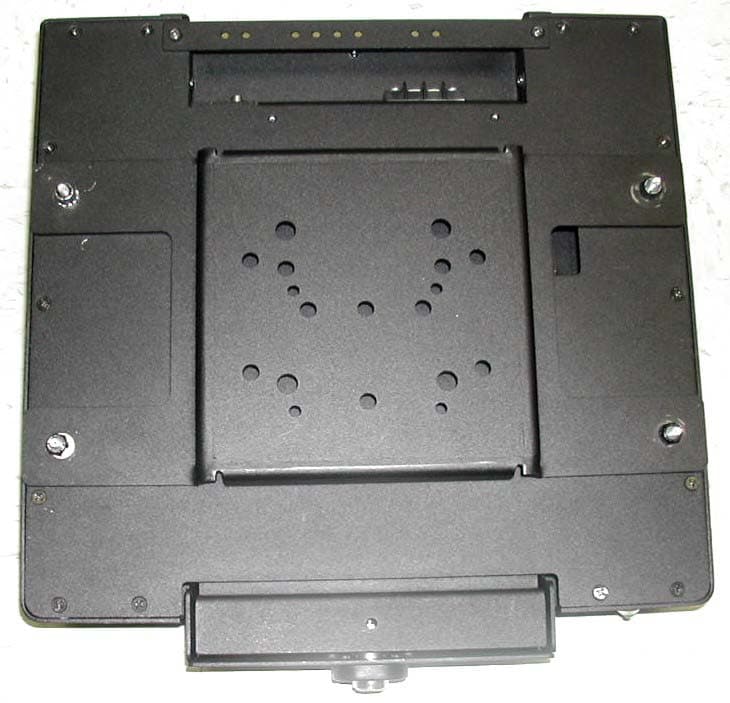
Click to zoom
Application Details
- Equipment Class
- PCB - PCS Licensed Transmitter
- Date of Grant
- Aug 25, 2004
- Application Purpose
- Original Equipment
- Date of Application
- Aug 25, 2004
- Equipment Note
- RUGGED LAPTOP PC WITH DUAL-BAND CDMA & 802.11b/g
- Frequency Range
- 824.70000000 - 848.31000000
- Country
- United States
Documents & Files
Document Text
Text extracted from the exhibit documents filed with the FCC. Open a document above to read the original.
Users Manual
Getting Started Congratulations on your purchase of the Itronix GoBook III computer! Your new GoBook III features the most innovative advances in portable computing technology. It combines state-of-the-art ergonomics with a rugged, durable architecture to provide you with a notebook computer that is compact, powerful, rugged and easy to use. Designed for a wide range of business and personal productivity applications, the GoBook III is an ideal choice for use in applications that require durability and performance. For maximum expandability without compromising portability, the GoBook III has a USB interface and aPC card slot. The high capacity hard disk drive provides you with plenty of storage space for multimedia files and applications. The GoBook III features a standard 87-key Nitevue® keyboard (89-key international). The high- resolution 12.1-inch touch screen LCD panel provides clear and crisp viewing with the convenience of a touch screen. This online document, GoBook III Help , contains all the information you need to set up and use your new GoBook III. It describes all the features of the GoBook III in an easy-to-read yet thorough manner. For information on printing, navigating or otherwise using GoBook III Help see How to Use This Help System. GoBook III ® Help Page 1 of 80GoBook III Help 7/5/2004file://C:\Documents%20and%20Settings\harwoodm.ITRXNT1\Local%20Settings\Temp\~h... Checklists After opening the package, carefully inspect the contents. Contact your dealer if any items are missing or appear damaged. The shipping carton should contain the following: STANDARD z The Itronix GoBook III computer z Battery z ADP-90AB or ADP-75FB AC adapter with power cord z 12.1 inch XGA display z Stylus z Shoulder Strap z GoBook III Quick Start Guide OPTIONS The following items are normally optional, but some vendors may include them in the standard package. Some items may not be available in some countries, or some vendors may choose not to carry all the items. z Floppy disk drive z CD-ROM drive z CD-RW Drive z DVD-ROM drive z Soft Handle z Media Bay Li-Ion battery pack z Hard Disk Drive Heater z LCD Heater CAUTION When purchasing any of the accessories listed above, purchase only those accessories that are approved for use with your computer. The above accessories are proprietary items. Your system vendor can obtain these approved accessories. If you use items that are not approved for use with this computer, you may cause your computer to malfunction, or to emit or receive electromagnetic radiation in excess of local regulations. For non-proprietary accessories such as PC Cards or printers, ensure that the accessor y functions properly in your computer before making the purchase. Your system vendor Page 2 of 80GoBook III Help 7/5/2004file://C:\Documents%20and%20Settings\harwoodm.ITRXNT1\Local%20Settings\Temp\~h... may be able to recommend reliable brands and models. Features High Capacity Hard Disk Drive The computer has a high capacity hard disk drive, enabling you to install your favorite programs and store large multimedia files. Full Array of Ports and Connectors Your computer includes standard ports for connecting to peripherals such as USB devices and monitors. USB ports allow you to add many types of peripherals. Large XGA LCD Your computer has a large, easy to view XGA LCD panel. Built-in Microphone and Stereo Speakers The stereo speakers and internal microphone enable you to run a variety of multimedia applications. Function Keys Function keys allow you to suspend your computer, shut the LCDs off, and give you easy control of audio and your monitor. Where to Look For Information About Your Computer This Help System describes the key elements of your computer. New users can find a simple step-by- step orientation in this chapter. About Windows For more extensive information and help about Windows go to Help and Support, found on the Start Menu. 72_0119_001 28 June 2004 © 2004 Itronix Corporation. All rights reserved. Page 3 of 80GoBook III Help 7/5/2004file://C:\Documents%20and%20Settings\harwoodm.ITRXNT1\Local%20Settings\Temp\~h... Precautions You can use your computer under a wide range of environmental conditions. However, to ensure long use and continued high performance, consider the following factors when setting up your computer: z Follow all warnings and instructions noted in this documentation and in Windows Help and Support, found on the Start Menu. z The first time you use your computer, we recommend that you carefully read the section on Power Management to familiarize yourself with some basic battery information and to ensure optimum performance z There is danger of explosion if the battery is incorrectly replaced. Replace only with the same or equivalent type recommended by the manufacturer. Dispose of used batteries according to the manufacturer's instructions. z Do not open the RAM door by yourself. z Unplug the computer from the power outlet before cleaning. Use a damp cloth for cleaning. Do not use aerosols, solvents, or strong detergents z Slots and openings in the computer case are for ventilation purposes. Do not block or cover these openings or the system could overheat z On the bottom of the GoBook III, there is a label with information on the power requirements of this system. These requirements must be followed. If you are unsure of your local power supply, consult your dealer or local Power Company z Do not step on or place anything on the power cord z If you use the computer with an extension cord, ensure that the total ampere ratings of all the devices sharing the extension do not exceed the rating of the extension cord or the rating of the wall outlet z Unless instructed, never push foreign objects into the computer through any of the slots or openings. Dangerous voltages are present, which could cause electric shock, fire, or damage sensitive components z For best results, use a power strip with a built-in surge protector. Do not use inferior extensi…
Text truncated - open the document above for the full version.
Cover Letter(s)
801 S. STEVENS STREET SPOKANE, WA 99204 509.624.6600 800.441.1309 FAX 509.626.4203 www.itronix.com July 16, 2004 Federal Communications Commission Equipment Authorization Branch 7435 Oakland Mills Road Columbia, MD 21046 Re: Itronix Corporation FCC ID: KBCIX260PROAC555 FCC Part 24(E) - Certification Request for Confidentiality In accordance with 0.459 of CFR 47, Itronix Corporation and Sierra Wireless Inc. hereby requests confidentiality of the Schematic Diagram(s), Parts List, Tune-Up Procedure, Operational Description, and Antenna Specifications attachments for the subject application. These documents contain detailed system and equipment description and related information about the product in which Itronix Corporation and Sierra Wireless Inc. considers to be proprietary, confidential, and a custom design and, otherwise, would not release to the general public. Since this design is a basis from which future technological products will evolve, Itronix Corporation and Sierra Wireless Inc. considers that this information would be of benefit to its competitors, and that the disclosure of the information in these documents would give competitors an unfair advantage in the market. Sincerely,
External Photos
© 2004 Celltech Labs Inc. ITRONIX CORPORATION FCC ID: KBCIX260PROAC555 (Model: IX260+) Rugged Laptop PC with Dual-Band CDMA Modem & Co-located 802.11b/g WLAN EXTERNAL DUT PHOTOGRAPHS © 2004 Celltech Labs Inc. ITRONIX CORPORATION FCC ID: KBCIX260PROAC555 (Model: IX260+) Rugged Laptop PC with Dual-Band CDMA Modem & Co-located 802.11b/g WLAN EXTERNAL DUT PHOTOGRAPHS © 2004 Celltech Labs Inc. ITRONIX CORPORATION FCC ID: KBCIX260PROAC555 (Model: IX260+) Rugged Laptop PC with Dual-Band CDMA Modem & Co-located 802.11b/g WLAN EXTERNAL DUT PHOTOGRAPHS External Swivel Dipole Antenna © 2004 Celltech Labs Inc. ITRONIX CORPORATION FCC ID: KBCIX260PROAC555 (Model: IX260+) Rugged Laptop PC with Dual-Band CDMA Modem & Co-located 802.11b/g WLAN EXTERNAL DUT PHOTOGRAPHS © 2004 Celltech Labs Inc. ITRONIX CORPORATION FCC ID: KBCIX260PROAC555 (Model: IX260+) Rugged Laptop PC with Dual-Band CDMA Modem & Co-located 802.11b/g WLAN EXTERNAL DUT PHOTOGRAPHS © 2004 Celltech Labs Inc. ITRONIX CORPORATION FCC ID: KBCIX260PROAC555 (Model: IX260+) Rugged Laptop PC with Dual-Band CDMA Modem & Co-located 802.11b/g WLAN EXTERNAL DUT PHOTOGRAPHS with Vehicle Cradle & 3 dBi Gain Vehicle Antenna (MaxRad P/N: WMLPVDB800/1900) © 2004 Celltech Labs Inc. ITRONIX CORPORATION FCC ID: KBCIX260PROAC555 (Model: IX260+) Rugged Laptop PC with Dual-Band CDMA Modem & Co-located 802.11b/g WLAN EXTERNAL DUT PHOTOGRAPHS Vehicle Cradle
ID Label/Location Info
© 2004 Celltech Labs Inc. ITRONIX CORPORATION FCC ID: KBCIX260PROAC555 (Model: IX260+) Rugged Laptop PC with Dual-Band CDMA Modem & Co-located 802.11b/g WLAN LABELING REQUIREMENTS PER §2.925 The label(s) shall be permanently affixed at a conspicuous location on the device. SEE NEXT PAGE(S) FOR FCC ID LABEL SEE NEXT PAGE(S) FOR FCC Part 15(B) DoC LABEL FCC ID LABEL & LOCATION
Internal Photos
© 2004 Celltech Labs Inc. ITRONIX CORPORATION FCC ID: KBCIX260PROAC555 (Model: IX260+) Rugged Laptop PC with Dual-Band CDMA Modem & Co-located 802.11b/g WLAN INTERNAL DUT PHOTOGRAPHS Cradle Contact Board © 2004 Celltech Labs Inc. ITRONIX CORPORATION FCC ID: KBCIX260PROAC555 (Model: IX260+) Rugged Laptop PC with Dual-Band CDMA Modem & Co-located 802.11b/g WLAN INTERNAL DUT PHOTOGRAPHS Sierra Wireless AirCard 555 Dual-Band CDMA PCMCIA Modem Card © 2004 Celltech Labs Inc. ITRONIX CORPORATION FCC ID: KBCIX260PROAC555 (Model: IX260+) Rugged Laptop PC with Dual-Band CDMA Modem & Co-located 802.11b/g WLAN INTERNAL DUT PHOTOGRAPHS Sierra Wireless AirCard 555 Dual-Band CDMA PCMCIA Modem Card © 2004 Celltech Labs Inc. ITRONIX CORPORATION FCC ID: KBCIX260PROAC555 (Model: IX260+) Rugged Laptop PC with Dual-Band CDMA Modem & Co-located 802.11b/g WLAN INTERNAL DUT PHOTOGRAPHS Sierra Wireless AirCard 555 Dual-Band CDMA PCMCIA Modem Card © 2004 Celltech Labs Inc. ITRONIX CORPORATION FCC ID: KBCIX260PROAC555 (Model: IX260+) Rugged Laptop PC with Dual-Band CDMA Modem & Co-located 802.11b/g WLAN INTERNAL DUT PHOTOGRAPHS Sierra Wireless AirCard 555 Dual-Band CDMA PCMCIA Modem Card © 2004 Celltech Labs Inc. ITRONIX CORPORATION FCC ID: KBCIX260PROAC555 (Model: IX260+) Rugged Laptop PC with Dual-Band CDMA Modem & Co-located 802.11b/g WLAN INTERNAL DUT PHOTOGRAPHS Sierra Wireless AirCard 555 Dual-Band CDMA PCMCIA Modem Card © 2004 Celltech Labs Inc. ITRONIX CORPORATION FCC ID: KBCIX260PROAC555 (Model: IX260+) Rugged Laptop PC with Dual-Band CDMA Modem & Co-located 802.11b/g WLAN INTERNAL DUT PHOTOGRAPHS Sierra Wireless AirCard 555 Dual-Band CDMA PCMCIA Modem Card © 2004 Celltech Labs Inc. ITRONIX CORPORATION FCC ID: KBCIX260PROAC555 (Model: IX260+) Rugged Laptop PC with Dual-Band CDMA Modem & Co-located 802.11b/g WLAN INTERNAL DUT PHOTOGRAPHS Intel Pro 2200BG 802.11b/g WLAN Mini-PCI Card © 2004 Celltech Labs Inc. ITRONIX CORPORATION FCC ID: KBCIX260PROAC555 (Model: IX260+) Rugged Laptop PC with Dual-Band CDMA Modem & Co-located 802.11b/g WLAN INTERNAL DUT PHOTOGRAPHS Intel Pro 2200BG 802.11b/g WLAN Mini-PCI Card © 2004 Celltech Labs Inc. ITRONIX CORPORATION FCC ID: KBCIX260PROAC555 (Model: IX260+) Rugged Laptop PC with Dual-Band CDMA Modem & Co-located 802.11b/g WLAN INTERNAL DUT PHOTOGRAPHS Intel Pro 2200BG 802.11b/g WLAN Mini-PCI Card © 2004 Celltech Labs Inc. ITRONIX CORPORATION FCC ID: KBCIX260PROAC555 (Model: IX260+) Rugged Laptop PC with Dual-Band CDMA Modem & Co-located 802.11b/g WLAN Front Back INTERNAL DUT PHOTOGRAPHS Intel Pro 2200BG 802.11b/g WLAN Mini-PCI Card © 2004 Celltech Labs Inc. ITRONIX CORPORATION FCC ID: KBCIX260PROAC555 (Model: IX260+) Rugged Laptop PC with Dual-Band CDMA Modem & Co-located 802.11b/g WLAN Front with Shielding Back INTERNAL DUT PHOTOGRAPHS Intel Pro 2200BG 802.11b/g WLAN Mini-PCI Card © 2004 Celltech Labs Inc. ITRONIX CORPORATION FCC ID: KBCIX260PROAC555 (Model: IX260+) Rugged Laptop PC with Dual-Band CDMA Modem & Co-located 802.11b/g WLAN Front with Shielding Removed INTERNAL DUT PHOTOGRAPHS Intel Pro 2200BG 802.11b/g WLAN Mini-PCI Card © 2004 Celltech Labs Inc. ITRONIX CORPORATION FCC ID: KBCIX260PROAC555 (Model: IX260+) Rugged Laptop PC with Dual-Band CDMA Modem & Co-located 802.11b/g WLAN INTERNAL DUT PHOTOGRAPHS Dual Internal Antennas for Intel Pro 2200BG WLAN Back Side of LCD Display Right Side Antenna (Primary) Left Side Antenna (Auxiliary) Spacing between WLAN Dual Internal Antennas © 2004 Celltech Labs Inc. ITRONIX CORPORATION FCC ID: KBCIX260PROAC555 (Model: IX260+) Rugged Laptop PC with Dual-Band CDMA Modem & Co-located 802.11b/g WLAN INTERNAL DUT PHOTOGRAPHS Dual Internal Antennas for Intel Pro 2200BG WLAN Spacing between WLAN Dual Antennas (Primary) Spacing between WLAN Dual Antennas (Auxiliary) © 2004 Celltech Labs Inc. ITRONIX CORPORATION FCC ID: KBCIX260PROAC555 (Model: IX260+) Rugged Laptop PC with Dual-Band CDMA Modem & Co-located 802.11b/g WLAN Distance at LCD back-side between dipole antenna feed/swivel-joint and WLAN primary antenna INTERNAL DUT PHOTOGRAPHS Dual Internal Antennas for Intel Pro 2200BG WLAN © 2004 Celltech Labs Inc. ITRONIX CORPORATION FCC ID: KBCIX260PROAC555 (Model: IX260+) Rugged Laptop PC with Dual-Band CDMA Modem & Co-located 802.11b/g WLAN WLAN Auxiliary Antenna WLAN Primary Antenna INTERNAL DUT PHOTOGRAPHS Dual Internal Antennas for Intel Pro 2200BG WLAN © 2004 Celltech Labs Inc. ITRONIX CORPORATION FCC ID: KBCIX260PROAC555 (Model: IX260+) Rugged Laptop PC with Dual-Band CDMA Modem & Co-located 802.11b/g WLAN INTERNAL DUT PHOTOGRAPHS Dual Internal Antennas for Intel Pro 2200BG WLAN
Test Report
© 2004 Celltech Labs Inc. 1 of 50 Test Report S/N: 052604-519KBC Test Date(s): July 26 - August 23, 2004 Test Type: FCC Parts 22 & 24 EMC Measurements This mobile device has demonstrated compliance with the applicable technical standards as indicated in the measurement report and was tested in accordance with the measurement procedures specified in FCC 47 CFR §24(E), §22(H), §2; Industry Canada RSS- 133 Issue 2, RSS-132 Issue 1 (Provisional); and ANSI TIA/EIA-603-A-2001. I attest to the accuracy of data. All measurements reported herein were performed by me or were made under my supervision and are correct to the best of my knowledge and belief. I assume full responsibility for the completeness of these measurements and vouch for the qualifications of all persons taking them. This test report shall not be reproduced partially, or in full, without the prior written approval of Celltech Labs Inc. The results and statements contained in this report pertain only to the device(s) evaluated. __________________________ Russell Pipe Senior Compliance Technologist Celltech Labs Inc. ____________________________ Duane M. Friesen EMC Manager Celltech Labs Inc. DECLARATION OF COMPLIANCE FCC PART 24(E) & 22(H) EMC MEASUREMENTS Test Lab CELLTECH LABS INC. Testing and Engineering Services 1955 Moss Court Kelowna, B.C. Canada V1Y 9L3 Tel.: 250-448-7047 Fax: 250-448-7046 e-mail: [email protected] web site: www.celltechlabs.com Applicant Information ITRONIX CORPORATION 801 South Stevens Street Spokane, WA 99210 United States FCC IDENTIFIER: KBCIX260PROAC555 Model(s): IX260+ FCC Rule Part(s): FCC 47 CFR §24(E), §22(H), §2 IC Rule Part(s): RSS-133 Issue 2, RSS-132 Issue 1 (Provisional) Test Procedure(s): FCC 47 CFR §24(E), §22(H), §2 IC RSS-133 Issue 2, IC RSS-132 Issue 1 (Provisional) ANSI TIA/EIA-603-A-2001 FCC Device Classification: PCS Licensed Transmitter (PCB) IC Device Classification: 2 GHz Personal Communication Services (RSS-133) 800 MHz Cellular Telephones Employing New Technologies (RSS-132) Device Type: Rugged Laptop PC with Sierra Wireless AirCard 555/550 Dual-Band CDMA PCMCIA Modem (co-located with Intel Pro 2200BG 802.11b/g WLAN & Internal Dual Surface-Mount Antenna) with External Swivel Dipole Antenna, Mobile Vehicle-Mount Antenna, & Vehicle Cradle Tx Frequency Range(s): 1851.25 - 1908.75 MHz (PCS CDMA) 824.70 - 848.31 MHz (Cellular CDMA) Rx Frequency Range(s): 1931.25 - 1988.75 MHz (PCS CDMA) 869.70 - 893.31 MHz (Cellular CDMA) Max. ERP/EIRP Measured: 0.302 Watts (24.80 dBm) EIRP - PCS CDMA (Itronix Swivel Dipole Antenna) 0.306 Watts (24.86 dBm) ERP - Cellular CDMA (Itronix Swivel Dipole Antenna) 0.040 Watts (16.03 dBm) EIRP - PCS CDMA (MaxRad Vehicle-Mount Antenna) 0.146 Watts (21.65 dBm) ERP - Cellular CDMA (MaxRad Vehicle-Mount Antenna) Max. Conducted Power Measured: 23.0 dBm (PCS CDMA) 23.0 dBm (Cellular CDMA) Modulation Type: QPSK Emission Designator(s): 1M25F9W Frequency Tolerance(s): 150 Hz (PCS CDMA) 300 Hz (Cellular CDMA) Antenna Type(s) Tested: Itronix IX260+ External Swivel Dipole (Dual-Band CDMA) MaxRad 3 dBi Gain Vehicle-Mount P/N: WMLPVDB800/1900 (Dual-Band CDMA) Power Source(s) Tested: 11.1 V Lithium-ion Battery, 6.0 Ah (Model: A2121-2) 12 V Vehicle Battery (for Vehicle Cradle) © 2004 Celltech Labs Inc. 2 of 50 Test Report S/N: 052604-519KBC Test Date(s): July 26 - August 23, 2004 Test Type: FCC Parts 22 & 24 EMC Measurements TABLE OF CONTENTS Section DESCRIPTION Page # 1.1 SCOPE 3 2.1 GENERAL INFORMATION / DEVICE DESCRIPTION 3 3.1 TEST EQUIPMENT LIST 4 Appendix MEASUREMENT PROCEDURES & DATA FCC Rule Part(s) IC Rule Part(s) Page # A RF Output Power §2.1046 RSS-133 §6.2 RSS-132 §4.4 5 B Spurious Emissions at Antenna Terminal §2.1051 RSS-133 §6.3 RSS-132 §4.5 6-16 C Occupied Bandwidth & Emission Bandwidth §2.1049 §22.917 §24.238 RSS-133 §6.3 RSS-132 §4.2 RSS-132 §4.5 17-25 D Effective Isotropic Radiated Power Output §24.232(b) RSS-133 §6.2 26-27 E Effective Radiated Power Output §22.913 RSS-132 §4.4 28-29 F Field Strength of Spurious Radiation §24.238 §22.917 RSS-133 §6.3 RSS-132 §4.5 30-42 G Frequency Stability / Temperature Variation §2.1055 §24.235 RSS-133 §6.3 RSS-132 §4.5 43-45 H Radiated Test Setup Photographs 46-50 © 2004 Celltech Labs Inc. ITRONIX CORPORATION FCC ID: KBCIX260PROAC555 (Model: IX260+) 3 of 50 Rugged Laptop PC with Dual-Band CDMA Modem & Co-located 802.11b/g WLAN Test Report S/N: 052604-519KBC Test Date(s): July 26 - August 23, 2004 Test Type: FCC Parts 22 & 24 EMC Measurements 1.1 SCOPE This report describes the measurements made and results collected during the Electromagnetic emissions testing of the Itronix Corporation IX260+ Rugged Laptop PC incorporating the internal Sierra Wireless AirCard 555/550 Dual-Band PCS/Cellular CDMA PCMCIA Modem with external swivel dipole antenna (co-located with the Intel Pro 2200BG 802.11b/g 2.4 GHz DSSS WLAN Mini-PCI Card and RangeStar internal dual surface-mount antenna), vehicle-mount antenna, and vehicle cradle. The measurement results were applied against the EMC requirements and limits outlined in the technical rules and regulations set forth in the Federal Communication Commission Code of Federal Regulations Title 47 Parts 24(E), 22(H), and 2. 2.1 GENERAL INFORMATION / DEVICE DESCRIPTION APPLICANT ITRONIX CORPORATION 801 South Stevens Street Spokane, WA 99210 FCC IDENTIFIER KBCIX260PROAC555 Model(s) IX260+ Serial No. ZZGEG4112ZZ9777 Production Unit Device Type Rugged Laptop PC with Sierra Wireless AirCard 555/550 Dual-Band CDMA PCMCIA Modem (co-located with Intel Pro 2200BG 802.11b/g WLAN & Internal Dual Surface-Mount Antenna) with External Swivel Dipole Antenna, Vehicle-Mount Antenna, & Vehicle Cradle Transmit Type Individual Transmit Only (co-located transmitters do not transmit simultaneously) FCC Rule Part(s) §24(E) §22(H) §2 IC Rule Part(s) RSS-133 Issue 2 RSS-132 Issue 1 (Provisional) FCC Classification PCS Licensed Transmitter (PCB) 2 GHz Personal Communication Services (RSS-133) IC Classification 800 M…
Text truncated - open the document above for the full version.
Contact Information
Applicant
Ray Garcia(Agency Manager)
Test Firm
Celltech Labs Inc.Ben Hewson
Technical Specifications
| # | Rule Parts | Frequency Range | Power Output | Emission | Tolerance |
|---|---|---|---|---|---|
| 2 | 22H | 824.7 MHz - 848.31 MHz | 200.00 mW | 1M25F9W | 300 Hz |
Other Applications from General Dynamics Itronix Corporation

KBCIX-BR-51
Jan 20, 2008IX-BTBR51
Equipment Class
DSS - Part 15 Spread Spectrum Transmitter
KBCIX-MC8775
May 30, 2007IX-MC8775
Equipment Class
PCB - PCS Licensed Transmitter
KBCIX-4965AGN
May 21, 2007IX-4965AGN
Equipment Class
NII - Unlicensed National Information Infrastructure TX
KBCIX-AC595
Apr 19, 2007IX-AC595 DUAL-BAND CDMA/EV-DO PCMCIA MODEM CARD
Equipment Class
PCB - PCS Licensed Transmitter
KBCIX-NW620
Mar 13, 2007IX-NW620 CDMA/EV-DO
Equipment Class
PCB - PCS Licensed Transmitter