KBCIX550AC300Rugged Laptop PC with CDPD Modem Card
General Dynamics Itronix Corporation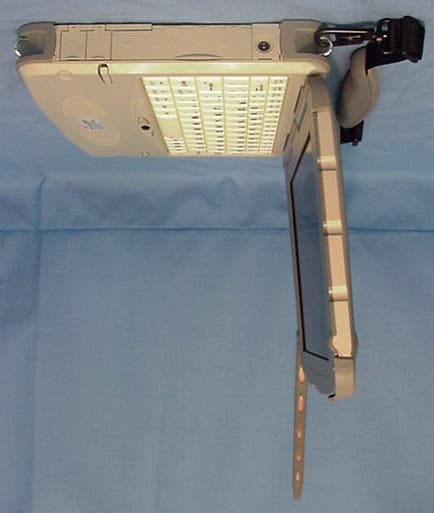
Click to zoom
Application Details
- Equipment Class
- TNB - Licensed Non-Broadcast Station Transmitter
- Date of Grant
- Jul 19, 2001
- Application Purpose
- Original Equipment
- Date of Application
- Jun 10, 2001
- Equipment Note
- Rugged Laptop PC with CDPD Modem Card
- Frequency Range
- 824.04000000 - 848.97000000
- Country
- United States
Documents & Files
Document Text
Text extracted from the exhibit documents filed with the FCC. Open a document above to read the original.
Users Manual
GoBook Pro HelpPage 1 of 74 file://C:\WINDOWS\TEMP\~hh6357.htm5/23/01 Getting Started Congratulations on your purchase of the Itronix GoBook Pro computer! Your new GoBook Pro features the most innovative advances in portable computing technology. It combines state-of-the-art ergonomics with a rugged, durable architecture to provide you with a notebook computer that is compact, powerful, rugged and easy to use. Designed for a wide range of business and personal productivity applications, the GoBook Pro is an ideal choice for use in applications that require the ultimate in ruggedness, durability, performance and intrinsic safety. For maximum expandability without compromising portability, the GoBook Pro accommodates a number of modules, including USB interfaces and one PC card slot. The high capacity hard disk drive provides you with plenty of storage space for multimedia files and applications. The GoBook Pro features a standard 81-key Nitevue® keyboard (82-key international). The high- resolution 10.4-inch touch screen LCD panel provides clear and crisp viewing with touch screen convenience. This User’s Guide contains all the information you need to set up and use your new GoBook Pro. It describes all the features of the GoBook Pro in an easy-to-read yet thorough manner. GoBook Pro Help 1. Getting Started Topics GoBook Pro HelpPage 2 of 74 file://C:\WINDOWS\TEMP\~hh6357.htm5/23/01 Unpacking Your System Inside your packaging you will find: lItronix GoBook Pro computer lPower cord lAC adapter lBattery l2 Styluses lGoBook Pro Quick Start Guide You may have additional components or peripherals if you ordered these items separately. Check your packing slip for a complete list of items included in your package. 79_0100_001 © 2001 Itronix Corporation. All rights reserved. Precautions You can use your computer under a wide range of environmental conditions. However, to ensure long use and continued high performance, consider the following factors when setting up your computer: lFollow all warnings and instructions noted in this documentation and in the Windows Help program. lThe first time you use your computer, we recommend that you carefully read Power Management to familiarize yourself with some battery basics to ensure optimum battery performance lUnplug the computer from the power outlet before cleaning. Use a damp cloth for cleaning. Do GoBook Pro Help 1. Getting Started Topics GoBook Pro HelpPage 3 of 74 file://C:\WINDOWS\TEMP\~hh6357.htm5/23/01 not use aerosols, solvents, or strong detergents lSlots and openings in the computer case are for ventilation purposes. Do not block or cover these openings or the system could overheat lOn the bottom of the GoBook Pro, there is a label with information on the power requirements of this system. These requirements must be followed. If you are unsure of your local power supply, consult your dealer or local Power Company lDo not step on or place anything on the power cord lIf you use the computer with an extension cord, ensure that the total ampere ratings of all the devices sharing the extension do not exceed the rating of the extension cord or the rating of the wall outlet lNever push foreign objects into the computer through any of the slots or openings. Dangerous voltages are present, which could cause electric shock or fire, or damage sensitive components lFor best results, use a power strip with a built-in surge protector. Do not use inferior extension cords as this may result in damage to your computer 79_0100_001 © 2001 Itronix Corporation. All rights reserved. Checklists After opening the package, carefully inspect the contents. Contact your dealer if any items are missing or appear damaged. The shipping carton should contain the following: STANDARD lA GoBook Pro computer lA battery lAn AC adapter with power cord GoBook Pro Help 1. Getting Started Topics GoBook Pro HelpPage 4 of 74 file://C:\WINDOWS\TEMP\~hh6357.htm5/23/01 l2 Styluses lQuick Start Guide OPTIONS The following items are normally optional, but some vendors may include them in the standard package. Some items may not be available in some countries, or some vendors may choose not to carry all the items. lAdditional battery pack lShoulder Strap lAudio adapter cable CAUTION When purchasing any of the accessories listed above, purchase only those accessories that are approved for use with your computer. The above accessories are proprietary items. Your system vendor can obtain these approved accessories. If you use items that are not approved for use with this computer, you may cause your computer to malfunction, or to emit or receive electromagnetic radiation in excess of local regulations. For non-proprietary accessories such as PC Cards or printers, ensure that the accessory functions properly in your computer before making the purchase. Your system vendor may be able to recommend reliable brands and models. Features High Capacity Hard Disk Drive The computer has a high capacity hard disk drive, enabling you to install your favorite programs and store large multimedia files. Full Array of Ports and Connectors Your computer includes standard ports for connecting to peripherals such as USB devices and monitors. USB ports allow you to add many other peripherals. Bright SVGA LCD Your computer has a bright, easy to view SVGA LCD panel with integrated touch screen. Built-in Speaker and Microphone The speaker and internal microphone enable you to run a variety of multimedia applications. An optional audio adapter cable is available for connecting external speakers (headphones) and microphone. Function Keys GoBook Pro HelpPage 5 of 74 file://C:\WINDOWS\TEMP\~hh6357.htm5/23/01 Function keys allow you to suspend your computer, shut the LCDs off, and give you easy control of audio and your monitor. Where to Look For Information About Your Computer This User’s Manual describes the key elements of your computer. New users can find a simple step-by- step orientation in this chapter. About Win…
Text truncated - open the document above for the full version.
Users Manual
GoBook Pro HelpPage 38 of 74 file://C:\WINDOWS\TEMP\~hh6357.htm5/23/01 Enabling Supervisor Password requires a password for entering Setup. The passwords are not case sensitive. Pressing Enter at either Set Supervisor Password or Set User Password displays a dialog box like this: FieldSetting Function Set User Password Up to seven alphanumeric characters Pressing Enter displays the dialog box for entering the user password. In related systems, this password gives restricted access to SETUP menus. Set Supervisor Password Up to seven alphanumeric characters Pressing Enter displays dialog box for entering the supervisor password. In related systems, this password gives full access to Setup menus. Password on boot Enabled Disabled Enabled requires a password on boot. Requires prior setting of the Supervisor password. If supervisor password is set and this option disabled, BIOS assumes user is booting. Diskette access Enabled Disabled Enabled requires a password to boot from or access the floppy disk. fixed disk boot sector Normal Write Protect Write protects the boot sector on the hard disk for virus protection. Requires a password to format or Fdisk the hard disk. System backup reminder Virus check reminder Disabled Daily Weekly Monthly Displays a message during boot up asking (Y/N) if you have backed up the system or scanned it for viruses. Message returns on each boot until you respond with "Y". Daily displays the message on the first boot of the day, weekly on the first boot after Sunday, and monthly on the first boot of the month. GoBook Pro HelpPage 39 of 74 file://C:\WINDOWS\TEMP\~hh6357.htm5/23/01 NOTE In some systems, the User and supervisor passwords are related; you cannot have a User password without first creating a Supervisor password. In other systems, you can create and use them independently 79_0100_001 © 2001 Itronix Corporation. All rights reserved. The Power Menu The options available in power management depend upon the hardware installed in your system. Those shown here are from a typical system. GoBook Pro Help 6. Customizing Your BIOS Topics GoBook Pro HelpPage 40 of 74 file://C:\WINDOWS\TEMP\~hh6357.htm5/23/01 FieldSetting Function Power Savings Disabled Customized Maximum Power Savings Maximum Performance Maximum options: pre-defined values. Select Customize to make your own selections from the following fields. Disabled turns off all power management. Idle Mode On Off Turn of/off the Idle Mode power savings. Standby Timeout Off 1 min 2 min 4 min 6 min 8 min 12 min 16 min Inactivity period required to put system in Standby (partial power shutdown). Auto Suspend Timeout Off 5 min 10 min 15 min 20 min 30 min 40 min 60 min Inactivity period required after Standby to Suspend (maximum power shutdown). Suspend Mode Suspend Save to Disk Low power state to enter when the suspend timeout has occurred Hard Disk Timeout Disabled 10 sec 15 sec 30 sec 45 sec 1 min 2 min 4 min 6 min 8 min 10 min 15 min Inactivity period of hard disk required before standby (motor off). Video Timeout Disabled 10 sec 15 sec 30 sec 45 sec 1 min 2 min 4 min Set inactivity period required before independently turning off monitor. Disabled turns CRT off in Standby. GoBook Pro HelpPage 41 of 74 file://C:\WINDOWS\TEMP\~hh6357.htm5/23/01 79_0100_001 © 2001 Itronix Corporation. All rights reserved. The Boot Menu When you turn on your computer, it attempts to load the operating system (such as Windows 98) from the device of your choice. If it cannot find the operating system on that device it attempts to load it from one or more other devices according to the order specified in the Boot Menu. Boot devices can include hard drives, floppy drives, CD-ROMs, removable devices and network cards. NOTE Specifying any device as a boot device on the Boot Menu requires the availability of an operating system on that device. Most PCs come with an operating system already installed on hard- drive C. 6 min 8 min 10 min 15 min Resume On Modem Ring Off On Wakes up system when an incoming call is detected on the modem. Resume On Time Off On Wakes up system at predetermined time. Resume Time XX:XX:XXPredetermined time to wake up the system GoBook Pro Help 6. Customizing Your BIOS Topics GoBook Pro HelpPage 42 of 74 file://C:\WINDOWS\TEMP\~hh6357.htm5/23/01 79_0100_001 © 2001 Itronix Corporation. All rights reserved. The Exit Menu You use the exit menu to leave the BIOS Setup Utility . ESC does not exit this menu. You must select on of the items from the menu or menu bar to exit. FieldSetting Function Removable DevicesN/AShows removable devices Hard DriveN/AShows hard drive(s) CD-ROMN/AShows CD-ROM(s) GoBook Pro Help 6. Customizing Your BIOS Topics GoBook Pro HelpPage 43 of 74 file://C:\WINDOWS\TEMP\~hh6357.htm5/23/01 79_0100_001 © 2001 Itronix Corporation. All rights reserved. Optional Equipment and Accessories FieldFunction Exit Saving Changes After making your selections on the Setup menus, this option stores the selections displayed in the menus in CMOS, a special section of memory that stays on after your turn your system off. It then exits the SETUP program. The next time you boot your computer, the BIOS configures your system according to the Setup selections stored in CMOS. During boot up, PhoenixBIOS attempts to load the values saved in CMOS. If those values cause the system boot to fail, reboot and press [F2] to enter Setup. In setup, you can get the Default Values or try to change the selections that caused the boot to fail. Exit Discarding Changes Use this option to exit Setup without storing in CMOS any new selections you may have made. The selections previously in effect remain in effect. Use Setup Settings Load Setup Defaults To display the default values for all Setup menus, select "Load Setup Defaults" from the Main Menu. If during boot up, the BIOS program detects a problem in the integrity of values stored in CMOS, it displays these messages: System CMOS checksum bad - run SETUP Press <F1> to resume, <F2> to…
Text truncated - open the document above for the full version.
Cover Letter(s)
Celltech Research Inc. 1955 Moss Court, Kelowna, B.C. Canada V1Y 9L3 Tel. 250-860-3130 •• Fax. 250-860-3110 •• [email protected] www.celltechlabs.com June 11, 2001 Federal Communications Commission Equipment Approval Services 7435 Oakland Mills Road Columbia, MD 21046 SUBJECT: ITRONIX CORPORATION FCC ID: KBCIX550AC300 Part 22 Certification Gentlemen: On behalf of Itronix Corporation is an application for Part 22 Certification of the Itronix IX550 Rugged Laptop PC with Sierra Wireless AirCard 300/350 CDPD modem card. FCC ID: KBCIX550AC300 Model(s): IX550 Equipment Class: Licensed Non-Broadcast Station Transmitter (TNB) Equipment Type: Rugged Laptop PC with CDPD Modem Card Tx Freq. Range: 824 - 849 MHz Rx Freq. Range: 869 - 894 MHz Max. RF Output Power: 0.591 Watts (ERP) Emission Designator: 31K5FXW Attached is the authorization letter, confidentiality request, Part 22 measurement report data and test plots, SAR measurement report data & photographs, FCC ID label and location, test setup photographs, internal and external photographs, block diagrams (confidential), circuit diagrams (confidential), circuit description (confidential), antenna specifications (confidential), operational description (confidential), parts list (confidential), tune-up procedure (confidential), and the user's manual with RF exposure warning statement. If you have any questions or comments concerning the above, please contact the undersigned. Sincerely, Shawn McMillen General Manager Celltech Research Inc. Testing & Engineering Lab cc: Itronix Corporation
External Photos
CELLTECH RESEARCH INC. Test Report S/N: 050201-100KBC 1955 Moss Court, Kelowna Dates of Tests: May 22-23, 2001 B.C. Canada V1Y 9L3 FCC Part 22 Certification © 2001 Celltech Research Inc. ITRONIX FCC ID: KBCIX550AC300 Rugged Laptop PC with CDPD Modem Card EXTERNAL EUT PHOTOGRAPHS ITRONIX IX550 LAPTOP PC CELLTECH RESEARCH INC. Test Report S/N: 050201-100KBC 1955 Moss Court, Kelowna Dates of Tests: May 22-23, 2001 B.C. Canada V1Y 9L3 FCC Part 22 Certification © 2001 Celltech Research Inc. ITRONIX FCC ID: KBCIX550AC300 Rugged Laptop PC with CDPD Modem Card EXTERNAL EUT PHOTOGRAPHS CELLTECH RESEARCH INC. Test Report S/N: 050201-100KBC 1955 Moss Court, Kelowna Dates of Tests: May 22-23, 2001 B.C. Canada V1Y 9L3 FCC Part 22 Certification © 2001 Celltech Research Inc. ITRONIX FCC ID: KBCIX550AC300 Rugged Laptop PC with CDPD Modem Card EXTERNAL EUT PHOTOGRAPHS ITRONIX DIPOLE ANTENNA
ID Label/Location Info
CELLTECH RESEARCH INC. Test Report S/N: 050201-100KBC 1955 Moss Court, Kelowna Dates of Tests: May 22-23, 2001 B.C. Canada V1Y 9L3 FCC Part 22 Certification © 2001 Celltech Research Inc. ITRONIX FCC ID: KBCIX550AC300 Rugged Laptop PC with CDPD Modem Card FCC ID LABEL & LOCATION LABELLING REQUIREMENTS PER §§ 2.925 The label shown shall be permanently affixed at a conspicuous location on the device and be readily visible to the user at the time of purchase.
Internal Photos
CELLTECH RESEARCH INC. Test Report S/N: 050201-100KBC 1955 Moss Court, Kelowna Dates of Tests: May 22-23, 2001 B.C. Canada V1Y 9L3 FCC Part 22 Certification © 2001 Celltech Research Inc. ITRONIX FCC ID: KBCIX550AC300 Rugged Laptop PC with CDPD Modem Card INTERNAL EUT PHOTOGRAPHS SIERRA WIRELESS CDPD MODEM CELLTECH RESEARCH INC. Test Report S/N: 050201-100KBC 1955 Moss Court, Kelowna Dates of Tests: May 22-23, 2001 B.C. Canada V1Y 9L3 FCC Part 22 Certification © 2001 Celltech Research Inc. ITRONIX FCC ID: KBCIX550AC300 Rugged Laptop PC with CDPD Modem Card INTERNAL EUT PHOTOGRAPHS MODEM INSTALLED IN PC
Internal Photos
APPLICATION FOR Class II Permissive Change to N7NACRD2 Transmitter Sierra Wireless Inc. FCC ID: N7NACRD2 MODEL: AIRCARD 2 Internal Equipment Photographs Prepared by: Sierra Wireless Inc. #260 - 13151 Vanier Place Richmond, B.C. V6V 2J2 May 4, 1999 Figure 1: PCBA Top Side Figure 2: PCBA Bottom Side
RF Exposure Info
CELLTECH RESEARCH INC. Test Report S/N: 050201-101KBC 1955 Moss Court, Kelowna Date(s) of Tests: May 22, 2001 B.C. Canada V1Y 9L3 FCC Part 22 Certification _________________________________________________________________________________________________________ © 2001 Celltech Research Inc. CERTIFICATE OF COMPLIANCE SAR EVALUATION This wireless mobile and/or portable device has been shown to be compliant for localized Specific Absorption Rate (SAR) for uncontrolled environment/general exposure limits specified in ANSI/IEEE Std. C95.1-1992 and has been tested in accordance with the measurement procedures specified in ANSI/IEEE Std. C95.3-1999. I attest to the accuracy of data. All measurements were performed by me or were made under my supervision and are correct to the best of my knowledge and belief. I assume full responsibility for the completeness of these measurements and vouch for the qualifications of all persons taking them. Celltech Research Inc. certifies that no party to this application has been denied FCC benefits pursuant to Section 5301 of the Anti-Drug Abuse Act of 1988, 21 U.S.C. 853(a). Shawn McMillen General Manager Celltech Research Inc. Test Lab: CELLTECH RESEARCH INC. Testing and Engineering Lab 1955 Moss Court Kelowna, B.C. Canada V1Y 9L3 Phone: 250 - 860-3130 Fax: 250 - 860-3110 Toll Free: 1-877-545-6287 e-mail: [email protected] web site: www.celltechlabs.com Applicant Information: ITRONIX CORPORATION 801 South Stevens Street Spokane, WA 99024 Attn: Fred Phillips, Certification Engineer Phone: 509-742-1506 Fax: 509-626-4204 FCC ID: KBCIX550AC300 Model(s): IX550 Equipment Type: Rugged Laptop PC with Sierra Wireless PCMCIA CDPD Modem Card Model: AirCard 300/350 Equipment Classification: Licensed Non-Broadcast Station Transmitter (TNB) Tx Frequency Range: 824-849 MHz Rx Frequency Range: 869-894 MHz Max. RF Output Power: 0.591 Watts (ERP) Antenna Type: Itronix Dipole Antenna FCC Rule Part(s): 2.1093; ET Docket 96.326 CELLTECH RESEARCH INC. Test Report S/N: 050201-101KBC 1955 Moss Court, Kelowna Date(s) of Tests: May 22, 2001 B.C. Canada V1Y 9L3 FCC Part 22 Certification _________________________________________________________________________________________________________ © 2001 Celltech Research Inc. TABLE OF CONTENTS 1.0 INTRODUCTION.................................................................. 1 2.0 DESCRIPTION OF EUT.......................................................... 1 3.0 SAR MEASUREMENT SYSTEM ............................................. 2 4.0 MEASUREMENT SUMMARY.................................................. 3 5.0 DETAILS OF SAR EVALUATION............................................ 4 6.0 EVALUATION PROCEDURES................................................. 4 7.0 SAR LIMITS........................................................................ 5 8.0 SYSTEM VALIDATION.......................................................... 5 9.0 SIMULATED EQUIVALENT TISSUES...................................... 6 10.0 TISSUE PARAMETERS......................................................... 6 11.0 SYSTEM SPECIFICATIONS.................................................... 7 12.0 TEST EQUIPMENT LIST........................................................ 8 13.0 MEASUREMENT UNCERTAINTIES........................................ 9 14.0 REFERENCES...................................................................... 10 APPENDIX A - SAR MEASUREMENT DATA........................................ 11 APPENDIX B - DIPOLE VALIDATION................................................ 12 APPENDIX C - PROBE CALIBRATION............................................... 13 APPENDIX D - SAR TEST SETUP PHOTOGRAPHS............................... 14 CELLTECH RESEARCH INC. Test Report S/N: 050201-101KBC 1955 Moss Court, Kelowna Date(s) of Tests: May 22, 2001 B.C. Canada V1Y 9L3 FCC Part 22 Certification _________________________________________________________________________________________________________ © 2001 Celltech Research Inc. ITRONIX CORPORATION FCC ID: KBCIX550AC300 1 Rugged Laptop PC with CDPD Modem Card (824-849MHz) 1.0 INTRODUCTION This measurement report demonstrates compliance of the ITRONIX CORPORATION IX550 Rugged Laptop PC FCC ID: KBCIX550AC300 with SIERRA WIRELESS AIRCARD 300/350 PCMCIA CDPD Modem Card with FCC Part 2, 1093, ET Docket 96-326 Rules for mobile and portable devices. The test procedures, as described in American National Standards Institute C95.1- 1992 (1), FCC OET Bulletin 65-1997 were employed. A description of the product and operating configuration, detailed summary of the test results, methodology and procedures used in the evaluation, equipment used, and the various provisions of the rules are included within this test report. 2.0 DESCRIPTION of Equipment Under Test (EUT) EUT Type Rugged Laptop PC with PCMCIA CDPD Modem Card Equipment Class Licensed Non-Broadcast Station Transmitter (TNB) FCC ID KBCIX550AC300 Model No.(s) IX550 Tx Frequency Range (MHz) 824-849 S/N No. Pre-production Rx Frequency Range (MHz) 869-894 Modem Type Sierra Wireless PCMCIA CDPD Modem Card Model: AirCard 300/350 Antenna Type Dipole Max. RF Output Power 0.591 Watts (ERP) Antenna Length 158 mm Signal Modulation(s) GMSK Application Type Part 22 Certification Power Supply From PC CELLTECH RESEARCH INC. Test Report S/N: 050201-101KBC 1955 Moss Court, Kelowna Date(s) of Tests: May 22, 2001 B.C. Canada V1Y 9L3 FCC Part 22 Certification _________________________________________________________________________________________________________ © 2001 Celltech Research Inc. ITRONIX CORPORATION FCC ID: KBCIX550AC300 2 Rugged Laptop PC with CDPD Modem Card (824-849MHz) 3.0 SAR MEASUREMENT SYSTEM Celltech Research SAR measurement facility utilizes the Dosimetric Assessment System (DASY™) manufactured by Schmid & Partner Engineering AG (SPEAG™) of Zurich, Switzerland. The DASY system is comprised of the robot controller, computer, near-field probe, probe alignment sensor, and the gener…
Text truncated - open the document above for the full version.
RF Exposure Info
GoBook Pro HelpPage 25 of 74 file://C:\WINDOWS\TEMP\~hh6357.htm5/23/01 RIM 902M radio, an application that uses one of these protocols must be installed on the computer and configured to communicate on COM4. Cisco Wireless LAN lGo to your preferred LAN application and run normally CAUTION When using the AirCard 300/350 CDPD modem, the antenna must be at least 2.0cm from all persons in order to comply with FCC RF exposure requirements. 79_0100_001 © 2001 Itronix Corporation. All rights reserved. Power Management Using the Battery Monitoring Battery Power There are two ways to monitor how much power the battery has left. 1.Click Start, Settings, Control Panel, Power Management (Power Options); then click the Power Meter tab. 2.Moving the cursor to the battery icon on the taskbar , without selecting anything, is the simplest way to check on battery power status. The status will show as a pop-up when you mouse-over the icon. NOTE If you do not see the battery icon on the taskbar, enable it in Start, Settings, Control Panel, Power Management. Choose the Advanced tab and select “Always show icon on the taskbar.” Low Battery Alarms GoBook Pro Help 5. Power Mangement Topics
Test Report
CELLTECH RESEARCH INC. Test Report S/N: 050201-100KBC 1955 Moss Court, Kelowna Dates of Tests: May 22-23, 2001 B.C. Canada V1Y 9L3 FCC Part 22 Certification ____________________________________________________________________________________________________________________ © 2001 Celltech Research Inc. CERTIFICATE OF COMPLIANCE FCC PART 22 MEASUREMENTS This equipment has been shown to be capable of compliance with the applicable technical standards as indicated in the measurement report and was tested in accordance with the measurement procedures specified in §2.947. I attest to the accuracy of data. All measurements reported herein were performed by me or were made under my supervision and are correct to the best of my knowledge and belief. I assume full responsibility for the completeness of these measurements and vouch for the qualifications of all persons taking them. Celltech Research Inc. certifies that no party to this application has been denied FCC benefits pursuant to Section 5301 of the Anti-Drug Abuse Act of 1988, 21 U.S.C. 853(a). Shawn McMillen General Manager Celltech Research Inc. Test Lab: CELLTECH RESEARCH INC. Testing and Engineering Services 1955 Moss Court Kelowna, B.C. Canada V1Y 9L3 Phone: 250 - 860-3130 Fax: 250 - 860-3110 Toll Free: 1-877-545-6287 e-mail: [email protected] web site: www.celltechlabs.com Applicant Information: ITRONIX CORPORATION 801 South Stevens Street Spokane, WA 99024 Attn: Fred Phillips, Certification Engineer Phone: 509-742-1506 Fax: 509-626-4204 FCC Classification: Licensed Non-Broadcast Station Transmitter (TNB) FCC Rule Part(s): §22.901(d), §2 FCC ID: KBCIX550AC300 Model(s): IX550 Equipment Type: Rugged Laptop PC with Sierra Wireless PCMCIA CDPD Modem Card Model: AirCard 300/350 Tx Frequency Range: 824-849 MHz Rx Frequency Range: 869-894 MHz Max. RF Output Power: 0.591 Watts (ERP) Frequency Tolerance: 2.5 PPM Emission Designator: 31K5FXW Antenna Type: Itronix Dipole Antenna CELLTECH RESEARCH INC. Test Report S/N: 050201-100KBC 1955 Moss Court, Kelowna Dates of Tests: May 23-24, 2001 B.C. CANADA V1Y 9L3 FCC Part 22 Certification ____________________________________________________________________________________________________________ © 2001 Celltech Research Inc. TABLE OF CONTENTS 1.1 GENERAL INFORMATION 1 2.1 MEASUREMENT PROCEDURES 2 Spurious/Harmonic Emissions at Antenna Terminal (2.1051) 2 Radiated Spurious & Harmonic Emissions (2.1053) 2 Frequency Stability/Temperature Variation (2.1055) 2 3.1 TEST DATA 3 Effective Radiated Power Output (2.1046) 3 Field Strength of Spurious Radiation (2.1053) 4-6 Frequency Stability 7-8 4.1 LIST OF TEST EQUIPMENT 9 5.1 CONCLUSION 10 ATTACHMENT A: COVER LETTER(S) ATTACHMENT B: ATTESTATION STATEMENT(S) ATTACHMENT C: TEST REPORT ATTACHMENT D: TEST PLOTS ATTACHMENT E: FCC ID LABEL & LOCATION ATTACHMENT F: TEST SETUP PHOTOGRAPHS ATTACHMENT G: EXTERNAL EUT PHOTOGRAPHS ATTACHMENT H: INTERNAL EUT PHOTOGRAPHS ATTACHMENT I: BLOCK DIAGRAM(S) ATTACHMENT J: CIRCUIT DIAGRAMS ATTACHMENT K: CIRCUIT DESCRIPTION ATTACHMENT L: PARTS LIST ATTACHMENT M: TUNE UP PROCEDURE ATTACHMENT N: ANTENNA SPECIFICATIONS ATTACHMENT O: OPERATIONAL DESCRIPTION ATTACHMENT P: USER’S MANUAL ATTACHMENT Q: SAR MEASUREMENT REPORT CELLTECH RESEARCH INC. Test Report S/N: 050201-100KBC 1955 Moss Court, Kelowna Dates of Tests: May 23-24, 2001 B.C. CANADA V1Y 9L3 FCC Part 22 Certification ____________________________________________________________________________________________________________ © 2001 Celltech Research Inc. ITRONIX CORPORATION FCC ID: KBCIX550AC300 1 Rugged Laptop PC with CDPD Modem Card (824-849MHz) APPLICANT: ITRONIX CORPORATION 801 South Stevens Street Spokane, WA 99024 Attn: Fred Phillips, Certification Engineer MEASUREMENT REPORT - FCC PART 22 1.1 SCOPE Measurement and determination of electromagnetic emissions (EME) from radio frequency devices for compliance with the technical rules and regulations of the Federal Communications Commission. §2.1033(a) General Information FCC ID KBCIX550AC300 Model(s) IX550 EUT Type Rugged Laptop PC with Sierra Wireless PCMCIA CDPD Modem Card Model: AirCard 300/350 Classification Licensed Non-Broadcast Station Transmitter (TNB) Rule Part(s) §22.901(d), §2 Max. RF Output Power 0.591 Watts (ERP) Tx Freq. Range 824-849 MHz Rx Freq. Range 869-894 MHz Emission Designator 31K5FXW Signal Modulation GMSK Mode(s) Tested Unmodulated Carrier Antenna Type Itronix Dipole Antenna CELLTECH RESEARCH INC. Test Report S/N: 050201-100KBC 1955 Moss Court, Kelowna Dates of Tests: May 23-24, 2001 B.C. CANADA V1Y 9L3 FCC Part 22 Certification ____________________________________________________________________________________________________________ © 2001 Celltech Research Inc. ITRONIX CORPORATION FCC ID: KBCIX550AC300 2 Rugged Laptop PC with CDPD Modem Card (824-849MHz) 2.1 MEASUREMENT PROCEDURES 2.2 SPURIOUS EMISSIONS AT ANTENNA TERMINAL - §2.1051 The level of the carrier and the various conducted spurious and harmonic frequencies were measured by means of a calibrated spectrum analyzer. The spectrum was scanned from 10MHz to 20GHz. The antenna output terminal of the EUT was connected to the input of a 50Ω spectrum analyzer through a matched 30dB attenuator and coaxial cable. The transmitter was operating at maximum power with internal data modulation. 2.3 RADIATED SPURIOUS AND HARMONIC EMISSIONS - §2.1053 Radiated and harmonic emissions above 1 GHz were measured at our 3-meter outdoor site. The EUT was placed on the turntable with the transmitter transmitting into a non-radiating load. A receiving antenna located 3 meters from the turntable received any signal radiated from the transmitter and its operating accessories. The receiving antenna was varied from 1 to 4 meters and the polarization was varied (horizontal and vertical) to determine the worst-case emission level. 2.4 FREQUENCY STABILITY/TEMPERATURE VARIATION - §2.1055 The frequency stability of the transmitter is measured by: a) Temperature: The te…
Text truncated - open the document above for the full version.
Test Setup Photos
CELLTECH RESEARCH INC. Test Report S/N: 050201-100KBC 1955 Moss Court, Kelowna Dates of Tests: May 22-23, 2001 B.C. Canada V1Y 9L3 FCC Part 22 Certification © 2001 Celltech Research Inc. ITRONIX FCC ID: KBCIX550AC300 Rugged Laptop PC with CDPD Modem Card RADIATED TEST SETUP PHOTOGRAPHS CELLTECH RESEARCH INC. Test Report S/N: 050201-100KBC 1955 Moss Court, Kelowna Dates of Tests: May 22-23, 2001 B.C. Canada V1Y 9L3 FCC Part 22 Certification © 2001 Celltech Research Inc. ITRONIX FCC ID: KBCIX550AC300 Rugged Laptop PC with CDPD Modem Card RADIATED TEST SETUP PHOTOGRAPHS
Contact Information
Applicant
Ray Garcia(Agency Manager)
Technical Contact
Celltech Research Inc.Jon Hughes
[email protected]250-860-3130
1955 Moss Court · Kelowna, B.C. · Canada
Non-Technical Contact
Celltech Research Inc.Jon Hughes
[email protected]250-860-3130
Technical Specifications
| # | Rule Parts | Frequency Range | Power Output | Emission | Tolerance |
|---|---|---|---|---|---|
| 1 | 22.901(d) | 824.04 MHz - 848.97 MHz | 591.00 mW | 31K5FXW | 2.5000000000 ppm |
Other Applications from General Dynamics Itronix Corporation

KBCIX-BR-51
Jan 20, 2008IX-BTBR51
Equipment Class
DSS - Part 15 Spread Spectrum Transmitter
KBCIX-MC8775
May 30, 2007IX-MC8775
Equipment Class
PCB - PCS Licensed Transmitter
KBCIX-4965AGN
May 21, 2007IX-4965AGN
Equipment Class
NII - Unlicensed National Information Infrastructure TX
KBCIX-AC595
Apr 19, 2007IX-AC595 DUAL-BAND CDMA/EV-DO PCMCIA MODEM CARD
Equipment Class
PCB - PCS Licensed Transmitter
KBCIX-NW620
Mar 13, 2007IX-NW620 CDMA/EV-DO
Equipment Class
PCB - PCS Licensed Transmitter