LU9337966TextMe!Walkie-Talkies
MGA Entertainment (HK) Ltd.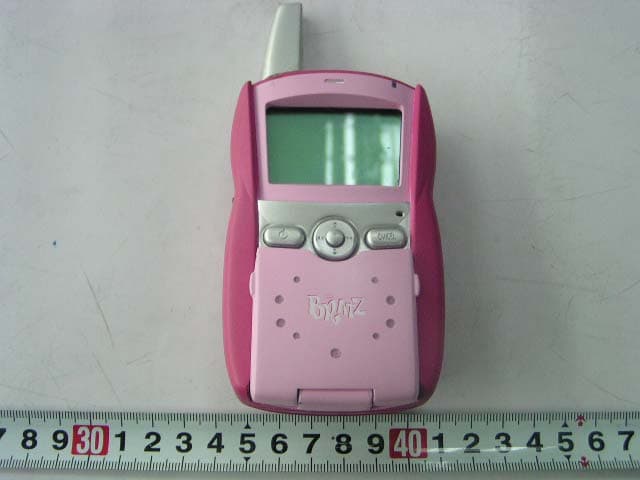
Click to zoom
Application Details
- Equipment Class
- FRF - Part 95 Family Radio Face Held Transmitter
- Date of Grant
- Jun 14, 2006
- Application Purpose
- Original Equipment
- Date of Application
- Jun 14, 2006
- Equipment Note
- TextMe!Walkie-Talkies
- Frequency Range
- 462.68750000 - 462.68750000
- Company
- MGA Entertainment (HK) Ltd.
- Country
- Hong Kong
Documents & Files
Document Text
Text extracted from the exhibit documents filed with the FCC. Open a document above to read the original.
Users Manual
Users Manual Contents 1. Introduction 2. Product Package Contents 3. Key Layout 4. Charging the Battery 5. Main features A. Talking function B. Messages C. Contact / Phone book D. Tools E. Notes F. Applications G. Settings H. Checking ID Number 1 - Introduction This product is a walkie-talkie with features of text messages transferring and data bank. It enables you to converse with other users of this type of Walkie-talkies, which is similar to chat on phone. You can communicate with them by messages transferring through it without any charge. 2 – Product Package Contents 2 Walkie-talkies and 1 instruction manual 3 – Key Layout Key Functions Remark 1 Talk/SMS switch Slide switch, which allows you to select talking mode and SMS mode. If mode A is selected, you Mode A is talking mode Mode B is SMS mode can receive the voice transmitted by other Walkie-talkies tuned to the same channel. If model B is selected, you can use SMS transmission to communicate with other users 2 ID Press it to see your Walkie-talkie ID The ID can be showed when mode B is activated. 3 Talk Press to transmit This key can work when mode A is activated. 4 Power Press to switch on/off the Walkie-talkie This key can work provided that mode B is activated. 5 5-directions key Moves cursor to select menu items, etc Press the middle “OK” key to confirm your selection 6 Cancel Cancel Keypad * / Shift key Switches input methods, e.g.: ABC, abc # In SMS mode, launches symbol screen. 4 – Charging the Battery 1 Open the battery door 2 Insert 4 AAA batteries into the Walkie- talkie 3 – Close the battery door 5 - Main features A - Talking function Function Step Talk through the Walkie-talkie Press Talk/SMS switch until the screen shows “Talk / Listen” Press “Talk” Listen Press Talk/SMS key until the screen shows “Talk / Listen” Volume Press → to increase volume Press ← to reduce volume Or adjust the volume through the rotary volume B - Messages Press Talk/SMS key until the screen shows the following diagram Press “OK” Fig 1 Fig 2 Fig 3 Fig 4 Fig 5 Function Steps Create messages to the Walkie-talkie which ID has been saved on the contact list Move the cursor to “NEW” by pressing ↓ shown as Fig 2 Press “OK” Press the message you want After you complete your message, press “OK”. The screen will change to Fig 4 Move the cursor to “CONTACT” by pressing ↑ or ↓ shown as Fig 4 Press “OK” Select the ID by moving the cursor Press “OK” The screen will change to a new menu shown as Fig 5 Select “SAVE” if you want to save the message only. Select “SAVE SENT” if you want to save the message and send it out. Select “SENT ONLY” if you want to send the message out and do not want to save it. Create messages to the Walkie-talkie which ID has not been saved Move the cursor to “NEW” by pressing ↓ shown as Fig 2 Press “OK” Press the message you want After you complete your message, press “OK”. The screen will change to Fig 4 Move the cursor to “NEW NUMBER” by pressing ↑ or ↓ Press “OK” Input ID number Press “OK” The screen will change to a new menu shown as Fig 5 Select “SAVE” if you want to save the message only. Select “SAVE SENT” if you want to save the message and send it out. Select “SENT ONLY” if you want to send the message out and do not want to save it Check inbox Move the cursor to “INBOX” in the menu shown as Fig 1 The screen will show MESSAGE 10 FROM XXXXXXXX Move the cursor to the messages you want to read by pressing ↑ or ↓ Press “OK” to read the message Press → change to a new screen shown as Fig 6 Move the cursor to “SAVE “ and press “OK” if you want to save the message Move the cursor to “DELETE” and press “OK” if you want to delete the message Move the cursor to “FORWARD” and press “OK” if you want to send forward the message to others Remark: “1” means the message number Max 8 messages can be saved The remark means the message was saved. The remark means the message was not saved. “XXXXXXXX” means the message was sent from “XXXXXXXX” If you have 8 messages have been stored, the “MEMORYFULL” shows on the screen if you receive a new message. Fig 6 Check Outbox Similar to the steps in check inbox Receiving messages The Walkie-talkie can receive messages in any mode Remark: you can save 8 messages in the inbox folder and can save 8 messages in the sent folder. C - Contact / Phone book Press Talk/SMS key, ← and → until the screen shows the menu as Fig 7 Fig 7 Fig 8 Fig 9 Fig 10 Press “OK” Function Steps Search Move the cursor to “PHONE BOOK” as shown on Fig 8 Press “OK” A new menu Fig 9 is shown Move the cursor to the name you want to search by pressing ↑ or ↓ Press “OK” A new menu Fig 10 is shown Move the cursor to “VIEW” and press “OK” if you want to see his/her record Move the cursor to “EDIT” and press “OK” if you want to edit his/her record Move the cursor to “DELETE” and press “OK” if you want to delete his/her record Save your friends’ record Move the cursor to “ADD” as shown on Fig 8 Press “OK” Fig 11 Fig 12 Fig 13 A new menu Fig 11 is shown Input your friend’s ID Press “OK” A new menu Fig 12 is shown Input your friend’s name Press “OK” A new menu Fig 13 is shown Move the cursor to “BIRTHDAY” and press “OK” if you want to input your friend’s birthday Move the cursor to “PHONE” and press “OK” if you want to input your friend’s cell phone number Move the cursor to “@” and press “OK” if you want to input your friend’s email address Move the cursor to “HOUSE” and press “OK” if you want to input your friend’s home address D - Tools Press Talk/SMS key, ← and → until the screen shows the menu as Fig 14 Fig 14 Fig 15 Press “OK” A new menu Fig 15 is shown. Function Steps Time Move the cursor to “CLOCK” and press ”OK” The screen shows what time it is Alarm setting Move the cursor to “ALARM” and press “OK” Input the alarm you want Countdown Move the cursor to “COUNT” and press “OK” Adjust the countdown timer Stopwatch Move the cursor to “STOPWATCH” and press “OK” Press “OK” for start counting E - Notes Press Talk/SMS key, ← and → until the …
Text truncated - open the document above for the full version.
Block Diagram
SPK LCD Display LCD Driver MCU Button Transmittion 462Mhz Power High Frequency Medium Frequency Ampifier VCO PLL Frequency Mix MIC Data Data
External Photos
EXHIBIT B - EUT PHOTOGRAPHS EUT – Front View EUT – Rear View EUT – Keyboard Open View
ID Label/Location Info
EXHIBIT A - FCC ID LABELING AND LOCATION Proposed FCC ID Labeling Proposed FCC ID Location FCC ID Label Location FCC ID: LU9337966
Internal Photos
EXHIBIT C - EUT INTERNAL PHOTOGRAPHS EUT – Uncovered View (1) EUT – Uncovered View (2) EUT – Main PCB Front View EUT – Main PCB Rear View
Operational Description
Circuit Description Transmitter Unit Q307.Q308.(2SC4901)D303(1SV214)L315 compose the VCO and PLL(TB31202), which controlled by MCU to adjust the crystal frequency at 462Mhz. The amplified signal is then amplified by the power amplifier 2SK3078 which supplied by DC 3.7V to create RF power through the antenna. Receiver Unit After the signal which received by the antenna filtered by L301, C301, it is amplified through the C303 and Q304 coupling. Then, it pass the 465Mhz filter and mixed out the first IF : 21.4 MHz. by Q306. and The first IF signal is then fed through the 21.4MHz crystal filter and Q310 to amplify, and input the IC (MC3361), which has its local oscillator 20.95MHz, after the mix, the signal generate a 450KHz second IF signal, and output the data and signal through the 9th Pin.
Operational Description
Frequency List Frequency Frequency for chatting 462.6625MHz. Channel spacing: 12.5 kHz (0.0125MHz) Frequency for text transfer 462.6875MHz. Channel spacing: 12.5 kHz (0.0125MHz). Chatting Effective distance for chatting 2 miles Text transfer parameter Max characters per one message 52 Max messages to be store 10 Effective distance for text transfer 2 miles Sources Batteries 4 AAA batteries
Operational Description
ItemMinTypicalMaxUnits CH1 Transmit Frequency 462.662462.6625462.663MHz CH2 Transmit Frequency 462.687462.6875462.688MHz CH1 Reveiver Frequency 462.662462.6625462.663MHz CH2 Reveiver Frequency 462.687462.6875462.688MHz RF Bandwidth 345KHZ IF Frequency 21.39921.421.401MHz IF Limiting Sensitivity (Sina=20db) -95-100-105dBm RF Output Power (Load=50ohm) 25 25.5 26 dBm ERP (Radiation) 19.5 20 20.5 dBm Transmitter Deviation (Mic Input 20mv 1KHz)11.52KHz Audio Output Power ( Load =4ohm)230250270mW Audio Distortion Amp Output1510% S/N Ratio455055dB Operation Voltage456V Talk Current 230240250mA No Talk Current 262830mA Standby Current2.533.5mA Battery sizeAAA Walkie talkie Specification
Parts List/Tune Up Info
1 1 X301 20.95MHz CRYSTAL 2 1 FL301 21.4M CRYSTAL FILTER 3 2 D05 D303 1SV214 4 1 Q202 2SA1162 5 2 Q307-308 2SC4901 6 1 Q301 2SK3078 7 1 FD201 LTUM 450HT 8 1 U2 LP2985-3.6V SOT-23 9 1 ANT301 ANT 10 1 U5 AT24C64 11 1 C282 CAP-5A,100U /6.3V 4*8 ELECTROLYTIC 12 1 C265 CAP-5A,220U/6.3V 5*11 ELECTROLYTIC 15 22 C121 C218 C221 C224 C233 C258 C308-309 C313 C318 C334 C342 C355 C357 C361 C364 C371 C374 C378-380 C376 100P 16 3 C201 C270 C321 102P 17 7 C111 C116 C273 C279 C319 C343 C346 103P 18 33 AC1 C102-103 C105-108 C110 C113 C115 C117 C120 C122 C202 C204-206 C208 C215-216 C220 C269 C272 C278 C281 C285 C289 C310 C314 C333 C340 C345 C372 104P 19 11 C101 C109 C203 C225-226 C259 C261 C277 C280 C356 C373 105P 21 5 C304-305 C317 C320 C331 10P 22 3 C118-119 C377 12P 23 1 C303 15P 24 3 C301 C338 C344 1P 25 1 C358 2.2P 26 1 C339 2.5P 27 1 C341 220P 28 3 C104 C230-231 222P 29 4 C211 C223 C254 C370 223P 30 4 C207 C260 C266 C268 224P 31 1 C332 22P 32 1 C306 27P 33 1 C383 2P 34 4 C217 C219 C257 C362 332P 35 1 C271 333P 36 3 C350 C352 C359 3P 37 4 C232 C354 C365 C388 470P 38 2 C255-256 472P 39 1 C2 473P 40 1 C363 474P(X7R) 41 2 C222 C337 47P 42 1 C330 4P 43 1 C385 5P 44 2 C209-210 680P 45 1 C375 68P 46 1 C302 6P 47 1 C360 8P 48 2 C351 C353 9P 50 1 L302 COIL-0.32*1.2*2TR 51 2 L315 L304 COIL-0.32*1.2*3TR 52 3 L301 L310 L305 COIL- 0.32*1.2*5TR 53 1 L309 COIL- 0.32*1.2*4TR 55 3 D101-102 D201 1206,1N4148 . 56 3 D301-302 D306 D304 KDS114 . 57 1 U301 TB31202 58 4 Q101-104 DTA143ZE 59 1 S301 HDF465A DIP 60 1 U201 KA3361D SOP16 76 1 K7 KEY-5-5,ID 81 1 K9 KEY-5-5,TALK 83 1 L308 12nH 0603 84 2 L311-312 15nH 0603 85 2 L303 L313 2.2uH 0603 86 1 L314 22nH 0603 87 1 LCD101 88 1 LED101 LED 0805 89 2 U202-203 LM358 SOP8 90 1 MIC2 91 4 Q303-304 Q306 Q310 2SC4901 92 2 R111 R316 0 93 1 R258 1.2K 94 1 R323 1.5K 95 1 R259 1.8K 96 7 R107 R117 R201-202 R268 R329 R337 10 97 6 R105-106 R118 R219 R273 R339 100K 98 1 R336 100R 99 1 R318 102P 100 17 R113 R116 R211-212 R218 R223 R226 R236 R238-239 R243-244 R254-255 R283 R328 R338 10K 101 1 R340 120K 102 2 R322 R316A 150R 103 2 R261 R341 18K 104 5 R115 R209 R301 R315 R3201K 105 3 R207 R224 R235 1M 106 7 R1 R108-109 R222 R252 R326 R380 2.2K 107 1 R308 2.7K 108 2 R205 R332 220K 109 1 R302 22K 110 2 R303 R333 27K 111 3 R210 R229 R317 3.3K 112 1 R203 3.9K 113 1 R342 330K 114 2 R227 R280 33K 115 1 R321 3K 116 10 R110 R114 R206 R213 R256 R309 R325 R327 R330-331 4.7K 117 3 R250-251 R307 4.7R 118 1 AR1 4.7k 119 2 R312-313 47 120 3 R208 R314 R381 470K 121 11 R104 R216 R221 R233-234 R241-242 R253 R257 R281 R324 47K 122 3 R101-103 560K 123 1 R217 680K 124 3 R204 R220 R310 68K 125 2 R225 R260 8.2K 126 2 R240 R282 820K 127 2 R228 R245 82K 129 2 VR2 VR201 130 1 U1 SH57P95 131 1 U3 SL386 SOP8 132 1 SPK201 SPEAKER,4R /1.5W 133 1 SW101 135 1 U102 136 5 Q9 Q105 Q201 Q203 Q309 umt3904 137 1 X101 32.768KHz 2*6 CRYSTAL 138 1 IF201 450KHz 139 1 TC301 6P ECRKN006A61X 140 1 RV201 141 1 RT1 2.2K 0603
RF Exposure Info
MGA Entertainment (HK) Ltd FCC ID: LU9337966 Report # RSZ06042001 Page 7 of 22 FCC PART 95 Report §1.1307(b) (1) RF EXPOSURE Standard Applicable According to §1.1307(b)(1), systems operating under the provisions of this section shall be operated in a manner that ensure that the public is not exposed to radio frequency energy level in excess of the Commission’s guideline. According to FCC Exclusion list, In the following table, fGHz is mid-band frequency in GHz, and d is the distance to a person’sbody, excluding hands, wrists, feet, and ankles. Routine SAR evaluation refers to that specifically required by § 2.1093, using measurements or computer simulation. When routine SAR evaluation is not required, portable transmitters with output power greater than the applicable low threshold require SAR evaluation to qualify for TCB approval. Measurement Result: This is a portable device and the Max peak output power is 89mW<258mW=(60/0.462GHz)mW*2 The SAR measurement is not necessary.
Schematics
smstalkv3.sch-1 - Tue Apr 18 10:45:09 2006
Schematics
smstalkv3.sch-2 - Tue Apr 18 10:46:18 2006
Schematics
smstalkv3.sch-3 - Tue Apr 18 10:46:21 2006
Test Report
Note: The test report is specially limited to the above company and this particular sample only. It may not be duplicated without prior written consent of Bay Area Compliance Lab Corp. (ShenZhen). This report must not be used by the client to claim product certification, approval, or endorsement by NVLAP, NIST or any agency of the US Government. FCC PART 95 EMI MEASUREMENT AND TEST REPORT For MGA Entertainment (HK) Ltd 9 th Floor, Tower 6, The Gateway, Harbour City, 9 Canton Road, Tsimshatsui, Kowloon, Hong Kong FCC ID: LU9337966 May 8, 2006 This Report Concerns: Original Report Equipment Type: TextMe!Walkie-Talkies Test Engineer: Charmi Peng Report No.: RSZ06042001 Test Date: April 27, 2006 Reviewed By: Chris Zeng Prepared By: Bay Area Compliance Lab Corp. (ShenZhen) 6/F, the 3rd Phase of WanLi Industrial Building, ShiHua Road, FuTian Free Trade Zone, ShenZhen, Guangdong 518038, P.R.China Tel: +86-755-33320018 Fax: +86-755-33320008 MGA Entertainment (HK) Ltd FCC ID: LU9337966 Report # RSZ06042001 Page 2 of 22 FCC PART 95 Report TABLE OF CONTENTS GENERAL INFORMATION.......................................................................................................................................3 PRODUCT DESCRIPTION FOR EQUIPMENT UNDER TEST (EUT) ....................................................................................3 OBJECTIVE...................................................................................................................................................................3 RELATED SUBMITTAL(S)/GRANT(S).............................................................................................................................3 TEST METHODOLOGY..................................................................................................................................................3 TEST FACILITY.............................................................................................................................................................3 SYSTEM TEST CONFIGURATION ..........................................................................................................................4 DESCRIPTION OF TEST CONFIGURATION......................................................................................................................4 EQUIPMENT MODIFICATIONS.......................................................................................................................................4 CONFIGURATION OF TEST SETUP.................................................................................................................................5 BLOCK DIAGRAM OF TEST SETUP................................................................................................................................5 SUMMARY OF TEST RESULTS...............................................................................................................................6 §1.1307(b) (1) RF EXPOSURE.....................................................................................................................................7 STANDARD APPLICABLE..............................................................................................................................................7 MEASUREMENT RESULT: .............................................................................................................................................7 §2.1046, and §95.639(d) - RF OUTPUT POWER.......................................................................................................8 APPLICABLE STANDARD..............................................................................................................................................8 TEST EQUIPMENT LIST AND DETAILS...........................................................................................................................8 TEST PROCEDURE........................................................................................................................................................8 TEST DATA..................................................................................................................................................................8 §2.1047, and §95.637(a) - MODULATION CHARACTERISTIC ............................................................................9 APPLICABLE STANDARD..............................................................................................................................................9 TEST EQUIPMENT LIST AND DETAILS...........................................................................................................................9 TEST PROCEDURE........................................................................................................................................................9 T EST D ATA ..................................................................................................................................................................9 §2.1049, and § 95.633(c) – OCCUPIED BANDWIDTH ...........................................................................................12 APPLICABLE STANDARD............................................................................................................................................12 TEST EQUIPMENT LIST AND DETAILS.........................................................................................................................12 TEST PROCEDURE......................................................................................................................................................12 TEST DATA................................................................................................................................................................12 §2.1053 and §95.635(b)(7) - RADIATED SPURIOUS EMISSION ........................................................................14 APPLICABLE STANDARD.................…
Text truncated - open the document above for the full version.
Test Setup Photos
EXHIBIT D - TEST SETUP PHOTOGRAPHS Radiated Emission - Front View Radiated Emission - Rear View Frequency Stability
Contact Information
Applicant
Julian Chung(QA Director)
Test Firm
Bay Area Compliance Laboratory Corp. (Shenzhen)John Chan
Technical Specifications
| # | Rule Parts | Frequency Range | Power Output | Emission | Tolerance |
|---|---|---|---|---|---|
| 2 | 95B | 462.6875 MHz - 462.6875 MHz | 89.00 mW | 11K0F2D | 2.5 ppm |
Other Applications from MGA Entertainment (HK) Ltd.
LU9657719TX
Feb 24, 2022Rescue Tales Walk N Wiggle Daisy
Equipment Class
DXX - Part 15 Low Power Communication Device Transmitter
LU9657566
Jul 29, 2021Tobi 2 Interactive Karaoke Machine
Equipment Class
DSS - Part 15 Spread Spectrum Transmitter
LU9654824
Jun 06, 2021My Real Jam Drum Set
Equipment Class
DXX - Part 15 Low Power Communication Device Transmitter
LU9654794
Jun 06, 2021My Real Jam-Acoustic Guitar
Equipment Class
DXX - Part 15 Low Power Communication Device Transmitter
LU9654800
Jun 06, 2021My Real Jam-Electric Guitar
Equipment Class
DXX - Part 15 Low Power Communication Device Transmitter