MSQS2NWM3B2200BGNotebook P.C. with WLAN
ASUSTeK Computer Inc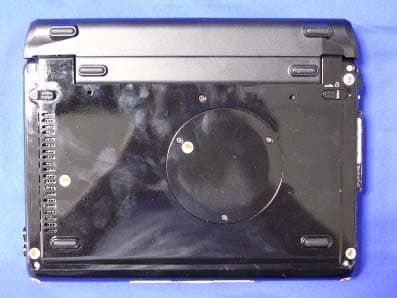
Click to zoom
Application Details
- Equipment Class
- DTS - Digital Transmission System
- Date of Grant
- Nov 20, 2004
- Application Purpose
- Original Equipment
- Date of Application
- Nov 20, 2004
- Equipment Note
- Notebook P.C. with WLAN
- Frequency Range
- 2412.00000000 - 2462.00000000
- Company
- ASUSTeK Computer Inc
- Country
- Taiwan
Documents & Files
Document Text
Text extracted from the exhibit documents filed with the FCC. Open a document above to read the original.
Users Manual
Intel(R) PRO/Wireless 2200BG User's Guide Your Intel(R) PRO/Wireless 2200BG Network Connection adapter works with either 802.11b or 802.11g wireless standard. Operating at 2.4 GHz frequency at speeds of up to 54 Mbps you can now connect your computer to high-capacity existing 802.11b networks using multiple access points within large or small environments, and also to high-speed 802.11g networks. Your wireless adapter maintains automatic data rate control according to access point location to achieve the fastest possible connection. All your wireless client connections can be easily managed by the Intel(R) PROSet for Wireless utility. Using the PROSet Profile Wizard, you can create profiles automatically to suite your specific connection requirements. Enhanced security measures using 802.1x, WPA encryption and authentication, and 128-bit WEP encryption is standard for both 802.11b and 802.11g. Introduction to Wireless Networking Software Installation Using Intel(R) PROSet Connecting to a Network Security Overview Setting Up Security Troubleshooting Specifications Glossary Customer Support Safety and Regulatory Notices Warranty Adapter Registration Information in this document is subject to change without notice. (c) 2000–2003 Intel Corporation. All rights reserved. Intel Corporation, 5200 N.E. Elam Young Parkway, Hillsboro, OR 97124-6497 USA The copying or reproducing of any material in this document in any manner whatsoever without the written permission of Intel Corporation is strictly forbidden. Intel(R) is a Please note that operation of this device in US is limited to Channels 1-11. The end user does not have any method of selecting a “country code” which may allow transmission outside of the legally permitted range. This device complies with part 15 of the FCC Rules. Operation is subject to the following two conditions: (1) This device may not cause harmful interference, and (2) this device must accept any interference received, including interference that may cause undesired operation. The user that changes or modifications not expressly approved by the party responsible for compliance could void the user's authority to operate the equipment. Note: This equipment has been tested and found to comply with the limits for a Class B digital device, pursuant to part 15 of the FCC Rules. These limits are designed to provide reasonable protection against harmful interference in a residential installation. This equipment generates, uses and can radiate radio frequency energy and, if not installed and used in accordance with the instructions, may cause harmful interference to radio communications. However, there is no guarantee that interference will not occur in a particular installation. If this equipment does cause harmful interference to radio or television reception, which can be determined by turning the equipment off and on, the user is encouraged to try to correct the interference by one or more of the following measures: -- Reorient or relocate the receiving antenna. -- Increase the separation between the equipment and receiver. -- Connect the equipment into an outlet on a circuit different from that to which the receiver is connected. -- Consult the dealer or an experienced radio/TV technician for help. This Notebook has been tested and meets the FCC RF exposure guidelines trademark or registered trademark of Intel Corporation or its subsidiaries in the United States and other countries. Other trademarks and trade names may be used in this document to refer to either the entities claiming the marks and names or their products. Intel disclaims any proprietary interest in trademarks and trade names other than its own. Microsoft and Windows are registered trademarks of Microsoft Corporation. *Other names and brands may be claimed as the property of others. Intel Corporation assumes no responsibility for errors or omissions in this document. Nor does Intel make any commitment to update the information contained herein. September 2003 Back to Contents Page Wireless LAN Overview: Intel(R) PRO/Wireless 2200BG User's Guide About Wireless LAN Technology l Choosing a WLAN l Configuring a WLAN l Identifying a WLAN l Surveying the Site of Your WLAN l Factors Affecting Range A wireless network connects computers without using network cables. Computers use radio communications to send data between each other. You can communicate directly with other wireless computers, or connect to an existing network through a wireless access point. When you set up your wireless adapter, you select the operating mode for the kind of wireless network you want. You can use your wireless adapter to connect to other similar wireless devices that comply with the 802.11 standard for wireless networking. Choosing a Wireless LAN Wireless LANs can operate with or without access points, depending on the number of users in the network. Infrastructure mode uses access points to allow wireless computers to send and receive information. Wireless computers transmit to the access point, the access point receives the information and rebroadcasts it to other computers. The access point can also connect to a wired network or to the Internet. Multiple access points can work together to provide coverage over a wide area. Peer-to-Peer mode, also called Ad Hoc mode, works without access points and allows wireless computers to send information directly to other wireless computers. Ad Hoc Mode is only supported in 802.11b and 802.11g networks. You can use Peer-to-Peer mode to network computers in a home or small office or to set up a temporary wireless network for a meeting. Configuring a Wireless LAN There are three basic components that must be configured for an 802.11 wireless LAN to operate properly: l Network Name: Each wireless network uses a unique Network Name to identify the network. This name is called the Service Set Identifier (SSID). When you set up your wireless adapter, you specify the SSID. If you want to connect to an…
Text truncated - open the document above for the full version.
Users Manual
Notebook PC User’s Manual Version: E1082 Version 1.00 Date of Release: August 2002 Please note that operation of this device in US is limited to Channels 1-11. The end user does not have any method of selecting a “country code” which may allow transmission outside of the legally permitted range. This device complies with part 15 of the FCC Rules. Operation is subject to the following two conditions: (1) This device may not cause harmful interference, and (2) this device must accept any interference received, including interference that may cause undesired operation. The user that changes or modifications not expressly approved by the party responsible for compliance could void the user's authority to operate the equipment. Note: This equipment has been tested and found to comply with the limits for a Class B digital device, pursuant to part 15 of the FCC Rules. These limits are designed to provide reasonable protection against harmful interference in a residential installation. This equipment generates, uses and can radiate radio frequency energy and, if not installed and used in accordance with the instructions, may cause harmful interference to radio communications. However, there is no guarantee that interference will not occur in a particular installation. If this equipment does cause harmful interference to radio or television reception, which can be determined by turning the equipment off and on, the user is encouraged to try to correct the interference by one or more of the following measures: -- Reorient or relocate the receiving antenna. -- Increase the separation between the equipment and receiver. -- Connect the equipment into an outlet on a circuit different from that to which the receiver is connected. -- Consult the dealer or an experienced radio/TV technician for help. This Notebook has been tested and meets the FCC RF exposure guidelines °∞ Take short breaks periodically; shake your wrists, shoulders and neck. °∞ Keep both hands lax and loose. Do not hit the keyboard heavily. Always keep your wrists supported. 2 Safety Information °∞ Adjust the monitor to the most comfortable angle. Do not use your computer in dark or reflective light areas. °∞ Keep you head and neck straight. Always keep yourself in a comfort- able position. °∞ Keep your thighs par- allel to the ground and al- low both feet to contact the ground comfortably. °∞ Use a chair de- signed to support your waist. Keep your spine straight and lean your back into the chair. °∞ Keep your eyes away from the monitor, approxi- mately 50 – 70 cm. Adjust the height of the desk to keep the monitor lower than your eyes. Blink your eyes as you like to refresh vision. Safety Information 1. Do not touch or press the monitor. 2. Do not use your Notebook PC in a dusty or dirty area. (Dust may cause system malfunction) 3. Do not place your Notebook PC on an unstable surface. 4. In order not to damage the monitor, do not pile books, papers or other heavy items on your Notebook PC. Do not close the cover of your Notebook PC heavily. 5. Keep your Notebook PC away from magnetic objects (such as amplifiers and TVs). Do not place diskettes in front of or above your Notebook PC. Otherwise, the electromagnetic interference may destroy the data in the diskettes. 6. Keep your Notebook PC away from direct sunshine, especially cars under direct sunshine. 7. Keep your monitor away from excessively cold or excessively hot areas Otherwise, you may have a hard time turning on your Notebook PC. 8. Keep your Notebook PC and its accessories away from water or moisture. 9. Keep the battery away from fire. Do not throw the battery into fire. The battery may explode. Please recycle the waste battery. 3 Safety Information 4 °∞ When Notebook PC is in use or being charged, the heat generated by the system flows to the surface of the Notebook PC. To prevent high temperatures from affecting your health, do not place your Notebook PC on your knees or any part of your body. °∞ Make sure that your Notebook PC bag is equipped with cushions to prevent collision. Do not place too many objects in bags with your Notebook PC. This may damage Notebook PC. °∞ Make sure that the ventilation holes are open when your Notebook PC is in use. To prevent the ventilation holes from being clogged, do not use your Notebook PC on a soft, uneven or cushioned desk. °∞ If your Notebook PC is temporarily not in use, please pull down the cover of monitor to activate the pause mode, thereby saving energy, prolonging the life of the monitor and keeping dust away. °∞ Make sure that all peripheral devices are connected properly before you turn on your Notebook PC. °∞ Turn off the power before your install or remove the peripheral devices that do not support warm plugging/unplugging. °∞ Do not use your Notebook PC when you are driving. It may distract you and cause danger. °∞ Do not use a transformer not contained in your Notebook PC box. Do not use the transformer of your Notebook PC for other purposes, because the circuits of the transformer are designed in a different way and may damage the parts. °∞ Do not eat while you are typing on your Notebook PC. Do not place any drinks beside your Notebook PC. These may cause malfunction. °∞ Do not insert anything into your Notebook PC. You may cause a short-circuit or destroy the circuit. °∞ Do not touch the monitor screen with your fingers. Please use the specially made cloth to wipe the screen. °∞ Do not use your Notebook PC if your palms are wet. Water may dip into the keyboard and destroy the parts inside your Notebook PC. Make sure your palms are dry and clean before you use your Notebook PC. °∞ Do not place your Notebook PC on heated objects, such as microwave ovens and electric warmers. °∞ Keep your Notebook PC away from steam generated by electric appliances, such as rice cookers and hot water pots. °∞ Use your Notebook PC in dry areas. The minerals contained in rainwater, moisture and liquid may corrode electronic circuits. °∞ Do n…
Text truncated - open the document above for the full version.
Attestation Statements
ASUSTek COMPUTER INC. FCC ID.: MSQS2NWM3B2200BG 4FL., No. 150, Li-Te Rd., Peitou, Taipei, Taiwan, R.O.C. Tel: +886 2 2894-3447 Federal Communications Commission Sep. 21, 2004 Authorization and Evaluation Division ATTESTATION FCC ID: MSQS2NWM3B2200BG Product: Notebook P.C. Model : S200N We don't provide any controls or software to allow operation outside the USA frequency band when we sell this product in USA. Sincerely, Vincent Huang / Product Manager ASUSTeK COMPUTER INC.
Block Diagram
Intel / WM3B2200BG Block Diagrams Option1 miniPCI Ramon2 Radio Transceiver Ardon 2 MAC AND ANALOG PHY Differential I and Q RF PA P2023 BAND PASS FILTER T/R-DIVERSITY RF SWITCH BANDPASS FILTER BAND PASS FILTER BALUN BALUN EEPROM Rx Tx 1.2V2.8V3.3V 2.9V MainAux 40 MHz Xtal 40MHz Clock 1.8V 2.8V3.3V LNA VCO 2.9V 2.8V Option2 mPCI Connector Page 4 Ardon 2 MAC & Analog PHY Page 5,6 & 7 Voltage Regulators & DC/ DC Converter Page 3 Ramon 2 Radio Transceiver Page 8 T/R- Diversity Switch Page 11 Main Aux Antenna Ports Tx RF Rx RF Tx BB Rx BB Transceiver Control Front End Control Front End Bias Transceiver Bias MAC Bias Bias Interface EEPROM Page 5 Tx PA Page 9 Rx LNA Page 10 Ext. VCO Page 13 BB Filter Loop Filter Xtal Circuit Page 12 Intel / WM3B2200BG Option 3 mPCI Connector Ardon 2 MAC & Analog PHY Voltage Regulators & DC/ DC Converter Ramon 2 Radio Transceiver RF Front End Main Aux Antenna Ports Tx RF Rx RF Tx BB Rx BB Transceiver Control Front End Control Front End Bias Transceiver Bias MAC Bias Bias Interface EEPROM
Cover Letter(s)
ASUSTek COMPUTER INC. FCC ID.: MSQS2NWM3B2200BG 4FL., No. 150, Li-Te Rd., Peitou, Taipei, Taiwan, R.O.C. Tel: +886 2 2894-3447 ASUSTeK COMPUTER INC. 4FL., No. 150, Li-Te Rd., Peitou, Taipei, Taiwan, R.O.C. Tel: +886 2 2894 3447 Fax:+886 2 2890 7965 Federal Communications Commission Sep. 21, 2004 Authorization and Evaluation Division Confidentiality Request Pursuant to Sections 0.457 and 0.459 of the Commission’s Rules, the Applicant Hereby requests confidential treatment of information accompanying this Application As outlined below: Schematics The above materials contain trade secrets and proprietary information not customarily Released to the public. The public disclosure of these matters might be harmful to the Applicant and provide unjustified benefits to its competitors. The Applicant understands that pursuant to Rule 0.457, disclosure of this Application and all accompanying documentation will not be made before the date of the Grant for this application. Sincerely, Vincent Huang / Product Manager ASUSTeK COMPUTER INC.
Cover Letter(s)
American Telecommunications Certification Body Inc. 6731 Whittier Ave, McLean, VA 22101 October 1, 2004 RE: ASUSTeK Computer Inc. FCC ID: MSQS2NWM3B2200BG I have a few comments on this Application. Depending on your responses, kindly understand there may be additional comments. 1.) The Manual for this device is very confusing – are you seeking approval for the complete computing system, or just a Limited Modular Approval (LMA) for the use of the Intel wireless card in this chassis computer? If Certification is sought for the entire notebook computer, a complete manual with all appropriate regulatory information must be presented. If LMA then all appropriate language must be in LMA manual as an advice to installers. 2.) The Label does not meet the current requirements for 15.19(a). It is no longer necessary to include the statement “For Home or Office Use”. 3.) If a LMA is sought for this product then the transmitter card must have its own label and not the Intel label. 4.) The Test Setup photos indicate their may be some mistake in the radiated testing setup. If either LMA specific to a particular chassis or full Certification of the complete notebook computer is requested, then the photos should show all ports are filled with peripherals. This device must be tested as a system. Typically I expect to see printer, serial device, mouse, and external monitor to name just a few possible devices. Kindly refer to ANSI C63.4 for complete information. 5.) The Band Edge plots in section 5.6 of the Test Report are too small to be useful. Have pity on my eyesight. Please provide better, clearer, larger plots. 6.) The SAR Report does not contain any Z-Axis scans at the point of maximum SAR value. Please supplement your report. 7.) The SAR report should show the ambient temperature, fluid temperature, and power drift on each plot. Please correct. 8.) Please make all SAR plots including System Validation Data bigger. Clarity is needed whenever graphical data is presented from the laboratory. The values on the SAR plot are not readable when this document is enlarged. 9.) Please note that operation of this device in US is limited to Channels 1-11. The end user must not have any method of selecting a “country code” which may allow transmission outside of the legally permitted range. I will be checking the finalized Manual for this feature. William H. Graff President and Director of Engineering mailto: [email protected] The items indicated above must be submitted before processing can continue on the above referenced application. Failure to provide the requested information may result in application termination. Correspondence should be considered part of the permanent submission and may be viewed from the Internet after a Grant of Equipment Authorization is issued. z Page 2 October 1, 2004 Please do not respond to this correspondence using the email reply button. In order for your response to be processed expeditiously, you must submit your documents through the AmericanTCB.com website. Also, please note that partial responses increase processing time and should not be submitted. Any questions about the content of this correspondence should be directed to the sender.
External Photos
Report No.: 048L125FI Page : 1 of 17 Version:1.0 Attachment 2 : EUT Detailed Photographs (1) EUT Photo (2) EUT Photo Report No.: 048L125FI Page : 2 of 17 Version:1.0 (3) EUT Photo (4) EUT Photo Report No.: 048L125FI Page : 3 of 17 Version:1.0 (5) EUT Photo (6) EUT Photo Report No.: 048L125FI Page : 4 of 17 Version:1.0 (7) EUT Photo (8) EUT Photo
ID Label/Location Info
ASUSTek COMPUTER INC. FCC ID.: MSQS2NWM3B2200BG 4FL., No. 150, Li-Te Rd., Peitou, Taipei, Taiwan, R.O.C. Tel: +886 2 2894-3447 FCC ID AND DoC Label The FCC ID and DoC Label will be placed on the equipment as shown in the photograph below. Notebook P.C. ATIO Model No.: S200N Notebook P.C. Model No.: S200N F F C C C C I I D D : : M M S S Q Q S S 2 2 N N W W M M 3 3 B B 2 2 2 2 0 0 0 0 B B G G This device complies with Part 15 of the FCC Rules. Operation is subject to the following two conditions: (1) this device may not cause harmful interference and (2) this device must accept any interference received, including interference that may cause undesired operation. S/N: Made in Taiwan
ID Label/Location Info
ASUSTek COMPUTER INC. FCC ID.: MSQS2NWM3B2200BG 4FL., No. 150, Li-Te Rd., Peitou, Taipei, Taiwan, R.O.C. Tel: +886 2 2894-3447 FCC ID AND DoC Label The FCC ID and DoC Label will be placed on the equipment as shown in the photograph below. Notebook P.C. ATIO Model No.: S200N Notebook P.C. Model No.: S200N F F C C C C I I D D : : M M S S Q Q S S 2 2 N N W W M M 3 3 B B 2 2 2 2 0 0 0 0 B B G G This device complies with Part 15 of the FCC Rules. Operation is subject to the following two conditions: (1) this device may not cause harmful interference and (2) this device must accept any interference received, including interference that may cause undesired operation. S/N: Made in Taiwan
Internal Photos
Report No.: 048L125FI Page : 5 of 17 Version:1.0 (9) EUT Photo (10) EUT Photo Report No.: 048L125FI Page : 6 of 17 Version:1.0 (11) EUT Photo (12) EUT Photo Report No.: 048L125FI Page : 7 of 17 Version:1.0 (13) EUT Photo (14) EUT Photo Report No.: 048L125FI Page : 8 of 17 Version:1.0 (15) EUT Photo (16) EUT Photo Report No.: 048L125FI Page : 9 of 17 Version:1.0 (17) EUT Photo (18) EUT Photo Report No.: 048L125FI Page : 10 of 17 Version:1.0 (19) EUT Photo (20) EUT Photo Report No.: 048L125FI Page : 11 of 17 Version:1.0 (21) EUT Photo (22) EUT Photo Report No.: 048L125FI Page : 12 of 17 Version:1.0 (23) EUT Photo (24) EUT Photo Report No.: 048L125FI Page : 13 of 17 Version:1.0 (25) EUT Photo (26) EUT Photo Report No.: 048L125FI Page : 14 of 17 Version:1.0 (27) EUT Photo (28) EUT Photo Report No.: 048L125FI Page : 15 of 17 Version:1.0 (29) EUT Photo (30) EUT Photo Report No.: 048L125FI Page : 16 of 17 Version:1.0 (31) EUT Photo (32) EUT Photo Report No.: 048L125FI Page : 17 of 17 Version:1.0 (33) EUT Photo
Operational Description
Report No. 048L125FI Page: 5 of 64 Version:1.0 1.2. Operational Description EUT is a Notebook P.C. with 11 channels. This device provided four kinds of transmitting speed 1, 2, 5.5 and 11Mbps. The device of RF carrier is DQPSK, DB PSK and CCK (IEEE 802.11b) or eight kinds of transmitting speed 6, 9, 12, 18, 24, 36, 48 and 54Mbps. The device of RF carrier is OFDM (IEEE 802.11g). The device adapts direct sequence spread spectrum modulation. The antenna was Connector provides diversity function to improve the receiving function. This Notebook P.C., compliant with IEEE 802.11b and IEEE 802.11g, is a high-efficiency Wireless LAN adapter. It allows your computer to connect to a wireless network and to share resources, such as files or printers without being bound to the network wires. Operation in 2.4GHz Direst Sequence Spread Spectrum (DSSS) radio transmission, the Notebook P.C. Wired Equivalent Protection (WEP) algorithm is used. In addition, its standard compliance ensures that it can communicate with any IEEE 802.11b and IEEE 802.11g network. Test Mode: Mode 1: Transmitter 802.11b Mode 1: Transmitter 802.11g
RF Exposure Info
Report No: 048L126 Page: 1 of 118 Version:1.0 SAR Test Report Product Name:Notebook PC Model No. :S200N Applicant :ASUSTEK COMPUTER INC. Address :4FL., No. 150, Li-Te Rd., Peitou, Taipei, Taiwan, R.O.C. Date of Receipt:2004/08/31 Issued Date :2004/11/27 Report No. :048L126 The test results relate only to the samples tested. The test report shall not be reproduced except in full without the written approval of QuieTek Corporation. Report No: 048L126 Page: 2 of 118 Version:1.0 Test Report Certification Issued Date: 2004/11/27 Report No.:048L126 Product Name : Notebook PC Applicant : ASUSTEK COMPUTER INC. Address : 4FL., No. 150, Li-Te Rd., Peitou, Taipei, Taiwan, R.O.C. Manufacturer : ASUSTEK COMPUTER INC. Model No. : S200N Trade Name : ASUS Measurement Standard : FCC Oet65 Supplement C June 2001 Measurement Procedure : FCC Oet65 Supplement C June 2001 Test Result : Max. SAR Measurement (1g) 802.11b: 0.44 W/kg 802.11g: 0.29 W/kg Application Type Certification The test results relate only to the samples tested. The test report shall not be reproduced except in full without the written approval of QuieTek Corporation. Documented By : (Grace Lin) Tested By : (Shine Hsu) Approved By : (Gene Chang) Report No: 048L126 Page: 3 of 118 Version:1.0 TABLE OF CONTENTS Description Page 1. General Information.............................................................................. 4 1.1 EUT Description ............................................................................................................4 1.2 Test Environment ...........................................................................................................4 2. SAR Measurement System .................................................................. 5 2.1 ALSAS-10U System Description .................................................................................. 5 2.1.1 Applications ................................................................................................................ 5 2.1.2 Area Scans................................................................................................................... 5 2.1.3 Zoom Scan (Cube Scan Averaging)............................................................................ 6 2.1.4 ALSAS-10U Interpolation and Extrapolation Uncertainty......................................... 6 2.2 Isotropic E-Field Probe .................................................................................................. 6 2.2.1 Isotropic E-Field Probe Specification ......................................................................... 8 2.3 Boundary Detection Unit and Probe Mounting Device ................................................. 8 2.4 Daq-Paq (Analog to Digital Electronics) ....................................................................... 9 2.5 Axis Articulated Robot .................................................................................................. 9 2.6 ALSAS Universal Workstation.................................................................................... 10 2.7 Universal Device Positioner......................................................................................... 10 2.8 Phantom Types............................................................................................................. 10 2.8.1 APREL SAM Phantoms ........................................................................................... 11 2.8.2 APREL Laboratories Universal Phantom ................................................................. 11 3. Tissue Simulating Liquid ................................................................... 12 3.1 The composition of the tissue simulating liquid .......................................................... 12 3.2 Tissue Calibration Result ............................................................................................. 12 3.3 Tissue Dielectric Parameters for Head and Body Phantoms ....................................... 13 4. SAR Measurement Procedure ........................................................... 14 4.1 SAR System Validation................................................................................................ 14 4.1.1 Validation Dipoles..................................................................................................... 14 4.1.2 Validation Result ....................................................................................................... 14 4.2 SAR Measurement Procedure ...................................................................................... 15 5. SAR Exposure Limits ......................................................................... 16 6. Test Equipment List............................................................................ 17 7. Measurement Uncertainty .................................................................. 18 8. Test Results......................................................................................... 19 8.1 SAR Test Results Summary ......................................................................................... 19 8.2 SAR System Validation Data ....................................................................................... 21 8.3 SAR Measurement Data............................................................................................... 25 Report No: 048L126 Page: 4 of 118 Version:1.0 EUT Test Setup Photographs ............................................................................................. 80 EUT Photographs ............................................................................................................... 82 Probe Calibration Data....................................................................................................... 84 Dipole Calibration Data ................................................................................................... 109 1. General Information 1.1 EUT Description Product Name Notebook PC…
Text truncated - open the document above for the full version.
RF Exposure Info
SAR System 2450MHz Validation Z-Axis plot EUT (802.11b) SAR test Z-Axis plot EUT (802.11g) SAR test Z-Axis plot
Test Report
Report No. 048L125FI Page: 1 of 64 Version:1.0 Test Report Product Name : Notebook P.C. Model No. : S200N FCC ID : MSQS2NWM3B2200BG Applicant : ASUSTeK COMPUTER INC. Address : 4FL., No. 150, Li-Te Rd., Peitou, Taipei, Taiwan, R.O.C. Date of Receipt : Aug. 23, 2004 Date of Test : Sep. 03, 2004 Report No. : 048L125FI The test results relate only to the samples tested. The test report shall not be reproduced except in full without the written approval of QuieTek Corporation. This report must not be used to claim product endorsement by NVLAP any agency of the U.S. Government Report No. 048L125FI Page: 2 of 64 Version:1.0 Test Report Certification Test Date: Sep. 03, 2004 Report No. : 048L125FI Test results relate only to the samples tested. The test report shall not be reproduced except in full without the written approval of QuieTek Corporation. This report must not be used to claim product endorsement by NVLAP any agency of the U.S. Government Product Name : Notebook P.C. Applicant : ASUSTeK COMPUTER INC. Address : 4FL., No. 150, Li-Te Rd., Peitou, Taipei, Taiwan, R.O.C. Manufacturer : ASUSTeK COMPUTER INC. Model No. : S200N Rated Voltage : AC 120V/60Hz Trade Name : ASUS Measurement Standard : FCC CFR Title 47 Part 15 Subpart C: 2003 Measurement Procedure : ANSI C63.4: 2001 Test Result : Complied Documented By : ( Anita Chou ) Tested By : ( Geddy Jeng ) Approved By : ( Gene Chang ) Accredited by NIST (NVLAP) NVLAP Lab Code: 200533-0 Report No. 048L125FI Page: 3 of 64 Version:1.0 TABLE OF CONTENTS Description Page 1. GENERAL INFORMATION .....................................................................................................4 1.1. EUT Description............................................................................................................................4 1.2. Operational Description ................................................................................................................5 1.3. Tested System Datails....................................................................................................................6 1.4. Configuration of tested System .....................................................................................................6 1.5. EUT Exercise Software .....…
Text truncated - open the document above for the full version.
Contact Information
Applicant
Jackson Yen(Associate Vice President)
Technical Contact
QuieTek CorporationJoe Liu
[email protected]886-2-8792-6808
5F, NO.20, Lane 76, Rueiguang · Taipei · Taiwan
Test Firm
DEKRA Testing and Certification Co., Ltd.Sky Hsu
Technical Specifications
| # | Rule Parts | Frequency Range | Power Output |
|---|---|---|---|
| 1 | 15C | 2.41 GHz - 2.46 GHz | 33.00 mW |
Other Applications from ASUSTeK Computer Inc
MSQ-GC701
Aug 21, 2026Wireless Gaming Controller
Equipment Class
DSS - Part 15 Spread Spectrum TransmitterMSQMPDONGLE3
Aug 18, 2026WIRELESS DONGLE
Equipment Class
DTS - Digital Transmission System
MSQ-GC701D
Aug 13, 2026USB Wireless Dongle
Equipment Class
DSS - Part 15 Spread Spectrum TransmitterMSQ-CM3206DM4A
May 27, 2026Chromebook/Notebook PC
Equipment Class
DCD - Part 15 Low Power Transmitter Below 1705 kHz
MSQ-GST868003
Apr 03, 2026MODULE-WIRELESS CHRG
Equipment Class
DCD - Part 15 Low Power Transmitter Below 1705 kHz