NBZNRM6833MINSTREL 540 Wireless CDPD Modem
Novatel Wireless, Inc.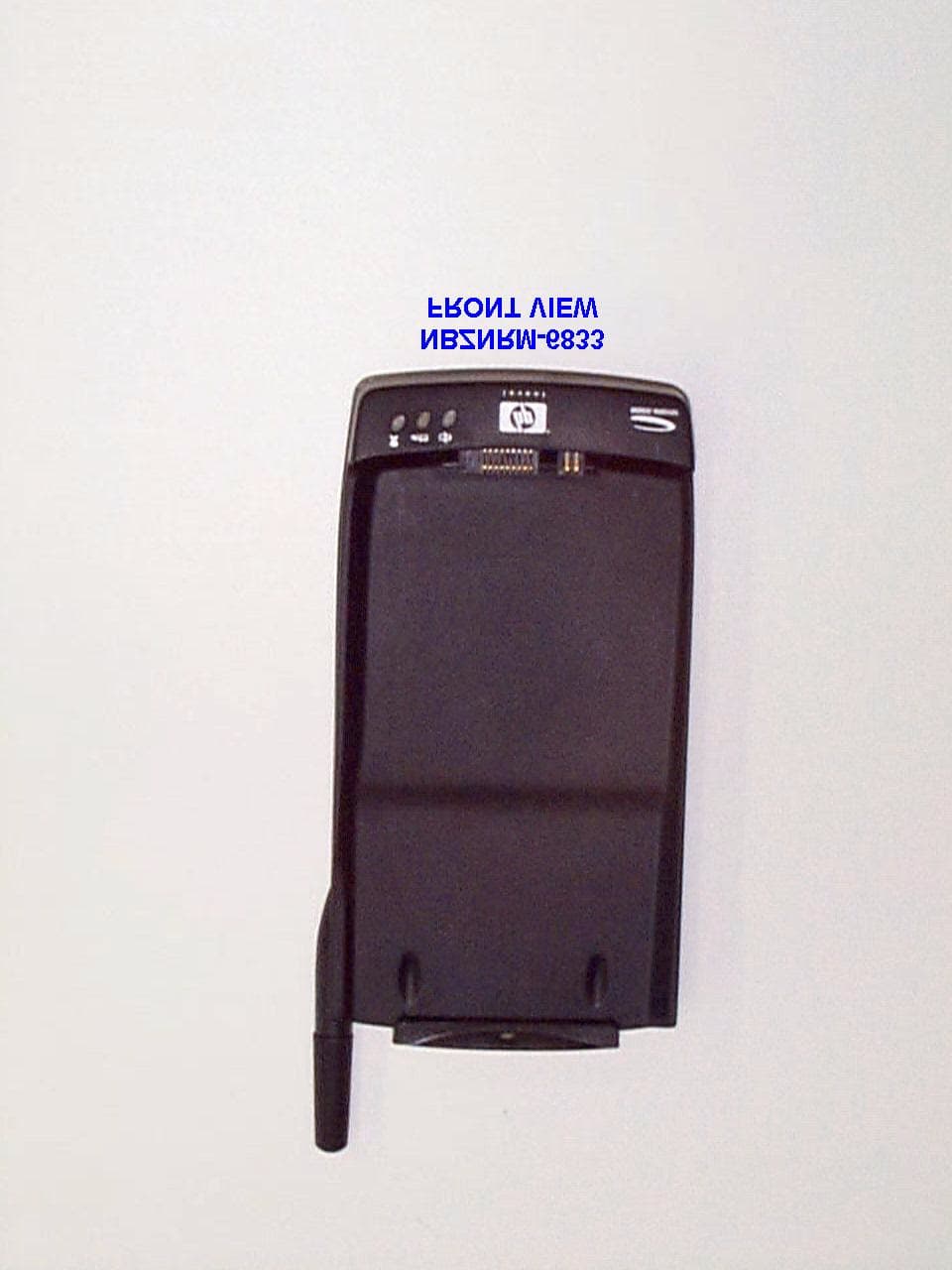
Click to zoom
Application Details
- Equipment Class
- TNB - Licensed Non-Broadcast Station Transmitter
- Date of Grant
- Oct 30, 2000
- Application Purpose
- Original Equipment
- Date of Application
- Sep 05, 2000
- Equipment Note
- MINSTREL 540 Wireless CDPD Modem
- Frequency Range
- 824.00000000 - 849.00000000
- Company
- Novatel Wireless, Inc.
- Country
- United States
Documents & Files
Document Text
Text extracted from the exhibit documents filed with the FCC. Open a document above to read the original.
Users Manual
June 2000 APREL Project No.: NVWB-MINSTREL 540 Consulting * Research * Training * Certification Testing Since 1981 Exhibit 9 Minstrel - 540 Novatel Wireless Technologies Ltd. FCC ID: NBZRNM6833 User’s Manual Minstrel Wireless Modem Accessory Quick Start Guide The Minstrel Wireless Modem Accessory provides wireless Internet connectivity for your HP Jornada 540 Pocket PC. In order to set up your Minstrel to access the Internet, follow the steps below. STEP 1 Connect the Jornada to your desktop computer using the communications software included with the Jornada. For information on how to do this, refer to the documentation supplied with the Jornada. STEP 2 Start the software installation by clicking Minstrel Modem Manager on the main window of the software installation program. If the installation program is not running, make sure that the Minstrel CD is inserted into your CD-ROM drive and double click on My Computer on your desktop. Then, double-click on your CD-ROM drive and then the Autorun.exe program. STEP 3 Following the instructions given by the installation program. The Minstrel software will automatically be installed to your Jornada once the desktop setup is complete. STEP 4 When the installation is complete, disconnect your Jornada from the desktop computer and attach the Minstrel wireless modem to the Jornada. To attach the Minstrel to the Jornada, position the devices so the front of the Minstrel is facing the back of the Jornada. Slide the Jornada down past the Minstrel's latch so that the two connectors of the Minstrel meet with the connector slots on the bottom edge of the Jornada. Then, lift up on the latch on the top of the Minstrel and slide the Jornada underneath it to secure the Jornada in place. STEP 5 Set up an account with a Wireless IP service provider in your area. You will need to provide the EID number found on the back of the Minstrel and record the network information you are given when setting up the account. STEP 6 Start the Configuration Wizard to configure your Minstrel. To start this program, select Programs from the Start menu on your Jornada. Then, locate the Modem Manager icon from the main window and tap it to start the Modem Manager program. The Modem Manager software will indicate that the modem has not yet been configured. When prompted, choose to start the Configuration Wizard program. If the modem has previously been configured and you are not prompted, select Configuration Wizard from the File menu. For information on the Configuration Wizard program, refer to the documentation included with the program by selecting Help from the Start menu found in the top left corner of the window. STEP 7 Once the configuration has been complete successfully, start the Modem Manager to register your wireless modem to the Wireless IP network. In order to send and receive data across the Internet, the Minstrel must be registered to this network. To start the Modem Manager program, select Programs from the Start menu on your Jornada and tap the icon labeled Modem Manager. For information on the Modem Manager software, refer to the documentation included with the program by selecting Help from the Help menu found at the bottom of the window. STEP 8 Click on the Status tab and wait for the Modem Ready check box to be checked. This indicates that your modem is registered to the network and is therefore ready to transmit and receive data. Also, the service LED found at the bottom of the Minstrel will be solid green when registration is successful. STEP 9 If you wish to use Internet Explorer to browse the web, start Internet Explorer and then select Options... from the Tools menu. Move to the Connections tab and select Minstrel from the Type list. Click OK. To connect to the Internet in the future, just start Internet Explorer as the Minstrel will automatically register to the network. If there are other Internet applications you wish to use on your Jornada, please consult the document provided with the application to determine how to set it up for use with the Minstrel. CONGRATULATIONS You are now ready to access the Internet using your Minstrel wireless modem accessory. For more information about your Minstrel wireless modem, select Novatel Minstrel Modem from the main Help listing on your Jornada. CUSTOMER FEEDBACK AND SUPPORT For software updates and to provide feedback on the beta field trial, or if you have any problems setting up your Minstrel wireless modem, please contact Novatel Wireless Customer Support. WWW:www.novatelwireless.com/support/index.html Phone: 1-888-888-9231 Email: [email protected] Fax:1-888-812-2888 NOTICE TO USERS This device has not been authorized as required by the rules of the Federal Communications Commission. This device is not, and may not be, offered for sale or lease, or sold or leased, until authorization is obtained. 01016914 Version B Novatel Minstrel Modem HelpPage 1 of 15 file://C:\WINDOWS\TEMP\User Guide.htm05/09/00 Minstrel 540 Help Getting Started Features and Requirements LEDs and Controls Charging the Battery Attaching the Minstrel to the HP Jornada Configuring the Minstrel Connecting to the Internet Notice to Users Customer Feedback and Support Configuration Wizard Introduction Starting Configuration Wizard Selecting a Wireless IP Service Provider Gathering the Network Information Entering the Network Addresses Reviewing and Saving the Configuration Configuration Saved Registration Check Registration Successful Troubleshooting Modem Manager Introduction Starting Modem Manager Menu Bar Config Tab Status Tab Advanced Tab Troubleshooting 01016914 Version B Main Configuration Wizard Help Introduction Selecting a Service Provider Gathering the Network Information Entering the Network Addresses Reviewing and Saving the Configuration Configuration Saved Registration Check Registration Successful Troubleshooting Help Modem Manager Help Introduction Menu Bar Novatel Minstrel Modem HelpPage 2 of 15 file://C:\WINDOWS\TEM…
Text truncated - open the document above for the full version.
Users Manual
1 Minstrel 540 TM User GuideVersion 1 GU-01016914 User Guide 2 Minstrel 540 TM User GuideVersion 1 GU-01016914 The information contained in this document is subject to change without notice and should not be construed as a commitment by Novatel Wireless, Inc. unless such commitment is expressly given in a covering document. The information herein is the exclusive property of Novatel Wireless Inc. No part of this publication may be reproduced or transmitted in any form or by any means including electronic storage, repro- duction, execution, or transmission without the prior written consent of Novatel Wireless, Inc. © 2000 Novatel Wireless, Inc. All rights reserved. Microsoft ® ,Windows ® ,Microsoft ® Pocket Internet Explorer,Microsoft ® Pocket Outlook,and Microsoft ® ActiveSync ® are either registered trademarks or trademarks of Microsoft Corporation in the United States and/or other countries. All other brand names and product names used in this document are trade names, service marks, trademarks, or registered trademarks of their respec- tive owners. 3 Minstrel 540 TM User GuideVersion 1 GU-01016914 Welcome.................................................................................................................................4 Getting Started....................................................................................................................... 5 Requirements ............................................................................................................. 6 Overview of the Minstrel 540 Modem ......................................................................... 7 Overview of the Minstrel 540 Software..................................................................... 11 Charging the Battery................................................................................................. 12 Installing the Software .............................................................................................. 13 Attaching the Minstrel to the Jornada ....................................................................... 14 Configuring the Minstrel............................................................................................ 17 Connecting to the Internet ........................................................................................ 21 Working with the Minstrel 540............................................................................................ 23 Managing the Network Connection .......................................................................... 24 Using the Minstrel 540 Help ..................................................................................... 28 Using the HP Jornada Software ............................................................................... 30 Glossary ...............................................................................................................................32 Glossary A-Pp .......................................................................................................... 33 Glossary Pr-Si .......................................................................................................... 34 Glossary Sl-Z............................................................................................................35 4 Minstrel 540 TM User GuideVersion 1 GU-01016914 Welcome Welcome to theMinstrel 540 User Guide. This guide provides information on the many compo- nents and features of your Minstrel 540 Wireless IP modem, including the following: •A general overview of the Minstrel 540 modem and software •Instructions to help get you started with your Minstrel 540 so you can download web pages and send and receive email almost immediately •Detailed information about working with your Minstrel 540 Caution To satisfy FCC RF exposure compliance requirements for portable transmitting devices, the user should generally maintain a separation distance of 4 cm between the person’s body, and the device and its antenna. The hands and wrists have a higher exposure limit because they are extremities, and the device should be used in a hand-held, hand-operated configuration only. This device has been tested for compliance with a separation distance of 4 cm from a person's body. The operating configurations of this device generally do not support normal transmissions while it is carried in pockets or holsters next to a person’s body. Technical Support If you have any questions or comments about your Minstrel 540, please contact the Novatel Wire- less Technical Support team. WWW:www.novatelwireless.com/support/index.html Email:[email protected] Phone:1-888-888-9231 Fax:1-888-812-2888 5 Minstrel 540 TM User GuideVersion 1 GU-01016914 Getting Started 6 Minstrel 540 TM User GuideVersion 1 GU-01016914 Requirements The following is required to set up and use your Minstrel 540 for sending and receiving data across the Internet: •An HP Jornada 540-series Pocket PC •Microsoft ® ActiveSync ® software to allow you to communicate between your desktop PC and the Jornada •Modem application software for the Jornada (included with your Minstrel) •An account with a Wireless IP service provider in your area •Application software for your Jornada such as an email client and web browser Wireless IP service is available from your local cellular carrier in most North American cities. Check your product packaging or www.novatelwireless.com for service provider contact informa- tion. 7 Minstrel 540 TM User GuideVersion 1 GU-01016914 Overview of the Minstrel 540 Modem The Minstrel 540 Wireless IP modem has many important features, including three status indicator LEDs, a latch for attaching the unit to the Jornada, and a DC jack for powering the unit and charg- ing the battery using the supplied AC adapter. Information on the LEDs is provided in the section following. For more information on the latch and the DC jack, refer to sectionsAttaching the Minstrel to the JornadaandCharging t…
Text truncated - open the document above for the full version.
Attestation Statements
June 2000 APREL Project No.: NVWB-MINSTREL 540 Consulting * Research * Training * Certification Testing Since 1981 Exhibit 1 Minstrel - 540 Novatel Wireless Technologies Ltd. FCC ID: NBZRNM6833 Authorization letter Letter requesting Confidentiality Letter from Novatel authorizing to use Novatel NRM6832 Radio Modem (FCC ID NBZNRM6832) in the Minstrel 540
Attestation Statements
June 2000 APREL Project No.: NVWB-MINSTREL 540 Consulting * Research * Training * Certification Testing Since 1981 Exhibit 11 Minstrel - 540 Novatel Wireless Technologies Ltd. FCC ID: NBZRNM6833 FCC Part 15, Subpart B, DoC letter
Cover Letter(s)
June 2000 APREL Project No.: NVWB-MINSTREL 540 Consulting * Research * Training * Certification Testing Since 1981 Table of Contents Wireless CDPD Modem Minstrel - 540 FCC ID: NBZRNM6833 Novatel Wireless Technologies Ltd. C C O O V V E E R R L L E E T T T T E E R R Exhibit 1: Authorization Letter and, Request for confidentiality Letter from Novatel authorizing to usu Novatel NRM6832 Radio Modem in the Minstrel 540 (FCC ID NBZNRM6832) Exhibit 2:Engineering Report (ERP & Spurious) Exhibit 3: Technical Descriptions and Tune-up Procedure Exhibit 4: FCC ID Label and location Exhibit 5:Photographs of the Equipment Exhibit 6: Block Diagram (Confidential) Exhibit 7: Schematic Diagram (Confidential) Exhibit 8:Parts List (Confidential) Exhibit 9:User’s Manual Exhibit 10:SAR Report (Includes Test Set-up Photographs) Exhibit 11: Declaration of Conformity Letter
Cover Letter(s)
* Consulting * Research * Training * Certification Testing Since 1981 51 Spectrum Waytel: (613) 820-2730 Nepean, Ontariovisit our Web Pages: www.aprel.comfax: (613) 820-4161 Canada K2R 1E6email: [email protected] 20 October 2000 Mr. Errol Chang FCC Application Processing Branch Re:Question from the FCC FCC ID:NBZNRM6833 Correspondence Reference Number:16687 731 Confirmation NumberEA98660 Date of Original E-Mail:10/19/2000 Dear Mr. Chang: Pursuant to your e-mail to APREL Laboratories' Jay Sarkar, I am forwarding to you our responses to item 1. The relevant portions of the FCC’s e-mail follow with our response inserted in the appropriate place: > 1.Two test configurations were used in the body-worn SAR > evaluation, "Clip" and "Phone" parallel to the phantom. Please > clarify or provide illustrations for these two test configurations. > Sent: Thursday, October 19, 2000 10:23 AM > To:Jayanta (Jay) Sarkar, [email protected] APREL Laboratories > From:Errol Chang, [email protected] > FCC Application Processing Branch > Re:FCC ID NBZNRM6833 > Applicant:Novatel Wireless Technologies Ltd > Correspondence Reference Number:16687 > 731 Confirmation Number:EA98660 > Date of Original E-Mail:10/20/2000 > > 1. The revised RF exposure statement in the manual differs > from that submitted previously. We would, therefore, like > you to confirm the following. The originally submitted RF exposure statement was erroneously carried over from the previous fillings for the similar products Minstrel III and Mintrel IV (FCC ID NBZNRM-6832). Those two had to be submitted as mobile products because they were re-using the FCC ID for a CDPD module that had a grant as a mobile device, thus the reference to a 20 cm separation. The device * Consulting * Research * Training * Certification Testing Since 1981 51 Spectrum Waytel: (613) 820-2730 Nepean, Ontariovisit our Web Pages: www.aprel.comfax: (613) 820-4161 Canada K2R 1E6email: [email protected] now under consideration is seeking approval as a portable device and the SAR measurements show that the device meets the FCC's health and safety requirements at a standard separation distance of 4 cm (agreed to by the FCC and Novatel Wireless in a meeting in June 2000 and confirmed in follow up e-mail). The RF exposure statement was therefore corrected to reflect this. I trust that the above will answer your inquiry. If not, feel free to contact me. Regards, Paul G. Cardinal, Ph.D. Director, Laboratory Operations
ID Label/Location Info
June 2000 APREL Project No.: NVWB-MINSTREL 540 Consulting * Research * Training * Certification Testing Since 1981 Exhibit 4 Minstrel - 540 Novatel Wireless Technologies Ltd. FCC ID: NBZRNM6833 FCC ID Label D C B A 4321 D C B A 4321 ECOAPV.DESCRIPTIONDATEREVDWN Initial ReleaseKM Novatel Wireless Technologies Ltd. Calgary, AB DWN: KM CHK: YdO NOTES: LABEL FCC (MINSTREL 540) SIZEFSCM NODWG NOREV ADA-010169021 SCALE 1 : 1 SHEET 1 OF 1 MINSTREL 540 WIRELESS IP MODEM FCC ID: NBZNRM-6833 CANADA: MADE IN USA SW: TA05-01AHW:01-01-01 Notes: 1) Built with process drawing DP-01016902 *0060D60026D0* MINSTREL 540WIRELESS IP MODEM FCC ID: NBZNRM6833CANADA:MADE IN USA SW: TA05-01A HW:01-01-01 *0060D60026D0*
ID Label/Location Info
June 2000 APREL Project No.: NVWB-MINSTREL 540 Consulting * Research * Training * Certification Testing Since 1981 Exhibit 4 Minstrel - 540 Novatel Wireless Technologies Ltd. FCC ID: NBZRNM6833 FCC ID Label D C B A 4321 D C B A 4321 ECOAPV.DESCRIPTIONDATEREVDWN Initial ReleaseKM Novatel Wireless Technologies Ltd. Calgary, AB DWN: KM CHK: YdO NOTES: LABEL FCC (MINSTREL 540) SIZEFSCM NODWG NOREV ADA-010169021 SCALE 1 : 1 SHEET 1 OF 1 MINSTREL 540 WIRELESS IP MODEM FCC ID: NBZNRM6833 CANADA: MADE IN USA SW: TA05-01AHW:01-01-01 Notes: 1) Built with process drawing DP-01016902 *0060D60026D0* MINSTREL 540WIRELESS IP MODEM FCC ID: NBZNRM6833CANADA:MADE IN USA SW: TA05-01A HW:01-01-01 *0060D60026D0*
Internal Photos
June 2000 APREL Project No.: NVWB-MINSTREL 540 Consulting * Research * Training * Certification Testing Since 1981 Exhibit 5 Minstrel - 540 Novatel Wireless Technologies Ltd. FCC ID: NBZRNM6833 Photographs of the Equipment Internal External
RF Exposure Info
June 2000 APREL Project No.: NVWB-MINSTREL 540 Consulting * Research * Training * Certification Testing Since 1981 Exhibit 10 Minstrel - 540 Novatel Wireless Technologies Ltd. FCC ID: NBZRNM6833 SAR Report (With Test Set-up Photographs) Page 2 of 24 51 Spectrum WayProject #: NVWB-Minstrel 540-3526 Nepean, Ontario, K2R 1E6 Tel. (613) 820-2730 Fax (613) 820 4161 e-mail: [email protected] © APREL 2000 This report shall not be reproduced, except in full, without the express written approval of APREL Laboratories. FCC ID:NBZNRM-6833 Applicant:Novatel Wireless Technologies Ltd. Equipment:Wireless CDPD Modem Model:Minstrel 540 Standard:FCC 96 –326, Guidelines for Evaluating the Environmental Effects of Radio- Frequency Radiation ENGINEERING SUMMARY This report contains the results of the engineering evaluation performed on a Novatel Minstrel 540 wireless CDPD modem. The measurements were carried out in accordance with FCC 96-326. The Minstrel 540 CDPD modem was evaluated at its nominal maximum ERP (power level 2) with 100% duty factor. The Minstrel 540 CDPD modem is an attachment for the HP Jornada PDA. The assembled device is intended to transmit while being operated from the user’s hand. The Minstrel 540 CDPD modem was tested at low, middle and high channels and on the LCD, back, antenna and top sides. The maximum 10g SAR (3.91 W/kg) was found to coincide with the peak performance RF output power of channel 991 (low, 824.04 MHz) for the antenna side of the assembled device. Test data and graphs are presented in this report. At a separation distance of 4 cm from the device, the maximum 1g SAR is 0.23 W/kg. The user manual will have a warning to keep bystanders, and parts of the user’s body other than their hands, at least 4 cm away from the antenna. Based on the test results and on how the device will be used, it is certified that the product meets the requirements as set forth in the above specifications, for an uncontrolled RF exposure environment. (The results presented in this report relate only to the sample tested.) Page 3 of 24 51 Spectrum WayProject #: NVWB-Minstrel 540-3526 Nepean, Ontario, K2R 1E6 Tel. (613) 820-2730 Fax (613) 820 4161 e-mail: [email protected] © APREL 2000 This report shall not be reproduced, except in full, without the express written approval of APREL Laboratories. TABLE OF CONTENTS 1.Introduction4 2.Applicable Documents4 3.Equipment Under Investigation4 4.Test Equipment5 5.Test Methodology5 6.Test Results6 6.1.Transmitter Characteristics6 6.2.SAR Measurements7 7.Bystander / non-extremities9 8.Conclusions11 TABLES AND FIGURES Table 1. Sampled Radiated RF Power........................................................................7 Table 2.SAR Measurements..................................................................................9 Table 3.SAR versus DUI-Phantom Separation.............................................................9 Table 4.Electric Properties of the Simulated Muscle Tissue at 835 MHz...........................23 Figure 1.Setup and Setup Close-up12 Figure 2.Grid inside the Phantom12 Figure 3.Contour Plot of the Area Scan 2.5mm Above Phantom Surface13 Figure 4.Surface Plot of the Area Scan 2.5mm Above Phantom Surface13 Figure 5.Contour Plot of the Area Scan 12.5mm Above Phantom Surface14 Figure 6.Surface Plot of the Area Scan 12.5mm Above Phantom Surface14 Figure 7.Zoom Scan 2.5mm Above Phantom Surface15 Figure 8.Zoom Scan 7.5mm Above Phantom Surface15 Figure 9.Zoom Scan 12.5mm Above Phantom Surface15 Figure 10.Zoom Scan 17.5mm Above Phantom Surface16 Figure 11.Zoom Scan 22.5mm Above Phantom Surface16 Figure 12.Overlay of the DUI’s Outlines Superimposed onto the Area Scan17 Figure 13.Local SAR versus Sensor Separation17 Figure 14.Local SAR versus DUI Separation from Phantom Surface18 Figure 15.Electric Properties of the Simulated Muscle Tissue22 Figure 16.Tissue Conversion Factor of the Probe for the Simulated Tissue23 Figure 17.Contour Plot of the Reference Area Scan 2.5mm Above Phantom24 Figure 18.Surface Plot of the Reference Area Scan 2.5mm Above Phantom24 Page 4 of 24 51 Spectrum WayProject #: NVWB-Minstrel 540-3526 Nepean, Ontario, K2R 1E6 Tel. (613) 820-2730 Fax (613) 820 4161 e-mail: [email protected] © APREL 2000 This report shall not be reproduced, except in full, without the express written approval of APREL Laboratories. 1. INTRODUCTION Tests were conducted to determine the Specific Absorption Rate (SAR) of a sample of a Novatel Minstrel 540 wireless CDPD modem . These tests were conducted at APREL Laboratories’ facility located at 51 Spectrum Way, Nepean, Ontario, Canada. A view of the SAR measurement setup can be seen in Appendix A Figure 1. This report describes the results obtained. 2. APPLICABLE DOCUMENTS The following documents are applicable to the work performed: 1) FCC 96-326, Guidelines for Evaluating the Environmental Effects of Radio-Frequency Radiation 2) ANSI/IEEE C95.1-1992, IEEE Standard for Safety Levels with Respect to Human Exposure to Radio Frequency Electromagnetic Fields, 3 kHz to 300 GHz. 3) ANSI/IEEE C95.3-1992, IEEE Recommended Practice for the Measurement of Potentially Hazardous Electromagnetic Fields – RF and Microwave. 4) OET Bulletin 65 (Edition 97-01) Supplement C (Edition 97-01), “Evaluating Compliance with FCC Guidelines for Human Exposure to Radio Frequency Electromagnetic Fields”. 3. EQUIPMENT UNDER INVESTIGATION • Two samples of Novatel Minstrel 540 wireless CDPD modem (s/n EID 0060D607CD91 and EID 0060D607CD8D), installed on • Two samples of HP Jornada personal digital assistant (PDA) (s/n SG01603387 and SG01603705) These units were received on 10 August 2000. The HP Jornada PDA with the Novatel Minstrel 540 wireless CDPD modem will be called DUI (Device Under Investigation) in the following. The DUI can operate in the frequency range 824-849 MHz. The antenna at the top left side of the DUI is a quarter wavelength helical antenna, 2.25 cm long (tip-shoulder). A photograph of Page 5 of 24 51 Spectrum W…
Text truncated - open the document above for the full version.
Test Report
June 2000 APREL Project No.: NVWB-MINSTREL 540 Consulting * Research * Training * Certification Testing Since 1981 Exhibit 2 Minstrel - 540 Novatel Wireless Technologies Ltd. FCC ID: NBZRNM6833 Engineering Reports (With Test Set-up Photographs) Effective Radiated Power Spurious Radiation Assessment of Compliance for Measurement of Effective Radiated Power (ERP) in accordance with the FCC Rules & Regulations Part 2.1046 Wireless CDPD Modem Minstrel 540 Novatel Wireless Technologies Ltd. 51 Spectrum Way Nepean ON K2R 1E6 Tel: (613) 820-2730 Fax: (613) 820-4161 email: [email protected] August 2000 NVWB-MINSTREL 540 -3539 This report shall not be reproduced, except in full, without the express written approval of APREL Laboratories * Consulting * Research * Training * Certification Testing Since 1981 51 Spectrum Waytel: (613) 820-2730 Nepean, Ontariovisit our Web Pages: www.aprel.comfax: (613) 820-4161 Canada K2R 1E6email: [email protected] August 2000 Page 2 APREL Project No NVWB-MINSTREL 540-3539 This report shall not be reproduced, except in full, without the express written approval of APREL Laboratories Consulting * Research * Training * Certification Testing Since 1981 FCC ID:NBZNRM6833 Applicant:Novatel Wireless Technologies Ltd. Equipment:Wireless CDPD Modem Model:Minstrel 540 Standard:FCC Rules and Regulations Part 2.1046 ENGINEERING SUMMARY This report contains the results of the effective radiated power (ERP) measurement performed on a NOVATEL WIRELESS Minstrel 540 wireless CDPD modem. The measurements were carried out in accordance with the FCC Rules and Regulations Part 2.1046. The product was evaluated for ERP when it was set at the maximum power level. The Minstrel 540 wireless CDPD modem is an attachment for the Handspring Visor PDA. Minstrel 540 was tested for ERP at high, middle, and low frequencies with the maximum ERP obtained at channel No.: 991 with the frequency being 824.04 MHz. The test data is presented in this report under the section: Test Results. The measured ERP is 0.316 W. (The results presented in this report relate only to the sample tested) August 2000 Page 3 APREL Project No NVWB-MINSTREL 540-3539 This report shall not be reproduced, except in full, without the express written approval of APREL Laboratories Consulting * Research * Training * Certification Testing Since 1981 Summary of the Results Test DescriptionPage No. Test Set-up Figure No. Results Summary RF Power Output as Radiated Ref. Paragraph 2.104681Passed August 2000 Page 4 APREL Project No NVWB-MINSTREL 540-3539 This report shall not be reproduced, except in full, without the express written approval of APREL Laboratories Consulting * Research * Training * Certification Testing Since 1981 INTRODUCTION General This report describes the results of the effective radiated power (ERP) measurement conducted on a Novatel Wireless Minstrel 540 wireless CDPD modem herein referred to as DUI (Device under Investigation) Test Facility The tests were performed for Novatel by APREL Laboratories at APREL’s EMI facility located in Nepean, Ontario, Canada. The laboratory operates an (3m and 10m) Open Area Test Site (OATS). The measurement facility is calibrated in accordance with ANSI C63.4-1992. A description of the measurement facility in accordance with the radiated and AC line conducted test site criteria per ANSI C63.4-1992 is on file with the Federal Communications Commission and is in compliance with the requirements of Section 2.948 of the Commissions rules and regulations. APREL’s registration number is: 90416 APREL is accredited by Standard Council of Canada, under PALCAN program (ISO Guide 25). APREL is also accredited by Industry Canada (formerly DOC) and recognised by the Federal Communications Commissions (FCC). Standard The evaluation and analysis were conducted in accordance with FCC Rules and Regulations Parts 2.1046 and the appropriate limits. Test Equipment The test equipment used during the evaluation is listed in Appendix A with calibration due dates. Environmental Conditions Measurements were conducted in open area test site. - Temperature:15 °C ± 2 - Relative Humidity:30 - 50 % August 2000 Page 5 APREL Project No NVWB-MINSTREL 540-3539 This report shall not be reproduced, except in full, without the express written approval of APREL Laboratories Consulting * Research * Training * Certification Testing Since 1981 - Air Pressure:101 kPa ± 3 FCC SUBMISSION INFORMATION FCC ID:NBZNRM6833 Equipment:Wireless CDPD Modem Model:Minstrel 540 For:Certification Applicant:Novatel Wireless Technologies Ltd. Suite 200 6715-8 th Street, N.E. Calgary, Alberta Canada, T2E 7H7 Manufacturer: Novatel Wireless Technologies Ltd. Suite 200 6715-8 th Street, N.E. Calgary, Alberta Canada, T2E 7H7 Evaluated by:APREL Laboratories 51 Spectrum Way Nepean, Ontario Canada K2R 1E6 August 2000 Page 6 APREL Project No NVWB-MINSTREL 540-3539 This report shall not be reproduced, except in full, without the express written approval of APREL Laboratories Consulting * Research * Training * Certification Testing Since 1981 MANUFACTURER’S DATA FCC ID No:NBZNRM6833 Equipment Type:Wireless CDPD Modem Model:Minstrel 540 Reference:FCC Rules and Regulations Parts 2 and Part 22 Manufacturer:Novatel Wireless Technologies Ltd. Power Source:DC Battery Development Stage of Unit:Production GENERAL SPECIFICATIONS 1.Frequency Range:824 to 849 MHz (Transmitter) 2.Output Power:0.316 W ERP 3. Frequency Tolerance:2.5 ppm 4.Type of Modulation:GMSK 5.Emission Designators(See 47 CFR § 2.201 and §2.202) 28K8FXW 6. Antenna Impedance:50 Ohms August 2000 Page 7 APREL Project No NVWB-MINSTREL 540-3539 This report shall not be reproduced, except in full, without the express written approval of APREL Laboratories Consulting * Research * Training * Certification Testing Since 1981 N N o o v v a a t t e e l l W W i i r r e e l l e e s s s s TEST RESULTS FOR Effective Radiated Power (ERP) Of Novatel Wireless Minstrel 540 CDPD modem August 2000 Page 8 APREL P…
Text truncated - open the document above for the full version.
Test Report
August 2000 APREL Project No.: NVWB-MINSTREL 540 Consulting * Research * Training * Certification Testing Since 1981 Exhibit 12 Minstrel 540 Novatel Wireless Technologies Ltd. FCC ID: NBZNRM6833 With a Novatel NRM6832 CDPD Transmitter (FCC ID: NBZNRM6832 Test Data) Test data for 2.1049(C)(1) and 2.1047 : Modulation Emission Mask/s (Occupied Bandwidth ) 2.1051(2.991): Spurious Emissions at Antenna Terminal 2.1055(2.995): Frequency Stability
Test Report
June 2…
Text truncated - open the document above for the full version.
Contact Information
Applicant
Bill Babbitt(Manager- Regulatory Engineering)
Technical Contact
Novatel Wireless Technologies Ltd.Owen Thistle
[email protected](403)295-4800
51 Spectrum Way · Calgary, Alberta · Canada
Non-Technical Contact
Novatel Wireless Technologies Ltd.Owen Thistle
[email protected]403)295-4800
Test Firm
APREL LaboratoriesJay Sarkar
Technical Specifications
| # | Rule Parts | Frequency Range | Power Output | Emission | Tolerance |
|---|---|---|---|---|---|
| 1 | 22H | 824 MHz - 849 MHz | 316.00 mW | 28K8FXW | 2.5000000000 ppm |
Other Applications from Novatel Wireless, Inc.

NBZNRM-CC208
Aug 02, 2011Cellular/ PCS CDMA and WiMAX PC Card/ Express Card Transceiver
Equipment Class
PCB - PCS Licensed Transmitter
NBZNRM-MC545
Nov 23, 2010MC545High-Speed Data Modem
Equipment Class
PCB - PCS Licensed Transmitter
NBZNRM-MC547
Nov 09, 2010MC545/MC547 HSPA+ Dual- Carrier High-Speed Data Modem
Equipment Class
PCB - PCS Licensed Transmitter
NBZNRM-MIFI2372R
Feb 21, 2010GSM/WCDMA USB WWAN Modem w/WLAN
Equipment Class
PCB - PCS Licensed Transmitter
NBZNRM-MIFI2352R
Jan 26, 2010GSM/WCDMA USB WWAN Modem w/WLAN
Equipment Class
DTS - Digital Transmission System