NMEAVTS1010AVTS1010
Data Critical Corporation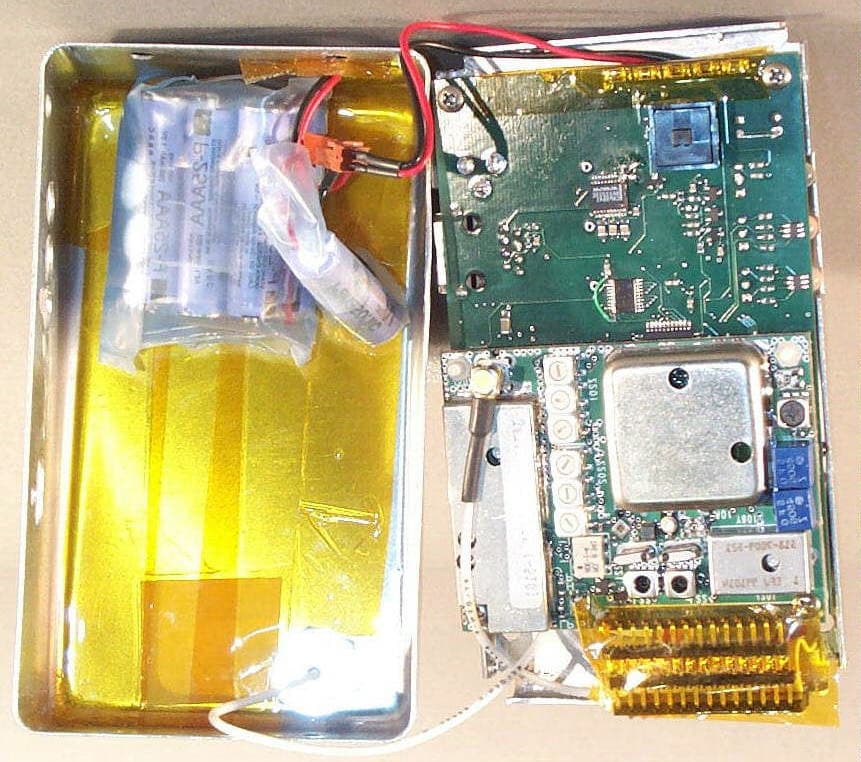
Click to zoom
Application Details
- Equipment Class
- TNB - Licensed Non-Broadcast Station Transmitter
- Date of Grant
- Sep 05, 2002
- Application Purpose
- Original Equipment
- Date of Application
- Jul 20, 2000
- Equipment Note
- AVTS1010
- Frequency Range
- 450.00000000 - 466.00000000
- Company
- Data Critical Corporation
- Country
- United States
Documents & Files
Document Text
Text extracted from the exhibit documents filed with the FCC. Open a document above to read the original.
Users Manual
EXHIBIT U – User Manual FCC ID# NMEAVTS1010 DATA CRITICAL CORP. AlarmView™ Users Guide Document Precautionary Information Caution Instructions - For continued safe use of this equipment, it is necessary that the listed instructions be followed. However, instructions listed in this manual in no way supersede established medical procedures concerning patient care. Intended Use - The system is intended to monitor various patient- monitoring devices for alarm conditions, and responds by transmitting message data that includes text information from the patient. Confirmation - When the system sends out a page, there is NO confirmation back that the intended pager has successfully received the page. Maintenance - Failure on the part of the hospital or institution to maintain the equipment as outlined in this manual may cause pre-mature equipment failure. Installation - The AlarmView System has been installed by qualified technicians. Modification of this installation may cause undue equipment failure. Electromagnetic Interference - The AlarmView System may cause electromagnetic interference with devices operated in close proximity to the transmitter (refer to Appendix C). System Components - Do not spill liquids on any of the AlarmView™ System components. Warnings Patient Monitoring - The most reliable method of patient monitoring combines close personal surveillance with correct operation of monitoring equipment. Patient alarm conditions and notifications are primary functions of the patient monitoring system. It is imperative that the caregiver and/or monitoring floor technicians monitor patient alarm conditions. The AlarmView System is not intended for use as the primary source for the patient alarm notification. Accidental Spills - In the event fluids are accidentally spilled in the equipment, take the equipment out of service and check for damage. Check operation after drying 24 hours later. Antenna Placement - The transmitter unit with a transmitter antenna may interfere with computer equipment with electronic switchboards located close to the antenna. If the transmitter unit must be located close to these types of equipment, a remote antenna should be used. Change of Performance - If the system fails to page users reliably, contact the hospital staff responsible for electromagnetic environment and Data Critical Corp. immediately. (Data Critical Corp. 24 hour support at 1-877-322-7828) Electrical Shock - To reduce the risk of electrical shock, DO NOT remove cover (or back). Refer servicing to qualified personnel. ! Environment - Data Critical Corporation does not assume responsibility for damage to the equipment caused by improperly vented cabinets, improper or faulty power, or insufficient wall strength to support equipment mounted on such walls. Explosion Hazard - Do not use this equipment in the presence of flammable anesthetics, skin cleaning agents, and disinfectants. Great care must be exercised when the device is used in an oxygen-enriched atmosphere. The atmosphere is considered to be oxygen enriched when the room air contains more than 25% of oxygen or nitrous oxide. Home Use - AlarmView™ System is not intended for home use. Power - Convenience outlets and all others that may be used for the patient must be on the hospital emergency circuit so that they are energized at all times. Site Surveys - Each institution is responsible for surveying existing equipment and ensuring no conflict exists when considering the introduction of additional radiating devices. Transmission Bands - Each institution is responsible for maintaining continued surveillance of transmission bands being used in the facility to prevent co-occupation of bands and cross-band interference. Indications for Use This device is intended for use in real-time monitoring of routine patient status and alarm events on medical devices. It serves as a parallel, redundant mechanism to inform the clinical staff of patient events. It is intended to be a secondary means of annunciating and displaying patient alarm information to mobile healthcare providers. AlarmView is limited to use by qualified medical professionals who have been trained on the use of the device. It is intended for use in hospital and hospital type environments and is not for home use. AlarmView is intended to supplement and not to replace any part of the current device monitoring procedures. AlarmView is not considered in and of itself to be diagnostic without skilled interpretation and does not replace physician’s care. AlarmView is currently validated for use with the N-x9y and the N-3000 data protocols. Please note that we have demonstrated compatibility with the data protocols that Nellcor Puritan Bennett has defined, not the individual monitors. However, for FDA reference, the chart below indicates all models using the protocol. Data Critical is compatible with all the listed monitors. Protocol:All Current Models: N-x9yN-290, N-295 N-3000N-3000 For devices not listed in the above compatibility chart, a separation distance of 5.5 feet between the AlarmView Transmitter and other emitting devices should be observed. For the devices listed on the above compatibility chart, the AlarmView Transmitter may be placed in either of the configurations described below: • The AlarmView transmitter can be located remotely from the patient device (e.g. place the AlarmView Transmitter on the wall instead of the patient monitoring equipment). • When placing the AlarmView Transmitter in close proximity to the patient monitoring equipment, place it as shown in the drawing below, using the velcro attachment provided: Alarm Data The alarm data that the AlarmView system echoes are listed in the following chart. AlarmNx9yN3000 SPO2 Upper LimitXX SPO2 Lower LimitXX PR Upper LimitXX PR Lower LimitXX No Pulse MotionXX No Pulse No MotionXX Sensor DisconnectXX HR Upper LimitX HR Lower LimitX AsystoleX ECG Lead OffX ECG Cable OffX ECG Operations ErrorX ECG NoiseX RR Upper LimitX RR…
Text truncated - open the document above for the full version.
Users Manual
EXHIBIT T – Service Manual FCC ID# NMEAVTS1010 AlarmView™ Service and Installation Manual Page 1 DATA CRITICAL CORP. AlarmView™ Service and Installation Manual AlarmView™ Service and Installation Manual Page 2 Precautionary Information Caution Instructions - For continued safe use of this equipment, it is necessary that the listed instructions be followed. However, instructions listed in this manual in no way supersede established medical procedures concerning patient care. Intended Use - The system is intended to monitor various patient-monitoring devices for alarm conditions, and responds by transmitting message data that includes text information from the patient. Confirmation - When the system sends out a page, there is NO confirmation back that the intended pager has successfully received the page. Maintenance - Failure on the part of the hospital or institution to maintain the equipment as outlined in this manual may cause pre-mature equipment failure. Installation - The AlarmView System has been installed by qualified technicians. Modification of this installation may cause undue equipment failure. Electromagnetic Interference - The AlarmView System may cause electromagnetic interference with devices operated in close proximity to the transmitter (refer to Appendix C). System Components - Do not spill liquids on any of the AlarmView™ System components. AlarmView™ Service and Installation Manual Page 3 Warnings Patient Monitoring - The most reliable method of patient monitoring combines close personal surveillance with correct operation of monitoring equipment. Patient alarm conditions and notifications are primary functions of the patient monitoring system. It is imperative that the caregiver and/or monitoring floor technicians monitor patient alarm conditions. The AlarmView System is not intended for use as the primary source for the patient alarm notification. Accidental Spills - In the event fluids are accidentally spilled in the equipment, take the equipment out of service and check for damage. Check operation after drying 24 hours later. Antenna Placement - The transmitter unit with a transmitter antenna may interfere with computer equipment with electronic switchboards located close to the antenna. If the transmitter unit must be located close to these types of equipment, a remote antenna should be used. Change of Performance - If the system fails to page users reliably, contact the hospital staff responsible for electromagnetic environment and Data Critical Corp. immediately. (Data Critical Corp. 24 hour support at 1-877-322-7828) Electrical Shock - To reduce the risk of electrical shock, DO NOT remove cover (or back). Refer servicing to qualified personnel. Environment - Data Critical Corporation does not assume responsibility for damage to the equipment caused by improperly vented cabinets, improper or faulty power, or insufficient wall strength to support equipment mounted on such walls. Explosion Hazard - Do not use this equipment in the presence of flammable anesthetics, skin cleaning agents, and disinfectants. Great care must be exercised when the device is used in an oxygen-enriched atmosphere. The atmosphere is considered to be oxygen enriched when the room air contains more than 25% of oxygen or nitrous oxide. ! AlarmView™ Service and Installation Manual Page 4 Home Use - AlarmView™ System is not intended for home use. Power - Convenience outlets and all others that may be used for the patient must be on the hospital emergency circuit so that they are energized at all times. Site Surveys - Each institution is responsible for surveying existing equipment and ensuring no conflict exists when considering the introduction of additional radiating devices. Transmission Bands - Each institution is responsible for maintaining continued surveillance of transmission bands being used in the facility to prevent co-occupation of bands and cross- band interference. Service and Technical Support Direct all inquires to: Data Critical Corporation 19820 North Creek Parkway Suite 100 Bothell, WA 98011 For technical advice or information concerning any equipment in your AlarmView™ System, contact Technical Support. Call, toll free at 1-877-DCC-STAT (1-877-322-7828). Copyright © 1998-1999 Data Critical Corp. All Rights Reserved. AlarmView™ Service and Installation Manual Page 5 Conventions of this Manual Two items that may help you as you work through the AlarmView User’s Guide are the special notes and cautions that appear throughout this text. Individual icons identify these notes and cautions, and they alert you to special information. The Caution icon alerts you to possible problems that you may encounter as you work through the AlarmView™ System programs. The possibility of losing data, for example, is information that could be mentioned in a caution. NOTE The Note icon alerts you to tips or hints that may make it easier for you to work within AlarmView System programs. These might include data entry tips, additional information about a window or field, or recommended procedures. NOTE: Due to continuing product innovation, specifications in this manual are subject to change without notice. Trademarks: Nellcor Puritan Bennett™ are registered trademarks of Nellcor Puritan Bennett, Inc. Windows™ CE is a registered trademark of Microsoft Corporation. AlarmView™ System is registered trademark of Data Critical Corporation. AlarmView™ Service and Installation Manual Page 6 Purpose The technical publications staff of Data Critical Corporation. prepared this service manual for the AlarmView system. This manual is geared for qualified service representatives and technical personnel involved in maintaining and repairing the AlarmView system. This manual is geared toward trained biomedical engineers. Users are expected to have a strong background in electronics, including a strong background in analog circuitry, digital circuitry, and microprocessor and microcontroller architecture. Safety In…
Text truncated - open the document above for the full version.
Users Manual
EXHIBIT DD – Revised Service Manual FCC ID# NMEAVTS1010 Data Critical Corp. AlarmView™ {Replace with AlarmView color logo} Wireless Data Network System Administrator’s Manual The AlarmView™ System is intended for use with Nellcor™ NPB-290, NPB-295, N-395, and N-3000 Pulse Oximetry Monitoring Systems AlarmView™ is a trademark of Data Critical Corp. Nellcor Puritan Bennett Inc. is a wholly owned subsidiary of Mallinckrodt Inc. Nellcor™ is a trademark of Mallinckrodt Inc. Microsoft® and Windows® CE are registered trademarks of Microsoft Corporation. Compac® and Aero® are registered trademarks of Compaq Computer Corporation. All other trademarks and registered trademarks are the property of their respective owners. © 2000 Data Critical Corp. All rights reserved. AlarmView™ Wireless Data Network System Administrator’s Manual Table of Contents USING THIS MANUAL................................................................................1 Procedures........................................................................................1 Cautions............................................................................................1 Notes.................................................................................................1 For Basic Operations.........................................................................2 SAFETY INFORMATION.............................................................................3 System Warnings...............................................................................3 SECTION 1: ALARMVIEW™ SYSTEM OVERVIEW.........................................6 Introduction........................................................................................6 List of Components............................................................................7 System Features................................................................................8 Transmitter.....................................................................................8 Programmer.................................................................................10 Pager...........................................................................................11 SECTION 2: SYSTEM SPECIFICATIONS.....................................................13 Transmitter......................................................................................13 Programmer.....................................................................................14 Pager...............................................................................................14 Electromagnetic Interference (EMI)..................................................15 SECTION 3: INSTALLATION.....................................................................17 Setting Up Transmitter.....................................................................17 Connect Antenna..........................................................................17 Connect to AC Power...................................................................17 Connect to Monitor.......................................................................18 Transmitter Placement.................................................................19 Turning Transmitter On................................................................19 Turning Transmitter Off................................................................21 Operating Transmitter On Battery Power..........................................22 SECTION 4: PROGRAMMING...................................................................23 Using Programmer...........................................................................23 Changing System Parameters.........................................................24 Changing System Password.........................................................25 Changing Individual Transmitter Assignments...............................26 Changing Survey Page Configuration...........................................30 Changing Global System Parameters...........................................31 SECTION 5: TESTING AND PERIODIC MAINTENANCE..................................33 Testing System Safety.....................................................................33 Earth Leakage Current.................................................................34 Testing System Performance...........................................................34 Communications Page.................................................................35 Test Page.....................................................................................36 Transmitter Range Test (Survey Paging).........................................37 Periodic Maintenance......................................................................39 Batteries.......................................................................................39 Cleaning Procedures....................................................................40 Inspection and Testing.................................................................40 Service.........................................................................................40 SECTION 6: TROUBLESHOOTING.............................................................42 Error Messages...............................................................................42 Getting System Information..............................................................45 Determining Programmer Software Version.....................................45 Repairing and Replacing Parts.........................................................46 Technical Support............................................................................47 APPENDIX A: DEFAULT SETTINGS..........................................................A-1 Transmitter.....................................................................................A-1 Pager.......................................................................................…
Text truncated - open the document above for the full version.
Cover Letter(s)
EXHIBIT R – Agent Authorization Letter FCC ID# NMEAVTS1010 19820 NORTH CREEK PARKWAY, SUITE 100, BOTHELL, WA 98011 TEL 425.482.7000, FAX 425.482.7010, WEBSITE www.datacritical.com December 21, 1999 Federal Communications Commission Authorization and Evaluation Division 7435 Oakland Mills Road Columbia, Maryland 21046 To whom it may concern, We, the undersigned, hereby authorize Northwest EMC, Inc., to act on our behalf, as our agent, in the following matters related to the FCC approval of our products: report submittal, related correspondence, the signing of all documents relating to these matters, and any other lawful activity necessary to obtain such certification. Any act carried out by Northwest EMC, Inc. within the scope of this authorization shall have the same affect as our own. This authorization shall expire 12 months from original date. Sincerely, Christopher Hartzog Quality Assurance Engineer Data Critical Corporation
Cover Letter(s)
EXHIBIT BB – Anti-Drug Abuse Certification FCC ID# NMEAVTS1010 19820 NORTH CREEK PARKWAY, SUITE 100, BOTHELL, WA 98011 TEL 425.482.7000, FAX 425.482.7010, WEBSITE www.datacritical.com May 3, 2000 Northwest EMC, Inc. 22975 NW Evergreen Parkway, #400 Hillsboro, OR 97124 Re: Section 5301 (Anti-Drug Abuse) Certification To whom it may concern, This letter is certify to you that neither the applicant nor any party to the application is subject to a denial of Federal benefits, that include FCC benefits, pursuant to Section 5301 of the Anti-Drug Abuse Act of 1988, 21 U.S.C. §862 because of a conviction for possession or distribution of a controlled substance. Sincerely, Christopher Hartzog Quality Assurance Engineer Data Critical Corporation
Cover Letter(s)
EXHIBIT S – Request for Confidentiality FCC ID# NMEAVTS1010 19820 NORTH CREEK PARKWAY, SUITE 100, BOTHELL, WA 98011 TEL 425.482.7000, FAX 425.482.7010, WEBSITE www.datacritical.com July 17, 2000 Federal Communications Commission Authorization and Evaluation Division 7435 Oakland Mills Road Columbia, Maryland 21046 Subject: Request for Confidentiality - FCC ID NMEAVTS1010 To whom it may concern, Data Critical Corporation hereby requests, pursuant to 47 CFR paragraph 0.459, that the following items which are submitted to the Commission as part of the application for the AVTS1010 be withheld from public inspection: 1. Schematics 2. Functional Block Diagrams 3. Theory of Operation Document 4. Bill Of Materials We wish to withhold these items due to their content being privileged information. Disclosure of such information would be of substantial competitive harm and is confined to our authorized agents and our company. Thank you. Sincerely, Christopher Hartzog Quality Assurance Engineer Data Critical Corporation
Cover Letter(s)
Exhibits for the FCC application of Data Critical Corporation’s AlarmView AVTS1010 FCC ID: NMEAVTS1010 Exhibit Description File Name Confidential Exhibit A Theory of Operations Theory of Operations.pdf Yes Exhibit B Schematics Schematics.pdf Yes Exhibit C Schematics2 Schematics2.pdf Yes Exhibit D Bill of Materials Bill of Materials.pdf Yes Exhibit E Transceiver Block Diagram Transceiver Block Diagram.pdf Yes Exhibit F System Block Diagram System Block Diagram.pdf Yes Exhibit G Modulating Wavetrain Scope Modulating Wavetrain Scope.pdf Exhibit H Bode Plots Bode Plots.pdf Exhibit I Output Power Data Output Power.pdf Exhibit J Occupied Bandwidth Data Occupied Bandwidth.pdf Exhibit K VCO Schematic VCO Schematic.pdf Yes Exhibit L Spurious Emissions @ Antenna Terminals Data Spurious Emissions@ Antenna Terminals.pdf Exhibit M Field Strength of Spurious Radiation Data Field Strength of Spurious Radiation.pdf Exhibit N Frequency Stability Data Frequency Stability.pdf Exhibit O Transient Frequency Behavior Data Transient Frequency Behavior.pdf Exhibit P Circuit Description & Tune-up Procedure Circuit Description and Tune-up Procedure.pdf Exhibit R Agent Authorization Letter Agent Authorization Letter.pdf Exhibit S Request for Confidentiality Letter Request for Confidentiality Letter.pdf Exhibit T Service Manual AVService Manual.pdf Exhibit U User Guide AVUser Guide.pdf Exhibit V Technical Report Technical Report.pdf Exhibit W FCC ID Label FCC ID Label.pdf Exhibit X Photos Enclosure/Antenna/Assembly Enclosure-Antenna-Assembly Photos.pdf Exhibit Y Photos RF Board RF Board Photos.pdf Exhibit Z Photos System Board System Board Photos.pdf Exhibit AA Photos Power Supply Power Supply Photos.pdf Exhibit BB Anti Drug Certification AntiDrug Letter.pdf Exhibit CC Test Setup Photos Test Setup Photos.pdf
Cover Letter(s)
Revised List of Exhibits for the FCC application of Data Critical Corporation’s AlarmView AVTS1010 FCC ID: NMEAVTS1010 Exhibit Description File Name Confidential Exhibit A Theory of Operations Theory of Operations.pdf Yes Exhibit B Schematics Schematics.pdf Yes Exhibit C Schematics2 Schematics2.pdf Yes Exhibit D Bill of Materials Bill of Materials.pdf Yes Exhibit E Transceiver Block Diagram Transceiver Block Diagram.pdf Yes Exhibit F System Block Diagram System Block Diagram.pdf Yes Exhibit G Modulating Wavetrain Scope Modulating Wavetrain Scope.pdf Exhibit H Bode Plots Bode Plots.pdf Exhibit I Output Power Data Output Power.pdf Exhibit J Occupied Bandwidth Data Occupied Bandwidth.pdf Exhibit K VCO Schematic VCO Schematic.pdf Yes Exhibit L Spurious Emissions @ Antenna Terminals Data Spurious Emissions@ Antenna Terminals.pdf Exhibit M Field Strength of Spurious Radiation Data Field Strength of Spurious Radiation.pdf Exhibit N Frequency Stability Data Frequency Stability.pdf Exhibit O Transient Frequency Behavior Data Transient Frequency Behavior.pdf Exhibit P Circuit Description & Tune-up Procedure Circuit Description and Tune-up Procedure.pdf Exhibit R Agent Authorization Letter Agent Authorization Letter.pdf Exhibit S Request for Confidentiality Letter Request for Confidentiality Letter.pdf Exhibit T Service Manual AVService Manual.pdf Exhibit U User Guide AVUser Guide.pdf Exhibit V Technical Report Technical Report.pdf Exhibit W FCC ID Label FCC ID Label.pdf Exhibit X Photos Enclosure/Antenna/Assembly Enclosure-Antenna-Assembly Photos.pdf Exhibit Y Photos RF Board RF Board Photos.pdf Exhibit Z Photos System Board System Board Photos.pdf Exhibit AA Photos Power Supply Power Supply Photos.pdf Exhibit BB Anti Drug Certification AntiDrug Letter.pdf Exhibit CC Test Setup Photos Test Setup Photos.pdf Exhibit DD Revised Service Manual Revised Service Manual.pdf Exhibit EE Revised User Manual Revised User Manual.pdf
External Photos
EXHIBIT X – Photos – Enclosure/Antenna/Assembly FCC ID# NMEAVTS1010
External Photos
EXHIBIT AA – Photos – Power Supply FCC ID# NMEAVTS1010
ID Label/Location Info
EXHIBIT W – FCC ID Label FCC ID# NMEAVTS1010
Internal Photos
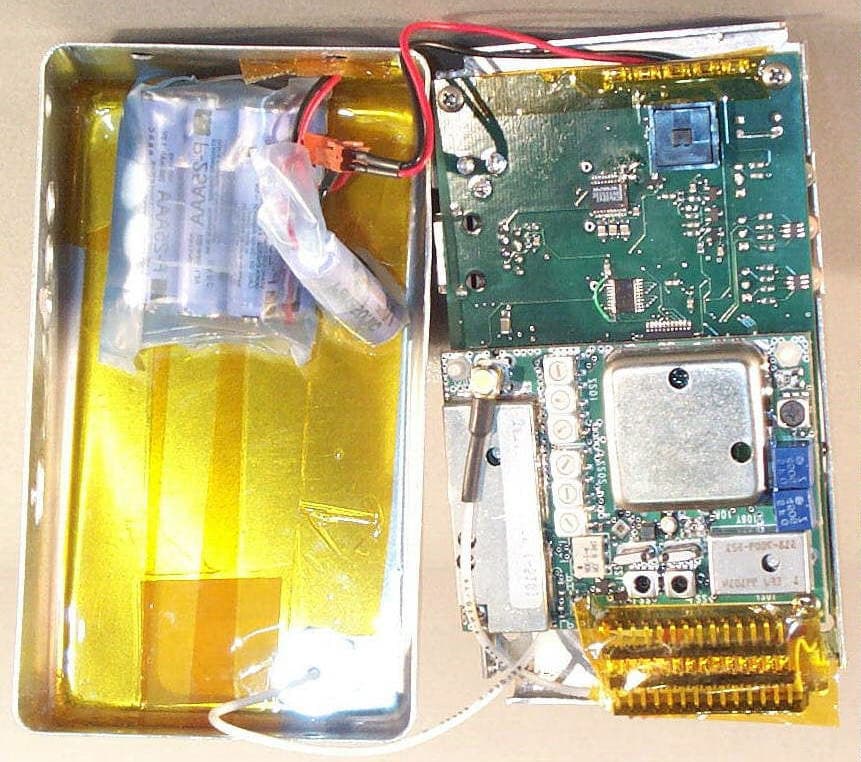
EXHIBIT Y – Photos – RF Board FCC ID# NMEAVTS1010
Internal Photos
EXHIBIT Z – Photos – System Board FCC ID# NMEAVTS1010
RF Exposure Info
EXHIBIT EE – Revised User Manual FCC ID# NMEAVTS1010 Data Critical Corp. AlarmView™ {Replace with AlarmView color logo} Wireless Data Network System User’s Guide The AlarmView™ System is intended for use with Nellcor™ NPB-290, NPB-295, N-395, and N-3000 Pulse Oximetry Monitoring Systems AlarmView™ is a trademark of Data Critical Corp. Nellcor Puritan Bennett Inc. is a wholly owned subsidiary of Mallinckrodt Inc. Nellcor™ is a trademark of Mallinckrodt Inc. Microsoft® and Windows® CE are registered trademarks of Microsoft Corporation. Compac® and Aero® are registered trademarks of Compaq Computer Corporation. All other trademarks and registered trademarks are the property of their respective owners. © 2000 Data Critical Corp. All rights reserved. AlarmView™ Wireless Data Network System User’s Guide Table of Contents Using this Guide..................................................................................1 Procedures........................................................................................1 Cautions............................................................................................1 Notes.................................................................................................1 For More Information.........................................................................1 Safety Information...............................................................................3 System Warnings...............................................................................3 Section 1: AlarmView™ System Overview.........................................6 Introduction........................................................................................6 AlarmView™ Transmitter................................................................6 AlarmView™ Pager.........................................................................6 AlarmView™ Handheld Programmer...............................................7 Section 2: AlarmView™ Transmitter Overview..................................8 Transmitter Product Description.........................................................8 Top Panel.......................................................................................8 Front Panel.....................................................................................8 Rear Panel....................................................................................10 Using the Transmitter.......................................................................10 Turning Transmitter On.................................................................10 Turning Transmitter Off.................................................................12 Operating Transmitter On Battery Power..........................................12 Testing System Setup......................................................................13 Send Test Page............................................................................13 Section 3: AlarmView™ Pager Overview.........................................14 Pager Product Description...............................................................14 Alarm Pages....................................................................................15 Alarm Page Event Levels..............................................................15 Alarm Page Format.......................................................................16 Alarm Page Types........................................................................16 Section 4: AlarmView™ Programmer Overview...............................19 Programmer Product Description.....................................................19 Using the Programmer.....................................................................20 Viewing and Editing Bed Numbers................................................21 Viewing and Editing Pager Numbers.............................................22 Viewing and Changing Bed and Pager Assignments.....................24 Assigning All Pagers from Transmitter...........................................28 Setting Reminder Page Delay.......................................................28 Section 5: Maintenance, Service, and Support................................31 Cleaning Procedures.......................................................................31 Inspection and Testing.....................................................................31 Service............................................................................................31 Technical Support............................................................................32 Appendix A: Basic Pager Functions...............................................A-1 Pager On/Off..................................................................................A-1 On...............................................................................................A-1 Off...............................................................................................A-1 Function Mode................................................................................A-2 Setting Tone/Vibrate....................................................................A-2 Setting Date/Time.....................................................…
Text truncated - open the document above for the full version.
Contact Information
Applicant
Sharon Untz
Technical Contact
Northwest EMC, Inc.Gregory V Kiemel
[email protected](503)844-4066
22975 NW Evergreen Parkway, Suite 400 · Hillsboro, Oregon · United States
Non-Technical Contact
Northwest EMC, Inc.Vicki L Albertson
[email protected](503)844-4066
Test Firm
Northwest EMC, Inc.Greg Kiemel
Technical Specifications
| # | Rule Parts | Frequency Range | Power Output | Emission | Tolerance |
|---|---|---|---|---|---|
| 1 | 90.203(j)(7) | 450 MHz - 466 MHz | 281.00 mW | 18K6F1D | 1.5000000000 ppm |
Other Applications from Data Critical Corporation
NMEAVTS1000
Sep 05, 2002AVTS1000
Equipment Class
TNB - Licensed Non-Broadcast Station Transmitter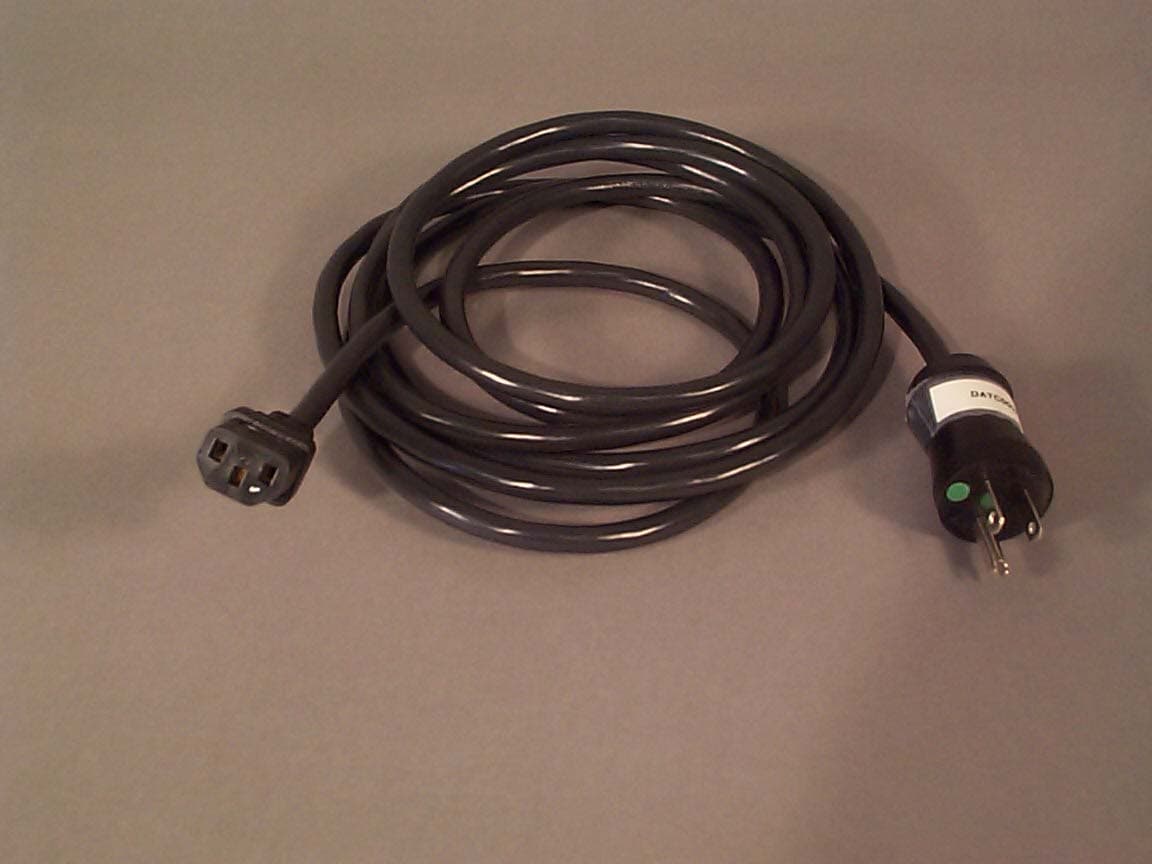
NMEAVTS1030
Jul 23, 2001Model AVTS1030, Rule Part 90.203(j)(7)
Equipment Class
TNB - Licensed Non-Broadcast Station TransmitterNME70000011
Nov 11, 1997Paging Receiver
Equipment Class
CXX - Communications Rcvr for use w/ licensed Tx and CBs