O3L-PT-00-MBWireless Mouse
Paten Wireless Technology Inc.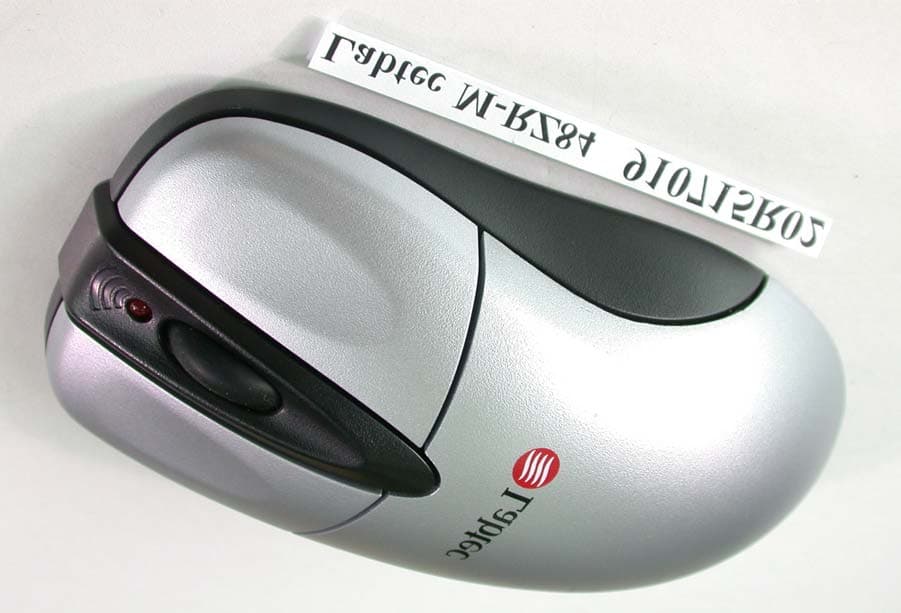
Click to zoom
Application Details
- Equipment Class
- DXX - Part 15 Low Power Communication Device Transmitter
- Date of Grant
- Aug 20, 2002
- Application Purpose
- Original Equipment
- Date of Application
- Aug 20, 2002
- Equipment Note
- Wireless Mouse
- Frequency Range
- 27.04500000 - 27.04500000
- Country
- Taiwan
Documents & Files
Document Text
Text extracted from the exhibit documents filed with the FCC. Open a document above to read the original.
Users Manual
Getting Started with Labtec ® Wireless Desktop ™ English Deutsch Français Italiano Español Português Nederlands Svenska Dansk Norsk Suomi Ελληνικά По-русски Magyar Česká verze Po polsku 2-6 7-11 12-16 17-21 22-26 27-31 32-36 37-41 42-46 47-51 52-56 57-61 62-66 67-71 72-76 77-81 English © 2002 Labtec. All rights reserved. 2 Important Ergonomic Information Long periods of repetitive motions using an improperly set-up workspace, incorrect body position, and poor work habits may be associated with physical discomfort and injury to nerves, tendons, and muscles. If you feel pain, numbness, weakness, swelling, burning, cramping, or stiffness in these areas, see a qualified health professional. Introduction to the Labtec ® Wireless Desktop The Labtec ® Wireless Desktop is loaded full of features. A wireless 3-button wheel mouse and a wireless 110/111-key multi-media keyboard connect to your computer with a single receiver using RF (Radio Frequency) technology. This custom designed receiver can accept signals up to 1.5 meters away. We have included all the batteries you need to get started. Battery life will depend greatly on the amount of usage but you can expect in excess of 2-6 months. The Wireless Mouse This 3-button wheel mouse uses the latest RF technology to bring you unprecedented performance and value. Using the included mouse driver you may program your mouse wheel to perform many commonly used functions. The included LED near the front of the mouse will inform you of Low Battery Power as a reminder to change the batteries. The Wireless Keyboard This 103/104-key keyboard comes loaded with 7 extra multi-media keys that are specifically designed to enhance your Internet and Media experiences. These 7 keys come pre-programmed to perform many common functions. The included LED on the upper left of the keyboard will inform you of Low Battery Power as a reminder to change the batteries. Package Checklist • Wireless Keyboard • Wireless Mouse •Receiver •Driver Disc for Mouse and Keyboard • 4 - AAA batteries • Users Guide • Comfort Guide • Battery Warning English © 2002 Labtec. All rights reserved. 3 Installation of the Wireless Desktop Make sure that your computer is powered off before plugging the receiver into the PS/2 mouse and keyboard ports located in the rear of your computer. Install the included batteries into the mouse and keyboard before turning on the system. Depending on your operating system you may be prompted to insert the driver disk into computer’s drive. Insert the included driver disk and follow the on-screen instructions. Connect Devices If you find that you are having problems with your mouse or keyboard (erratic or no movement), simply pressing the "connect" key on the receiver then press the "reset" key on th bottom of the mouse or Keyboard. Low Battery Lights If the light in the front of the mouse or the top left of the keyboard does not go on when you move the mouse or press a key, the voltage of the battery is low. Please replace your batteries. Expected battery life is 2 to 6 months depending on usage. Driver & Utilities Installation The utilities program can be used to install the mouse and keyboard customization driver, this adds additional programmability to your mouse buttons and the multimedia keys of the keyboard. After the proper installation of the hardware, insert the program driver disk into the disk drive, and double click on the “SETUP”icon to start the installation. Follow the on screen prompts to finish the installation, which may or may not ask you to restart your computer (dependent on your operating system). Labtec ® Wireless Mouse Utility Program The utility program uses your normal “Mouse Control Panel”. This addition adds two sets of tabs to the menus (“Wheel”and Buttons”). For additional help with all “Mouse Control Panel”items use the help buttons located in the menus. Scrolling Functions These controls enable and disable smooth scrolling and the number of lines to scroll at a time. See the details button for more information. English © 2002 Labtec. All rights reserved. 4 3rd Button Functionality These controls support the functions of the middle wheel button. The available controls are outlined here. See the Help button for more details. • Universal Scroll- Allows you to change the scrolling style and speeds of the mouse wheel. • Zooming - Magnify a section of your screen for easier viewing of small text and graphics. • Auto Scroll- Program the screen to scroll by the direction of mouse movement. • Vertical Wheel - Cooperate Functions - This provides 3 types of additional functions to the scroll wheel including; zoom, shift lock, and switch from vertical to horizontal scrolling. • Other Functions- Among these additional functions are “Backspace”,“F1”, and “Delete”plus activation of other special functions of Windows and Explorer. Labtec ® Keyboard Multi-Media Key Assignments Play/Pause - Starts and stops the playback of your Audio and Video applications Volume Mute - Mutes your system volume Refresh - Refreshes the currently displayed web page Internet - Opens your system default Internet Browser Mail - Opens your systems default E-mail application Volume Up - Increases your system volume Volume Down - Decreases your system volume English © 2002 Labtec. All rights reserved. 5 Maintenance of your Wireless Desktop ™ •If the mouse does not move smoothly, you should clean the roller ball and the roller bars in the mouse. •Open the cover of the ball by turning it counter-clockwise, remove the ball and wipe it with a clean cloth. •There are three sets of roller bars. Remove the dust or any other miscellaneous matter by using a cotton swab. You can dip the cotton swab in alcohol to help remove deposits if necessary. •You may clean the surface of the Mouse and Keyboard with a soft damp cloth. •Do not use any harsh or abrasive cleaners •Before using any chemical cleaners, please test the results on the bottom of the device. Installation Configuration and…
Text truncated - open the document above for the full version.
Cover Letter(s)
Inform Letter Dear Customer, According to FCC’s regulation, the following Declaration of Conformity has to be made by a company located in USA. They are: This device has been confirmed to be in compliance with the requirements of ANSI C63.4 & FCC part 15 regulations. The test result has been shown in the ADT test report with number RF910715R01A. And this compliance is subject to the following two conditions: (1) This device may not cause harmful interference and, (2) This device must accept any interference received, including interference that may cause undesired operation. This declaration can be a separate sheet and be sure that the following message will be also included in this declaration: 1) Product name, model name and trade name. 2) Company name, and address of the one who is responsible for this declaration. 3) Name, title, telephone and fax number as well as the signature of the contact person. Thanks for your attention.
External Photos
Page 1 ANNEX PHOTOGRAPHS OF EUT Page 2
Internal Photos
Page 3 Page 4 Page 5 Page 6
Operational Description
FCC ID: O3L-PT-00-MB ADT No.910715R01A Operational Description The transmitter of the EUT (Wireless Mouse) is powered by 3V Battery. The receiver is powered by host computer. Both transmitter and receiver use Integral Antenna. The output power of this device is very low. Under normal use condition, the transmitter and the receiver are quite close, so high EIRP power is neither necessary nor allowed because of interference.
Test Report
FCC ID: O3L-PT-00-MB Report No.: RF910715R01A 1 Issued: August 14, 2002 FCC TEST REPORT REPORT NO.: RF910715R01A MODEL NO.: M-RZ84 RECEIVED: July 15, 2002 TESTED: August 5 ~ August 7, 2002 APPLICANT: Paten Wireless Technology Inc. ADDRESS: 4F, No.50, Lane 10, Jihu Road, Neihu, Taipei, Taiwan, R.O.C. ISSUED BY: Advance Data Technology Corporation LAB LOCATION: 47 14th Lin, Chia Pau Tsuen, Linkou Hsiang, Taipei, Taiwan, R.O.C. This test report consists of 14 pages in total. It may be duplicated completely for legal use with the approval of the applicant. It should not be reproduced except in full, without the written approval of our laboratory. The client should not use it to claim product endorsement by NVLAP or any U.S. government agencies. The test results in the report only apply to the tested sample. Lab Code: 200102-0 0528 ILAC MRA FCC ID: O3L-PT-00-MB Report No.: RF910715R01A 2 Issued: August 14, 2002 Table of Contents 1CERTIFICATION..............................................................................................3 2SUMMARY OF TEST RESULTS .....................................................................4 3GENERAL INFORMATION..............................................................................5 3.1GENERAL DESCRIPTION OF EUT ................................................................5 3.2DESCRIPTION OF TEST MODES ..................................................................6 3.3GENERAL DESCRIPTION OF APPLIED STANDARDS .................................6 3.4DESCRIPTION OF SUPPORT UNITS ............................................................6 4TEST PROCEDURE AND RESULT ................................................................7 4.1CONDUCTED EMISSION MEASUREMENT...................................................7 4.2RADIATED EMISSION MEASUREMENT........................................................7 4.2.1 LIMITS OF RADIATED EMISSION MEASUREMENT .....................................7 4.2.2 TEST INSTRUMENT .......................................................................................8 4.2.3 TEST PROCEDURE........................................................................................9 4.2.4 TEST SETUP.................................................................................................10 4.2.5 EUT OPERATING CONDITION.....................................................................10 4.2.6 TEST RESULT............................................................................................... 11 5PHOTOGRAPHS OF THE TEST CONFIGURATION ....................................13 6INFORMATION ON THE TESTING LABORATORIES ..................................14 FCC ID: O3L-PT-00-MB Report No.: RF910715R01A 3 Issued: August 14, 2002 1 CERTIFICATION PRODUCT : Labtec Wireless Desktop (Mouse) BRAND NAME : Labtec MODEL NO : M-RZ84 APPLICANT : Paten Wireless Technology Inc. MANUFACTURER: WEI FU MOLD PLASTIC & METAL FACTORY STANDARDS : 47 CFR Part 15, Subpart C(15.227) ANSI C63.4-1992 We, Advance Data Technology Corporation , hereby certify that one sample of the designation has been tested in our facility on August 5 ~ August 7, 2002. The test record, data evaluation and Equipment Under Test (EUT) configurations represented herein are true and accurate accounts of the measurements of the sample's EMC characteristics under the conditions herein specified. FCC ID: O3L-PT-00-MB Report No.: RF910715R01A 4 Issued: August 14, 2002 2 SUMMARY OF TEST RESULTS The EUT has been tested according to the following specifications: APPLIED STANDARD: 47 CFR Part 15, Subpart C STANDARD PARAGRAPH TEST TYPERESULTREMARK 15.207Conducted Emission TestN/A Power supply is 3VDC from batteries 15.227Radiated Emission TestPASS Minimum passing margin is –2.60dBuV at 408.62MHz NOTE: The receiver part to communicate with the EUT has been verified to comply with FCC Part 15, Subpart B, Class B (DoC). The test report can be provided upon request. FCC ID: O3L-PT-00-MB Report No.: RF910715R01A 5 Issued: August 14, 2002 3 GENERAL INFORMATION 3.1 GENERAL DESCRIPTION OF EUT PRODUCT Labtec Wireless Desktop (Mouse) MODEL NO. M-RZ84 POWER SUPPLY 3VDC from battery MODULATION TYPE FSK CARRIER FREQUENCY OF EACH CHANNEL 27.045MHz BANDWIDTH OF EACH CHANNEL +/-5kHz NUMBER OF CHANNEL 1 ANTENNA TYPE Integral antenna DATA CABLE NA I/O PORTS NA ASSOCIATED DEVICES NA NOTE: 1. The EUT is the transmitter part. 2. For more detailed features description of the EUT, please refer to the manufacturer's specifications or the User's Manual. FCC ID: O3L-PT-00-MB Report No.: RF910715R01A 6 Issued: August 14, 2002 3.2 DESCRIPTION OF TEST MODES One channel was provided to this EUT. ChannelFrequency 127.045MHz 3.3 GENERAL DESCRIPTION OF APPLIED STANDARDS The EUT is the transmitter part of a Labtec Wireless Desktop (Mouse). According to the specifications of the manufacturer, it must comply with the requirements of the following standards: FCC CFR 47 Part 15, Subpart C (15.227) ANSI C63.4-1992 All tests have been performed and recorded as per the above standards. 3.4 DESCRIPTION OF SUPPORT UNITS NA FCC ID: O3L-PT-00-MB Report No.: RF910715R01A 7 Issued: August 14, 2002 4 TEST PROCEDURE AND RESULT 4.1 CONDUCTED EMISSION MEASUREMENT NA 4.2 RADIATED EMISSION MEASUREMENT 4.2.1 LIMITS OF RADIATED EMISSION MEASUREMENT According to 15.227 the field strength of emissions from intentional radiators operated under these frequencies bands shall not exceed the following: Fundamental Frequency (MHz) Field Strength of Fundamental (dBuV/m) PeakAverage 26.96-27.28 10080 Field strength limits are at the distance of 3 meters, emissions radiated outside of the specified bands, shall be according to the general radiated limits in 15.209 as following: Field Strength of Fundamental Other Frequencies (MHz) uV/meterdBuV/meter 30-8810040.0 88-21615043.5 216-96020046.0 Above 96050054.0 As shown in 15.35(b), for frequencies above 1000MHz, the field strength limits are based on average detector, however, the peak field st…
Text truncated - open the document above for the full version.
Test Setup Photos
FCC ID: O3L-PT-00-MB Report No.: RF910715R01A 13 Issued: August 14, 2002 5 PHOTOGRAPHS OF THE TEST CONFIGURATION RADIATED EMISSION TEST
Contact Information
Applicant
Jon Liao(R&D Manager)
Technical Contact
Advance Data Technology CorporationAlan Lane
[email protected]+886-3-327-0910
13-1, Lane 19, WenShan 3rd., St. · Taoyuan · Taiwan
Non-Technical Contact
Advance Data Technology CorporationAlan Lane
[email protected]+886-3-327-0910
Test Firm
Bureau Veritas CPS (H.K.) Ltd. Taoyuan BranchRichard Chen
Technical Specifications
| # | Rule Parts | Frequency Range | Power Output |
|---|---|---|---|
| 1 | 15C | 27.045 MHz - 27.045 MHz | - |
Other Applications from Paten Wireless Technology Inc.

O3L-PT61R001
Oct 03, 2007WIRELESS OPTICAL LIPSTICK MOUSE
Equipment Class
DXT - Part 15 Low Power Transceiver, Rx Verified
O3L-PT-03-K4D
Oct 29, 200627MHz Wireless Optical Desktop
Equipment Class
DXX - Part 15 Low Power Communication Device Transmitter
O3L-PT2005-MH2
Sep 20, 2006Wireless Laser Mouse
Equipment Class
DXX - Part 15 Low Power Communication Device Transmitter
O3L-PT2005-MH
May 02, 2006Labtec Wireless Laser Mouse for Notebooks
Equipment Class
DXX - Part 15 Low Power Communication Device Transmitter
O3L-PT2005-MF
Apr 27, 2006Wireless Laser Mouse
Equipment Class
DXX - Part 15 Low Power Communication Device Transmitter