O3L-PT-03-K2FWIRELESS DESKTOP EDGE KEYBOARD
Paten Wireless Technology Inc.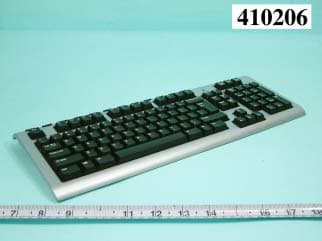
Click to zoom
Application Details
- Equipment Class
- DXX - Part 15 Low Power Communication Device Transmitter
- Date of Grant
- Mar 04, 2004
- Application Purpose
- Original Equipment
- Date of Application
- Mar 04, 2004
- Equipment Note
- WIRELESS DESKTOP EDGE KEYBOARD
- Frequency Range
- 26.96000000 - 27.28000000
- Country
- Taiwan
Documents & Files
Document Text
Text extracted from the exhibit documents filed with the FCC. Open a document above to read the original.
Users Manual
AAA 1.5V AAA 1.5V OPEN AA 1.5V AA 1.5V connect 1 Package contents 1. Keyboard 2. Mouse 3. Receiver 4. Software 5. Four batteries Contenu 1. Clavier 2. Souris 3. Récepteur 4. Logiciel 5. Quatre piles Contenido de la caja 1. Teclado 2. Ratón 3. Receptor 4. Software 5. Cuatro pilas 2 Turn OFF computer. Mettez l’ordinateur HORS tension. APAGUE el ordenador. 3 Plug receiver cables into computer Keyboard connector (purple) plus mouse connector (green). Connectez les câbles du récepteur à l’ordinateur: le connecteur du clavier (violet) et le connecteur de la souris (vert). Conecte al ordenador los cables del receptor El conector de teclado (morado) y el conector de ratón (verde). 4 Place receiver away from electrical devices Avoid metallic surfaces. Eloignez le récepteur de tout appareil électrique Evitez tout contact avec une surface métallique. NO coloque el receptor cerca de dispositivos eléctricos Evite las superficies metálicas. 5 Install the batteries The mouse uses 2 large AA batteries; the keyboard uses 2 small AAA batteries. Follow the diagram for battery orientation. Installez les piles La souris utilise 2 piles AA et le clavier 2 piles AAA. Suivez le schéma pour la disposition des piles. Coloque las pilas El ratón utiliza dos 2 pilas AA grandes; el teclado utiliza 2 pilas AAA pequeñas. El diagrama muestra la posición correcta. 6 Turn ON computer. Mettez l’ordinateur SOUS tension. ENCIENDA el ordenador. 7 Connect keyboard and mouse to receiver Press the Connect button on receiver, and within 10 seconds press the Connect button under mouse. Wait 15 seconds. Press the Connect button on receiver, and within 10 seconds press the Connect button on the keyboard. Connectez le clavier et la souris au récepteur Appuyez sur le bouton Connect du récepteur, patientez 10 secondes, puis appuyez sur le bouton Connect situé sous la souris. Patientez 15 secondes. Appuyez sur le bouton Connect du récepteur, patientez 10 secondes, puis appuyez sur le bouton Connect du clavier. Conecte el teclado y el ratón al receptor Pulse el botón Connect del receptor y, en menos de diez segundos, pulse el botón Connect situado en la parte inferior del ratón. Espere 15 segundos. Pulse el botón Connect del receptor y, en menos de diez segundos, pulse el botón Connect del teclado. 8 Install software To enjoy all the features of the keyboard and mouse, you must install the software. Installez le logiciel Pour profiter pleinement de toutes les fonctions du clavier et de la souris, vous devez installer le logiciel. Instale el software Para disponer de todas las funciones del teclado y el ratón, debe instalar el software. Red = PMS186 Color Logo Color logo Black/White Logo Black/White logo Color logo with reversed type Black/White logo with reversed type Ta b EscF1F2F3F4F5F6F7F8F9F10F11F12 Q A ZXCVBNM < , > . ? / SDFGHJKL : ; " ' | \ WERTYUIOP{ [ } ] Caps Lock CtrlAltCtrlAlt ~ ` ! 1 @ 2 # 3 $ 4 % 5 ^ 6 & 7 * 8 ( 9 ) 0 _ - + = Shift Shift Backspace HomeEnd Page Up Num Lock HomePgUp PgDnEnd InsDel Enter Page Down Insert Delete Enter / 78 9 45 6 12 0 3 * - + Print Screen SysR q Scroll Lock Pause Break 1 2 3 5 4 Ta b EscF1F2F3F4F5F6F7F8F9F10F11F12 Q A ZXCVBNM < , > . ? / SDFGHJKL : ; " ' | \ WERTYUIOP{ [ } ] Caps Lock CtrlAltCtrlAlt ~ ` ! 1 @ 2 # 3 $ 4 % 5 ^ 6 & 7 * 8 ( 9 ) 0 _ - + = Shift Shift Backspace HomeEnd Page Up Num Lock HomePgUp PgDn End InsDel Enter Page Down Insert Delete Enter / 78 9 45 6 12 0 3 * - + Print Screen SysR q Scr oll Lock Pause Break 20 cm 8 in. Installation Guide 12 p ace HomeEnd Page Up Num Lock Insert 7 Print Scre e n SysRq connect connect connect 15 sec. Red = PMS186 Color Logo Color logo Black/White Logo Black/White logo Color logo with reversed type Black/White logo with reversed type Solving Setup Problems 1. Check cable connections. 2. Place receiver away from electrical devices, and avoid metallic surfaces. 3. Check battery instal- lation. The mouse uses 2 AA batteries; the keyboard uses 2 AAA batteries. 4. Establish communications. Press the Connect button on receiver, and within 10 seconds press the Connect button under mouse. Wait 15 seconds. Press the Connect button on receiver, and within 10 seconds press the Connect button on the keyboard. More Information Refer to the Software CD for ergonomic and other product information. Warranty and FCC This product comes with a limited 2-year warranty and is FCC compliant. For more information, please read the included Product Warranty and FCC document located on the software CD. Customer Service Contact Labtec in the U.S. at +1 (702) 269-3612 or on the Web at: www.labtec.com Résolutions des problèmes d’installation 1. Vérifiez les connexions des câbles. 2. Eloignez le récepteur des autres appareils électriques et évitez les surfaces métalliques. 3. Vérifiez que les piles sont bien installées. La souris utilise 2 piles AA et le clavier 2 piles AAA. 4. Etablissez la communication. Appuyez sur le bouton Connect du récepteur, patientez 10 secondes, puis appuyez sur le bouton Connect situé sous la souris. Patientez 15 secondes. Appuyez sur le bouton Connect du récepteur, patientez 10 secondes, puis appuyez sur le bouton Connect du clavier. Informations supplémentaires Pour plus d’informations relatives au confort et à d’autres produits, reportez-vous au CD du logiciel. Garantie et FCC Votre produit est livré avec une garantie limitée de 2 ans, et il est conforme FCC. Pour plus d’informations, lisez la section relative à la garantie du produit, située sur le CD du logiciel. Service clientèle Contactez Labtec aux Etats-Unis par téléphone au +1 (702) 269-3612 ou sur Internet à l’adresse suivante: www.labtec.com Resolución de problemas de instalación 1. Compruebe las conexiones de los cables. 2. No coloque el receptor cerca de dispositivos eléctricos o sobre superficies metálicas. 3. Compruebe la colocación de las pilas. El ratón utiliza dos 2 pilas AA; el teclado utiliza 2 pilas AAA. 4. Establezca la comunicación. Pulse el botón Connect del receptor y, en …
Text truncated - open the document above for the full version.
Cover Letter(s)
Paten Wireless technology Inc. Jan, 14,2004 FCC ID:03L-PT-03-K2F Federal Communications Commission Authorization and Evaluation Division Confidentially Request Pursuant to Section 0.457 and 0.459 of the Commission’s Rules, the Applicant hereby requests confidential treatment of information accompanying this Application as outlined below: Schematics Block Diagram The above materials contain trade secrets and proprietary information not customarily released to the public. The public disclosure of these matters might be harmful to the Applicant and provide unjustified benefits to its competitors. The Applicant understands that pursuant to Rule 0.457, disclosure of this Application and all accompanying documentation will not be made before the date of the grant for this application. With best regards,
ID Label/Location Info
FCC ID: 03L-PT-03-K2F Label Location
Internal Photos
FCC TEST REPORT REPORT NO. : F410206 SPORTON International Inc. PAGE NUMBER : A1 OF A3 TEL : 886-2-2696-2468 ISSUED DATE : Jan. 30, 2004 FAX : 886-2-2696-2255 FCC TEST REPORT REPORT NO. : F410206 SPORTON International Inc. PAGE NUMBER : A2 OF A3 TEL : 886-2-2696-2468 ISSUED DATE : Jan. 30, 2004 FAX : 886-2-2696-2255 FCC TEST REPORT REPORT NO. : F410206 SPORTON International Inc. PAGE NUMBER : A3 OF A3 TEL : 886-2-2696-2468 ISSUED DATE : Jan. 30, 2004 FAX : 886-2-2696-2255
Operational Description
Labtec Wireless Desktop Edge Specification Description: Wireless keyboard and wireless mouse are the new type of input devices for the consumers. Most of the consumers still keep the way of using the traditional wired keyboard and mouse on the wireless products. Therefore, the consumers do not have enough knowledge with “Channel” and “Linking” idea. A good product should be easily use and not to educate how to use. From the start point of decrease the problem of “Channel” and “Linking” or decrease the conflict of interference in multi-users environment. One Channel with Multi-IDs will be the perfect reception of price and function. System Requirement: A. IBM PC Compatible B. Available PS/2 Keyboard Port And Mouse Port C. CD or DVD-ROM Drive D. Microsoft Windows 95, 98, NT 4.0, ME, 2000, XP Operating System Basic Specification: Keyboard: 1. 1 Channel (With Multi Task, Paten’s Patent) 2. Security ID: 256 Sets 3. Cordless Technology: Radio Frequency (TDMA technology) 4. Carry Frequency: 27.045MHZ 5. Modulation Mode: FSK (Frequency Shift Key) 6. Transfer Rate: 14 kbps 7. Input Power: 3VDC (2*AAA) 8. Power Consumption: 10 mA 9. RF Power: 500uv/m at 3m 10. Switch Activation Mechanism: Membrane 11. Indicator LED: 1 LED (Green, Blinking) 12. Operation Switch: 1 Link Switch (Tact switch) 13. Effective Distance: 1.8 M 14. Battery Life: 6 Months Mouse: 1. Channel (With Multi Task, Paten’s Patent) 2. Security ID: 256 Sets 3. Cordless Technology: Radio Frequency (TDMA technology) 4. Carry Frequency: 27.045MHZ 5. Modulation: FSK (Frequency Shift Key) 6. Transfer Rate: 14 kbps 7. Input Power: 3VDC (2*AA) 8. Rated Output Power Level :50 mA (Maximum_dark surface) 9. RF Power: 500uv/m at 3m 10. Buttons: 2 Buttons, Scroll Button(3-Button Type) 11. Encoder Technology: Optical 12. Resolution: 800 CPI 13. Operation Switch: 1 Link Switch 14. Effective Distance: 1.8 M 15. Battery Life: 2 Months Receiver: 1. Interface: PS/2 2. 3. 4. Receiver Sensitivity: -90dbm Indicator LED: 4 Lens Operation Switch: 1 Micro Switch
Test Report
FCC ID: 03L-PT-03-K2F Issued on Feb. 16, 2004 Report No.: F410206 SPORTON International Inc. TEL : 886-2-2696-2468 FCC TEST REPORT CATEGORY: Outdoor Mobile End Product PRODUCT NAME: Labtec Wireless Desktop Edge (Keyboard) FCC ID.: 03L-PT-03-K2F FILING TYPE: Certification BRAND NAME: Paten MODEL NAME: Y-RU58 APPLICANT: Paten Wireless Technology Inc. 8F, No. 407, Zui Kuang Rd., Nei-Hu, Taipei 114, Taiwan, R.O.C. MANUFACTURER: The same as Applicant. ISSUED BY: SPORTON INTERNATIONAL INC. 6F, No. 106, Sec. 1, Hsin Tai Wu Rd., His Chih, Taipei Hsien, Taiwan, R.O.C. Statements: The test result in this report refers exclusively to the presented test model / sample. Without written approval of SPORTON International Inc., the test report shall not be reproduced except in full. Certificate or Test Report could not be used by the applicant to claim the product endorsement by CNLA, NVLAP or any agency of U.S. government. The test equipment used to perform the test are calibrated and traceable to NML/ROC or NIST/USA. Lab Code: 200079-0 FAX : 886-2-2696-2255 FCC ID: 03L-PT-03-K2F Issued on Feb. 16, 2004 Report No.: F410206 Table of Contents History of this test report....................................................................................................................................ii 1. GENERAL DESCRIPTION OF EQUIPMENT UNDER TEST...........................................................................1 1.1. General Description.........................................................................................................................................................................1 1.2. Technical Features..........................................................................................................................................................................1 2. TEST CONFIGURATION OF THE EQUIPMENT UNDER TEST.....................................................................2 2.1. Description of the Test....................................................................................................................................................................2 2.2. Frequency Range Investigated.......................................................................................................................................................2 2.3. Details of the Supporting Units........................................................................................................................................................2 2.4. Connection Diagram of Test System..............................................................................................................................................2 2.5. Band edge compliance plot per 15.227(b)......................................................................................................................................3 3. TEST SOFTWARE............................................................................................................................................5 4. TEST LOCATION AND STANDARDS.............................................................................................................6 4.1. Test Location...................................................................................................................................................................................6 4.2. Test Standards................................................................................................................................................................................6 5. Conducted Emission Measurement..............................................................................................................7 6. Test of Radiated Emission..............................................................................................................................8 7. List of Measuring Equipments Used...........................................................................................................15 Appendix A. Photographs of EUT..........................................................................................................A1 ~ A4 SPORTON International Inc. FCC ID. : 03L-PT-03-K2F TEL : 886-2-2696-2468 Page No. : i FAX : 886-2-2696-2255 Issued Date : Feb. 16, 2004 FCC ID: 03L-PT-03-K2F Issued on Feb. 16, 2004 Report No.: F410206 History of this test report No additional attachment. Additional attachment were issued as following record: Attachment No. Issue Date Description SPORTON International Inc. FCC ID. : 03L-PT-03-K2F TEL : 886-2-2696-2468 Page No. : ii FAX : 886-2-2696-2255 Issued Date : Feb. 16, 2004 FCC ID: 03L-PT-03-K2F Issued on Feb. 16, 2004 Report No.: F410206 1. GENERAL DESCRIPTION OF EQUIPMENT UNDER TEST 1.1. General Description Items Description Sample Type Labtec Wireless Desktop Edge ( Keyboard ) Date of Testing Jan. 13, 2004 1.2. Technical Features Items Description Modulation FSK Number of Channels 1 Operating Frequency Band 27.045MHz Type of Antenna Loop Antenna Function Type Transmitter Power Rating (DC/AC , Voltage) 3 VDC SPORTON International Inc. FCC ID. : 03L-PT-03-K2F TEL : 886-2-2696-2468 Page No. : 1 of 15 FAX : 886-2-2696-2255 Issued Date : Feb. 16, 2004 FCC ID: 03L-PT-03-K2F Issued on Feb. 16, 2004 Report No.: F410206 2. TEST CONFIGURATION OF THE EQUIPMENT UNDER TEST 2.1. Description of the Test a) The used peripherals as well as the configuration fulfill the requirements of ANSI C63.4:2001. The configuration is operated in a manner which tends to maximize its emission characteristics in a typical application. b) 3 meters measurement distance was used in this test. 2.2. Frequency Range Investigated a) Radiated emission test: from 30 MHz to 1000MHz. 2.3. Details of the Supporting Units The EUT was tested alone. No support device is needed for testing. 2.4. Connection Diagram of Test System EUT (Wireless Keyboard) SPORTON International Inc. FCC ID. : 03L-PT-03-K2F TEL : 886-2-2696-2468 Page No. : 2 of 15 FAX : …
Text truncated - open the document above for the full version.
Contact Information
Applicant
Jon Liao(R&D Manager)
Test Firm
Sporton International Inc.Kathy Lin
Technical Specifications
| # | Rule Parts | Frequency Range | Power Output |
|---|---|---|---|
| 1 | 15C | 26.96 MHz - 27.28 MHz | - |
Other Applications from Paten Wireless Technology Inc.

O3L-PT61R001
Oct 03, 2007WIRELESS OPTICAL LIPSTICK MOUSE
Equipment Class
DXT - Part 15 Low Power Transceiver, Rx Verified
O3L-PT-03-K4D
Oct 29, 200627MHz Wireless Optical Desktop
Equipment Class
DXX - Part 15 Low Power Communication Device Transmitter
O3L-PT2005-MH2
Sep 20, 2006Wireless Laser Mouse
Equipment Class
DXX - Part 15 Low Power Communication Device Transmitter
O3L-PT2005-MH
May 02, 2006Labtec Wireless Laser Mouse for Notebooks
Equipment Class
DXX - Part 15 Low Power Communication Device Transmitter
O3L-PT2005-MF
Apr 27, 2006Wireless Laser Mouse
Equipment Class
DXX - Part 15 Low Power Communication Device Transmitter