OFIOONTZANGLEThe Ultra Portable Wireless Bluetooth Speaker
Soundworks, Inc.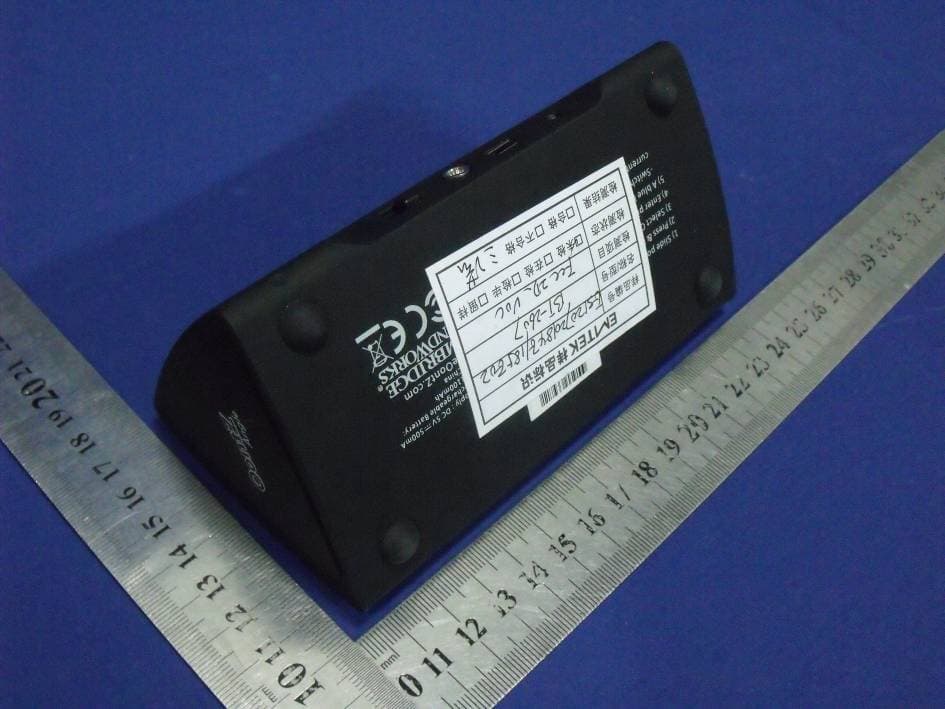
Click to zoom
Application Details
- Equipment Class
- DSS - Part 15 Spread Spectrum Transmitter
- Date of Grant
- Aug 06, 2012
- Application Purpose
- Original Equipment
- Date of Application
- Aug 06, 2012
- Equipment Note
- The Ultra Portable Wireless Bluetooth Speaker
- Frequency Range
- 2402.00000000 - 2480.00000000
- Company
- Soundworks, Inc.
- Country
- United States
Documents & Files
Document Text
Text extracted from the exhibit documents filed with the FCC. Open a document above to read the original.
Users Manual
USER MANUAL The OontZ Angle Guide The Ultra Portable Wireless Bluetooth Speaker Model: Oontz Angle Thank you very much for selecting the OontZ Angle. We hope that you will love it! The OontZ Angle is designed to be simple to use, and this guide was written to help you get started quickly. Please take a few minutes to read through the guide, and try out the features on your OontZ Angle. Contents: ·OontZ Angle Ultra Portable Wireless Bluetooth Speaker ·USB cable ·Line in cable (3.5mm plug) ·OontZ Angle Pouch USB cable Line in cable OontZ Angle Pouch The OontZ Angle The OontZ Angle - Overview ① ② Bluetooth/Answer/Reject Call /Play/Pause ③ Volume Down ④ Power on/off Volume Up ⑤ AUX-IN Port ⑥ USB Port(for charging) ⑦ Charging indicator ⑧ MIC ⑨ Sync LED indicator Page 1, Total 9 Page 2, Total 9 The OontZ Angle is compatible with most Bluetooth devices that support A2DP Most Devices with A2DP Bluetooth can use the OontZ Angle to play music and receive calls. The functionality and features that can be used on the OontZ Angle are dependent on the Bluetooth device (iPhone, iPod, Mobile Phone, Mp3/ MP4 Player, PC, Mac, etc.) the OontZ Angle is to be paired with. Devices without A2DP cannot play music wirelessly through the OontZ Angle. For further instructions on Bluetooth connectivity, please check the user guide for your A2DP Bluetooth device. Compatibility (Bluetooth device) Bluetooth 3.0 with A2DP/HFP/HSP A2DP - Advanced Audio Distribution Profile HSP - Headset Profile HFP – Hands Free Profile Using the OontZ Angle speaker with Non Bluetooth Devices Non-Bluetooth devices can be connected to the OontZ Angle using the supplied Line-in cable (3.5mm Stereo) for speaker use only. Charging your OontZ Angle The OontZ Angle has a built in rechargeable Lithium Ion battery. To charge the OontZ Angle, connect the USB cable to an available USB port on a PC or Mac or with a USB Power Adapter which has the official USB logo. When the OontZ Angle is charging, the LED indicator at the back of the speaker will illuminate Blue and Red. Once the OontZ Angle is fully charged, the LED will change color from Blue & Red to Red. The OontZ Angle CAN be used while it is recharging. Page 3, Total 9 Paring the OontZ Angle with a Bluetooth Device 1. Ensure the OontZ Angle is charged or that the OontZ Angle is connected to a USB power source. 2. On the back of the OontZ Angle, slide power button to ON. 3. Press and hold the Bluetooth button on the back of the OontZ Angle until the red/blue LED starts flashing on the front of the OontZ Angle. 4. Use your Bluetooth device to search for OontZ Angle and select it. 5. If a pin is required, enter "0000". 6.The LED on front of the OontZ Angle will stop flashing red/blue and will return to blue. This confirms successful pairing. 7. Check your Bluetooth device to ensure that connection is successful. 8. You can now play your music wirelessly from your device to the OontZ Angle. Note: To switch Bluetooth devices, turn off the Bluetooth connection on your device, the OontZ Angle is now free to pair with the next device, repeat steps 3-8 above to re-enter pairing mode. Note: The unit default audio input is Bluetooth. The source will automatically switch to AUX IN mode when the line in stereo audio cable is inserted, but will not disconnect the connected Bluetooth input. The source will auto- matically switch back to the Bluetooth input when the line in stereo audio cable is unplugged. Page 4, Total 9 Using the OontZ Angle as a Speaker phone 1.To Answer a call - Press Bluetooth/Answer/Reject Call Button on the back of the OontZ Angle. 2.To Reject a call - Press & Hold (3 Seconds) Bluetooth/Answer/Reject Call Button on the back of the OontZ Angle 3.To hang up a call - Press & Hold Bluetooth/Answer/Reject Call Button on the back of the OontZ Angle 4.To switch call signal between speaker mode and phone mode, press Bluetooth/Answer/Reject Call Button on the back of the OontZ Angle. Playing music from a non-Bluetooth device To use your OontZ Angle to play other portable audio devices such as iPod shuffle, MP3, MiniDisc and Portable CD Players, connect your device to the OontZ Angle with the line in cable. 1.Plug in the line in cable into the AUX IN socket on the rear of the OontZ Angle. 2.Connect the other end of the line in cable to your devices headphone socket. 3.Set your device volume level to maximum and press play on your device. Note: The unit default audio input is Bluetooth. The source will automatically switch to AUX IN mode when a 3.5mm stereo audio cable inserted, but will not disconnect the connected Bluetooth input this time. And the source will automatically switch back to Bluetooth input when unplugged the 3.5mm audio cable CD LED Indicator Power OFF – LED OFF Power ON – LED ON (Blue) Pairing Mode – LED Flashing Blue/Red Paired – LED ON (Blue) Aux in – LED ON (Blue) Battery recharging – LED indicate Blue and Red Battery fully recharged – LED indicate Red Trouble Shooting Ensure the Bluetooth device supports A2DP Check that the device and the OontZ Angle are paired or connected properly Ensure the Power Switch at the back of the OontZ Angle is switched ON Ensure the OontZ Angle is fully charged or the OontZ Angle is attached to a power source. Adjust the volume lower on the OontZ Angle or the Bluetooth device Ensure your Bluetooth phone supports HSP/HFP Check that the Bluetooth phone and the OontZ Angle are properly paired Music cannot be heard through the OontZ Angle The OontZ Angle does not power up Sound is distorting Cannot answer calls Music does not resume after hanging up a call Press Play to resume music I cannot find the OontZ Angle on my Bluetooth device Ensure the OontZ Angle is in pairing mode with the LED on front flashing blue and red (See: Paring the OontZ Angle with a Bluetooth Device) Ensure the OontZ Angle is not already connected to another Bluetooth device, the OontZ Angle can only connect to 1 Bluetooth device at a time. To switch Bluetooth devices, turn o…
Text truncated - open the document above for the full version.
Cover Letter(s)
Confidentiality Request Letter Page 1 of 2 Confidentiality Request Letter Revision History Reason for Amendment (current / obsolete) From To Approved Date Initial Release (obsolete) 1.0 1.0 Nov-14-2006 Adding CFR 2.459 (obsolete) 1.0 2.0 August – 11 - 2008 Updated company template & Added text box (current) 2.0 3.0 Jan-31-2012 Confidentiality Request Letter Page 2 of 2 Soundworks, Inc (2012-08-01) To: Federal Communications Commission Office of Engineering and Technology Equipment Authorization Division 7345 Oakland Mills Road Columbia, Maryland 21046 Subject: Permanent Confidentiality Request for FCC ID: OFIOONTZANGLE We hereby request confidential treatment of information accompanying this application as outlined below: - Block diagram - Operation description - Schematic The above materials contain trade secrets and proprietary information not customarily released to the public. The public disclosure of these materials may be harmful to the applicant and provide unjustified benefits to its competitors. The applicant understands that pursuant to Section 0.457 & 0.459 of the Rules, disclosure of this application and all accompanying documentation will not be made before the date of the Grant for this application. Sincerely, Signature Loretta Skillings E-mail: : [email protected] Phone: 408 219 5737 Fax: 408 219 5737 Address : 2995 Woodside Road Suite 400 Woodside Ca. 94062 USA
ID Label/Location Info
2012-08-03 Silkscreen 427C Silkscreen 427C Silkscreen 427C Silkscreen: 427C Silkscreen 427C BT-2607 美国版(Cambridge)丝印图: LeftRight 1) Slide power switch to on. 2) Press & hold paring button until LED flashes red /blue. 3) Select OontZ Angle on your bluetooth device. 4) Enter pin "0000" if requested. 5) A blue LED confirms pairing & ready to play. -Switching devices: disconnect bluetooth on current device & repeat steps 2–5 for next device. Model: OontZ Angle Power Supply: LI-ION Rechargeable Battery: DC 3.7V, 1100mAh FCC ID: OFIOONTZANGLE Made in China DC 5V 500mA TheOontZ.com 27mm 20mm
Internal Photos
BT Module Antenna
RF Exposure Info
FCC ID : OFIOONTZANGLE BT (Speaker device) According to §15.247(e)(i) and §1.1307(b)(1), systems operating under the provisions of this section shall be operated in a manner that ensures that the public is not exposed to radio frequency energy level in excess of the Commission’s guidelines. According to KDB 447498 (2)(a)(i) Frequency Range Low Frequency (MHz) High Frequency(MHz) Center frequency (MHz) 60/f SAR Limitation (mw) 2402 2480 2441 25 Maximum measured transmitter power: Conducted Power (dB) Max Antenna Gain (dBi) EIRP (mw) 1.70 2.0 2.34 Threshold at which no SAR required is 25 mW. Maximum Tx po wer is 2.34mw EIRP Conclusion: No SAR is required. Sincerely, Signature Loretta Skillings E-mail: : [email protected] Phone: 408 219 5737 Fax: 408 219 5737 Address : 2995 Woodside Road Suite 400 Woodside Ca. 94062 USA
Test Report
SHENZHEN EMTEK CO., LTD. REPORT NO: ES120720184E FCC ID: OFIOONTZANGLE DATE: 02/08/2012 Page 1 of 53 ELECTROMAGNETIC EMISSIONS COMPLIANCE REPORT INTENTIONAL RADIATOR CERTIFICATION TO FCC PART 15 SUBPARTC REQUIREMENT OF The Ultra Portable Wireless Bluetooth Speaker MODEL No.: Oontz Angle Trade Mark : FCC ID: OFIOONTZANGLE REPORT NO: ES120720184E ISSUE DATE: August 02, 2012 Prepared for SOUNDWORKS, INC 2995 Woodside Road Suite 400 Woodside Ca. 94062 USA Prepared by SHENZHEN EMTEK CO., LTD Bldg 69, Majialong Industry Zone, Nanshan District, Shenzhen, Guangdong, China TEL : 86-755-26954280 FAX: 86-755-26954282 SHENZHEN EMTEK CO., LTD. REPORT NO: ES120720184E FCC ID: OFIOONTZANGLE DATE: 02/08/2012 Page 3 of 53 Ta b l e o f C o n t e n t s 1. GENERAL INFORMATION ................................................................................................. 5 1.1 PRODUCT DESCRIPTION........................................................................................................................... 5 1.2 RELATED SUBMITTAL(S) / GRANT (S) ..................................................................................................... 5 1.3 TEST METHODOLOGY.............................................................................................................................. 5 1.4 SPECIAL ACCESSORIES............................................................................................................................ 5 1.5 EQUIPMENT MODIFICATIONS.................................................................................................................. 5 1.6 TEST FACILITY........................................................................................................................................ 6 2. SYSTEM TEST CONFIGURATION .................................................................................... 7 2.1 EUT CONFIGURATION............................................................................................................................. 7 2.2 EUT EXERCISE........................................................................................................................................ 7 2.3 TEST PROCEDURE.................................................................................................................................... 7 2.4 LIMITATION............................................................................................................................................. 7 2.5 CONFIGURATION OF TESTED SYSTEM................................................................................................... 11 2.6 EQUIPMENT USED IN TESTED SYSTEM....................................................................................................... 11 2.7 DESCRIPTION OF TEST MODES.................................................................................................................... 12 3. SUMMARY OF TEST RESULTS ....................................................................................... 13 4. CONDUCTED EMISSIONS TEST ..................................................................................... 14 4.1 MEASUREMENT PROCEDURE:................................................................................................................ 14 4.2 TEST SET-UP (BLOCK DIAGRAM OF CONFIGURATION) ....................................................................... 14 4.3 MEASUREMENT EQUIPMENT USED: ...................................................................................................... 14 4.4 CONDUCTED EMISSION LIMIT.................................................................................................................... 14 4.5 MEASUREMENT RESULT:....................................................................................................................... 15 4.6 CONDUCTED MEASUREMENT PHOTOS: ...................................................................................................... 16 5. RADIATED EMISSION TEST ............................................................................................ 17 5.1 MEASUREMENT PROCEDURE................................................................................................................. 17 5.2 TEST SET-UP (BLOCK DIAGRAM OF CONFIGURATION) ....................................................................... 18 5.3 MEASUREMENT EQUIPMENT USED: ...................................................................................................... 19 5.4 MEASUREMENT RESULT........................................................................................................................ 20 5.5 RADIATED MEASUREMENT PHOTOS: ......................................................................................................... 24 6. CHANNEL SEPARATION TEST ....................................................................................... 26 6.1 MEASUREMENT PROCEDURE................................................................................................................. 26 6.2 TEST SET-UP (BLOCK DIAGRAM OF CONFIGURATION) ....................................................................... 26 6.3 MEASUREMENT EQUIPMENT USED: ...................................................................................................... 26 6.4 MEASUREMENT RESULTS:..................................................................................................................... 26 7. BANDWIDTH TEST ............................................................................................................. 33 7.1 MEASUREMENT PROCEDURE................................................................................................................. 33 7.2 TEST SET-UP (BLOCK DIAGRAM OF CONFIGURATION) ....................................................................... 33 SHENZHEN EMTEK CO., LTD. REPORT NO: ES120720184E FCC ID: OFIOONTZANGLE DATE: 02/08/2012 Page 4 of 53 7.3 MEASUREMENT EQUIPMENT USED: .…
Text truncated - open the document above for the full version.
Test Setup Photos
Radiated Emission Conducted Emissions
Contact Information
Applicant
Mike Roets
Test Firm
EMTEK (Shenzhen) Co., Ltd.David Lee
Technical Specifications
| # | Rule Parts | Frequency Range | Power Output |
|---|---|---|---|
| 1 | 15C | 2.40 GHz - 2.48 GHz | 1.50 mW |
Other Applications from Soundworks, Inc.

OFIOONTZXL
Jun 18, 2013OONTZ XL
Equipment Class
DSS - Part 15 Spread Spectrum Transmitter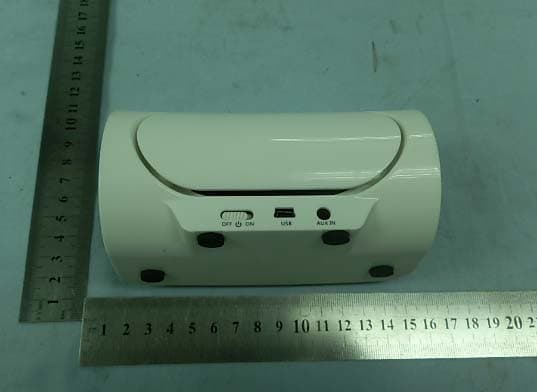
OFIOONTZ
Jul 10, 2012THE ULTRA PORTABLE WIRELESS BLUETOOTH SPEAKER
Equipment Class
DSS - Part 15 Spread Spectrum Transmitter