OPK-S501BLUETOOTH STEREO HEADSET
Shenzhen Kemei Wireless Communication Co., Ltd.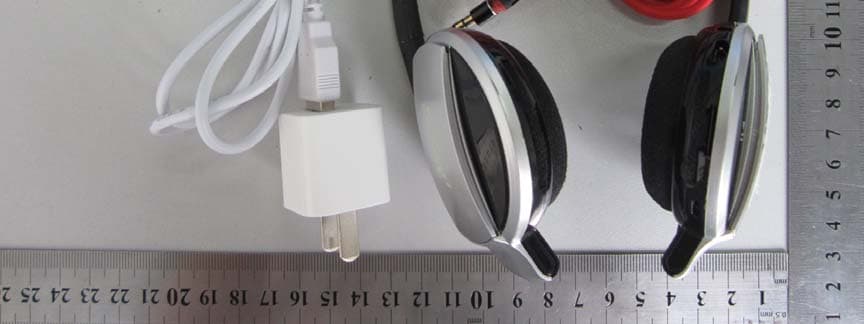
Click to zoom
Application Details
- Equipment Class
- DTS - Digital Transmission System
- Date of Grant
- Sep 02, 2012
- Application Purpose
- Original Equipment
- Date of Application
- Sep 02, 2012
- Equipment Note
- BLUETOOTH STEREO HEADSET
- Frequency Range
- 2402.00000000 - 2480.00000000
- Country
- China
Documents & Files
Document Text
Text extracted from the exhibit documents filed with the FCC. Open a document above to read the original.
Users Manual
Evogue Road Runner Series Sport Style EVE-S501 User Manual Thank you for selecting Bluetooth headset EVE-S501 The EVE-S501 lets you listen to stereo music through your Bluetooth - enabled mobile phone or music player, while ensuring you never miss a call. Use the 3.5mm music cable for wired music listening from your MP3 or PC. Folding style is more fashionable and convenient. S501 Bluetooth headset with stylish patent design, perfect construction, stereo R, L model. Let you enjoy the wonderful music. EVE-S501 Bluetooth headset is compliant with Bluetooth Version 3.0 + EDR specification, and is compatible with latest mobile phones supporting Bluetooth headset or heads free profiles. Charging Your Headset Rechargeable battery with Micro-USB charging option from AC power supply, PC via USB cable, the batter indicator will turn red when charging. Turning on the Headset Press and hold the MFB for 3 seconds until Blue and Red Led showed. About paring function, please refer to "Paring Your Headset". Turning off the Headset Press and hold the MFB for 3 seconds until the indicator off. Pairing Your Headset The headset works with Bluetooth-enable phones, prior to using and pairing your headset for the first time, please check if your mobile phone is Bluetooth-enable. The pairing instructions for typical Bluetooth-enable mobile phone are explained on the below. The headset pairing procedure may vary depending on the setting of your mobile phone. Please contact the manufacture of your mobile phone or its agent further information. 1, Press the headset and the mobile phone where they are easily viewable and no more than one meter apart; 2, Ensure the headset is turned off; 3, Please press the MFB 2 second until the Blue and Red Led show, the headset being paring; 4, Activate your mobile phones' Bluetooth function, please refer to your mobile phone user guide for details; 5, Set the mobile phone to search for Bluetooth devices within range and select "S501" from the list of devices shown; 6, Enter password "0000" and press "ok" to pair your headset with mobile phone, when the pairing is completed, the headset enters in standby mode; 7, Now you can use your Bluetooth headset to listen to the music and make a call. Some of the mobile phones, when they are re-started, the headset will be connected with the mobile phone automatically. Pairing with second mobile phone 1. After finishing pairing with your first mobile phone, turn off first mobile phone and your Bluetooth headset. 2. Repeat to pairing your second mobile phone. After finishing pairing second mobile phone then turn off EVE-S501 Bluetooth headset. 3. Turn on your first mobile phone and EVE-S501 Bluetooth headset waiting for headset to connect your first and second mobile phone automatically. Wearing Your Headset Please note the Left/Right wearing indicator inside the headband. Alternatively aways wear the S501 with the MFB on your right. Using Your Headset Answering a Call When a call is coming, the ring tone will be heard by headset, press the MFB once to accept the call or answer the call via your mobile phone in normal way. Reject a Call Press the MFB for 2 seconds to reject the incoming a call. Ending a Call While speaking, press the MFB once to end the call or hang up on your mobile phone. Adjusting the Volume (Being calling or playing music) Press Volume + to raise up the volume, each press the Volume +, the volume will be up, until to the MAX and you will hear "DU" alarm; Press Volume - to raise down the volume, each press volume -, the volume will be down, until to the bottom and you will hear "DU" alarm. Play/Pause Music When the Bluetooth headset was connected with stereo mobile phone, press Play/Pause once to play music and press it one again to pause music. (Attention: your mobile phone must support A2DP profile.) Last Track Connected with stereo mobile phone, be playing, press the "Last Track" key to select the last track. Next Track Connected with stereo mobile phone, be playing, press the "Next Track" key to select the next track. Transferring a Call While speaking, long press the "Play/Pause" to transfer the call from your headset to your mobile phone (Please check if your mobile phone has this function), repeat the above procedure to transfer the call from mobile phone to your headset. Connected with the last paired device The headset will connect with the last paired device, if the pairing is successful, it enters the standby status, if the pairing can not be completed within 5 minutes after the paring mode has been activated, the headset will turn off automatically. Last number redial from your headset In standby status, double press the Play/Pause on your headset to redial the last number you called. Use the 3.5mm stereo music cable Your Bluetooth headset connected with the mobile phone, you also can listen to music from PC via 3.5mm stereo music cable when a call is coming, the music and cal will automatically switch, then press the MFB to answer the call. MP3 Playing/Control function Being switch on, insert SD card, the MP3 will play automatically Being MP3 playing, see PIC, the bluetooth has the normal function for: " Volume +/-" and the "Next/Last Track key". Headset Battery Status If the headset paired with iPhone or iPad, the battery status meter will show on the iPhone or iPad Screen. User can download APP from Android phones to show the battery status on the Android phones. Troubleshooting If you are unable to connect your headset and mobile phone, please try the following: Ensure your headset is turned on and is fully charged; Ensure the headset is paired with your mobile phone; Ensure your mobile phone's Bluetooth feature is activated. Please refer to your mobile phone user guide for specific instruction; Ensure the headset is within a 10 meter range of your mobile headset and there are no obstructions, such as walls or tother electronic devices in between. If the above steps do not solve the problem, please rechar…
Text truncated - open the document above for the full version.
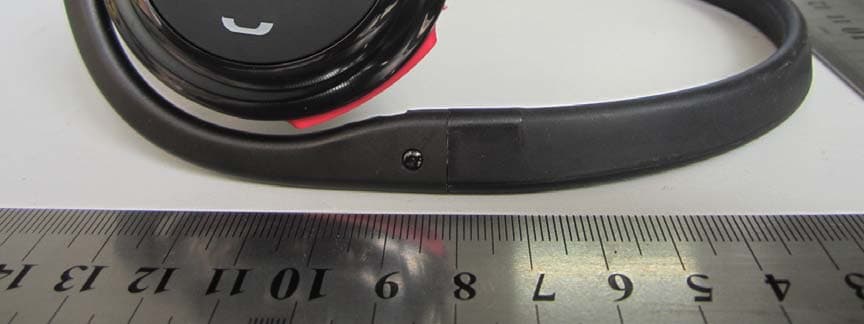
External Photos
External Photos
ID Label/Location Info
FCC ID: OPK-S501 Label Label Location FCC ID Label Location
Internal Photos
Internal Photos
Test Report
SZ12080056W02 Page 2 of 37 DIRECTORY 1. GENERAL INFORMATION .................................................................................................... 3 1.1. EUT Description ....................................................................................................................... 3 1.2. Test Standards and Results ........................................................................................................ 4 1.3. Facilities and Accreditations ..................................................................................................... 5 2. 47 CFR PART 15C REQUIREMENTS .................................................................................... 6 2.1. Peak Output Power.................................................................................................................... 6 2.2. Average power .......................................................................................................................... 9 2.3. 6dB Bandwidth ....................................................................................................................... 10 2.4. 99% Bandwidth ....................................................................................................................... 13 2.5. Conducted Spurious Emissions ............................................................................................... 16 2.6. Power spectral density (PSD) ................................................................................................. 18 2.7. Band Edge ............................................................................................................................... 21 2.8. Conducted Emission ............................................................................................................... 25 2.9. Radiated Emission................................................................................................................... 28 Change History Issue Date Reason for change 1.0 Aug 25, 2012 First edition SZ12080056W02 Page 3 of 37 1. General Information 1.1. EUT Description EUT Type ............................. : Bluetooth Stereo Headset Serial No. .............................. : (n.a, marked #1 by test site) Hardware Version ................. : REV 6 Software Version .................. : Applicant .............................. : Manufacturer ........................ : 1200807 Shenzhen Kemei Wireless communication Co., Ltd. F/2, Dapengche Building, Zerong industrial park, Huangmabu, Xixiang, Baoan, Shenzhen, Guangdong 518000 China Shenzhen Kemei Wireless communication Co., Ltd. F/2, Dapengche Building, Zerong industrial park, Huangmabu, Xixiang, Baoan, Shenzhen, Guangdong Frequency Range .................. : The frequency range used is 2402MHz - 2480MHz (40 channels, at intervals of 2MHz); Modulation Type .................. : GFSK Antenna Type ........................ : PCB Antenna Antenna Gain ........................ : 0dBi Note 1: The EUT is Bluetooth Stereo Headset, it contains Bluetooth 2.1 EDR, Bluetooth 4.0 LE Dual Module operating at 2.4GHz ISM band; the frequencies allocated for the Bluetooth Module is F(MHz)=2402+2*n (0<=n<=39). The lowest, middle, highest channel numbers of the Bluetooth Module used and tested in this report are separately 0 (2402MHz), 19 (2440MHz) and 39 (2480MHz). Note 2: For a more detailed description, please refer to Specification or User’s Manual supplied by the applicant and/or manufacturer. SZ12080056W02 Page 4 of 37 1.2. Test Standards and Results The objective of the report is to perform testing according to 47 CFR Part 15 Subpart C (2.4GHz ISM band radiators) for the EUT FCC ID Certification: No. Identity Document Title 1 47 CFR Part 15 (10-1-09 Edition) Radio Frequency Devices Test detailed items/section required by FCC rules and results are as below: No. Section Description Result 1 15.247(a) Number of Hopping Frequency (n.a) 2 15.247(b) Peak Output Power PASS 3 15.247(b) Average power PASS 4 15.247(a) 6dB Bandwidth PASS 5 15.247(a) 99% Bandwidth PASS 6 15.247(a) Carrier Frequency Separation (n.a) 7 15.247(a) Time of Occupancy (Dwell time) (n.a) 8 15.247(c) Conducted Spurious Emission PASS 9 15.247(c) Band Edge PASS 10 15.207 Conducted Emission PASS 11 15.209 15.247(c) Radiated Emission PASS 12 15.247(d) Power spectral density (PSD) PASS The tests of Conducted Emission and Radiated Emission were performed according to the method of measurements prescribed in ANSI C63.4 2009. These RF tests were performed according to the method of measurements prescribed in KBD558074. SZ12080056W02 Page 5 of 37 1.3. Facilities and Accreditations 1.3.1. Facilities Shenzhen Morlab Communications Technology Co., Ltd. Morlab Laboratory is a testing organization accredited by China National Accreditation Service for Conformity Assessment (CNAS) according to ISO/IEC 17025. The accreditation certificate number is L3572. All measurement facilities used to collect the measurement data are located at FL.3, Building a, FeiYang Science Park, No.8 LongChang Road, Block 67, BaoAn District, ShenZhen, GuangDong Province, P. R. China. The test site is constructed in conformance with the requirements of ANSI C63.7, ANSI C63.4 and CISPR Publication 22; the FCC registration number is 741109. 1.3.2. Test Environment Conditions During the measurement, the environmental conditions were within the listed ranges: Temperature (°C): 15 - 35 Relative Humidity (%): 30 -60 Atmospheric Pressure (kPa): 86-106 SZ12080056W02 Page 6 of 37 2. 47 CFR Part 15C Requirements 2.1. Peak Output Power 2.1.1. Requirement According to FCC section 15.247(b)(3), For systems using digital modulation in the 902-928 MHz, 2400-2483.5 MHz, and 5725-5850 MHz bands: The maximum peak conducted output power of the intentional radiator shall not exceed 1 Watt. 2.1.2. Test Description The measured output power was calculated by the reading of the spectrum analyzer and calibration. A. Test Setup: The EUT (Equipment und…
Text truncated - open the document above for the full version.
Test Setup Photos
Test Setup Photos 1. CE 2.RE 3. CSE
Contact Information
Applicant
Kexue Bai(CEO)
Test Firm
Shenzhen Morlab Communications Technology Co.,LtdShu Luan
Technical Specifications
| # | Rule Parts | Frequency Range | Power Output |
|---|---|---|---|
| 1 | 15C | 2.40 GHz - 2.48 GHz | 3.00 mW |
Other Applications from Shenzhen Kemei Wireless Communication Co., Ltd.
OPK-S503
Sep 05, 2012BLUETOOTH STEREO HEADSET
Equipment Class
DTS - Digital Transmission System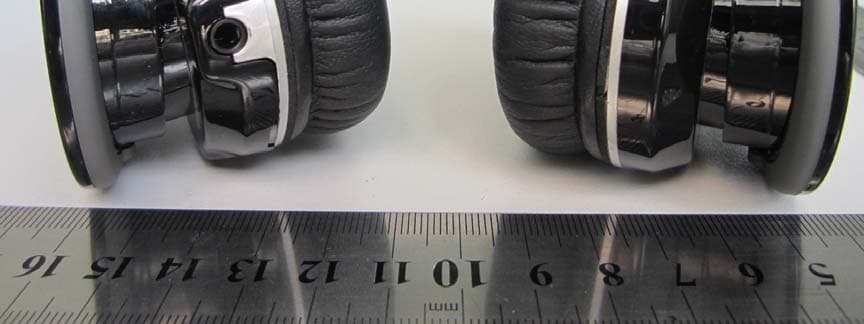
OPK-S680
Sep 02, 2012BLUETOOTH STEREO HEADSET
Equipment Class
DSS - Part 15 Spread Spectrum Transmitter