PEBMFDU03FINGERPRINT RECOGNITION MOUSE
NITGen Co., Ltd.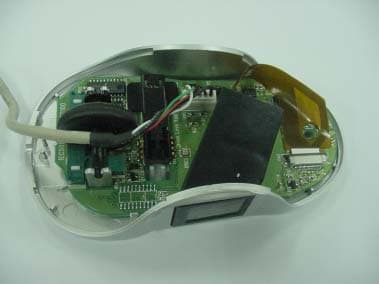
Click to zoom
Application Details
- Equipment Class
- JBP - Part 15 Class B Computing Device Peripheral
- Date of Grant
- Nov 29, 2005
- Application Purpose
- Original Equipment
- Date of Application
- Nov 29, 2005
- Equipment Note
- FINGERPRINT RECOGNITION MOUSE
- Company
- NITGen Co., Ltd.
- Country
- South Korea
Documents & Files
Document Text
Text extracted from the exhibit documents filed with the FCC. Open a document above to read the original.
Users Manual
Driver Installation for Fingerprint Sensors Contents © Copyright 2002-2005, NITGEN Co., Ltd. All rights reserved. Features and specifications are subject to change without notice. No part of this guide may be copied or reproduced for any purpose without the prior written authorization from NITGEN. NITGEN holds the copyright on the brands NITGEN. Any other brands are the registered trademarks of owners. To Contact Us Tel. 82-2-3415-1800 Fax. 82-2-3415-1601 Email: [email protected] URL: http://www.nitgen.com Contents Chapter 1 Before You Begin ................................................................ 5 Features ............................................................................................................................ 6 Typical Applications...........................................................................................................7 System Requirements....................................................................................................... 7 Package Contents............................................................................................................. 8 Product Types ................................................................................................................. 10 Chapter 2 Driver Installation................................................................. 13 USB Driver Installation .................................................................................................... 14 Chapter 3 How To Use The Device Diagnostic Tool.......................................... 20 Running the Diagnostic Tool ........................................................................................... 21 Device ............................................................................................................................. 22 Enroll ............................................................................................................................... 24 Verify ............................................................................................................................... 26 Fingerprint Quality Check................................................................................................ 28 General ........................................................................................................................... 30 About............................................................................................................................... 31 Chapter 4 Troubleshooting......................................................................... 33 USB FRD Problems ........................................................................................................ 34 Driver Installation without Installshield wizard................................................................. 36 Contents 5 Chapter 1 Before You Begin Features Typical Applications System Requirements Package Contents Product Types 6 Features The NITGEN FRD (Fingerprint Recognition Device) is a world-class fingerprint device that uses state-of-the-art technology, to facilitate biometric authentication of a user’s fingerprint using a combination of quality hardware and software that is convenient and easy to use. The FRD is equipped with high-performance and compact NITGEN fingerprint recognition module, which can transfer data to computers to reject any unauthorized user’s access. NITGEN FRD will provide the most reliable authentication by identifying fingerprints with exactness through its high-resolution fingerprint recognition technology that can be used to replace existing password-based security systems. NITGEN FRD is the security device for the next generation, where the security of personal data as well as corporate data is indispensable. 7 Typical Applications System Requirements System requirements for FRD are as follows; ⊙ USB Type z CD-ROM drive z USB 1.1/2.0 port (If you are connecting the FRD Fingkey Mouse into a hub, you must use a self powered USB hub.) z 16MB RAM z 20MB available hard disk space z MS Windows 98(Second Edition or later version)/ME/2000/XP/2003 Some typical applications for fingerprint authentication technology are as follows: Information Technology and Computer Network Security Internet Business Security for Banking and Financial System Medical Information Systems Further Security Field using Passwords 8 Package Contents FRD Kits include the following; Please check the contents of your package. 1. USB Type Fingerprint Recognition Fingkey Mouse (MFDU01) 2. USB Type Fingerprint Recognition Fingkey Hamster (HFDU01) MFDU01 Installation CD Installation Guide HFDU01 Installation CD Installation Guide 9 3. USB Type Fingerprint Recognition Fingkey Hamster II (HFDU11) HFDU11 Installation CD Installation Guide 10 Product Types It is important to know the type of FRD you are installing prior to beginning the installation process in order to ensure that the device is configured correctly on your system. If you are not certain, please refer to the diagrams below or locate the model number on the bottom of the fingerprint device. After you have identified the type of FRD that you are installing, follow the installation guide to install the drivers and use the FRD. 1. USB Type Fingerprint Recognition Fingkey Mouse (MFDU01) 2. USB Type Fingerprint Recognition Fingkey Hamster (HFDU01) USB Connector Fingerprint Recognition Fingkey Mouse USB Connector Fingerprint Recognition Fingkey Hamster 11 3. USB Type Fingerprint Recognition Fingkey Hamster II (HFDU11) USB Connector Fingerprint Recognition Fingkey Hamster II 12 13 Chapter 2 Driver Installation USB Driver Installation 14 USB Driver Installation If you are installing the USB Fingkey Mouse in the Windows 98 environment, the Windows 98 Installation CD will be required if there are no Human Interface Device (HID) drivers installed on your system. 1. Prior to beginning the installation, please close all applications that are running.…
Text truncated - open the document above for the full version.
Block Diagram
* Fingerprint Identification Mouse Block Diagram 24Mhz 24Mhz PrismLens Sensor Interface Image Sensor Immage Sensor Lens Light Surface Digital Signal Processor X, Y, Z counter Wheel Detector Prism USB Composit Device
ID Label/Location Info
Fingerprint Recognition Mouse Model Name: MFDU03 FCC ID: PEBMFDU03
Test Report
Emission and Immunity of electromagnetic disturbance Test Report No. : ERI-FCC05-0048 Equipment : Fingerprint Recognition Mouse Name of basic model : MFDU03 Family model : None Manufacturer : NITGEN Co., Ltd (Guro Factory) Applicant : NITGEN Co., Ltd (Head Office) Date of receipt EUT : 2005. 11. 02 Tested date : 2005. 11. 03 ~ 11. 16 Issued date : 2005. 11. 22 Test results : PASS Test Standards : FCC Part 15 Subpart B (Class B) / Class B digital devices, peripherals EMC Research Institute President Nov 22, 2005 EMC Research Institute CONTENTS 1. CLIENT INFORMATION 2. LABORATORY INFORMATION 3. EQUIPMENT UNDER TEST INFORMATION(EUT) 3.1 Identification of the EUT 3.2 Additional information about the EUT 3.3 Peripheral equipment 4. TEST SPECIFICATIONS 4.1 Standards 5. TEST RESULTS SUMMARY 5.1 Test results 5.2 Measurement uncertainty 6 TEST RESULTS 6.1 CONTINUOUS DISTURBANCE VOLTAGE, MAIN TERMINAL 6.1.1 Operating environment 6.1.2 Test set-up and test procedures 6.1.3 Test instrument 6.1.4 Test results 6.2 RADIATED DISTURBANCE : 30MHz – 1000MHz 6.2.1 Operating environment 6.2.2 Test set-up 6.2.3 Test conditions 6.2.4 Test instrument 6.2.5 Test results 7. PRODURCT PHOTOGRAPHS 7.1 Front Photograph of EUT 7.2 Rear Photograph of EUT Appendix (None) EMC Research Institute 1. CLIENT INFORMATION The EUT has been tested by request of : Company : NITGEN Co., Ltd (Head Office) Address : Korea Sanhak Foundation Bldg.5F, 1337-31, Seocho- dong,Seocho-gu, Seoul, 137-860 Name of contact : Moon Yong Geun Telephone : +82-2-3415-1635 +82-2-3415-1629 2. LABORATORY INFORMATION The 10m full-anechoic chamber and/or EMC facilities are used for these testing. These facilities were accredited by KOLAS, EK, MIC of Korea and FCC of USA. Address ELECTROMAGNETIC RESEARCH INSTITUTE. 66-6, Jeil-ri, Yangji-myun, Youngin-si, Gyeonggi-do, Korea. Telephone No. : +82-31-336-1186~7 Facsimile No. : +82-31-336-1184 Registered No. KOLAS : 111 EK : J MIC : KR0030 FCC Filing No. : 302567 3. EQUIPMENT UNDER TEST INFORMATION(EUT) 3.1 Identification of the EUT Type of equipment : Fingerprint Recognition Mouse Model name : MFDU03 Brand name : NONE Manufacturer : NITGEN Co., Ltd (Guro Factory) Address : Ace Techno-Tower #105, 197-7, Guro-dong, Guro-gu, Seoul, 152-766. Telephone : +82-2-3415-1635 Facsimile : +82-2-3415-1629 Country of origin : KOREA Rating : DC 5 V EMC Research Institute 3.2 Additional information about the EUT Class B, Family Models List Basic Model Variant Model Differential point MFDU03 None None 3.3 Peripheral equipment Equipment needed for correct operation of the EUT is given below. Description Model No. Serial No. Manufacture PC MTC2 PSZS91S Dell Monitor PN15VT P181H80R907989 Chung Wha Printer C6427A CN13V1B1RY JIT Electronics Mouse MFDU03 - NITGEN Keyboard SK-8110 - SILTEK YET FOUNDATE Earphone/MIKE JPC-199MV - TSOUND 4. TEST SPECIFICATIONS 4.1 Standards The standard for a EUT is given below. Standard Remark ANSI 63.4: 2003 Methods of Measurement of Radio-Noise Emission from Low-Voltage Electrical and Electronic Equipment in the range of 9 kHz to 40 GHz EMC Research Institute 5. TEST RESULTS SUMMARY 5.1 Test Results Standards Test items / Frequency Result 1. Main Terminal disturbance voltage(150kHz~30MHz) Pass ANSI 63.4: 2003 2. Radiated disturbance(30MHz ~ 1000MHz) Pass 5.2 Measurement Uncertainty Although the measured emissions indicate that the EUT complies with required limits, some measurements are close to these limits. When the uncertainty of measurement is considered, there is some possibility that the EUT may not be compliant Compliance or non-compliance with a disturbance limit shall be determined in the following manner. If U lab is less than or equal to U cispr - compliance is deemed to occur if no measured disturbance exceeds the disturbance limit; - non-compliance is deemed to occur if any measured disturbance exceeds the disturbance limit If U lab is greater than U cispr - compliance is deemed to occur if no measured disturbance, increased by (U lab - U cispr ), exceeds the disturbance limit; - non-compliance is deemed to occur if any measured disturbance, increased by (U lab -U cispr ), exceeds the disturbance limit; z Measurement uncertainty for Test Items - Conducted disturbance(150 kHz ~ 30 MHz) : ± 3.0 dB(k=2) - Radiated disturbance( 30 MHz ~ 300 MHz) : ± 4.6 dB(k=2) - Radiated disturbance ( 300 MHz ~ 1 000 MHz) : ± 4.7 dB(k=2) EMC Research Institute 6, TEST RESULTS 6.1 CONTINUOUS DISTURBANCE VOLTAGE, MAIN TERMINAL : Frequency range 0.15 MHz to 30 MHz 6.1.1 Operating environment Temperature : (22.0 ± 0.7) Relative Humidity : (30.0 ± 4.5) % Atmospheric pressure : (1006.00 ± 0.25) hPa 6.1.2 Test set-up and test procedures AC Main LISN LISN Monitor Printer EUT EMC Research Institute The mains terminal disturbance voltage was measured with the equipment under test(EUT) in a shield room. The EUT was connected to an artificial mains network(LISN) placed on the floor. The EUT was placed on non-metallic table 0.8m above the metallic, grounded floor. The distance to other metallic surface was at least 0.8m. Amplitude measurements were performed with a quasi-peak detector and an average detector. Operation condition: This device is PC peripheral FRD (Fingerprint Recognition Device) through USB interface. This device can identify an individual by measuring their physical uniqueness, and comparing it to those on record. 6.1.3 Test instrument Instrument Model No Serial No. Makers Next cal.date Used Test receiver ESCS30 100021 R&S 2006. 2. 6 ESH3-Z5 827246/008 R&S 2006. 3. 31 L.I.S.N. ESH3-Z5 831887/018 R&S 2006. 3. 31 Shield room 8 6 3.3m/H - - - 6.1.4 Test results Date of test: 2005. 11. 16 An overview sweep performed with peak detector & average detector are included in the report as test reports. EMC Research Institute [Live line] EMC Research Institute [Live line] EMC Research Institute [Neutral line] EMC Research Institute [Neutral Line] EMC Research Institute 6.2. RADIATED DISTURBANCE : 30MHz – 1000MHz …
Text truncated - open the document above for the full version.
Contact Information
Applicant
Yong-Geun Moon
Test Firm
EMC Research InstituteKyu-Hong Jung
Technical Specifications
| # | Rule Parts | Frequency Range | Power Output |
|---|---|---|---|
| 1 | 15B | - | - |
Other Applications from NITGen Co., Ltd.

PEBNAC-2500LR
Jan 21, 2008COMMERCIAL
Equipment Class
DCD - Part 15 Low Power Transmitter Below 1705 kHz
PEBNAC-2500LM
Jan 02, 2008ACCESS CONTROLLER
Equipment Class
DXX - Part 15 Low Power Communication Device Transmitter
PEBNAC-3000M
Feb 21, 2007ACCESS CONTROLLER
Equipment Class
DXX - Part 15 Low Power Communication Device Transmitter
PEBNAC-2500R
Aug 21, 2006ACCESS CONTROLLER
Equipment Class
DCD - Part 15 Low Power Transmitter Below 1705 kHz
PEBNAC-2500M
Aug 20, 2006ACCESS CONTROLLER
Equipment Class
DXX - Part 15 Low Power Communication Device Transmitter