PIZMH91101900 MHz Analog Cordless Phone
CIDMATE International Technology Inc.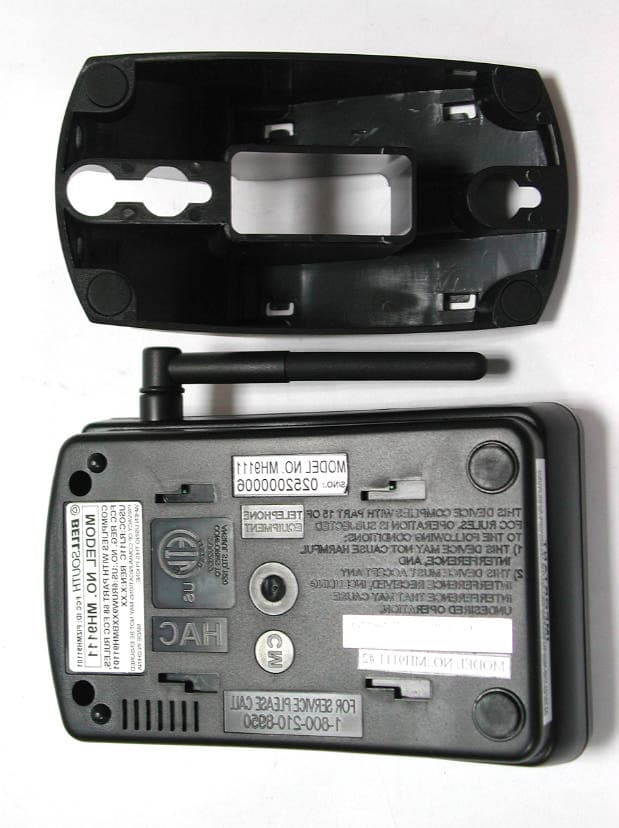
Click to zoom
Application Details
- Equipment Class
- DXX - Part 15 Low Power Communication Device Transmitter
- Date of Grant
- Mar 11, 2003
- Application Purpose
- Original Equipment
- Date of Application
- Mar 11, 2003
- Equipment Note
- 900 MHz Analog Cordless Phone
- Frequency Range
- 925.37500000 - 927.37500000
- Country
- Taiwan
Documents & Files
Document Text
Text extracted from the exhibit documents filed with the FCC. Open a document above to read the original.
Users Manual
1 Safety Instructions ------------------------------------------------------------------------------------------- 3 Getting Started ------------------------------------------------------------------------------------------------ 5 Desk Mounting ------------------------------------------------------------------------------------------------ 8 Wall Mounting ------------------------------------------------------------------------------------------------- 9 Cordless Telephone Operation -------------------------------------------------------------------------- 11 Preparing for Use ---------------------------------------------------------------------------------------- 11 NO LINE Indicator --------------------------------------------------------------------------------------- 11 Receiving Calls ------------------------------------------------------------------------------------------ 11 Placing Calls --------------------------------------------------------------------------------------------- 12 Headset Feature ---------------------------------------------------------------------------------------- 13 Redial Feature ------------------------------------------------------------------------------------------- 13 Caller ID System Operation ------------------------------------------------------------------------------ 14 Caller ID System ---------------------------------------------------------------------------------------- 14 Viewing Caller Information During Incoming Calls ------------------------------------------ 14 MSG WAITING (Message Waiting) ------------------------------------------------------------ 14 Call Waiting ------------------------------------------------------------------------------------------ 15 Voice Mail Function -------------------------------------------------------------------------------- 15 C-F (Forwarded Call) ------------------------------------------------------------------------------ 15 L-D-C (Long Distance Call) ---------------------------------------------------------------------- 15 Caller List ------------------------------------------------------------------------------------------------- 15 Viewing the Caller List ----------------------------------------------------------------------------- 16 Placing a Call From the Caller List ------------------------------------------------------------- 16 Editing the Caller List before Dialing ----------------------------------------------------------- 16 Saving the Name and Number in the Caller List into the DIRECTORY--------------- 17 Deleting All Records in the Caller List --------------------------------------------------------- 17 Selective Deleting in the Caller List ------------------------------------------------------------ 17 Name and Telephone Number DIRECTORY----------------------------------------------------- 17 Viewing the DIRECTORY------------------------------------------------------------------------- 17 Speed Viewing the DIRECTORY--------------------------------------------------------------- 18 Saving in the DIRECTORY----------------------------------------------------------------------- 18 PREFERRED CALLS ----------------------------------------------------------------------------- 18 BLOCKED CALLS ---------------------------------------------------------------------------------- 18 Editing a Name and Number in the DIRECTORY------------------------------------------- 19 Contents 2 Editing the Number in the DIRECTORYbefore Dialing ----------------------------------- 20 Placing Calls from the DIRECTORY----------------------------------------------------------- 21 Deleting All Records in the DIRECTORY----------------------------------------------------- 21 Selective Deleting in the DIRECTORY-------------------------------------------------------- 21 Function Operation ------------------------------------------------------------------------------------- 22 A. Language ---------------------------------------------------------------------------------------- 23 B. Silent On/Off ------------------------------------------------------------------------------------- 23 C. Time Set ------------------------------------------------------------------------------------------ 23 D. Ringer Volume ---------------------------------------------------------------------------------- 24 E. LCD Contrast ------------------------------------------------------------------------------------ 24 F.PBX Number ------------------------------------------------------------------------------------ 24 G. Flash Time --------------------------------------------------------------------------------------- 25 H. Pause Time -------------------------------------------------------------------------------------- 25 I. Voice Mail ---------------------------------------------------------------------------------------- 26 J. MSG Waiting (Message Waiting) ----------------------------------------------------------- 26 Telephone Keypad Characters ----------------------------------------------------------------------- 27 Security ------------------------------------------------------------------------------------------------------- 28 Recharging the Battery Pack ---------------------------------------------------------------------------- 29 Changing the Battery Pack ------------------------------------------------------------------------------- 30 Problem Solving -------------------------------------------------------------------------------------------- 31 Technical Information -------------------------------------------------------------------------------------- 32 FCC Requirements ----------------------------------------------------------------------------------------- 33 Warranty ------------------------------------------------------------------------------------------------------ 35 Wall Mounting Template ---------------------------------------------------------------------------------- 41 Contents 3 IMPORTANT SAFETYINSTRUCTIONS To reduce the risk …
Text truncated - open the document above for the full version.
Users Manual
Security System Your cordless telephone uses a digital coding security system to prevent unauthorized use of your telephone line by another nearby cordless telephone. The system has its own identifying signal created by microcomputers in both the BASE UNITand the HANDSET. Security Code This telephone has an internal security code with 65,536 possible combinations. Resetting Security Code and Channel Information Communication between the HANDSETand the BASE UNITmay not be possible in any of the following situations: 1.After a power failure. 2.After relocating the BASE UNITby disconnecting the AC ADAPTER. 3.After replacing the HANDSETBATTERYPACK. To reset, place the HANDSETon the BASE UNITfor 2 to 5 seconds. Multi-Channel Access Your cordless telephone lets you select a channel from the 40 frequencies available to transmit signals between the BASE UNITand HANDSET. When you notice interference from other cordless telephones, change to another channel by pressing the button on the HANDSET. DELETE SCAN 28 Security Battery Type Use the following type and size of BATTERYPACK: Cordless Telephone BATTERYPACK 3.6V, 600mAh U.S. Electronics Inc. Ni-Cd Battery Pack: Model B650 This BATTERYPACK is available through: U.S. Electronics Service Center 105 Madison Avenue New York, NY10016 1-800-825-5208 NOTES:1.During a power interruption, the BASE UNIT does not operate, and a phone conversation cannot be made on the HANDSET. 2.A“beep” will be heard when the HANDSET is properly positioned in the BASE UNIT CHARGE CRADLE and charging. Securely positioning the HANDSET,KEYPAD face up,in the BASE UNIT will also prevent the HANDSET from failing. Recharging the Battery Pack The nickel cadmium (Ni-Cd) BATTERYPACK in the HANDSETcan be recharged many times using the built-in charger in the BASE UNIT. When the BATTLOW symbol appears on the LCD Screen, a “beep” sound will be heard every 10 seconds. This indicates that the BATTERYPACK needs to be recharged. Charge the BATTERYPACK at least once every 90 days of non-use to avoid battery failure. When the BATTERYPACK can no longer be charged, replacement of the BATTERYPACK will be necessary. The BATTERYPACK used in your telephone may develop a condition known as “MEMORY”. Once subjected to a regular short discharging routine, the BATTERYPACK assumes the discharging pattern it was subjected to. This is known as a “MEMORY” condition which causes rapid discharging thereby shortening the BATTERYPACK charge span. If you believe your BATTERYPACK has developed a “MEMORY” condition, do not charge the HANDSETuntil the BATTLOW symbol appears on the LCD Screen. When the BATTLOW symbol appears on the LCD Screen, charge the HANDSETfully for 12 hours. 29 Recharging the BATTERYPACK IMPORTANT In order to get maximum life from the HANDSET BATTERYPACK, be sure to charge the HANDSET for 12 hours before initial use. Ni-Cd Changing the Battery Pack The BATTERYPACK provides power for the HANDSETof your cordless telephone. To Replace BATTERYPACK: 1.Remove the HANDSETBATTERYCOMPARTMENTCOVER by sliding it down. 2.Pull out the BATTERYPACK PLUG and remove the BATTERYPACK. 3.Plug the new BATTERYPACK into the BATTERYCONNECTOR. 4.Slide the HANDSETBATTERYCOMPARTMENTCOVER firmly into place in its closed position. 5.Before use, charge the new BATTERYPACK for 12 hours. ATTENTION: The telephone that you have purchased contains a rechargeable BATTERYPACK. The BATTERYPACK is recyclable. At the end of its useful life, under various state and local laws, it may be illegal to dispose of this BATTERYPACK into the municipal waste stream. Check with your local solid waste officials for details in your area for recycling options or proper disposal. 30 Changing the BATTERYPACK IMPORTANT In order to get maximum life from the HANDSET BATTERYPACK, be sure to charge the HANDSET for 12 hours before initial use. Problem Solving Section For your assistance, we have listed below a few common problems. Phone does not work, check the following: 1.BASE UNITis plugged into a power source. 2.HANDSETis charged. 3.TONE/PULSE Select switch is in the right position. 4.TELEPHONE LINE CORD is plugged into the TELEPHONE JACK. Range of phone limited, check the following: 1.ANTENNAon BASE UNITis raised. 2.BASE UNITis centrally located in your residence. 3.BASE UNITis not located near appliances. No dial tone, check the following: 1.TELEPHONE LINE CORD plugs are connected to the TELEPHONE JACK and TELEPHONE LINE CONNECTION JACK. 2.BASE UNITis plugged into a power source. 3.If you had a power failure or had unplugged the BASE UNIT, replace the HANDSETon the BASE UNITfor 2 to 5 seconds to reset the system. Received signal flutters or fades, check the following: 1.BATTERYPACK in the HANDSETis fully charged. 2.HANDSETis not too far from the BASE UNIT. 3.ANTENNAon BASE UNITis raised. Interference on reception, check the following: 1.Noise may be picked up from electrical products in the home or electrical storms. Generally, this noise is a minor annoyance and should not be interpreted as a defect in your system. (See Technical Information on page 32.) 2.Choose an alternate channel using the button on the HANDSET. Long Distance “L-D-C” indicator is not ON when receiving a long distance call, check the following: 1.Your local telephone company can provide the Area Code on an incoming long distance call. Excess static, check the following: 1.Check to see that the ANTENNAis not touching another metal object. 2.Raise or reposition the BASE UNITANTENNA. If after pressing the button, you receive three “beeps” and no dial tone, check the following: 1.BASE UNITis plugged into a power source. 2.If you had a power failure or had unplugged the BASE UNIT, replace the HANDSETon the BASE UNITfor 2 to 5 seconds to reset the system. NOTE:If none of telephones in the house are working, disconnect one set at a time to verify that none of the phones are causing the problem. If you still have a problem after doing this, and your telephone still does not work, plea…
Text truncated - open the document above for the full version.
Users Manual
900 MHz CORDLESS CALLER ID TELEPHONE WITH CALL WAITING 40 CHANNEL AUTOSCAN Model MH9111 OWNER’S MANUAL INSTALLATION AND OPERATING INSTRUCTIONS PLEASE READ THIS MANUALCAREFULLY BEFORE USE. KEEPFOR YOUR REFERENCE. For installation information, please see “Getting Started” instructions on page 5 or your separate Quick Start Guide. Visit Us on the Web: www.uselectronics.info © 2002 Bellsouth Corporation Make certain you receive the best performance from your telephone. Read this manual first. Visit Us on the Web: www.uselectronics.info Made in China CM STOP Congratulations on your selection of a quality BellSouthproduct. With proper care, and by following the set-up and user instructions in this Owner’s Manual, this unit will provide you with years of trouble-free service. BellSouthis committed to providing quality products that fit your needs. We would like to have any comments or suggestions you might have on this product. You may mail your comments to: U.S. Electronics 105 Madison Avenue New York, NY10016 When examining your new BellSouthcordless telephone, you will find an array of special features including: Filtered Sound T M S y s t e m- Gets considerably less noise than conventional cordless telephones because of a special circuit which delivers the clearest possible reception. 40 Channel Auto Scan- Press the button on the HANDSETto find and lock on to the clearest channel for any call. Desk or Wall Mount - Use this equipment as a desk phone or as a wall phone. TONE or PULSE Dialing- Use this phone for either TONE (push-button) or PULSE (rotary) dialing. Automated Functions- Redial the last number called and automatic STANDBYmode. Security- Ensures greater privacy because a built-in security code with 65,536 combinations prevents use of your telephone line by another nearby cordless phone. Dependable Battery- Recharge your BATTERYPACK many times with the built-in charger. The battery low warning tone tells you when the BATTERYPACK needs recharging. (See page 29.) Special Services- Use the button to access special services such as Call Waiting supplied by your telephone company or company switchboard. STANDBYMode- When in STANDBYmode (ON-HOOK), the phone is capable of receiving a call. When the HANDSETis on the BASE UNIT, it is automatically in the STANDBYmode (ON-HOOK). When the HANDSETis taken off the BASE UNIT, it remains in the STANDBY mode until you activate the button. Battery Power Saver- Once fully charged, in STANDBYmode, the HANDSETcan receive/send calls for a maximum of five days without the need for recharging. Length of charge depends on frequency of use. Luminous LCD Screen-The LCD Screen emits light for 5 seconds every time you press any of the buttons on the HANDSET. HANDSET Ringer Level- Select the ringer volume level (HI, LOW, OFF). HANDSET VOLUME CONTROLSwitch- Select the receiver volume level (HI, MID, LOW). HEADSET JACK-Your telephone can utilize a headset for hands-free communication. BELT CLIP- Use the BELTCLIPto hang your HANDSETon your belt. TALK FLASH DELETE SCAN Special Features CALLER ID SYSTEM Multi-Function Large LCD Screen- Shows the number you are dialing, and with Caller ID service (available through subscription from your local telephone company), displays information about the caller before you answer the call. Name and Number DIRECTORY- Stores up to 40 names and numbers so that you can call them with a single key stroke. Caller List-Available with Caller ID service. Stores up to 80 calls to keep track of everyone who called. The name, phone number, time, and date of the call are recorded. Allows you to return their calls with a single key stroke. Preferred Calls-You can mark the name and number of a welcome caller in the DIRECTORY. When that number calls in, the caller’s name will appear on the LCD Screen and a special ring sound will be heard. Blocked Calls-You can mark the name and number of an unwelcome caller in the DIRECTORY. When that number calls in, the caller’s name will appear on the LCD Screen and the ringer will be disabled. Repeat Call Indicator- Shows if a new incoming call has called more than once. Out of Area Call Indicator-Advises you that the incoming call is not in a Caller ID service area, or does not support the Caller ID system. Private Call Indicator-Advises you that the caller’s name and/or telephone number of the incoming call is blocked by the system. Call Waiting Service- Displays the name and number of the second caller, if you have subscribed to call waiting service from your local telephone company (See page 15). Voice Mail- Indicates message waiting signal if you subscribed to Voice Mail message service and requested Visual Message Indication from your local telephone company (see page 15). This telephone also detects a Stutter Dial Tone signal every time there is a Voice Mail message for your Voice Mail message provider if you have subscribed to Voice Mail message service. Special Features HANDSET Controls 1.HANDSET ANTENNA 2.NEW CALL/MSG (MESSAGE) WAITING LED Indicator: Blinks when recording a new incoming call or when receiving a Message Waiting signal, if you have subscribed to a Voice Mail message service from your local telephone company. (See page 14 for details.) 3.LCD Screen: Shows call information, phone status, prompts and directory items. 4.TALK Button: Press to answer an incoming call or to place a call. Press to end a call. TALK HANDSET Controls 2.NEW CALL/MESSAGE WAITING INDICATOR Pg. 14 3.LCD SCREEN 1.HANDSETANTENNA 4.TALK BUTTON Pg. 6, 7, 11~13, 15~16, 20, 21, 31 5.SCROLLUP-DOWN/ SHIFTLEFT-RIGHT BUTTON Pg. 14, 16~27 6.VOLUME CONTROL (HI, MID, LOW) SWITCH 7.DIAL10 BUTTON Pg. 12, 16, 20~21, 25 8.DIAL7/TEMPORARY TONE(*) BUTTON Pg. 12, 16, 18, 20~21, 25 9.REDIAL/PAUSE/SAVE BUTTON Pg. 13, 16~20, 23~26 10.EDITBUTTON Pg. 16, 18~20, 23~27 11.DIR BUTTON Pg. 16~21, 27 12.FUNCTION/VOICE MAIL BUTTON Pg. 15, 22~26 13.HEADSETJACK Pg. 13 17.FLASH BUTTON Pg. 15 18.CHARGE CONTACTS 14.TELEPHONE KEYPAD Pg. 16, 18~20, 22…
Text truncated - open the document above for the full version.
ID Label/Location Info
MH9111BA LABELS' LOCATION DESIGNED BY: Deng LingDATE : Feb/24/2003 THIS DEVICE COMPLIES WITH PART 15 OF FCC RULES. OPERATION IS SUBJECTED TO THE FOLLOWING CONDITIONS: 1) THIS DEVICE MAY NOT CAUSE HARMFUL INTERFERENCE, AND 2) THIS DEVICE MUST ACCEPT ANY INTERFERENCE RECEIVED, INCLUDING INTERFERENCE THAT MAY CAUSE UNDESIRED OPERATION. HAC CM FOR SERVICE PLEASE CALL 1-800-210-8950 TELEPHONE EQUIPMENT US 2002627 CONFORMS TOANSI/UL STD,1950 R CHARGE PAGE IN USE S/NO.: 0307000001 MODEL NO. MH9111 Licensed under U.S. Patent No. 5,263,084 QC 2A ACC FCC ID: PIZMH91101 MODEL NO.: MH9111 PRIVACY OF COMMUNICATIONS MAY NOT BE ENSUREDWHEN USING THIS PHONE. MADE IN CHINA COMPLIES WITH PART 68 FCC RULES,FCC REG. NO.:US:6RUW900BMH9111USOC:RJ11C REN:0.0B MODEL NO. MH9111 FCC ID:P1ZMH91101 900MHz NOTE
Test Report
Test Report ------------------------------------------------------------------------------ 1/28 Report No.: C5015365, 900MHz Analog Cordless Phone, FCC Part 15 Class B Training Research Co., Ltd. TEL: 886-2-26935155, Fax: 886-2-26934440 MEASUREMENT REPORT of CORDLESS TELEPHONE Applicant : CIDMATE International Technology Inc. Model No. : MH9110xx, MH9111xx (x could be numbers or alphabets) EUT : 900MHz Analog Cordless Phone FCC ID : PIZMH91101 Report No. : C5015365 Test by : Training Research Co., Ltd. TEL : 886-2-26935155 FAX : 886-2-26934440 No. 255, Nan-yang Street, Shijr, Taipei Hsien 221, Taiwan, R.O.C. Test Report ------------------------------------------------------------------------------ 2/28 Report No.: C5015365, 900MHz Analog Cordless Phone, FCC Part 15 Class B Training Research Co., Ltd. TEL: 886-2-26935155, Fax: 886-2-26934440 CERTIFICATION We here by verify that: The test data, data evaluation, test procedures and equipment configurations shown in this report were made mainly in accordance with the procedures given in ANSI C63.4 (1992) as a reference. All test were conducted by Training Research Co., Ltd., No. 255, Nan-yang Street, Shijr, Taipei Hsien 221, Taiwan, R.O.C. Also, we attest to the accuracy of each. We further submit that the energy emitted by the sample EUT tested as described in the report is in compliance with the technical requirements set forth in the FCC Rules Part 15 Subpart C Section 15.249. Applicant : CIDMATE International Technology Inc. Product Name : 900MHz Analog Cordless Phone Model No. : MH9110xx, MH9111xx FCC ID : PIZMH91101 Report No. : C5015365 Test Date : February 15, 2003 Prepared by: Approved by: JACK TSAI FRANK TSAI Test by : Training Research Co., Ltd. TEL : 886-2-26935155 FAX : 886-2-26934440 No. 255, Nan-yang Street, Shijr, Taipei Hsien 221, Taiwan, R.O.C. Test Report ------------------------------------------------------------------------------ 3/28 Report No.: C5015365, 900MHz Analog Cordless Phone, FCC Part 15 Class B Training Research Co., Ltd. TEL: 886-2-26935155, Fax: 886-2-26934440 Tables of Contents I. GENERAL 1.1 Introduction .................................................................................................................. 5 1.2 Description of EUT ...................................................................................................... 5 1.3 Description of Support Equipment ................................................................................ 6 1.4 Configuration of System Under Test .............................................................................. 7 1.5 Test Procedure ............................................................................................................. 8 1.6 Location of the Test Site ............................................................................................... 8 1.7 General Test Condition ................................................................................................. 8 II. Conducted Emissions Measurements 2.1 Test Condition & Setup ............................................................................................... 9 2.2 List of Test Instruments ................................................................................................ 9 2.3 Test Result of Conducted Emissions ............................................................................ 10 III. Radiated Emissions Measurements 3.1 Test Condition & Setup .............................................................................................. 13 3.2 List of Test Instruments ............................................................................................... 13 3.3 Test Result of Radiated Emissions ............................................................................... 15 3.4 Test Result of Spurious Radiated Emissions ................................................................. 16 IV. Verify Frequencies and Channels ............................................................................... 24 Appendix A .......................................................................................................................... 25 Appendix B .......................................................................................................................... 28 Test Report ------------------------------------------------------------------------------ 4/28 Report No.: C5015365, 900MHz Analog Cordless Phone, FCC Part 15 Class B Training Research Co., Ltd. TEL: 886-2-26935155, Fax: 886-2-26934440 TABLES Table 1 Power Line Conducted Emissions [Channel 01]................................................... 10 Table 2 Power Line Conducted Emissions [Channel 40]................................................... 11 Table 3 Power Line Conducted Emissions [Charging mode]............................................. 12 Table 4 Fundamental Emissions ...................................................................................... 15 Table 5 Radiated Emissions [Base Channel 01 Horizontal 30MHz to1GHz]...................... 16 Table 6 Radiated Emissions [Base Channel 01 Vertical 30MHz to1GHz] ...................... 16 Table 7 Radiated Emissions [Base Channel 01 Horizontal 1GHz to 10 GHz] ................... 17 Table 8 Radiated Emissions [Base Channel 01 Vertical 1GHz to 10 GHz] ...................... 17 Table 9 Radiated Emissions [Base Channel 40 Horizontal 30MHz to 1GHz] .................. 18 Table 10 Radiated Emissions [Base Channel 40 Vertical 30MHz to 1GHz]........................ 18 Table 11 Radiated Emissions [Base Channel 40 Horizontal 1GHz to 10 GHz] .................. 19 Table 12 Radiated Emissions [Base Channel 40 Vertical 1GHz to 10 GHz] ..................... 19 Table 13 Radiated Emissions [Handset Channel 01 Horizontal 30MHz to 1GHz]............... 20 Table 14 Radiated Emissions [Handset Channel 01 Vertical 30MHz to 1GHz]................... 20 Table 15 Radiated Emissions [Handset Channel 01 Horizontal…
Text truncated - open the document above for the full version.
Test Setup Photos
Test Setup Photos ------------------------------------------------------------------------- 1/3 FCC ID: PIZMH91101 Training Research Co., Ltd., TEL: 886-2-26935155, Fax: 886-2-26934440 Conducted Test Setup Placement: (Operating mode) Front View of the Test Configuration Rear View of the Test Configuration Test Setup Photos ------------------------------------------------------------------------- 2/3 FCC ID: PIZMH91101 Training Research Co., Ltd., TEL: 886-2-26935155, Fax: 886-2-26934440 Radiated Test Setup Placement: (BASE) Front View of the Test Configuration of Base Rear View of the Test Configuration of Base Test Setup Photos ------------------------------------------------------------------------- 3/3 FCC ID: PIZMH91101 Training Research Co., Ltd., TEL: 886-2-26935155, Fax: 886-2-26934440 Radiated Test Setup Placement: (Handset) Front View of the Test Configuration of Y-axis Front View of the Test Configuration of X-axis
Contact Information
Applicant
Beryl Liu(Sales Asst. Manager)
Test Firm
Training Research Co., Ltd.Jack Tsai
Technical Specifications
| # | Rule Parts | Frequency Range | Power Output |
|---|---|---|---|
| 2 | 15C | 925.375 MHz - 927.375 MHz | - |
Other Applications from CIDMATE International Technology Inc.
PIZGH9492
Mar 28, 20042.4 GHz Analog Cordless Phone with CID and DAM
Equipment Class
DXX - Part 15 Low Power Communication Device Transmitter
PIZGH9764
Mar 24, 20042.4GHz DSST Multi-Handset w/ CID+DAM
Equipment Class
DTS - Digital Transmission System
PIZXG34001
Aug 17, 20032.4GHz ANALOG CORDLESS PHONE
Equipment Class
DXX - Part 15 Low Power Communication Device Transmitter
PIZMINI1
Jul 24, 20032.4 GHz Analog Cordless Telephone with CID
Equipment Class
DXX - Part 15 Low Power Communication Device Transmitter
PIZXG32010
Jul 09, 20032.4GHz ANALOG CORDLESS PHONE
Equipment Class
DXX - Part 15 Low Power Communication Device Transmitter