PKLWBC-1000BlueConnect
Widcomm, Inc.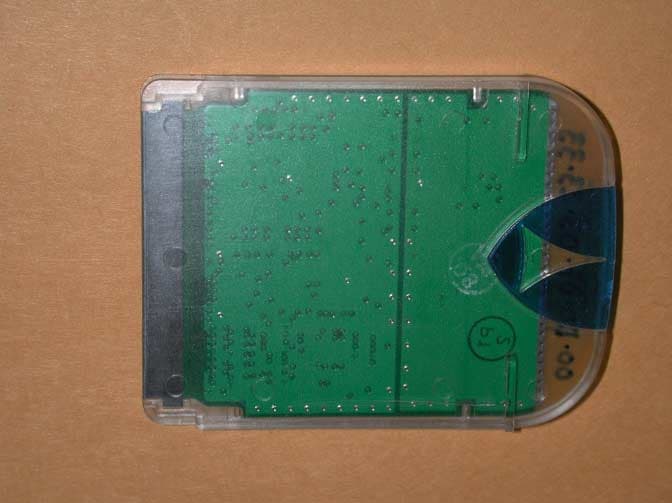
Click to zoom
Application Details
- Equipment Class
- DSS - Part 15 Spread Spectrum Transmitter
- Date of Grant
- May 22, 2001
- Application Purpose
- Original Equipment
- Date of Application
- May 22, 2001
- Equipment Note
- BlueConnect
- Frequency Range
- 2402.00000000 - 2483.50000000
- Company
- Widcomm, Inc.
- Country
- United States
Documents & Files
Document Text
Text extracted from the exhibit documents filed with the FCC. Open a document above to read the original.
Users Manual
BlueConnect Development Kit User’s Guide Document Number: BCDK-UG-012401-1200 Revision 1.7 ________________________________________________ WIDCOMM, Inc. Wireless Internet and Data Communication © Copyright 2000-2001. All rights reserved. 9645 Scranton Road, Suite 205 San Diego, CA 92121 Voice: (858) 453-8400 Fax: (858) 453-5735 Email : [email protected] or [email protected] FCC Statement Widcomm Inc. 9645 Scranton Road, Suite 205 San Diego, CA 92121 858-453-8400 BlueConnect WDC-WBC-1000 This device complies with part 15 of the FCC Rules. Operation is subject to the following two conditions: (1) This device may not cause harmful interference, and, (2) This device must accept any interference received including interference that may cause undesired operation. Per CFR 47, PART 15, Paragraph 15.21: User changes or modifications not expressly approved by the party responsible for compliance could void the users authority to operate the equipment. © Copyright 2000 – 2001, WIDCOMM, Inc. (“WIDCOMM”). All rights reserved. This documentation may be printed and copied solely in connection with developing products in accordance with the license agreement provided to you with this documentation. Only two (2) copies of this documentation may be made for archival and backup purposes. Except for the foregoing, no part of this documentation may be reproduced or transmitted in any form or by any means or used to make any derivative work (such as translation, transformation or adaptation) without the express written consent of WIDCOMM. WIDCOMM, the WIDCOMM logo, and BlueConnect are trademarks of WIDCOMM, Inc. Bluetooth is a trademark owned by the Bluetooth SIG, Inc., and used by WIDCOMM under license. Handspring and Visor are registered trademarks of Handspring, Inc. HotSync, Palm Computing, and Palm OS are registered trademarks of Palm, Inc. Microsoft and Windows are registered trademarks of Microsoft Corporation. Other brand and product names may be registered trademarks or trademarks of their respective holders. Table of Contents 1 INTRODUCTION ............................................................................................................1 2 REQUIRED MATERIALS..............................................................................................2 3 INSTALLATION AND SETUP ......................................................................................2 3.1 I NSERTING AND CONFIGURING THE BLUECONNECT MODULE.....................................2 3.2 C ONNECTING TO A REMOTE DEVICE (INQUIRY AND DISCOVERY)................................4 3.2.1 Clients, Servers, and Services.............................................................................4 3.2.2 The Server Mode .................................................................................................5 3.2.3 The Client Mode..................................................................................................6 4 LAUNCHING APPLICATIONS ..................................................................................13 4.1 O N THE SERVER.........................................................................................................13 4.2 O N THE CLIENT..........................................................................................................13 5 CLOSING APPLICATIONS AND COMMUNICATIONS SHUTDOWN ..............14 6 TROUBLESHOOTING .................................................................................................15 6.1 E RROR MESSAGE: COULDN’T OPEN BLUETOOTH LIBRARY......................................15 6.2 B EHAVIOR: DEVICES NEVER CONNECT.....................................................................15 6.3 E RROR MESSAGE: (DURING DISCOVERY PROCESS) CONNECTION FAILED................15 6.4 B EHAVIOR: THE SERVER AND CLIENT DO NOT CONNECT...........................................15 6.5 B EHAVIOR: DISCOVER APPLICATION DOES NOT WORK.............................................15 6.6 B EHAVIOR: STALE ENTRIES ON “DEVICES” SCREEN................................................17 6.7 B EHAVIOR: STALE ENTRIES ON “SERVICES” SCREEN...............................................17 6.8 B EHAVIOR: FATAL ERROR WHEN THE REMOVING BLUECONNECT CARD.................18 6.9 B EHAVIOR: “UNABLE TO OPEN THE SERIAL COMMUNICATIONS LIBRARY”..............19 BlueConnect Development Kit User’s Guide WIDCOMM, Inc. 1 1 Introduction This document describes the basic procedures for proper use of the BlueConnect module for the Handspring Visor. is a part of the BlueConnect Development Kit and it describes the basic procedures for proper use of the BlueConnect module for the Handspring Visor. The BlueConnect module comes with code libraries and some applications already burned into ROM. The libraries are: • Bluetooth – The WIDCOMM Bluetooth API libraries. These appear as Bluetooth Library and Bluetooth Library 2 on the application info screen of your Visor. • Discover – The libraries for supporting device discovery. These appear as Discover Library and Discovery Database on the application info screen of your Visor. These libraries are loaded into the Visor’s RAM from the BlueConnect module ROM once the BlueConnect module is plugged into the Visor. Since these applications reside on the BlueConnect card, they will only show up on the application info screen of your Visor whenever the BlueConnect card is inserted. If you remove the BlueConnect card, your Visor will reset and the libraries will vanish. In addition to these libraries, the module also holds the following applications: • Bluetooth – allows the user to select serial port and debug options. • BT-Pong – an amusing game. • Discover – lets you find other Bluetooth devices and discover services on them. • WidChat – a sample chat application. The applications residing on the BlueConnect module ROM can be identified by the fact that their names have a square bullet icon next to them. An interesting example of this is the Discover application. Th…
Text truncated - open the document above for the full version.
Attestation Statements
TÜV PRODUCT SERVICE 10040 Mesa Rim Road San Diego, CA 92121-2912 Phone 858 546 3999 FAX 858 546 0364 Report No. SC100278-06 Page 24 Rev.No 1.0 ATTESTATION STATEMENT GENERAL REMARKS: SUMMARY: All tests were performed per CFR 47, FCC Part 15, Paragraphs 15.205; 15.209; 15.209(a); 15.247; 15.247(a)(1)(ii) n - Performed The Equipment Under Test n - Fulfills the requirements of CFR 47, FCC Part 15, Paragraphs 15.205; 15.209; 15.209(a); 15.247; 15.247(a)(1)(ii) - TÜV PRODUCT SERVICE, INC. - Responsible Engineer: Mary Washington (EMC Engineer)
Block Diagram
Widcomm Inc.3/28/2001 FCC Application XXX-WBC-10001Oscillator Block Diagram Additional Information for the FCC approval of Widcomm Inc.’s BlueConnect Oscillator Block Diagram March 22, 2001 Springboard Interface Connector (To Handspring Visor) UART 14.7456 MHz Oscillator Ericsson ROK-101-007 RF Module
External Photos
IN CASE FRONT IN CASE REAR
Internal Photos
NO CASE BOTTOM NO CASE TOP BLUECONNECT PCB ASSEMBLY BLUCONNECT PCB
Operational Description
Widcomm Inc.3/28/2001 FCC Application XXX-WBC-10001Operating Description Application PKL-WBC-1000 Additional Information for the FCC approval of Widcomm Inc.’s BlueConnect Operating Description March 26, 2001 Blue Connect is an add-on module designed to be used with a Handspring Visor personal digital assistant. The Blueconnect module contains an Ericsson integrated Bluetooth transceiver component, interface components, and power management. The function of this module is to provide a wireless bi-directional link between a hand held Visor and any other Bluetooth device. The module, Visor, and software work in conjunction allowing a seamless connection that is designed to operate simultaneously with neighboring wireless Bluetooth devices. The Bluetooth topology, concept, and algorithms handle multiple user environments. The transceiver is implemented at 2.4GHz, 78 one megahertz channels, fast frequency hopping. The antenna is a PCB type inverted-F, is included in the module and cannot be accessed externally. There is no ground provision because it is not necessary for a portable battery powered device. Support IC’s internal to the module are Flash memory, a UART with a crystal oscillator at 14.7456MHz, and a power management support IC.
RF Exposure Info
Widcomm Inc. 5/22/2001 FCC Application XXX-WBC-1000 1 Sample Label FCC Statement: RF Exposure Compliance Widcomm Inc. 9645 Scranton Road, Suite 205 San Diego, CA 92121 858-453-8400 BlueConnect RF exposure compliance issues regarding FCC ID: “PKLWBC-1000" The maximum RF output of the Blueconnect module is 0dBm(1mW), and the internal PCB mounted antenna has a maximum gain less than 3 dBi. With references to the Ericsson Bluetooth Module used, FCC ID: 8001001, the product RF output is below the SAR and MPE limits.
Test Report
TÜV PRODUCT SERVICE 10040 Mesa Rim Road San Diego, CA 92121-2912 Phone 858 546 3999 FAX 858 546 0364 Report No. SC100278-06 Page 1 Rev.No 1.0 MEASUREMENT AND TECHNICAL REPORT WIDCOMM, INC. 9645 Scranton Road, Suite 205 San Diego, CA 92121 DATE: 16 May 2001 This Report Concerns:Original Grant: XClass II Change: Equipment Type:Blue Connect, Model Blue Connect Deferred grant requested per 47 CFR 0.457(d)(1)(ii)?Yes: Defer until: No: X Company Name agrees to notify the Commission by:N/A of the intended date of announcement of the product so that the grant can be issued on that date. Transition Rules Request per 15.37?Yes:No: X* (*) FCC Part 15, Paragraphs 15.205; 15.209; 15.209(a); 15.247; 15.247(a)(1)(ii) Report Prepared by: TÜV PRODUCT SERVICE 10040 Mesa Rim Road San Diego, CA 92121-2912 Phone: 858 546 3999 Fax: 858 546 0364 TÜV PRODUCT SERVICE 10040 Mesa Rim Road San Diego, CA 92121-2912 Phone 858 546 3999 FAX 858 546 0364 Report No. SC100278-06 Page 2 Rev.No 1.0 TABLE OF CONTENTS Pages 1 GENERAL INFORMATION3 1.1Product Description3 1.2Related Submittal Grant4 1.3Tested System Details4 1.4Test Methodology4 1.5Test Facility4 2 SYSTEM TEST CONFIGURATION6 2.1Justification6 2.2EUT Exercise Software6 2.3Special Accessories6 2.4Equipment Modifications6 2.5Configuration of Tested System6 3RADIATED EMISSION EQUIPMENT/DATA7 Field Strength Calculation14 4 CONDUCTED EMISSION EQUIPMENT/DATA15 5Attestation Statement24 TÜV PRODUCT SERVICE 10040 Mesa Rim Road San Diego, CA 92121-2912 Phone 858 546 3999 FAX 858 546 0364 Report No. SC100278-06 Page 3 Rev.No 1.0 1 GENERAL INFORMATION 1.1Product Description EUT Description:Wireless PDA Data Transmitter and Receiver EUT Name: Blue Connect Model No.: Blue Connect Typical Installation and/or Operating Environment Home/office EUT Power Cable XNot Applicable EUT Interface Ports and Cables InterfaceShielding TypeTypeTermination Connector TypePort Termination USBX1XFoilTwistedUSB100 ohm1 mX Or RS232 X1XTwisted9-pin D-sub100 ohm1 mX EUT System Components DescriptionModel #Serial #FCC ID # Handspring VisorDeluxe Ericsson Bluetooth Module Support Equipment DescriptionModel #Serial #FCC ID # None Oscillator Frequencies FrequencyDerived FrequencyComponent # / LocationDescription of Use 2.4 to 2.5 GEricsson module XtalTX output Vart Power Supply ManufacturerModel #Serial #Type N/A Power Line Filters ManufacturerModel #Location in EUT N/A Critical EMI Components (Capacitors, ferrites, etc.) DescriptionManufacturerPart # or ValueQtyComponent # / Location N/A EMC Critical Detail -- Describe other EMC Design details used to reduce high frequency noise. N/A TÜV PRODUCT SERVICE 10040 Mesa Rim Road San Diego, CA 92121-2912 Phone 858 546 3999 FAX 858 546 0364 Report No. SC100278-06 Page 4 Rev.No 1.0 1 GENERAL INFORMATION (continued) 1.2Related Submittal/Grant None 1.3Tested System Details The FCC IDs for all equipment, plus descriptions of all cables used in the tested system are: None 1.4Test Methodology Purpose of Test:To demonstrate compliance with the ANSI C63.4 setup. Test Performed:X1. Conducted Emissions, FCC Part 15, Paragraph 15.247(a)(1)(ii) 2. Radiated Emissions EN55022: 1992 Class B limit, 30 - 1,000 MHz, 10 meters X3. Radiated Emission per FCC Part 15, Paragraphs 15.205; 15.209(a); and 15.247 4. Engineering evaluations 5. Frequency Stability, Part 2, Paragraph 2.995, and Part 87, Paragraph 87.133 6. RF Output Power, Part 2, Paragraph 2.985, Part 22, Paragraph 22.917 Both Conducted and radiated testing were performed according to the procedures in FCC/ANSI C63.4 and CSA 108.8 - M1983. Radiated testing was performed at an antenna-to-EUT distance of 3 meters (1 - 10 GHz). TÜV PRODUCT SERVICE 10040 Mesa Rim Road San Diego, CA 92121-2912 Phone 858 546 3999 FAX 858 546 0364 Report No. SC100278-06 Page 5 Rev.No 1.0 1.5Test Facility The open area test site and conducted measurement data were tested by: TÜV PRODUCT SERVICE 10040 Mesa Rim Road San Diego, CA 92121-2912 Phone: 619 546 3999 Fax: 619 546 0364 The Test Site Data and performance comply with ANSI 63.4 and are registered with the FCC, 7435 Oakland Mills Rd, Columbia Maryland 21046. All Measurement Data is acquired according to the content of FCC Measurement Procedure and ANSI C63.4, unless supplemented with additional requirements as noted in the test report. TÜV PRODUCT SERVICE 10040 Mesa Rim Road San Diego, CA 92121-2912 Phone 858 546 3999 FAX 858 546 0364 Report No. SC100278-06 Page 6 Rev.No 1.0 2.SYSTEM TEST CONFIGURATION 2.1Justification The EUT was initially tested for FCC emission in the following configuration: See Block Diagram. 2.2EUT Exercise Software None 2.3Special Accessories None 2.4Modification None 2.5Configuration of Tested System See Block Diagram. TÜV PRODUCT SERVICE 10040 Mesa Rim Road San Diego, CA 92121-2912 Phone 858 546 3999 FAX 858 546 0364 Report No. SC100278-06 Page 7 Rev.No 1.0 3RADIATED EMISSION EQUIPMENT/DATA The following data lists the significant emission frequencies, measured levels, correction factor (which includes cable and antenna corrections), the corrected reading, and the limit. See following page(s). See test setup photos for radiated emissions test setup. TÜV PRODUCT SERVICE 10040 Mesa Rim Road San Diego, CA 92121-2912 Phone 858 546 3999 FAX 858 546 0364 Report No. SC100278-06 Page 13 Rev.No 1.0 Emissions Test Conditions: RADIATED EMISSIONS, FCC Part 15, Paragraph 15.205, 15.209, 15.247 The RADIATED EMISSIONS measurements were performed at the following test location : o - Test not applicable n - Canyon #3 (Open Area Test Site), Carroll Canyon, San Diego Testing was performed at a test distance of: o - 1 meters n - 3 meters o - 10 meters Test Equipment Used : Model No.Prop. No.DescriptionManufacturerSerial No.Cal Date 3115251Antenna, Double Ridge GuideEMCO249510/01 3146243Antenna, Log Periodic DipoleEMCO106302/02 8566B720Spectrum AnalyzerHewlett Packard21150084203/17/01 8566B721Spectrum Analyzer DisplayHewlett Packard2112A0218503/17/01 ESVS30466ReceiverRohde & Schwarz83382…
Text truncated - open the document above for the full version.
Contact Information
Applicant
Nancy Mitchell(Sr. Director Engineering)
Test Firm
TUV AmericaJames Owen
Technical Specifications
| # | Rule Parts | Frequency Range | Power Output |
|---|---|---|---|
| 1 | 15C | 2.40 GHz - 2.48 GHz | 2.00 mW |
Other Applications from Widcomm, Inc.
PKLWBG-2100
Jul 26, 2001Bluegate 2100
Equipment Class
DSS - Part 15 Spread Spectrum Transmitter
PKLWBG-1000
Jun 10, 2001Bluetooth Network Access Point, Bluegate1000
Equipment Class
DSS - Part 15 Spread Spectrum Transmitter