PRDKB17Wireless Keyboard
Acrox Technologies Co., Ltd.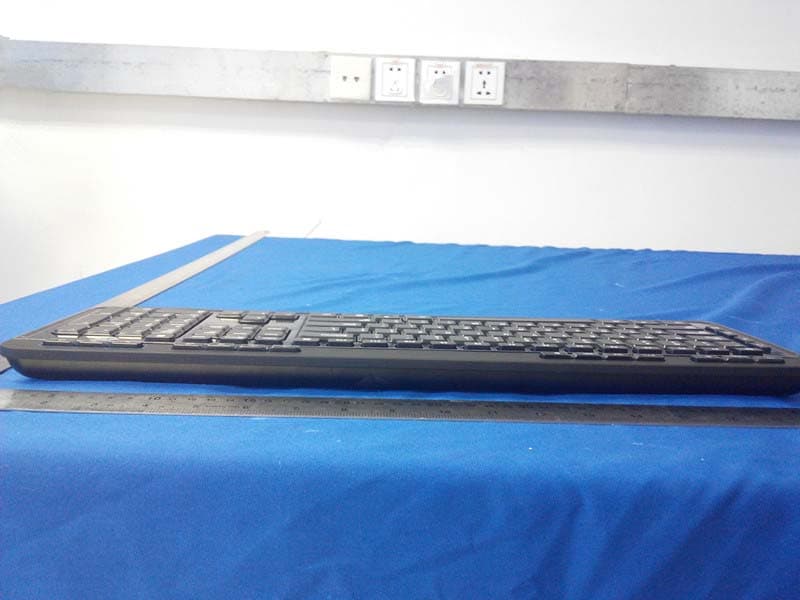
Click to zoom
Application Details
- Equipment Class
- DXX - Part 15 Low Power Communication Device Transmitter
- Date of Grant
- Oct 15, 2014
- Application Purpose
- Original Equipment
- Date of Application
- Oct 15, 2014
- Equipment Note
- Wireless Keyboard
- Frequency Range
- 2408.00000000 - 2474.00000000
- Company
- Acrox Technologies Co., Ltd.
- Country
- Taiwan
Documents & Files
Document Text
Text extracted from the exhibit documents filed with the FCC. Open a document above to read the original.
Users Manual
2.4G Deluxe Multimedia Keyboard USER'S GUIDE Ver.:1.00 CAUTION: To use this product properly, please read the user's guide before installation 1 Federal Communication Commission Interference Statement This equipment has been tested and found to comply with the limits for a Class B digital device, pursuant to Part 15 of the FCC Rules. These limits are designed to provide reasonable protection against harmful interference in a residential installation. This equipment generates, uses and can radiate radio frequency energy and, if not installed and used in accordance with the instructions, may cause harmful interference to radio communications. However, there is no guarantee that interference will not occur in a particular installation. If this equipment does cause harmful interference to radio or television reception, which can be determined by turning the equipment off and on, the user is encouraged to try to correct the interference by one of the following measures: - Reorient or relocate the receiving antenna. - Increase the separation between the equipment and receiver. - Connect the equipment into an outlet on a circuit different from that to which the receiver is connected. - Consult the dealer or an experienced radio/TV technician for help. FCC Caution: Any changes or modifications not expressly approved by the party responsible for compliance could void the user's authority to operate this equipment. This device complies with Part 15 of the FCC Rules. Operation is subject to the following two conditions: (1) This device may not cause harmful interference, and (2) this device must accept any interference received, including interference that may cause undesired operation. 2 Functional Introduction Keyboard Buttons AAA battery X2 Media Player Hot Keys 3 Media Player Hot Keys 1. Outlook(E-mail)ÆDefault Start the default e-mail program 2 Homepage(www/e) Start the default Web browser and loads the home Web page 3. Forward Forward to the next page on Internet browser 4. Back Back to the last page on Internet browser 5. Search Open the Internet Explorer Search panel 6. Refresh Reload the current page 7. My Favorites Start my favorites 8. Play/Pause Switch between playing and pausing media 9. Previous Switch to the previous media track 10. Next Switch to the next media track 11. Stop(Media) Stop playing the media in the media player 12. My Computer My Computer 13. Volume down (Voice-) Decrease the computer's sound volume. 14. Volume up (Voice+) Increase the computer's sound volume. 15 Mute Mute (turns off) the computer's sound 16 Media Player on Open the media player 17 Sleep let PC into sleep (stand by) mode 18 Weak up let PC (had into stand by) to weak up 19 Power let PC to shut off 20 Calculator Start Microsoft Calculator 21 LED Indicator Low Battery & Pairing Indicator 22 Battery Cover Setup the Connection between the Receiver and the Keyboard. 1. Insert the batteries into the Keyboard, then follow the steps below. 2. Plug the Nano receiver into the USB port of your computer. 4 3. If the keyboard is not working, please put it into pairing mode. 4. Pairing: Re-plug the receiver into the USB port of your computer, then press the “ESC” and “K” button on the keyboard. If the keyboard does not work after 10 seconds, pair them again. (The receiver has auto pairing function). 5. The LED indicator on keyboard flashes steadily when it is in pairing mode and stops blinking when it is successfully paired with the receiver. 6. When the batteries’ power of the keyboard is low, the Low Power indicator will start to blink. LED indicator Power ON *Keyboard Indicator Red LED is on for 10 sec. Red LED Blinking Pairing (LED OFF when paired or failed after 10 sec.) Red LED Blinks for 10 sec. Low Battery Warning
Cover Letter(s)
SCS-F18: Project and Product Certification Representative Authorization Letter Page 1 of 2 Rev 5.0 775 Montague Expressway Milpitas, CA 95035 Tel: 408-526-1188 Fax: 408-526-1088 Email: [email protected] Project and Product Certification Representative Authorization Letter Revision History Reason for Amendment (current / obsolete) From To Approved Date Initial Release (obsolete) 1.0 1.0 Nov-14-2006 Revised wording (obsolete) 1.0 2.0 Sept–25-2007 Updated company template (obsolete) 2.0 3.0 Jan-31-2012 Updated letter information (obsolete) 3.0 4.0 May-23-2014 Added FCC ID field (current) 4.0 5.0 Sept 16 2014 SCS-F18: Project and Product Certification Representative Authorization Letter Page 2 of 2 Rev 5.0 Acrox Technologies Co., Ltd. 4F., No.89, Minshan St., Neihu Dist.,Taipei City 114, Taiwan, R.O.C 2014-9-17 To: SIEMIC, INC. 775 Montague Expressway, Milpitas, CA 95035 USA Dear Sir/Madam, Re: Product Certification Representative Authorization Letter We, Acrox Technologies Co., Ltd. hereby authorize SIEMIC, Inc. to act as a Certification Body for certifying for the following project(s): FCC ID: PRDKB17 Model: KBL, LS9500R Product name: Wireless Keyboard Sincerely, signature : name / title:Gavin Hsieh / Product Manager address: 4F., No.89, Minshan St., Neihu Dist.,Taipei City 114, Taiwan, R.O.C
Cover Letter(s)
SCS-F19: Confidentiality Request Letter Page 1 of 2 Rev 3.0 775 Montague Expressway Milpitas, CA 95035 Tel: 408-526-1188 Fax: 408-526-1088 Email: [email protected] Confidentiality Request Letter Revision History Reason for Amendment (current / obsolete) From To Approved Date Initial Release (obsolete) 1.0 1.0 Nov-14-2006 Adding CFR 2.459 (obsolete) 1.0 2.0 August – 11 - 2008 Updated company template & Added text box (current) 2.0 3.0 Jan-31-2012 SCS-F19: Confidentiality Request Letter Page 2 of 2 Rev 3.0 Acrox Technologies Co., Ltd. 4F., No.89, Minshan St., Neihu Dist.,Taipei City 114, Taiwan, R.O.C 2014-9-17 To: Federal Communications Commission Authorization and Evaluation Division 7435 Oakland Mills Road Columbia, MD Subject: Permanent Confidentiality Request for FCC ID: PRDKB17 We hereby request confidential treatment of information accompanying this application as outlined below: Block Diagram Schematics Operational Description The above materials contain trade secrets and proprietary information not customarily released to the public. The public disclosure of these materials may be harmful to the applicant and provide unjustified benefits to its competitors. The applicant understands that pursuant to Section 0.457 & 0.459 of the Rules, disclosure of this application and all accompanying documentation will not be made before the date of the Grant for this application. Sincerely, signature : name / title: Gavin Hsieh / Product Manager address: 4F., No.89, Minshan St., Neihu Dist.,Taipei City 114, Taiwan, R.O.C
Cover Letter(s)
n Acrox Technologies Co., Ltd. 4F., No.89, Minshan St., Neihu Dist.,Taipei City 114, Taiwan, R.O.C FCC ID: PRDKB17 Hereby we: Acrox Technologies Co., Ltd. (Name of Manufacturer) Basic Model Number: KBL Basic Brand Name: Basic Product Name: Wireless Keyboard Declare the Circuit, PCB Layout, shape of enclosure and Electrical Parts of the following product(s) are identical to the basic model: New / Additional Model Number(s): LS9500R New / Additional Brand Name(s): / Except the following(s) : Model number, Signature with Company Chop : Printed Name : Gavin Hsieh DATE: 2014-09-18
External Photos
.
ID Label/Location Info
Label location
Internal Photos
Antenna location
Test Report
FCC ID: PRDKB17 Keyway Testing Technology Co., Ltd. Report No. 14KWE091896F Page 1 of 23 FCC TEST REPORT for Acrox Technologies Co., Ltd. Wireless Keyboard Model Number: KBL, LS9500R FCC ID: PRDKB17 Prepared for : Acrox Technologies Co., Ltd. Address : 4F., No.89, Minshan St., Neihu Dist.,Taipei City 114, Taiwan, R.O.C Prepared by : Keyway Testing Technology Co., Ltd. Address : Baishun Industrial Zone, Zhangmutou Town, Dongguan, Guangdong, China Tel: 86-769-8718 2258 Fax: 86-769-8718 1058 Report No. : 14KWE091896F Date of Test : Sep. 17~ 18, 2014 Date of Report : Sep. 18, 2014 FCC ID: PRDKB17 Keyway Testing Technology Co., Ltd. Report No. 14KWE091896F Page 2 of 23 TABLE OF CONTENTS Test Report Declaration Page 1. TEST SUMMARY .......................................................................................................................... 4 2. GENERAL PRODUCT INFORMATION......................................................................................... 4 2.1. Product Function.................................................................................................................... 4 2.2. Description of Device (EUT) .................................................................................................. 4 2.3. Difference between Model Numbers...................................................................................... 4 2.4. Independent Operation Modes .............................................................................................. 4 2.5. Test Supporting System......................................................................................................... 4 3. TEST SITES .................................................................................................................................. 5 3.1. Test Facilities ......................................................................................................................... 5 3.2. List of Test and Measurement Instruments............................................................................ 6 4. TEST SET-UP AND OPERATION MODES .................................................................................. 7 4.1. Principle of Configuration Selection .......................................................................................7 4.2. Block Diagram of Test Set-up ................................................................................................ 7 4.3. Test Operation Mode and Test Software ............................................................................... 7 4.4. Special Accessories and Auxiliary Equipment ....................................................................... 7 4.5. Countermeasures to Achieve EMC Compliance.................................................................... 7 5. EMISSION TEST RESULTS ......................................................................................................... 8 5.1. Radiated Emission Test ......................................................................................................... 8 6. 20DB OCCUPY BANDWIDTH..................................................................................................... 14 6.1. Limits.................................................................................................................................... 14 6.2. Test setup ............................................................................................................................ 14 7. BAND EDGE COMPLIANCE TEST............................................................................................. 16 7.1. Limits.................................................................................................................................... 16 7.2. Test setup ............................................................................................................................ 16 8. ANTENNA REQUIREMENTS...................................................................................................... 17 8.1. Limits.................................................................................................................................... 17 8.2. Result................................................................................................................................... 17 9. PHOTOGRAPHS OF TEST SET-UP .......................................................................................... 18 10. PHOTOGRAPHS OF THE EUT............................................................................................... 19 FCC ID: PRDKB17 Keyway Testing Technology Co., Ltd. Report No. 14KWE091896F Page 3 of 23 Keyway Testing Technology Co., Ltd. Applicant: Address: Acrox Technologies Co., Ltd. 4F., No.89, Minshan St., Neihu Dist.,Taipei City 114,Taiwan, R.O.C Manufacturer: Address: Acrox Technologies Co., Ltd. 4F., No.89, Minshan St., Neihu Dist.,Taipei City 114,Taiwan, R.O.C E.U.T: Wireless Keyboard Model Number: KBL, LS9500R Trade Name: Serial No.: ------ Date of Receipt: Sep. 16, 2014 Date of Test: Sep. 17~ 18, 2014 Test Specification: FCC Part 15, Subpart C Section 15.249: Oct. 1, 2013 ANSI C63.4:2009 Test Result: The equipment under test was found to be compliance with the requirements of the standards applied. Issue Date: Sep. 17, 2014 Tested by: Reviewed by: Approved by: Jack Bu / Engineer Andy Gao / Supervisor Jade Yang/ Supervisor Other Aspects: None. Abbreviations: OK/P=passed fail/F=failed n.a/N=not applicable E.U.T=equipment under tested This test report is based on a single evaluation of one sample of above mentioned products. It is not permitted to be duplicated in extracts without written approval of Keyway Testing Technology Co., Ltd. FCC ID: PRDKB17 Keyway Testing Technology Co., Ltd. Report No. 14KWE091896F Page 4 of 23 1. TEST SUMMARY Test Items Test Requirement Result Conducted Emissions 15.207 N/A Radiated Emissions 15.209 15.249(a)(d) PASS 20dB Bandwidth 15.249 PASS Emissions from out …
Text truncated - open the document above for the full version.
Test Setup Photos
Radiated Emission
Contact Information
Applicant
Gavin Hsieh(Product Manager)
Test Firm
Keyway Testing Technology Co., Ltd.Jade Yang
Technical Specifications
| # | Rule Parts | Frequency Range | Power Output |
|---|---|---|---|
| 1 | 15C | 2.41 GHz - 2.47 GHz | - |
Other Applications from Acrox Technologies Co., Ltd.

PRDRX12
May 27, 2026Wireless Receiver
Equipment Class
DXX - Part 15 Low Power Communication Device Transmitter
PRDRX11
Apr 07, 2026Wireless Receiver
Equipment Class
DXX - Part 15 Low Power Communication Device Transmitter
PRDKB72
Apr 03, 2026WIRELESS SPLIT KEY ERGONOMIC KEYBOARD
Equipment Class
DTS - Digital Transmission System
PRDRX1P
Apr 03, 2026Wireless Receiver
Equipment Class
DXX - Part 15 Low Power Communication Device Transmitter
PRDKB73
Apr 03, 2026Gaming Keyboard
Equipment Class
DTS - Digital Transmission System