PRDKB19HP Pro Tablet 408 Bluetooth Keyboard Case
Acrox Technologies Co., Ltd.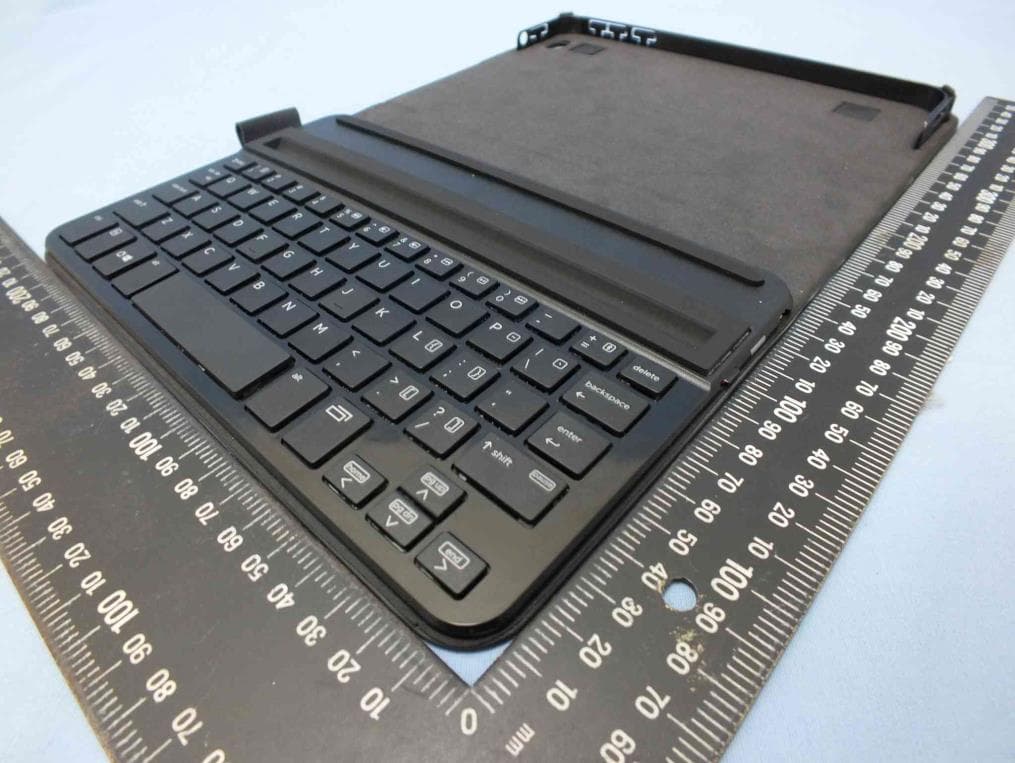
Click to zoom
Application Details
- Equipment Class
- DSS - Part 15 Spread Spectrum Transmitter
- Date of Grant
- Jan 13, 2015
- Application Purpose
- Original Equipment
- Date of Application
- Jan 12, 2015
- Equipment Note
- HP Pro Tablet 408 Bluetooth Keyboard Case
- Frequency Range
- 2402.00000000 - 2480.00000000
- Company
- Acrox Technologies Co., Ltd.
- Country
- Taiwan
Documents & Files
Document Text
Text extracted from the exhibit documents filed with the FCC. Open a document above to read the original.
Users Manual
Regulatory notices This document provides country- and region-specific non-wireless and wireless regulatory notices and compliance information for your product. Some of these notices may not apply to your product. 이 문서에는 국가 및 지역별 유무선 규제사항 설명과 제품의 준수 정보가 있습니다. 이러한 정보 중 일부는 귀하의 제품에 적용되지 않을 수 있습니다. Federal Communications Commission notice This equipment has been tested and found to comply with the limits for a Class B digital device, pursuant to Part 15 of the FCC Rules. These limits are designed to provide reasonable protection against harmful interference in a residential installation. This equipment generates, uses, and can radiate radio frequency energy and, if not installed and used in accordance with the instructions, may cause harmful interference to radio communications. However, there is no guarantee that interference will not occur in a particular installation. If this equipment does cause harmful interference to radio or television reception, which can be determined by turning the equipment off and on, the user is encouraged to try to correct the interference by one or more of the following measures: ■Reorient or relocate the receiving antenna. ■Increase the separation between the equipment and receiver. ■Connect the equipment to an outlet on a circuit different from that to which the receiver is connected. ■Consult the dealer or an experienced radio or television technician for help. Modifications The FCC requires the user to be notified that any changes or modifications made to this device that are not expressly approved by HP may void the user's authority to operate the equipment. Cables To maintain compliance with FCC Rules and Regulations, connections to this device must be made with shielded cables having metallic RFI/EMI connector hoods. Declaration of Conformity for products marked with the FCC logo (United States only) This device complies with Part 15 of the FCC Rules. Operation is subject to the following 2 conditions: 1.This device may not cause harmful interference. 2.This device must accept any interference received, including interference that may cause undesired operation. If you have questions about the product that are not related to this declaration, write to Hewlett-Packard Company P. O. Box 692000, Mail Stop 530113 Houston, TX 77269-2000 For questions regarding this FCC declaration, write to Hewlett-Packard Company P. O. Box 692000, Mail Stop 510101 Houston, TX 77269-2000 or call HP at 281-514-3333 To identify your product, refer to the part, series, or model number located on the product. Products with wireless LAN devices or HP Mobile Broadband Modules This device must not be co-located or operating in conjunction with any other antenna or transmitter. Å WARNING: Exposure to Radio Frequency Radiation The radiated output power of this device is below the FCC/Industry Canada radio frequency exposure limits. Nevertheless, the device should be used in such a manner that the potential for human contact is minimized during normal operation of tablet PCs and notebook computers. During normal operation of tablet PCs and notebook computers with displays equal to or less than30.5 cm (12 inches): To avoid the possibility of exceeding the FCC/Industry Canada radio frequency exposure limits, human proximity to the antennas should not be less than 2.5 cm (1 inch). To identify the location of the wireless antennas, refer to the computer user guides included with your computer. During normal operation of notebook computers with displays greater than 30.5 cm (12 inches): To avoid the possibility of exceeding the FCC/Industry Canada radio frequency exposure limits, human proximity to the antennas should not be less than 20 cm (8 inches), including when the computer display is closed. To identify the location of the wireless antennas, refer to the computer user guides included with your computer. Brazil notice Este equipamento opera em caráter secundário, isto é, não tem direito a proteção contra interferência prejudicial, mesmo de estações do mesmo tipo, e não pode causar interferência em sistemas operando em caráter primário. Este equipamento atende aos limites da Taxa de Absorção Específica referente à exposição a campos elétricos, magnéticos e eletromagnéticos de frequência adotados pela ANATEL. Canada notices This Class B digital apparatus meets all requirements of the Canadian Interference-Causing Equipment Regulations CAN ICES-3(B)/NMB-3(B). If this device has WLAN or Bluetooth capability, the device complies with Industry Canada license-exempt RSS standard(s). Operation is subject to the following two conditions: (1) this device may not cause interference, and (2) this device must accept any interference, including interference that may cause undesired operation of the device. Avis Canadien Ce dispositif numérique de Classe B répond aux exigences de la réglementation du Canada relative aux équipements causant des interférences CAN ICES-3(B)/NMB-3(B). Si ce dispositif est doté de fonctionnalités de réseau sans fil ou Bluetooth, il est conforme aux normes d’exemption de licence RSS d’Industrie Canada. Son fonctionnement est assujetti aux deux conditions suivantes : 1) Ce dispositif ne doit causer aucune interférence dangereuse, et 2) ce dispositif doit accepter touteinterférence reçue, y compris les interférences pouvant provoquer un fonctionnement indésirable. Radiation Exposure Statement: The product comply with the US/Canada portable RF exposure limit set forth for an uncontrolled environment and are safe for intended operation as described in this manual. The further RF exposure reduction can be achieved if the product can be kept as far as possible from the user body or set the device to lower output power if such function is available. Déclaration d'exposition aux radiations: Le produit est conforme aux limites d'exposition pour les appareils portables RF pour les Etats-Unis et le Canada établies pour un environnement non contrôlé. Le produit est sûr pour un fonct…
Text truncated - open the document above for the full version.
Users Manual
To connect to a tablet using Bluetooth®: 1. Turn on the tablet and the keyboard. 2. Open your tablet’s Bluetooth settings to begin searching for the keyboard. For more information, see your tablet user guide. 3. Press the fn key and the Bluetooth key on the keyboard. See figure 6. 4. Select HP Bluetooth Keyboard to complete the pairing process. LightStatus Solid white (5 seconds)The keyboard is fully charged, and the user has plugged in the AC adapter or switched on the power button, or the keyboard has successfully paired to a tablet. Solid amber (5 seconds)The keyboard is not fully charged and the user has switched on the power button. Pulsing amber (10 seconds)The keyboard is not fully charged, and the user has plugged in the AC adapter. Blinking amber (60 seconds)The user has switched on the power button and then pressed the pairing keys. Blinking amber (15 second intervals) The battery power is less than 20%. : Bluetooth® بواسطة لوحي بكمبيوتر للتوصيل 1 ..بتشغيل الكمبيوتر اللوحي ولوحة المفاتيح قم 2 .على الكمبيوتر اللوحي للبدء بالبحث عن لوحة المفاتيح. Bluetooth إعدادات افتح .المعلومات، راجع دليل مستخدم الكمبيوتر اللوحي الخاص بك للمزيد من 3 .. 6 في لوحة المفاتيح. انظر الصورة Bluetooth ومفتاح fn على مفتاح اضغط 4 ..لإكمال عملية الإقران ( HP Bluetooth لوحة مفاتيح) HP Bluetooth Keyboard حدد الضوءالحالة (ثوان 5) أبيض ثابت لوحة المفاتيح مشحونة بالكامل، وقام المستخدم بتوصيل محول التيار المتناوب أو تشغيل زر الطاقة، .أو تم إقران لوحة المفاتيح بكمبيوتر لوحي بنجاح (ثوان 5) كهرماني ثابت لوحة المفاتيح غير مشحونة بالكامل وقام .المستخدم بتشغيل زر الطاقة (ثوان 10) كهرماني نابض لوحة المفاتيح غير مشحونة بالكامل، وقام المستخدم بتوصيل محول التيار المتناوب. (ثانية 60) كهرماني وامض قام المستخدم بتشغيل زر الطاقة ثم ضغط على مفتاحي الإقران. كهرماني وامض (بفواصل ثانية) 15زمنية مقدارها . % 20طاقة البطارية أقل من Menghubungkan ke tablet dengan Bluetooth®: 1. Menyalakan tablet dan keyboard. 2. Buka pengaturan Bluetooth pada tablet Anda untuk mulai memindai keyboard. Untuk informasi lebih lanjut, lihat panduan pengguna tablet Anda. 3. Tekan tombol fn dan tombol Bluetooth pada keyboard. Lihat gambar 6. 4. Pilih HP Bluetooth Keyboard untuk menyelesaikan proses pemasangan. Lampu indikatorStatus Putih gading (5 detik) Keyboard telah terisi penuh, dan pengguna telah memasang adaptor AC atau menyalakan tombol daya, atau keyboard berhasil terpasang ke tablet. Amber pekat (5 detik) Keyboard belum terisi penuh dan pengguna telah menyalakan tombol daya. Amber menyala berdenyut (10 detik) Keyboard belum terisi penuh dan pengguna telah memasang adaptor AC. Amber berkedip (60 seconds) Pengguna telah menyalakan tombol daya lalu menekan tombol pemasangan. Berkedip kuning (interval 15 detik) Daya baterai kurang dari 20%. За да свържете към таблет чрез Bluetooth®: 1. Включете таблета и клавиатурата. 2. Отворете настройките за Bluetooth на таблета, за да започнете търсенето за клавиатурата. За повече информация вижте ръководството за потребителя на таблета. 3. Натиснете клавиша fn и клавиша Bluetooth на клавиатурата. Вижте фигура 6. 4. Изберете HP Bluetooth Keyboard, за да завършите процеса на сдвояване. ИндикаторСъстояние Непрекъснато бяло (5 секунди) Клавиатурата е напълно заредена и потребителят е включил променливотоковия адаптер/бутона на захранването или клавиатурата е успешно сдвоена с таблета. Непрекъснато жълто (5 секунди) Клавиатурата не е напълно заредена и потребителят е включил бутона на захранването. Пулсиращо жълто (10 секунди) Клавиатурата не е напълно заредена и потребителят е включил в контакта променливотоковия адаптер. Мигащо жълто (60 секунди) Потребителят е включил бутона на захранването, след което е натиснал клавишите за сдвояване. Мигащо жълто (интервал от 15 секунди) Зарядът на батерията е по-малко от 20%. Připojení tabletu pomocí technologie Bluetooth®: 1. Zapněte tablet a klávesnici. 2. Otevřete nastavení rozhraní Bluetooth na tabletu a začněte hledat klávesnici. Další informace naleznete v uživatelské příručce tabletu. 3. Na klávesnici stiskněte klávesu fn a klávesu Bluetooth. Viz obrázek 6. 4. Výběrem možnosti HP Bluetooth Keyboard dokončete párování. KontrolkaStav Svítí bíle (5 sekund)Pokud je klávesnice plně nabitá a uživatel připojí adaptér střídavého proudu nebo zapnul napájení, nebo je klávesnice úspěšně spárována s tabletem. Svítí oranžově (5 sekund)Klávesnice není plně nabitá a uživatel zapnul napájení. Pulzuje oranžově (10 sekund)Klávesnice není plně nabitá a uživatel připojil adaptér střídavého proudu. Bliká oranžově (60 sekund)Uživatel zapnul napájení a poté stisknul klávesy párování. Bliká oranžově (v intervalu 15 sekund) Baterie je nabitá na méně než 20%. Sådan opretter du forbindelse til en tablet ved hjælp af Bluetooth®: 1. Tænd for tabletten og tastaturet. 2. Åbn tablettens Bluetooth-indstillinger for at søge efter tastaturet. Se tablettens brugervejledning for yderligere oplysninger. 3. Tryk på tasten fn og Bluetooth-tasten på tastaturet. Se figur 6. 4. Vælg HP Bluetooth Keyboard for at gennemføre parringsprocessen. LysdiodeStatus Lyser hvidt (5 sekunder)Tastaturet er fuldt opladet, og brugeren har tilsluttet vekselstrømsadapteren eller tændt tastaturet på tænd/sluk-knappen, eller tastaturet er blevet parret med tabletten. Lyser gult (5 sekunder)Tastaturet er ikke fuldt opladet, og brugeren har tændt tastaturet på tænd/sluk-knappen. Blinker gult (10 sekunder)Tastaturet er ikke fuldt opladet, og brugeren har tilsluttet vekselstrømsadapteren. Blinker gult (60 sekunder)Brugeren har tændt på tænd/sluk-knappen og derefter trykket på parringstasterne. Blinker gult (intervaller på 15 sekunder) Batterispændingen er lavere end 20 %. So schließen Sie ein Tablet über Bluetooth® an: 1. Schalten Sie Tablet und Tastatur ein. 2. Öffnen Sie die Bluetooth-Einstellungen des Tablets, um die Tastatursuche zu starten. Weitere Informationen finden Sie im Benutzerhandbuch Ihres Tablets. 3. Drücken Sie die fn-Taste und die Bluetooth-Taste auf der Tastatur. Siehe Abbildung 6. 4. Wählen Sie HP Bluetooth Keyboard …
Text truncated - open the document above for the full version.
External Photos
Project No.: EP4D1702 Page No. : 1 of 9 Photographs of EUT Project No.: EP4D1702 Page No. : 2 of 9 Project No.: EP4D1702 Page No. : 3 of 9
ID Label/Location Info
HP Pro Tablet 408 Bluetooth Keyboard Case 藍芽無線鍵盤 Model( 型號 / 型号 ):HSTNH-A501M SPS: 801342-001 Rating( 額定電壓電流/額定电压电流 ) 5VDC 500mA Made in China( 中國製造/中国制造 ) FCC ID: PRDKB19 K8P76AA IC6180A-K3A 73mm 2.00mm Corner Radius HP Godzilla Regulatory Label Last updated on 12.19.14 HP CONFIDENTIAL 27mm COMPLIANCE LABEL: Process = Printed on Sticker Material Col or = PMS Black Graphic Col or = PMS Cool Grey 11C Size = W:83mm x H:32mm Label Location
Internal Photos
Project No.: EP4D1702 Page No. : 4 of 9 Project No.: EP4D1702 Page No. : 5 of 9 Project No.: EP4D1702 Page No. : 6 of 9 Project No.: EP4D1702 Page No. : 7 of 9 Project No.: EP4D1702 Page No. : 8 of 9 Project No.: EP4D1702 Page No. : 9 of 9
RF Exposure Info
Report No.: FA4D1702 Page : 1 of 7 Report Version: Rev. 01 FCC RF Exposure Report FCC ID : PRDKB19 Equipment : HP Pro Tablet 408 Bluetooth Keyboard Case Model No. : K3A, HSTNH-A501M (please refer to section 1.1.1 for more details.) Brand Name : ACROX, HP (please refer to section 1.1.1 for more details.) Applicant : ACROX Technologies Co., Ltd. Address : 4F., No.89, Minshan St., Neihu Dist., Taipei City 114 Standard : 47 CFR FCC Part 2.1093 Received Date : Dec. 16, 2014 Tested Date : Dec. 23 ~ Dec. 26, 2014 We, International Certification Corp., would like to declare that the tested sample has been evaluated and in compliance with the requirement of the above standards. The test results contained in this report refer exclusively to the product. It may be duplicated completely for legal use with the approval of the applicant. It shall not be reproduced except in full without the written approval of our laboratory. Approved & Reviewed by: Gary Chang / Manager Ty: XXX Report No.: FA4D1702 Page : 2 of 7 Report Version: Rev. 01 Table of Contents 1 GENERAL DESCRIPTION .................................................................................................................... 4 1.1 Information .............................................................................................................................................. 4 2 EXPOSURE EVALUATION OF PORTABLE DEVICES ....................................................................... 5 2.1 LIMITS FOR GENERAL POPULATION/UNCONTROLLED EXPOSURE............................................. 5 2.2 EVALUATION RESULTS ....................................................................................................................... 6 3 TEST LABORATORY INFORMATION ................................................................................................. 7 Report No.: FA4D1702 Page : 3 of 7 Report Version: Rev. 01 Release Record Report No. Version Description Issued Date FA4D1702 Rev. 01 Initial issue Jan. 09, 2015 Report No.: FA4D1702 Page : 4 of 7 Report Version: Rev. 01 1 General Description 1.1 Information 1.1.1 Product Details The following models are provided to this EUT. Brand Name Model Name Product Name Description ACROX K3A HP Pro Tablet 408 Bluetooth Keyboard Case Marketing purpose HP HSTNH-A501M All models are electrically identical, different model names are for marketing purpose. The above models, model K3A was selected as a representative one for the final test and only its data was recorded in this report. Report No.: FA4D1702 Page : 5 of 7 Report Version: Rev. 01 2 EXPOSURE EVALUATION OF PORTABLE DEVICES Human exposure to RF emissions from portable devices (47 CFR §2.1093), as defined by the FCC, must be evaluated with respect to the FCC-adopted limits for SAR. Evaluation of mobile devices, as defined by the FCC, may also be performed with respect to SAR limits, but in such cases it is usually simpler and more cost-effective to evaluate compliance with respect to field strength or power density limits. For certain devices that are designed to be used in both mobile and portable configurations similar to those described in 47 CFR §2.1091(d)(4), such as certain desktop phones and wireless modem modules, compliance for mobile configurations is also satisfied when the same device is evaluated for SAR compliance in portable configurations. 2.1 LIMITS FOR GENERAL POPULATION/UNCONTROLLED EXPOSURE Frequency (MHz) 5 10 15 20 25 Separation distance (mm) 150 39 77 116 155 194 SAR Test Exclusion Threshold (mW) 300 27 55 82 110 137 450 22 45 67 89 112 835 16 33 49 66 82 900 16 32 47 63 79 1500 12 24 37 49 61 1900 11 22 33 44 54 2450 10 19 29 38 48 3600 8 16 24 32 40 5200 7 13 20 26 33 5400 6 13 19 26 32 5800 6 12 19 25 31 The 1-g and 10-g SAR test exclusion thresholds for 100 MHz to 6 GHz at test separation distances ≤ 50 mm are determined by [(max. power of channel, including tune-up tolerance, mW)/(min. test separation distance, mm)] · [√f(GHz)] ≤ 3.0 for 1-g SAR and ≤ 7.5 for 10-g extremity SAR, where •f(GHz) is the RF channel transmit frequency in GHz • Power and distance are rounded to the nearest mW and mm before calculation • The result is rounded to one decimal place for comparison The test exclusions are applicable only when the minimum test separation distance is ≤ 50 mm and for transmission frequencies between 100 MHz and 6 GHz. When the minimum test separation distance is < 5 mm, a distance of 5 mm is applied to determine SAR test exclusion Report No.: FA4D1702 Page : 6 of 7 Report Version: Rev. 01 2.2 EVALUATION RESULTS Frequency (MHz) Maximum Conducted Average Power (dBm) Maximum Conducted Average Power (mW) Antenna Gain (dBi) 2402 ( BT ) 0.88 1.22 2.78 2441 ( BT ) 0.97 1.25 2.78 2480 ( BT ) 1.03 1.27 2.78 [(max. power of channel, including tune-up tolerance, mW)/(min. test separation distance, mm)] * [√f(GHz)] =1.27 / 5 * √2.480 = 0.40< 3.0 SAR Test Exclusion Thresholds is < 10mW and 3.0 for separation distance 5mm. Therefore, SAR test is not required. Report No.: FA4D1702 Page : 7 of 7 Report Version: Rev. 01 3 Test laboratory information Established in 2012, ICC provides foremost EMC & RF Testing and advisory consultation services by our skilled engineers and technicians. Our services employ a wide variety of advanced edge test equipment and one of the widest certification extents in the business. International Certification Corp, it is our definitive objective is to institute long term, trust-based associations with our clients. The expectation we set up with our clients is based on outstanding service, practical expertise and devotion to a certified value structure. Our passion is to grant our clients with best EMC / RF services by oriented knowledgeable and accommodating staff. Our Test sites are located at Linkou District and Kwei Shan Hsiang. Location map can be found on our website http://www.icertifi.com.tw. Linkou Kwei Shan Kwei Shan Site II Tel: 886-2-2601-1640 Tel: 886-3-271-8666 Tel: 886-…
Text truncated - open the document above for the full version.
Test Report
Report No.: FR4D1702 Page : 1 of 37 Report Version: Rev. 01 FCC Test Report FCC ID : PRDKB19 Equipment : HP Pro Tablet 408 Bluetooth Keyboard Case Model No. : K3A, HSTNH-A501M (please refer to section 1.1.1 for more details.) Brand Name : ACROX, HP (please refer to section 1.1.1 for more details.) Applicant : ACROX Technologies Co., Ltd. Address : 4F., No.89, Minshan St., Neihu Dist., Taipei City 114 Standard : 47 CFR FCC Part 15.247 Received Date : Dec. 16, 2014 Tested Date : Dec. 23 ~ Dec. 26, 2014 We, International Certification Corp., would like to declare that the tested sample has been evaluated and in compliance with the requirement of the above standards. The test results contained in this report refer exclusively to the product. It may be duplicated completely for legal use with the approval of the applicant. It shall not be reproduced except in full without the written approval of our laboratory. Approved & Reviewed by: Gary Chang / Manager Ty: XXX Report No.: FR4D1702 Page : 2 of 37 Report Version: Rev. 01 Table of Contents 1 GENERAL DESCRIPTION .................................................................................................................... 5 1.1 Information .............................................................................................................................................. 5 1.2 Local Support Equipment List ................................................................................................................ 7 1.3 Test Setup Chart .................................................................................................................................... 7 1.4 The Equipment List ................................................................................................................................ 8 1.5 Test Standards ....................................................................................................................................... 9 1.6 Measurement Uncertainty ...................................................................................................................... 9 2 TEST CONFIGURATION ..................................................................................................................... 10 2.1 Testing Condition ................................................................................................................................. 10 2.2 The Worst Test Modes and Channel Details ....................................................................................... 10 3 TRANSMITTER TEST RESULTS ........................................................................................................ 11 3.1 Conducted Emissions ........................................................................................................................... 11 3.2 Unwanted Emissions into Restricted Frequency Bands ...................................................................... 14 3.3 Unwanted Emissions into Non-Restricted Frequency Bands .............................................................. 24 3.4 Conducted Output Power ..................................................................................................................... 27 3.5 Number of Hopping Frequency ............................................................................................................ 29 3.6 20dB and Occupied Bandwidth ............................................................................................................ 31 3.7 Channel Separation .............................................................................................................................. 33 3.8 Number of Dwell Time .......................................................................................................................... 35 4 TEST LABORATORY INFORMATION ............................................................................................... 37 Report No.: FR4D1702 Page : 3 of 37 Report Version: Rev. 01 Release Record Report No. Version Description Issued Date FR4D1702 Rev. 01 Initial issue Jan. 09, 2015 Report No.: FR4D1702 Page : 4 of 37 Report Version: Rev. 01 Summary of Test Results FCC Rules Test Items Measured Result 15.207 Conducted Emissions [dBuV]: 0.489MHz 31.99 (Margin -14.20dB) - AV Pass 15.247(d) 15.209 Radiated Emissions [dBuV/m at 3m]: (1) 2497.00MHz 51.72(Margin -2..28dB) - AV (2) 7440.00MHz 71.72(Margin -2.28dB) - PK Pass 15.247(d) Band Edge Meet the requirement of limit Pass 15.247(b)(1) Conducted Output Power Power [dBm]: BR: 1.07 Pass 15.247(a)(1)(iii) Number of Hopping Channels Meet the requirement of limit Pass 15.247(a)(1) Hopping Channel Separation Meet the requirement of limit Pass 15.247(a)(1)(iii) Dwell Time Meet the requirement of limit Pass 15.203 Antenna Requirement Meet the requirement of limit Pass Report No.: FR4D1702 Page : 5 of 37 Report Version: Rev. 01 1 General Description 1.1 Information 1.1.1 Product Details The following models are provided to this EUT. Brand Name Model Name Product Name Description ACROX K3A HP Pro Tablet 408 Bluetooth Keyboard Case Marketing purpose HP HSTNH-A501M All models are electrically identical, different model names are for marketing purpose. The above models, model K3A was selected as a representative one for the final test and only its data was recorded in this report. 1.1.2 Specification of the Equipment under Test (EUT) RF General Information Frequency Range (MHz) Bluetooth Mode Ch. Frequency (MHz) Channel Number Data Rate 2400-2483.5 BR V3.0 2402-2480 0-78 [79] 1 Mbps Note 1: RF output power specifies that Maximum Peak Conducted Output Power. Note 2: The device supports GFSK modulation only. 1.1.3 Antenna Details Ant. No. Type Gain (dBi) Connector Remark 1 PCB 2.78 --- --- 1.1.4 Power Supply Type of Equipment under Test (EUT) Power Supply Type 3.7Vdc from battery 1.1.5 Accessories Accessories No. Equipment Description 1 USB cable 1.0m shielded cable w/o core (For chargin…
Text truncated - open the document above for the full version.
Test Setup Photos
Report No.: FR4D1702 Page: : 1 of 4 Report Version: Rev. 01 Photographs of the Test Configuration Conducted Emission Test Report No.: FR4D1702 Page: : 2 of 4 Report Version: Rev. 01 Radiated Emission Below 1GHz Test Report No.: FR4D1702 Page: : 3 of 4 Report Version: Rev. 01 Radiated Emission Above 1GHz Test Report No.: FR4D1702 Page: : 4 of 4 Report Version: Rev. 01
Contact Information
Applicant
Gavin Hsieh(Product Manager)
Technical Contact
International Certification Corp.Gary Chang
[email protected]886-3-271-8628
No.3-1, Lane 6, Wen San 3rd St. Kwei Shan · Taiwan
Non-Technical Contact
International Certification Corp.
[email protected]886-3-271-8629
Test Firm
International Certification Corp.Fu-Cheng Chuang
Technical Specifications
| # | Rule Parts | Frequency Range | Power Output |
|---|---|---|---|
| 1 | 15C | 2.40 GHz - 2.48 GHz | 1.00 mW |
Other Applications from Acrox Technologies Co., Ltd.

PRDRX12
May 27, 2026Wireless Receiver
Equipment Class
DXX - Part 15 Low Power Communication Device Transmitter
PRDRX11
Apr 07, 2026Wireless Receiver
Equipment Class
DXX - Part 15 Low Power Communication Device Transmitter
PRDKB72
Apr 03, 2026WIRELESS SPLIT KEY ERGONOMIC KEYBOARD
Equipment Class
DTS - Digital Transmission System
PRDRX1P
Apr 03, 2026Wireless Receiver
Equipment Class
DXX - Part 15 Low Power Communication Device Transmitter
PRDKB73
Apr 03, 2026Gaming Keyboard
Equipment Class
DTS - Digital Transmission System