PRDKB23HP 10 G2 Tablet KB Case T1000
Acrox Technologies Co., Ltd.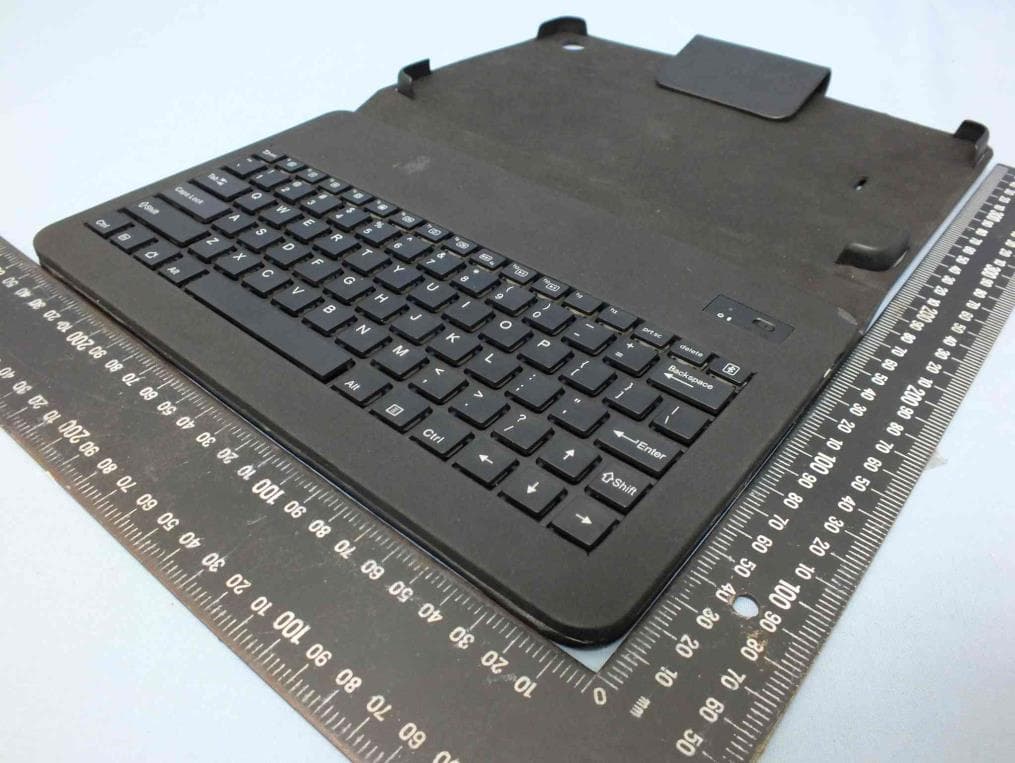
Click to zoom
Application Details
- Equipment Class
- DSS - Part 15 Spread Spectrum Transmitter
- Date of Grant
- Jul 12, 2015
- Application Purpose
- Original Equipment
- Date of Application
- Jul 09, 2015
- Equipment Note
- HP 10 G2 Tablet KB Case T1000
- Frequency Range
- 2402.00000000 - 2480.00000000
- Company
- Acrox Technologies Co., Ltd.
- Country
- Taiwan
Documents & Files
Document Text
Text extracted from the exhibit documents filed with the FCC. Open a document above to read the original.
Users Manual
K3L Tables Sleeve case with Bluetooth Scissor Keyboard USER'S GUIDE Ver.:1.00 Federal Communication Commission Interference Statement This equipment has been tested and found to comply with the limits for a Class B digital device, pursuant to Part 15 of the FCC Rules. These limits are designed to provide reasonable protection against harmful interference in a residential installation. This equipment generates, uses and can radiate radio frequency energy and, if not installed and used in accordance with the instructions, may cause harmful interference to radio communications. However, there is no guarantee that interference will not occur in a particular installation. If this equipment does cause harmful interference to radio or television reception, which can be determined by turning the equipment off and on, the user is encouraged to try to correct the interference by one of the following measures: - Reorient or relocate the receiving antenna. - Increase the separation between the equipment and receiver. - Connect the equipment into an outlet on a circuit different from that to which the receiver is connected. - Consult the dealer or an experienced radio/TV technician for help. FCC Caution: Any changes or modifications not expressly approved by the party responsible for compliance could void the user's authority to operate this equipment. This device complies with Part 15 of the FCC Rules. Operation is subject to the following two conditions: (1) This device may not cause harmful interference, and (2) this device must accept any interference received, including interference that may cause undesired operation. IMPORTANT NOTE: Radiation Exposure Statement: This equipment complies with FCC radiation exposure limits set forth for an uncontrolled environment. This equipment should be installed and operated with minimum distance 20cm between the radiator & your body. This transmitter must not be co-located or operating in conjunction with any other antenna or transmitter. Country Code selection feature to be disabled for products marketed to the US/CANADA Bluetooth Keyboard Thank you for your purchasing Bluetooth keyboard .Before you use this product, please read this manual thoroughly and use this product correctly. After you read this manual, please keep it in place and refer to it when necessary. Supplied with the product: The following items are included in the package. Please make sure all items are included as you open the package. If there is any item missing or damaged, please contact the reseller who sold you this product, or our support center. - Bluetooth Keyboard - User’s Guide - Micro USB Charging cable System Requirements: -Android 4.2 (or later) -Running Bluetooth® 4.0 ,3.0, 2.1, 2.0 & 1.1 wireless technology Functional Introduction Installing Hardware Step1: Turn the Tables power to ON, then place keyboard power switch to ON Step2: Start your device’s Bluetooth set up function to search for this Bluetooth keyboard. Step3:Select SETTINGS > WIRELESS & NETWORKS > BLUETOOTH >ON Step4: Press the Fn and Pair button on your keyboard. A blue LED light will flash until your device and the keyboard are paired. Step5: Your device should find the “HP Bluetooth Keyboard T1000” and then list it as an available device. If it doesn’t, simply touch Search for devices and it will scan again. Step6: When the “HP Bluetooth Keyboard T1000” shows in your list of available devices, touch it to complete pairing. Charge The LED keep flashing in your working, the keyboard is short of power. It is time to charge the keyboard. Step1: Use the USB charging cable plug into outlet, put one end of the plug into keyboard USB charging cable. Step2: A Blue light will illuminate to indicate the keyboard is charging. Wait until this light turns off, indicating a full charge. It usually takes 2-4 hours to completely charge your keyboard. LED Indicator: Definition Indicator Description Charge with USB cable Blue No LED solid on When full charged, LED off Turn on power (no USB cable attached) Blue LED on after 3 seconds LED off Bluetooth pairing Blue LED blinking (1 time/per sec for 2 mins) Low power(=3.4v) Blue No When key in, LED blink When no action, LED off No power No LED off By accident protect for Keyboard No When the key press and hold after 15sec, the keyboard will stop send scan code. Keyboard specification and hotkey function: Hot Keys Function ( * compound key, Press with Fn key) *Back/ESC Keyboard ESCAPE *Search Search *Brightness Decrement Keyboard F2 *Brightness Increment Keyboard F3 *System Setting Keyboard F4 *Lock screen System Sleep for Android 4.0 or above *Mute Turns off the tablet sound *Volume Decrement Decrease the tablet sound volume. *Volume Increment Increase the tablet sound volume. *Scan Next Track Switch to the next track *Play/Pause Switch between Play and Pause *Scan Previous Track Switches to the previous track Home Home Left GUI Keyboard Left GUI Bluetoot h Bluetooth pairing System Requirement Hardware Android Tablet PC Support OS Android 4.2 or later Interface Bluetooth 3.0 Operating Operating Humidity 10%~90% Operating Temperature -20°C~55°C Keyboard Specification Key Layout 82 Keys Hot Keys 12 Hot keys Key switch type scissor-structure type Press Keys travel 2.25 ± 0.30 mm (Max) Key operating force 62 ± 20 g Hardware Bluetooth IC Broadcom 20730 PCB Material FR4 LED indicator 1 (Paring / Battery low) Charger type Micro USB cable Battery type Li-Polymer 300 mAh with NTC/PTC Battery Life 120 hrs (operation) Keystroke life 10 Millions Power consumption DC 3.7V +/-5%, Operation : 3mA (Max.) Standby : 0.8 mA (Max.) Sleep : 400uA (Max.) Recharge current 300 mA (Max.) Recharging time less than 4 hours Note: This device complies with part 15 of the FCC Rules. Operation is subject to the following two conditions: (1) This device may not cause harmful interference, and (2) this device must accept any interference received, including interference that may cause undesired operation. Now, enjoy…
Text truncated - open the document above for the full version.
External Photos
Project No.: EP560801 Page No. : 1 of 5 Photographs of EUT Project No.: EP560801 Page No. : 2 of 5
ID Label/Location Info
HP 10 G2 Tablet KB Case T1000 Model: K3L SPS:827801-001 Rating:5VDC 500mA Made in China FCC ID:PRDKB23 P/N: N5G45AA 27*37mm S/N: 7CHXXXXXXX HP 10 G2 Tablet KB Case T1000 Model: K3L SPS:827802-001 Rating:5VDC 500mA Made in China FCC ID:PRDKB23 P/N:N5G46AA 27*37mm S/N: 7CHXXXXXXX HP 10 G2 Tablet KB Case T1000 Model: K3L SPS:827803-001 Rating:5VDC 500mA Made in China FCC ID:PRDKB23 P/N:N5G47AA 27*37mm S/N: 7CHXXXXXXX HP 10 G2 Tablet KB Case T1000 Model: K3L SPS:827804-001 Rating:5VDC 500mA Made in China FCC ID:PRDKB23 P/N:N5G48AA 27*37mm S/N: 7CHXXXXXXX Label Location FCC ID: PRDKB23
Test Setup Photos
Report No.: FR560801 Page: : 1 of 4 Report Version: Rev. 01 Photographs of the Test Configuration Conducted Emission Test Report No.: FR560801 Page: : 2 of 4 Report Version: Rev. 01 Radiated Emission Below 1GHz Test Report No.: FR560801 Page: : 3 of 4 Report Version: Rev. 01 Radiated Emission Above 1GHz Test Report No.: FR560801 Page: : 4 of 4 Report Version: Rev. 01 Radiated Emission Above 1GHz Test
Contact Information
Applicant
Gavin Hsieh(Product Manager)
Technical Contact
International Certification Corp.Gary Chang
[email protected]886-3-271-8628
No.3-1, Lane 6, Wen San 3rd St. Kwei Shan · Taiwan
Non-Technical Contact
International Certification Corp.Wendy Liao
[email protected]886-3-271-8629
Test Firm
International Certification Corp.Fu-Cheng Chuang
Technical Specifications
| # | Rule Parts | Frequency Range | Power Output |
|---|---|---|---|
| 1 | 15C | 2.40 GHz - 2.48 GHz | 2.00 mW |
Other Applications from Acrox Technologies Co., Ltd.

PRDRX12
May 27, 2026Wireless Receiver
Equipment Class
DXX - Part 15 Low Power Communication Device Transmitter
PRDRX11
Apr 07, 2026Wireless Receiver
Equipment Class
DXX - Part 15 Low Power Communication Device Transmitter
PRDKB72
Apr 03, 2026WIRELESS SPLIT KEY ERGONOMIC KEYBOARD
Equipment Class
DTS - Digital Transmission System
PRDRX1P
Apr 03, 2026Wireless Receiver
Equipment Class
DXX - Part 15 Low Power Communication Device Transmitter
PRDKB73
Apr 03, 2026Gaming Keyboard
Equipment Class
DTS - Digital Transmission System