PRDKB63heyday compact kb
Acrox Technologies Co., Ltd.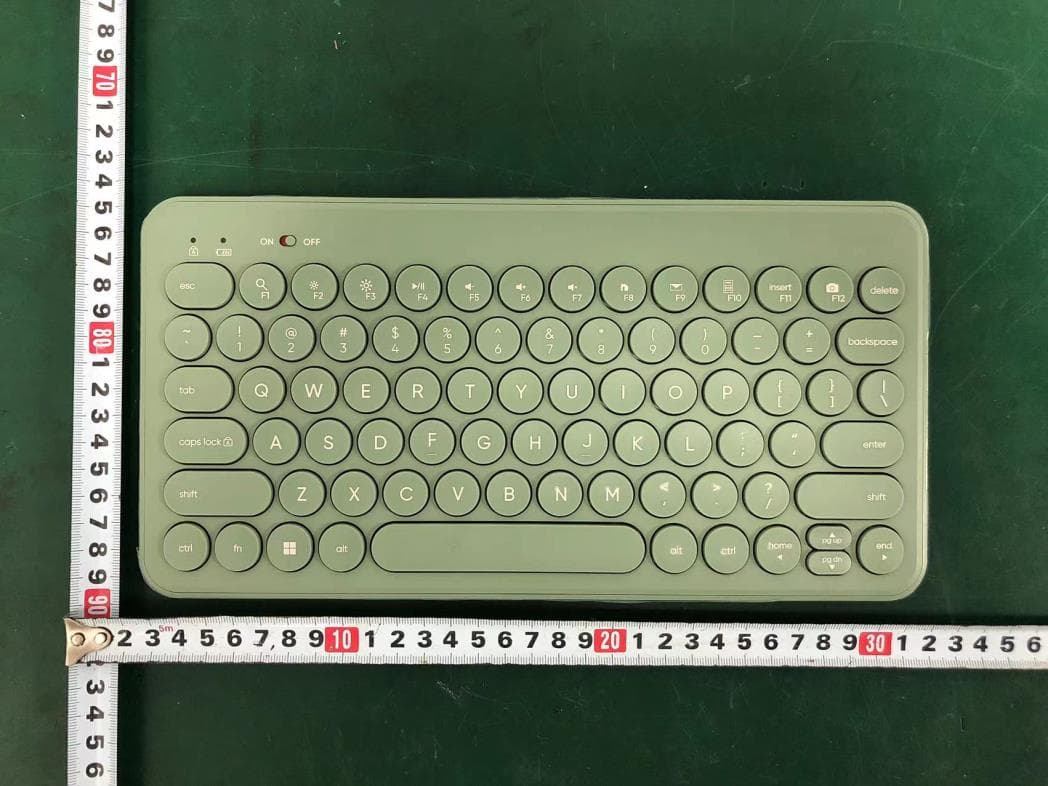
Click to zoom
Application Details
- Equipment Class
- DTS - Digital Transmission System
- Date of Grant
- Jun 24, 2024
- Application Purpose
- Original Equipment
- Date of Application
- Jun 24, 2024
- Equipment Note
- heyday compact kb
- Frequency Range
- 2402.00000000 - 2480.00000000
- Company
- Acrox Technologies Co., Ltd.
- Country
- Taiwan
Documents & Files
Document Text
Text extracted from the exhibit documents filed with the FCC. Open a document above to read the original.
Users Manual
Press F1 ~ F12 as standard function keys Press and hold Fn + F1 ~ F12 as shortcut function keys Decrease display brightness Increase display brightness Play media or pause current media track Decrease the device's volume Increase the device's volume Mutes (turns off) the device's sound Homepage Print Screen Switch to Bluetooth channel 1 / device 1 Switch to Bluetooth channel 2 / device 2 Switch to wireless USB receiver channel / device Insert Function keys Battery status LED indicator If this LED starts to flash in red, it means you need to change battery low battery If it is not working on previous paired devices, make sure to turn on Bluetooth on that device and set keyboard on correct Bluetooth channel For example, a tablet has paired with , and a laptop has paired with Set keyboard on if you want to use keyboard on that tablet Turn off your keyboard and turn on power again (make sure channel is set on or ) Make sure to turn on Bluetooth on your device Press and HOLD “Fn” and LONG press “ or ” key to set keyboard in pairing mode, make sure it is discoverable on your device and then pair with your keyboard If it does not work after 10 seconds, reboot your device and repeat step 1 to 3 Trouble shooting If it is not working, try below steps to re setup 1. 2. 3. 4. • Turn on your keyboard and set it on either Bluetooth channel or Click on Apple menu (top left corner of your screen) Go to System Preferences -> Bluetooth -> Turn Bluetooth on to set up Bluetooth device Press and HOLD “Fn” and LONG press “ or ” key to set keyboard in pairing mode so that it can be found on you device (its LED will start to flash in green for and in red for ) Click on “heyday compact kb” to connect (its LED will stop flashing and light up in green for and in red for and then go off when pairing is completed) 1. 2. 3. 4. connect / pair via Bluetooth in Mac connect / pair via Bluetooth in Windows 1. 2. 3. 4. Turn on your keyboard and set it on either Bluetooth channel or Click on Start Menu (bottom left corner of your screen) Go to Settings -> Device -> Bluetooth & other devices Turn on Bluetooth -> Add Bluetooth or other device -> Add a device (Bluetooth) Press and HOLD “Fn” and LONG press “ or ” key to set keyboard in pairing mode so that it can be found on your device (its LED will start to flash in green for and in red for ) Click on “heyday compact kb” to connect / pair (its LED will stop flashing and light up in green for and in red for and then go off when pairing is completed) • Trouble shooting If it is not working, try below steps to re-pair keyboard and USB receiver 1. 2. 3. Turn off your keyboard and re-plug in USB receiver, turn on power (make sure channel is set on ) Press and HOLD “Fn” and LONG press “ ” key (keep keyboard close to receiver) If it does not work after 10 seconds, reboot your device and repeat step 1 to 3 connect via wireless USB receiver It is plug and play for USB receiver, make sure power is on, plug in USB receiver into available USB A port on device and set connection channel on “wireless USB receiver” • This keyboard can automatically detect operating systems It can automatically detect the operating system (Windows or Mac) on the current device and remap keys to provide functions and shortcuts where you expect them to be But if it fails to correctly detect the operating system of a device (incorrect key layout), you can still manually select the operating system by using combination keys below “Fn + P” long press switch to Windows“Fn + I” long press to switch to Mac • Press and HOLD “fn” and SHORT press “ ” keys ONCE to switch between each channel (the default channel is “wireless USB receiver”) For example, if you are using channel “wireless USB receiver” ( ) and want to switch to channel “Bluetooth Channel 1” ( ) to connect with another device, just press and HOLD “fn” and SHORT press “ ” once to switch it, its LED indicator will start to flash / light up in green, same for switching to “Bluetooth channel 2” ( ) its LED indicator will start to flash/light up in red and “wireless USB receiver”its LED indicator will start to flash/light up in green ( ) detailed setup This keyboard can be paired with up to 3 different devices Use “ ” keys to switch connection channel between wireless USB receiver and 2 other Bluetooth channels • bottom included Compact Wireless Keyboard (connect via wireless USB receiver or Bluetooth) USB receiver 2 x AAA batteries • • • battery compartment wireless USB receiver 2 x AAA batteriesbattery cover wireless USB receiver Bluetooth channel 1 Bluetooth channel 2 connection channel for top ON / OFF switch connect / pairing low battery LED indicators compact wireless keyboard FCC ID: PRDKB63 Input: 3V 50mA Made in CHINA This device complies with Part 15 of the FCC rules. Operation is subject to the following two conditions: 1) this device may not cause harmful interference, and 2) this device must accept interference received, including interference that may cause undesired operation. Warning: Changes or modifications to this unit not expressly approved by the party responsible for compliance could void the user’s authority to operate the equipment. NOTE: This equipment has been tested and found to comply with the limits for a Class B digital device, pursuant to Part 15 of the FCC Rules. These limits are designed to provide reasonable protection against harmful interference in a residential installation. This equipment generates, uses and can radiate radio frequency energy and, if not installed and used in accordance with the instructions, may cause harmful interference to radio communications. However, there is no guarantee that interference will not occur in a particular installation. If this equipment does cause harmful interference to radio or television reception, which can be determined by turning the equipment off and on, the user is encouraged to try to correct the interference by one or more of the following measures: • Reorient or relocate the …
Text truncated - open the document above for the full version.
Attestation Statements
Acrox Technologies Co., Ltd. Covered Equipment Certification Attestation Letter 6/22/2024 Federal Communications Commission Authorization and Evaluation Division 7435 Oakland Mills Road Columbia, MD 21046 USA ATTN.: Reviewing Engineer FCC ID: PRDKB63 Acrox Technologies Co., Ltd. (“the applicant”) certifies that, as of the date of the filing of the application, the applicant is not identified on the Covered List as an entity producing “covered” equipment. Signed: Printed name: Gavin Hsieh Title: Product Manager Company Name: Acrox Technologies Co., Ltd. Date: 6/22/2024
Attestation Statements
Acrox Technologies Co., Ltd. * the applicant must designate a contact located in the United States for purposes of acting as the applicant’s agent for service of process, regardless of whether the applicant is a domestic or foreign entity. An applicant located in the United States may designate itself as the agent for service of process. U.S. Agent Designation for Service of Process - Certification Attestation Letter 6/22/2024 Federal Communications Commission Authorization and Evaluation Division 7435 Oakland Mills Road Columbia, MD 21046 USA ATTN.: Reviewing Engineer FCC ID: PRDKB63 FRN of applicant: 0018333633 Per section 2.911(d)(7) of the FCC rules, Acrox Technologies Co., Ltd. (“the applicant”) certifies that the equipment for which authorization is sought is designated to the following U.S. agent* for service of process: Company Name: 1PerfectChoice, Inc. FCC Registration Number (FRN): 0033429309 Physical U.S. Company Address: 21908 Valley Blvd., Walnut, CA 91789 Contact Person: Choon Kek Agent Email Address: [email protected] The above contact person accepts the obligation for service of process. The applicant accepts to maintain an agent for no less than one year after the grantee has terminated all marketing and importation or the conclusion of any Commission-related proceeding involving the equipment. Applicant Signed: Agent Signed (if different from Applicant): Signed: Signed: Printed name: Gavin Hsieh Printed name: Choon Kek Title: Product Manager Title: Chief Operating Officer Company Name: Acrox Technologies Co., Ltd. Company Name: 1PerfectChoice, Inc. Date: 6/22/2024 Date: 6/22/2024
Attestation Statements
Acrox Technologies Co., Ltd. Covered Equipment Certification Attestation Letter 6/22/2024 Federal Communications Commission Authorization and Evaluation Division 7435 Oakland Mills Road Columbia, MD 21046 USA ATTN.: Reviewing Engineer FCC ID: PRDKB63 Acrox Technologies Co., Ltd. (“the applicant”) certifies that the equipment for which authorization is sought is not “covered” equipment prohibited from receiving an equipment authorization pursuant to section 2.903 of the FCC rules. Note: If the equipment for which the applicant seeks authorization is produced by any of the entities identified on the current Covered List , the applicant should include an explanation on why the equipment is not “covered” equipment. Signed: Printed name: Gavin Hsieh Title: Product Manager Company Name: Acrox Technologies Co., Ltd. Date: 6/22/2024
Cover Letter(s)
DATE : 6/22/2024 Equipment Autorisation Division Federal Communications Commission 7435 Oakland Mills Road Columbia, MD 21046 FCC ID: PRDKB63 Product Name: heyday compact kb Request for Confidentiality Pursuant to Sections 0.457 and 0.459 of the commissions rules, we hereby request that the following documents be held confidential: Schematics Block diagram Operation description These materials contain trade secrets and proprietary information and are not customarily released to the public. The public disclosure of this information might be harmful to the company and provide unjustified benefits to our competitors. <Signature> Name:Gavin Hsieh Title:Product Manager Company:Acrox Technologies Co., Ltd.
Cover Letter(s)
Acrox Technologies Co., Ltd. I, the undersigned, Gavin Hsieh: The following models have the same technical construction including circuit diagram, PCB Layout, components and component layout, all electrical construction and mechanical construction, except the different model number and color. 1) Model No.: KSR-JA 2) Model No.: 056-00-7011 3) Model No.: KSR-DC 4) Model No.: 056-00-8487 5) Model No.: KSR-BW 6) Model No.: 056-00-0096 FCC ID: PRDKB63 Sincerely, Client’s signature : Client’s name / title : Gavin Hsieh / Product Manager Contact information / address : 4F., No.89, Minshan St., Neihu Dist., Taipei City 114, Taiwan Telephone: 886-2-2796-5888 Fax No.: 886-2-2793-8999
Cover Letter(s)
DATE : 6/22/2024 Federal Communications Commission Authorization & Evaluation Division 7345 Oakland Mills Road Columbia, Maryland 21046 Authority to Act as Agent On our behalf, I appoint EST Technology Co., Ltd. Address:Chilingxiang, Qishantou, Santun, Houjie, Dongguan, Guangdong, China to act as our agent in the preparation of this application for equipment certification. I certify that submitted documents properly describe the device or system for which equipment certification is sought. I also certify that each unit manufactured, imported or marketed, as defined in the Federal Communications Commission’s regulations will have affixed to it a label identical to that submitted for approval with this application. For instances where our authorized agent signs the application for certification on our behalf, I acknowledge that all responsibility for complying with the terms and conditions for certification, still resides with Acrox Technologies Co., Ltd. Address:4F., No.89, Minshan St., Neihu Dist., Taipei City 114, Taiwan <Signature> Name:Gavin Hsieh Title:Product Manager Applicant Company:Acrox Technologies Co., Ltd.
External Photos
External Photos M/N: KSR-JA External Photos M/N: KSR-JA External Photos M/N: KSR-JA External Photos M/N: KSR-JA
ID Label/Location Info
Label Location
Internal Photos
Internal Photos M/N: KSR-JA Internal Photos M/N: KSR-JA Antenna
Test Setup Photos
Radiated Test (30-1000 MHz) Radiated Test (Above 1GHz)
Contact Information
Applicant
Gavin Hsieh(Product Manager)
Test Firm
EST Technology Co., Ltd.Iceman Hu
[email protected]+86 0769-83081888
Technical Specifications
| # | Rule Parts | Frequency Range | Power Output |
|---|---|---|---|
| 1 | 15C | 2.40 GHz - 2.48 GHz | 812.80 µW |
Other Applications from Acrox Technologies Co., Ltd.

PRDRX12
May 27, 2026Wireless Receiver
Equipment Class
DXX - Part 15 Low Power Communication Device Transmitter
PRDRX11
Apr 07, 2026Wireless Receiver
Equipment Class
DXX - Part 15 Low Power Communication Device Transmitter
PRDKB72
Apr 03, 2026WIRELESS SPLIT KEY ERGONOMIC KEYBOARD
Equipment Class
DTS - Digital Transmission System
PRDRX1P
Apr 03, 2026Wireless Receiver
Equipment Class
DXX - Part 15 Low Power Communication Device Transmitter
PRDKB73
Apr 03, 2026Gaming Keyboard
Equipment Class
DTS - Digital Transmission System