PRDMO10050812RF Optical Mouse
Acrox Technologies Co., Ltd.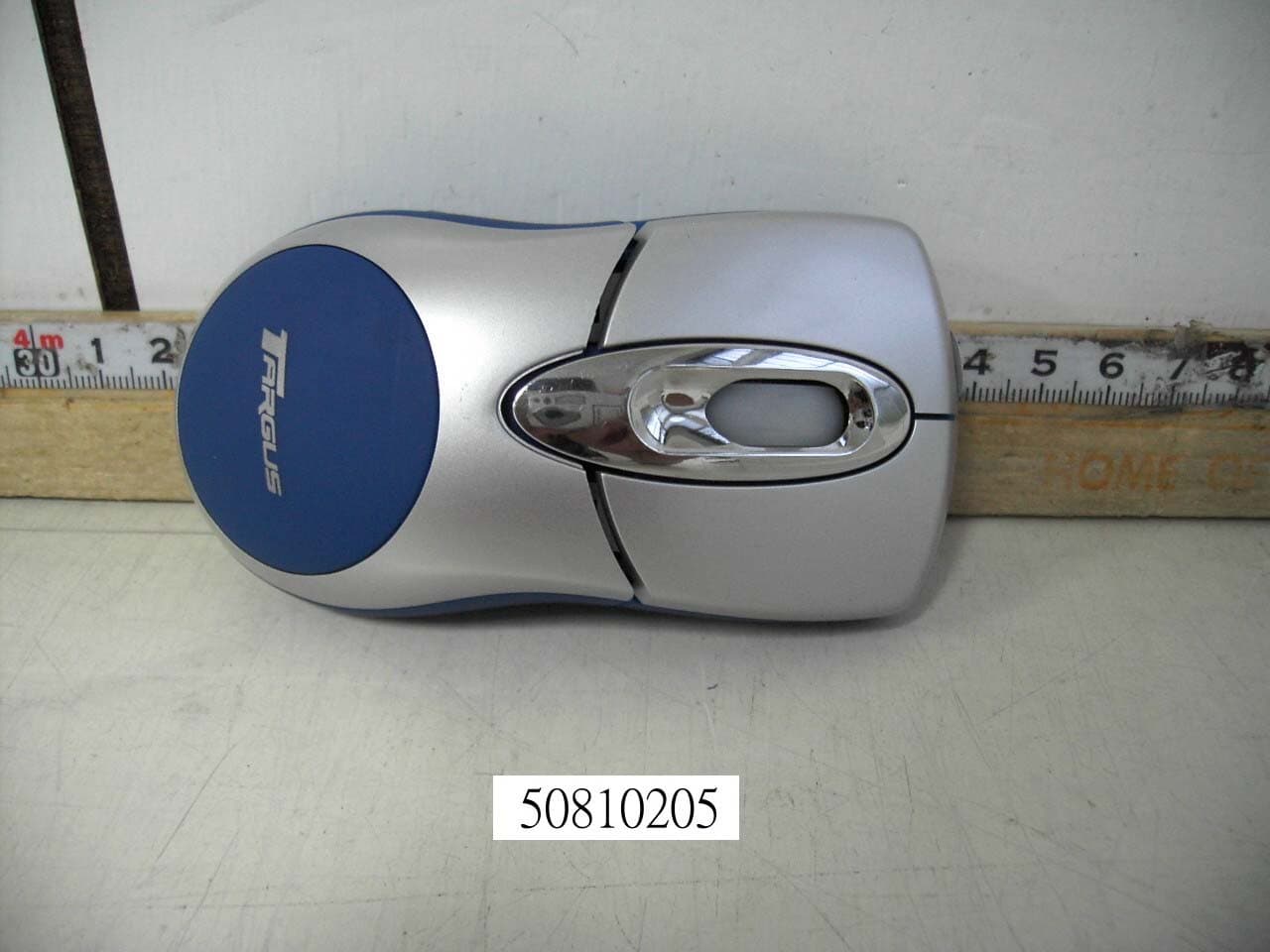
Click to zoom
Application Details
- Equipment Class
- DXX - Part 15 Low Power Communication Device Transmitter
- Date of Grant
- Sep 11, 2005
- Application Purpose
- Original Equipment
- Date of Application
- Sep 11, 2005
- Equipment Note
- RF Optical Mouse
- Frequency Range
- 27.04500000 - 27.04500000
- Company
- Acrox Technologies Co., Ltd.
- Country
- Taiwan
Documents & Files
Document Text
Text extracted from the exhibit documents filed with the FCC. Open a document above to read the original.
Users Manual
BRUSSELS HANNOVER BARCELONA TOKYO MILAN AMSTERDAM SINGAPORE LONDON PARIS NEW YORK LOS ANGELES TORONTO HONG KONG SYDNEY Targus Wireless Rechargeable Mouse USER’S GUIDE Making Your Mobile Life Easier. ® Making Your Mobile Life Easier. ® Visit our Web site at: www.targus.com Features and specifications are subject to change without notice. © 2005 Targus Group International, Inc. and Targus Inc. AMW05US/400-0221-001A 3 TARGUS WIRELESS RECHARGEABLE MINI OPTICAL MOUSE Introduction Congratulations on your purchase of a Targus Wireless Rechargeable Mini Optical Mouse. This ergonomically designed mouse uses a radio frequency (RF) link that enables you to use the mouse anywhere within four feet of its receiver. No line-of-sight between the mouse and its receiver is required. In addition to this user’s guide this package contains: System Requirements Hardware •PC with a Pentium ® processor or equivalent •USB interface Operating System •Windows ® 98SE/Me/2000/XP •Mouse • USB receiver • USB charge cable • USB extension cable • 2 AAA rechargeable batteries • Carrying pouch 4 Targus Wireless Rechargeable Mini Optical Mouse NOTE: The third button and the scrolling wheel only work with the operating systems listed above. If you use the mouse with a different operating system, it will lose its enhanced features and function as a standard, two-button mouse. Connecting the Mouse Receiver To connect the mouse receiver: 1 Plug the USB receiver into an available USB port on your computer. 2 Your computer’s operating system identifies the receiver and begins installing the default driver. Follow any on-screen procedures to complete the default driver installation. Using the Mouse Installing the Batteries 1 If the mouse is on, slide the on/off switch on the bottom of the mouse to the “off” position. 2 Remove the battery cover from the top of the mouse by pressing the battery cover hinge located on the bottom of the mouse and sliding it off. 5 Targus Wireless Rechargeable Mini Optical Mouse NOTE: The battery cover is also the top cover of the mouse. 3 Insert the supplied batteries, making sure that the positive (+) and negative (-) ends of each battery match the polarity indicators inside the battery housing. WARNING: When replacing the batteries, use only heavy-duty NiMH batteries. Recharging alkaline batteries may damage the mouse. Avoid mixing new and used batteries in a device. 4 Slide the battery cover back into position until it “clicks” firmly into place. 5 Turn on the mouse by sliding the on/off switch on the bottom of the mouse to the “on” position. The optical sensor, located on the bottom of the mouse, illuminates. 6 Targus Wireless Rechargeable Mini Optical Mouse Charging the Batteries For best results, you should charge the mouse at least 4 hours before using it. You can do this via the supplied USB charge cable. To do this: 1 Connect the cable’s USB connector into an available USB port on your computer 2 Connect the other end to the mouse. NOTE: To continuously charge the mouse via the USB charge cable, your computer must be on and awake. For best results, turn off your computer’s power management feature while charging the mouse. Establishing a Communications Link The mouse has 256 identification codes that allow the mouse and its receiver to operate without interference from other radio frequency devices. After your computer detects the USB receiver and the driver is installed, you must establish a communications link between the mouse and its receiver BEFORE you can use the mouse. To do this, follow the instructions below: 1 Press and release the link button located on the bottom of the receiver. 7 Targus Wireless Rechargeable Mini Optical Mouse Receiver The receiver’s status light blinks when the receiver is activated. 2 Press and release the link button, located on the bottom of the mouse. You are now ready to use the mouse. Mouse Power Management To power the mouse on and off, slide the on/off switch at the bottom of the mouse to the desired position. When power is on, the mouse goes into "sleep mode" after 8 minutes of no use. To activate the mouse, move the mouse or press any key. To save battery power, turn off the mouse while traveling. Status light 8 Targus Wireless Rechargeable Mini Optical Mouse Operating Hints For optimal performance and RF reception: • Place the receiver at least 8 inches (20 cm) away from all electrical devices, such as your monitor, speakers or external storage devices. If necessary, use the supplied extension cable to keep the receiver away from the computer. Plug the receiver into the extension cable, and the extension cable to the computer. • Avoid using the mouse on a metal surface. Metals, such as iron, aluminum or copper, shield the radio frequency transmission and may slow down the mouse’s response time or cause the mouse to fail temporarily. • The mouse will enter a suspend mode at the same time your computer does. To activate the mouse, simply move the mouse. • If your computer has a metal case that contains aluminum or magnesium, use the mouse to the side. The display panel may interfere with the radio frequency signal if you use the mouse directly in front of the computer. • Never use the mouse on a glass or mirrored surface as these surfaces will cause the mouse to fail temporarily. • To maximize battery life, use the mouse on a white, or light colored surface. Dark surfaces cause the mouse’s light emitter diode (LED) light to glow brighter, which causes the battery to discharge more rapidly. 9 Targus Wireless Rechargeable Mini Optical Mouse Comfortable Usage Research suggests that physical discomfort and injury to nerves, tendons, and muscles may be related to repetitive motion, an improperly set up work area, incorrect body posture, and poor work habits. To reduce the risk of injury, follow these precautions: • Stand, stretch, and move around several times every hour. • Switch hands while performing tasks. Use shortcut keys to avoid repetitive or awkwa…
Text truncated - open the document above for the full version.
Cover Letter(s)
Date: August 31, 2005 Compliance Certification Services Certification Division 561F Monterey Road Morgan Hill, CA 95037 To whom it may concern: We, the undersigned, hereby authorize the Testing Division of Compliance Engineering Services, Inc., d.b.a. Compliance Certification Services and hereafter referred to as CCS, to act on our behalf in all manners relating to application for equipment authorization, including signing of all documents relating to these matters. Any and all acts carried out by CCS on our behalf shall have the same effect as acts of our own. We, the undersigned, hereby certify that we are not subject to a denial of federal benefits, that includes FCC benefits, pursuant to Section 5301 of the Anti-Drug Abuse Act of 1988, 21 U.S.C. 853(a). In authorizing CCS Testing Division as our agent, we still recognize that we are responsible to: a) comply with the relevant provisions of the certification program; b) make all necessary arrangements for the conduct of the evaluation, including provision for examining documentation and access to all areas, records (including internal audit reports) and personnel for the purposes of evaluation (e.g. testing, inspection, assessment, surveillance, reassessment) and resolution of complaints; c) make claims regarding certification only in respect of the scope for which certification has been granted; d) do not use our product certification in such a manner as to bring the Certification Division into disrepute and not make any statement regarding our product certification which the Certification Division may consider misleading or unauthorized; e) upon suspension or cancellation of certification, discontinue use of all advertising matter that contains any reference thereto and return any certification documents as required by the Certification Division; f) use certification only to indicate the products are certified as being in conformity with specified standards; g) endeavor to ensure that no certificate or report nor any part thereof is used in a misleading manner; h) ensure that any reference to our product certification in communication media such as documents, brochures or advertising, complies with the requirements of the Certification Division; i) keep a record of all complaints made known to the us relating to the product’s compliance with requirements of the relevant standard and to make these records available to the Certification Division when requested; j) take appropriate action with respect to such complaints and any deficiencies found in products or services that affect compliance with the requirements for certification; k) document the actions taken. This authorization is valid until further written notice from the applicant. Sincerely Yours, (Leo Chen / Manager) (Acrox Technologies Co.,Ltd.) REMARK: 1. This authorization letter will be sent along with your application when filing with the Certification Division. 2. Please follow the format and type it on company letterhead and send original to us.
Cover Letter(s)
Subject: FW: Re : FW: ACROX TECHNOLOGIES, CO., LTD., FCC ID: PRDMO10050812, Assessment NO.: AN05T5117, Notice#1 9/12/2005 Dear Helen, Question #1: The test report indicates the device has two channels: 27.045MHz and 27.195MHz, but the schematic indicates ONE CHANNEL, and the ocsillator frequency is 27.042MHz. Please confirm what is the fundamental frequency this device operates at, 27.045MHz or 27.042MHz, two channels or one channnel. --->After we confirmed with customers. The fundamental frequency this device operates at 27.045MHz, one channnel. the schematic (the ocsillator frequency is 27.042MHz) in the filing is the correct one. So we devised the report p.4 & p.6! Attached please find 50810205-RP1.pdf! Best Regards, Naomi Zhang
External Photos
Compliance Certification Services Inc. Report No.: 50810205 Date of Issue: August 31, 2005 PHOTOGRAPHS OF EUT Page 1 Total Page: 5 Rev. 00 Compliance Certification Services Inc. Report No.: 50810205 Date of Issue: August 31, 2005 Page 2 Rev. 00 Compliance Certification Services Inc. Report No.: 50810205 Date of Issue: August 31, 2005 Page 3 Rev. 00
ID Label/Location Info
FCC ID LABEL FORMAT AND LOCATION Applicant: Acrox Technologies Co., Ltd. FCC ID: PRDMO10050812 This device complies with part 15 of the FCC Rules. Operation is subject to the following two conditions: (1) This device may not cause harmful interference, and (2) this device must accept any interference received, including interference that may cause undesired operation. FCC ID: PRDMO10050812 FCC ID LABEL AREA
Internal Photos
Compliance Certification Services Inc. Report No.: 50810205 Date of Issue: August 31, 2005 Page 4 Rev. 00 Compliance Certification Services Inc. Report No.: 50810205 Date of Issue: August 31, 2005 Page 5 Rev. 00
Operational Description
MO1 Work Basis Mouse (optical): 1. When the mouse was moved, the optical sensor would detect the different between two points, and then sensor will send the signal to the MO1. 2. The MO1 will encode the signal and modulate the signal that uses FSK modulation type). 3. Through the 27 MHz RF circuit transmit the modulation signal. Receiver: 1. When the receiver receives the modulation signal will demodulate signal through RF circuit. And responds signal to MO1. 2. The MO1 meeting decodes the signal PC acceptable format. ps. FSK: Frequency Shift Key MO1: Micro Control Unit RF: Radio Frequency
Schematics
1234 A B C D 4321 D C B A Title NumberRevisionSize A4 Date:12-Aug-2005Sheet of File:D:\\LASER.ddb程曉梅Drawn By: C122pF C2 22pF C6104pF C12 33pF C11 75pF C3 22pF C482pF C5 8pF R M L L1 0.82uH L4100uH Y3 12MHz Y1 76.8K L2 1.8uH C7 104pF C9 104pF ID1 LED1 C17 100uF/10V VBAT1 C18 220uF/10V LED3 XY_LED C8 104pF C21 47uF/10V DCVR PD 1 OF 1 VBAT C A B Z1 ENCODER MO1C003 ONE CHANNEL V1.1 MO1C003 V1.0 3D RF OPTICAL MOUSE PCB NO: R1 10M RP1 100K R510 R20 10 R1310 VDD DRAWINGDESIGNAPPROVAL D2 1N5817 C13 50pF Y2 27.042MHz C153.3pF C1427pF YB R16OPEN R17open VDD SVDIN SVDIN R181.2M R19560K DCVR R14 390K R15 OPEN LX 3 OUT 2 VSS 1 U2 RH5RH30 VDD J2 SW SP DT + + R3 OPEN VBAT R8 30 1W R930 1W R791 + C16 220uF/10V R101.5K Q3 TL431 + C24 100uF/10V C23104pF R11 10K 1% R12 24K 1% Q12N3906 R6620 1% VCC VCC 1 DATA+ 3 DATA- 2 GND 4 FGND1 5 FGND2 6 J1 USB- B Q2S8050 + Q1-C Q4 2N3906 Q1-C VDD1 VDD1 VBT1 VBT1 VDD CHENYAN R2410 C25 104pF C4+C5=90pF R18 , R19 為配對可調電阻 OSC1 1 VSS 2 OSC2 3 VDD 4 RBUT 5 MBUT 6 LBUT 7 RFOUT 8 ORFIN0 9 ORF0 11 TXD 12 PD 13 WA 14 WB 15 Z1IN 16 Z2IN 17 BATL 21 TXCB 24 BBUT 25 FBUT 26 VL 29 ORFIN1 10 SVDIN 27 DCVR 28 P1.5/SSEL 19 X2IN 18 X1IN 20 Y1IN 22 Y2IN 23 U1 MA6221-DICE VDD XA XB YA VSS_LED 1 LED 2 OSCOUT 3 OSCIN 4 NC 5 VSS 6 VSS 7 VDD 8 VRB 9 VRT 10 YA 11 YB 12 XA 13 XB 14 NC 15 NC 16 NC 17 SCLK 18 SDIO 19 PD 20 U3 PAN301BSI-208 PD YB XA XB YA VDD C20104pF C10 * C19 * R2 *
Test Report
Compliance Certification Services Inc. Report No.: 50810205-RP1 FCC ID: PRDMO10050812 Date of Issue: August 31, 2005 Page 1 Total Page: 18 Rev. 00 FCC CFR 47 PART 15 SUBPART C TEST REPORT For Acrox Technologies Co., Ltd. RF Optical Mouse Model: MO1; MS8; MS9; AMW05 Trade Name: Acrox Issued to Acrox Technologies Co., Ltd. 8F, No. 437, Rui Guang Rd., Nei Hu Dist., Taipei 114, Taiwan, R.O.C. Issued by Compliance Certification Services Inc. Hsintien Lab. No. 165, Chunghsen Road, Hsintien City Taipei Hsien, Taiwan TEL: (02) 2217-0894 FAX: (02) 2217-1029 Note: This report shall not be reproduced except in full, without the written approval of Compliance Certification Services Inc. This document may be altered or revised by Compliance Certification Services Inc. personnel only, and shall be noted in the revision section of the document. Compliance Certification Services Inc. Report No.: 50810205-RP1 FCC ID: PRDMO10050812 Date of Issue: August 31, 2005 Page 2 Rev. 00 TABLE OF CONTENTS 1. TEST RESULT CERTIFICATION ................................................................................ 3 2. EUT DESCRIPTION ........................................................................................................ 4 3. TEST METHODOLOGY ................................................................................................. 5 3.1 EUT CONFIGURATION ........................................................................................... 5 3.2 EUT EXERCISE......................................................................................................... 5 3.3 GENERAL TEST PROCEDURES ............................................................................ 5 3.4 FCC PART 15.205 RESTRICTED BANDS OF OPERATIONS .............................. 6 3.5 DESCRIPTION OF TEST MODES........................................................................... 6 4. INSTRUMENT CALIBRATION .................................................................................... 7 5. FACILITIES AND ACCREDITATIONS....................................................................... 7 5.1 FACILITIES ............................................................................................................... 7 5.2 EQUIPMENT ............................................................................................................. 7 5.3 LABORATORY ACCREDITATIONS AND LISTINGS ......................................... 7 5.4 TABLE PF ACCREDITATIONS AND LISTINGS .................................................. 8 6. SETUP OF EQUIPMENT UNDER TEST...................................................................... 9 6.1 SETUP CONFIGURATION OF EUT ....................................................................... 9 6.2 SUPPORT EQUIPMENT........................................................................................... 9 7. FCC PART 15.227 REQUIREMENTS ......................................................................... 10 7.1 26 DB BANDWIDTH .............................................................................................. 10 7.2 RADIATED EMISSIONS ........................................................................................ 12 7.3 POWERLINE CONDUCTED EMISSIONS............................................................ 17 APPENDIX 1 - PHOTOGRAPHS OF TEST SETUP ....................................................... 18 Compliance Certification Services Inc. Report No.: 50810205-RP1 FCC ID: PRDMO10050812 Date of Issue: August 31, 2005 Page 3 Rev. 00 1. TEST RESULT CERTIFICATION Applicant: Acrox Technologies Co., Ltd. 8F, No. 437, Rui Guang Rd., Nei Hu Dist., Taipei 114, Taiwan, R.O.C. Equipment Under Test: RF Optical Mouse Trade Name: Acrox Model: MO1; MS8; MS9; AMW05 Model Difference: N/A Report Number: 50628218-RP1 Date of Test: August 12, 2005 ~ August 23, 2005 APPLICABLE STANDARDS STANDARD TEST RESULT FCC Part 15 Subpart C No non-compliance noted The above equipment was tested by Compliance Certification Services Inc. The test data, data evaluation, test procedures, and equipment configurations shown in this report were made in accordance with the procedures given in ANSI C63.4 (2003) and the energy emitted by the sample EUT tested as described in this report is in compliance with conducted and radiated emission limits of FCC Rules Part 15.227. The test results of this report relate only to the tested sample identified in this report. Approved by: Reviewed by: Compliance Certification Services Inc. Report No.: 50810205-RP1 FCC ID: PRDMO10050812 Date of Issue: August 31, 2005 Page 4 Rev. 00 2. EUT DESCRIPTION Product RF Optical Mouse Trade Name Acrox Model MO1; MS8; MS9; AMW05 Power Supply 3VDC From Battery AAA size X 2 pcs. Operate Frequency 27.045MHz Transmit Pow er N/A Modulation Technique Frequency Shift Keying (FSK) Number of Channels 2 Channels Operating Mode Point-to-Point Antenna Designation Internal loop, which is built in EUT Note: The product is a composite system which includes Transmitter and Receiver. This submittal(s) (test report) is intended for FCC ID: PRDMO10050812 filing to comply with Section 15.227 of the FCC Part 15 Subpart C Rules. The composite system (digital device) is compliance with Subpart B is authorized under a DoC procedure. MODEL DIFFERENCE Model Number Difference Test (check) Original MO1 MS8 MS9 Additional AMW05 The difference of models is marketing purposes only. Note: Client consigns only one model sample (Model Number is MO1) to test. Compliance Certification Services Inc. Report No.: 50810205-RP1 FCC ID: PRDMO10050812 Date of Issue: August 31, 2005 Page 5 Rev. 00 3. TEST METHODOLOGY The tests documented in this report were performed in accordance with ANSI C63.4 and FCC CFR 47 Part 15 Subpart C. 3.1 EUT CONFIGURATION The EUT configuration for testing is installed on RF field strength measurement to meet the Commissions requirement and operating in a manner that intends to maximize its emission characteristics in a continuo…
Text truncated - open the document above for the full version.
Test Setup Photos
Compliance Certification Services Inc. Report No.: 50810205-RP1 FCC ID: PRDMO10050812 Date of Issue: August 31, 2005 Page 18 Rev. 00 APPENDIX 1 - PHOTOGRAPHS OF TEST SETUP
Contact Information
Applicant
Gavin Hsieh(Product Manager)
Test Firm
Compliance Certification Services Inc.Kurt Chen
Technical Specifications
| # | Rule Parts | Frequency Range | Power Output |
|---|---|---|---|
| 1 | 15C | 27.045 MHz - 27.045 MHz | - |
Other Applications from Acrox Technologies Co., Ltd.

PRDRX12
May 27, 2026Wireless Receiver
Equipment Class
DXX - Part 15 Low Power Communication Device Transmitter
PRDRX11
Apr 07, 2026Wireless Receiver
Equipment Class
DXX - Part 15 Low Power Communication Device Transmitter
PRDKB72
Apr 03, 2026WIRELESS SPLIT KEY ERGONOMIC KEYBOARD
Equipment Class
DTS - Digital Transmission System
PRDRX1P
Apr 03, 2026Wireless Receiver
Equipment Class
DXX - Part 15 Low Power Communication Device Transmitter
PRDKB73
Apr 03, 2026Gaming Keyboard
Equipment Class
DTS - Digital Transmission System