PRDMO40050812RF OPTICAL MOUSE
Acrox Technologies Co., Ltd.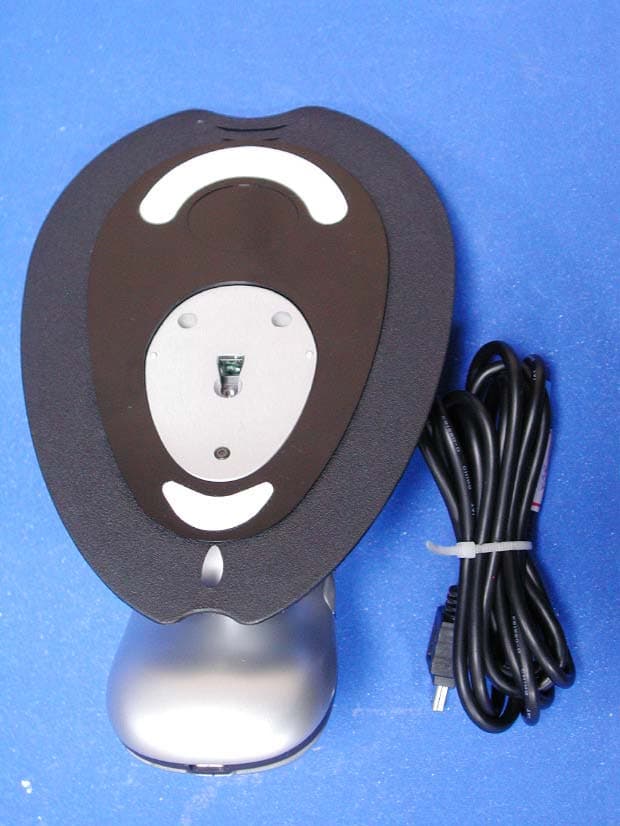
Click to zoom
Application Details
- Equipment Class
- DXX - Part 15 Low Power Communication Device Transmitter
- Date of Grant
- Aug 24, 2005
- Application Purpose
- Original Equipment
- Date of Application
- Aug 24, 2005
- Equipment Note
- RF OPTICAL MOUSE
- Frequency Range
- 27.04500000 - 27.04500000
- Company
- Acrox Technologies Co., Ltd.
- Country
- Taiwan
Documents & Files
Document Text
Text extracted from the exhibit documents filed with the FCC. Open a document above to read the original.
Users Manual
B RUSSELS H ANNOVER B ARCELONA T OKYO M ILAN A MSTERDAM S INGAPORE L ONDON P ARIS N EW Y ORK L OS A NGELES T ORONTO H ONG K ONG S YDNEY ® ® 5-Button Rechargeable Hover Mouse USER’S GUIDE Making Your Mobile Life Easier. ® Making Your Mobile Life Easier. ® Visit our Web site at: www.targus.com Features and specifications are subject to change without notice. © 2005 Targus Group International, Inc. and Targus Inc. AMW06US/400-0212-001A 3 TARGUS 5-BUTTON RECHARGEABLE HOVER MOUSE Introduction Congratulations on your purchase of a Targus Ergo Rechargeable Mouse. This ergonomically designed mouse uses a radio frequency (RF) link that enables you to use the mouse anywhere within four feet of its receiver. No line-of- sight between the mouse and its receiver is required. This user’s guide describes how to connect the mouse receiver to your computer, install default software drivers and set up the radio link. In addition to this user’s guide, this package contains: System Requirements Hardware •PC with a Pentium ® processor or equivalent •USB interface •Mouse • Receiver • 2 AAA rechargeable batteries • USB extension seat • USB charge cable 4 Targus 5-Button Rechargeable Hover Mouse Operating System •Windows ® Me/2000/XP NOTE: The extra buttons and the scrolling wheel only work with the operating systems listed above. If you use the mouse with a different operating system, it will lose its enhanced features and function as a standard, two-button mouse. Connecting the Receiver and Using the Mouse To connect the mouse receiver, plug it into an available USB port on your computer. Installing the Batteries 1 Remove the battery cover from the top of the mouse by pressing the hinge located on the center of the top cover and sliding the cover off. 5 Targus 5-Button Rechargeable Hover Mouse NOTE: The battery cover is also the top cover of the mouse. 2 2 AAA NiMH rechargeable batteries are included. Insert the supplied batteries, making sure that the positive (+) and negative (-) ends of each battery match the polarity indicators inside the battery housing. WARNINGS: When replacing the batteries, you must use heavy-duty NiMH batteries. Never use alkaline if you intend to use the recharging feature. Avoid mixing new and used batteries in a device. 3 Slide the battery cover back into position until it “clicks” firmly into place. 4 Turn on the mouse by clicking any mouse button. The optical sensor, located on the bottom of the mouse, glows red. Charging the Mouse For best results, you should charge the mouse at least 4 hours before using it. You can do this via the supplied USB charge cable. To do this: 1 Connect the supplied charging cable’s USB connector into an available USB port on your computer. 6 Targus 5-Button Rechargeable Hover Mouse 2 Connect the other end to the mouse; the charger connector is located on the front tip of the mouse.. 3 Alternatively, you can connect the receiver to the supplied extension seat and plug the extension seat cable to the USB port on your computer. NOTE: To continuously charge the mouse via the USB charge cable, your computer must be on and awake. For best results, turn off your computer’s power management feature while charging the mouse. 7 Targus 5-Button Rechargeable Hover Mouse Establishing a Communications Link The mouse has 256 identification codes that allow the mouse and its receiver to operate without interference from other radio frequency devices. After your computer detects the USB receiver and the driver software is installed, you must establish a communications link between the mouse and its receiver BEFORE you can use the mouse. To establish this link, you need to set the identification code so that the mouse works properly. Make sure that your computer is turned on and has detected the USB receiver before you establish a communications link. 1 Press and release the connection button on the receiver. The USB connector rotates 90 degrees to facilitate easy connection to your computer. Status light Connection button 8 Targus 5-Button Rechargeable Hover Mouse The receiver’s red status light blinks when the receiver is activated. Bottom of mouse 2 Press and release the connection button located on the bottom of the mouse. You are now ready to use the mouse. Operating Hints For optimal performance and RF reception: • Do not separate the mouse pad from the mouse. The pad is permanently attached to the mouse. • Place the receiver at least 8 inches (20 cm) away from all electrical devices, such as your monitor, speakers or external storage devices. If necessary, use the supplied extension seat to keep the receiver away from the computer. Plug the receiver into the extension seat, and the extension cable to the computer. Connection button 9 Targus 5-Button Rechargeable Hover Mouse • Avoid using the mouse on a metal surface. Metals, such as iron, aluminum or copper, shield the radio frequency transmission and may slow down the mouse’s response time or cause the mouse to fail temporarily. • The mouse will enter a suspend mode at the same time your computer does. To activate the mouse, move the mouse or click on any mouse button. • If your computer has a metal case that contains aluminum or magnesium, use the mouse to the side. The display panel may interfere with the radio frequency signal if you use the mouse directly in front of the computer. • Never use the mouse on a glass or mirrored surface as these surfaces will cause the mouse to fail temporarily. • To maximize battery life, use the mouse on a white, or light colored surface. Dark surfaces cause the mouse’s light emitter diode (LED) light to glow brighter, which causes the battery to discharge more rapidly. Comfortable Usage Research suggests that physical discomfort and injury to nerves, tendons, and muscles may be related to repetitive motion, an improperly set up work area, incorrect body posture, and poor work habits. To reduce the risk of injury, follow these precautions: • Stand, stretch, and move around …
Text truncated - open the document above for the full version.
External Photos
External Photos of RF Optical Mouse -----------------------------------------------1/ 7 Applicant:Acrox Technologies Co., Ltd. FCC ID: PRDMO40050812 Training Research Co., Ltd., TEL: 886-2-26935155, Fax: 886-2-26934440 External Photos of RF Optical Mouse -----------------------------------------------2/ 7 Applicant:Acrox Technologies Co., Ltd. FCC ID: PRDMO40050812 Training Research Co., Ltd., TEL: 886-2-26935155, Fax: 886-2-26934440 Internal Photos of RF Optical Mouse -----------------------------------------------3/ 7 Applicant:Acrox Technologies Co., Ltd. FCC ID: PRDMO40050812 Training Research Co., Ltd., TEL: 886-2-26935155, Fax: 886-2-26934440
ID Label/Location Info
LABEL Sample and Location information ----------------------------------------- 1/2 Applicant: Acrox Technologies Co., Ltd. FCC ID: PRDMO40050812 Training Research Co., Ltd., TEL: 886-2-26935155, Fax: 886-2-26934440 LABEL Format: LABEL Size: 28 x 21.5 mm FCC ID: PRDMO40050812 MODEL: MO4 LABEL Sample and Location information ----------------------------------------- 2/2 Applicant: Acrox Technologies Co., Ltd. FCC ID: PRDMO40050812 Training Research Co., Ltd., TEL: 886-2-26935155, Fax: 886-2-26934440 LABEL Position:
Internal Photos
Internal Photos of RF Optical Mouse -----------------------------------------------4/ 7 Applicant:Acrox Technologies Co., Ltd. FCC ID: PRDMO40050812 Training Research Co., Ltd., TEL: 886-2-26935155, Fax: 886-2-26934440 Internal Photos of RF Optical Mouse -----------------------------------------------5/ 7 Applicant:Acrox Technologies Co., Ltd. FCC ID: PRDMO40050812 Training Research Co., Ltd., TEL: 886-2-26935155, Fax: 886-2-26934440 Internal Photos of RF Optical Mouse -----------------------------------------------6/ 7 Applicant:Acrox Technologies Co., Ltd. FCC ID: PRDMO40050812 Training Research Co., Ltd., TEL: 886-2-26935155, Fax: 886-2-26934440 Internal Photos of RF Optical Mouse -----------------------------------------------7/ 7 Applicant:Acrox Technologies Co., Ltd. FCC ID: PRDMO40050812 Training Research Co., Ltd., TEL: 886-2-26935155, Fax: 886-2-26934440
Test Report
Test Report ------------------------------------------------------------------------------- 1/18 Report No.: A8515050617, FCC Part 15.227 Training Research Co., Ltd. TEL:886-2-26935155, Fax:886-2-26934440 MEASUREMENT REPORT of 27MHz Wireless Mouse Applicant : Acrox Technologies Co., Ltd. FCC ID : PRDMO40050812 Model : MO4 Test by : Training Research Co., Ltd. TEL : 886-2-26935155 FAX : 886-2-26934440 No. 255, Nan-yang Street, Shijr, Taipei Hsien 221, Taiwan Test Report ------------------------------------------------------------------------------- 2/18 Report No.: A8515050617, FCC Part 15.227 Training Research Co., Ltd. TEL:886-2-26935155, Fax:886-2-26934440 CERTIFICATION We here by verify that: The test data, data evaluation, test procedures and equipment configurations shown in this report were made mainly in accordance with the procedures given in ANSI C63.4 (2003) as a reference. All tests were conducted by Training Research Co., Ltd., No. 255, Nan-yang Street, Shijr, Taipei Hsien 221, Taiwan. Also, we attest to the accuracy of each. We further submit that the energy emitted by the sample EUT tested as described in the report is in compliance with the technical requirements set forth in the FCC Rules Part 15 Subpart C Section 15.227. Applicant : Acrox Technologies Co., Ltd. Applicant address : 8F, No. 437, Rui Guang Road, Nei Hu District, Taipei 114, Taiwan Report No. : A8515050617 Test Date : August 19, 2005 Prepared by: Approved by: Jack Tsai Frank Tsai Conditions of issue : (1) This test report shall not be reproduced except in full, without written approval of TRC. And the test result contained within this report only relate to the sample submitted for testing. (2) This report must not be used by the client to claim product endorsement by NVLAP or any agency of U.S. Government. (3) This test report, measurements made by TRC are traceable to the NIST only Conducted and Radiated Method. NVLAP LAB CODE: 200174-0 Test Report ------------------------------------------------------------------------------- 3/18 Report No.: A8515050617, FCC Part 15.227 Training Research Co., Ltd. TEL:886-2-26935155, Fax:886-2-26934440 Tables of Contents CHAPTER 1 GENERAL........................................................................................... 4 1.1 INTRODUCTION...........................................................................................4 1.2 DESCRIPTION OF EUT.................................................................................4 1.3 TEST METHOD.............................................................................................4 1.4 DESCRIPTION OF SUPPORT EQUIPMENT......................................................5 1.5 TEST PROCEDURE.......................................................................................7 1.6 LOCATION OF THE TEST SITE......................................................................7 1.7 GENERAL TEST CONDITION........................................................................7 CHAPTER 2 CONDUCTED EMISSIONS MEASUREMENTS....................................... 8 2.1 TEST CONDITION & SETUP.........................................................................8 2.2 LIST OF TEST INSTRUMENTS.......................................................................9 2.3 TEST RESULT OF CONDUCTED EMISSIONS................................................10 CHAPTER 3 RADIATED EMISSION MEASUREMENTS.......................................... 11 3.1 HARMONIC AND SPURIOUS EMISSION.......................................................11 3.1.1 Test Condition and Setup.............................................................11 3.1.2 List of Test Instruments ...............................................................12 3.1.3 Configuration of System Under Test ...........................................13 3.1.4 Test Result of Harmonic and Spurious Emission ........................14 3.2 PEAK POWER MEASUREMENT OF FUNDAMENTAL FREQUENCY................15 3.2.1 Test Condition and Setup.............................................................15 3.2.2 List of Test Instruments ...............................................................15 3.2.3 Configuration of System Under Test ...........................................16 3.2.4 Test Result of Fundamental Emission .........................................17 3.3 TEST RESULT OF THE BANDEDGE.............................................................18 Test Report ------------------------------------------------------------------------------- 4/18 Report No.: A8515050617, FCC Part 15.227 Training Research Co., Ltd. TEL:886-2-26935155, Fax:886-2-26934440 Chapter 1 General 1.1 Introduction The following measurement report is submitted on behalf of Applicant in support of a RF mouse certification in accordance with Part 2 Subpart J and Part 15 Subpart C of the Commission's Rules and Regulations. 1.2 Description of EUT Product Name : RF Optical Mouse Model : MO4 Frequency Range : 26.96MHz ~ 27.28MHz Operating Frequency : 27.045MHz Modulation Skill : FSK Power Type : Powered by 1.5V batteries (SIZE AAA*2) or USB 1.3 Test method All measurements contained in this report were performed according to the techniques described in Measurement procedure ANSI C63.4 – 2003. Pretest was found that the emission of operating mode is worse than standby mode. So, the final test is made at the operating mode (transmitted). The EUT set in 27.045MHz and continuously transmitting mode, which transmitted the maximum emission. The test placement as the photographs showed is the worst case emission placed. (If the emission is close to the ambient, the resolution BW and view resolution will be reduced and the data will be recorded by detection of maximum hold peak mode.) Test Report ------------------------------------------------------------------------------- 5/18 Report No.: A8515050617, FCC Part 15.227 Training Research Co., Ltd. TEL:886-2-26935155, Fax:886-2-26934440 1.4 Description of Support …
Text truncated - open the document above for the full version.
Test Setup Photos
Test Setup Photos ------------------------------------------------------------------------- 1/3 Applicant: Acrox Technologies Co., Ltd. FCC ID: PRDMO40050812 Training Research Co., Ltd., TEL: 886-2-26935155, Fax: 886-2-26934440 Conducted Test Setup Placement: (Charging mode) Front View of the Test Configuration Side View of the Test Configuration Test Setup Photos ------------------------------------------------------------------------- 2/3 Applicant: Acrox Technologies Co., Ltd. FCC ID: PRDMO40050812 Training Research Co., Ltd., TEL: 886-2-26935155, Fax: 886-2-26934440 Radiated Test Setup Placement: (Charging mode) Front View of the Test Configuration Rear View of the Test Configuration Test Setup Photos ------------------------------------------------------------------------- 3/3 Applicant: Acrox Technologies Co., Ltd. FCC ID: PRDMO40050812 Training Research Co., Ltd., TEL: 886-2-26935155, Fax: 886-2-26934440 Radiated Test Setup Placement: (Intentional test) Front View of the Test Configuration Rear View of the Test Configuration
Contact Information
Applicant
Gavin Hsieh(Product Manager)
Test Firm
Training Research Co., LtdJack Tsai
Technical Specifications
| # | Rule Parts | Frequency Range | Power Output |
|---|---|---|---|
| 1 | 15C | 27.045 MHz - 27.045 MHz | - |
Other Applications from Acrox Technologies Co., Ltd.

PRDRX12
May 27, 2026Wireless Receiver
Equipment Class
DXX - Part 15 Low Power Communication Device Transmitter
PRDRX11
Apr 07, 2026Wireless Receiver
Equipment Class
DXX - Part 15 Low Power Communication Device Transmitter
PRDKB72
Apr 03, 2026WIRELESS SPLIT KEY ERGONOMIC KEYBOARD
Equipment Class
DTS - Digital Transmission System
PRDRX1P
Apr 03, 2026Wireless Receiver
Equipment Class
DXX - Part 15 Low Power Communication Device Transmitter
PRDKB73
Apr 03, 2026Gaming Keyboard
Equipment Class
DTS - Digital Transmission System