PRDMP10050622RF Laser Mouse
Acrox Technologies Co., Ltd.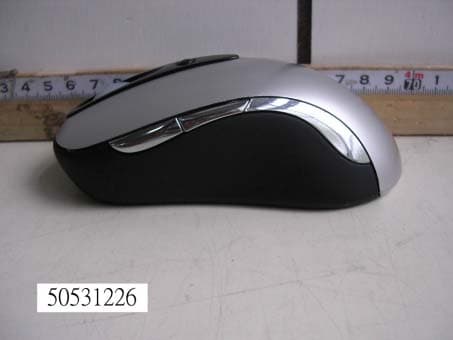
Click to zoom
Application Details
- Equipment Class
- DXX - Part 15 Low Power Communication Device Transmitter
- Date of Grant
- Jul 14, 2005
- Application Purpose
- Original Equipment
- Date of Application
- Jul 14, 2005
- Equipment Note
- RF Laser Mouse
- Frequency Range
- 27.04500000 - 27.19500000
- Company
- Acrox Technologies Co., Ltd.
- Country
- Taiwan
Documents & Files
Document Text
Text extracted from the exhibit documents filed with the FCC. Open a document above to read the original.
Users Manual
Deluxe RF Laser Mouse With Office hot key OWNER'S GUIDE CAUTION : To use this mouse properly, please read the user's guide before installation Welcome Your mouse uses a new generation technology – laser module that replaces the traditional LED mouse and provides amazing tracking ability. The laser module accurately scans the surface in 30 times sensitive of LED optical mouse. You can work with your mouse in most surfaces perfectly. 1 Safety Notice 1. This product complies with IEC 60825-1, class 1 laser product. 2. Your product complies with FCC and CE rules. 3. This product has no serviceable parts. Use of controls or adjustments of procedures other than the user guide may result in dangerous. CAUTION: Change or modifications not expressly approved by the manufacturer responsible for compliance could void the user's authority to operate the equipment SETUP the Mouse The Mouse is connected to your computer via a cable. It needs to plug in your computer by a USB port or a mouse port. 2 USB Port For PS/2 mouse port installation Please turn off your computer before installing your mouse. Plugging and unplugging cables to your computer's mouse port while the computer is running can damage the mouse port or your Computer. PS2 Mouse Port For USB port installation Windows 98 (or higher) and Macintosh OS 8.6 (or higher) are required for USB port installation. Connect the receiver cable to the USB port on the computer. For Windows, you may be prompted to insert the Windows software CD. Insert the divers’ CD into the computer's CD-ROM driver when asked to do so. Follow the instructions steps. Installing the batteries Step 1 Press the tag on the battery compartment cover of the mouse and pull up. Step 2 Insert the batteries as shown inside the battery compartment. Step 3 Replace the cover. Install the Receiver and the recharger Connect to the USB port of your computer 3 Functional Introduction: Channel reset button OFF/ ON switch Low power LED Office hot key Mouse wheel Previous / Next page Setup the connection Rf channel between the Mouse and the Receiver Push 2 Push 1 Push the channel reset button on the mousePush the channel reset button on the receiver f the cursor does NOT move after 30 seconds, please re-do the steps above. I 4 Green LED FLASH 0.5 sec. Regularly Green LED FLASH if any action Green LED ON SEARCHING the channel Channel connected No action Recharging: 5 Red LED off Red LED FLASH Low Power Normal / No batteries Red LED ON Recharging Red LED OFF Finished charging Using your mouse How to use the wheel Your mouse has a wheel that functions both as a wheel for Windows Scrolling and also as a customized button. It can be used as a standard mouse button, click (press down) the wheel. To Use the Middle Button, Directly Press down the Wheel. For scrolling the screen, simply move the wheel. Software Installation Please follow the steps below to install your mouse driver: 1. Follow the instruction on screen; system will install the Driver automatically. 2. Insert your driver disk into the driver. 3. Go to “Start” Menu and select “Run”. 4. Type “A:\Setup”, press the “Enter” button on your keyboard. 5. Reboot your system while completing the installation process. ( “A:” device CD drive or floppy drive) 6 Utility & Office hot key: The Office hot key provides you with easy way to customize your mouse operations and total control over the screen without using taskbar or start menu. You just need to press the Office Selector Key on your mouse then round shaped quick panel will pop up. You will see eight items on the Quick Panel providing effective accessibility for most frequently used Windows applications including Word, Excel and PowerPoint. You just need to click on the item you want to launch. Quick Panel 7 Launch Word Adjust Volume Launch Outlook Open My Document Launch Excel Launch PowerPoint Launch My Computer Launch IE (Tips: There are popup tips when you point on the screen icons.) Utility Settings Double click the mouse icon on the right bottom corner of the Windows screen to get into the setting window. You can add new functions to your Quick Panel for making your own frequently Command Quick Panel in the Office applications. Example: Add a “save” functional key in the Quick Panel for the Word application. 4 3 2 1 8 5 Important Notes: • Please follow the instructions contained in the instruction manual. Do not try to disassemble or replace parts in the product. • Do not put the product in water or on any wet surface; if this occurs quickly remove from the computer and take to your nearest dealer for repair. • To avoid electrocution, please do not pick up the device when your hands are wet. • Do not put the product near a heat source or put the product in high temperatures. • This product’s casing has holes for the drive to ventilate. Do not cover the ventilation holes in order to avoid hard drive damage. 9 10 Troubleshooting Mouse does not work upon installation Try one or more of the following: z Make sure you have installed the Driver correctly. z Make sure the receiver cable is plugged into the right mouse port. z Unplug the Mouse and then plug in the mouse again. Make sure that Mouse had been detected by the Operating Systems properly. z Make sure your mouse port has the proper configuration. Refer to your computer documentation for the correct port configuration. z You may have other system devices (e.g. a LAN card) that conflict with your mouse. Check the IRQ/address settings of these devices for conflicts, and change the settings as required. N-MP1&MR8-01
External Photos
Compliance Certification Services Inc. Report No.: 50531226 Date of Issue: June 23, 2005 Page PHOTOGRAPHS OF EUT Compliance Certification Services Inc. Report No.: 50531226 Date of Issue: June 23, 2005 Page Compliance Certification Services Inc. Report No.: 50531226 Date of Issue: June 23, 2005 Page
ID Label/Location Info
FCC ID LABEL FORMAT AND LOCATION Applicant: Acrox Technologies Co., Ltd. FCC ID: PRDMP10050622 This device complies with part 15 of the FCC Rules. Operation is subject to the following two conditions: (1) This device may not cause harmful interference, and (2) this device must accept any interference received, including interference that may cause undesired operation. FCC ID: PRDMP10050622 FCC ID LABEL AREA
Internal Photos
Compliance Certification Services Inc. Report No.: 50531226 Date of Issue: June 23, 2005 Page Compliance Certification Services Inc. Report No.: 50531226 Date of Issue: June 23, 2005 Page
Operational Description
MP1 Work Basis Mouse (optical): 1. When the mouse was moved, the optical sensor would detect the different between two points, and then sensor will send the signal to the MP1. 2. The MP1 will encode the signal and modulate the signal that uses FSK modulation type). 3. Through the 27 MHz RF circuit transmit the modulation signal. Receiver: 1. When the receiver receives the modulation signal will demodulate signal through RF circuit. And responds signal to MP1. 2. The MP1 meeting decodes the signal PC acceptable format. ps. FSK: Frequency Shift Key MP1: Micro Control Unit RF: Radio Frequency
Schematics
1234 A B C D 4321 D C B A Title NumberRevisionSize A4 Date:20-May-2005Sheet of File:D:\\LASER.ddb程曉梅Drawn By: R1 10M Y1 76.8K C122pF C222pF C8104pF R M L C1533pF L21.8uH C17 75pF L1 0.82uH C3 22pF C7OPEN C6 56pF PD C A B Z1 ENCODER R4560 LED2 ID1 C10 104pF + C25 100uF/10V BT1 UM- 4( X2) R8 * VBT XA XB V1.2 PCB No: RF 3D OPTICAL MOUSE YB YA XA XB YB YA LED1 C12 104pF VSS_LED 1 LED 2 OSCOUT 3 OSCIN 4 NC 5 VSS 6 VSS 7 VDD 8 VRB 9 VRT 10 YA 11 YB 12 XA 13 XB 14 NC 15 NC 16 NC 17 SCLK 18 SDIO 19 PD 20 U1 ACX1001 R2 1.2M R3560K PD TOUCH_PAD-A CR1 OPEN TOUCH_PAD-B RP1100K RP2 OPEN MP1C002-B V1.0 MP1C002 ONE CHANNEL V1.2 VDD 1 OF 1 DRAWINGDESIGNAPPROVAL VDD OSC1 1 VSS 2 OSC2 3 VDD 4 RBUT 5 MBUT 6 LBUT 7 RFOUT 8 ORFIN0 9 ORF0 11 TXD 12 PD 13 WA 14 WB 15 Z1IN 16 Z2IN 17 X2IN 18 X1IN 20 BATL 21 Y1IN 22 Y2IN 23 TXCB 24 SVD_IN 27 DCVR 28 ORFIN1 10 VL 29 BBUT 25 FBUT 26 P1.5/SSEL 19 VL_NM 30 U2 MA6221 COB VDD VDD Y4 27MHz J4 Power switch L3100uH C18 104pF + C22 100uF/10V D1 1N5817 VDD VSS 1 OUT 2 IN 3 U3RH5RH301PR C6+C7=56pF VBT C5 OPEN C16OPEN C447pF Y2 27.042MHz C13 OPEN Y3 OPEN R10 0 C300 C31 OPEN C32 27pF C33 3pF SW1 SW2 R14 390K VDD C34OPEN C35OPEN C14 104pF + C23 47uF/10V R910 C29 104pF C19 OPEN 1 2 3 4 5 6 J1-A CON6 1 2 3 4 5 6 J1-B CON6 XB L M GND YB YA R M L PD YA YB XB XA B A YB YA XA XB 1 2 3 4 5 J2-B CON5 1 2 3 4 5 J2-A CON5 XB XA ID ID R B 1 2 3 4 5 J3-B CON5 1 2 3 4 5 J3-A CON5 VDD VBT VBT A ID D3 1N4148 D4 1N4148 SW3 Office Key Office Key VDD Q5 2N3906 PD R1510K C37 104pF R16 47K + C36 47uF/10V R17 OPEN MP1C002-A V1.2 HOUSING R2,R3為配對電阻 R11 * R12 * R13 *
Test Report
Compliance Certification Services Inc. Report No.: 50531226-RP1 FCC ID: PRDMP10050622 Date of Issue: June 23, 2005 Page 1 Total Page: 18 Rev. 00 FCC CFR 47 PART 15 SUBPART C TEST REPORT For Acrox Technologies Co., Ltd. RF Laser Mouse Model: MP1; MSS; MOY; MOZ; MPA Trade Name: Acrox Issued to Acrox Technologies Co., Ltd. 8F, No. 437, Rui Guang Rd., Nei Hu Dist., Taipei 114, Taiwan, R.O.C. Issued by Compliance Certification Services Inc. Hsintien Lab. No. 165, Chunghsen Road, Hsintien City Taipei Hsien, Taiwan TEL: (02) 2217-0894 FAX: (02) 2217-1029 Note: This report shall not be reproduced except in full, without the written approval of Compliance Certification Services Inc. This document may be altered or revised by Compliance Certification Services Inc. personnel only, and shall be noted in the revision section of the document. Compliance Certification Services Inc. Report No.: 50531226-RP1 FCC ID: PRDMP10050622 Date of Issue: June 23, 2005 Page 2 Rev. 00 TABLE OF CONTENTS 1. TEST RESULT CERTIFICATION ................................................................................ 3 2. EUT DESCRIPTION ........................................................................................................ 4 3. TEST METHODOLOGY ................................................................................................. 5 3.1 EUT CONFIGURATION ........................................................................................... 5 3.2 EUT EXERCISE......................................................................................................... 5 3.3 GENERAL TEST PROCEDURES ............................................................................ 5 3.4 FCC PART 15.205 RESTRICTED BANDS OF OPERATIONS .............................. 6 3.5 DESCRIPTION OF TEST MODES........................................................................... 6 4. INSTRUMENT CALIBRATION .................................................................................... 7 5. FACILITIES AND ACCREDITATIONS....................................................................... 7 5.1 FACILITIES ............................................................................................................... 7 5.2 EQUIPMENT ............................................................................................................. 7 5.3 LABORATORY ACCREDITATIONS AND LISTINGS ......................................... 7 5.4 TABLE PF ACCREDITATIONS AND LISTINGS .................................................. 8 6. SETUP OF EQUIPMENT UNDER TEST...................................................................... 9 6.1 SETUP CONFIGURATION OF EUT ....................................................................... 9 6.2 SUPPORT EQUIPMENT........................................................................................... 9 7. FCC PART 15.227 REQUIREMENTS ......................................................................... 10 7.1 26 DB BANDWIDTH .............................................................................................. 10 7.2 RADIATED EMISSIONS ........................................................................................ 12 7.3 POWERLINE CONDUCTED EMISSIONS............................................................ 17 APPENDIX 1 - PHOTOGRAPHS OF TEST SETUP ....................................................... 18 Compliance Certification Services Inc. Report No.: 50531226-RP1 FCC ID: PRDMP10050622 Date of Issue: June 23, 2005 Page 3 Rev. 00 1. TEST RESULT CERTIFICATION Applicant: Acrox Technologies Co., Ltd. 8F, No. 437, Rui Guang Rd., Nei Hu Dist., Taipei 114, Taiwan, R.O.C. Equipment Under Test: RF Laser Mouse Trade Name: Acrox Model: MP1; MSS; MOY; MOZ; MPA Model Difference: N/A Report Number: 50531226-RP1 Date of Test: June 02, 2005 ~ June 06, 2005 APPLICABLE STANDARDS STANDARD TEST RESULT FCC Part 15 Subpart C No non-compliance noted The above equipment was tested by Compliance Certification Services Inc. The test data, data evaluation, test procedures, and equipment configurations shown in this report were made in accordance with the procedures given in ANSI C63.4 (2003) and the energy emitted by the sample EUT tested as described in this report is in compliance with conducted and radiated emission limits of FCC Rules Part 15.227. The test results of this report relate only to the tested sample identified in this report. Approved by: Reviewed by: Compliance Certification Services Inc. Report No.: 50531226-RP1 FCC ID: PRDMP10050622 Date of Issue: June 23, 2005 Page 4 Rev. 00 2. EUT DESCRIPTION Product RF Laser Mouse Trade Name Acrox Model MP1; MSS; MOY; MOZ; MPA Power Supply 3VDC From Battery AA size X 2 pcs. Operate Frequency 27.045MHz; 27.195MHz Transmit Power N/A Modulation Technique Frequency Shift Keying (FSK) Number of Channels 2 Channels Operating Mode Point-to-Point Antenna Designation Internal loop, which is built in EUT Note: The product is a composite system which includes Transmitter and Receiver. This submittal(s) (test report) is intended for FCC ID: PRDMP10050622 filing to comply with Section 15.227 of the FCC Part 15 Subpart C Rules. The composite system (digital device) is compliance with Subpart B is authorized under a DoC procedure. MODEL DIFFERENCE Model Number Difference Test (check) Original MP1 MSS MOY MOZ Additional MPA The difference of models is marketing purposes only. Note: Client consigns only one model sample (Model Number is MR6) to test. Compliance Certification Services Inc. Report No.: 50531226-RP1 FCC ID: PRDMP10050622 Date of Issue: June 23, 2005 Page 5 Rev. 00 3. TEST METHODOLOGY The tests documented in this report were performed in accordance with ANSI C63.4 and FCC CFR 47 Part 15 Subpart C. 3.1 EUT CONFIGURATION The EUT configuration for testing is installed on RF field strength measurement to meet the Commissions requirement and operating in a manner that intends to maximize its emission characteristics in a continuo…
Text truncated - open the document above for the full version.
Test Setup Photos
Compliance Certification Services Inc. Report No.: 50531226-RP1 FCC ID: PRDMP10050622 Date of Issue: June 23, 2005 Page 18 Rev. 00 8. APPENDIX 1 - PHOTOGRAPHS OF TEST SETUP
Contact Information
Applicant
Gavin Hsieh(Product Manager)
Test Firm
Compliance Certification Services Inc.Kurt Chen
Technical Specifications
| # | Rule Parts | Frequency Range | Power Output |
|---|---|---|---|
| 1 | 15C | 27.045 MHz - 27.195 MHz | - |
Other Applications from Acrox Technologies Co., Ltd.

PRDRX12
May 27, 2026Wireless Receiver
Equipment Class
DXX - Part 15 Low Power Communication Device Transmitter
PRDRX11
Apr 07, 2026Wireless Receiver
Equipment Class
DXX - Part 15 Low Power Communication Device Transmitter
PRDKB72
Apr 03, 2026WIRELESS SPLIT KEY ERGONOMIC KEYBOARD
Equipment Class
DTS - Digital Transmission System
PRDRX1P
Apr 03, 2026Wireless Receiver
Equipment Class
DXX - Part 15 Low Power Communication Device Transmitter
PRDKB73
Apr 03, 2026Gaming Keyboard
Equipment Class
DTS - Digital Transmission System