PRDMPO008PXOXRF Laser Mouse
Acrox Technologies Co., Ltd.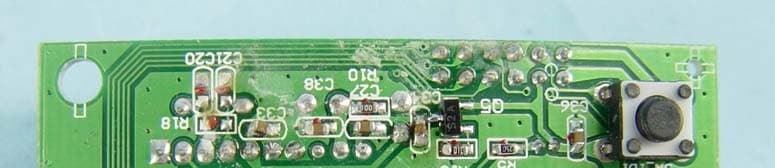
Click to zoom
Application Details
- Equipment Class
- DXX - Part 15 Low Power Communication Device Transmitter
- Date of Grant
- Sep 12, 2006
- Application Purpose
- Original Equipment
- Date of Application
- Sep 12, 2006
- Equipment Note
- RF Laser Mouse
- Frequency Range
- 27.04500000 - 27.04500000
- Company
- Acrox Technologies Co., Ltd.
- Country
- Taiwan
Documents & Files
Document Text
Text extracted from the exhibit documents filed with the FCC. Open a document above to read the original.
Users Manual
Deluxe RF Laser Mouse With Office hot key OWNER'S GUIDE CAUTION : To use this mouse properly, please read the user's guide before installation Welcome Your mouse uses a new generation technology – laser module that replaces the traditional LED mouse and provides amazing tracking ability. The laser module accurately scans the surface in 30 times sensitive of LED optical mouse. You can work with your mouse in most surfaces perfectly. 1 Safety Notice 1. This product complies with IEC 60825-1, class 1 laser product. 2. Your product complies with FCC and CE rules. 3. This product has no serviceable parts. Use of controls or adjustments of procedures other than the user guide may result in dangerous. CAUTION: Change or modifications not expressly approved by the manufacturer responsible for compliance could void the user's authority to operate the equipment SETUP the Mouse The Mouse is connected to your computer via a cable. It needs to plug in your computer by a USB port or a mouse port. 2 USB Port For PS/2 mouse port installation Please turn off your computer before installing your mouse. Plugging and unplugging cables to your computer's mouse port while the computer is running can damage the mouse port or your Computer. PS2 Mouse Port For USB port installation Windows 98 (or higher) and Macintosh OS 8.6 (or higher) are required for USB port installation. Connect the receiver cable to the USB port on the computer. For Windows, you may be prompted to insert the Windows software CD. Insert the divers’ CD into the computer's CD-ROM driver when asked to do so. Follow the instructions steps. Installing the batteries Step 1 Press the tag on the battery compartment cover of the mouse and pull up. Step 2 Insert the batteries as shown inside the battery compartment. Step 3 Replace the cover. Install the Receiver and the recharger Connect to the USB port of your computer 3 Functional Introduction: Channel reset button OFF/ ON switch Low power LED Office hot key Mouse wheel Previous / Next page Setup the connection Rf channel between the Mouse and the Receiver Push 2 Push 1 Push the channel reset button on the mousePush the channel reset button on the receiver f the cursor does NOT move after 30 seconds, please re-do the steps above. I 4 Green LED FLASH 0.5 sec. Regularly Green LED FLASH if any action Green LED ON SEARCHING the channel Channel connected No action Recharging: 5 Red LED off Red LED FLASH Low Power Normal / No batteries Red LED ON Recharging Red LED OFF Finished charging Using your mouse How to use the wheel Your mouse has a wheel that functions both as a wheel for Windows Scrolling and also as a customized button. It can be used as a standard mouse button, click (press down) the wheel. To Use the Middle Button, Directly Press down the Wheel. For scrolling the screen, simply move the wheel. Software Installation Please follow the steps below to install your mouse driver: 1. Follow the instruction on screen; system will install the Driver automatically. 2. Insert your driver disk into the driver. 3. Go to “Start” Menu and select “Run”. 4. Type “A:\Setup”, press the “Enter” button on your keyboard. 5. Reboot your system while completing the installation process. ( “A:” device CD drive or floppy drive) 6 Utility & Office hot key: The Office hot key provides you with easy way to customize your mouse operations and total control over the screen without using taskbar or start menu. You just need to press the Office Selector Key on your mouse then round shaped quick panel will pop up. You will see eight items on the Quick Panel providing effective accessibility for most frequently used Windows applications including Word, Excel and PowerPoint. You just need to click on the item you want to launch. Quick Panel 7 Launch Word Adjust Volume Launch Outlook Open My Document Launch Excel Launch PowerPoint Launch My Computer Launch IE (Tips: There are popup tips when you point on the screen icons.) Utility Settings Double click the mouse icon on the right bottom corner of the Windows screen to get into the setting window. You can add new functions to your Quick Panel for making your own frequently Command Quick Panel in the Office applications. Example: Add a “save” functional key in the Quick Panel for the Word application. 4 3 2 1 8 5 Important Notes: • Please follow the instructions contained in the instruction manual. Do not try to disassemble or replace parts in the product. • Do not put the product in water or on any wet surface; if this occurs quickly remove from the computer and take to your nearest dealer for repair. • To avoid electrocution, please do not pick up the device when your hands are wet. • Do not put the product near a heat source or put the product in high temperatures. • This product’s casing has holes for the drive to ventilate. Do not cover the ventilation holes in order to avoid hard drive damage. 9 10 Troubleshooting Mouse does not work upon installation Try one or more of the following: z Make sure you have installed the Driver correctly. z Make sure the receiver cable is plugged into the right mouse port. z Unplug the Mouse and then plug in the mouse again. Make sure that Mouse had been detected by the Operating Systems properly. z Make sure your mouse port has the proper configuration. Refer to your computer documentation for the correct port configuration. z You may have other system devices (e.g. a LAN card) that conflict with your mouse. Check the IRQ/address settings of these devices for conflicts, and change the settings as required. N-MP1&MR8-01 MP1 Work Basis Mouse (optical): 1. When the mouse was moved, the optical sensor would detect the different between two points, and then sensor will send the signal to the MP1. 2. The MP1 will encode the signal and modulate the signal that uses FSK modulation type). 3. Through the 27 MHz RF circuit transmit the modulation signal. Receiver: 1. When the receiver receives the modulation signal will demodulate signal through RF cir…
Text truncated - open the document above for the full version.
External Photos
Page 1 CONSTRUCTION PHOTOS OF EUT
ID Label/Location Info
FCC ID LABEL FORMAT AND LOCATION Applicant: Acrox Technologies Co., Ltd. FCC ID: PRDMPO008PXOX This device complies with part 15 of the FCC Rules. Operation is subject to the following two conditions: (1) This device may not cause harmful interference, and (2) this device must accept any interference received, including interference that may cause undesired operation. FCC ID: PRDMPO008PXOX FCC ID LABEL AREA
Internal Photos
Page 2 Page 3 Page 4 Page 5 Page 6 Page 7 Page 8
Operational Description
FCC ID: PRDMPO008PXOX Report No.: RF950824L18 Operational Description The transmitter of the EUT (RF Laser Mouse) is powered from 3Vdc Batteries. The EUT uses Loop Antenna. The output power of this device is very low. Under normal use condition, the transmitter and the receiver are quite close, so high EIRP power is neither necessary nor allowed because of interference.
Test Report
Report No.: RF950824L181Report Format Version 2.0.4 FCC TEST REPORT REPORT NO.: RF950824L18 MODEL NO.: MPO (refer to page 5 for other models) RECEIVED: Sep. 05, 2006 TESTED: Sep. 05 ~ Sep. 06, 2006 ISSUED: Sep. 07, 2006 APPLICANT: Acrox Technologies Co., Ltd. ADDRESS: 8F, No. 437, Rui Guang RD., Nei Hu Dist., Taipei 114, Taiwan, R.O.C. ISSUED BY: Advance Data Technology Corporation LAB ADDRESS: No. 47, 14 th Ling, Chia Pau Tsuen, Lin Kou Hsiang 244, Taipei Hsien, Taiwan, R.O.C. TEST LOCATION: No. 19, Hwa Ya 2 nd Rd., Wen Hwa Tsuen, Kwei Shan Hsiang, Taoyuan Hsien 333, Taiwan, R.O.C. This test report consists of 16 pages in total. It may be duplicated completely for legal use with the approval of the applicant. It should not be reproduced except in full, without the written approval of our laboratory. The client should not use it to claim product endorsement by CNLA, A2LA or any government agencies. The test results in the report only apply to the tested sample. Report No.: RF950824L182Report Format Version 2.0.4 Table of Contents 1CERTIFICATION ......................................................................................................... 3 2SUMMARY OF TEST RESULTS................................................................................. 4 2.1MEASUREMENT UNCERTAINTY .............................................................................. 4 3GENERAL INFORMATION ......................................................................................... 5 3.1D GENERAL DESCRIPTION OF EUT ........................................................................ 5 3.2DESCRIPTION OF TEST MODES.............................................................................. 6 3.2.1CONFIGURATION OF SYSTEM UNDER TEST ........................................................ 6 3.2.2TEST MODE APPLICABILITY AND TESTED CHANNEL DETAIL.............................. 7 3.3GENERAL DESCRIPTION OF APPLIED STANDARDS ............................................. 8 3.4DESCRIPTION OF SUPPORT UNITS........................................................................ 8 4TEST PROCEDURE AND RESULT ............................................................................ 9 4.1CONDUCTED EMISSION MEASUREMENT .............................................................. 9 4.2RADIATED EMISSION MEASUREMENT ................................................................... 9 4.2.1LIMITS OF RADIATED EMISSION MEASUREMENT ................................................ 9 4.2.2TEST INSTRUMENT................................................................................................. 10 4.2.3TEST PROCEDURE ................................................................................................. 11 4.2.4TEST SETUP ............................................................................................................ 12 4.2.5EUT OPERATING CONDITION ................................................................................ 12 4.2.6TEST RESULTS ........................................................................................................ 13 4INFORMATION ON THE TESTING LABORATORIES .............................................. 15 APPENDIX-A ......................................................................................................................A-1 Report No.: RF950824L183Report Format Version 2.0.4 1 CERTIFICATION PRODUCT : RF Laser Mouse BRAND NAME : Acrox (refer to page 5 for other Brands) MODEL NO. : MPO (refer to page 5 for other models) APPLICANT : Acrox Technologies Co., Ltd. TESTED : Sep. 05 ~ Sep. 06, 2006 TEST SAMPLE : ENGINEERING SAMPLE STANDARDS : FCC Part 15, Subpart C (Section 15.227), ANSI C63.4-2003 The above equipment (model: MPO) have been tested by Advance Data Technology Corporation, and found compliance with the requirement of the above standards. The test record, data evaluation & Equipment Under Test (EUT) configurations represented herein are true and accurate accounts of the measurements of the sample’s EMC characteristics under the conditions specified in this report. PREPARED BY:, DATE:Sep. 07, 2006 Andrea Hsia TECHNICAL ACCEPTANCE:, DATE:Sep. 07, 2006 Responsible for RF Long Chen APPROVED BY:, DATE: Sep. 07, 2006 Gary Chang / Supervisor Report No.: RF950824L184Report Format Version 2.0.4 2 SUMMARY OF TEST RESULTS The EUT has been tested according to the following specifications: APPLIED STANDARD: FCC Part 15, Subpart C STANDARD PARAGRAPH TEST TYPERESULTREMARK 15.207Conducted Emission TestNA Power supply is 3.0Vdc from batteries 15.227 15.209 Radiated Emission TestPASS Minimum passing margin is –12.47dB at 296.31MHz 2.1 MEASUREMENT UNCERTAINTY Where relevant, the following measurement uncertainty levels have been estimated for tests performed on the EUT as specified in CISPR 16-4-2: MEASUREMENTFREQUENCYUNCERTAINTY 30MHz ~ 200MHz3.59 dB 200MHz ~1000MHz3.61 dB 1GHz ~ 18GHz2.26 dB Radiated emissions 18GHz ~ 40GHz1.94 dB This uncertainty represents an expanded uncertainty expressed at approximately the 95% confidence level using a coverage factor of k=2. Report No.: RF950824L185Report Format Version 2.0.4 3 GENERAL INFORMATION 3.1 GENERAL DESCRIPTION OF EUT PRODUCT RF Laser Mouse MODEL NO. MPO FCC ID PRDMPO008PXOX POWER SUPPLY 3Vdc from battery MODULATION TYPE FSK CARRIER FREQUENCY OF EACH CHANNEL 27.045 NUMBER OF CHANNEL 1 ANTENNA TYPE Loop antenna DATA CABLE NA I/O PORTS NA ASSOCIATED DEVICES NA NOTE: 1. There are eight models provided to this EUT BrandModelRemark AcroxMOZFor Marketing Difference Only AcroxMPNFor Marketing Difference Only AcroxMOYFor Marketing Difference Only AcroxMPTFor Marketing Difference Only AcroxMPIFor Marketing Difference Only AcroxMPUFor Marketing Difference Only AcroxMPJFor Marketing Difference Only GearheadMPOFor Marketing Difference Only 2. The above EUT information was declared by manufacturer and for more detailed features description, please refer to the manufacturer's specifications or User's Manual. Repor…
Text truncated - open the document above for the full version.
Test Setup Photos
1 PHOTOGRAPHS OF THE TEST CONFIGURATION RADIATED EMISSION TEST
Contact Information
Applicant
Gavin Hsieh(Product Manager)
Technical Contact
Advance Data Technology Corporation (Hwa Ya)Gary Chang
[email protected]886-3-3183232
No. 19, Hwa Ya 2nd Rd., Kwei Shan Hsiang · Taoyuan Hsien · Taiwan
Non-Technical Contact
Advance Data Technology CorporationEllis Wu
[email protected]886-3-3183232
Test Firm
Bureau Veritas CPS (H.K.) Ltd. Taoyuan BranchRichard Chen
Technical Specifications
| # | Rule Parts | Frequency Range | Power Output |
|---|---|---|---|
| 1 | 15C | 27.045 MHz - 27.045 MHz | - |
Other Applications from Acrox Technologies Co., Ltd.

PRDRX12
May 27, 2026Wireless Receiver
Equipment Class
DXX - Part 15 Low Power Communication Device Transmitter
PRDRX11
Apr 07, 2026Wireless Receiver
Equipment Class
DXX - Part 15 Low Power Communication Device Transmitter
PRDKB72
Apr 03, 2026WIRELESS SPLIT KEY ERGONOMIC KEYBOARD
Equipment Class
DTS - Digital Transmission System
PRDRX1P
Apr 03, 2026Wireless Receiver
Equipment Class
DXX - Part 15 Low Power Communication Device Transmitter
PRDKB73
Apr 03, 2026Gaming Keyboard
Equipment Class
DTS - Digital Transmission System