PRDMU34Bluetooth Wireless BlueTrace Mouse
Acrox Technologies Co., Ltd.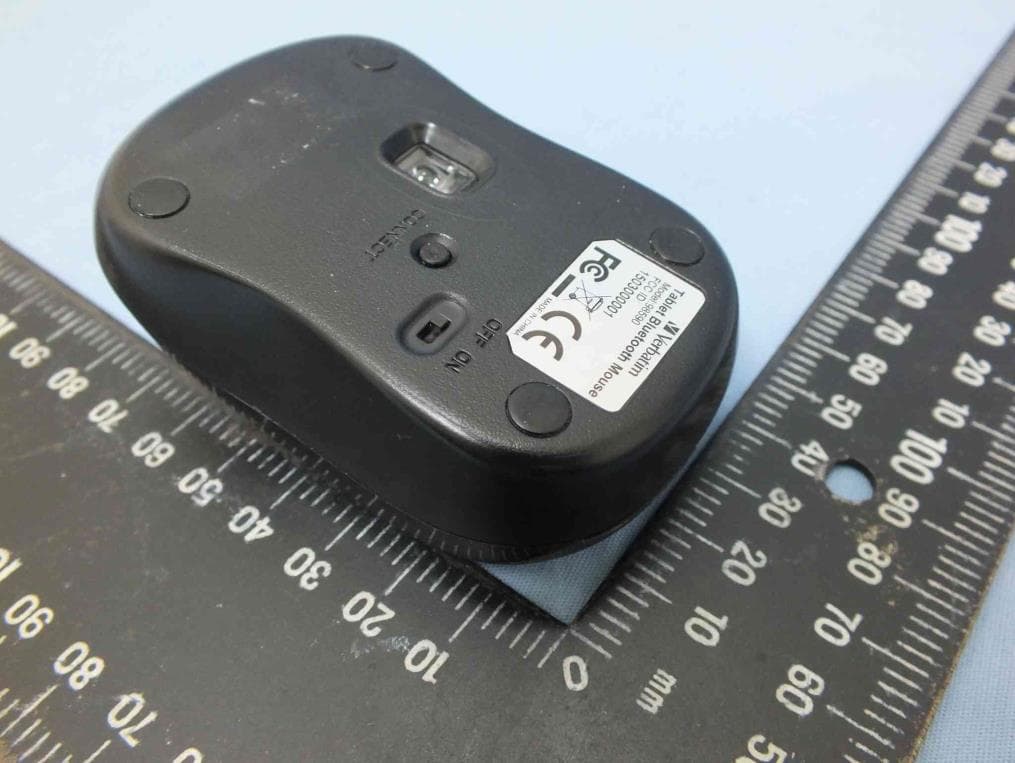
Click to zoom
Application Details
- Equipment Class
- DSS - Part 15 Spread Spectrum Transmitter
- Date of Grant
- May 21, 2015
- Application Purpose
- Original Equipment
- Date of Application
- May 21, 2015
- Equipment Note
- Bluetooth Wireless BlueTrace Mouse
- Frequency Range
- 2402.00000000 - 2480.00000000
- Company
- Acrox Technologies Co., Ltd.
- Country
- Taiwan
Documents & Files
Document Text
Text extracted from the exhibit documents filed with the FCC. Open a document above to read the original.
Users Manual
Bluetooth Wireless BlueTrace Mouse OWNER'S GUIDE Ver.1.0 CAUTION: To use this product properly, please read the user's guide before installing. 1 Federal Communication Commission Interference Statement This equipment has been tested and found to comply with the limits for a Class B digital device, pursuant to Part 15 of the FCC Rules. These limits are designed to provide reasonable protection against harmful interference in a residential installation. This equipment generates, uses and can radiate radio frequency energy and, if not installed and used in accordance with the instructions, may cause harmful interference to radio communications. However, there is no guarantee that interference will not occur in a particular installation. If this equipment does cause harmful interference to radio or television reception, which can be determined by turning the equipment off and on, the user is encouraged to try to correct the interference by one of the following measures: - Reorient or relocate the receiving antenna. - Increase the separation between the equipment and receiver. - Connect the equipment into an outlet on a circuit different from that to which the receiver is connected. - Consult the dealer or an experienced radio/TV technician for help. FCC Caution: Any changes or modifications not expressly approved by the party responsible for compliance could void the user's authority to operate this equipment. This device complies with Part 15 of the FCC Rules. Operation is subject to the following two conditions: (1) This device may not cause harmful interference, and (2) this device must accept any interference received, including interference that may cause undesired operation. Radiation Exposure Statement: The product comply with the FCC portable RF exposure limit set forth for an uncontrolled environment and are safe for intended operation as described in this manual. The further RF exposure reduction can be achieved if the product can be kept as far as possible from the user body or set the device to lower output power if such function is available. This transmitter must not be co-located or operating in conjunction with any other antenna or transmitter. 2 Functional Introduction Scrolling Wheel Connect Button OFF/ON Switch Right button Left button LED indicator *Mouse Indicator Red LED Blinking Low battery Warning in working mode, LED will be off after 10 sec when mouse inactivity. Power ON Red LED is on for 10 sec. Red LED Blinking LED will be light blinking during paring and mouse didn’t work, and light off when paired or if it failed to pair after 3 mins Battery Cover 3 Battery and Power Management: Step 1: Pull the battery cover backward. Step 2: Insert the batteries as shown inside the battery compartment. Step 3: Replace the cover. Step 4: Turn on power switch. **Warning: *Please insert the battery with the correct position according to the instruction labeled on the mouse. Power saving features: To conserve the battery power, the mouse offers power management functions as below: 1. The mouse goes into “Saving Mode” after inactivity. 2. The mouse powers down to “Sleeping Mode” after 5 minutes of Inactivity. There may be a slight delay while the mouse re-establishes Bluetooth connection from power saving or sleeping mode. Establishing a Bluetooth Connection The Bluetooth mouse can work in any Bluetooth environment. Before connecting your Bluetooth mouse with your computer, make sure your computer has a working Bluetooth configuration with Human Interface Device (HID) profile. If your computer does not support Bluetooth, you AAA Battery 4 need to obtain and install a commercially available Bluetooth dongle which converts your computer to a Bluetooth environment. Troubleshooting A. Mouse does not work upon installation or is not detected Try one or more of the following: Make sure the batteries are installed correctly and turn the switch on. Replace a fresh set of batteries if it still does not work. Verify that the computer is Bluetooth enabled. Press the connection button to reset the Bluetooth connection between your mouse and your computer. Make sure it has been detected by the Operating Systems properly. B. The screen cursor does not move properly If your screen cursor lags behind the movement, then your Bluetooth connection may not be able to transmit all of the data from the mouse with the necessary speed. This may be caused by interference from other radio sources, obstructions in the radio wave path, excessive distance from the computer, or a combination of the above. ※ Try the following actions to improve your Bluetooth connection and optimize your mouse performance: Remove any metallic objects from the line of sight between your computer and the Bluetooth mouse. If you are using a computer with a built-in Bluetooth antenna, try reorienting the computer until you get a better data rate. If you are using a Bluetooth dongle, use a USB extension cable and place the Bluetooth dongle onto your desktop or somewhere in sight of your Bluetooth mouse. Move the mouse closer to your Bluetooth dongle. Turn off the mouse and turn it on again for better connection. Disconnect any Bluetooth audio devices, such as headsets, that may be connected to your computer. 5 Switch off any other devices operating in the 2.4 GHz radio spectrum, such as Wi-Fi network, mobile telephones, etc., or move their antennas further away from your computer. 6 Pairing your Bluetooth mouse with your computer Before pairing your Bluetooth mouse with your computer, you should read through the instructions that came with your Bluetooth hardware and software for details on how to pair a device to your specific Bluetooth configuration. Follow the steps below to pair your Bluetooth mouse Windows 8 1. Plug or turn on the Bluetooth dongle for your computer 2. Turn on the BT mouse. 3. Press the “window” button to get into Desktop. 7 4. Click the BT icon on the task bar and then click “Add a Bluetooth…
Text truncated - open the document above for the full version.
External Photos
Project No.: EP541301 Page No. : 1 of 3 Photographs of EUT
ID Label/Location Info
Tablet Bluetooth Mouse Model:98590 FCC ID:PRDMU34 1504000001 BKB Label Location
Internal Photos
Project No.: EP541301 Page No. : 2 of 3 Project No.: EP541301 Page No. : 3 of 3
RF Exposure Info
Report No.: FA541301 Page : 1 of 6 Report Version: Rev. 01 FCC RF Exposure Report FCC ID : PRDMU34 Equipment : Bluetooth Wireless BlueTrace Mouse Model No. : BKB Brand Name : ACROX Applicant : ACROX Technologies Co., Ltd. Address : 4F., No.89, Minshan St., Neihu Dist., Taipei City 114 Standard : 47 CFR FCC Part 2.1093 Received Date : Apr. 13, 2015 Tested Date : Apr. 29 ~ May 04, 2015 We, International Certification Corp., would like to declare that the tested sample has been evaluated and in compliance with the requirement of the above standards. The test results contained in this report refer exclusively to the product. It may be duplicated completely for legal use with the approval of the applicant. It shall not be reproduced except in full without the written approval of our laboratory. Approved & Reviewed by: Gary Chang / Manager Ty: XXX Report No.: FA541301 Page : 2 of 6 Report Version: Rev. 01 Table of Contents 1 MPE EVALUATION OF MOBILE DEVICES ......................................................................................... 4 1.1 LIMITS FOR GENERAL POPULATION/UNCONTROLLED EXPOSURE............................................. 4 1.2 EVALUATION RESULTS ....................................................................................................................... 5 2 TEST LABORATORY INFORMATION ................................................................................................. 6 Report No.: FA541301 Page : 3 of 6 Report Version: Rev. 01 Release Record Report No. Version Description Issued Date FA541301 Rev. 01 Initial issue May 11, 2015 Report No.: FA541301 Page : 4 of 6 Report Version: Rev. 01 1 EXPOSURE EVALUATION OF PORTABLE DEVICES Human exposure to RF emissions from portable devices (47 CFR §2.1093), as defined by the FCC, must be evaluated with respect to the FCC-adopted limits for SAR. Evaluation of mobile devices, as defined by the FCC, may also be performed with respect to SAR limits, but in such cases it is usually simpler and more cost-effective to evaluate compliance with respect to field strength or power density limits. For certain devices that are designed to be used in both mobile and portable configurations similar to those described in 47 CFR §2.1091(d)(4), such as certain desktop phones and wireless modem modules, compliance for mobile configurations is also satisfied when the same device is evaluated for SAR compliance in portable configurations. 1.1 LIMITS FOR GENERAL POPULATION/UNCONTROLLED EXPOSURE Frequency (MHz) 5 10 15 20 25 Separation distance (mm) 150 39 77 116 155 194 SAR Test Exclusion Threshold (mW) 300 27 55 82 110 137 450 22 45 67 89 112 835 16 33 49 66 82 900 16 32 47 63 79 1500 12 24 37 49 61 1900 11 22 33 44 54 2450 10 19 29 38 48 3600 8 16 24 32 40 5200 7 13 20 26 33 5400 6 13 19 26 32 5800 6 12 19 25 31 The 1-g and 10-g SAR test exclusion thresholds for 100 MHz to 6 GHz at test separation distances ≤ 50 mm are determined by [(max. power of channel, including tune-up tolerance, mW)/(min. test separation distance, mm)] · [√f(GHz)] ≤ 3.0 for 1-g SAR and ≤ 7.5 for 10-g extremity SAR, where •f(GHz) is the RF channel transmit frequency in GHz • Power and distance are rounded to the nearest mW and mm before calculation • The result is rounded to one decimal place for comparison The test exclusions are applicable only when the minimum test separation distance is ≤ 50 mm and for transmission frequencies between 100 MHz and 6 GHz. When the minimum test separation distance is < 5 mm, a distance of 5 mm is applied to determine SAR test exclusion Report No.: FA541301 Page : 5 of 6 Report Version: Rev. 01 1.2 EVALUATION RESULTS Frequency (MHz) Maximum Conducted Average Power (dBm) Maximum Conducted Average Power (mW) Antenna Gain (dBi) 2402 3.18 2.08 2.78 2441 3.27 2.12 2.78 2480 3.35 2.16 2.78 [(max. power of channel, including tune-up tolerance, mW)/(min. test separation distance, mm)] * [√f(GHz)] =2.16 / 5 * √2.48 = 0.68 < 3.0 SAR Test Exclusion Thresholds is < 10mW and 3.0 for separation distance 5mm. Therefore, SAR test is not required. Report No.: FA541301 Page : 6 of 6 Report Version: Rev. 01 2 Test laboratory information Established in 2012, ICC provides foremost EMC & RF Testing and advisory consultation services by our skilled engineers and technicians. Our services employ a wide variety of advanced edge test equipment and one of the widest certification extents in the business. International Certification Corp, it is our definitive objective is to institute long term, trust-based associations with our clients. The expectation we set up with our clients is based on outstanding service, practical expertise and devotion to a certified value structure. Our passion is to grant our clients with best EMC / RF services by oriented knowledgeable and accommodating staff. Our Test sites are located at Linkou District and Kwei Shan Hsiang. Location map can be found on our website http://www.icertifi.com.tw. Linkou Kwei Shan Kwei Shan Site II Tel: 886-2-2601-1640 Tel: 886-3-271-8666 Tel: 886-3-271-8640 No. 30-2, Ding Fwu Tsuen, Lin Kou District, New Taipei City, Taiwan, R.O.C. No. 3-1, Lane 6, Wen San 3rd St., Kwei Shan Hsiang, Tao Yuan Hsien 333, Taiwan, R.O.C. No. 14-1, Lane 19, Wen San 3rd St., Kwei Shan Hsiang, Tao Yuan Hsien 333, Taiwan, R.O.C. If you have any suggestion, please feel free to contact us as below information Tel: 886-3-271-8666 Fax: 886-3-318-0155 Email: [email protected] ══END══
Test Report
Report No.: FR541301 Page : 1 of 35 Report Version: Rev. 02 FCC Test Report FCC ID : PRDMU34 Equipment : Bluetooth Wireless BlueTrace Mouse Model No. : BKB Brand Name : ACROX Applicant : ACROX Technologies Co., Ltd. Address : 4F., No.89, Minshan St., Neihu Dist., Taipei City 114 Standard : 47 CFR FCC Part 15.247 Received Date : Apr. 13, 2015 Tested Date : Apr. 29 ~ May 04, 2015 We, International Certification Corp., would like to declare that the tested sample has been evaluated and in compliance with the requirement of the above standards. The test results contained in this report refer exclusively to the product. It may be duplicated completely for legal use with the approval of the applicant. It shall not be reproduced except in full without the written approval of our laboratory. Approved & Reviewed by: Gary Chang / Manager Ty: XXX Report No.: FR541301 Page : 2 of 35 Report Version: Rev. 02 Table of Contents 1 GENERAL DESCRIPTION ............................................................................................................... 5 1.1 Information ........................................................................................................................................ 5 1.2 Local Support Equipment List ............................................................................................................ 7 1.3 Test Setup Chart ............................................................................................................................... 7 1.4 The Equipment List ........................................................................................................................... 8 1.5 Test Standards ................................................................................................................................. 9 1.6 Measurement Uncertainty ................................................................................................................. 9 2 TEST CONFIGURATION ................................................................................................................ 10 2.1 Testing Condition ............................................................................................................................ 10 2.2 The Worst Test Modes and Channel Details .................................................................................... 10 3 TRANSMITTER TEST RESULTS ................................................................................................... 11 3.1 Unwanted Emissions into Restricted Frequency Bands ................................................................... 11 3.2 Unwanted Emissions into Non-Restricted Frequency Bands ............................................................ 22 3.3 Conducted Output Power ................................................................................................................ 25 3.4 Number of Hopping Frequency........................................................................................................ 27 3.5 20dB and Occupied Bandwidth ....................................................................................................... 29 3.6 Channel Separation ........................................................................................................................ 31 3.7 Number of Dwell Time ..................................................................................................................... 33 4 TEST LABORATORY INFORMATION ........................................................................................... 35 Report No.: FR541301 Page : 3 of 35 Report Version: Rev. 02 Release Record Report No. Version Description Issued Date FR541301 Rev. 01 Initial issue May 11, 2015 FR541301 Rev. 02 Modify ANSI C63.10 version May 22, 2015 Report No.: FR541301 Page : 4 of 35 Report Version: Rev. 02 Summary of Test Results FCC Rules Test Items Measured Result 15.207 Conducted Emissions Note 1 N/A 15.247(d) 15.209 Radiated Emissions [dBuV/m at 3m]: 144.00MHz 41.55 (Margin -1.95dB) - QP Pass 15.247(d) Band Edge Meet the requirement of limit Pass 15.247(b)(1) Conducted Output Power Power [dBm]: 3.38 Pass 15.247(a)(1)(iii) Number of Hopping Channels Meet the requirement of limit Pass 15.247(a)(1) Hopping Channel Separation Meet the requirement of limit Pass 15.247(a)(1)(iii) Dwell Time Meet the requirement of limit Pass 15.203 Antenna Requirement Meet the requirement of limit Pass N/A means Not Applicable. Note 1 : The EUT consumes DC power from battery, so the test is not required. Report No.: FR541301 Page : 5 of 35 Report Version: Rev. 02 1 General Description 1.1 Information 1.1.1 Specification of the Equipment under Test (EUT) RF General Information Frequency Range (MHz) Bluetooth Mode Ch. Frequency (MHz) Channel Number Data Rate 2400-2483.5 BR V3.0 2402-2480 0-78 [79] 1 Mbps Note 1: Bluetooth BR uses a GFSK. Note 2: Packet type is only DH1. 1.1.2 Antenna Details Ant. No. Type Connector Gain (dBi) Remark 1 PCB N/A 2.78 --- 1.1.3 Power Supply Type of Equipment under Test (EUT) Power Supply Type 3Vdc from battery 1.1.4 Accessories N/A Report No.: FR541301 Page : 6 of 35 Report Version: Rev. 02 1.1.5 Channel List Frequency band (MHz) 2400~2483.5 Channel Frequency (MHz) Channel Frequency (MHz) Channel Frequency (MHz) Channel Frequency (MHz) 0 2402 20 2422 40 2442 60 2462 1 2403 21 2423 41 2443 61 2463 2 2404 22 2424 42 2444 62 2464 3 2405 23 2425 43 2445 63 2465 4 2406 24 2426 44 2446 64 2466 5 2407 25 2427 45 2447 65 2467 6 2408 26 2428 46 2448 66 2468 7 2409 27 2429 47 2449 67 2469 8 2410 28 2430 48 2450 68 2470 9 2411 29 2431 49 2451 69 2471 10 2412 30 2432 50 2452 70 2472 11 2413 31 2433 51 2453 71 2473 12 2414 32 2434 52 2454 72 2474 13 2415 33 2435 53 2455 73 2475 14 2416 34 2436 54 2456 74 2476 15 2417 35 2437 55 2457 75 2477 16 2418 36 2438 56 2458 76 2478 17 2419 37 2439 57 2459 77 2479 18 2420 38 2440 58 2460 78 2480 19 2421 39 2441 59 2461 --- --- Report No.: FR541301 Page : 7 …
Text truncated - open the document above for the full version.
Test Setup Photos
Report No.: FR541301 Page: : 1 of 4 Report Version: Rev. 01 Photographs of the Test Configuration Radiated Emission Below 1GHz Test Report No.: FR541301 Page: : 2 of 4 Report Version: Rev. 01 Radiated Emission Below 1GHz Test Report No.: FR541301 Page: : 3 of 4 Report Version: Rev. 01 Radiated Emission Above 1GHz Test Report No.: FR541301 Page: : 4 of 4 Report Version: Rev. 01 Radiated Emission Above 1GHz Test
Contact Information
Applicant
Gavin Hsieh(Product Manager)
Technical Contact
International Certification Corp.Gary Chang
[email protected]886-3-271-8628
No.3-1, Lane 6, Wen San 3rd St. Kwei Shan · Taiwan
Non-Technical Contact
International Certification Corp.Wendy Liao
[email protected]886-3-271-8629
Test Firm
International Certification Corp.Fu-Cheng Chuang
Technical Specifications
| # | Rule Parts | Frequency Range | Power Output |
|---|---|---|---|
| 1 | 15C | 2.40 GHz - 2.48 GHz | 2.00 mW |
Other Applications from Acrox Technologies Co., Ltd.

PRDRX12
May 27, 2026Wireless Receiver
Equipment Class
DXX - Part 15 Low Power Communication Device Transmitter
PRDRX11
Apr 07, 2026Wireless Receiver
Equipment Class
DXX - Part 15 Low Power Communication Device Transmitter
PRDKB72
Apr 03, 2026WIRELESS SPLIT KEY ERGONOMIC KEYBOARD
Equipment Class
DTS - Digital Transmission System
PRDRX1P
Apr 03, 2026Wireless Receiver
Equipment Class
DXX - Part 15 Low Power Communication Device Transmitter
PRDKB73
Apr 03, 2026Gaming Keyboard
Equipment Class
DTS - Digital Transmission System