PRDMU88HP wireless mouse
Acrox Technologies Co., Ltd.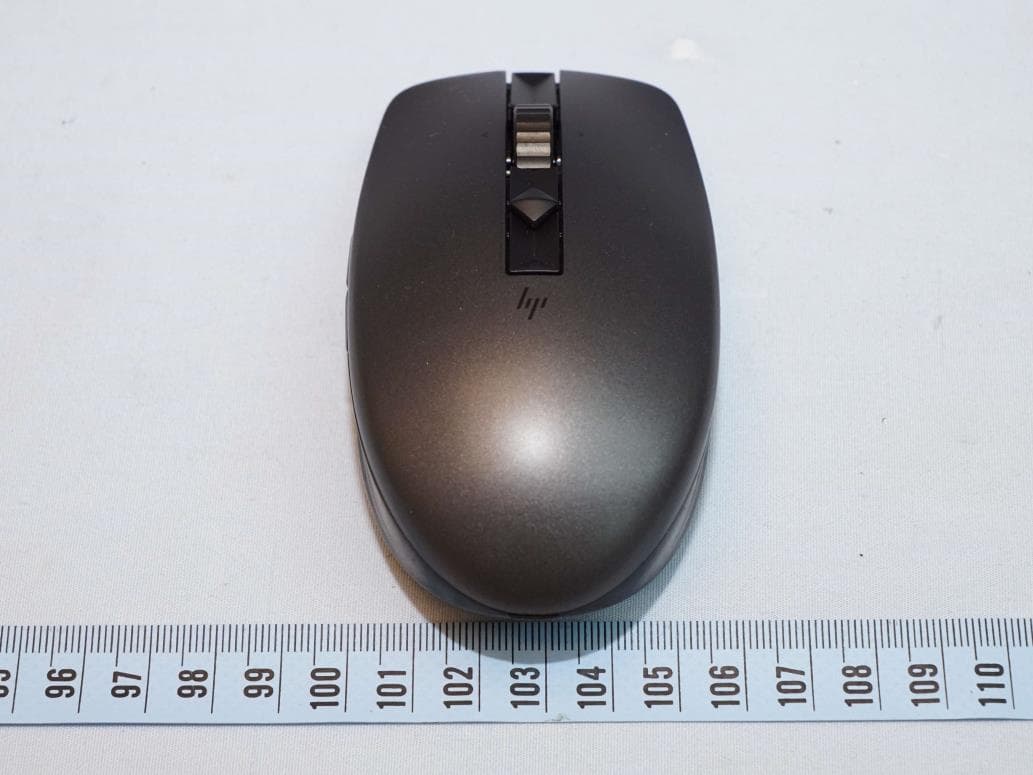
Click to zoom
Application Details
- Equipment Class
- DTS - Digital Transmission System
- Date of Grant
- Nov 12, 2020
- Application Purpose
- Original Equipment
- Date of Application
- Nov 12, 2020
- Equipment Note
- HP wireless mouse
- Frequency Range
- 2402.00000000 - 2480.00000000
- Company
- Acrox Technologies Co., Ltd.
- Country
- Taiwan
Documents & Files
Document Text
Text extracted from the exhibit documents filed with the FCC. Open a document above to read the original.
Users Manual
Color side 1: BLACK Flat size: 17.5 x 20 in. Fold 1: 5-panel accordion Fold 2: 5-panel accordion Color side 2: BLACK Finished size: 3.5 x 4 in. إشعارات المنتج Pemberitahuan produk Бележки за продукта Obavještenja o proizvodu Informace o produktu Produktbemærkninger Produkthinweise Tootemärkused Avisos sobre el producto Σημειώσεις προϊόντος Informations sur le produit Obavijesti o proizvodima Avvisi sul prodotto Өнім туралы ескертулер Izstrādājuma paziņojumi Įspėjimuose dėl produktų Termékinformációk Productaankondigingen Produktopplysninger Informacje na temat produktów Avisos do produto Avisos sobre o produto Notificări despre produs Уведомления о продукте Upozornenia o produkte Obvestila o izdelku Tuotetiedotteet Obaveštenja o proizvodu Produktmeddelanden ประกาศเก ี ่ ยวก ั บผล ิ ตภ ั ณฑ ์ Ürün Bildirimleri Зауваження щодо виробу 제품 고지사항 产品通告 產品注意事項 © Copyright 2015-2020 HP Development Company, L.P. Bluetooth is a trademark owned by its proprietor and used by HP Inc. under license. Java is a registered trademark of Oracle and/or its affiliates. The information contained herein is subject to change without notice. The only warranties for HP products and services are set forth in the express warranty statements accompanying such products and services. Nothing herein should be construed as constituting an additional warranty. HP shall not be liable for technical or editorial errors or omissions contained herein. Twelfth Edition: August 2020 First Edition: August 2015 Product Notices Regulatory Notices This document provides country- and region-specific non-wireless and wireless regulatory notices and compliance information for your product. Some of these notices may not apply to your product. 이 문서에는 국가 및 지역별 유무선 규제사항 설명과 제품의 준수 정보가 있습니다. 이러한 정보 중 일부는 귀하의 제품에 적용되지 않을 수 있습니다. Federal Communications Commission notice This equipment has been tested and found to comply with the limits for a Class B digital device, pursuant to Part 15 of the FCC Rules. These limits are designed to provide reasonable protection against harmful interference in a residential installation. This equipment generates, uses, and can radiate radio frequency energy and, if not installed and used in accordance with the instructions, may cause harmful interference to radio communications. However, there is no guarantee that interference will not occur in a particular installation. If this equipment does cause harmful interference to radio or television reception, which can be determined by turning the equipment off and on, the user is encouraged to try to correct the interference by one or more of the following measures: • Reorient or relocate the receiving antenna. • Increase the separation between the equipment and receiver. • Connect the equipment to an outlet on a circuit different from that to which the receiver is connected. • Consult the dealer or an experienced radio or television technician for help. This device complies with Part 15 of the FCC Rules. Operation is subject to the following two conditions: 1. This device may not cause harmful interference, and 2. This device must accept any interference received, including interference that may cause undesired operation. For questions regarding this product, write to HP Inc. 1501 Page Mill Road Palo Alto, CA 94304 email [email protected], or call HP at 650-857-1501. To identify your product, refer to the part, series, or model number located on the product. Modifications The FCC requires the user to be notified that any changes or modifications made to this device that are not expressly approved by HP may void the user’s authority to operate the equipment. Cables To maintain compliance with FCC Rules and Regulations, connections to this device must be made with shielded cables having metallic RFI/EMI connector hoods. Products with wireless LAN devices or HP Mobile Broadband Modules This device must not be co-located or operating in conjunction with any other antenna or transmitter. WARNING: Exposure to Radio Frequency Radiation The radiated output power of this device is below the FCC/ Industry Canada radio frequency exposure limits. Nevertheless, the device should be used in such a manner that the potential for human contact is minimized during normal operation of tablet PCs and notebook computers. During normal operation of tablet PCs and notebook computers with displays equal to or less than 30.5 cm (12 inches): To avoid the possibility of exceeding the FCC/Industry Canada radio frequency exposure limits, human proximity to the antennas should not be less than 2.5 cm (1 inch). To identify the location of the wireless antennas, refer to the computer user guides included with your computer. During normal operation of notebook computers with displays greater than 30.5 cm (12 inches): To avoid the possibility of exceeding the FCC/Industry Canada radio frequency exposure limits, human proximity to the antennas should not be less than 20 cm (8 inches), including when the computer display is closed. To identify the location of the wireless antennas, refer to the computer user guides included with your computer. CAUTION: When using IEEE 802.11a wireless LAN, this product is restricted to indoor use, due to its operation in the 5.15- to 5.25-GHz frequency range. FCC/Industry Canada requires this product to be used indoors for the frequency range of 5.15 GHz to 5.25 GHz to reduce the potential for harmful interference to co-channel mobile satellite systems. High-power radar is allocated as the primary user of the 5.25- to 5.35-GHz and 5.65- to 5.85-GHz bands. These radar stations can cause interference with and/or damage to this device. The antennas for this device are not replaceable. Any attempt at user access will damage your computer. Aviso para o Brasil Este equipamento não tem direito à proteção contra interferência prejudicial e não pode causar interferência em sistemas devidamente autorizados. Para maiores informações, consulte o site da ANATEL – www.anatel.gov.b…
Text truncated - open the document above for the full version.
Users Manual
ARABIC To download the Bluetooth Pairing User Guide, go to http://www.hp.com/support Connect the mouse to one computer using the receiver and up to two computers via Bluetooth. Or, connect to three computers via Bluetooth. To program the mouse buttons or change the DPI setting (1200 DPI by default), download the software. If the software does not download automatically, on your computer, open Microsoft Store or Apple Store. Search for HP Accessory Center, and then download the app. Components description 1 Programmable forward button By default, press to display the next page in your browser history. 2 Programmable back button By default, press to display the previous page in your browser history. 3 Scroll wheel Scrolls the screen up or down. Tilt right, tilt left, or click to use functions programmed in the app. By default, tilt right to scroll the screen right and tilt left to scroll the screen left. 4 Hyperscroll button Press to turn hyperscroll on or off. 5 Battery light Amber: The mouse batteries need to be replaced. 6 Power switch Turns the mouse on or off. 7 Receiver light Quickly blinking white (5 s): If turning on the mouse, the receiver channel is active but the receiver is not connected to a computer. If attempting to re-pair to the receiver, pairing was unsuccessful. If attempting to pair to a computer via Bluetooth, pairing was unsuccessful. Solid white (5 s): If turning on the mouse, the receiver channel is active and connected to a computer. If attempting to re-pair to the receiver, pairing was successful. If attempting to pair to a computer via Bluetooth, pairing was successful. Slowly blinking white (180 s): The mouse is in pairing mode to either re-pair to the receiver or pair to a computer via Bluetooth. Note: Be sure the mouse is placed within 1 m of the receiver. The receiver is in pairing mode for 60 s after it is connected to a computer. 8 First bluetooth pairing light Solid white (5 s): The mouse is on and the first computer is active. Slowly flashing white (5 s): The mouse is on and not connected to the first computer. Quickly flashing white (180 s): The mouse is in pairing mode. Solid white (5 s): The mouse paired successfully to the first computer. Slow flashing amber: The mouse batteries need to be replaced, and the first computer is active. 9 Second bluetooth pairing light Solid white (5 s): The mouse is on and the second computer is active. Slowly flashing white (5 s): The mouse is on and not connected to the second computer. Quickly flashing white (180 s): The mouse is in pairing mode. Solid white (5 s): The mouse paired successfully to the second computer. Slow flashing amber: The mouse batteries need to be replaced, and the second computer is active. - Pairing button Press to switch between channels. Press and hold for 3 s to enter pairing mode for the selected channel. BAHASA INDONESIA To download the Bluetooth Pairing User Guide, go to http://www.hp.com/support Connect the mouse to one computer using the receiver and up to two computers via Bluetooth. Or, connect to three computers via Bluetooth. To program the mouse buttons or change the DPI setting (1200 DPI by default), download the software. If the software does not download automatically, on your computer, open Microsoft Store or Apple Store. Search for HP Accessory Center, and then download the app. Components description 1 Programmable forward button By default, press to display the next page in your browser history. 2 Programmable back button By default, press to display the previous page in your browser history. 3 Scroll wheel Scrolls the screen up or down. Tilt right, tilt left, or click to use functions programmed in the app. By default, tilt right to scroll the screen right and tilt left to scroll the screen left. 4 Hyperscroll button Press to turn hyperscroll on or off. 5 Battery light Amber: The mouse batteries need to be replaced. 6 Power switch Turns the mouse on or off. 7 Receiver light Quickly blinking white (5 s): If turning on the mouse, the receiver channel is active but the receiver is not connected to a computer. If attempting to re-pair to the receiver, pairing was unsuccessful. If attempting to pair to a computer via Bluetooth, pairing was unsuccessful. Solid white (5 s): If turning on the mouse, the receiver channel is active and connected to a computer. If attempting to re-pair to the receiver, pairing was successful. If attempting to pair to a computer via Bluetooth, pairing was successful. Slowly blinking white (180 s): The mouse is in pairing mode to either re-pair to the receiver or pair to a computer via Bluetooth. Note: Be sure the mouse is placed within 1 m of the receiver. The receiver is in pairing mode for 60 s after it is connected to a computer. 8 First bluetooth pairing light Solid white (5 s): The mouse is on and the first computer is active. Slowly flashing white (5 s): The mouse is on and not connected to the first computer. Quickly flashing white (180 s): The mouse is in pairing mode. Solid white (5 s): The mouse paired successfully to the first computer. Slow flashing amber: The mouse batteries need to be replaced, and the first computer is active. 9 Second bluetooth pairing light Solid white (5 s): The mouse is on and the second computer is active. Slowly flashing white (5 s): The mouse is on and not connected to the second computer. Quickly flashing white (180 s): The mouse is in pairing mode. Solid white (5 s): The mouse paired successfully to the second computer. Slow flashing amber: The mouse batteries need to be replaced, and the second computer is active. - Pairing button Press to switch between channels. Press and hold for 3 s to enter pairing mode for the selected channel. BULGARIAN To download the Bluetooth Pairing User Guide, go to http://www.hp.com/support Connect the mouse to one computer using the receiver and up to two computers via Bluetooth. Or, connect to three computers via Bluetooth. To program the mouse buttons or change the DPI setting (…
Text truncated - open the document above for the full version.
Attestation Statements
Acrox Technologies Co., Ltd. Declaration letter Federal Communications Commission 7435 Oakland Mills Road Columbia MD 21046 Subject: Declaration letter for label requirement Date: 2020-11-12 FCC ID:PRDMU88 The label is permanent affixed in the battery compartment, and the EUT will be selling to market without the battery installed. The users can see the label during the battery installation process. The battery cover can be opened without any special tools. Please don’t hesitate to contact us, if you have any question(s). Thank you!
External Photos
Reference No.: BDYV-WTW-P20080526-ExtPhoPage No. 1 / 3 CONSTRUCTION PHOTOS OF EUT Reference No.: BDYV-WTW-P20080526-ExtPhoPage No. 2 / 3 Reference No.: BDYV-WTW-P20080526-ExtPhoPage No. 3 / 3
Internal Photos
Reference No.: BDYV-WTW-P20080526-IntPho Page No. 1 / 6 CONSTRUCTION PHOTOS OF EUT Reference No.: BDYV-WTW-P20080526-IntPho Page No. 2 / 6 Reference No.: BDYV-WTW-P20080526-IntPho Page No. 3 / 6 Antenna Reference No.: BDYV-WTW-P20080526-IntPho Page No. 4 / 6 Reference No.: BDYV-WTW-P20080526-IntPho Page No. 5 / 6 Reference No.: BDYV-WTW-P20080526-IntPho Page No. 6 / 6
RF Exposure Info
Report No.: SABDYV-WTW-P20080526 Page No. 1 / 6 Report Format Version: 6.1.1 RF Exposure Report Report No.: SABDYV-WTW-P20080526 FCC ID: PRDMU88 Test Model: STA-AM01 Received Date: Aug. 26, 2020 Test Date: Oct. 27 to 30, 2020 Issued Date: Nov. 3, 2020 Applicant: Acrox Technologies Co., Ltd Address: 4F., No. 89, Minshan St., Neihu Dist., Taipei City 114, Taiwan, R.O.C. Issued By: Bureau Veritas Consumer Products Services (H.K.) Ltd., Taoyuan Branch Lin Kou Laboratories Lab Address: No. 47-2, 14th Ling, Chia Pau Vil., Lin Kou Dist., New Taipei City, Taiwan FCC Registration / Designation Number: 198487 / TW2021 This report is for your exclusive use. Any copying or replication of this report to or for any other person or entity, or us e of our nam e or trademark, is permitted only with our prior written perm ission. This report sets forth our findings solely with respect to the test sam ples identified herein. The res ults s et forth in this report are not indicative or representative of the quality or characteristics of the lot from which a test sample was taken or any similar or identical product unless specifically and expressly noted. Our report includes all of the tests requested by you and the results thereof based upon the information that you provided to us. You have 60 days from date of issuance of this report to notify us of any m aterial error or om ission caused by our negligence, provided, however, that such notice shall be in writing and shall specifically address the issue you wish to raise. A failure to raise such issue within the prescribed time shall constitute your unqualified acceptance of the com pleteness of this report, the tests conducted and the correctness of the report contents. Unless specific m ention, the uncertainty of measurement has been explicitly taken into account to declare the compliance or non-compliance to the specification. Report No.: SABDYV-WTW-P20080526 Page No. 2 / 6 Report Format Version: 6.1.1 Table of Contents Release Control Record .......................................................................................................................... 3 1 Certificate of Conformity ................................................................................................................ 4 2 Evaluation Result .......................................................................................................................... 5 3 SAR Test Exclusion Thresholds ..................................................................................................... 6 4 Conclusion ................................................................................................................................... 6 Report No.: SABDYV-WTW-P20080526 Page No. 3 / 6 Report Format Version: 6.1.1 Release Control Record Issue No. Description Date Issued SABDYV-WTW-P20080526 Original release. Nov. 3, 2020 Report No.: SABDYV-WTW-P20080526 Page No. 4 / 6 Report Format Version: 6.1.1 1 Certificate of Conformity Product: HP wireless mouse Brand: hp Test Model: STA-AM01 Sample Status: Engineering sample Applicant: Acrox Technologies Co., Ltd Test Date: Oct. 27 to 30, 2020 Standards: FCC Part 2 (Section 2.1093) IEEE C95.1-1992 References Test Guidance: KDB 447498 D01 General RF Exposure Guidance v06 The above equipment has been tested by Bureau Veritas Consumer Products Services (H.K.) Ltd., Taoyuan Branch, and found compliance with the requirement of the above standards. The test record, data evaluation & Equipment Under Test (EUT) configurations represented herein are true and accurate accounts of the measurements of the sample’s RF characteristics under the conditions specified in this report. Prepared by : , Date: Nov. 3, 2020 Jessica Cheng / Senior Specialist Approved by : , Date: Nov. 3, 2020 Rex Lai / Associate Technical Manager Report No.: SABDYV-WTW-P20080526 Page No. 5 / 6 Report Format Version: 6.1.1 2 Evaluation Result Following FCC KDB 447498 D01 “General SAR test exclusion guidance” The corresponding SAR Exclusion Threshold condition, listed below: 1) The 1-g and 10-g SAR test exclusion thresholds for 100 MHz to 6 GHz at test separation distances ≤ 50 mm are determined by: [(max. power of channel, including tune-up tolerance, mW)/(min. test separation distance, mm)] ·[√f(GHz)] ≤ 3.0 for 1-g SAR and ≤ 7.5 for 10-g extremity SAR, where . rounded to the nearest mW and mm before calculation. The test exclusions are applicable only when the minimum test separation distance is ≤ 50 mm and for transmission frequencies between 100 MHz and 6 GHz. When the minimum test separation distance is < 5 mm, a distance of 5 mm is applied to determine SAR test exclusion. 2) At 100 MHz to 6 GHz and for test separation distances > 50 mm, the SAR test exclusion threshold is determined according to the following: a) [Threshold at 50 mm in step 1) + (test separation distance - 50mm)·( f(MHz)/150)] mW, at 100MHz to 1500 MHz b) [Threshold at 50 mm in step 1) + (test separation distance - 50 mm)·10] mW at > 1500 MHz and ≤ 6 GHz 3) At frequencies below 100 MHz, the following may be considered for SAR test exclusion. a) The threshold at the corresponding test separation distance at 100 MHz in step 2) is multiplied by [1 + log(100/f(MHz))] for test separation distances > 50 mm and < 200 mm. b) The threshold determined by the equation in a) for 50 mm and 100 MHz is multiplied by ½ for test separation distances ≤ 50 mm. c) SAR measurement procedures are not established below 100 MHz. When SAR test exclusion cannot be applied, a KDB inquiry is required to determine SAR evaluation requirements for any test results to be acceptable. Report No.: SABDYV-WTW-P20080526 Page No. 6 / 6 Report Format Version: 6.1.1 3 SAR Test Exclusion Thresholds Maximum measured transmitter power: Function Frequency (GHz) AV Max. Power (mW) Min. test separation distance (mm) SAR test exclusion calculation value (NOTE 3) 10-g extremity SAR test exclusion thresholds Result BT LE 2.402-2.480 0.4315 …
Text truncated - open the document above for the full version.
Test Report
Report No.: RFBDYV-WTW-P20080526 Page No. 1 / 32 Report Format Version: 6.1.1 FCC Test Report Report No.: RFBDYV-WTW-P20080526 FCC ID: PRDMU88 Test Model: STA-AM01 Received Date: Aug. 26, 2020 Test Date: Oct. 27 to 30, 2020 Issued Date: Nov. 3, 2020 Applicant: Acrox Technologies Co., Ltd Address: 4F., No. 89, Minshan St., Neihu Dist., Taipei City 114, Taiwan, R.O.C. Issued By: Bureau Veritas Consumer Products Services (H.K.) Ltd., Taoyuan Branch Lin Kou Laboratories Lab Address: No. 47-2, 14th Ling, Chia Pau Vil., Lin Kou Dist., New Taipei City, Taiwan FCC Registration / Designation Number: 198487 / TW2021 This report is for your exclusive use. Any copying or replication of this report to or for any other person or entity, or use of our name or trademark, is permitted only with our prior written perm ission. This report sets forth our findings solely with respect to the test sam ples identified herein. The res ults s et forth in this report are not indicative or representative of the quality or characteristics of the lot from which a test sample was taken or any similar or identical product unless specifically and expressly noted. Our report includes all of the tests requested by you and the results thereof based upon the information that you provided to us. You have 60 days from date of issuance of this report to notify us of any material error or omission caused by our negligence, provided, however, that such notice shall be in writing and shall specifically address the issue you wish to raise. A failure to raise such issue within the prescribed time shall constitute your unqualified acceptance of the com pleteness of this report, the tests conducted and the correctness of the report contents. Unless specific m ention, the uncertainty of measurement has been explicitly taken into account to declare the compliance or non-compliance to the specification. Report No.: RFBDYV-WTW-P20080526 Page No. 2 / 32 Report Format Version: 6.1.1 Table of Contents Release Control Record ........................................................................................................................ 4 1 Certificate of Conformity ............................................................................................................. 5 2 Summary of Test Results ............................................................................................................ 6 2.1 Measurement Uncertainty .......................................................................................................... 6 2.2 Modification Record ................................................................................................................... 6 3 General Information .................................................................................................................... 7 3.1 General Description of EUT........................................................................................................ 7 3.2 Description of Test Modes .......................................................................................................... 8 3.2.1 Test Mode Applicability and Tested Channel Detail ....................................................................... 9 3.3 Description of Support Units ..................................................................................................... 10 3.3.1 Configuration of System under Test ........................................................................................... 10 3.4 Duty Cycle of Test Signal ......................................................................................................... 11 3.5 General Description of Applied Standards and references .......................................................... 11 4 Test Types and Results ............................................................................................................. 12 4.1 Radiated Emission and Bandedge Measurement ....................................................................... 12 4.1.1 Limits of Radiated Emission and Bandedge Measurement .......................................................... 12 4.1.2 Test Instruments ...................................................................................................................... 13 4.1.3 Test Procedures ....................................................................................................................... 14 4.1.4 Deviation from Test Standard .................................................................................................... 14 4.1.5 Test Setup ............................................................................................................................... 15 4.1.6 EUT Operating Conditions ........................................................................................................ 16 4.1.7 Test Results............................................................................................................................. 17 4.2 6dB Bandwidth Measurement................................................................................................... 22 4.2.1 Limits of 6dB Bandwidth Measurement ...................................................................................... 22 4.2.2 Test Setup ............................................................................................................................... 22 4.2.3 Test Instruments ...................................................................................................................... 22 4.2.4 Test Procedure ........................................................................................................................ 22 4.2.5 Deviation from Test Standard .................................................................................................... 22 4.2.6 EUT Operating Conditions ........................................................................................................ 22 4.2.7 Tes…
Text truncated - open the document above for the full version.
Test Setup Photos
Reference No.: RFBDYV-WTW-P20080526 Page No. 1 / 2 PHOTOGRAPHS OF THE TEST CONFIGURATION RADIATED EMISSION TEST <Frequency Range below 1GHz> Reference No.: RFBDYV-WTW-P20080526 Page No. 2 / 2 RADIATED EMISSION TEST <Frequency Range above 1GHz>
Contact Information
Applicant
Gavin Hsieh(Product Manager)
Test Firm
Bureau Veritas CPS(H.K.) Ltd., Taoyuan BranchLiu Ken
Technical Specifications
| # | Rule Parts | Frequency Range | Power Output |
|---|---|---|---|
| 1 | 15C | 2.40 GHz - 2.48 GHz | 500.00 µW |
Other Applications from Acrox Technologies Co., Ltd.

PRDRX12
May 27, 2026Wireless Receiver
Equipment Class
DXX - Part 15 Low Power Communication Device Transmitter
PRDRX11
Apr 07, 2026Wireless Receiver
Equipment Class
DXX - Part 15 Low Power Communication Device Transmitter
PRDKB72
Apr 03, 2026WIRELESS SPLIT KEY ERGONOMIC KEYBOARD
Equipment Class
DTS - Digital Transmission System
PRDRX1P
Apr 03, 2026Wireless Receiver
Equipment Class
DXX - Part 15 Low Power Communication Device Transmitter
PRDKB73
Apr 03, 2026Gaming Keyboard
Equipment Class
DTS - Digital Transmission System