PRDOPBTTGMU01Bluetooth Optical Mouse
Acrox Technologies Co., Ltd.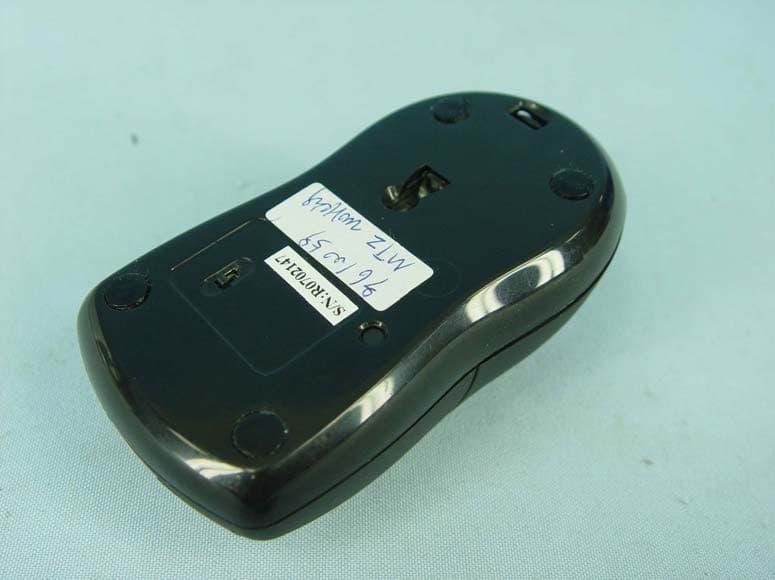
Click to zoom
Application Details
- Equipment Class
- DSS - Part 15 Spread Spectrum Transmitter
- Date of Grant
- Mar 25, 2008
- Application Purpose
- Original Equipment
- Date of Application
- Mar 25, 2008
- Equipment Note
- Bluetooth Optical Mouse
- Frequency Range
- 2402.00000000 - 2480.00000000
- Company
- Acrox Technologies Co., Ltd.
- Country
- Taiwan
Documents & Files
Document Text
Text extracted from the exhibit documents filed with the FCC. Open a document above to read the original.
Users Manual
Bluetooth Wireless Optical Mouse OWNER'S GUIDE Ver.1.0 1 Safety Notice 1. Your product complies with FCC and CE rules. 2. This product has no serviceable parts. Use of controls or adjustments of procedures other than the user guide may result in danger. Welcome Your Bluetooth Wireless Optical Mouse works without a receiver for the ultimate in hassle-free mobility. It instantly connects to a PC/notebook enabled with Bluetooth wireless technology, providing up to 30 feet of cordless range. Power-saving sleep modes, a low-battery indicator light, and an on/off switch let you manage working power wisely. With newly developed optical sensor that replaces the traditional mouse ball, it accurately scans the surface of your computer many times per second for smooth and fast cursor tracking on your computer screen. The powerful 800-dpi optical sensor glides across almost any surface with no moving parts and no cleaning needed. Package Contents ● Bluetooth Wireless Optical Mouse ● 2 x AAA Rechargeable Batteries ● User’s Guide Minimum System Requirements ● Bluetooth-enabled Computer ● Windows 98/2000/ME/XP (Support WinXP SP2, Widcomm BTW, Toshiba Stack or IVT BlueSoleil Bluetooth Software) ● Mac OS X ( 10.2.8 or later ) running Bluetooth software CAUTION: Change or modifications not expressly approved by the manufacturer responsible for compliance could void the user's authority to operate the equipment 2 Functional Introduction 3 Battery and Power Management: Installing the batteries Step 1: Press the button on the mouse and pull the battery cover backward. Step 2: Insert the batteries as shown inside the battery compartment. Step 3: Replace the cover. 1 2 Pull Charging the battery When to charge 1. First-Time Use: Please charge at least 7* hours for the first time usage and charge at least 2* hours when battery runs low 2. Red LED Blinking: When the red LED starts blinking, it means the battery is nearly empty 4 Power saving features: To conserve the battery power, the mouse offers power management functions as below : 1. The mouse goes into “Saving Mode” after 10 seconds of inactivity 2. The mouse powers down to “Sleep Mode” after 5 minutes of inactivity Press one of the mouse buttons to wake it up while in Saving or Sleep Mode. There may be a slight delay while the mouse re-establishes Bluetooth connection from power saving or sleep mode. In Use Saving ModeSleep Mode Power Consumption 26mA-36mA@3V up on tracking sensitivity 5.5mA@3V 2mA@3V 5 Establishing a Bluetooth Connection The Bluetooth mouse can work in any Bluetooth working environment. Before connecting your Bluetooth mouse with your computer, make sure your computer has a working Bluetooth configuration that meets Bluetooth Specification v1.1 or higher with Human Interface Device (HID) profile. If your computer does not support Bluetooth, you need to obtain and install a commercially available Bluetooth adapter which converts your computer to a Bluetooth environment. Paring your Bluetooth mouse with your computer Before paring your Bluetooth mouse with your computer, you should read through the instructions that came with your Bluetooth hardware and software for detail how to pair a device to your specific Bluetooth configuration. Follow below steps to paring your Bluetooth mouse under Windows XP/SP2 system. 1. Attach or turn on the Bluetooth radio adaptor for your Windows XP computer. 2. Turn on the switch on the bottom of the mouse. 3. Click Start menu, click Control Panel and double click “Bluetooth Devices”. 4. On the “Devices” tab, click “Add”. 6 5. Select the “My device is set up and ready to be found” check box, and then click “Next”. 6. Press the connection button of the mouse and it starts paring with your PC/notebook. The Red LED light will blink when connecting. Click the icon that represents the Bluetooth mouse, and then click “Next”. 7 7. Click “Don’t use a passkey”, and then click “Next”. Check the documentation for the mouse for any passkey instructions. 8. You can find the Bluetooth mouse in the “Devices” tab when it connected. The Red LED will turn off automatically when the paring is successfully done. Note : Once the Bluetooth mouse is installed, you can either disconnect the wired mouse or leave it connected. (If you leave both mice connected, they will both work.) 8 Disconnecting Bluetooth mouse from your computer If you would like to disconnect your Bluetooth mouse, just open the Bluetooth devices control panel and delete the pairing for the mouse. Using your mouse How to use the wheel Your mouse has a wheel that functions both as a wheel for Windows Scrolling. For scrolling the screen, simply move the wheel. 9 Troubleshooting A. Mouse does not work upon installation or is not detected Try one or more of the following: y Make sure you have installed the batteries correctly and turn the switch on. Replace a fresh set of batteries if it still doesn’t work. y Make sure that computer’s Bluetooth is enabled. y Press the connection button to reset the Bluetooth connection between your mouse and computer. Make sure it had been detected by the Operating Systems properly. B. The screen cursor does not move properly If your screen cursor lags behind the movement, then your Bluetooth connection may not be able to transmit all of the data from the mouse with the necessary speed. This may be caused by interference from other radio sources, obstructions in the radio wave path, excessive distance from the computer, or a combination of the above. 1. Low Battery : Make sure that the battery low indicator is NOT lit. Replace batteries if the low battery indicator is lit. 2. Try the following actions to improve your Bluetooth connection and optimize your mouse performance: y Remove any metallic objects from the line of sight between your computer and Bluetooth mouse. y If you are using a computer with a built-in Bluetooth antenna, try reorienting the computer until you get a better data rate. y Move the mouse closer to your Bluetooth…
Text truncated - open the document above for the full version.
External Photos
Page 1 CONSTRUCTION PHOTOS OF EUT Page 2
ID Label/Location Info
MADEINCHINA 25mm*10mm
ID Label/Location Info
FCC ID .: PRDOPBTTGMU01 Label Location
Internal Photos
Page 3 Page 4 Page 5
Operational Description
FCC ID: PRDOPBTTGMU01 Report No.: RF970225L01 Operational Description The transmitter of the EUT (Bluetooth Optical Mouse) is powered by battery. The antenna is printed antenna without antenna connector. For more detailed instruction, please take a look at the user’s manual. This device is a Frequency Hopping device with 79 hopping frequencies.
RF Exposure Info
FCC ID: PRDOPBTTGMU01 Report No: SA970225L01 1 RF EXPOSURE REPORT REPORT NO.: SA961017L03 MODEL NO.: MTZ, AMB04 ACCORDING: FCC Guidelines for Human Exposure IEEE C95.1 APPLICANT: Acrox Technologies Co., Ltd ADDRESS: 8F, No. 437, Rui Guang RD., Nei Hu Dist., Taipei 114, Taiwan, R.O.C. ISSUED BY: Advance Data Technology Corporation LAB ADDRESS: No. 47, 14 th Ling, Chia Pau Tsuen, Lin Kou Hsiang 244, Taipei Hsien, Taiwan, R.O.C. TEST LOCATION: No. 19, Hwa Ya 2 nd Rd., Wen Hwa Tsuen, Kwei Shan Hsiang, Taoyuan Hsien 333, Taiwan, R.O.C. FCC ID: PRDOPBTTGMU01 Report No: SA970225L01 2 No evaluation required if power is below this threshold: F(GHz) mW Low 2.402 High 2.480 24.580 Maximum measured transmitter power: Pout (dBm) Pout (mW) Conducted Power 1.900 1.549 EIRP Power 0.260 1.062 *Note: The antenna is printed antenna with -1.64dBi gain Threshold for no SAR evaluation is 24.580mW Transmitter power is1.549mW Conclusion: No SAR evaluation required since Transmitter Pout is below FCC threshold
Test Report
Report No.: RF970225L01 1 Report Format Version 2.1.0 FCC TEST REPORT REPORT NO.: RF970225L01 MODEL NO.: MTZ (Refer to item 3.1 for more detail) RECEIVED: Feb. 25, 2008 TESTED: Mar. 04 ~ Mar. 20, 2008 ISSUED: Mar. 24, 2008 APPLICANT: Acrox Technologies Co., Ltd ADDRESS: 8F, No. 437, Rui Guang RD., Nei Hu Dist., Taipei 114, Taiwan, R.O.C. ISSUED BY: Advance Data Technology Corporation LAB ADDRESS: No. 47, 14 th Ling, Chia Pau Tsuen, Lin Kou Hsiang 244, Taipei Hsien, Taiwan, R.O.C. TEST LOCATION: No. 19, Hwa Ya 2 nd Rd., Wen Hwa Tsuen, Kwei Shan Hsiang, Taoyuan Hsien 333, Taiwan, R.O.C. This test report consists of 44 pages in total. It may be duplicated completely for legal use with the approval of the applicant. It should not be reproduced except in full, without the written approval of our laboratory. The client should not use it to claim product endorsement by TAF, A2LA or any government agencies. The test results in the report only apply to the tested sample. Report No.: RF970225L01 2 Report Format Version 2.1.0 TABLE OF CONTENTS 1. CERTIFICATION .......................................................................................................4 2. SUMMARY OF TEST RESULTS ...............................................................................5 2.1 MEASUREMENT UNCERTAINTY ............................................................................6 3. GENERAL INFORMATION........................................................................................7 3.1 GENERAL DESCRIPTION OF EUT..........................................................................7 3.2 DESCRIPTION OF TEST MODES............................................................................8 3.2.1 CONFIGURATION OF SYSTEM UNDER TEST .......................................................8 3.2.2 TEST MODE APPLICABILITY AND TESTED CHANNEL DETAIL ............................9 3.2.3 GENERAL DESCRIPTION OF APPLIED STANDARDS .........................................10 3.2.4 DESCRIPTION OF SUPPORT UNITS .................................................................... 11 4. TEST TYPES AND RESULTS .................................................................................12 4.1 CONDUCTED EMISSION MEASUREMENT ..........................................................12 4.2 RADIATED EMISSION MEASUREMENT ...............................................................12 4.2.1 LIMITS OF RADIATED EMISSION MEASUREMENT.............................................12 4.2.2 TEST INSTRUMENTS ............................................................................................13 4.2.3 TEST PROCEDURES .............................................................................................14 4.2.4 DEVIATION FROM TEST STANDARD ...................................................................14 4.2.5 TEST SETUP ..........................................................................................................15 4.2.6 EUT OPERATING CONDITIONS ............................................................................15 4.2.7 TEST RESULTS ......................................................................................................16 4.3 NUMBER OF HOPPING FREQUENCY USED .......................................................20 4.3.1 LIMIT OF HOPPING FREQUENCY USED .............................................................20 4.3.2 TEST INSTRUMENTS ............................................................................................20 4.3.3 TEST PROCEDURES .............................................................................................20 4.3.4 DEVIATION FROM TEST STANDARD ...................................................................21 4.3.5 TEST SETUP ..........................................................................................................21 4.3.6 TEST RESULTS ......................................................................................................21 4.4 DWELL TIME ON EACH CHANNEL .......................................................................23 4.4.1 LIMIT OF DWELL TIME USED................................................................................23 4.4.2 TEST INSTRUMENTS ............................................................................................23 4.4.3 TEST PROCEDURES .............................................................................................23 4.4.4 DEVIATION FROM TEST STANDARD ...................................................................23 4.4.5 TEST SETUP ..........................................................................................................24 4.4.6 TEST RESULTS ......................................................................................................24 4.5 CHANNEL BANDWIDTH.........................................................................................26 4.5.1 LIMITS OF CHANNEL BANDWIDTH ......................................................................26 4.5.2 TEST INSTRUMENTS ............................................................................................26 Report No.: RF970225L01 3 Report Format Version 2.1.0 4.5.3 TEST PROCEDURE ...............................................................................................26 4.5.4 DEVIATION FROM TEST STANDARD ...................................................................27 4.5.5 TEST SETUP ..........................................................................................................27 4.5.6 EUT OPERATING CONDITION ..............................................................................27 4.5.7 TEST RESULTS ......................................................................................................27 4.6 HOPPING CHANNEL SEPARATION ......................................................................30 4.6.1 LIMIT OF HOPPING CHANNEL SEPARATION ......................................................30 4.6.2 TEST INSTRUMENTS ........…
Text truncated - open the document above for the full version.
Test Setup Photos
1 PHOTOGRAPHS OF THE TEST CONFIGURATION RADIATED EMISSION TEST
Contact Information
Applicant
Gavin Hsieh(Product Manager)
Technical Contact
Advance Data Technology Corporation (Hwa Ya)Gary Chang
[email protected]886-3-3183232
No. 19, Hwa Ya 2nd Rd., Kwei Shan Hsiang · Taoyuan Hsien · Taiwan
Non-Technical Contact
Advance Data Technology CorporationStephanie Hung
[email protected]886-3-3183232
Test Firm
Bureau Veritas CPS (H.K.) Ltd. Taoyuan BranchRichard Chen
Technical Specifications
| # | Rule Parts | Frequency Range | Power Output |
|---|---|---|---|
| 1 | 15C | 2.40 GHz - 2.48 GHz | 1.50 mW |
Other Applications from Acrox Technologies Co., Ltd.

PRDRX12
May 27, 2026Wireless Receiver
Equipment Class
DXX - Part 15 Low Power Communication Device Transmitter
PRDRX11
Apr 07, 2026Wireless Receiver
Equipment Class
DXX - Part 15 Low Power Communication Device Transmitter
PRDKB72
Apr 03, 2026WIRELESS SPLIT KEY ERGONOMIC KEYBOARD
Equipment Class
DTS - Digital Transmission System
PRDRX1P
Apr 03, 2026Wireless Receiver
Equipment Class
DXX - Part 15 Low Power Communication Device Transmitter
PRDKB73
Apr 03, 2026Gaming Keyboard
Equipment Class
DTS - Digital Transmission System