PRDOPWIRWMU212.4G Blue Trace mouse
Acrox Technologies Co., Ltd.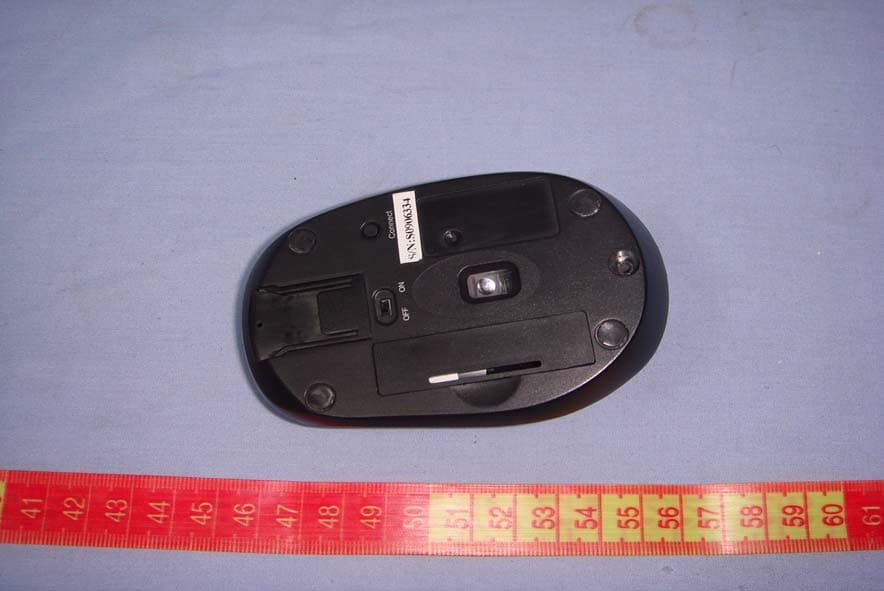
Click to zoom
Application Details
- Equipment Class
- DXX - Part 15 Low Power Communication Device Transmitter
- Date of Grant
- Aug 29, 2010
- Application Purpose
- Original Equipment
- Date of Application
- Aug 29, 2010
- Equipment Note
- 2.4G Blue Trace mouse
- Frequency Range
- 2402.00000000 - 2480.00000000
- Company
- Acrox Technologies Co., Ltd.
- Country
- Taiwan
Documents & Files
Document Text
Text extracted from the exhibit documents filed with the FCC. Open a document above to read the original.
Users Manual
2.4G Blue Trace mouse GKC;GKB;GKS;GKD;GKT;GKQ;GM3 USER'S GUIDE Ver.:1.00 CAUTION: To use this product properly, please read the user's guide before installation 1 Federal Communication Commission Interference Statement This equipment has been tested and found to comply with the limits for a Class B digital device, pursuant to Part 15 of the FCC Rules. These limits are designed to provide reasonable protection against harmful interference in a residential installation. This equipment generates, uses and can radiate radio frequency energy and, if not installed and used in accordance with the instructions, may cause harmful interference to radio communications. However, there is no guarantee that interference will not occur in a particular installation. If this equipment does cause harmful interference to radio or television reception, which can be determined by turning the equipment off and on, the user is encouraged to try to correct the interference by one of the following measures: - Reorient or relocate the receiving antenna. - Increase the separation between the equipment and receiver. - Connect the equipment into an outlet on a circuit different from that to which the receiver is connected. - Consult the dealer or an experienced radio/TV technician for help. FCC Caution: Any changes or modifications not expressly approved by the party responsible for compliance could void the user's authority to operate this equipment. This device complies with Part 15 of the FCC Rules. Operation is subject to the following two conditions: (1) This device may not cause harmful interference, and (2) this device must accept any interference received, including interference that may cause undesired operation. 2 Functional Introduction Installing the batteries Step 1: Take the battery cover off. Step 2: Insert the batteries as shown inside the battery compartment. Step 3: Replace the cover. Step 4: Turn on power switch. **Warning: *Please insert the battery with the correct position according to the instruction labeled on the mouse. Push AAA Battery 1’st 2’nd Left button Right button Battery Cover Scrolling Wheel & LED Indicator Connect Button ON/OFF Switch Nano Receiver 3 Setup the Connection between the Receiver and the Mouse 1. Plug the Nano receiver into the USB port of your computer. 2. Insert the batteries into the mouse, then follow the steps below. 3. If the mouse is not working, please put it into pairing mode. 4. Pairing: Re-plug the receiver into the USB port of your computer, then press the connect button on the mouse. If the mouse does not work after 10 seconds, pair them again. (The receiver has auto pairing function). 5. The LED indicator on mouse flashes steadily when it is in pairing mode and stops blinking when it is successfully paired with the receiver. 6. When the batteries’ power of the mouse is low, the Low Power indicator will start to blink. LED Indicator *Mouse Indicator Red LED Blinks 3 times During Pairing Red LED is on 3 sec. Power ON Low Battery Warning will blink 10 times when turn on.
External Photos
Report No: T100806203 Page 1 / 2 EXTERNAL PHOTOGRAPHS OF EUT Report No: T100806203 Page 2
ID Label/Location Info
Label Location
Internal Photos
Report No: T100806203 Page 1 / 3 INTERNAL PHOTOGRAPHS OF EUT Report No: T100806203 Page 2 Report No: T100806203 Page 3 Antenna
Test Report
Report No: T100806203-RP1 FCC ID: PRDOPWIRWMU21 Date of Issue: August 23, 2010 Page 1 / 30 FCC 47 CFR PART 15 Subpart C TEST REPORT For 2.4G Blue Trace mouse Model GKC; GKB; GKS; GKD; GKT; GKQ; GM3 Trade Name: ACROX Issued to Acrox Technologies Co., Ltd. 4F., No. 89, Minshan St., Neihu Dist., Taipei City 114, Taiwan, R.O.C. Issued by Compliance Certification Services Inc. No. 81-1, Lane 210, Pa-De 2nd Rd., Luchu Hsiang, Taoyuan Shien, (338) Taiwan, R.O.C. TEL: 886-3-324-0332 FAX: 886-3-324-5235 http://www.ccsrf.com [email protected] Note: This report shall not be reproduced except in full, without the written approval of Compliance Certification Services Inc. This document may be altered or revised by Compliance Certification Services Inc. personnel only, and shall be noted in the revision section of the document. The client should not use it to claim product endorsement by TAF, A2LA, NIST or any government agencies. The test results in the report only apply to the tested sample. Report No: T100806203-RP1 FCC ID: PRDOPWIRWMU21 Date of Issue: August 23, 2010 Page 2 This report shall not be reproduced except in full, without the written approval of Compliance Certification Services. Revision History Rev. Issue Date Revisions Effect Page Revised By 00 August 23, 2010 Initial Issue ALL Celine Chou Report No: T100806203-RP1 FCC ID: PRDOPWIRWMU21 Date of Issue: August 23, 2010 Page 3 This report shall not be reproduced except in full, without the written approval of Compliance Certification Services. TABLE OF CONTENTS 1. TEST RESULT CERTIFICATION.................................................................................... 4 2. EUT DESCRIPTION ....................................................................................................... 5 3. TEST METHODOLOGY.................................................................................................. 6 3.1 EUT CONFIGURATION............................................................................................. 6 3.2 EUT EXERCISE......................................................................................................... 6 3.3 GENERAL TEST PROCEDURES.............................................................................. 6 3.4 FCC PART 15.205 RESTRICTED BANDS OF OPERATIONS .................................. 7 3.5 DESCRIPTION OF TEST MODES ............................................................................ 7 4. INSTRUMENT CALIBRATION ........................................................................................ 8 4.1 MEASURING INSTRUMENT CALIBRATION ............................................................ 8 4.2 MEASUREMENT EQUIPMENT USED ...................................................................... 8 4.3 MEASUREMENT UNCERTAINTY ............................................................................. 8 5. FACILITIES AND ACCREDITATIONS ............................................................................ 9 5.1 FACILITIES................................................................................................................ 9 5.2 EQUIPMENT ............................................................................................................. 9 5.3 TABLE OF ACCREDITATIONS AND LISTINGS ...................................................... 10 6. SETUP OF EQUIPMENT UNDER TEST.......................................................................11 6.1 SETUP CONFIGURATION OF EUT ........................................................................ 11 6.2 SUPPORT EQUIPMENT ......................................................................................... 11 7. FCC PART 15.249 REQUIREMENTS........................................................................... 12 7.1 20 DB BANDWIDTH.................................................................................................. 12 7.2 BAND EDGES MEASUREMENT ............................................................................. 15 7.3 SPURIOUS EMISSION............................................................................................ 20 7.4 POWERLINE CONDUCTED EMISSIONS............................................................... 27 8. APPENDIX 1 PHOTOGRAPHS OF TEST SETUP........................................................ 29 Report No: T100806203-RP1 FCC ID: PRDOPWIRWMU21 Date of Issue: August 23, 2010 Page 4 This report shall not be reproduced except in full, without the written approval of Compliance Certification Services. 1. TEST RESULT CERTIFICATION Applicant: Acrox Technologies Co., Ltd. 4F., No.89, Minshan St., Neihu Dist., Taipei City 114, Taiwan, R.O.C. Equipment Under Test: 2.4G Blue Trace mouse Trade Name: ACROX Model: GKC; GKB; GKS; GKD; GKT; GKQ; GM3 Date of Test: August 19 ~20, 2010 APPLICABLE STANDARDS STANDARD TEST RESULT FCC 47 CFR Part 15 Subpart C No non-compliance noted We hereby certify that: The above equipment was tested by Compliance Certification Services Inc. The test data, data evaluation, test procedures, and equipment configurations shown in this report were made in accordance with the procedures given in ANSI C63.4: 2003 and the energy emitted by the sample EUT tested as described in this report is in compliance with the requirements emission limits of FCC Rules Part 15.207, 15.209 and 15.249. The test results of this report relate only to the tested sample identified in this report. Approved by: Reviewed by: Stan Lin Supervisor Alonso Lu Engineer Report No: T100806203-RP1 FCC ID: PRDOPWIRWMU21 Date of Issue: August 23, 2010 Page 5 This report shall not be reproduced except in full, without the written approval of Compliance Certification Services. 2. EUT DESCRIPTION Product 2.4G Blue Trace mouse Model GKC; GKB; GKS; GKD; GKT; GKQ; GM3 Brand ACROX Model Discrepancy 1. All the model numbers are identical just for marketing purpose only 2. Client consigns only one sample to test (model number: GKC). Therefore, the testing Lab. just guarantees …
Text truncated - open the document above for the full version.
Test Setup Photos
Report No: T100806203-RP1 FCC ID: PRDOPWIRWMU21 Date of Issue: August 23, 2010 Page 29 This report shall not be reproduced except in full, without the written approval of Compliance Certification Services. 8. APPENDIX 1 PHOTOGRAPHS OF TEST SETUP Radiated Emission Set up Photos Below 1GHz Report No: T100806203-RP1 FCC ID: PRDOPWIRWMU21 Date of Issue: August 23, 2010 Page 30 This report shall not be reproduced except in full, without the written approval of Compliance Certification Services. Above 1GHz
Contact Information
Applicant
Gavin Hsieh(Product Manager)
Test Firm
Compliance Certification Services Inc.Kurt Chen
Technical Specifications
| # | Rule Parts | Frequency Range | Power Output |
|---|---|---|---|
| 1 | 15C | 2.40 GHz - 2.48 GHz | - |
Other Applications from Acrox Technologies Co., Ltd.

PRDRX12
May 27, 2026Wireless Receiver
Equipment Class
DXX - Part 15 Low Power Communication Device Transmitter
PRDRX11
Apr 07, 2026Wireless Receiver
Equipment Class
DXX - Part 15 Low Power Communication Device Transmitter
PRDKB72
Apr 03, 2026WIRELESS SPLIT KEY ERGONOMIC KEYBOARD
Equipment Class
DTS - Digital Transmission System
PRDRX1P
Apr 03, 2026Wireless Receiver
Equipment Class
DXX - Part 15 Low Power Communication Device Transmitter
PRDKB73
Apr 03, 2026Gaming Keyboard
Equipment Class
DTS - Digital Transmission System