PRK-BLUE-I420-430Sleeves for PDA
Tactel AB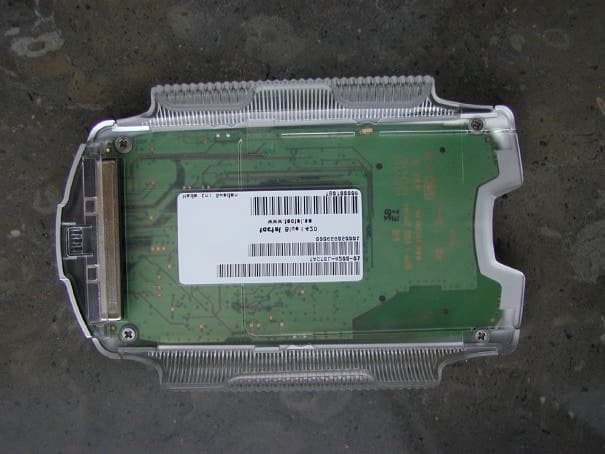
Click to zoom
Application Details
- Equipment Class
- DSS - Part 15 Spread Spectrum Transmitter
- Date of Grant
- Apr 09, 2002
- Application Purpose
- Original Equipment
- Date of Application
- Apr 09, 2002
- Equipment Note
- Sleeves for PDA
- Frequency Range
- 2402.00000000 - 2480.00000000
- Company
- Tactel AB
- Country
- Sweden
Documents & Files
Document Text
Text extracted from the exhibit documents filed with the FCC. Open a document above to read the original.
Users Manual
Blue I manual 1.0 Getting started 1.1 Package includes You should have in your possession a blue containing all the software you will need to take full advantage of this Bluetooth device. This manual should be sufficient help to get you up and running with your new blue I. 1.2 Prepare your device Your blue I is easily slipped on to the back of your iPAQ. Make sure that it is pulled up to the max; you will hear a click once the blue I is in the right place. Once there, the installation program starts directly. 2.0 Installing the software When the Blue I is correctly slipped on, the software installation will commence automatically and install the software needed for the iPAQ. Afterwards the Wizard will start to guide you thru the pairing process. 2.1 Wizard The wizard is here to help you to pair your Bluetooth devices with your iPAQ. Put the Bluetooth device(s) you want to pair with in discoverable mode and click next. The wizard will now start to discover you devices. This operation will take a few seconds, and when its done you will see a list of devices found. (screen). Select the device you want and the wizard will try and pair it for you. If the device you are paring with requires a passkey the wizard will prompt you for one now. When completed, you will find yourself in the Bluetooth properties page and hopefully with your paired device in one of the roll-down menus. If you do have any problem with the wizard please see7.1Installingsoftware, for more information. 3.0 Bluetooth Properties page The Bluetooth Properties page is the place from where you have full control over anything concerning Bluetooth. You will see three tabs to the bottom; Favorites, Settings and Devices. There is also a menu where you can reach the wizard, as well as enable or disable the startup tips. 3.1 Favorites tab Favorites give you an overview of the devices in use, and a nice and easy way to change the active in the different services by selecting a new one from the drop-down menus. To change or add a device you simply roll down that service drop-down menu to your preferred choice. •You canselectadeviceto connect with. •Selectonconnectallows you to select which device to connect to when the connection is made. •Automaticchooses the first Bluetooth device it can find. •Adddeviceallows you to add a device to the list, can also be done from the device properties page, see 3.3.1 Device properties. 3.2 Settings tab Here you have the opportunity to change the settings of the blue I. The local bluetooth device name is the name that other Bluetooth devices will see. Make discoverable will enable the blue I to be found by other Bluetooth devices until you press the button again or you close Bluetooth preferences. More options you may change are •Use authentication selects if you want your devices to use a passkey to be able to pair with your blue I. •Default pincode allows you to set a pincode, instead of being prompted of one when pairing. •Use encryption, allows you to turn of the embedded encryption. •Disable led turns of the blinking LEDs on the back to save battery. You will also find a power save mode, where you set if the blue I shouldBooton insertionorBootondemand. The last one saves your battery power, butBooton insertionis faster to start up. 3.3 Devices tab This is the complete device list of devices known to your blue I. Every Bluetooth device your blue I is paired with will be on this list and also all devices that you manually add. In the right column you see if the device is paired with your blue I. A double-click or a tap and hold on the name will bring out the device menu, from where you can do the following... •See and change the properties of the device •Remove the device from your device list You can also add a device to the list of known, by clicking on add device. 3.3.1 Device properties In the device properties page you see all information about the remote device, such as device name, address and remote services supported. You can change what the remote device will be called on your device. Here is also an option to use the device for ActiveSync. Only one device can be selected for ActiveSync. To start ActiveSync over Bluetooth, see 4.2 Synchronizing thru Bluetooth. To retrieve the remote device name and services, press the refresh button. There is also a button where you can pair or unpair your blue I with the remote device. At the bottom of this page is a list of all services supported by the remote device. All services that are checked, will be shown in the favorites tab under the correct profile. 4.0 iPAQ configuration At the end of the wizard you will be prompted to enter your information to set up a modem using dial up networking thru Bluetooth. If you missed out on this or you need to change your information you may enter the information manually in connections or you can use the wizard at the bottom of the Bluetooth Properties page. 4.1 Connections Information on how to manually set up a connection, please consult you iPAQ manual. 4.2 Synchronizing thru Bluetooth To start an ActiveSync over Bluetooth go to the today screen. At the bottom right is a Bluetooth icon, click on this to show a menu. SelectStartActiveSyncto commence a sync with your selected ActiveSync partner. 5.0 Smartcard You insert the Smartcard at the top. 6.0 Bluetooth tray icon In the today screen you will have a Bluetooth icon when your blue I is attached. If you click on it a menu will appear. From here you can see what devices you are currently connected to. Other things you can do is: •ConnecttoInternet, allows you to choose a connection and get connected. •Bluetoothsettings, takes you directly to the Bluetooth preferences. •StartActiveSync, starts an ActiveSync session thru Bluetooth. 7.0 Troubleshooting 7.1 Installing software The software installation process, as described in 2.0, starts automatically the first time you insert the blue I jacket to your iPAQ. If not, or you at any time would like to upgrade or i…
Text truncated - open the document above for the full version.
Cover Letter(s)
April 10, 2002 CONFIDENTIALITY REQUEST Federal Communications Commission Authorization and Evaluation Division 7435 Oakland Mills Road Columbia, MD 21046 Re: TACTEL AB., FCC ID: PRK-BLUE-I420-430 Gentlemen: TACTELAB, herein submits a request for Confidentiality for the specified attachments that are filed forFCCID:PRK-BLUE-I420-430. Certification is sought under the TCB certification program pursuant to the requirements of the Federal Communications Commission for a spread spectrum transmitter under FCC Rules Part 15.TACTELAB, requests, pursuant to 47CFR 0.459, post grant confidentiality for portions of the material contained in this application such that the identified material will be withheld from public inspection by the Commission following the grant of this authorization. This material, as indicated by request for confidentiality of the item during the electronic submission process and further identified below, includes: 1.Circuit diagrams, BOM, and PCB submitted as Equipment Authorization Electronic Filing attachment:"Schematics”. 2.Bloc kdiagram submitted as Equipment Authorization Electronic Filing attachment: “Blockdiagram ”. 3.Operational Description submitted as Equipment Authorization Electronic Filing attachment:“Operational Description”. If you have any questions, please feel free to contact me at the address shown below. Regards, (signed) Gerald Schmidt, Cetecom ICT GmbH, Untertürkheimer Strasse 6-10 D-66117 Saarbrücken Germany Email:[email protected] Phone: +49 681 598 8723
Internal Photos
Blue I 420 Blue I 420 Blue I 430 Blue I 430
RF Exposure Info
RF Exposure compliance issues: The max. RF EIRP power output from the device is less than 1 mW. If the entire RF Power were absorbed by 1 gram of tissue (not possible considering typical RF circuits) the SAR limit of 1.6mW/g would still not be exceed. Therefore no warning labels, no RF exposure warnings in the manual or other protection measures are required for the transceiver.
Test Report
CETECOM ICT Services GmbH Radio Satellite Communication Untertürkheimer Straße 6-10 . D-66117 SaarbrückenTelefon: +49 (0)681 598-9100Telefax: -9075 RSC14issue test report consist of 66 PagesPage 1 (66) TTI-P-G 166/98-30 Accredited Bluetooth™ Test Facility (BQTF) Test report no.: 2_2686-01-02/01 FCC Part 15.247 / CANADA RSS-210 Blue I 410, Blue I 420 und Blue I 430 CETECOM – ICT Services GmbH Untertürkheimerstr. 6-10 66117 Saarbrücken, Germany Telephone: + 49 (0) 681 / 598-0 Fax: + 49 (0) 681 / 9075 BLUETOOTH is a trademark owned by Bluetooth SIG, Inc. and licensed to CETECOM CETECOM ICT Services GmbH Test report nr.:2_2686-01-02/01Issue date:05.03.01Page 2 (66) Table of Contents 1 General information 1.1 Notes 1.2 Testing laboratory 1.3 Details of applicant 1.4 Application details 1.5 Test item 1.6 Test standards 2 Technical test 2.1 Summary of test results 2.2 Test report 1 General information 1.1 Notes The test results of this test report relate exclusively to the test item specified in 1.5. The CETECOM ICT Services GmbH does not assume responsibility for any conclusions and generalisations drawn from the test results with regard to other specimens or samples of the type of the equipment represented by the test item. The test report may only be reproduced or published in full. Reproduction or publication of extracts from the report requires the prior written approval of the CETECOM ICT Services GmbH. 1.2Testing laboratory CETECOM ICT Services GmbH Untertürkheimer Straße 6 - 10 66117 Saarbrücken Germany Telefone: + 49 681 598 - 9100 Telefax : + 49 681 598 - 9075 E-mail : [email protected] Internet : www.cetecom.de Accredited testing laboratory DAR-registration number : TTI-P-G 166/98-30 Accredited Bluetooth™ Test Facility (BQTF) BLUETOOTH is a trademark owned by Bluetooth SIG, Inc. and licensed to CETECOM CETECOM ICT Services GmbH Test report nr.:2_2686-01-02/01Issue date: 11.03.2002Page 3 (66) 1.3Details of applicant Name : Tactel AB Street : Norra Vallgatan 64 City : SE-21122 Malmö Lomma Country : Sweden Telephone : +46 (0)40 250 600 Telefax : +46 (0)40 250 601 Contact : Mr. Ulf Estberg Telephone : +46 (0)40 250 640 1.4Application details Date of receipt of application : 26.10.01 Date of receipt of test item : 28.11.01 Date of test : 28.11.01 1.5Test item Type of equipment : Bluetooth Adapter for PDA (iPAQ) Type designation: Blue I 410, Blue I 420 und Blue I 430 Manufacturer: applicant Street: City: Country: Serial number: See photographs Additional informations: : Frequency: 2400 – 2483.5 MHz Type of modulation: 1M00FXD / 79M8FXD (FHSS) Number of channels : 79 Antenna: integral antenna Power supply: 3,6 V DC from PalmTop Output power: EIRP:0.617 mW Type of equipment: Temperature range : -10°C - +55°C 1.6Test standards: FCC Part 15 §15.247 CANADA RSS-210 CETECOM ICT Services GmbH Test report nr.:2_2686-01-02/01Issue date: 11.03.2002Page 4 (66) 2 Technical test 2.1Summary of test results The radiated measurements were performed vertical andhorizontal over the whole frequency range.We start at 1 m high with vertical receiving antenna and rotate the dish continuously. During rotation we use the antenna lift system to vary the high from 1 to 4 m. So we find maximum radiation output. At this points we do manual remeasurements. After this we do the same measurements in horizontal position of the receiving antenna. This (horizontal and vertical) is made for all the three planes of the test sample. We use the maximum received results. The detector function and selection of bandwidth are according ANSI C63.2-1996 item 8.2.1 and ANSI C63.4-1992 Item 4.2. Antennas are conform with ANSI C63.2-1996 item 15. 150 kHz - 30 MHz: Quasi Peak measurement, 9kHz Bandwidth, passive loop antenna. 30 MHz - 200 MHz: Quasi Peak measurement, 120KHz Bandwidth, biconical antenna 200MHz - 1GHz: Quasi Peak measurement, 120KHz Bandwidth, log periodic antenna 1GHz: Average, RBW 1MHz, VBW 10 MHz, waveguide horn The antenna gain measurement was performed by the difference between conducted and radiated output measurement. All measurement settings are according to FCC 15.35, 15.205, 15.209, 15.247 and the „Measurement guidelines for FHSS systems“. The product fullfills also the requirements for CANACA RSS-210 No deviations from the technical specification(s) were ascertained in the course of the tests performed. Final verdict : PASS Technical responsibility for area of testing : 11.03.02RSC 8411 Berg M. DateSectionNameSignature Technical responsibility for area of testing : 11.03.02RSC8412Hausknecht D. DateSectionNameSignature CETECOM ICT Services GmbH Test report nr.:2_2686-01-02/01Issue date: 11.03.2002Page 5 (66) 2.2Testreport TEST REPORT Testreport no. : 2_2686-01-02/01 CETECOM ICT Services GmbH Test report nr.:2_2686-01-02/01Issue date: 11.03.2002Page 6 (66) TEST REPORT REFERENCE LIST OF MEASUREMENTS ParagraphPARAMETER TO BE MEASUREDPAGE Transmitter parameters § 15.204Antenna gain 7 § 15.247 (a) Carrier frequency separation8 § 15.247 (a)Number of hopping channels9 § 15.247 (a)Time of occupancy (dwell time)11 § 15.247 (d) Power spectral density (Inquiry/Page mode)16 § 15.247 (a)(1) Spectrum bandwidth of a FHSS System17 § 15.247 (b)(2) Maximum peak output power21 §15.247Band edge compliance26 § 15.247 (c)(1) Emission limitations 34 Receiver parameters § 15.209Spurious radiations - Radiated47 Test equipment listing52 Photographs of the equipment54 CETECOM ICT Services GmbH Test report nr..: 2_2686-01-02/01Issue Date: 11.03.2002Page 7 (66) Equipment under test : Blue I 400 Series Ambient temperature : 23,3° °° °C Relative humidity : 35% REFERENCE NUMBER(S) OF TEST EQUIPMENT USED (for reference numbers see test equipment listing) - Antenna GainSUBCLAUSE § 15.204 The gain is 2.0 dBi (measured effectiv radiated power over dipol– measured conducted power with a temporary RF-connector) CETECOM ICT Services GmbH Test report nr..: 2_2686-01-02/01Issue Date: 11.03.2002Page 8 (66) Equipment under test : Blue I 400 Series…
Text truncated - open the document above for the full version.
Test Report
REPORT1 (11) Uppgjord (även faktaansvarig om annan) - Prepared (also subject responsible if other) Nr - No. EMN/ERH/TA Frank Hooijschuur, ECS/UT/UV Leif Wilhelmsson EMN/ERH/TA-00:2502 Dokansv/Godk - Doc respons/Approved Kontr – Checked Datum - Date RevFile ECS/UM/VC Anders Svensso n2000-06-21R1procgainresults.doc D:\Ready_To_Convert\Doc\106902.DOC N /FAD 109 251 R1B PROCESSING GAIN MEASUREMENT RESULTS OF ERICSSON’S BLUETOOTH RECEIVER USING THE CW- JAMMING MARGIN METHOD Abstract This paper presents results co ncerning the processing gain (PG) for Ericsson’s Bluetooth receiver when measured according to FCC’s CW- jamming margin method. The PG from the direct sequence spreading caused by the access code in page and inquiry mode is found to be abo ut 4 dB for three different access codes, with considerably different properties. Therefore, since Bluetooth in page and inquiry is considered as a hybrid system which is required to have a total PG of 17 dB, and the PG from the frequency hopping part is 15 dB, it is concluded that Ericsson’s receiver passes the test with a margin of about 2 dB. REPORT2 (11) Uppgjord (även faktaansvarig om annan) - Prepared (also subject responsible if other) Nr - No. EMN/ERH/TA Frank Hooijschuur, ECS/UT/UV Leif Wilhelmsson EMN/ERH/TA-00:2502 Dokansv/Godk - Doc respons/Approved Kontr – Checked Datum - Date RevFile ECS/UM/VC Anders Svensso n2000-06-21R1procgainresults.doc D:\Ready_To_Convert\Doc\106902.DOC N /FAD 109 251 R1B Contents 1 Introduction 2 Description of the Method 3 Measurement results 4 Conclusions REPORT3 (11) Uppgjord (även faktaansvarig om annan) - Prepared (also subject responsible if other) Nr - No. EMN/ERH/TA Frank Hooijschuur, ECS/UT/UV Leif Wilhelmsson EMN/ERH/TA-00:2502 Dokansv/Godk - Doc respons/Approved Kontr – Checked Datum - Date RevFile ECS/UM/VC Anders Svensso n2000-06-21R1procgainresults.doc D:\Ready_To_Convert\Doc\106902.DOC N /FAD 109 251 R1B 1 INTRODUCTION FCC has expressed that they preferably would like the processing gain obtained from the DS part to be measured by a (possibly modified) CW jamming margin method. Ericsson has performed such a measurement, and in this paper it is described how this measurement is performed together with the result showing that the PG from the DS part is about 4 dB. Consequently, it is concluded that Ericsson’s receiver has a PG from the DS part which exceeds the required 2 dB, and thus a total PG exceeding 17 dB, so that it indeed f ulfils the by FCC imposed requirements. The remaining part of the paper is organized as follows. In Sectio n 2, the CW- jamming method is recapitulated, and all parameter values that have to be determined for an measurement are given. Measurement method and results are given in Section 3. Finally, in Section 4, conclusio ns are drawn. 2 DESCRIPTION OF THE METHOD Referring to FCC §15.247 (e)(2), the processing gain may be determined as measured using the CW jamming margin method, which, for the sake of completeness, is repeated here: A signal generator is stepped in 50 kHz increments across the passband of the system, recording at each point the generator level required to produce the recommended Bit Error Rate (BER). This level is the jammer level. The output power of the intentional radiator is measured at the same point. The jammer to signal ratio (J/S) is then calculated, discarding the worst 20 % of the J/S data points. The lowest remaining J/S ratio is used to calculate the processing gain, as follows: Gp = S/N + Mj + Lsys, where Gp = the processing gain of the system, S/N = signal to noise ratio required for the chosen BER, Mj =J/S ratio, and Lsys = system losses. Note that total losses in a system, including intentional radiator and receiver, should be assumed to be no more than 2 dB. In Bluetooth, the despreading is accomplished by correlating the received bit stream with the bit pattern of the access code. Then the value of this correlatio n determines whether or not the access code should be co nsidered as present. For Bluetooth, a “bit error” corresponds to that either the access code is present, but falsely rejected, or that the access code is absent but falsely accepted. The probability of the latter is negligible when compared to the former for any reasonable user scenario, and thus the false rejection ratio (FRR) is the figure of merit when evaluating the PG of the system. To reflect this, the CW jamming margin method, when applied to the Bluetooth system is interpreted as follows: REPORT4 (11) Uppgjord (även faktaansvarig om annan) - Prepared (also subject responsible if other) Nr - No. EMN/ERH/TA Frank Hooijschuur, ECS/UT/UV Leif Wilhelmsson EMN/ERH/TA-00:2502 Dokansv/Godk - Doc respons/Approved Kontr – Checked Datum - Date RevFile ECS/UM/VC Anders Svensso n2000-06-21R1procgainresults.doc D:\Ready_To_Convert\Doc\106902.DOC N /FAD 109 251 R1B A signal generator is stepped in 50 kHz increments across the passband of the system, recording at each point the generator level required to produce the recommended false rejection ratio (FRR). This level is the jammer level. The output power of the intentional radiator is measured at the same point. The jammer to signal ratio (J/S) is then calculated, discarding the worst 20\% of the J/S data points. The lowest remaining J/S ratio is used to calculate the processing gain, as follows: Gp = S/N + Mj + Lsys, where Gp = the processing gain of the system, S/N = signal to noise ratio required for the chosen FRR, Mj =J/S ratio, and Lsys = system losses. Note that total losses in a system, including intentional radiator and receiver, should be assumed to be no more than 2 dB. It should here be noted that in order for the above test to be meaningf ul, the correct sampling time must have been found. If this is not the case, the BER would of course not be at an interesting level. For Bluetooth, the access code, whether in page, inquiry, or connection mode, is used to actually find the a suitable sampling point. 2.1 SYSTEM LOSS…
Text truncated - open the document above for the full version.
Test Setup Photos
CETECOM ICT Services GmbH Test report nr..: 2_2686-01-02/01Issue Date: 11.03.2002Page 54 (66) Test site CETECOM ICT Services GmbH Test report nr..: 2_2686-01-02/01Issue Date: 11.03.2002Page 55 (66) PHOTOGRAPHS OF THE EQUIPMENT Testsite
Contact Information
Applicant
Ulf Estberg(Manager)
Test Firm
Cetecom ICT Services GmbHRalf Hoehn
Technical Specifications
| # | Rule Parts | Frequency Range | Power Output |
|---|---|---|---|
| 1 | 15C | 2.40 GHz - 2.48 GHz | 620.00 µW |
Other Applications from Tactel AB
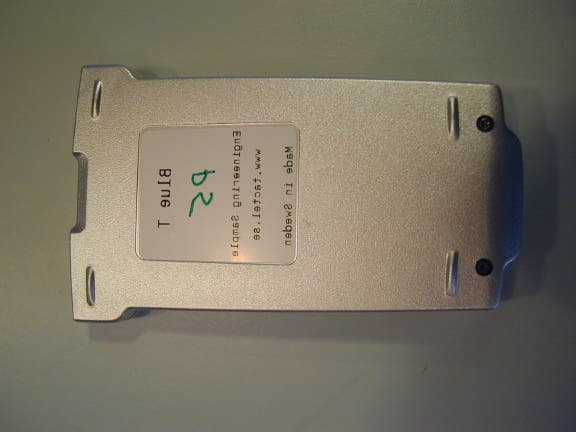
PRKBLUE-M
Nov 07, 2001Bluetooth PDA adapter
Equipment Class
DSS - Part 15 Spread Spectrum Transmitter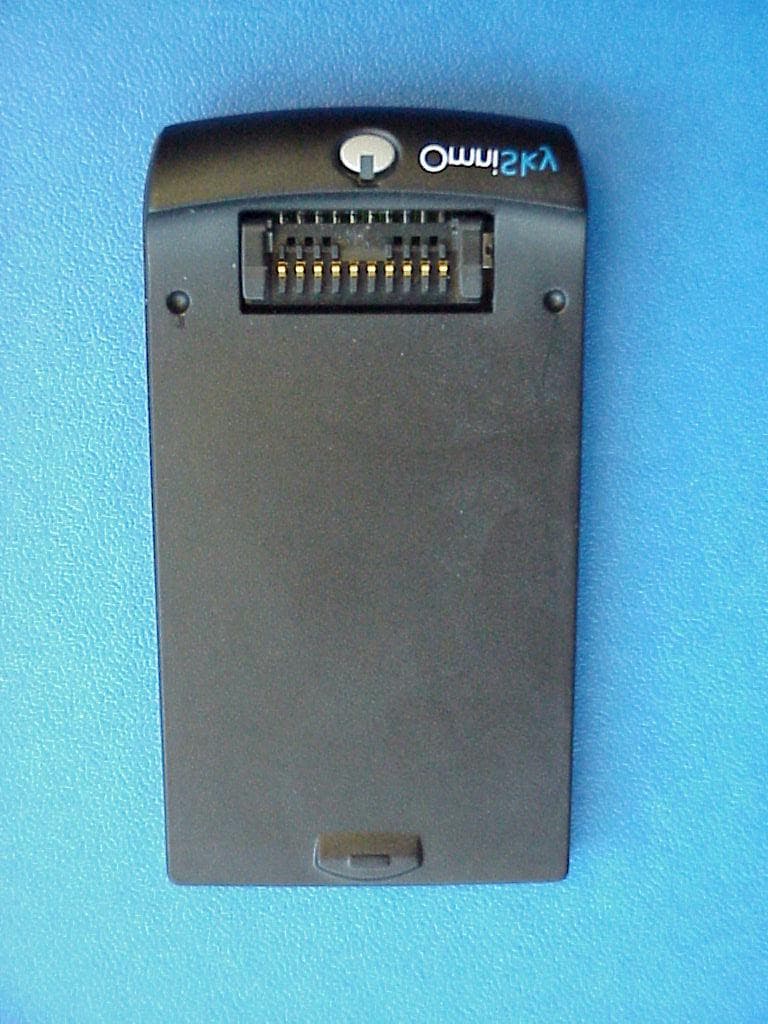
PRK531102
Aug 21, 2001Bluetooth transmitter for palm type computers
Equipment Class
DSS - Part 15 Spread Spectrum Transmitter