PY313400249WiFi USB Adapter
Netgear Incorporated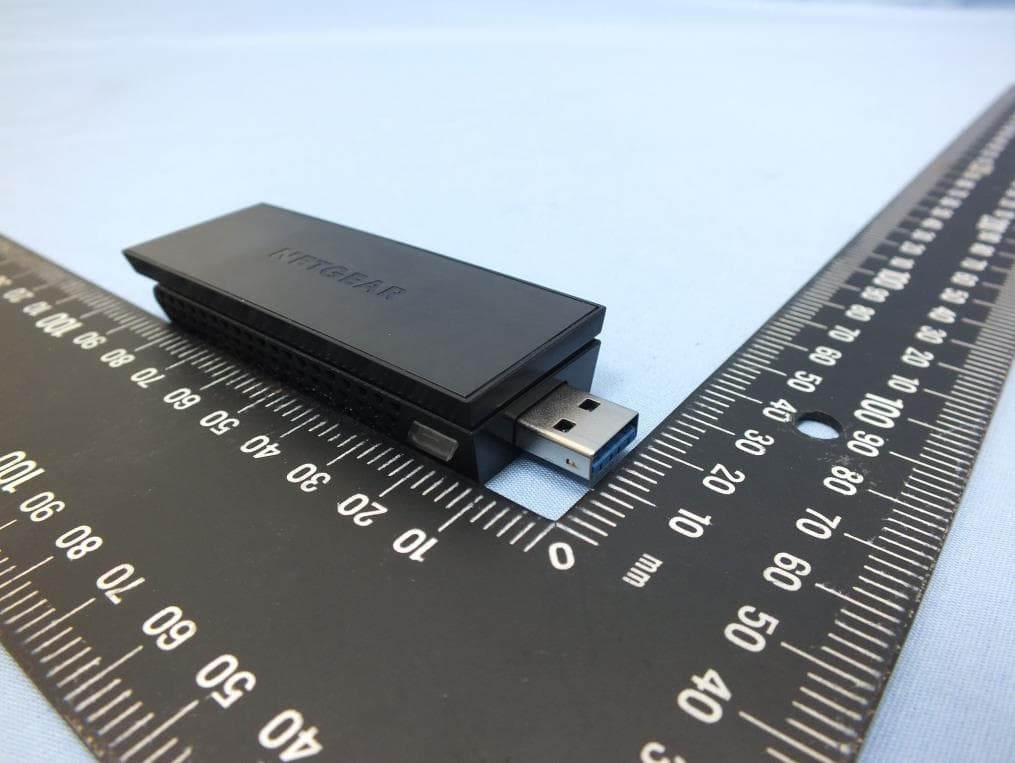
Click to zoom
Application Details
- Equipment Class
- NII - Unlicensed National Information Infrastructure TX
- Date of Grant
- Jun 24, 2014
- Application Purpose
- Original Equipment
- Date of Application
- Jun 23, 2014
- Equipment Note
- WiFi USB Adapter
- Frequency Range
- 5530.00000000 - 5530.00000000
- Company
- Netgear Incorporated
- Country
- United States
Documents & Files
Document Text
Text extracted from the exhibit documents filed with the FCC. Open a document above to read the original.
Users Manual
Notification of Compliance Regulatory Compliance Information This document includes user requirements for operating NETGEAR products in accordance with national laws including usage of radio spectrum and operation of radio devices. Failure of the end-user to comply with the applicable requirements may result in unlawful operation and adverse action against the end-user by the applicable national regulatory authority. The NETGEAR product firmware limits operation to only the channels allowed in a particular region or country. Therefore, all options described in this document may not be available in your version of the product. This document applies to both Class A and Class B devices: Class A devices are intended to be used in a commercial or industrial environment. They are not intended to be used in a residential home or be available for general public use. Class B devices are intended to be used in a residential setting, and may also be used in commercial and industrial applications. Examples of Class B devices are telephones, personal computers, and residential data gateways. Fuses should only be installed by service personnel. NETGEAR recommends the use of 26 AWG or larger gauge phone line cords. Europe – EU Declaration of Conformity This section applies to products bearing the CE or CE! mark: Products bearing the CE or CE! mark comply with the following EU directives: EMC Directive 2004/108/EC Low Voltage Directive 2006/95/EC Ecodesign Directive 2009/125/EC RoHS Directive 2011/65/EU If the product has telecommunications functionality, it also complies with the requirement of the following EU directive: R&TTE Directive 1999/5/EC Compliance with these directives implies conformity to harmonized European standards that are noted in the EU Declaration of Conformity. The EU CE Declaration of Conformity may be found at http://support.netgear.com/app/answers/detail/a_id/11621/. Caution for installing this equipment outdoors: (Valid in all EU member states, EFTA states, and Switzerland.) Be aware that outdoor installations require special attention and will only be handled by trained and qualified installation personnel. No one from the general public is permitted to install NETGEAR wireless products outdoors when external antennas, power and grounding must be installed for use. Particular attention has to be given allowed operational frequencies. Contact NETGEAR for instructions on how to contact an installer for outdoor operations if this product requires the special considerations for outdoor installations. For detailed iformation concerning installations in France, the user should contact the national spectrum authority in France (http://www.arcep.fr/ ) The following paragraphs apply to WN2500RP: This device is a 2.4GHz and 5GHz wideband transmission system (transceiver), intended for indoor use only in all EU member states, EFTA states, and Switzerland. In Italy the end-user should apply for a license at the national spectrum authorities in order to obtain authorization to use the device for setting up outdoor radio links and/or for applying public access to telecommunications and/or network services. This device may not be used for setting up outdoor radio links in France and in some areas the RF output power may be limited to 10mW EIRP in the frequency range of 2454-2483.5 MHz. For detailed information the end-user should contact the national spectrum authority in France. Warning NETGEAR Class A products that may be utilized in domestic/residential environments may cause radio interference in which case the user may be required to take adequate measures. FCC Requirements for Operation in the United States Information in this section applies to products bearing the FCC mark (or statement): FCC Information to User This NETGEAR product does not contain any user serviceable components and is to be used with approved antennas only. Any product changes or modifications will invalidate all applicable regulatory certifications and approvals. The following statement applies to these products: C6300 JWNR2010v5 WN3000RPv2 D6200V2 R6050 WN3500RP EX6100 R7500 WNDR3400v3 EX6200 R8000 WN1000v4 HMNC100 STS7000 WNR2010 JNR1010v2 VEGN2200 WNR2020 JR6150 WN370 WNR614 JWNR2000v5 WN2500RP WNR618 This device and its antenna(s) must not be co-located or operating in conjunction with any other antenna or transmitter except in accordance with FCC multi-transmitter product procedures. FCC Guidelines for Human Exposure The NETGEAR product complies with FCC radiation exposure limits set forth for an uncontrolled environment. The equipment should be installed and operated with minimum distance of 20cm between the radiator and your body. The following statement applies to this product: C6300XB3 This product complies with FCC radiation exposure limits set forth for an uncontrolled environment. The device should be installed and operated with minimum distance of 25cm between the radiator and your body. The following statement applies to this product: R8000 This product complies with FCC radiation exposure limits set forth for an uncontrolled environment. The device should be installed and operated with minimum distance of 30cm between the radiator and your body. FCC Declaration of Conformity We, NETGEAR, Inc., 350 East Plumeria Drive, San Jose, CA 95134, declare under our sole responsibility that this product complies with Part 15 Subpart B of FCC CFR47 Rules. Operation is subject to the following two conditions: The device may not cause harmful interference, and The device must accept any interference received, including interference that may cause undesired operation. FCC Radio Frequency Interference Warnings & Instructions The NETGEAR product has been tested and found to comply with the limits for a Class B digital device, pursuant to Part 15 of the FCC Rules. These limits are designed to provide reasonable protection against harmful inter…
Text truncated - open the document above for the full version.
Users Manual
Installation Guide A6210 WiFi USB Adapter 802.11ac USB 3.0 Dual Band Package Contents A6210 WiFi Resource CD USB Adapter Desktop Dock with USB cable attached Installation To begin using your A6210 WiFi USB adapter, follow these instructions. To set up your adapter: 1.Insert the resource CD in your computer CD drive. Note: If your computer does not have a CD drive, download the A6210 resource CD driver by visiting http://support.netgear.com. Click the Support for Home Products button and enter A6210 in the search field. If the Resource CD screen does not display, browse the files on the CD and double-click Autorun.exe. The NETGEAR Resource CD screen displays. 2.Click the Setup link. The Software Update Check screen displays. 3.Install the setup software. You have two options: •Connected to the Internet. If you are connected to the Internet, click the Check for Updates button. After the software checks for updates, the Update Check Complete screen displays. Click the Continue button. The Welcome screen displays. •Not connected to the Internet. If you are not connected to the Internet, click the Install from CD button. The Welcome screen displays. 4.To accept the license agreement, click the I agree radio button and then click the Next button. A message displays asking you to wait while software is installed. After a few minutes, NETGEAR genie prompts you to insert your adapter. 5. You can use the adapter with or without the desktop dock: •To use the adapter with the desktop dock, place the wireless adapter into the dock and connect the USB cable to a USB port on your computer. Note: When placed in the desktop dock, you can fold out the adapter to its maximum angle for increased WiFi performance. •To use the adapter without the desktop dock, insert the adapter into a USB port on your computer. 6. Click the Next button. The NETGEAR genie screen displays a list of wireless networks in your area. January 2014 BETA DOCUMENT NETGEAR, the NETGEAR logo, and Connect with Innovation are trademarks and/or registered trademarks of NETGEAR, Inc. and/or its subsidiaries in the United States and/or other countries. Information is subject to change without notice. © NETGEAR, Inc. All rights reserved. NETGEAR, Inc. 350 East Plumeria Drive San Jose, CA 95134 USA Standalone Driver Installation To install a standalone driver: 1.Insert the resource CD in your computer CD drive. Note: If your computer does not have a CD drive, download the A6210 resource CD driver by visiting http://support.netgear.com. Click the Support for Home Products button and enter A6210 in the search field. If the Resource CD screen does not display, browse the files on the CD and double-click Autorun.exe. The NETGEAR Resource CD screen displays. 2.Click the Install Windows Standalone Driver link. The driver installs on your computer. 3.When prompted, either place the adapter into the desktop dock and connect the USB cable to a USB port on your computer, or use the adapter without the desktop dock and insert the adapter into a USB port on your computer. Join a Wireless Network You can join a wireless network from the NETGEAR genie, or you can use Wi-Fi Protected Setup (WPS) if your wireless router supports it. To join a network using NETGEAR genie: 1.From the NETGEAR genie screen, click the Join a Network button. 2.Select your wireless network. 3.Click the Connect button. 4.If the network is secure, enter its password or network key. The adapter joins the network, which can take a few minutes. Your settings are saved in a profile. To join a network using WPS: 1.Press and hold the WPS button on the adapter for two seconds. 2.Within two minutes, press the WPS button on your wireless router or gateway. WPS button The adapter joins the network, which can take a few minutes. Your settings are saved in a profile. Check Your Connection Status When you install your adapter, the NETGEAR genie icon displays in the Windows system tray and on the desktop. You can double-click this icon to open NETGEAR genie to make changes or connect to a different wireless network. The color of the icon indicates the strength of your wireless connection: White. 3–5 bars (strong connection) Yellow. 1–2 bars (weak connection) Red. 0 (zero) bars (no connection) If you remove your adapter, NETGEAR genie is not available, so the icon does not display. When you insert the adapter again, the icon returns. Support Thank you for selecting NETGEAR products. After installing your device, locate the serial number on the label of your product and use it to register your product at https://my.netgear.com. You must register your product before you can use NETGEAR telephone support. NETGEAR recommends registering your product through the NETGEAR website. For product updates and web support, visit http://support.netgear.com. NETGEAR recommends that you use only the official NETGEAR support resources. You can get the user manual online at http://downloadcenter.netgear.com or through a link in the product’s user interface. For regulatory compliance information, visit http://www.netgear.com/about/regulatory. See the regulatory compliance document before connecting the adapter.
Cover Letter(s)
Netgear Inc. 350 East Plumeria Drive San Jose, CA 95134 U.S.A. Date: 2014/5/15 Federal Communications Commission 7435 Oakland Mills Rd Columbia MD 21046-1609 Subject: Product Certification Representative Authorization Letter FCC ID: PY313400249 To whom it may concern: We the undersigned, hereby authorize following person to act as our agent in the preparation of an application for equipment authorization o the FCC Rules and Regulations. International Certification Corp. Address : No.3-1, Lane 6, Wen San 3rd St. Kwei Shan Hsiang, Tao Yuan Hsein 333, Taiwan (R.O.C.) Name : Gary Chang Job Title : Manager e-mail : [email protected] Webs We further certifies that neither the applicant nor any party to this application, as defined in 47 CFR Ch. 1.2002(b), is subject to a denial to Federal benefits, that include FCC benefits, pursuant to section 5301 of the Anti-Drug Abuse Act of 1998, 21 U.S.C. 835(a). This appointment also includes the authority to complete FCC Form 731 on our behalf and sign the application as an authorized agent. Applicant : NETGEAR, Inc. Address : 350 East Plumeria Drive, San Jose, California 95134, USA Signature : _________________________________ Name and Job Title. : David Kay / Regulatory Compliance Manager E-mail : [email protected] Tel. : 408-890-3160
Cover Letter(s)
Netgear Inc. 350 East Plumeria Drive San Jose, CA 95134 U.S.A. Date: May 15, 2014 Federal Communications Commission Authorization and Evaluation Division 7435 Oakland Mills Rd Columbia MD 21046-1609 Subject: Request for confidentiality FCC ID: PY313400249 To whom it may concern: Short-term confidentiality Pursuant to DA 04-1705 of the Commission’s public notice, in order to comply with the marketing regulations in 47CFR §2.803 and the importation rules in 47 CFR §2.1204, while ensuring that business sensitive information remains confidential until the actual marketing of newly authorized devices. We are requesting the commission to grant short-term confidentiality request on the following attachments for 180 days. ☒ Internal Photographs ☒ External Photographs ☒ User's manual ☒ Test Set up photo Permanent confidentiality Pursuant to Sections 0.457 and 0.459 of the Commission’s Rules, the Applicant Hereby requests confidential treatment of information accompanying this Application As outlined below: ☒ Block Diagram ☒ Schematics ☒ Operation description The above materials contain trade secrets and proprietary information not customarily released to the public. The public disclosure of these materials may be harmful to the applicant and provide unjustified benefits to its competitors. The applicant understands that pursuant to Section 0.457 of the Rules, disclosure of this application and all accompanying documentation will not be made before the date of the Grant for this application. Should you require any further information, please contact the undersigned. Thank you for your consideration in this matter. Applicant : NETGEAR, Inc. Address : 350 East Plumeria Drive, San Jose, California 95134, USA Signature : ______________________________ Name and Job Title. : David Kay / Regulatory Compliance Manager E-mail : [email protected] Tel. : 408-890-3160
Cover Letter(s)
Netgear Inc. 350 East Plumeria Drive San Jose, CA 95134 U.S.A. Date: May 15, 2014 Subject: Ad Hoc Mode Function Declaration To whom it may concern, We, NETGEAR, Inc. declare that the device does not support any non-US channels and country code selection in all the operational mode(s) for the following product. FCC ID: PY313400249 IC : 4054A-13400249 Regards, Applicant’s company name : NETGEAR, Inc. Applicant’s company address : 350 East Plumeria Drive, San Jose, California 95134, USA Signature : Name and Job Title : David Kay / Regulatory Compliance Manager E-Mail : [email protected] Tel. : 408-890-3657
Cover Letter(s)
Date : June 10, 2014 UNII Declaration Letter We have declared below featured for FCC equipment authorization, Device FCC ID: PY313400249 (1) DFS Device -- Master , Client with Radar detection capability , Client without radar detection capability, N/A (2) Active / Passive Scanning , adhoc mode access point capability Frequency Band (MHz) Active Scanning (the device can transmit a probe (beacon)) passive scanning (where the device is can listen only with no probes) Ad Hoc Mode capability Access point capability 2412 – 2462 Yes , No Yes , No Yes , No Yes , No 2422 - 2452 Yes , No Yes , No Yes , No Yes , No 5745 - 5825 Yes , No Yes , No Yes , No Yes , No 5765 - 5795 Yes , No Yes , No Yes , No Yes , No 5180 – 5240 Yes , No Yes , No Yes , No Yes , No 5190 – 5230 Yes , No Yes , No Yes , No Yes , No 5260 – 5320 Yes , No Yes , No Yes , No Yes , No 5270 – 5310 Yes , No Yes , No Yes , No Yes , No 5500 – 5700 Yes , No Yes , No Yes , No Yes , No 5510 - 5670 Yes , No Yes , No Yes , No Yes , No (3) Country code selection ability - Yes , No If no, pls explain how was implemented : (4) Meet 15.202 requirement - Yes , No , pls check below : A master device is defined as a device operating in a mode in which it has the capability to transmit without receiving an enabling signal. In this mode it is able to select a channel and initiate a network by sending enabling signals to other devices A client device is defined as a device operating in a mode in which the transmissions of the device are under control of the master. A device in client mode is not able to initiate a network. (5) For client devices that have software configuration control to operate in different modes (active scanning in some and passive scanning in others) in different bands (devices with multiple equipment classes or those that operate on non-DFS frequencies) or modular devices which configure the modes of operations through software, the application must provide software and operations description on how the software and / or hardware is implemented to ensure that proper operations modes can not be modified by end user or an installer. Apply , No Apply , (If apply , pls help to provide explanation on how it was implement (By hardware or software , and how software was controlled) On DFS channels, the WLAN driver on the device operates under the control of an AP at all times, except when in ad-hoc mode, on US non-DFS channels. As described in the answer to question (2), the device passively scans DFS frequencies until a master device is detected. The control of this functionality is not accessible to anyone under any conditions. Furthermore, the device driver is locked with signature with Microsoft’s certification and cannot be changed or modified by end user. Applicant : NETGEAR, Inc. Address : 350 East Plumeria Drive, San Jose, California 95134, USA Signature : _________________________________ Name and Job Title. : David Kay / Regulatory Compliance Manager E-mail : [email protected] Tel. : 408-890-3657
External Photos
Project No.: EP430402 Page No. : 1 of 13 Photographs of EUT Project No.: EP430402 Page No. : 2 of 13 Project No.: EP430402 Page No. : 3 of 13 Project No.: EP430402 Page No. : 4 of 13
ID Label/Location Info
SHEET: AUTHOR:TITLE: P/N: REV: THIS DOCUMENT AND THE DATA DISCLOSED HEREIN OR WHEREWITH IS NOT TO BE REPRODUCED, USED OR DISCLOSED IN WHOLE OR IN PART TO ANYONE WITHOUT THE PERMISSION OF NETGEAR, INC. REV DESCRIPTION OF REVISION ENG APPDDATE 11DEC13J RAMONESINITIAL DOCUMENT CREATION01 01AW-12795-011 of 1 AW,A6210,PLBL,V1 J RAMONES NOTE: 1. REFER TO NETGEAR SPEC. DOC-0093 FOR COLOR TOLERANCES. 2. INK COLOR IS SHOWN TO THE RIGHT. 3. OUTLINES ARE MAGENTA COLOR AND DO NOT PRINT. White Black PMS Cool Gray 7C Label location
Internal Photos
Project No.: EP430402 Page No. : 5 of 13 Project No.: EP430402 Page No. : 6 of 13 Project No.: EP430402 Page No. : 7 of 13 Project No.: EP430402 Page No. : 8 of 13 Project No.: EP430402 Page No. : 9 of 13 Project No.: EP430402 Page No. : 10 of 13 Project No.: EP430402 Page No. : 11 of 13 Project No.: EP430402 Page No. : 12 of 13 Project No.: EP430402 Page No. : 13 of 13
RF Exposure Info
Test Laboratory: Sporton International Inc. SAR/HAC Testing Lab Date: 2014/5/6 System Check_Body_2450MHz-140506 DUT: D2450V2-924 Communication System: CW; Frequency: 2450 MHz;Duty Cycle: 1:1 Medium: MSL_2450_140506 Medium parameters used: f = 2450 MHz; σ = 2.015 S/m; ε r = 53.957; ρ = 1000 kg/m 3 23.3 22.3 DASY5 Configuration: - Probe: EX3DV4 - SN3955; ConvF(7.42, 7.42, 7.42); Calibrated: 2013/11/12; - Sensor-Surface: 2mm (Mechanical Surface Detection) - Electronics: DAE4 Sn1399; Calibrated: 2013/11/7 - Phantom: ELI v5.0; Type: QDOVA002AA; Serial: TP:1227 - Measurement SW: DASY52, Version 52.8 (7); SEMCAD X Version 14.6.10 (7164) Configuration/Pin=250mW/Area Scan (61x61x1): Interpolated grid: dx=1.200 mm, dy=1.200 mm Maximum value of SAR (interpolated) = 20.0 W/kg Configuration/Pin=250mW/Zoom Scan (7x7x7)/Cube 0: Measurement grid: dx=5mm, dy=5mm, dz=5mm Reference Value = 100.8 V/m; Power Drift = 0.13 dB Peak SAR (extrapolated) = 27.1 W/kg SAR(1 g) = 13.3 W/kg; SAR(10 g) = 6.18 W/kg Maximum value of SAR (measured) = 20.3 W/kg 0 dB = 20.3 W/kg = 13.07 dBW/kg Test Laboratory: Sporton International Inc. SAR/HAC Testing Lab Date: 2014/5/6 System Check_Body_2450MHz_140506 DUT: D2450V2-924 Communication System: CW ; Frequency: 2450 MHz;Duty Cycle: 1:1 Medium: MSL_2450_140506 Medium parameters used: f = 2450 MHz; σ = 2.015 S/m; ε r = 53.957; ρ = 1000 kg/m 3 23.3 22.3 DASY5 Configuration: - Probe: EX3DV4 - SN3931; ConvF(7.24, 7.24, 7.24); Calibrated: 2013/9/10; - Sensor-Surface: 2mm (Mechanical Surface Detection) - Electronics: DAE4 Sn1425; Calibrated: 2014/3/3 - Phantom: ELI v5.0; Type: QDOVA002AA; Serial: TP:1227 - Measurement SW: DASY52, Version 52.8 (7); SEMCAD X Version 14.6.10 (7164) Configuration/Pin=250mW/Area Scan (61x61x1): Interpolated grid: dx=1.200 mm, dy=1.200 mm Maximum value of SAR (interpolated) = 20.3 W/kg Configuration/Pin=250mW/Zoom Scan (7x7x7)/Cube 0: Measurement grid: dx=5mm, dy=5mm, dz=5mm Reference Value = 98.417 V/m; Power Drift = 0.05 dB Peak SAR (extrapolated) = 27.2 W/kg SAR(1 g) = 13.2 W/kg; SAR(10 g) = 6.16 W/kg Maximum value of SAR (measured) = 20.1 W/kg 0 dB = 20.1 W/kg = 13.03 dBW/kg Test Laboratory: Sporton International Inc. SAR/HAC Testing Lab Date: 2014/5/26 System Check_Body_2450MHz-140526 DUT: D2450V2-924 Communication System: CW ; Frequency: 2450 MHz;Duty Cycle: 1:1 Medium: MSL_2450_140526 Medium parameters used: f = 2450 MHz; σ = 1.922 S/m; ε r = 53.185; ρ = 1000 kg/m 3 23.4 22.4 DASY5 Configuration: - Probe: EX3DV4 - SN3955; ConvF(7.42, 7.42, 7.42); Calibrated: 2013/11/12; - Sensor-Surface: 2mm (Mechanical Surface Detection) - Electronics: DAE4 Sn1399; Calibrated: 2013/11/7 - Phantom: ELI v5.0; Type: QDOVA002AA; Serial: TP:1227 - Measurement SW: DASY52, Version 52.8 (7); SEMCAD X Version 14.6.10 (7164) Configuration/Pin=250mW/Area Scan (61x61x1): Interpolated grid: dx=1.200 mm, dy=1.200 mm Maximum value of SAR (interpolated) = 19.1 W/kg Configuration/Pin=250mW/Zoom Scan (7x7x7)/Cube 0: Measurement grid: dx=5mm, dy=5mm, dz=5mm Reference Value = 100.8 V/m; Power Drift = 0.13 dB Peak SAR (extrapolated) = 25.9 W/kg SAR(1 g) = 12.7 W/kg; SAR(10 g) = 5.89 W/kg Maximum value of SAR (measured) = 19.4 W/kg 0 dB = 19.4 W/kg = 12.88 dBW/kg Test Laboratory: Sporton International Inc. SAR/HAC Testing Lab Date: 2014/4/30 System Check_Body_5200MHz_140430 DUT: D5GHzV2-1128 Communication System: CW; Frequency: 5200 MHz;Duty Cycle: 1:1 Medium: MSL_5G_140430 Medium parameters used: f = 5200 MHz; σ = 5.257 S/m; ε r = 47.536; ρ = 1000 kg/m 3 23.6 22.6 DASY5 Configuration: - Probe: EX3DV4 - SN3955; ConvF(4.64, 4.64, 4.64); Calibrated: 2013/11/12; - Sensor-Surface: 1.4mm (Mechanical Surface Detection) - Electronics: DAE4 Sn1399; Calibrated: 2013/11/7 - Phantom: ELI v5.0; Type: QDOVA002AA; Serial: TP:1227 - Measurement SW: DASY52, Version 52.8 (7); SEMCAD X Version 14.6.10 (7164) Configuration/Pin=100mW/Area Scan (71x71x1): Interpolated grid: dx=1.000 mm, dy=1.000 mm Maximum value of SAR (interpolated) = 18.2 W/kg Configuration/Pin=100mW/Zoom Scan (7x7x7)/Cube 0: Measurement grid: dx=4mm, dy=4mm, dz=1.4mm Reference Value = 65.442 V/m; Power Drift = 0.18 dB Peak SAR (extrapolated) = 32.2 W/kg SAR(1 g) = 7.8 W/kg; SAR(10 g) = 2.15 W/kg Maximum value of SAR (measured) = 19.1 W/kg 0 dB = 19.1 W/kg = 12.81 dBW/kg Test Laboratory: Sporton International Inc. SAR/HAC Testing Lab Date: 2014/5/25 System Check_Body_5200MHz_140525 DUT: D5GHzV2-1128 Communication System: CW; Frequency: 5200 MHz;Duty Cycle: 1:1 Medium: MSL_5G_140525 Medium parameters used: f = 5200 MHz; σ = 5.143 S/m; ε r = 47.437; ρ = 1000 kg/m 3 23.4 22.4 DASY5 Configuration: - Probe: EX3DV4 - SN3955; ConvF(4.64, 4.64, 4.64); Calibrated: 2013/11/12; - Sensor-Surface: 1.4mm (Mechanical Surface Detection) - Electronics: DAE4 Sn1399; Calibrated: 2013/11/7 - Phantom: ELI v5.0; Type: QDOVA002AA; Serial: TP:1227 - Measurement SW: DASY52, Version 52.8 (7); SEMCAD X Version 14.6.10 (7164) Configuration/Pin=100mW/Area Scan (71x71x1): Interpolated grid: dx=1.000 mm, dy=1.000 mm Maximum value of SAR (interpolated) = 17.8 W/kg Configuration/Pin=100mW/Zoom Scan (7x7x7)/Cube 0: Measurement grid: dx=4mm, dy=4mm, dz=1.4mm Reference Value = 65.442 V/m; Power Drift = 0.18 dB Peak SAR (extrapolated) = 31.5 W/kg SAR(1 g) = 7.63 W/kg; SAR(10 g) = 2.1 W/kg Maximum value of SAR (measured) = 18.7 W/kg 0 dB = 18.7 W/kg = 12.72 dBW/kg Test Laboratory: Sporton International Inc. SAR/HAC Testing Lab Date: 2014/5/1 System Check_Body_5300MHz_140501 DUT: D5GHzV2-1128 Communication System: CW; Frequency: 5300 MHz;Duty Cycle: 1:1 Medium: MSL_5G_140501 Medium parameters used: f = 5300 MHz; σ = 5.405 S/m; ε r = 47.298; ρ = 1000 kg/m 3 23.6 22.6 DASY5 Configuration: - Probe: EX3DV4 - SN3955; ConvF(4.36, 4.36, 4.36); Calibrated: 2013/11/12; - Sensor-Surface: 1.4mm (Mechanical Surface Detection) - Electronics: DAE4 Sn1399; Calibrated: 2013/11/7 - Phantom: ELI v5.0; Type: QDOVA002AA; Serial: TP:1227 - Measurement SW: DASY52, Version 52.8 (7); SEMCAD X Version 1…
Text truncated - open the document above for the full version.
RF Exposure Info
Test Laboratory: Sporton International Inc. SAR/HAC Testing Lab Date: 2014/5/6 #01_WLAN2.4GHz_802.11b 1Mbps_Horizontal Down_0.5cm_Ch11;Angle 135_Ant A+B Communication System: 802.11b ; Frequency: 2462 MHz;Duty Cycle: 1:1 Medium: MSL_2450_140506 Medium parameters used: f = 2462 MHz; σ = 2.032 S/m; ε r = 53.942; ρ = 1000 kg/m 3 23.3 22.3 DASY5 Configuration: - Probe: EX3DV4 - SN3955; ConvF(7.42, 7.42, 7.42); Calibrated: 2013/11/12; - Sensor-Surface: 2mm (Mechanical Surface Detection) - Electronics: DAE4 Sn1399; Calibrated: 2013/11/7 - Phantom: ELI v5.0; Type: QDOVA002AA; Serial: TP:1227 - Measurement SW: DASY52, Version 52.8 (7); SEMCAD X Version 14.6.10 (7164) Configuration/Ch11/Area Scan (51x141x1): Interpolated grid: dx=1.200 mm, dy=1.200 mm Maximum value of SAR (interpolated) = 1.53 W/kg Configuration/Ch11/Zoom Scan (7x7x7)/Cube 0: Measurement grid: dx=5mm, dy=5mm, dz=5mm Reference Value = 27.234 V/m; Power Drift = -0.01 dB Peak SAR (extrapolated) = 2.07 W/kg SAR(1 g) = 0.917 W/kg; SAR(10 g) = 0.393 W/kg Maximum value of SAR (measured) = 1.48 W/kg 0 dB = 1.48 W/kg = 1.70 dBW/kg Test Laboratory: Sporton International Inc. SAR/HAC Testing Lab Date: 2014/5/3 #02_WLAN5GHz_802.11a 6Mbps_Horizontal Down_0.5cm_Ch149;Angle 135_Ant A+B Communication System: 802.11a ; Frequency: 5745 MHz;Duty Cycle: 1:1 Medium: MSL_5G_140503 Medium parameters used: f = 5745 MHz; σ = 6.12 S/m; ε r = 46.644; ρ = 1000 kg/m 3 23.5 22.5 DASY5 Configuration: - Probe: EX3DV4 - SN3955; ConvF(4.25, 4.25, 4.25); Calibrated: 2013/11/12; - Sensor-Surface: 1.4mm (Mechanical Surface Detection) - Electronics: DAE4 Sn1399; Calibrated: 2013/11/7 - Phantom: ELI v5.0; Type: QDOVA002AA; Serial: TP:1227 - Measurement SW: DASY52, Version 52.8 (7); SEMCAD X Version 14.6.10 (7164) Configuration/Ch149/Area Scan (51x161x1): Interpolated grid: dx=1.000 mm, dy=1.000 mm Maximum value of SAR (interpolated) = 2.69 W/kg Configuration/Ch149/Zoom Scan (7x7x7)/Cube 0: Measurement grid: dx=4mm, dy=4mm, dz=1.4mm Reference Value = 24.467 V/m; Power Drift = -0.03 dB Peak SAR (extrapolated) = 5.29 W/kg SAR(1 g) = 1.04 W/kg; SAR(10 g) = 0.301 W/kg Maximum value of SAR (measured) = 2.83 W/kg 0 dB = 2.83 W/kg = 4.52 dBW/kg Test Laboratory: Sporton International Inc. SAR/HAC Testing Lab Date: 2014/4/30 #03_WLAN5GHz_802.11a 6Mbps_Horizontal Down_0.5cm_Ch44;Angle 135_Ant A+B Communication System: 802.11a ; Frequency: 5220 MHz;Duty Cycle: 1:1 Medium: MSL_5G_140430 Medium parameters used : f = 5220 MHz; σ = 5.271 S/m; ε r = 47.474; ρ = 1000 kg/m 3 23.6 22.6 DASY5 Configuration: - Probe: EX3DV4 - SN3955; ConvF(4.64, 4.64, 4.64); Calibrated: 2013/11/12; - Sensor-Surface: 1.4mm (Mechanical Surface Detection) - Electronics: DAE4 Sn1399; Calibrated: 2013/11/7 - Phantom: ELI v5.0; Type: QDOVA002AA; Serial: TP:1227 - Measurement SW: DASY52, Version 52.8 (7); SEMCAD X Version 14.6.10 (7164) Configuration/Ch44/Area Scan (61x181x1): Interpolated grid: dx=1.000 mm, dy=1.000 mm Maximum value of SAR (interpolated) = 1.58 W/kg Configuration/Ch44/Zoom Scan (7x7x7)/Cube 0: Measurement grid: dx=4mm, dy=4mm, dz=1.4mm Reference Value = 25.548 V/m; Power Drift = 0.15 dB Peak SAR (extrapolated) = 4.83 W/kg SAR(1 g) = 1.01 W/kg; SAR(10 g) = 0.302 W/kg Maximum value of SAR (measured) = 2.75 W/kg 0 dB = 2.75 W/kg = 4.39 dBW/kg Test Laboratory: Sporton International Inc. SAR/HAC Testing Lab Date: 2014/5/1 #04_WLAN5GHz_802.11a 6Mbps_Horizontal Down_0.5cm_Ch56;Angle 135_Ant A+B Communication System: 802.11a; Frequency: 5280 MHz;Duty Cycle: 1:1 Medium: MSL_5G_140501 Medium parameters used : f = 5280 MHz; σ = 5.364 S/m; ε r = 47.335; ρ = 1000 kg/m 3 23.6 22.6 DASY5 Configuration: - Probe: EX3DV4 - SN3955; ConvF(4.36, 4.36, 4.36); Calibrated: 2013/11/12; - Sensor-Surface: 1.4mm (Mechanical Surface Detection) - Electronics: DAE4 Sn1399; Calibrated: 2013/11/7 - Phantom: ELI v5.0; Type: QDOVA002AA; Serial: TP:1227 - Measurement SW: DASY52, Version 52.8 (7); SEMCAD X Version 14.6.10 (7164) Configuration/Ch56/Area Scan (61x181x1): Interpolated grid: dx=1.000 mm, dy=1.000 mm Maximum value of SAR (interpolated) = 1.55 W/kg Configuration/Ch56/Zoom Scan (7x7x7)/Cube 0: Measurement grid: dx=4mm, dy=4mm, dz=1.4mm Reference Value = 22.534 V/m; Power Drift = -0.08 dB Peak SAR (extrapolated) = 4.75 W/kg SAR(1 g) = 0.980 W/kg; SAR(10 g) = 0.306 W/kg Maximum value of SAR (measured) = 2.70 W/kg 0 dB = 2.70 W/kg = 4.31 dBW/kg Test Laboratory: Sporton International Inc. SAR/HAC Testing Lab Date: 2014/5/2 #05_WLAN5GHz_802.11a 6Mbps_Horizontal Down_0.5cm_Ch116;Angle 135_Ant A+B Communication System: 802.11a; Frequency: 5580 MHz;Duty Cycle: 1:1 Medium: MSL_5G_140502 Medium parameters used : f = 5580 MHz; σ = 5.843 S/m; ε r = 46.797; ρ = 1000 kg/m 3 23.5 22.5 DASY5 Configuration: - Probe: EX3DV4 - SN3955; ConvF(4.27, 4.27, 4.27); Calibrated: 2013/11/12; - Sensor-Surface: 1.4mm (Mechanical Surface Detection) - Electronics: DAE4 Sn1399; Calibrated: 2013/11/7 - Phan…
Text truncated - open the document above for the full version.
Contact Information
Applicant
David Kay
Test Firm
International Certification Corp.Fu-Cheng Chuang
Technical Specifications
| # | Rule Parts | Frequency Range | Power Output |
|---|---|---|---|
| 11 | 15E | 5.53 GHz - 5.53 GHz | 26.00 mW |
Other Applications from Netgear Incorporated
PY325100647
Aug 04, 2026BE5000 Dual-Band PoE 2.5G Insight Managed WiFi 7 Outdoor Access Point
Equipment Class
DTS - Digital Transmission SystemPY325300652
May 12, 2026BE5000 Dual-Band PoE 2.5G Insight Managed WiFi 7 Access Point
Equipment Class
NII - Unlicensed National Information Infrastructure TXPY325400656
Apr 16, 2026Orbi Outdoor Satellite
Equipment Class
DTS - Digital Transmission SystemPY324400640
Dec 12, 2025Orbi 11BE WiFi 7 Tri-band Router, Orbi 11BE WiFi 7 Tri-band Satellite
Equipment Class
NII - Unlicensed National Information Infrastructure TXPY324100618
Jul 31, 2024Nighthawk 5G Mobile Router
Equipment Class
PCB - PCS Licensed Transmitter