Q78-CX991MOBILE PHONE
ZTE Corporation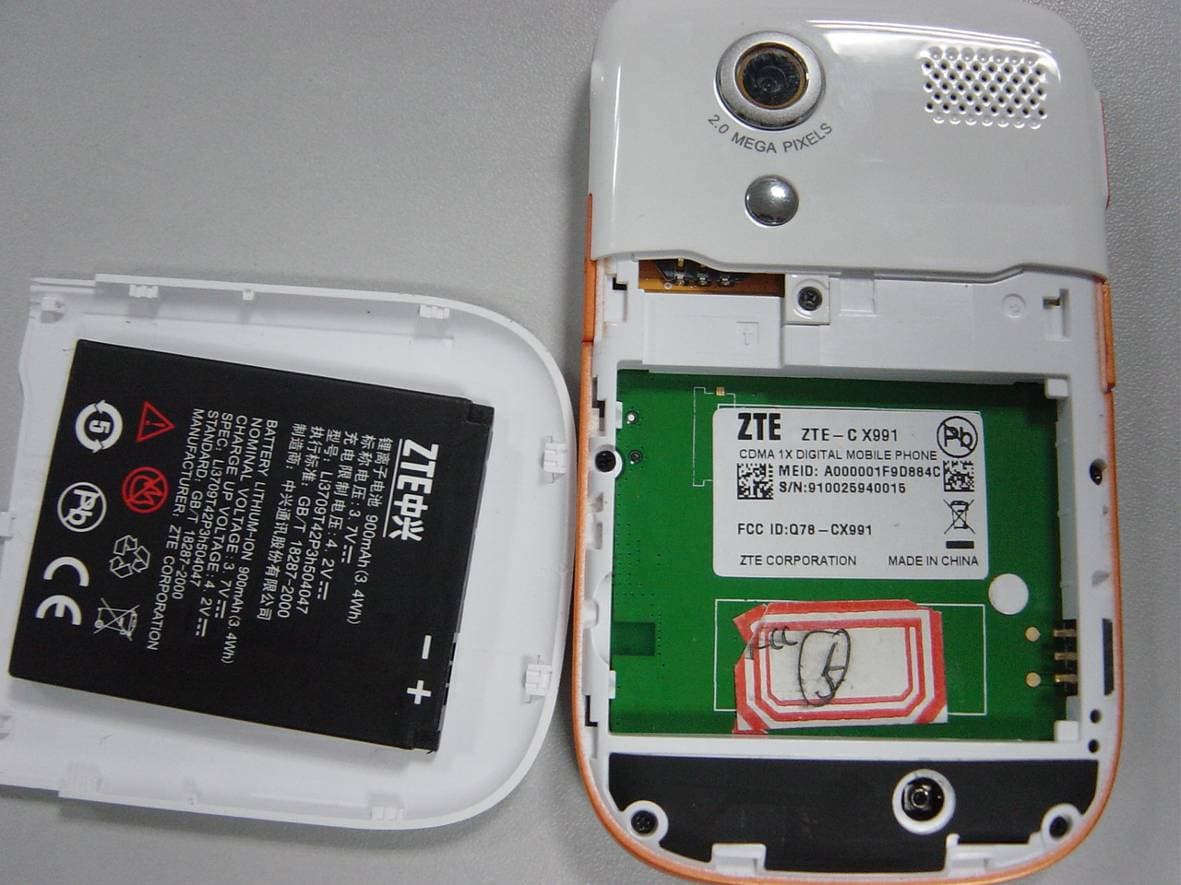
Click to zoom
Application Details
- Equipment Class
- JBP - Part 15 Class B Computing Device Peripheral
- Date of Grant
- Dec 06, 2010
- Application Purpose
- Original Equipment
- Date of Application
- Dec 05, 2010
- Equipment Note
- MOBILE PHONE
- Company
- ZTE Corporation
- Country
- China
Documents & Files
Document Text
Text extracted from the exhibit documents filed with the FCC. Open a document above to read the original.
Users Manual
X991 CDMA 1X Digital Mobile Phone User Manual Copyright © 2009 by ZTE Corporation All rights reserved. No part of this publication may be excerpted, reproduced, translated or utilized in any form or by any means, electronic or mechanical, including photocopying and microfilm, without th e prior written permission of ZTE Corporation. The manual is published by ZTE Corpor ation. We reserve the right to make modifications on print errors or update specifications without prior notice. The informatio n on the package is only for your reference. Images are for you reference only. Please check the product model before purchasing. ZTE Corporation ZTE Plaza, Keji Road South, Hi-tech Industrial Park, Nanshan District, Shenzhen, P.R.China Zip Code: 518057 Http://www.zte.com.cn Service Hotline: +86-755-26779999 1E-mail: [email protected] Manual No.079584500xxx Contents Know your Phone ......................... ........................ 3 Key Instruction ............................. ........................ 6 Interface Icons .............................. ...................... 10 Insert and Extract T-Flash Card ......................... 11 Remove and Install the Battery ........................... 12 Charge the Battery ........................... .................. 14 Power on/ off Your Phone ................................... 14 Make and Answer a Call .................................... 15 Menu Tree ................................. .......................... 16 Voice Mail ................................. .......................... 17 Te x t I n p u t .................................. .......................... 18 2Message .................................... .......................... 19 Menu Functions ............................ ...................... 20 Phone Lock ............................... .......................... 24 Warning and Maintenance .................................. 25 Warranty Terms ............................ ...................... 26 Limitation of Liability ......................................... 27 3Know your Phone 4 Receive r End key Left & Right Soft key Send ke y Direction Key&OK key Power on key Camera key Cap Lock Spacebar Enter key Delete key Lock key Fn key SYM key LCD Screen Number Key QWERTY Key are 5 Volume Key USB Port 自拍镜 Vidicon T-Flash Speaker Suspend Rope Hole Autodyne Mirror Eearphone Hole 6Key Instruction Key Function Description Send key Make or answer a call. Press Send key in standby mode to enter all dialed calls list. End key Short press to end an active call or reject a call. Exit from any interface to standby mode. Left soft key Enter main Menu in standby mode. Confirm the commands and options selected as OK key. Switch to the options of left bottom submenu. Right soft key Erase character(s) while editing. Cancel or stop operation, exit to previous window. 7 OK key Enter main Menu in standby mode. Press OK key to confirm the commands and options selected. Confirm the character chosen while character inputting. Switch to Play and Pause in Audio/Video Player. Up/Down Key Scroll the cursor up and down. Used as selection key up and down for keying in commands and selecting options shown on the display. In standby mode, press Down key to enter Messages menu , press Up key to enter Shortcuts menu. Adjust volume in conversation. Used as direction key in games. Left /Right key Scroll the cursor left and right. In standby mode, press Left key to enter Neo Application e nu, press Right key to Neo Navigation. Used as direction key in a mes. 8 Key in numbers or characters. Make a Speed Dial call (2-9) in standby mode if you set the speed dial call openly; and hold 1 key to enter Voice Mail defaultly. If you use input modes to edit ,press this butter to Input Space. SYM key Enter the symbols selection interface when editing press SYM key in standby mode to switch the silent and general mode. Lock key Switch input method when editing Long press Lock key in standby mode to lock phone’s keypad. 9 Enter key Press Enter key when you edit messages to make the cursor move to the next line. Delete key Press Delete key to delete the character before the cursor. 10Interface Icons Icon Indication Signal strength Earphone in use Keypad locked Electric quantity indicator New message Unread alarm Unread schedule Missed calls indicator Ring for incoming call 11 Ring before vibration for incoming call Ring & Vibration for incoming call Vibration for incoming call Silence for incoming call Music&FM background Alarm indicator USB mode Push message T-flash Card inserted New MMS Insert and Extract T-Flash Card Power off the phone, remove the ba ttery and other external power. 12 Insert T-Flash into T-Flash slot in the phone, or remove T-Flash out of slot, as shown in picture . Remove and Install the Battery The attached Li-ion battery along with the ph one can be used after unpacking. For the first three times, please use up the power and charge it fully for a new battery to perform well. Remove : (1) Put finger on the top finger grip in back-cover, and then s lide the back-cover of the phone down to release and remove. (2) Put finger on the finger grip, and then lift up the battery to remove the battery. 13 Install : (1) Replace the battery into the battery slot, to be noted that the lower en d of the battery firstly inserted. (2) Put the back-cover of the phone flatly upon the body of phone. Push the back-cover of the phone to lock the cover into its place. 14Charge the Battery Plug out rubber away from the jack on the top of the handset and connect the lead from the charger to the socket on the top of the phone. (Note: The top with arrow should be upright while connecting). Connect the charger to a standard wall AC socket. When the charging animation on the screen stops, the charging is completed. The charging takes usually up to 3 hours. During charging, it is a normal phenomenon that the battery, phone an…
Text truncated - open the document above for the full version.
Cover Letter(s)
Date: 14 Nov, 2010 To: Federal Communications Commission, Authorization & Evaluation Division, 7435 Oakland Mills Road, Columbia, MD 21046 To Whom It May Concern: The ZTE Corporation, the undersigned, hereby authorizes Mr. Wu Xuewen from Shenzhen Morlab Communications Technology Co., Ltd., to act on the behalf of the ZTE Corporation solely in matters relating to the application for an FCC equipment authorization for FCC ID: Q78-CX991 including the signing of documents in connection with this Application. Necessary acts carried out by ZTE Corporation on our behalf of the ZTE Corporation in connection with the Application shall have the same effect as acts of the ZTE Corporation. The ZTE Corporation also hereby certify that no party to this application is subject to a denial of benefits, including FCC benefits, pursuant to Section 5301 of the Anti-Drug Abuse Act of 1988, 21 U.S.C. 853(a). Thank you for your attention to this matter. Yours Sincerely, Royce Wang ZTE product approval manager
Cover Letter(s)
Date: 14 Nov, 2010 To: Federal Communications Commission, Authorization & Evaluation Division, 7435 Oakland Mills Road, Columbia, MD 21046 Re: ZTE Corporation FCC ID: Q78-CX991 FCC Part 22 Certification Confidentiality Request Gentlemen: This letter is to comply with 47 CFR 0.457 and 0.459 pertaining to confidentiality material. ZTE Corporation requests that the following documents regarding this submission for FCC ID: Q78-CX991 be kept confidential: Exhibit Type File Name Block Diagram CONF APPENDIX Q78-CX991_Block Diagram.pdf Schematics CONF APPENDIX Q78-CX991_Schematics.pdf Operational Description CONF APPENDIX Q78-CX991_Operational Description.pdf Part list CONF APPENDIX Q78-CX991_BOM.pdf Tune-Up-Procedure CONF APPENDIX Q78-CX991_Tune up procedure.pdf Those documents contain detailed system and equipment description and related information about the product which ZTE Corporation considers to be confidential proprietary, a custom design and, otherwise, not releasable to the general public. Since this design is a basis form which future technological products will evolve, ZTE Corporation considers this information would be of benefit to its competitors, and that the disclosure of the information in these documents would give competitors an unfair advantage in the market. Royce Wang ZTE product approval manager
External Photos
External Photos 1. Front View of EUT 2. Back View of EUT 3. All Side View of EUT
ID Label/Location Info
Label Label Location
ID Label/Location Info
14 Nov, 2010 Equipment Authorization Division Office of Engineering and Technology Federal Communications Commission 7435 Oakland Mills Road Columbia, MD 21046 Ref: FCC ID: Q78-CX991 Dear Sirs: ZTE Corporation requests acceptance of the labeling proposal described below for cell phone bearing FCC identifier Q78-CX991. The subject cell phone are compact handheld models as shown in figure 1, authorized under 47CFR Part 22 for mobile services. Figure 1. Because the majority of the cell phone housing is composed of display, speaker, operating controls, camera and a removable battery pack, there is extremely limited space available to attach the required label carrying the FCC identifier. Attaching the label to the battery pack is not acceptable because the battery pack is a removable item. For this reason, ZTE Corporation proposes placing the label carrying the FCC identifier inside the battery compartment as shown in figure 2. Figure 2. The consumer packaging for these models includes the battery pack as a separate item, NOT installed on the radio. As such, the FCC identifier will be readily visible to the user before the battery pack is installed and whenever the battery pack is removed or replaced. In this location, the label will also be protected from physical abuse and remain readable for the anticipated life of the device. The consumer packaging for these models is a "gift box" which does not allow the transceiver to be seen at time of purchase. In order to meet the requirements of 47CFR Part 2.925 (d), ZTE Corporation will add the FCC identifier "Q78-CX991" to the outside of the consumer "gift box" packaging. Thank you for your attention to this matter. Yours Sincerely, Royce Wang ZTE product approval manager
Internal Photos
Internal Photos
Test Report
Report No.: SZ10110077E02 Page 2 of 15 TABLE OF CONTENTS 1. TEST RESULT CERTIFICATION .......................................................................................... 3 2. GENERAL INFORMATION .................................................................................................... 4 2.1 Equipment under Test (EUT) Description ............................................................................... 4 2.2 Test Standards and Results ........................................................................................................ 5 2.3 Facilities and Accreditations ...................................................................................................... 6 2.3.1 Facilities .................................................................................................................................... 6 2.3.2 Test Environment Conditions .................................................................................................... 6 2.3.3 Measurement Uncertainty ......................................................................................................... 6 3. TEST CONDITIONS SETTING............................................................................................... 7 3.1 General Information ................................................................................................................... 7 3.1.1 Test Mode .................................................................................................................................. 7 3.2 Test Setup .................................................................................................................................... 8 3.2.1 Conducted Emission.................................................................................................................. 8 3.2.2 Radiated Emission ..................................................................................................................... 9 3.3 Conducted Emission ................................................................................................................. 10 3.3.1 Requirement ............................................................................................................................ 10 3.3.2 Test Procedure ......................................................................................................................... 10 3.3.3 Test Result ............................................................................................................................... 11 3.4 Radiated Emission .................................................................................................................... 13 3.4.1 Requirement ............................................................................................................................ 13 3.4.2 Test Procedure ......................................................................................................................... 13 3.4.3 Test Result ............................................................................................................................... 14 Change History Issue Date Reason for change 1.0 November 23, 2010 First edition Report No.: SZ10110077E02 Page 4 of 15 2. General Information 2.1 Equipment under Test (EUT) Description Description ........................... : CDMA 1X Digital Mobile Phone Model Name ......................... : ZTE-C X991 Serial No. .............................. : N/A Hardware Version ................. : X991MB_B Software Version .................. : x991ve_v1.2 Modulation ........................... : CDMA 1X Frequency ............................. : Tx: 824.7 – 848.31 MHz; Rx: 869.7-893.31MHz Power Supply: ...................... : Battery Brand name: ZTE Model Name: Li3709T42P3h504047 Capacitance: 900mAh Rated voltage: 3.7V Charge limited: 4.2V Manufacturer: ZTE Manufacturer Address: ZTE Plaza, Keji Road South, Hi-Tech, Industrial Park,Nanshan District,Shenzhen,Guangdong,P.R.China Accessory Equipment: ........... AC Adapter (Charger for Battery) Brand Name: Ruide Model Name: STC-A22O50U5-C Rated Input: 100-240V 50/60Hz 200mA Rated Output: 5V 700mA Manufacturer: Ruide Electronical Industrial Co., Ltd, Wire Length: 120cm NOTE: 1. The EUT is a model of CDMA 1X mobile station operating in Cellular band. 2. The normal configuration for the EUT is the Mobile Phone (MS) associated with ancillary equipments e.g. the Battery and/or the AC Adapter (Charger). 3. For detailed features about the EUT, please see user manual supplied by the applicant. Report No.: SZ10110077E02 Page 5 of 15 2.2 Test Standards and Results The objective of the report is to perform tests according to 47 CFR Part 2, Part 15 Part 22 for FCC ID Certification: No. Identity Document Title 1 47 CFR Part 2 (10-1-09 Edition) Frequency Allocations and Radio Treaty Matters; General Rules and Regulations 2 47 CFR Part 15 (10-1-09 Edition) Radio Frequency Devices Test detailed items and the results are as below: No. Rules Test Type Result FCC Part 15 Requirement 1 §15.107 Conducted Emissions PASS 2 §15.109 Radiated Emissions PASS NOTE: The tests were performed according to the method of measurements prescribed in ANSI C63.4 2003. Report No.: SZ10110077E02 Page 6 of 15 2.3 Facilities and Accreditations 2.3.1 Facilities Shenzhen Morlab Communications Technology Co., Ltd. Morlab Laboratory is a testing organization accredited by China National Accreditation Service for Conformity Assessment (CNAS) according to ISO/IEC 17025. The accreditation certificate number is L3572.. All measurement facilities used to collect the measurement data are located at 3/F, Electronic Testing Building, Shahe Road, Xili, Nanshan District, Shenzhen, 518055 P. R. China.The site was constructed in conformance with the requirements of ANSI C63.7, ANSI C63.4 and CISPR Publication 22, the FCC registration number is 741109. 2.3.2 Test Environment Conditions During the measurement, the environm…
Text truncated - open the document above for the full version.
Test Setup Photos
Test Setup Photos 1. CE 2. RE
Contact Information
Applicant
Cary Kong(Product Certification Manager)
Test Firm
Shenzhen Morlab Communications Technology Co.,LtdShu Luan
Technical Specifications
| # | Rule Parts | Frequency Range | Power Output |
|---|---|---|---|
| 1 | 15B | - | - |
Other Applications from ZTE Corporation

Q78-E1320
Oct 06, 2022Home Gateway
Equipment Class
NII - Unlicensed National Information Infrastructure TX
Q78-E3330
Sep 21, 2022Home Gateway
Equipment Class
JBP - Part 15 Class B Computing Device Peripheral
Q78-ZXV10B866V2
May 23, 2021RichMedia Box
Equipment Class
DTS - Digital Transmission System
Q78-ZXHNH298Q
Apr 22, 2021Home Gateway
Equipment Class
NII - Unlicensed National Information Infrastructure TX
Q78-ZXHNH196Q
Apr 19, 2021Home Gateway
Equipment Class
NII - Unlicensed National Information Infrastructure TX