Q78-K4201-ZHSPA USB Stick
ZTE Corporation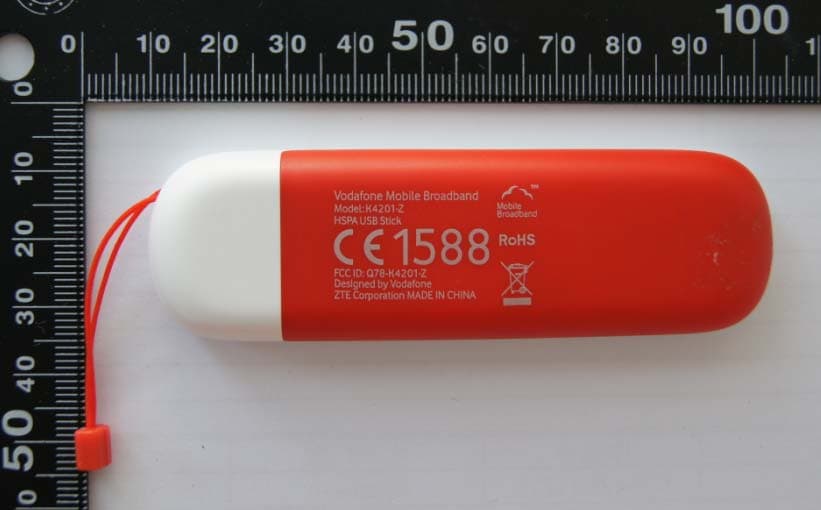
Click to zoom
Application Details
- Equipment Class
- PCB - PCS Licensed Transmitter
- Date of Grant
- Apr 21, 2013
- Application Purpose
- Original Equipment
- Date of Application
- Apr 21, 2013
- Equipment Note
- HSPA USB Stick
- Frequency Range
- 1850.20000000 - 1909.80000000
- Company
- ZTE Corporation
- Country
- China
Documents & Files
Document Text
Text extracted from the exhibit documents filed with the FCC. Open a document above to read the original.
Users Manual
User Guide Vodafone Mobile Broadband USB Stick K4201-Z Designed by Vodafone Welcome to theworld ofmobile communications 1Welcome 2Set up your USB Stick dnanoitallatsni8swodniW3 user experience 4Connection window 5QuickStart window layout 6QuickStart view: Current network panel 7SMS view 8Account view 9USB Stick LED lights 10Hints and tips 15Glossary 16 FCC Compliance 16 Radio Frequency (RF) Energy 1 Your new Vodafone Mobile Broadband USB Stick connects your computer to the internet over the Vodafone mobile phone network. The Vodafone QuickStart technology built into the device lets you connect quickly, simply and easily. Browse the web You can now access the web and any other internet ser vice wherever there’s a mobile phone network. Pick up emails Keep up to date with your emails, wherever you are. Send and receive SMS text messages You can send and receive SMS text messages straight from your computer. The SMS application provides an easy way to view messages, write new ones, and manage them. System Requirements To use this USB Stick and the Vodafone Mobile Broadband application, you need: A computer running Microsoft– ® Windows ® 8, Windows ® 7 (SP1 recommended), Windows Vista™ (SP2 recommended), or Windows ® XP (SP3 recommended), or an Apple Mac running Mac OS ® X 10.5 (Intel ® ), 10.6 or 10.7 (all with latest updates), or a computer running Linux Ubuntu 11.10/10.10/10.04, openSUSE 11.4/11.3, Fedora 16/14, Debian 6.0/5.0, Mandriva 2010.2, Red Flag 7.0. There may be some limitations in the Linux implementation. A USB socket– Administrator rights on your computer.– Welcome Note: Linux users can access the Vodafone Mobile Broadband application by entering either of the following addresses into your browser: http:// VodafoneMobile.vmb or http://192.168.9.1. 2 Step 1 Slide the front cover off the USB Stick, and insert your SIM as shown. Step 2 Important. If you have an earlier version of the VMB software on your computer, you must un-install the VMB software completely and re-boot your PC before inserting this USB Stick. Step 3 Plug the USB Stick fi rmly into your computer’s USB port. You should see a progress bar whilst the Vodafone Mobile Broadband ser vice is installed on your computer from the USB Stick. Once setup is complete, the Vodafone Mobile Broadband application is started automatically, and you are connected to the Vodafone network (if a PIN is required you will see a popup screen requesting it before you can connect). The LED on the USB Stick will change from fl ashing to solid, and you will see 2 popup screens. Set up your USB Stick Note: Some computers may be set up to prevent automatic installation of the VMB Lite service from your USB Stick. In this case, follow the steps in the hints and tips section to manually install the VMB Lite service on your computer. On a Windows 8 PC the user experience is slightly different. This is explained on the next page. 3 On a Windows 8 PC the Mobile Broadband user experience is slightly different as the mobile network connectivity is managed within the Windows 8 operating system. When you plug in the USB Stick, you need to open the ‘charms’ (Search, Share, Start, Device and Settings), and select Settings > Networks (or Your Wi-Fi Network Name) > Mobile Broadband. Select Connect Automatically if required, then click Connect. Initially the Connection Manager will show ‘Get recommended app’ and this will change to ‘View my account’ when the Mobile Broadband application has been automatically downloaded by Windows 8. Windows 8 installation and user experience Note: The Mobile Broadband application can be launched by selecting the application Tile or View My Account Link in the Networks area of the Settings charm 4 Connection window Connect/Disconnect Connect to the internet via the mobile phone network or Wi-Fi, to browse the web or use email Status Check the status of the current connection Shortcuts Select ser vices, applications and tools Menu bar Device and network settings and diagnostics, SMS functionality, manage your account. Help View Help topics Always Best Connected Confi gure connection preferences 4 5 3 1 2 6 Note: Once setup is complete, you can always access the Vodafone Mobile Broadband application when your USB Stick is inserted into your computer by clicking the desktop icon 4 5 3 2 1 6 5 3 5 1 2 Note: Every window in the QuickStart application has this same standard layout. Context-sensitive help for each window is always available at the bottom of the window. Sometimes an additional Menu bar will appear on the left of the window Navigation tabs – Select QuickStart, SMS or Account view Navigation bar – Select an area within each view Current network panel – Status of mobile broadband network connection Content area – Content for current area Context help – Context-sensitive help for current area (scroll down) Language selection – Defaults to browser language QuickStart window layout 4 6 In the QuickStart view Settings area you can: Set options for automatic connection to the mobile network– Specify the SIM PIN number (if required by your network)– Set other options via the Menu bar on the left-hand side of the – window. 6 1 2 3 4 5 6 Note: Whenever you insert your USB Stick into your computer you are connected to the mobile network. If you are running Linux you will need to open the browser manually. Automatic network connection can be disabled from the Settings area in the QuickStart view. The QuickStart application can also be accessed from the Vodafone Mobile Broadband desktop icon. The Current network panel appears on the right-hand side of every screen within the QuickStart application. ‘Roaming network’ is displayed when you are roaming on another operator’s network, or ‘Home network’. Mobile number – Shown if permitted by your network operator Signal – More bars indicates better mobile broadband network signal Status – Tick when connected to network; Cross when not connected Network – Name and type of currently con…
Text truncated - open the document above for the full version.
Cover Letter(s)
内部公开▲ 本文所有信息为中兴通讯股份有限公司内部信息,未经允许,不得外传 第1页,共1页 ZTE CORPORATION ZTE Plaza, Keji Road South, Hi-Tech Industrial Park, Nanshan District, Shenzhen, Guangdong, 518057, P.R.China Date: Apr. 9, 2013 To: Federal Communications Commission, Authorization & Evaluation Division, 7435 Oakland Mills Road, Columbia, MD 21046 And American Certification Body, Inc. 6731 Whittier Avenue Suite C110 McLean, VA 22101 To Whom It May Concern: Shanghai Tejet Communications Technology Co.,Ltd. is authorized to act on our behalf, until otherwise notified, for applications to American Certification Body, Inc. (ACB). We certify that we are not subject to denial of federal benefits, that includes FCC benefits, pursuant to Section 5301 of the Anti-Drug Abuse Act of 1988, U.S.C. 862. Further, no party, as defined in 47 CFR 1.2002 (b) to the application is subject to denial of federal benefits, that includes FCC benefits. Thank you. Sincerely yours, Royce Wang ZTE CORPORATION Tel: 0755-26770345 Fax: 0755-26770347 E-Mail: [email protected]
Cover Letter(s)
内部公开▲ 本文所有信息为中兴通讯股份有限公司内部信息,未经允许,不得外传 第1页,共1页 ZTE CORPORATION ZTE Plaza, Keji Road South, Hi-Tech Industrial Park, Nanshan District, Shenzhen, Guangdong, 518057, P.R.China Date: Apr. 9, 2013 Federal Communications Commission Office of Engineering and Technology Equipment Authorization Division 7345 Oakland Mills Road Columbia, Maryland 21046 Subject: Permanent Confidentiality request for FCC ID: Q78-K4201-Z To Whom It May Concern, Pursuant to sections 0.457 and 0.459 of CFR 47, the applicant requests permanent confidential treatment of the following information accompanying this application: - Block Diagram - Schematics - Operational Description - BOM list/Tune-Up-Procedure The above materials contain trade secrets and proprietary information not customarily released to the public. The public disclosure of these matters might be harmful to the applicant and provide unjustified benefits to its competitors. Sincerely yours, Royce Wang ZTE CORPORATION Tel: 0755-26770345 Fax: 0755-26770347 E-Mail: [email protected]
Cover Letter(s)
Date:2013-4-15 Federal Communications Commission Office of Engineering and Technology Equipment Authorization Division 7345 Oakland Mills Road Columbia, Maryland 21046 Subject: SHORT-TERM Confidentiality request for FCC ID: Q78-K4201-Z To Whom It May Concern, Pursuant to sections 0.457 and 0.459 of CFR 47 and to avoid premature release of sensitive information prior to marketing or release of the product to the public, the applicant requests the following documents contained in this certification application be temporarily withheld from public disclosure for an initial period of 180 days: - External Photos - Internal Photos - Test Setup Photos - User manual The applicant also acknowledges that they will also provide appropriate notice to ACB should either of the following occur: a) if the applicant requires additional 45 days extension periods they will notify ACB with a new request letter at least 7 days prior to the short-term confidentiality expiration date – [Note: up to a maximum of 3 extensions only are allowed], or b) immediately notify ACB in the event the information regarding the product or the product is made available to the public. ACB will then release the documents listed above for public disclosure pursuant to FCC Public Notice DA 04-1705. Yours Sincerely, Name / Title: ZhaoYang / Certificate Manager Company name: ZTE Corporation Tel:+86-21-68896840 E-mail: [email protected]
External Photos
K4201‐Z External Photos
ID Label/Location Info
Label and Location
Internal Photos
K4201‐Z Internal Photos
RF Exposure Info
Report No. RZA1303-0032SAR01 Page 1 of 91 TESTING No. L2264 OET 65 TEST REPORT Product Name HSPA USB Stick Model K4201-Z FCC ID Q78-K4201-Z Client ZTE CORPORATION Manufacturer ZTE CORPORATION Date of issue April 10, 2013 TA Technology (Shanghai) Co., Ltd. TA Technology (Shanghai) Co., Ltd. Test Report Report No. RZA1303-0032SAR01 Page 2 of 91 GENERAL SUMMARY Reference Standard(s) FCC 47CFR §2.1093 Radiofrequency Radiation Exposure Evaluation: Portable Devices ANSI C95.1, 1992: Safety Levels with Respect to Human Exposure to Radio Frequency Electromagnetic Fields, 3 kHz to 300 GHz.(IEEE Std C95.1-1991) SUPPLEMENT C Edition 01-01 to OET BULLETIN 65 Edition 97-01 June 2001 including DA 02-1438, published June 2002: Evaluating Compliance with FCC Guidelines for Human Exposure to Radio frequency Electromagnetic Fields Additional Information for Evaluation Compliance of Mobile and Portable Devices with FCC Limits for Human Exposure to Radio frequency Emissions. KDB 865664 D01 SAR measurement 100 MHz to 6 GHz v01 SAR Measurement Requirements for 100 MHz to 6 GHz KDB 447498 D01 Mobile Portable RF Exposure v05: Mobile and Portable Device RF Exposure Procedures and Equipment Authorization Policies KDB 941225 D01 SAR test for 3G devices v02: SAR Measurement Procedures CDMA 20001x RTT, 1x Ev-Do, WCDMA, HSDPA/HSPA KDB 941225 D03 SAR Test Reduction GSM/GPRS/EDGE v01: Recommended SAR Test Reduction Procedures for GSM/GPRS/EDGE KDB 447498 D02 SAR Procedures for Dongle Xmtr v02: SAR Measurement Procedures for USB Dongle Transmitters. Conclusion This portable wireless equipment has been measured in all cases requested by the relevant standards. Test results in Chapter 7 of this test report are below limits specified in the relevant standards for the tested bands only. General Judgment: Pass Comment The test result only responds to the measured sample. Approved by Director Revised by SAR Manager Performed by SAR Engineer TA Technology (Shanghai) Co., Ltd. Test Report Report No. RZA1303-0032SAR01 Page 3 of 91 TABLE OF CONTENT 1. General Information ........................................................................................................................ 5 1.1. Notes of the Test Report.......................................................................................................... 5 1.2. Testing Laboratory ................................................................................................................... 5 1.3. Applicant Information ............................................................................................................... 6 1.4. Manufacturer Information ......................................................................................................... 6 1.5. Information of EUT................................................................................................................... 7 1.6. The Maximum Reported SAR 1g ............................................................................................... 9 1.7. Test Date ................................................................................................................................. 9 2. SAR Measurements System Configuration ................................................................................... 10 2.1. SAR Measurement Set-up .....................................................................................................10 2.2. DASY5 E-field Probe System ................................................................................................ 11 2.2.1. ES3DV3 Probe Specification ...........................................................................................11 2.2.2. E-field Probe Calibration ................................................................................................. 12 2.3. Other Test Equipment ............................................................................................................12 2.3.1. Device Holder for Transmitters ....................................................................................... 12 2.3.2. Phantom .........................................................................................................................13 2.4. Scanning Procedure ..............................................................................................................13 2.5. Data Storage and Evaluation ................................................................................................. 15 2.5.1. Data Storage...................................................................................................................15 2.5.2. Data Evaluation by SEMCAD ......................................................................................... 15 3. Laboratory Environment................................................................................................................ 17 4. Tissue-equivalent Liquid ............................................................................................................... 18 4.1. Tissue-equivalent Liquid Ingredients...................................................................................... 18 4.2. Tissue-equivalent Liquid Properties ....................................................................................... 18 5. System Check ............................................................................................................................... 19 5.1. Description of System Check ................................................................................................. 19 5.2. System Check Results ...........................................................................................................20 6. Operational Conditions during Test ............................................................................................... 21 6.1. General Description of Test Procedures................................................................................ 21 6.2. Test Con…
Text truncated - open the document above for the full version.
Test Report
No. 2013TAR340 Page1 of 65 TEST REPORT No. 2013TAR340 for ZTE Corporation HSPA USB Stick Model Name: K4201-Z FCC ID: Q78- K4201-Z with Hardware Version: dt3A Software Version: VDF_K4201F4V1.0.0B04 Issued Date: 2013-4-17 Note: The test results in this test report relate only to the devices specified in this report. This report shall not be reproduced except in full without the written approval of TMC Beijing. Test Laboratory: DAR accreditation (DIN EN ISO/IEC 17025): No. D-PL-12123-01-01 FCC 2.948 Listed: No.733176 IC O.A.T.S listed: No.6629B TMC Beijing, Telecommunication Metrology Center of Ministry of Industry and Information Technology 3/F Shou Xiang Technology Building, No.51 Xueyuan Road, Hai Dian District, Beijing, P. R. China,100191. Tel:+86(0)10-62304633-2604, Fax:+86(0)10-62304793, Email:[email protected], web: www.emcite.com No. 2013TAR340 Page2 of 65 CONTENTS 1. TEST LABORATORY ......................................................................................................................... 3 1.1. TESTING LOCATION .................................................................................................................... 3 1.2. TESTING ENVIRONMENT ........................................................................................................... 3 1.3. PROJECT DATA .............................................................................................................................. 3 1.4. SIGNATURE ..................................................................................................................................... 3 2. CLIENT INFORMATION ................................................................................................................... 4 2.1. APPLICANT INFORMATION ....................................................................................................... 4 2.2. MANUFACTURER INFORMATION ............................................................................................ 4 3. EQUIPMENT UNDER TEST (EUT) AND ANCILLARY EQUIPMENT (AE) ............................. 5 3.1. ABOUT EUT ..................................................................................................................................... 5 3.2. INTERNAL IDENTIFICATION OF EUT USED DURING THE TEST .................................... 5 3.3. INTERNAL IDENTIFICATION OF AE USED DURING THE TEST ........ 错误!未定义书签。 3.4. GENERAL DESCRIPTION ............................................................................................................ 5 4. REFERENCE DOCUMENTS ............................................................................................................. 6 4.1. REFERENCE DOCUMENTS FOR TESTING ............................................................................. 6 5. LABORATORY ENVIRONMENT ..................................................................................................... 7 6. SUMMARY OF TEST RESULTS ....................................................................................................... 8 7. TEST EQUIPMENTS UTILIZED ...................................................................................................... 9 ANNEX A: MEASUREMENT RESULTS ................................................................................................ 10 A.1 OUTPUT POWER ........................................................................................................................... 10 A.2 EMISSION LIMIT ........................................................................................................................... 16 A.3 FREQUENCY STABILITY ............................................................................................................ 22 A.4 OCCUPIED BANDWIDTH .............................................................................................................. 24 A.5 EMISSION BANDWIDTH................................................................................................................ 32 A.6 BAND EDGE COMPLIANCE .......................................................................................................... 40 A.7 CONDUCTED SPURIOUS EMISSION ........................................................................................... 45 No. 2013TAR340 Page3 of 65 1. Test Laboratory 1.1. Testing Location Company Name: TMC Beijing, Telecommunication Metrology Center of MIIT Address: 3/F Shou Xiang Technology Building, No.51 Xueyuan Road, Hai Dian District, Beijing, P. R. China Postal Code: 100191 Telephone: 00861062304633 Fax: 00861062304793 1.2. Testing Environment Normal Temperature: 15-35°C Relative Humidity: 20-75% 1.3. Project data Testing Start Date: Mar. 22, 2013 Testing End Date: Apr. 19, 2013 1.4. Signature Zi Xiaogang (Prepared this test report) Sun Xiangqian (Reviewed this test report) Lu Bingsong Deputy Director of the laboratory (Approved this test report) No. 2013TAR340 Page4 of 65 2. Client Information 2.1. Applicant Information Company Name: ZTE Corporation Address /Post: ZTE Plaza, Keji Road South, Hi-Tech Industrial Park, Nanshan District, Shenzhen, Guangdong, 518057, P.R.China City: Shenzhen Postal Code: 518057 Country: China Telephone: 0086 21 68897541 Fax: 0086 21 50801070 2.2. Manufacturer Information Company Name: ZTE Corporation Address /Post: ZTE Plaza, Keji Road South, Hi-Tech Industrial Park, Nanshan District, Shenzhen, Guangdong, 518057, P.R.China City: Shenzhen Postal Code: 518057 Country: China Telephone: 0086 21 68897541 Fax: 0086 21 50801070 No. 2013TAR340 Page5 of 65 3. Equipment Under Test (EUT) and Ancillary Equipment (AE) 3.1. About EUT Description HSPA USB Stick Model Name K4201-Z FCC ID Q78- K4201-Z Frequency GPRS operation mode GSM 850MHz; PCS 1900MHz; Class B GPRS Class Class 10 EGPRS Class Class 12 Antenna Integrated Power supply Charger (AC Adaptor) Output power 31.38dBm maximum EIRP measured for PCS 1900 Extreme vol. Limits 4.8VDC to 5.2VDC (nominal: 5.0VDC) Extreme temp. Tol…
Text truncated - open the document above for the full version.
Test Setup Photos
TA Technology (Shanghai) Co., Ltd. Test Report Report No. RZA1303-0032SAR01 Page 88 of 91 ANNEX H: The EUT Appearances and Test Configuration Picture 5: Constituents of the EUT TA Technology (Shanghai) Co., Ltd. Test Report Report No. RZA1303-0032SAR01 Page 89 of 91 Picture 6: Test position 1 Picture 7: Test position 2 5mm 5mm TA Technology (Shanghai) Co., Ltd. Test Report Report No. RZA1303-0032SAR01 Page 90 of 91 Picture 8: Test Position 3 Picture 9: Test Position 4 5mm 5mm TA Technology (Shanghai) Co., Ltd. Test Report Report No. RZA1303-0032SAR01 Page 91 of 91 Picture 10: Test Position 5 5mm
Test Setup Photos
RSE1 RSE2
Contact Information
Applicant
Cary Kong(Product Certification Manager)
Technical Contact
Shanghai Tejet Communications Technology Co., Ltd.Xiang Meixiu
[email protected]86-21-61650880
Room 6205-6208, Building 6, No.399 Cailun Rd. · Shanghai · China
Test Firm
TMC-Telecommunication Metrology Center of M.I.I.TChongwen Song
Technical Specifications
| # | Rule Parts | Frequency Range | Power Output | Emission | Tolerance |
|---|---|---|---|---|---|
| 4 | 24E | 1.85 GHz - 1.91 GHz | 760.00 mW | 300KG7W | 0.1 ppm |
Other Applications from ZTE Corporation

Q78-E1320
Oct 06, 2022Home Gateway
Equipment Class
NII - Unlicensed National Information Infrastructure TX
Q78-E3330
Sep 21, 2022Home Gateway
Equipment Class
JBP - Part 15 Class B Computing Device Peripheral
Q78-ZXV10B866V2
May 23, 2021RichMedia Box
Equipment Class
DTS - Digital Transmission System
Q78-ZXHNH298Q
Apr 22, 2021Home Gateway
Equipment Class
NII - Unlicensed National Information Infrastructure TX
Q78-ZXHNH196Q
Apr 19, 2021Home Gateway
Equipment Class
NII - Unlicensed National Information Infrastructure TX