Q78-MF112HSUPA USB MODEM
ZTE Corporation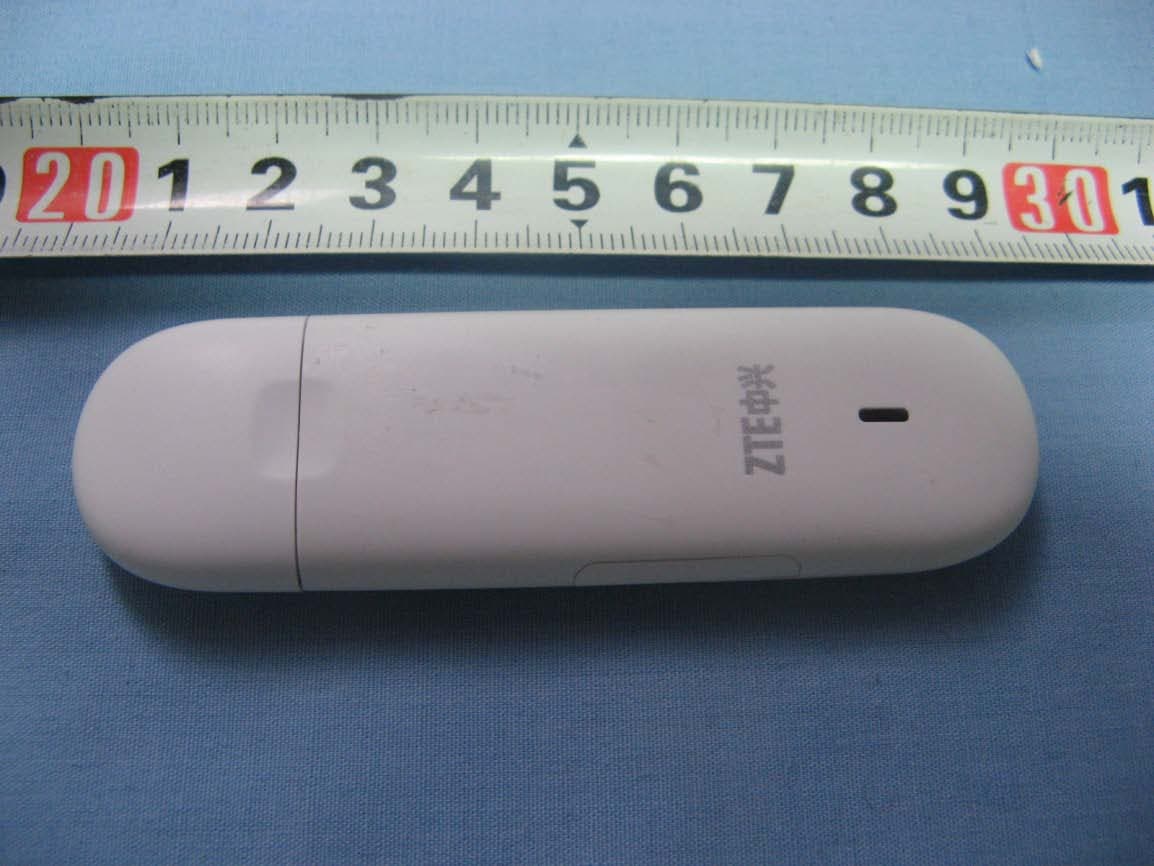
Click to zoom
Application Details
- Equipment Class
- JBP - Part 15 Class B Computing Device Peripheral
- Date of Grant
- Jun 02, 2010
- Application Purpose
- Original Equipment
- Date of Application
- Jun 01, 2010
- Equipment Note
- HSUPA USB MODEM
- Company
- ZTE Corporation
- Country
- China
Documents & Files
Document Text
Text extracted from the exhibit documents filed with the FCC. Open a document above to read the original.
Users Manual
1 ZTE MF112 USB Modem User Manual 2 Copyright © 2008 by ZTE Corporation All rights reserved. No part of this publication may be excerpted, reproduced, translated or utilized in any form or by any means, electronic or mechanical, including photocopying and microfilm, without the prior written permission of ZTE Corporation. The manual is published by ZTE Corporation. We reserve the right to make modifications on print errors or update specifications without prior notice. Edition 1st edition, Dec 2008 3 Contents 1 Modem Introduction .................................................... 5 1.1 Introduction ....................................................... 5 1.2 Warning and Notice ........................................ 5 1.3 Applicability Scope ......................................... 8 1.4 System requirements ..................................... 8 1.5 Functions ........................................................... 8 2 Installation ................................................................... 11 2.1 Software Installation .................................... 11 2.2 Run the Application Software ................... 13 2.3 Software Uninstall ........................................ 17 3 Functions & Operation ............................................. 18 3.1 Interface introduction .................................. 18 3.1.1 Main Interface ....................................................... 18 3.1.2 Description of Mini Icons ..................................... 19 3.2 Connecting Internet ...................................... 20 3.3 SMS .................................................................... 20 3.3.1 Read SMS ............................................................. 21 3.3.2 Create new message .............................................. 21 3.3.3 The SMS box Operating Guide ............................. 22 3.4 Phonebook ....................................................... 22 3.4.1 Creating a new contact .......................................... 22 3.4.2 Modifying contacts ................................................ 23 3.4.3 Deleting contacts ................................................... 23 3.4.4 Sending SMS to a contact ..................................... 23 3.4.5 Searching for a contact .......................................... 23 3.5 Settings ............................................................ 23 3.5.1 Connect Settings .................................................... 24 4 3.5.2 Network Selection ................................................. 24 3.5.3 Preference Network ............................................... 25 3.5.4 SMS Settings ......................................................... 25 3.5.5 Alert settings ......................................................... 26 3.5.6 Security Settings .................................................... 26 3.5.7 System Settings ..................... 错误!未定义书签。 3.5.8 Speed Manager ...................... 错误!未定义书签。 3.5.9 Upgrade Settings ................... 错误!未定义书签。 3.6 Data Record .................................................... 26 3.8 MicroSD card .................................................. 26 3.9 Help .................................................................... 26 4 FAQ & Answers ........................................................... 28 5 1 Modem Introduction 1.1 Introduction Thank you for using ZTE USB Modem. To guarantee the modem always in its best condition, please read this manual carefully and keep it for further use. The pictures, symbols and contents in this manual are just for your reference. They might not be completely identical with your modem. We operate a policy of continuous development. We reserve the right to update the technical specifications in this document at any time without prior notice. The ZTE USB Modem is a type of multi-mode, 3G modem, suitable for GSM/GPRS/WCDMA/EDGE/HSDPA network. It adopts USB interface which provides an easy interface to laptop and desktop PC. With the GSM/ GPRS/ EDGE/ UMTS/ HSDPA mobile network, it can help you carry out SMS, data service and will help you break away from the limit of time and zone, and realize wireless communication at any moment everywhere. 1.2 Warning and Notice To the owner Some electronic devices are susceptible to electromagnetic interference sent by modem if inadequately shielded, such as electronic system of vehicles. Please consult the manufacturer of the device before using the modem if necessary. Operating of laptop and desktop PC and modem may interfere with medical devices like hearing aids and pacemakers. Please always keep them more than 20 centimeters away from such medical devices when they are turned on. Turn the modem off if necessary. Consult a physician or the manufacturer of the medical device before using the modem. Be aware of the usage limitation when using a modem at 6 places such as oil warehouses or chemical factories, where there are explosive gases or explosive products being processed. Therefore, turn off your modem if required. Don’t touch the inner antenna area if not necessary. Otherwise it will affect your modem’s performance. Store the modem out of the reach of little children. The modem may cause injury if used as a toy. Modem Please use original accessories or accessories that are authorized. Using any unauthorized accessories may affect your modem’s performance, and violate related national regulations about telecom terminals. Avoid using the modem near metallic structure device or establishment that can emit electromagnet wave. Otherwise it may influence receiving signals. The modem is non-waterproof type, please keep it dry and store in shady and cool place. Don’t use the modem immediately after a sudden temperature change. In such case, it will produce dew inside and outside the modem, so don’t use it until it becomes dry. Take the modem carefully. Don’t lose, bend or cause it struck. Otherwise it will lead to destru…
Text truncated - open the document above for the full version.
Cover Letter(s)
内部公开▲ 本文所有信息为中兴通讯股份有限公司内部信息,未经允许,不得外传 第1页,共1页 ZTE CORPORATION ZTE Plaza, Keji Road South, Hi-Tech Industrial Park, Nanshan District, Shenzhen, Guangdong, 518057, P.R.China Date: May 10, 2010 Federal Communications Commission Office of Engineering and Technology Equipment Authorization Division 7345 Oakland Mills Road Columbia, Maryland 21046 Subject: Permanent Confidentiality request for FCC ID: Q78-MF112 To Whom It May Concern, Pursuant to sections 0.457 and 0.459 of CFR 47, the applicant requests permanent confidential treatment of the following information accompanying this application: - Block Diagram - Schematics - Operational Description - BOM list/Tune-Up-Procedure The above materials contain trade secrets and proprietary information not customarily released to the public. The public disclosure of these matters might be harmful to the applicant and provide unjustified benefits to its competitors. Sincerely yours, Royce Wang ZTE CORPORATION Tel: 0755-26770345 Fax: 0755-26770347 E-Mail: [email protected]
Cover Letter(s)
内部公开 内部公开内部公开 内部公开▲ 本文中的所有信息归中兴通讯股份有限公司所有,未经允许,不得外传 第 1 / 1 页 ZTE CORPORATION ZTE Plaza, Keji Road South, Hi-Tech Industrial Park,Nanshan District,Shenzhen, Guangdong, 518057, P.R.China Date: Oct 12,2009 To: Federal Communications Commission, Authorization & Evaluation Division, 7435 Oakland Mills Road, Columbia, MD 21046 And American Telecommunications Certification Body, Inc. 6731 Whittier Avenue Suite C110 McLean, VA 22101 To Whom It May Concern: TMC(Telecommunication Metrology Center of MII) is authorized to act on our behalf, until otherwise notified, for applications to American Telecommunications Certification Body, Inc. (ATCB). We certify that we are not subject to denial of federal benefits, that includes FCC benefits, pur suant to Section 5301 of the Anti-Drug Abuse Act of 1988, U.S.C. 862. Further, no party, as defined in 47 CFR 1.2002 (b) to the application is subject to denial of federal benefits, that includes FCC benefits. Thank you. Regards, Royce Wang ZTE CORPORATION Tel:0755-26770345 Fa x:0755-26770347 E- Mail:[email protected]
External Photos
External Photos
ID Label/Location Info
MF112 Label Location Label
Internal Photos
Internal Photos
Test Report
No.2010TAR217 Page1 of 14 ©Copyright. All rights reserved by TMC Beijing. TEST REPORT No. 2010TAR217 for ZTE CORPORATION HSUPA USB MODEM Type MF112 FCC ID : Q78-MF112 with Hardware Version: P671A2-2.0.0 Software Version: BD_P671A2V1.0.0B04 Issued Date: May 31th, 2010 Note: The test results in this test report relate only to the devices specified in this report. This report shall not be reproduced except in full without the written approval of TMC Beijing. Test Laboratory: DAR accreditation (DIN EN ISO/IEC 17025): No. DGA-PL-114/01-02 FCC 2.948 Listed: No.733176 IC O.A.T.S listed: No.6629A-1 TMC Beijing, Telecommunication Metrology Center of Ministry of Industry and Information Technology No. 52, Huayuan Bei Road, Haidian District, Beijing, P. R. China 100191 Tel:+86(0)10-62304633 , Fax:+86(0)10-62304633 Email:[email protected]. www.emcite.com No.2010TAR217 Page2 of 14 ©Copyright. All rights reserved by TMC Beijing. CONTENTS 1. TEST LABORATORY ............................................................................................................... 3 1.1. TESTING LOCATION ........................................................................................................... 3 1.2. TESTING ENVIRONMENT ................................................................................................... 3 1.3. PROJECT DATA ................................................................................................................... 3 1.4. SIGNATURE .......................................................................................................................... 3 2. CLIENT INFORMATION ........................................................................................................... 4 2.1. APPLICANT INFORMATION ................................................................................................ 4 2.2. MANUFACTURER INFORMATION ...................................................................................... 4 3. EQUIPMENT UNDER TEST (EUT) AND ANCILLARY EQUIPMENT (AE) ............................ 5 3.1. ABOUT EUT .......................................................................................................................... 5 3.2. INTERNAL IDENTIFICATION OF EUT USED DURING THE TEST ................................... 5 4. REFERENCE DOCUMENTS .................................................................................................... 6 4.1. REFERENCE DOCUMENTS FOR TESTING....................................................................... 6 5. LABORATORY ENVIRONMENT .............................................................................................. 7 6. SUMMARY OF TEST RESULTS .............................................................................................. 8 7. TEST EQUIPMENTS UTILIZED ............................................................................................... 9 ANNEX A: MEASUREMENT RESULTS ....................................................................................... 10 No.2010TAR217 Page3 of 14 ©Copyright. All rights reserved by TMC Beijing. 1. Test Laboratory 1.1. Testing Location Company Name: TMC Beijing, Telecommunication Metrology Center of MIIT Address: No 52, Huayuan beilu, Haidian District, Beijing,P.R.China Postal Code: 100191 Telephone: 00861062304633 Fax: 00861062304793 1.2. Testing Environment Normal Temperature: 15-35°C Relative Humidity: 20-75% 1.3. Project data Testing Start Date: Nov 20 th , 2009 Testing End Date: Dec 10 th , 2009 1.4. Signature Zi Xiaogang (Prepared this test report) Sun Xiangqian (Reviewed this test report) Lu Bingsong Deputy Director of the laboratory (Approved this test report) No.2010TAR217 Page4 of 14 ©Copyright. All rights reserved by TMC Beijing. 2. Client Information 2.1. Applicant Information Company Name: ZTE CORPORATION Address /Post: ZTE Plaza, Keji Road South, Hi-Tech Industrial Park,Nanshan District,Shenzhen, Guangdong, 518057, P.R.China City: Shenzhen Postal Code: 518057 Country: China Telephone: +86-21-68897541 Fax: +86-21-50801070 2.2. Manufacturer Information Company Name: ZTE CORPORATION Address /Post: ZTE Plaza, Keji Road South, Hi-Tech Industrial Park,Nanshan District,Shenzhen, Guangdong, 518057, P.R.China City: Shenzhen Postal Code: 518057 Country: China Telephone: +86-21-68897541 Fax: +86-21-50801070 No.2010TAR217 Page5 of 14 ©Copyright. All rights reserved by TMC Beijing. 3. Equipment Under Test (EUT) and Ancillary Equipment (AE) 3.1. About EUT Description HSUPA USB MODEM Model Name MF112 FCC ID Q78-MF112 Power supply USB Note: Components list, please refer to documents of the manufacturer; it is also included in the original test record of Telecommunication Metrology Center of MII of People’s Republic of China. 3.2. Internal Identification of EUT used during the test EUT ID* SN or IMEI HW Version SW Version N01 / P671A2-2.0.0 BD_P671A2V1.0.0B04 *EUT ID: is used to identify the test sample in the lab internally. No.2010TAR217 Page6 of 14 ©Copyright. All rights reserved by TMC Beijing. 4. Reference Documents 4.1. Reference Documents for testing The following documents listed in this section are referred for testing. Reference Title Version FCC Part 15, Subpart B Radio frequency devices July 10, 2008 Edition ANSI C63.4 Methods of Measurement of Radio-Noise Emissions from Low-Voltage Electrical and Electronic Equipment in the Range of 9 kHz to 40 GHz 2009 No.2010TAR217 Page7 of 14 ©Copyright. All rights reserved by TMC Beijing. 5. LABORATORY ENVIRONMENT Semi-anechoic chamber (23 meters×17meters×10meters) did not exceed following limits along the EMC testing: Temperature Min. = 15 °C, Max. = 30 °C Relative humidity Min. = 30 %, Max. = 60 % Shielding effectiveness > 110 dB Electrical insulation > 10 k Ground system resistance < 0.5 Normalised site attenuation (NSA) < ±3.2 dB, 10 m distance, from 30 to 1000 MHz Uniformity of field strength Between 0 and 6 dB, from 80 to 2000 MHz Control room did not exceed following lim…
Text truncated - open the document above for the full version.
Test Setup Photos
MF112 Test Set Up Photos 1. Part22/24 Radiated Spurious Emission 2. Part15B Conducted Emission 3. Part15B Radiated Emission
Contact Information
Applicant
Cary Kong(Product Certification Manager)
Test Firm
TMC-Telecommunication Metrology Center of M.I.I.TChongwen Song
Technical Specifications
| # | Rule Parts | Frequency Range | Power Output |
|---|---|---|---|
| 1 | 15B | - | - |
Other Applications from ZTE Corporation

Q78-E1320
Oct 06, 2022Home Gateway
Equipment Class
NII - Unlicensed National Information Infrastructure TX
Q78-E3330
Sep 21, 2022Home Gateway
Equipment Class
JBP - Part 15 Class B Computing Device Peripheral
Q78-ZXV10B866V2
May 23, 2021RichMedia Box
Equipment Class
DTS - Digital Transmission System
Q78-ZXHNH298Q
Apr 22, 2021Home Gateway
Equipment Class
NII - Unlicensed National Information Infrastructure TX
Q78-ZXHNH196Q
Apr 19, 2021Home Gateway
Equipment Class
NII - Unlicensed National Information Infrastructure TX