Q78-MF190BHSPA USB Stick
ZTE Corporation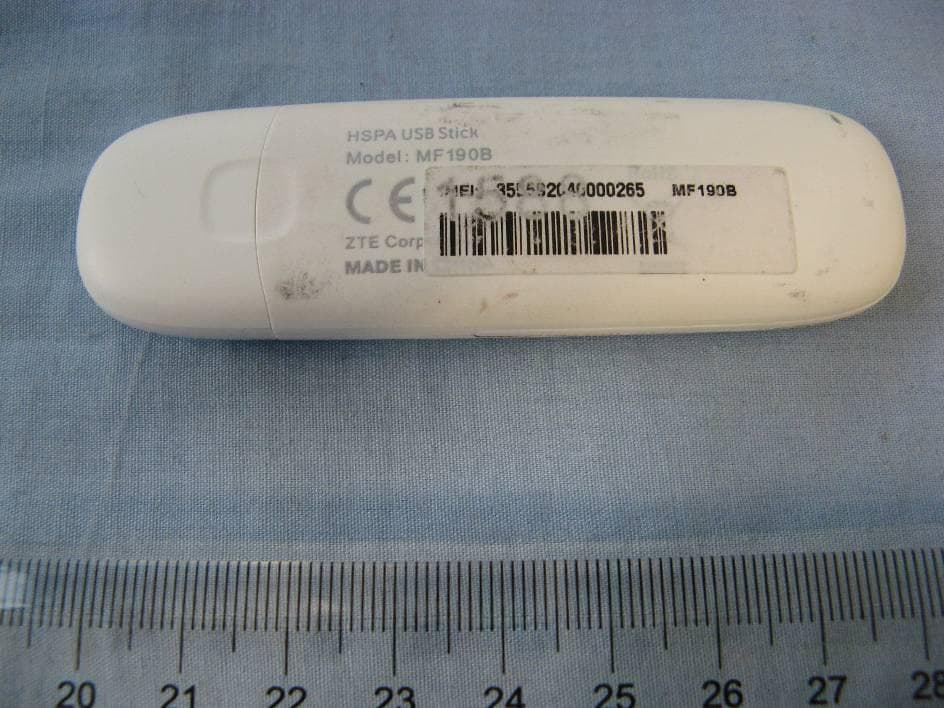
Click to zoom
Application Details
- Equipment Class
- JBP - Part 15 Class B Computing Device Peripheral
- Date of Grant
- Apr 26, 2011
- Application Purpose
- Original Equipment
- Date of Application
- Apr 26, 2011
- Equipment Note
- HSPA USB Stick
- Company
- ZTE Corporation
- Country
- China
Documents & Files
Document Text
Text extracted from the exhibit documents filed with the FCC. Open a document above to read the original.
Users Manual
MF190B USB Modem Quick Guide ZTE CORPORATION NO. 55, Hi-tech Road South, ShenZhen, P.R.China Postcode: 518057 LEGAL INFORMATION Copyright © 2010 ZTE CORPORATION. All rights reserved. No part of this publication may be excerpted, reproduced, translated or utilized in any form or by any means, electronic or mechanical, including photocopying and microfilm, without the prior written permission of ZTE Corporation. The manual is published by ZTE Corporation. We reserve the right to make modifications on print errors or update specifications without prior notice. Version No. : R1.0 Confidential and Proprietary Information of ZTE CORPORATION 1 C h a p t e r 1 Quick Guide Introduction The ZTE USB modem is a multi-mode USB modem, working in HSUPA/HSDPA/WCDMA/EDGE/GPRS/GSM networks. With USB interface connecting to a laptop or a desktop PC, it integrates the functionality of a modem and a mobile phone (SMS), and combines mobile communication with Internet perfectly. It supports data and SMS services through the mobile phone network, enabling you to communicate anytime and anywhere. Specification The following table shows the specification of your device. Interface Type USB 2.0 HIGH SPEED Systems supported Supports most types of laptop and desktop PC. Operating systems supported Windows XP, Vista, Windows 7 MAC 10.4, 10.5, 10.6 Functions SMS service, Data service, Applications management, etc. Network Standards HSUPA/HSDPA/WCDMA/EDGE/GPRS/GSM Transmission speed (Max) HSUPA: 5.76Mbps UL HSDPA: 7.2Mbps DL Temperature Storage: -40°C ~ +80°C Operation:-10°C ~ +60°C Dimension 76mm×26mm×11mm(without cap) Weight About 21g Getting to know your device The following figure shows the appearance of the MF190B. It is only for your reference. The actual product may be different. MF190 Quick Guide 2 Confidential and Proprietary Information of ZTE CORPORATION 1. Indicator 2. Front Cover 3. Modem Cap 4. SIM/USIM card slot 5. USB Connector Hardware Installation 1. Put finger on the bottom finger grip, and then lift the front cover of the modem to release and remove. Notes: Do not open the front cover rudely so as to avoid the damage of the front cover. 2. Insert the SIM/USIM card into the SIM/USIM card slot. Insert the SIM/USIM card with the metal contact area facing downwards into the slot, and then push SIM/USIM card as far as possible, shown as the following picture. MF190 Quick Guide Confidential and Proprietary Information of ZTE CORPORATION 3 3. Put the front cover of the modem flatly upon the body of modem. Direct the front cover towards the locking catches on the sides of the modem and push the front cover of the modem to lock the front cover into its place. 4. Connect the Modem to your laptop or desktop PC. Plug the USB connector into your computer’s USB port and make sure that it is tightly inserted. The OS automatically detects and recognizes new hardware and starts the installation wizard. Software Installation Guide On different operating systems, the installation procedures may be difference. Follow the system prompts during operation. For Windows OS Your system will start the software setup process automatically when you connect the modem to your MF190 Quick Guide 4 Confidential and Proprietary Information of ZTE CORPORATION computer correctly. Follow the system prompts to complete the software installation. Notes: If the system does not launch installation automatically, you can run the installation program in path of My Computer > ZTEMODEM. For Mac OS The system will automatically display a ZTEMODEM CD-ROM icon on the desktop, when you connect the modem to your computer correctly. Double click the installation software package in the ZTEMODEM, and follow the system prompts to complete the software installation. Safe removal from your system Please close the application software, and then you can pull out the USB Modem safely. How to use your modem Various icons are presented to enable quick operation of the following functions: Connect Connect to the Internet. SMS Click New button, enter recipient’s number and content, and then click Send to send new message. Phonebook Click New to fill in a new contact person and contact details. Settings Set the configuration for the USB modem. Data records Show the connection information. Warning and Notice To the owner • Some electronic devices are susceptible to electromagnetic interference sent by modem if inadequately shielded, such as the electronic system of vehicles. Please consult the manufacturer of the device before using the modem if necessary. • Operating of laptop and desktop PCs and the modem may interfere with medical devices like hearing aids and pacemakers. Please always keep them more than 20 centimeters away from such medical devices when they are turned on. Turn the modem off if necessary. Consult a physician or the manufacturer of the medical device before using the modem. • Be aware of the usage limitation when using a modem at places such as oil warehouses or chemical factories, where there are explosive gases or explosive products being processed. Turn off your modem if required. • The use of electronic transmitting devices is forbidden in aircrafts, at petrol stations and in hospitals. Please observe and obey all warning signs and switch off your modem in these conditions. MF190 Quick Guide Confidential and Proprietary Information of ZTE CORPORATION 5 • Do not touch the inner antenna area if not necessary. Otherwise it will affect your modem’s performance. • Store the modem out of the reach of little children. The modem may cause injury if used as a toy. • Do not touch the metallic parts of the modem so as to avoid a burn, when the modem is working. Using your USB Modem • Please use original accessories or accessories that are authorized. Using any unauthorized accessories may affect your modem’s performance, and violate related national regulations about telecom terminals. • Avoid using the modem near or inside metallic structures or…
Text truncated - open the document above for the full version.
Cover Letter(s)
5F, E building, No. 232, Liang Jing Road ZhangJiang High-Tech Park, Pudong Area Shanghai, P.R. China. 201203 TEL: +86(0)21 61460666 FAX: +86(0)21 61460602 4/4/2011 Federal Communications Commission Office of Engineering and Technology Equipment Authorization Division 7345 Oakland Mills Road Columbia, Maryland 21046 Subject: Permanent Confidentiality request for FCC ID: Q78-MF190B To Whom It May Concern, Pursuant to sections 0.457 and 0.459 of CFR 47, the applicant requests permanent confidential treatment of the following information accompanying this application: - Block Diagram - Schematics - Operational Description - BOM list/Tune-Up-Procedure The above materials contain trade secrets and proprietary information not customarily released to the public. The public disclosure of these matters might be harmful to the applicant and provide unjustified benefits to its competitors. Yours Sincerely, Zhizhou Gong Approval Team Leader TCT Mobile Limited
External Photos
Q78-MF190B external photo
ID Label/Location Info
Q78-MF190B, FCC label placement
Internal Photos
Q78-MF190B internal photos
Test Report
No.2011TAR074 Page 1 of 14 ©Copyright. All rights reserved by TMC Beijing. TEST REPORT No. 2011TAR074 for ZTE Corporation HSPA USB Stick Model Name: MF190B FCC ID : Q78-MF190B with Hardware Version: dj2A Software Version: EN_ZTE_MF190BV1.0.0B05 Issued Date: 2011-03-28 Note: The test results in this test report relate only to the devices specified in this report. This report shall not be reproduced except in full without the written approval of TMC Beijing. Test Laboratory: DAR accreditation (DIN EN ISO/IEC 17025): No. DGA-PL-114/01-02 FCC 2.948 Listed: No.733176 IC O.A.T.S listed: No.6629A-1 TMC Beijing, Telecommunication Metrology Center of Ministry of Industry and Information Technology No. 52, Huayuan Bei Road, Haidian District, Beijing, P. R. China 100191 Tel:+86(0)10-62304633 , Fax:+86(0)10-62304633 Email:[email protected]. www.emcite.com No.2011TAR074 Page 2 of 14 ©Copyright. All rights reserved by TMC Beijing. CONTENTS 1. TEST LABORATORY ............................................................................................................... 3 1.1. TESTING LOCATION ........................................................................................................... 3 1.2. TESTING ENVIRONMENT ................................................................................................... 3 1.3. PROJECT DATA ................................................................................................................... 3 1.4. SIGNATURE .......................................................................................................................... 3 2. CLIENT INFORMATION ........................................................................................................... 4 2.1. APPLICANT INFORMATION ................................................................................................ 4 2.2. MANUFACTURER INFORMATION ...................................................................................... 4 3. EQUIPMENT UNDER TEST (EUT) AND ANCILLARY EQUIPMENT (AE) ............................ 5 3.1. ABOUT EUT .......................................................................................................................... 5 3.2. INTERNAL IDENTIFICATION OF EUT USED DURING THE TEST ................................... 5 4. REFERENCE DOCUMENTS .................................................................................................... 6 4.1. REFERENCE DOCUMENTS FOR TESTING....................................................................... 6 5. LABORATORY ENVIRONMENT .............................................................................................. 7 6. SUMMARY OF TEST RESULTS .............................................................................................. 8 7. TEST EQUIPMENTS UTILIZED ............................................................................................... 9 ANNEX A: MEASUREMENT RESULTS ....................................................................................... 10 No.2011TAR074 Page 3 of 14 ©Copyright. All rights reserved by TMC Beijing. 1. Test Laboratory 1.1. Testing Location Company Name: TMC Beijing, Telecommunication Metrology Center of MIIT Address: No 52, Huayuan beilu, Haidian District, Beijing, P. R. China Postal Code: 100191 Telephone: 00861062304633 Fax: 00861062304633 1.2. Testing Environment Normal Temperature: 15 – 35 °C Relative Humidity: 20 – 75 % 1.3. Project data Testing Start Date: Mar. 4, 2011 Testing End Date: Mar. 6, 2011 1.4. Signature Qu Pengfei (Prepared this test report) Sun Xiangqian (Reviewed this test report) Lu Bingsong Deputy Director of the laboratory (Approved this test report) No.2011TAR074 Page 4 of 14 ©Copyright. All rights reserved by TMC Beijing. 2. Client Information 2.1. Applicant Information Company Name: ZTE Corporation Address /Post: #68 Zijin Hua Road, Nanjing, Jiangsu Province, P. R. China City: Nan Jing Postal Code: 210012 Country: China Telephone: +86-25-52878232 Fax: +86-25-68897541 2.2. Manufacturer Information Company Name: ZTE Corporation Address /Post: #68 Zijin Hua Road, Nanjing, Jiangsu Province, P. R. China City: Nan Jing Postal Code: 210012 Country: China Telephone: +86-25-52878232 Fax: +86-25-68897541 No.2011TAR074 Page 5 of 14 ©Copyright. All rights reserved by TMC Beijing. 3. Equipment Under Test (EUT) and Ancillary Equipment (AE) 3.1. About EUT Description HSPA USB Stick Model Name MF190B FCC ID Q78-MF190B Extreme vol. Limits 4.8VDC to 5.2VDC (nominal: 5.0VDC) Note: Components list, please refer to documents of the manufacturer; it is also included in the original test record of Telecommunication Metrology Center of MIIT of People’s Republic of China. 3.2. Internal Identification of EUT used during the test EUT ID* SN or IMEI HW Version SW Version N01 355820400006288 dj2A EN_ZTE_MF190BV1.0.0B05 *EUT ID: is used to identify the test sample in the lab internally. No.2011TAR074 Page 6 of 14 ©Copyright. All rights reserved by TMC Beijing. 4. Reference Documents 4.1. Reference Documents for testing The following documents listed in this section are referred for testing. Reference Title Version FCC Part 15, Subpart B Radio frequency devices July 10, 2008 Edition ANSI C63.4 Methods of Measurement of Radio-Noise Emissions from Low-Voltage Electrical and Electronic Equipment in the Range of 9 kHz to 40 GHz 2003 No.2011TAR074 Page 7 of 14 ©Copyright. All rights reserved by TMC Beijing. 5. LABORATORY ENVIRONMENT Semi-anechoic chamber (23 meters×17meters×10meters) did not exceed following limits along the EMC testing: Temperature Min. = 15 °C, Max. = 30 °C Relative humidity Min. = 30 %, Max. = 60 % Shielding effectiveness > 110 dB Electrical insulation > 10 k Ground system resistance < 0.5 Normalised site attenuation (NSA) < ±3.2 dB, 10 m distance, from 30 to 1000 MHz Uniformity of field strength Between 0 and 6 dB, from 80 to 2000 MHz Control room did not exceed following limits along the EMC testing: Temperature Mi…
Text truncated - open the document above for the full version.
Test Setup Photos
MF190B FCC test setup photo 1. Radiated Spurious Emission 2. Conducted Emission(USB) 3. Radiated Emission(USB)
Contact Information
Applicant
Cary Kong(Product Certification Manager)
Technical Contact
Test Firm
TMC-Telecommunication Metrology Center of M.I.I.TChongwen Song
Technical Specifications
| # | Rule Parts | Frequency Range | Power Output |
|---|---|---|---|
| 1 | 15B | - | - |
Other Applications from ZTE Corporation

Q78-E1320
Oct 06, 2022Home Gateway
Equipment Class
NII - Unlicensed National Information Infrastructure TX
Q78-E3330
Sep 21, 2022Home Gateway
Equipment Class
JBP - Part 15 Class B Computing Device Peripheral
Q78-ZXV10B866V2
May 23, 2021RichMedia Box
Equipment Class
DTS - Digital Transmission System
Q78-ZXHNH298Q
Apr 22, 2021Home Gateway
Equipment Class
NII - Unlicensed National Information Infrastructure TX
Q78-ZXHNH196Q
Apr 19, 2021Home Gateway
Equipment Class
NII - Unlicensed National Information Infrastructure TX