Q78-MF680DC-HSPA+USB Modem
ZTE Corporation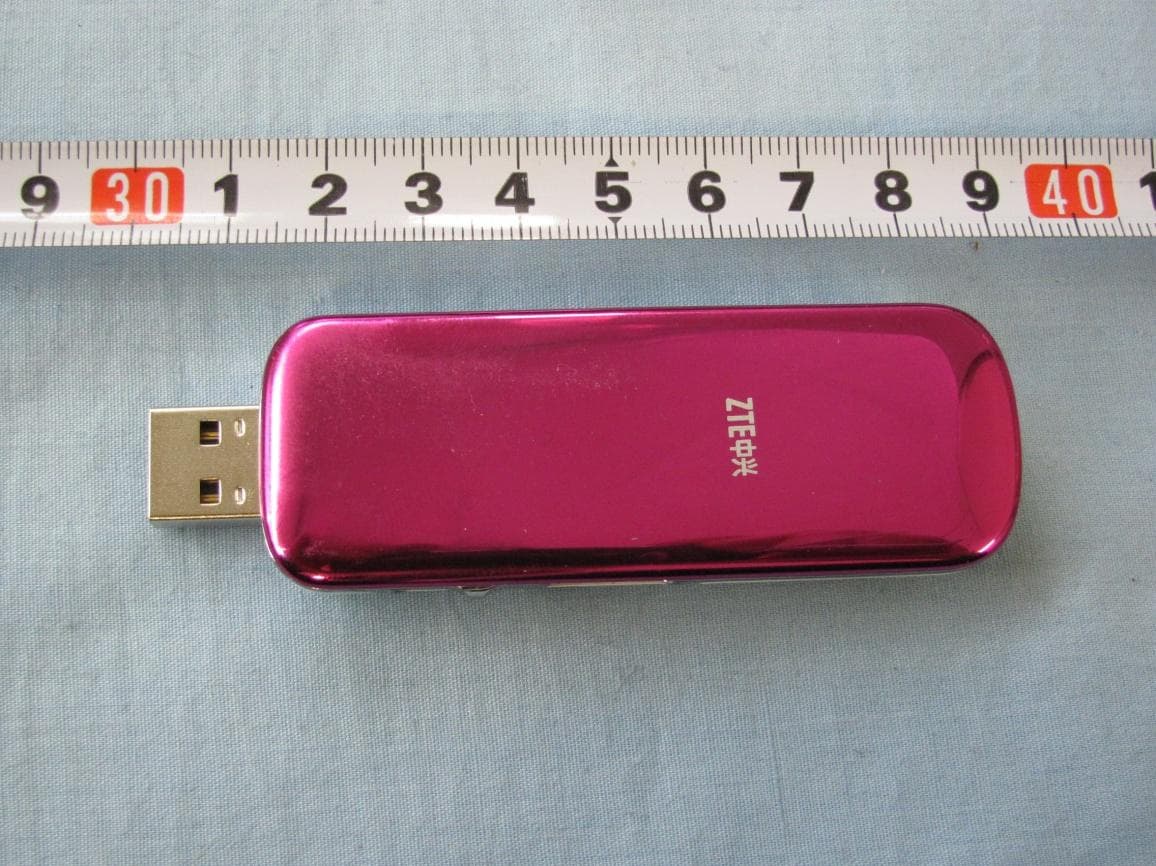
Click to zoom
Application Details
- Equipment Class
- JBP - Part 15 Class B Computing Device Peripheral
- Date of Grant
- Mar 27, 2011
- Application Purpose
- Original Equipment
- Date of Application
- Mar 23, 2011
- Equipment Note
- DC-HSPA+USB Modem
- Company
- ZTE Corporation
- Country
- China
Documents & Files
Document Text
Text extracted from the exhibit documents filed with the FCC. Open a document above to read the original.
Users Manual
Confidential and Proprietary Information of ZTE CORPORATION 1 MF680 USB Modem Quick Guide Quick Guide Introduction The USB modem is a multi-mode 3G modem. With a USB interface connecting to your laptop or desktop computer, it supports data and SMS services through the mobile phone network, helping you realize mobile communication anytime and anywhere. Hardware Installation Installing the SIM/USIM Card 1. Remove the back cover on the modem. 2. Hold your SIM/USIM card with the cut corner oriented as shown and then slide it into the card holder with the metal contacts facing the modem. 3. Replace the back cover. MF680 Quick Guide 2 Confidential and Proprietary Information of ZTE CORPORATION Installing the Memory Card Only microSD card is supported by the modem and do not insert other types of memory cards into the modem. The maximum capacity of the microSD card supported is 32 GB. Insert the microSD card, orientated as shown, into the microSD card slot until you hear a click. Notes: The logo is a trademark of the SD Card Association. Connecting to Your Computer Plug the retractable USB of the modem to the USB port of your computer. Make sure that it is tightly inserted. If your PC runs a Windows operating system, it will automatically detect and recognize the modem and display a new icon in the taskbar, indicating that the PC and the modem have been connected properly. Software Installation On different operating systems, the software installation procedures may be different. Please follow the general guide below and the system prompts during installation. • For Windows XP, Vista and Windows 7 When you connect the modem to your PC correctly, the system automatically recognizes the modem as a new CD-ROM drive and launch the software installation wizard. If the system does not launch the installation wizard automatically, please start it by running the executable file in the new CD-ROM directory. • For Mac OS The system will automatically display a new CD-ROM icon on the desktop, when you connect the modem to your Mac correctly. Double click the installation software package in the CD-ROM, and follow the system prompts to complete the software installation. Functions Open the installed software and click the following buttons to access each function. Connect Connect to the Internet. SMS Send and receive text messages. Phonebook Manage contacts information. Settings Configure the USB modem settings. MF680 Quick Guide Confidential and Proprietary Information of ZTE CORPORATION 3 Data record Show connection information. LED Light The LED lights up when the modem is connected to the PC. Color Modem Status Red Power on, but not registered to a network Blue solid Registered to a 3G network Blue blinking Active data transfer on the 3G network Green solid Registered to a 2G network Green blinking Active data transfer on the 2G network Warning and notice To the owner • Some electronic devices are susceptible to electromagnetic interference sent by modem if inadequately shielded, such as the electronic system of vehicles. Please consult the manufacturer of the device before using the modem if necessary. • Operating of laptop and desktop PCs and the modem may interfere with medical devices like hearing aids and pacemakers. Please always keep them more than 20 centimeters away from such medical devices when they are turned on. Turn the modem off if necessary. Consult a physician or the manufacturer of the medical device before using the modem. • Operating of laptop and desktop PCs please keep this modem more than 5mm away from your body. • Be aware of the usage limitation when using a modem at places such as oil warehouses or chemical factories, where there are explosive gases or explosive products being processed. Turn off your modem if required. • The use of electronic transmitting devices is forbidden in aircrafts, at petrol stations and in hospitals. Please observe and obey all warning signs and switch off your modem in these conditions. • Do not touch the inner antenna area if not necessary. Otherwise it will affect your modem’s performance. • Store the modem out of the reach of little children. The modem may cause injury if used as a toy. • Do not touch the metallic parts of the modem so as to avoid a burn, when the modem is working. Health and safety information Radio Frequency (RF) Energy This USB MODEM meets the government’s requirements for exposure to radio waves. This USB MODEM is designed and manufactured not to exceed the emission limits for exposure to radio frequency (RF) energy set by the Federal Communications Commission of the U.S. Government: The exposure standard for wireless mobile phones employs a unit of measurement known as the Specific Absorption Rate, or SAR. The SAR limit set by the FCC is 1.6W/kg. *Tests for SAR are conducted using standard operating positions accepted by the FCC with the USB MODEM transmitting at its highest certified power level in all tested frequency bands. Although the SAR is determined at the highest certified power level, the actual SAR level of the USB MODEM while operating can be well below the maximum value. This is because the USB MODEM is designed to operate at multiple power levels so as to use only the poser required to reach the network. In general, the closer you are to a wireless base station antenna, the lower the power output. MF680 Quick Guide 4 Confidential and Proprietary Information of ZTE CORPORATION The highest SAR value for the USB MODEM as reported to the FCC when tested for Body-worn measurements is 1.17 W/kg with 5mm air gap. While there may be differences between the SAR levels of various phones and at various positions, they all meet the government requirement. The FCC has granted an Equipment Authorization for this model phone with all reported SAR levels evaluated as in compliance with the FCC RF exposure guidelines. SAR information on this model phone is on file with the FCC and can be found under the Display Grant section of…
Text truncated - open the document above for the full version.
Cover Letter(s)
内部公开Internal Use Only▲ <以上所有信息均为中兴通讯股份有限公司所有,不得外传> All Rights reserved, No Spreading abroad without Permission of ZTE 第1页 ZTE CORPOARTION 2011-3-11 F ederal Communications Commission Office of Engineering and Technology Equipment Authorization Division 7345 Oakland Mills Road Columbia, Maryland 21046 Subject: SHORT-TERM Confidentiality request for FCC ID: Q78 -MF680 To Whom It May Concern, Pursuant to sections 0.457 and 0.459 of CFR 47 and to avoid premature release of sensitive information prior to marketing or release of the product to the public, the applicant requests the following documents contained in this certification application be temporarily withheld from public disclosure for an initial period of 45 days: External Photos Internal Photos Test Setup Photos User’s Manual The applicant also acknowledges that they will also provide appropriate notice to ATCB should either of the following occur: a) if the applicant requires additional 45 day extension periods they will notify ATCB with a new request letter at least 7 days prior to the short-term confidentiality expiration date - [Note: up to a maximum of 3 extensions only are allowed], or b) immediately notify ACB in the event the information regarding the product or the product is made available to the public. ACB will then release the documents listed above for public disclosure pursuant to FCC Public Notice DA 04 -1705. Sincerely, Royce Wang CERTIFICATION MANAGER ZTE CORPORATION
Cover Letter(s)
内部公开 内部公开内部公开 内部公开▲ 本文中的所有信息归中兴通讯股份有限公司所有,未经允许,不得外传 第 1 / 1 页 ZTE CORPORATION ZTE Plaza, Keji Road South, Hi-Tech Industrial Park,Nanshan District,Shenzhen, Guangdong, 518057, P.R.China Date: Oct 12,2009 To: Federal Communications Commission, Authorization & Evaluation Division, 7435 Oakland Mills Road, Columbia, MD 21046 And American Telecommunications Certification Body, Inc. 6731 Whittier Avenue Suite C110 McLean, VA 22101 To Whom It May Concern: TMC(Telecommunication Metrology Center of MII) is authorized to act on our behalf, until otherwise notified, for applications to American Telecommunications Certification Body, Inc. (ATCB). We certify that we are not subject to denial of federal benefits, that includes FCC benefits, pur suant to Section 5301 of the Anti-Drug Abuse Act of 1988, U.S.C. 862. Further, no party, as defined in 47 CFR 1.2002 (b) to the application is subject to denial of federal benefits, that includes FCC benefits. Thank you. Regards, Royce Wang ZTE CORPORATION Tel:0755-26770345 Fa x:0755-26770347 E- Mail:[email protected]
Cover Letter(s)
内部公开▲ 本文所有信息为中兴通讯股份有限公司内部信息,未经允许,不得外传 第1页,共1页 ZTE CORPORATION ZTE Plaza, Keji Road South, Hi-Tech Industrial Park, Nanshan District, Shenzhen, Guangdong, 518057, P.R.China Date: March 11, 2011 Federal Communications Commission Office of Engineering and Technology Equipment Authorization Division 7345 Oakland Mills Road Columbia, Maryland 21046 Subject: Permanent Confidentiality request for FCC ID: Q78-MF680 To Whom It May Concern, Pursuant to sections 0.457 and 0.459 of CFR 47, the applicant requests permanent confidential treatment of the following information accompanying this application: - Block Diagram - Schematics - Operational Description - BOM list/Tune-Up-Procedure The above materials contain trade secrets and proprietary information not customarily released to the public. The public disclosure of these matters might be harmful to the applicant and provide unjustified benefits to its competitors. Sincerely yours, Royce Wang ZTE CORPORATION Tel: 0755-26770345 Fax: 0755-26770347 E-Mail: [email protected]
External Photos
MF680 External Photos:
Internal Photos
Pic A-5 USB Modem Disassembly Pic A-6 USB Modem Disassembly Pic A-7 USB Modem Disassembly Pic A-8 USB Modem Disassembly Pic A-9 USB Modem Disassembly Pic A-10 USB Modem Disassembly Pic A-11 USB Modem Disassembly Pic A-12 USB Modem Disassembly Pic A-13 USB Modem Disassembly
Test Report
No.2011TAR050 Page 1 of 14 ©Copyright. All rights reserved by TMC Beijing. TEST REPORT No. 2011TAR050 for ZTE Corporation DC-HSPA+ USB Modem Model Name: MF680 with FCC ID : Q78-MF680 IC ID: 5200A-MF680 Hardware Version: d37A Software Version: M8220B-SCAQDCZD-2.1.33T Issued Date: 2011-03-11 Note: The test results in this test report relate only to the devices specified in this report. This report shall not be reproduced except in full without the written approval of TMC Beijing. Test Laboratory: DAR accreditation (DIN EN ISO/IEC 17025): No. DGA-PL-114/01-02 FCC 2.948 Listed: No.733176 IC O.A.T.S listed: No.6629A-1 TMC Beijing, Telecommunication Metrology Center of Ministry of Industry and Information Technology No. 52, Huayuan Bei Road, Haidian District, Beijing, P. R. China 100191 Tel:+86(0)10-62304633 , Fax:+86(0)10-62304633 Email:[email protected]. www.emcite.com No.2011TAR050 Page 2 of 14 ©Copyright. All rights reserved by TMC Beijing. CONTENTS 1. TEST LABORATORY ......................................................................................................................... 3 1.1. TESTING LOCATION .................................................................................................................... 3 1.2. TESTING ENVIRONMENT ........................................................................................................... 3 1.3. PROJECT DATA .............................................................................................................................. 3 1.4. SIGNATURE ..................................................................................................................................... 3 2. CLIENT INFORMATION ................................................................................................................... 4 2.1. APPLICANT INFORMATION ....................................................................................................... 4 2.2. MANUFACTURER INFORMATION ............................................................................................ 4 3. EQUIPMENT UNDER TEST (EUT) AND ANCILLARY EQUIPMENT (AE) ............................. 5 3.1. ABOUT EUT ..................................................................................................................................... 5 3.2. INTERNAL IDENTIFICATION OF EUT USED DURING THE TEST .................................... 5 4. REFERENCE DOCUMENTS ............................................................................................................. 6 4.1. REFERENCE DOCUMENTS FOR TESTING ............................................................................. 6 5. LABORATORY ENVIRONMENT ..................................................................................................... 7 6. SUMMARY OF TEST RESULTS ....................................................................................................... 8 7. TEST EQUIPMENTS UTILIZED ...................................................................................................... 9 ANNEX A: MEASUREMENT RESULTS ................................................................................................ 10 No.2011TAR050 Page 3 of 14 ©Copyright. All rights reserved by TMC Beijing. 1. Test Laboratory 1.1. Testing Location Company Name: TMC Beijing, Telecommunication Metrology Center of MIIT Address: No 52, Huayuan beilu, Haidian District, Beijing, P. R. China Postal Code: 100191 Telephone: 00861062304633 Fax: 00861062304633 1.2. Testing Environment Normal Temperature: 15-35°C Relative Humidity: 20-75% 1.3. Project data Testing Start Date: Mar 02, 2011 Testing End Date: Mar 11, 2011 1.4. Signature Liu Baodian (Prepared this test report) Sun Xiangqian (Reviewed this test report) Lu Bingsong Deputy Director of the laboratory (Approved this test report) No.2011TAR050 Page 4 of 14 ©Copyright. All rights reserved by TMC Beijing. 2. Client Information 2.1. Applicant Information Company Name: ZTE Corporation Address /Post: #68 Zijin Hua Road, Nanjing, Jiangsu Province, P. R. China City: Nan Jing Postal Code: 210012 Country: China Telephone: +86-25-52878232 Fax: +86-25-68897541 2.2. Manufacturer Information Company Name: ZTE Corporation Address /Post: #68 Zijin Hua Road, Nanjing, Jiangsu Province, P. R. China City: Nan Jing Postal Code: 210012 Country: China Telephone: +86-25-52878232 Fax: +86-25-68897541 No.2011TAR050 Page 5 of 14 ©Copyright. All rights reserved by TMC Beijing. 3. Equipment Under Test (EUT) and Ancillary Equipment (AE) 3.1. About EUT Description DC-HSPA+ USB Modem Model Name MF680 FCC ID Q78-MF680 IC ID 5200A-MF680 Frequency GSM 850MHz; PCS 1900MHz;WCDMA band II/V Antenna Internal Note: Components list, please refer to documents of the manufacturer; it is also included in the original test record of Telecommunication Metrology Center of MII of People’s Republic of China. 3.2. Internal Identification of EUT used during the test EUT ID* SN or IMEI HW Version SW Version EUT1 35385304000003 d37A M8220B-SCAQDCZD-2.1.33T *EUT ID: is used to identify the test sample in the lab internally. No.2011TAR050 Page 6 of 14 ©Copyright. All rights reserved by TMC Beijing. 4. Reference Documents 4.1. Reference Documents for testing The following documents listed in this section are referred for testing. Reference Title Version FCC Part 15, Subpart B Radio frequency devices July 10, 2008 Edition ANSI C63.4 Methods of Measurement of Radio-Noise Emissions from Low-Voltage Electrical and Electronic Equipment in the Range of 9 kHz to 40 GHz 2003 ICES-003 Spectrum Management and Telecommunications Policy Interference-Causing Equipment Standard Digital Apparatus Issue 4, Feb. 2004 No.2011TAR050 Page 7 of 14 ©Copyright. All rights reserved by TMC Beijing. 5. LABORATORY ENVIRONMENT Semi-anechoic chamber (23 meters×17meters×10meters) did not exceed following limits along the EMC testing: Temperature Min. = 15 , °CMax. = 30 °C Relative humidity Min. = 30 %, Max. = 60 % Shielding e…
Text truncated - open the document above for the full version.
Contact Information
Applicant
Cary Kong(Product Certification Manager)
Technical Contact
Telecommunication Metrology Center of MIITXue Zhen
[email protected]+86-62304633
No. 52, Huayuan Bei Road, Haidian District, · Beijing · China
Test Firm
TMC-Telecommunication Metrology Center of M.I.I.TChongwen Song
Technical Specifications
| # | Rule Parts | Frequency Range | Power Output |
|---|---|---|---|
| 1 | 15B | - | - |
Other Applications from ZTE Corporation

Q78-E1320
Oct 06, 2022Home Gateway
Equipment Class
NII - Unlicensed National Information Infrastructure TX
Q78-E3330
Sep 21, 2022Home Gateway
Equipment Class
JBP - Part 15 Class B Computing Device Peripheral
Q78-ZXV10B866V2
May 23, 2021RichMedia Box
Equipment Class
DTS - Digital Transmission System
Q78-ZXHNH298Q
Apr 22, 2021Home Gateway
Equipment Class
NII - Unlicensed National Information Infrastructure TX
Q78-ZXHNH196Q
Apr 19, 2021Home Gateway
Equipment Class
NII - Unlicensed National Information Infrastructure TX