Q78-ZTEWP657GSM 850/1900 Fixed Wireless Terminal
ZTE Corporation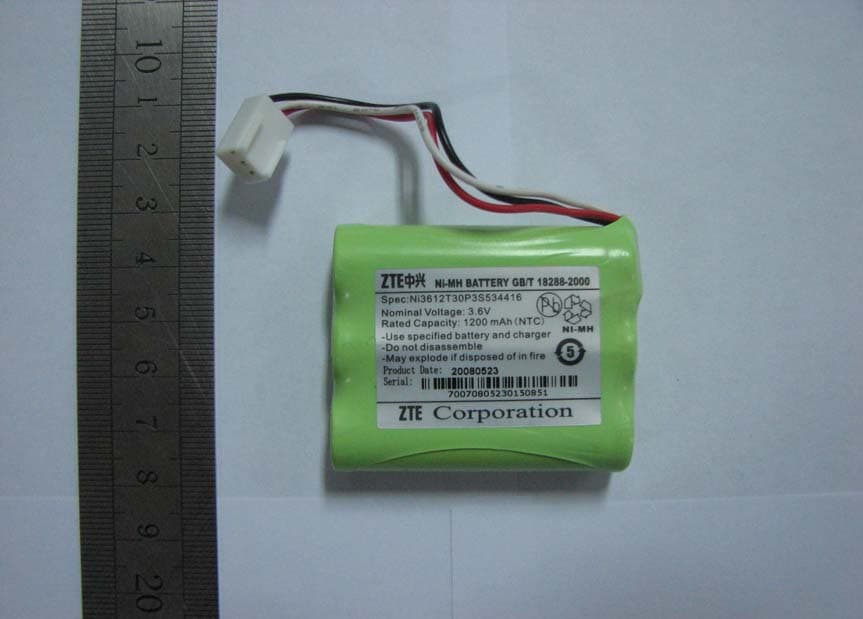
Click to zoom
Application Details
- Equipment Class
- JBP - Part 15 Class B Computing Device Peripheral
- Date of Grant
- Jun 20, 2010
- Application Purpose
- Original Equipment
- Date of Application
- Jun 20, 2010
- Equipment Note
- GSM 850/1900 Fixed Wireless Terminal
- Company
- ZTE Corporation
- Country
- China
Documents & Files
Document Text
Text extracted from the exhibit documents filed with the FCC. Open a document above to read the original.
Users Manual
1 ZTE WP657 GSM Wireless Phone User Guide Copyright © 2010 by ZTE Corporation All rights reserved. No part of this publication may be excerpted, reproduced, translated or utilized in any form or by any means, electronic or mechanical, including photocopying and microfilm, without the prior written permission of ZTE Corporation. The guide is published by ZTE Corporation. We reserve the right to make modifications on print errors or update specifications without prior notice. The information on the package is only for your reference. Images are for you reference only. Please check the product model before purchasing. ------------------------------------------------------------------------------------------------------------- NO. 55, Hi-tech Road South, ShenZhen, P.R.China Postcode: 518057 Service Hotline: +86-755-26779999 Http://www.zte.com.cn E-mail: [email protected] 2 Know Your Phone Key Instruction Key Description 1. MENU/SELECT It is used to enter main Menu, select or confirm options in menus, or confirm the character chosen in condition of character input. 2. Number Use the number keys to enter characters. 3.# , * It differs in different mode, option or function menu. 4.Scrolling Press these keys to scroll cursor to the left, right, up or down when inputting characters or selecting items. 6 10 LCD Screen 5 4 3 2 8 7 1 9 3 Or default functions in standby mode are set in Settings menu. 5. EXT PWR Lights on when the phone is connected to external power supply. 6. NAMES/CLR/BACK It is used to erase input information, or cancel operating, exit to previous interface, or enter Names list in standby mode. 7.MESSAGE This is the shortcut key to enter message menu in standby mode. 8. EXIT It is used to power on/power off the phone; end an active call or reject a call. 9. CALL/REDIAL Press this key to make a call after having entered the telephone number intended for calling. Or press to enter all recent calls list in standby mode. 10.HANDS-FREE If you are using the handset to call and want to transfer the call to the speakerphone, press this key and hang up the handset to put conversation on the speakerphone. Press this key to end a hands-free call. 4 Interface Icons Installation 1. Handset Connect phone set and handset with the phone cord. 2. External power adapter Plug the external power adapter to the external AC socket. 3. SIM card Always switch the phone off before removing or inserting SIM card. Open the bottom cover of the battery before inserting the SIM card. Remove the battery, slide the SIM card into the SIM slot. Make sure that the contact area of the card is facing down. And the beveled corner matches with the SIM slot. Put in the battery and install the bottom cover. Signal strength New Message (blinks when memory is full) Mute Divert always Power Indicator Alarm clock Roaming Keypad Lock Icon Description Icon Description 5 How to power on/off To power on the phone, connect phone and external power outlet with the power adapter and then hold the Exit key for about three seconds. To power off the phone, hold the Exit key till it is powered off. ※ It is strongly recommended to connect the phone to external power outlet, and use internal battery to power your phone only when external power fails or is not available. How to Make a Call Pick up the handset or press the HANDS-FREE key, or go to step 2 directly. Enter the telephone number by using the Number keys (add country code, area code when making an international call) or select from Names, or press CALL/REDIAL Key to enter the recent calls list, select a number. Press the CALL/REDIAL Key to make the call. Voice Mail Before using Voicemail, please consult with service provider to confirm that the voice mailbox has been activated. The system automatically sends a message to your phone informing a new voice message. Read the message in Inbox and then dial voice mail box number to listen to your voice message. To read or send your voice mail quickly, you set the Voicemail No. first, Then pick up the handset or press HANDS-FREE key, and then hold ”1” key to dial voice mail number directly. Message Select Short Messages in Menu. ¾ Select New message to write and edit message text, select Options to send or save the message. ¾ Select Inbox to view messages received. ¾ Select Outbox to view the messages sent unsuccessfully. ¾ Select Draftbox to view draft messages. 6 ¾ Select Msg settings to make some necessary short message settings. ¾ Select Voicemail → Get voicemail, to listen or leave message following guide prompt or set the Voicemail No.. Phone code Phone code could prevent your phone from illegal use. The default phone code is 1234. Change it to your own phone password as soon as possible. If you change the default phone code to a new one, remember it or place it at secure place. PIN Code and PUK Code PIN(PIN1 or PIN2) code: PIN code could prevent your SIM card from illegal use. When PIN lock is on, you should enter the PIN code when powering on the phone again. Change the default PIN code to your own PIN code as soon as possible. PUK code: Consecutive inputting wrong PIN code for several times can cause locking of SIM card. To unlock, you need PUK code. PIN code and PUK code may be offered together with the SIM card. If not, contact the network operator. Text Input Operation Method Input Letters Multitap Input—“ABC” or “abc”, press corresponding letter key till the letter appears. Press # key to switch between capitalization and lowercase. Input Words eZiText Input—“Eng”, press the Number keys to input the characters of the word. If the word displayed is not the word you want, press Scrolling keys to look for another matching word. Input Digits Numbers Input—“123”, press number keys once. 7 Input Symbol Symbols Input —press * key, then select corresponding symbol by pressing Scrolling key. ABC/abc Input — press “1” key till the symbol (common symbols) appears. Input Space Press “0” key, except for being in numbers m…
Text truncated - open the document above for the full version.
Cover Letter(s)
Request of Confidentiality Federal Communications Commission Authorization and Evaluation Division Pursuant to Sections 0.457 and 0.459 of the Commission’s Rules, the Applicant hereby requests confidential treatment of information accompanying of following product: Product Name: GSM Wireless Phone Product Model: ZTE WP657 FCC ID: Q78-ZTEWP657 The following information should be held confidential: All Schematics/block diagrams All Parts list for the above schematic diagram Tune-Up Procedure Operational description and technical overview of product The above materials contain trade secrets and proprietary information not customarily released to the public. The public disclosure of these matters might be harmful to the applicant and provide unjustified benefits to its competitors. The applicant understands that pursuant to Rule 0.457, disclosure of this application and all accompanying documentation will not be made before the date of the Grant for this application. Royce Wang Title: Product Certification Director ZTE Corporation Zhongxing Bldg, Shenzhen Hi-tech Industrial Park Nanshan District, Shenzhen city, GuangDong Province, P.R.China 518057 Tel: 086-021-68895196 Fax: 086-021-50801070
External Photos
Q78-ZTEWP657 External Photo
Internal Photos
Q78-ZTEWP657 Internal Photo
Test Report
DAT-P-174/04-00 CNAS L0447 Registration No.910917 TEST REPORT Report No.: SRMC2010-H024-E0032 Product Name: GSM Wireless Phone Product Model: ZTE WP657 Applicant: ZTE Corporation Manufacturer: ZTE Corporation Specification: FCC Part15B July 10, 2008 (Certification) FCC ID: Q78-ZTEWP657 The State Radio Monitoring Center State Radio Spectrum Monitoring and Testing Center No.80 Beilishi Road Xicheng District Beijing, China Tel: 86-10-68009202 Fax: 86-10-68009205 The State Radio Monitoring Center No.: SRMC2010-H024-E0032 State Radio Spectrum Monitoring and Testing Center FCC ID: Q78-ZTEWP657 Tel: 86-10-68009202 68009203 Fax: 86-10-68009195 68009205 Page 2 of 13 CONTENTS 1. General information .................................................................................. 3 1.1 Notes of the test report...................................................................................................3 1.2 Information about the testing laboratory.......................................................................3 1.3 Applicant’s details............................................................................................................3 1.4 Manufacturer’s details.....................................................................................................3 1.5 Application details............................................................................................................4 1.6 Reference specification...................................................................................................4 1.7 Information of EUT..........................................................................................................4 1.7.1 General information..............................................................................................4 1.7.2 EUT details............................................................................................................5 1.7.3 Auxiliary equipment details..................................................................................5 2. Test information ........................................................................................ 6 2.1 Summary of the test results............................................................................................6 2.2 Test result..........................................................................................................................7 2.2.1 Conducted Emissions-FCC Part15.107............................................................7 2.2.2 Radiated Emissions-FCC Part15.109...............................................................9 2.3. List of test equipments.................................................................................................12 Appendix .................................................................................................... 13 The State Radio Monitoring Center No.: SRMC2010-H024-E0032 State Radio Spectrum Monitoring and Testing Center FCC ID: Q78-ZTEWP657 Tel: 86-10-68009202 68009203 Fax: 86-10-68009195 68009205 Page 3 of 13 1. General information 1.1 Notes of the test report The test report may only be reproduced or published in full. Reproduction or publication of extracts from the report requires the prior written permission of The State Radio Monitoring Center. The test results relate only to individual items of the samples which have been tested. 1.2 Information about the testing laboratory Company: The State Radio Monitoring Center State Radio Spectrum Monitoring and Testing Center Address: No.80 Beilishi Road, Xicheng District, Beijing China City: Beijing Country or Region: China Contacted person: Wang Junfeng Tel: +86 10 68009181 +86 10 68009202 Fax: +86 10 68009195 +86 10 68009205 Email: [email protected] 1.3 Applicant’s details Company: ZTE Corporation Address: 10# TangYan Road South, Hi-Tech Industrial Park, 710065 City: Xi'an Country or Region: P.R.China Grantee Code: Q78 Contacted person: Wang Lei Tel: +86-029-88724011 Fax: +86-029-88723249 Email: [email protected] 1.4 Manufacturer’s details Company: ZTE Corporation Address: Zhongxing Bldg, Hi-Tech Park, NanShan, 518057 City: Shenzhen Country or Region: P.R.China Grantee Code: Q78 Contacted person: Li Dezi Tel: +86-021-68895196 Fax: +86-021-50801070 Email: [email protected] The State Radio Monitoring Center No.: SRMC2010-H024-E0032 State Radio Spectrum Monitoring and Testing Center FCC ID: Q78-ZTEWP657 Tel: 86-10-68009202 68009203 Fax: 86-10-68009195 68009205 Page 4 of 13 1.5 Application details Date of reception of test sample: 7 th May 2010 Date of test: 7 th May 2010 to 25 th May 2010 1.6 Reference specification FCC Part 15B July 10, 2008 (Certification) 1.7 Information of EUT 1.7.1 General information Name of EUT GSM Wireless Phone FCC ID Q78-ZTEWP657 Frequency range GSM850: Tx:824~849MHz Rx:869~894MHz PCS1900: Tx:1850~1910MHz Rx:1930~1990MHz Rated output power GSM850:33.0dBm PCS1900:30.0dBm E.R.P. & E.I.R.P. E.R.P.: 27.5dBm E.I.R.P.: 26.8dBm Modulation type GMSK Emission Designator 300KGXW Duplex mode FDD Equipment Class Class B Duplex spacing GSM850:45MHz PCS1900:80MHz Antenna type External Power Supply Battery or charger Rated Power Supply Voltage 3.6V Extreme Temperature Lowest: -30°C Highest: +50°C Extreme Voltage Minimum: 3.3V Maximum: 4.3V HW Version 100301 SW Version TLF_PER_WP657V1.0.0B01 The State Radio Monitoring Center No.: SRMC2010-H024-E0032 State Radio Spectrum Monitoring and Testing Center FCC ID: Q78-ZTEWP657 Tel: 86-10-68009202 68009203 Fax: 86-10-68009195 68009205 Page 5 of 13 1.7.2 EUT details Name Model IMEI GSM Wireless Phone ZTE WP657 351789030034964 1.7.3 Auxiliary equipment details Equipment Charger Manufacturer ZTE Corporation Model Number STC-A22O50C35-C Equipment Battery Manufacturer ZTE Corporation Model Number Ni3607T30P3S473211 Capacity 1200mAh Rated Voltage 3.6V The State Radio Monitoring Center No.: SRMC2010-H024-E0032 State Radio Spectrum Monitoring and Testing Center FCC ID: Q78-ZTEWP657 Te…
Text truncated - open the document above for the full version.
Test Setup Photos
DAT-P-174/04-00 CNAS L0447 Registration No.910917 Appendix1 TEST SETUP Report No.: SRMC2010-H024-E0032 Product Name: GSM Wireless Phone Product Model: ZTE WP657 Applicant: ZTE Corporation Manufacturer: ZTE Corporation Specification: FCC Part15B July 10, 2008 (Certification) FCC ID: Q78-ZTEWP657 The State Radio Monitoring Center State Radio Spectrum Monitoring and Testing Center No.80 Beilishi Road Xicheng District Beijing, China Tel: 86-10-68009202 Fax: 86-10-68009205 The State Radio Monitoring Center No.: SRMC2010-H024-E0032 State Radio Spectrum Monitoring and Testing Center FCC ID: Q78-ZTEWP657 Tel: 86-10-68009202 68009203 Fax: 86-10-68009195 68009205 Page 1 of 1 Appendix1 Test Setup Radiated Emissions Test Setup Conducted Emissions Test Setup
Contact Information
Applicant
Cary Kong(Product Certification Manager)
Test Firm
The State Radio_Monitoring_Center Testing (SRTC)Junfeng Wang
Technical Specifications
| # | Rule Parts | Frequency Range | Power Output |
|---|---|---|---|
| 1 | 15B | - | - |
Other Applications from ZTE Corporation

Q78-E1320
Oct 06, 2022Home Gateway
Equipment Class
NII - Unlicensed National Information Infrastructure TX
Q78-E3330
Sep 21, 2022Home Gateway
Equipment Class
JBP - Part 15 Class B Computing Device Peripheral
Q78-ZXV10B866V2
May 23, 2021RichMedia Box
Equipment Class
DTS - Digital Transmission System
Q78-ZXHNH298Q
Apr 22, 2021Home Gateway
Equipment Class
NII - Unlicensed National Information Infrastructure TX
Q78-ZXHNH196Q
Apr 19, 2021Home Gateway
Equipment Class
NII - Unlicensed National Information Infrastructure TX