QQGBT1022Bluetooth 2.0 Class II Module
J-Three International Holding Co., Ltd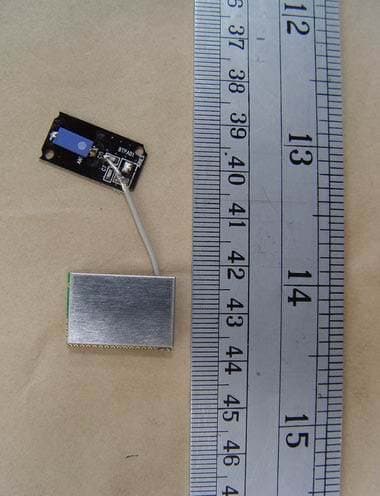
Click to zoom
Application Details
- Equipment Class
- DSS - Part 15 Spread Spectrum Transmitter
- Date of Grant
- May 09, 2006
- Application Purpose
- Original Equipment
- Date of Application
- May 09, 2006
- Equipment Note
- Bluetooth 2.0 Class II Module
- Frequency Range
- 2402.00000000 - 2480.00000000
- Country
- Taiwan
Documents & Files
Document Text
Text extracted from the exhibit documents filed with the FCC. Open a document above to read the original.
Users Manual
BluetoothTM Module Connect your peripherals and computing devices without cables BT-1022 Quick Installation Guide Introduction PC System Requirements ‧ PC-compatible computer, CPU speed of 200MHz or above ‧ Memory: 64MB or above, 128MB recommended ‧ One available USB port, USB 1.1 standard ‧ Windows® 98 SE, Me, 2000, and XP Product Contents ‧ Bluetooth USB Adapter ‧ CD-ROM for installation software and documentation ‧ Quick Installation Guide Step 1: Software Setup Software Setup for Windows 98 SE, Me, 2000, and XP To install the software for the USB Adapter, follow the instructions below: Note: The installation process for Windows XP may look slightly different from Windows 98 SE, Me, and 2000. Note: Do not insert the USB Adapter into the USB port prior to software installation. 1. Insert the software installation CD-ROM into the PC’s CD-ROM drive. 2. The “Software InstallShield Wizard” window appears. Click on “Next” to begin the installation process. 2 Step 1: Software Setup 3. Choose “I accept the terms in the license agreement” to accept the license agreement. Click on “Next” to continue. 4. Specify the location where the software files will be installed on your hard drive. It is recommended that you install the software in the default directory “C:\Program Files\WIDCOMM\ Bluetooth Software\”. Click on “Next” to continue. 3 5. Confirm that the device software is ready to be installed and click on “Install”. 6. The InstallShield Wizard will begin to install the Bluetooth Software. This may take several minutes. 4 Step 1: Software Setup 7. During the installation process you may be prompted to insert your USB Adapter. If your USB Adapter is not plugged into your computer at this time, you may insert it into an available USB 1.1-compliant port on your desktop or notebook computer, then click “OK” to continue. Click on “Cancel” to continue installation without the Bluetooth device inserted. Refer to the “Hardware Installation” section of this User Manual for instructions for installing the hardware. Note: If at any time during the installation process you receive a “Driver Signature Notice”, click “OK” to continue the installation process. 5 Step 1: Software Setup 8. Confirm the completion of the software installation; click “Finish” and restart the system if prompted to do so. 6 Step 1: Software Setup Hardware Setup for Windows 98 SE, Me, 2000, and XP Follow these instructions to install your USB Adapter on your PC. Note: Your USB Adapter is sensitive to static electricity, which can damage its delicate electrical components. To protect your device, always touch the metal chassis of your computer before handing the USB Adapter. This will ground any potential electrostatic discharge. Avoid touching the metal connector when handling the USB Adapter. Dry weather conditions or walking across carpeted floors may cause you to acquire an electrostatic charge. 1. Connect the USB Adapter directly to an available USB A-type connector on your desktop or notebook computer. Your system should register a new USB device found. 2. Choose “Install from a list or specific location”; then click “Next”. Step 2: Hardware Setup 7 3. Browse for the location of the device driver “:\Program Files\WIDCOMM\ Bluetooth\Software\bin\” then click “Next”. 4. If you receive the following “Hardware installation notice”, click on “Continue Anyway” to continue with the installation process. 8 Step 2: Hardware Setup 5. A window will appear that confirms the completion of the hardware installation; click on “Finish” to complete the installation process. Step 2: Hardware Setup 9 Uninstalling the Software for Windows 98 SE, Me, 2000, and XP Follow these instructions to uninstall your USB Adapter on your PC. 1. Insert the CD-ROM included with your USB Adapter. 2. This “InstallShield Wizard” should automatically load. If it does not load, explore the CD and run the “Setup.exe” file. 3. The “InstallShield” window should now appear. Click “Next” to continue with the uninstall process. 10 Federal Communication Commission Interference Statement This equipment has been tested and found to comply with the limits for a Class B digital device, pursuant to Part 15 of the FCC Rules. These limits are designed to provide reasonable protection against harmful interference in a residential installation. This equipment generates, uses and can radiate radio frequency energy and, if not installed and used in accordance with the instructions, may cause harmful interference to radio communications. However, there is no guarantee that interference will not occur in a particular installation. If this equipment does cause harmful interference to radio or television reception, which can be determined by turning the equipment off and on, the user is encouraged to try to correct the interference by one of the following measures: . Reorient or relocate the receiving antenna. . Increase the separation between the equipment and receiver. . Connect the equipment into an outlet on a circuit different from that to which the receiver is connected. . Consult the dealer or an experienced radio/TV technician for help. FCC Caution :To assure continued compliance, any changes or modifications not expressly approved by the party responsible for compliance could void the user's authority to operate this equipment. (Example - use only shielded interface cables when connecting to computer or peripheral devices). This device complies with Part 15 of the FCC Rules. Operation is subject to the following two conditions: (1) This device may not cause harmful interference, and (2) This device must accept any interference received, including interference that may cause undesired operation.
Cover Letter(s)
J-Three International Holding Co., Ltd. No.23-7, Dungshyh 12 Lirn Dungshyh Lii, Pingchien City, Taoyuan Hsien 324, Taiwan, R.O.C. Federal Communications Commission Dear Sir: We, the undersigned, hereby authorize ETS Dr. Genz Taiwan PS Co., Ltd. to act on our behalf in all matters relating to application for“Bluetooth 2.0 ClassII Module” ( Model :BT1022, FCC ID: QQGBT1022)"authorization, including the signing of all documents relating to these matters. Any and all acts carried out by ETS Dr. Genz Taiwan PS Co., Ltd. on our behalf shall have the same effect as acts of our own. The applicant certifies that in the case of an individual applicant ( e.g., corporation ), no party to the applicant is subject to a denial of federal benefits, that includes FCC benefits, pursuant to section 5301 of the Anti-drug abuse Act of 1988, 21 U.S.C. 862. For a definition of a “party” for these purposes See 47 C.F.R. 1.2002 (b). By: By: Mr. David Wu (Signature) (Printed) Title : Product Manager Applicant : J-Three International Holding Co., Ltd. Address : No.23-7, Dungshyh 12 Lirn Dungshyh Lii Pingchien City, Taoyuan Hsien 324, Taiwan, R.O.C. Tel : +886-3-4606755 Fax: +886-3-4606761 Date : April 19, 2006
Cover Letter(s)
J-Three International Holding Co., Ltd. No.23-7, Dungshyh 12 Lirn Dungshyh Lii, Pingchien City, Taoyuan Hsien 324, Taiwan, R.O.C. 8 RF exposure requirements This module may be installed into any end products. Because the power of this module is very low, it complies with RF exposure requirements. 5 Stand-alone configuration The module transmitter has been performed the test as a stand alone configuration and then confirmed the compliance. Please refer to test report. (No. W6M20603-6643-C-1) Sincerely yours, Signature Name: Mr. David Wu Company : No.23-7, Dungshyh 12 Lirn Dungshyh Lii Pingchien City, Taoyuan Hsien 324, Taiwan, R.O.C. Tel / Fax: +886-3-4606755 / +886-3-4606761 Date: April 19, 2006
External Photos
ETS DR.GENZ TAIWAN PS CO., LTD. Registration number: W6M20603-6643-P-15 FCC ID : QQGBT1022 ETS Dr. Genz Taiwan PS Co., Ltd. ETS DR.GENZ TAIWAN PS CO., LTD. Registration number: W6M20603-6643-P-15 FCC ID : QQGBT1022 ETS Dr. Genz Taiwan PS Co., Ltd. ETS DR.GENZ TAIWAN PS CO., LTD. Registration number: W6M20603-6643-P-15 FCC ID : QQGBT1022 ETS Dr. Genz Taiwan PS Co., Ltd.
Test Report
ETS Dr.Genz Taiwan PS Co., LTD FCC Registration No.: 930600 Industry Canada filed test laboratory Reg. No. IC 5679 Accredited Testing Laboratory A2LA Cert.No.: 2300.01 PCTRB Accredited Type Certification Test House FCC TEST - REPORT FCC RULES PART 15 / SUBPART C FCC ID: QQGBT1022 Test report no.: W6M20603-6643-P-15 ETS DR.GENZ TAIWAN PS CO., LTD. 6F, NO. 58, LANE 188, RUEY-KUANG RD., NEIHU, TAIPEI 114, TAIWAN, R.O.C. PHONE 886-2-66068877 FAX 886-2-66068879 ETS DR.GENZ TAIWAN PS CO., LTD. . Registration number: W6M20603-6643-P-15 FCC ID : QQGBT1022 ETS Dr. Genz Taiwan PS Co., Ltd. Page 2 of 43 TABLE OF CONTENTS 1 GENERAL INFORMATION ...................................................................................................... 3 1.1 Notes .................................................................................................................................... 3 1.2 Testing laboratory ................................................................................................................ 4 1.2.1 Location .......................................................................................................................4 1.2.2 Details of accreditation status ..................................................................................... 4 1.3 Details of approval holder.................................................................................................... 4 1.4 Application details ............................................................................................................... 5 1.5 General information of Test item......................................................................................... 5 1.6 Test standards....................................................................................................................... 6 2 TECHNICAL TEST .................................................................................................................... 7 2.1 Summary of test results........................................................................................................ 7 2.2 Test environment.................................................................................................................. 7 2.3 Test Equipment List ............................................................................................................. 8 3 TEST RESULTS (ENCLOSURE) ............................................................................................ 14 3.1 Peak Output Power (transmitter)........................................................................................ 15 3.2 Equivalent isotropic radiated power .................................................................................. 17 3.2.1 Transmitter................................................................................................................. 17 3.3 RF Exposure Compliance Requirements ........................................................................... 17 3.4 Out of Band Radiated Emissions ....................................................................................... 17 3.5 Transmitter Radiated Emissions in restricted Bands ......................................................... 18 3.6 Spurious emissions (tx) .................................................................................................... 19 3.7 Carrier Frequency Separation .......................................................................................... 22 3.8 Number of Hopping Frequencies ..................................................................................... 23 3.8.1 Pseudorandom Frequency Hopping Sequence ......................................................... 23 3.8.2 Coordination of hopping sequences to other transmitters......................................... 23 3.8.3 System Receiver Hopping Capability......................................................................... 23 3.9 Time of Occupancy (Dwell Time) ................................................................................... 24 3.10 20dB Bandwidth .............................................................................................................. 25 3.10.1 System Receiver Input Bandwidth.............................................................................. 26 3.11 Band-edge Compliance of RF Emissions ........................................................................ 26 3.12 Radiated Emissions from Receiver Section of Transceiver............................................. 28 3.13 Power Line Conducted Emission ....................................................................................... 31 APPENDIX ........................................................................................................................................ 33 Appendix A .................................................................................................................................... 34 Appendix B .................................................................................................................................... 35 Appendix C .................................................................................................................................... 36 Appendix D .................................................................................................................................... 37 Appendix E .................................................................................................................................... 38 Appendix F..................................................................................................................................... 39 Appendix G .................................................................................................................................... 40 Appendix H ...............................................................................................................................…
Text truncated - open the document above for the full version.
Test Setup Photos
ETS DR.GENZ TAIWAN PS CO., LTD. Registration number: W6M20603-6643-P-15 FCC ID : QQGBT1022 ETS Dr. Genz Taiwan PS Co., Ltd. Set Up Photos ETS DR.GENZ TAIWAN PS CO., LTD. Registration number: W6M20603-6643-P-15 FCC ID : QQGBT1022 ETS Dr. Genz Taiwan PS Co., Ltd. ETS DR.GENZ TAIWAN PS CO., LTD. Registration number: W6M20603-6643-P-15 FCC ID : QQGBT1022 ETS Dr. Genz Taiwan PS Co., Ltd. ETS DR.GENZ TAIWAN PS CO., LTD. Registration number: W6M20603-6643-P-15 FCC ID : QQGBT1022 ETS Dr. Genz Taiwan PS Co., Ltd. ETS DR.GENZ TAIWAN PS CO., LTD. Registration number: W6M20603-6643-P-15 FCC ID : QQGBT1022 ETS Dr. Genz Taiwan PS Co., Ltd.
Contact Information
Applicant
Chen Wei Ming(Communication R&D Dept. Software Engineer)
Technical Contact
ETS Dr. Genz Taiwan PS CO., LTD.Steven Chuang
[email protected]+886-2-6606-8877
6F., No. 58, Lane 188, Ruey Kuang Road, Neihu · Taipei · Taiwan
Non-Technical Contact
ETS Dr. Genz Taiwan PS CO., LTD.Chiney Chen
[email protected]+886-2-6606-8877
Test Firm
Worldwide Testing Services (Taiwan) Co. Ltd.Chang Tse-Ming
Technical Specifications
| # | Rule Parts | Frequency Range | Power Output |
|---|---|---|---|
| 1 | 15C | 2.40 GHz - 2.48 GHz | 951.00 µW |
Other Applications from J-Three International Holding Co., Ltd
QQGBU-2096-1
May 23, 2008Bluetooth (class I)
Equipment Class
DSS - Part 15 Spread Spectrum Transmitter
QQGBU2096
Mar 07, 2008Bluetooth Adaptor
Equipment Class
DSS - Part 15 Spread Spectrum Transmitter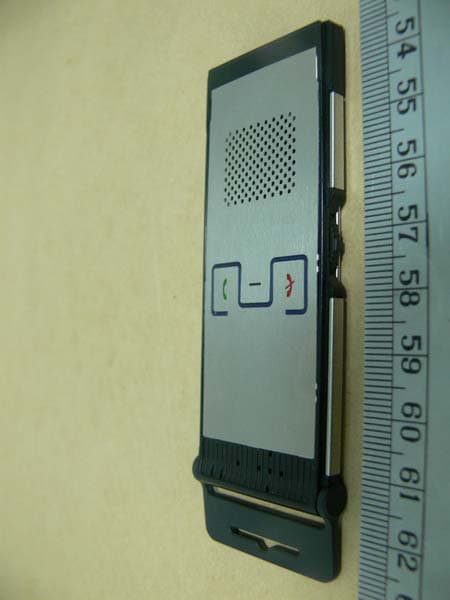
QQGCP-2020
Oct 17, 2007Bluetooth VOIP Phone
Equipment Class
DSS - Part 15 Spread Spectrum Transmitter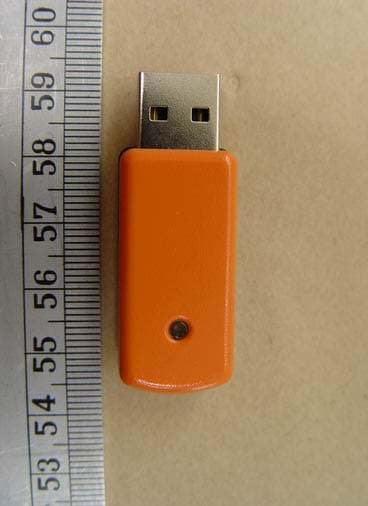
QQGBU-2094-J
May 29, 2006BLUETOOTH USB ADAPTER (Class I)
Equipment Class
DSS - Part 15 Spread Spectrum Transmitter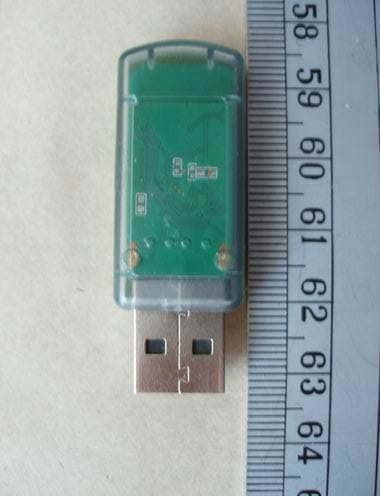
QQGBU-2084-J
May 20, 2006BLUETOOTH USB ADAPTER (Class II)
Equipment Class
DSS - Part 15 Spread Spectrum Transmitter