RAD153GSM/GPRS/EDGE/WCDMA Digital Mobile Phone with Bluetooth
TCT Mobile Limited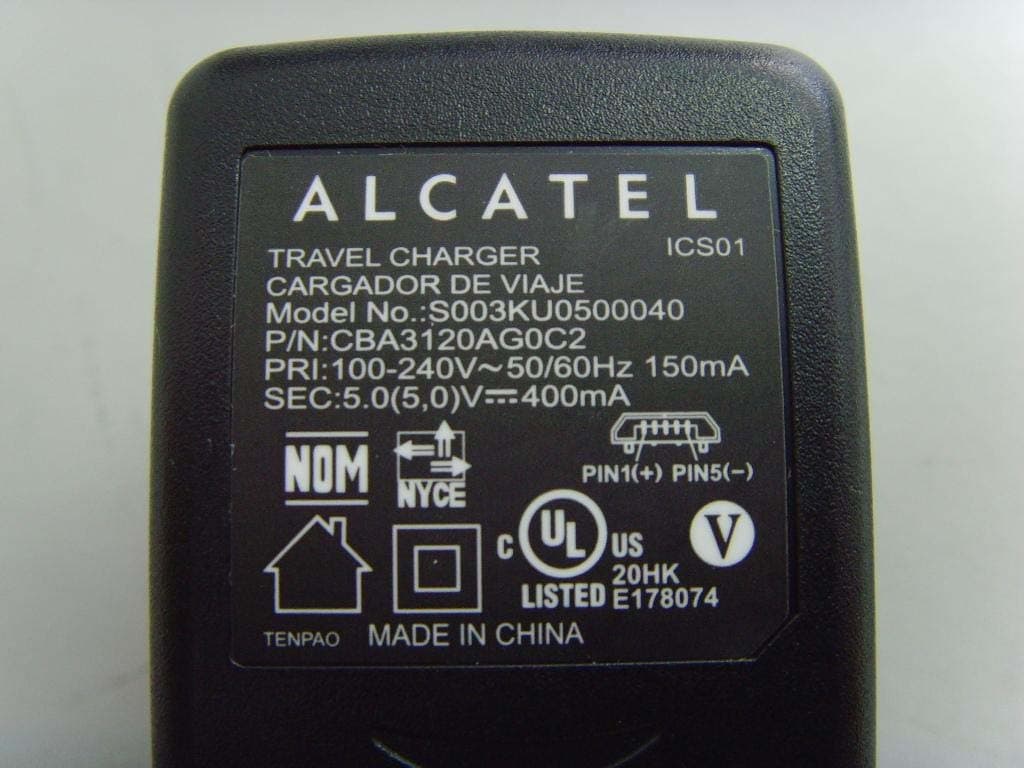
Click to zoom
Application Details
- Equipment Class
- DSS - Part 15 Spread Spectrum Transmitter
- Date of Grant
- May 06, 2011
- Application Purpose
- Original Equipment
- Date of Application
- May 01, 2011
- Equipment Note
- GSM/GPRS/EDGE/WCDMA Digital Mobile Phone with Bluetooth
- Frequency Range
- 2402.00000000 - 2480.00000000
- Company
- TCT Mobile Limited
- Country
- China
Documents & Files
Document Text
Text extracted from the exhibit documents filed with the FCC. Open a document above to read the original.
Users Manual
1 10 2 11 3 12 4 13 5 14 6 15 7 16 89 1817 Your cellphone 1 .............. Keys and connectors1.1 Status bar icons1.2.1 (1) Battery charge level Vibrate alert: your cellphone vibrates, but does not ring or beep with the exception of the alarm. Bluetooth status (Activated). Bluetooth status (Connected to an audio device). Java status (Activated). Headset connected. Call forwarding activated: your calls are forwarded. Alarm or appointments programmed. Level of network reception. Wi-Fi connected (2) . Wi-Fi disconnected (2) . Voicemail message arrived. Missed calls. Call in progress. Stopwatch is active. Radio is on. Email unread. WAP messages (1) . Roaming. SD card scanning in progress. SD card scanning completed. SIM card unavailable. Line switching (1) : indicates the selected line. GPRS connection status (Activated). GPRS connecting. EDGE connecting. EDGE attached. 2G network available. 3G network available. Music player active. MMS receipt in progress. Sending a SMS. Sending a MMS. Silence mode: your cellphone does not ring, beep or vibrate with the exception of the alarm. SMS unread. MMS unread. (Flickering) Message list is full: your cellphone cannot accept any new messages. You must access the message list and delete at least one message on your SIM card. Flight mode. Status list1.2.2 Touch the status bar and drag down to open, drag up to close. To open an application, touch it from the list. Toolbar1.2.3 Toolbar with 4 fixed shortcuts to access Main menu, Calls, Message, Edit Home screen. Personalize your home screen1.2.4 Adding items To add an item, touch and hold an empty area of the Home screen or select from the toolbar. Add shortcuts• To add a shortcut to the Home screen, such as Alarm, Bookmarks, Contacts, etc. Add widgets• To add a widget to the Home screen, such as the World clock, Music player, etc. Editing/Removing/Re-organizing items Press and hold the application on the Home screen to edit/remove/ re-organize it, touch to edit (only for my favorites), touch to remove. Touch and hold the application and drag it to the location you desire, and then confirm by touching "Done". Customizing wallpaper To personalize your wallpaper, you can select one of the following two ways: Touch and hold an empty area from the Home screen, select • "Wallpaper", then touch a folder to select an image as your wallpaper. Touch • from the tool bar, select "Wallpaper", then touch a folder to select an image as your wallpaper. Getting started 2 ........... Set-up2.1 Removing or installing the back cover Inserting or removing the SIM card You must insert your SIM card to make phone calls. Please power off your cellphone and remove battery before inserting or removing the SIM card. Place the SIM card with the chip facing downwards and slide it into its housing. Make sure that it is correctly inserted. To remove the card, press and slide it out. Installing or removing the battery Insert and click the battery into place, then close the cellphone • cover. Unclip the cover, then remove the battery.• Charging the battery Connect the battery charger to your cellphone and outlet respectively. To reduce power consumption and energy waste, when battery is fully charged, disconnect your charger from the plug; switch off Wi-Fi (1) , Bluetooth or background- running applications when not in use; reduce the backlight time, etc. Power on your cellphone2.2 Hold down the key until the cellphone powers on. Power off your cellphone2.3 Hold down the key from the Home screen. Using the touchscreen2.4 Touch To access an application, touch it with your finger. Drag Place your finger on the screen to drag the object to the destination. Scroll Slide the screen to scroll up and down the applications, images, web pages... at your convenience. Making a call 3 ................ To place a call, you may touch from tool bar. Enter the desired number on the on-screen keypad directly or select a contact from Call log or Contacts by touching or respectively, then touch or press key to place the call. The number you entered can be saved to Contacts by selecting . If you make a mistake, you can delete the incorrect digits by touching . To hang up the call, press the key. When making, receiving or during a call, press to return to the middle Home screen, and then touch or press to retrieve the call. Muting the ringtone You may mute ringtone of current incoming call by touching . Answer the call by pressing the key. Rejecting a call Press the key once to reject the call, or reject call with SMS by touching . Message 4 ................ Access4.1 You may access this menu using the following options: - Touch to enter the main menu screen, and then select . - Access from tool bar by selecting . Conversational On (Off) mode4.2 In conversational on mode, you can view chat history in chronological order. In conversational off mode, you can access the following folders: Inbox, Outbox, Sent, Broadcast SMS, Voicemail, Drafts, etc. You can switch between these two modes by selecting "Switch view mode" via . Conversational on mode is set as the default mode and the following instructions are based on this mode. Write message4.3 Touch to create text/multimedia messages. Specific letters (accent) will increase the size of the SMS, this may cause multiple SMS to be sent to your recipient. An SMS will be converted to MMS automatically when: images, videos, audio, slides or attachments are inserted; Subject, CC/BCC/email address is added; or the message contains more than 8 pages of text. Timer send Schedule an SMS/MMS to be sent out at predefined time (select "Timer send" via ). Email 5 ...................... Your cellphone has an email client with the settings predefined for a few popular email services like – GoogleMail, Yahoo, AOL, etc. Besides this, you can set up other POP3 or IMAP4 email accounts that you may be using. Palringo 6 (1) ................ Palringo Instant message (IM) allows you to chat with other people using Palringo account. You…
Text truncated - open the document above for the full version.
Cover Letter(s)
Authorization Letter FCC ID: RAD153 Date: 6 th April, 2010 To whom it may concern: We, the undersigned, hereby authorize The State Radio_monitoring_center Testing Center (SRTC) to act on our behalf, as our agent, in the following matters related to the FCC approval of our product: Product Name: GSM/GPRS/EDGE/WCDMA Digital Mobile Phone with Bluetooth Marketing Name: one touch 905A Product Model: MINI3G A Report submittal, related correspondence, the signing of all documents relating to these matters, and any other lawful activity necessary to obtain such certification. Any act carried out by The State Radio_monitoring_center Testing Center (SRTC) within the scope of this authorization shall have the same effects as our own. This authorization shall expire 2 months from original date. If you have any question regarding the authorization, please don’t hesitate to contact with me. Thank you. Sincerely, Gong Zhizhou TCT Mobile Limited. 5F, E building, No. 232, Liang Jing Road ZhangJiang High-Tech Park, Pudong Area Shanghai, 201203, P.R. China Tel: +86-021-61460890 Fax: +86-021-61460602
Cover Letter(s)
Request of Confidentiality Federal Communications Commission Authorization and Evaluation Division Pursuant to Sections 0.457 and 0.459 of the Commission’s Rules, the Applicant hereby requests confidential treatment of information accompanying of following product: Product Name: GSM/GPRS/EDGE/WCDMA Digital Mobile Phone with Bluetooth Marketing Name: one touch 905A Product Model: MINI3G A FCC ID: RAD153 The following information should be held confidential: All Schematics/block diagrams All Parts list for the above schematic diagram Tune-Up Procedure Operational description and technical overview of product The above materials contain trade secrets and proprietary information not customarily released to the public. The public disclosure of these matters might be harmful to the applicant and provide unjustified benefits to its competitors. The applicant understands that pursuant to Rule 0.457, disclosure of this application and all accompanying documentation will not be made before the date of the Grant for this application. Gong Zhizhou TCT Mobile Limited. 5F, E building, No. 232, Liang Jing Road ZhangJiang High-Tech Park, Pudong Area Shanghai, 201203, P.R. China Tel: +86-021-61460890 Fax: +86-021-61460602
External Photos
RAD153 External Photo Battery CAB3120000C1 Battery CAB3120000C2 Charger CBA3120AG0C2 Charger CBA3120AG0C2 Charger CBA3001AG0C1 Charger CBA3001AG0C1 Headset CCB3160A10C2 Headset CCB3160A10C3
Internal Photos
RAD153 Internal Photo
Test Report
D-PL-12111-01-01 CNAS L0447 Registration No.910917 TEST REPORT Report No.: SRTC2011-H024-E0015 Product Name: GSM/GPRS/EDGE/WCDMA Digital Mobile Phone with Bluetooth Marketing Name: one touch 905A Product Model: MINI3G A Applicant: TCT Mobile Limited Manufacture: TCT Mobile Limited Specification: 47CFR Part 15 July 10, 2008, Subpart C FCC ID: RAD153 The State Radio_monitoring_center Testing Center (SRTC) No.80 Beilishi Road Xicheng District Beijing, China Tel: 86-10-68009202 Fax: 86-10-68009205 No.: SRTC2011-H024-E0015 FCC ID: RAD153 The State Radio_monitoring_center Testing Center (SRTC) Page number: 2 of 70 Tel: 86-10-68009202 68009203 Fax: 86-10-68009195 68009205 Copyright © SRTC CONTENTS 1.General information ................................................................................. 3 1.1 Notes of the test report ................................................................................................... 3 1.2 Information about the testing laboratory ....................................................................... 3 1.3 Applicant’s details ............................................................................................................ 3 1.4 Manufacturer’s details ..................................................................................................... 3 1.5 Application details ............................................................................................................ 4 1.6 Reference specification ................................................................................................... 4 1.7 Information of EUT .......................................................................................................... 4 1.7.1 General information .............................................................................................. 4 1.7.2 EUT details ............................................................................................................ 4 1.7.3 Auxiliary equipment details .................................................................................. 5 2. Test information ........................................................................................ 6 2.1 Summary of the test results............................................................................................ 6 2.2 Test result .......................................................................................................................... 7 2.2.1 Occupied Bandwidth-§15.247(a) (1) .................................................................. 7 2.2.2 Peak power output-§15.247(a) (1) ................................................................... 13 2.2.3 Spurious RF conducted emissions-§15.247(d) .............................................. 20 2.2.4 Spurious radiated emissions-§15.247(d),§15.35(b),§15.209 ...................... 38 2.2.5 Band edge compliance-§15.247(d) .................................................................. 45 2.2.6 Dwell time-§15.247(a) (1)(iii) ......................................................................... 57 2.2.7 Channel separation-§15.247(a) (1) .................................................................. 64 2.2.8 Number of hopping frequencies-§15.247(a) (iii) ......................................... 66 2.2.9 AC Powerline Conducted Emission-§15.107, §15.207 ................................. 68 2.3. List of test equipment ................................................................................................... 70 No.: SRTC2011-H024-E0015 FCC ID: RAD153 The State Radio_monitoring_center Testing Center (SRTC) Page number: 3 of 70 Tel: 86-10-68009202 68009203 Fax: 86-10-68009195 68009205 Copyright © SRTC 1.General information 1.1 Notes of the test report The test report may only be reproduced or published in full. Reproduction or publication of extracts from the report requires the prior written permission of The State Radio_monitoring_center Testing Center (SRTC). The test results relate only to individual items of the samples which have been tested. 1.2 Information about the testing laboratory Company: The State Radio_monitoring_center Testing Center (SRTC) Address: No.80 Beilishi Road, Xicheng District, Beijing China City: Beijing Country or Region: China Contacted person: Wang Junfeng Tel: +86 10 68009181 +86 10 68009202 Fax: +86 10 68009195 +86 10 68009205 Email: [email protected] / [email protected] 1.3 Applicant’s details Company: TCT Mobile Limited Address: 5F, E building, No. 232, Liang Jing Road ZhangJiang High-Tech Park, Pudong Area City: Shanghai Country or Region: P.R.China Grantee Code: RAD Contacted Person: Gong Zhizhou Tel: +86-21-61460890 Fax: +86-21-61460602 Email: [email protected] 1.4 Manufacturer’s details Company: TCT Mobile Limited Address: 5F, E building, No. 232, Liang Jing Road ZhangJiang High-Tech Park, Pudong Area City: Shanghai Country or Region: P.R.China Contacted Person: Gong Zhizhou Tel: +86-21-61460890 Fax: +86-21-61460602 Email: [email protected] No.: SRTC2011-H024-E0015 FCC ID: RAD153 The State Radio_monitoring_center Testing Center (SRTC) Page number: 4 of 70 Tel: 86-10-68009202 68009203 Fax: 86-10-68009195 68009205 Copyright © SRTC 1.5 Application details Date of reception of test sample: 16 th Feb 2011 Date of test: 24 th Feb 2011 to 29 th April 2011 1.6 Reference specification 47CFR Part 15, July 10, 2008, Subpart C 1.7 Information of EUT 1.7.1 General information Name of EUT GSM/GPRS/EDGE/WCDMA Digital Mobile Phone with Bluetooth FCC ID RAD153 Frequency range 2.4000~2.4835GHz Number of channel 79 Modulation type GFSK, π/4DQPSK,8DPSK Duplex mode TDD Channel spacing 1MHz Data rate 1Mbps,2 Mbps,3 Mbps Antenna type Integral Power Supply Battery or charger Rated Power Supply Voltage 3.8V HW Version PIO SW Version sw132 1.7.2 EUT details Product Name Marketing Name Product Model IMEI GSM/GPRS/EDGE/WCDMA Digital Mobile Phone with Bluetooth one touch 905A MINI3G A EUT 1: 012525000006777 EU…
Text truncated - open the document above for the full version.
Test Setup Photos
D-PL-12111-01-01 CNAS L0447 Registration No.910917 Appendix1 TEST SETUP Report No.: SRTC2011-H024-E0015 Product Name: GSM/GPRS/EDGE/WCDMA Digital Mobile Phone with Bluetooth Marketing Name: one touch 905A Product Model: MINI3G A Applicant: TCT Mobile Limited Manufacture: TCT Mobile Limited Specification: 47CFR Part 15 July 10, 2008, Subpart C FCC ID: RAD153 The State Radio_monitoring_center Testing Center (SRTC) No.80 Beilishi Road Xicheng District Beijing, China Tel: 86-10-68009202 Fax: 86-10-68009205 No.: SRTC2011-H024-E0015 FCC ID: RAD153 The State Radio_monitoring_center Testing Center (SRTC) Page number: 2 of 3 Tel: 86-10-68009202 68009203 Fax: 86-10-68009195 68009205 Copyright © SRTC Appendix1 Test Setup Conducted Spurious Emissions Test setup Spurious Radiated Emissions Test setup No.: SRTC2011-H024-E0015 FCC ID: RAD153 The State Radio_monitoring_center Testing Center (SRTC) Page number: 3 of 3 Tel: 86-10-68009202 68009203 Fax: 86-10-68009195 68009205 Copyright © SRTC AC Power Line Conducted Emission Test setup
Contact Information
Applicant
Zhizhou Gong
Technical Contact
The State Radio_monitoring_center Testing CenterWang Junfeng
[email protected]+86 10 68009181
No.80 Beilishi Road, Xicheng District · Beijing · China
Test Firm
The State Radio_Monitoring_Center Testing (SRTC)Junfeng Wang
Technical Specifications
| # | Rule Parts | Frequency Range | Power Output |
|---|---|---|---|
| 1 | 15C | 2.40 GHz - 2.48 GHz | 10.00 mW |
Other Applications from TCT Mobile Limited

RAD558
Nov 15, 2015HSUPA/HSDPA/UMTS tribands / GSM quadbands/LTE 6-band mobile phone
Equipment Class
JBP - Part 15 Class B Computing Device Peripheral
RAD556
Sep 08, 2015CDMA 1X BC0/BC1/BC10 mobile phone
Equipment Class
PCE - PCS Licensed Transmitter held to ear
RAD552
Jun 20, 2015GSM Quadband / UMTS Triband mobile phone
Equipment Class
PCE - PCS Licensed Transmitter held to ear
RAD550
Jun 06, 2015HSDPA/HSUPA/HSPA+/UMTS quad band /GSM quad band/LTE 4 band mobile phone
Equipment Class
DSS - Part 15 Spread Spectrum Transmitter
RAD549
May 13, 2015WCDMA tri band / GSM quad band Moblie phone with BT, Wi-Fi functionality.
Equipment Class
DSS - Part 15 Spread Spectrum Transmitter