RAD228HSPA + USB MODEM
TCT Mobile Limited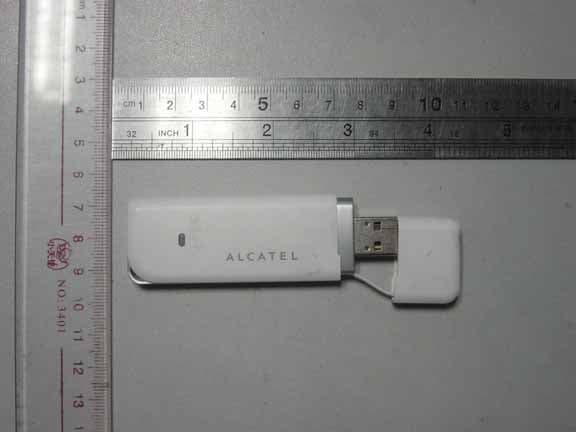
Click to zoom
Application Details
- Equipment Class
- JBP - Part 15 Class B Computing Device Peripheral
- Date of Grant
- Nov 20, 2011
- Application Purpose
- Original Equipment
- Date of Application
- Nov 20, 2011
- Equipment Note
- HSPA + USB MODEM
- Company
- TCT Mobile Limited
- Country
- China
Documents & Files
Document Text
Text extracted from the exhibit documents filed with the FCC. Open a document above to read the original.
Users Manual
User Manual Table of Contents 1. Safety and Use.........................................................................2. Installation Guide..............................................................................3. Main Interface Overview...................................................................4. Connect to Internet...........................................................................5. Statistics.............................................................................................6. Communication ................................................................................7. Settings..............................................................................................8. Browser..............................................................................................9. Warranty..........................................................................................10. FAQs.................................................................................................14 11.Certification ...............................................................................15 1. Safety and Use We recommend that you read this chapter carefully before using your modem. The manufacturer disclaims any liability for damage, which may result as a consequence of improper use of the modem or of use contrary to the instructions contained herein. Traffic Safety When driving, do not use the modem: ? When switched on, the modem emits electromagnetic waves that can interfere with the vehicle’s electronic systems such as ABS anti‐lock brakes or airbags. To ensure that there is no problem, please do not place the modem on top of the dashboard or within an airbag deployment area. ? Check with your car dealer or the car manufacturer to make sure that the dashboard is adequately shielded from modem RF energy. Conditions of Use 1. Switch the modem off before boarding an aircraft. 2. Switch the modem off when you are in health care facilities, except in designated areas. As with many other types of equipment now in regular use, mobile Tele‐modems can interfere with other electrical or electronic devices, or equipment‐using radio frequencies. 3. Switch the modem off when you are near gas or flammable liquids. Strictly obey all signs and instructions posted in a fuel depot, petrol station, chemical plant, or in any potentially explosive atmosphere. 4. When the modem is switched on, it should be kept at least 15 cm from any medical device such as a pacemaker, a hearing aid or insulin pump, etc. 5. Do not let children use the modem without supervision. The modem may contain small parts that could become detached and create a choking hazard. 6. When replacing the cover, please note that the modem may contain substances that could create an allergic reaction. 7. Always handle the modem with care and keep it in a clean and dust‐free place. 8. Do not allow the modem to be exposed to adverse weather or environmental conditions (moisture, humidity, rain, infiltration of liquids, dust, sea air, etc). The manufacturer’s recommended operating temperature range is ‐10°C to +50°C. 9. Do not open, dismantle or attempt to repair the modem yourself. 10. Do not drop, throw or bend the modem. 11. Do not paint the modem. This symbol on the modem means that it must be taken to collection points at the end of their life: ? Municipal waste disposal centers with specific bins for these items of equipment Collection bins at points of sale. ? They will then be recycled, preventing substances being disposed of in the environment, so that their components can be reused. In European Union countries: These collection points are accessible free of charge. All products with this symbol must be brought to these collection points. In non European Union jurisdictions: Items of equipment with this symbol are not to be thrown into ordinary bins if your jurisdiction or your region has suitable recycling and collection facilities; instead they are to be taken to collection points for them to be recycled. In the United States, please visit www.recyclewirelessphones.org for more information on recycling wireless products. Protection against theft The modem is identified by an IMEI (modem serial number) shown on the packaging label and in the modem’s dashboard. We recommend that you note the number the first time you use the modem by opening the dashboard “Settings” > “Diagnostics” to get it. Disclaimer There may be certain differences between the user manual description and the modem’s operation, depending on the software release of the modem or specific operator services. 2. Installation Guide 2.1 Installation Guide for Windows Installation procedures may vary based on the operating system installed on your PC. The following instructions are based on the Windows XP OS: Turn on your PC and plug the modem into the USB interface slot to begin software installation. Windows should automatically detect the new device and will prompt you to begin installation. After following the prompts of installation setup, upon completion, a shortcut will be placed on your desktop for quick future access. Note: 1 If installation “auto‐run” does not begin, you will need to locate the “autoRun.exe)” file in the driver path, and Double‐Click on AutoRun.exe to run the installation manually. 2 A Micro‐SD card is an optional accessory. 3 Please do not remove the USIM/SIM card or the Micro‐SD card when the modem is in use. Upon successful installation of the USB modem program, the program will launch automatically. You may also double‐click the short cut icon on the desktop to launch the program. 2.2 Installation Guide for Mac This manual describes the operations of the connect application. This application requires MAC OS X10.4.9 or 10.6. 1 To install the modem connect application on MAC OS X. Please double‐click the file My Connection.pkg 2 Click Continue 3 Select the Partition to install the application and click “Continue Installatio…
Text truncated - open the document above for the full version.
Cover Letter(s)
TCT Mobile Limited To Whom It May Concern: The TCT Mobile Limited, the undersigned, declared that the model One Touch X520Y support Quad-band GSM bands but 900MHz and 1800MHz bands cannot be used in US. And also it support Tri-band UMTS bands, but WCDMA 2100MHz cannot be used in US too. Thank you for your attention to this matter. Yours Sincerely, Zhizhou Gong Project Engineer
Cover Letter(s)
Date: Oct, 10, 2011 To: Federal Communications Commission, Authorization & Evaluation Division, 7435 Oakland Mills Road, Columbia, MD 21046 To Whom It May Concern: The TCT Mobile Limited. ,the undersigned, hereby authorizes Mr. Wu Xuewen from Shenzhen Morlab Communications Technology Co., Ltd.,, to act on the behalf of the TCT Mobile Limited. solely in matters relating to the application for an FCC equipment authorization for FCC ID # RAD228 including the signing of documents in connection with this Application. Necessary acts carried out by TCT Mobile Limited.on our behalf of the TCT Mobile Limited.in connection with the Application shall have the same effect as acts of the TCT Mobile Limited.. The TCT Mobile Limited.also hereby certify that no party to this application is subject to a denial of benefits, including FCC benefits, pursuant to Section 5301 of the Anti-Drug Abuse Act of 1988, 21 U.S.C. 853(a). Yours Sincerely, Zhizhou Gong Project Manager
Cover Letter(s)
Date: Oct. 10, 2011 To: Federal Communications Commission, Authorization & Evaluation Division, 7435 Oakland Mills Road, Columbia, MD 21046 Re: TCT Mobile Limited FCC ID: RAD228 FCC Part 22 & 24 Certification Confidentiality Request Gentlemen: This letter is to comply with 47 CFR 0.457& 0.459 pertaining to confidentiality material. TCT Mobile Limited requests that the following documents regarding this submission for FCC ID: RAD228 be kept confidential: Exhibit Type File Name Block Diagram CONF APPENDIX RAD228_Block Diagram.pdf Schematics CONF APPENDIX RAD228_Schematics.pdf Operational Description CONF APPENDIX RAD228_Operational Description.pdf Part list CONF APPENDIX RAD228_BOM.pdf Tune-Up-Procedure CONF APPENDIX RAD228_Tune up procedure.pdf Those documents contain detailed system and equipment description and related information about the product which TCT Mobile Limited considers to be confidential proprietary, a custom design and , otherwise, not releasable to the general public. Since this design is a basis form which future technological products will evolve, TCT Mobile Limited considers this information would be of benefit to its competitors, and that the disclosure of the information in these documents would give competitors an unfair advantage in the market. Yours Sincerely, Zhizhou Gong Project Manager
External Photos
RAD228 External Photo
ID Label/Location Info
FCC ID: RAD228 Label Label Location
ID Label/Location Info
TCT Mobile Limited Date: Oct. 10, 2010 Equipment Authorization Division Office of Engineering and Technology Federal Communications Commission 7435 Oakland Mills Road Columbia, MD 21046 Ref: FCC ID: RAD228 Dear Sirs: TCT Mobile Limited. requests acceptance of the labeling proposal described below for HSPA+ USB Modem bearing FCC identifier RAD228. The subject HSPA+ USB Modem are compact handheld models as shown in figure 1, authorized under 47CFR Part 22H&24E for GSM and WCDMA mobile services. Figure 1. Because the majority of the HSPA+ USB Modem housing is composed of indicators, rotating USB head, there is extremely limited space available to attach the required label carrying the FCC identifier. TCT Mobile Limited. proposes placing the label carrying the FCC identifier inside product body as shown in figure 2. Figure 2. TCT Mobile Limited The consumer packaging for these models is a "gift box" which does not allow the HSPA+ USB Modem to be seen at time of purchase. In order to meet the requirements of 47CFR Part 2.925 (d), TCT Mobile Limited. will add the FCC identifier "RAD228" to the outside of the consumer "gift box" packaging. Thank you for your attention to this matter. Yours Sincerely, Zhizhou Gong Project Engineer
Internal Photos
RAD228 Internal Photo
Test Report
Report No.: SZ11090017E04 Page 2 of 11 TABLE OF CONTENTS 1. GENERAL INFORMATION .................................................................................................... 3 1.1 EUT Description ......................................................................................................................... 3 1.2 Test Standards and Results ........................................................................................................ 4 1.3 Facilities and Accreditations ...................................................................................................... 5 1.3.1 Facilities .................................................................................................................................... 5 1.3.2 Test Environment Conditions .................................................................................................... 5 1.3.3 Measurement Uncertainty ......................................................................................................... 5 2. TEST CONDITIONS SETTING............................................................................................... 6 2.1 Test Mode .................................................................................................................................... 6 2.2 Test Setup and Equipments List ................................................................................................ 7 2.2.1 Radiated Emission ..................................................................................................................... 7 3. 47 CFR PART 15B REQUIREMENTS .................................................................................... 9 3.1 Radiated Emission ...................................................................................................................... 9 3.1.1 Requirement .............................................................................................................................. 9 3.1.2 Test Description ........................................................................................................................ 9 3.1.3 Test Result ............................................................................................................................... 10 Change History Issue Date Reason for change 1.0 October 10, 2011 First edition 2.0 November 4, 2011 Second edition Report No.: SZ11090017E04 Page 3 of 11 1. GENERAL INFORMATION 1.1 EUT Description EUT Type ....................... HSPA+ USB Modem Serial No. ....................... (n.a., marked #1 by test site) Hardware Version ........... PIO Software Version ............ Applicant ........................ Manufacturer .................. S1_B15001S_1110000_B10001S TCT Mobile Limited 5F, E building, No. 232, Liang Jing Road, ZhangJiang High-Tech Park, Pudong Area, Shanghai, P.R. China. 201203 TCL COMMUNICATION TECHNOLOGY HOLDINGS LIMITED 70 Huifeng 4rd,ZhongKai Hi-tech Development District ,Huizhou, Guangdong 516006 P.R. China (TCL Mobile Communication Co., LTD. Huizhou) Power supply .................. USB Power supply NOTE: 1. The EUT is a HSPA+ USB Modem, it supports GSM 850MHz, 900MHz, 1800MHz, 1900MHz, GPRS, EGPRS, WCDMA 900MHz, 1900MHz, HSDPA, HSUPA and HSPA+ bands. 2. The EUT was connected with a PC while testing. 3. For a more detailed description, please refer to Specification or User’s Manual supplied by the applicant and/or manufacturer. Report No.: SZ11090017E04 Page 4 of 11 1.2 Test Standards and Results The objective of the report is to perform testing according to 47 CFR Part 15 Subpart B: No. Identity Document Title 1 47 CFR Part 15 (10-1-09 Edition) Radio Frequency Devices Test detailed items/section required by FCC and IC rules and results are as below: No. Section Description Result 1 15.109 Radiated Emission PASS 2 15.107 Conducted Emission N/A NOTE: The tests were performed according to the method of measurements prescribed in ANSI C63.4 2003. Report No.: SZ11090017E04 Page 5 of 11 1.3 Facilities and Accreditations 1.3.1 Facilities Shenzhen Morlab Communications Technology Co., Ltd. Morlab Laboratory is a testing organization accredited by China National Accreditation Service for Conformity Assessment (CNAS) according to ISO/IEC 17025. The accreditation certificate number is L3572. All measurement facilities used to collect the measurement data are located at 3/F, Electronic Testing Building, Shahe Road, Xili, Nanshan District, Shenzhen, 518055 P. R. China. The test site is constructed in conformance with the requirements of ANSI C63.7, ANSI C63.4 and CISPR Publication 22; the FCC registration number is 741109. 1.3.2 Test Environment Conditions During the measurement, the environmental conditions were within the listed ranges: Temperature (°C): 15 - 35 Relative Humidity (%): 30 - 60 Atmospheric Pressure (kPa): 86 - 106 1.3.3 Measurement Uncertainty The uncertainty is calculated using the methods suggested in the "Guide to the Expression of Uncertainty in Measurement" (GUM) published by ISO. Uncertainty of Conducted Emission: ±1.8dB Uncertainty of Radiated Emission: ±3.1dB Report No.: SZ11090017E04 Page 6 of 11 2. TEST CONDITIONS SETTING 2.1 Te s t M o d e During the measurement, the test modes of the EUT are showed as below: (1) The first test mode (Idle) The EUT configuration of the emission tests is EUT + PC. During the measurement, The EUT was powered by a PC and maintained until test end. No communication link was established between the EUT and the System Simulator (SS). Report No.: SZ11090017E04 Page 7 of 11 2.2 Test Setup and Equipments List 2.2.1 Radiated Emission A. Test Procedure: a. The measuring distance of at 3 m shall be used for measurements at frequency up to 1GHz.For frequencies above 1GHz, any suitable measuring distance may be used. b. The EUT was placed on the top of a rotating table 0.8 meters above the ground at a 3m meter open area test site. The table was rotated 360 degrees to determine the position of …
Text truncated - open the document above for the full version.
Test Setup Photos
Test Setup Photos 1. RE
Contact Information
Applicant
Zhizhou Gong
Test Firm
Shenzhen Morlab Communications Technology Co.,LtdShu Luan
Technical Specifications
| # | Rule Parts | Frequency Range | Power Output |
|---|---|---|---|
| 1 | 15B | - | - |
Other Applications from TCT Mobile Limited

RAD558
Nov 15, 2015HSUPA/HSDPA/UMTS tribands / GSM quadbands/LTE 6-band mobile phone
Equipment Class
JBP - Part 15 Class B Computing Device Peripheral
RAD556
Sep 08, 2015CDMA 1X BC0/BC1/BC10 mobile phone
Equipment Class
PCE - PCS Licensed Transmitter held to ear
RAD552
Jun 20, 2015GSM Quadband / UMTS Triband mobile phone
Equipment Class
PCE - PCS Licensed Transmitter held to ear
RAD550
Jun 06, 2015HSDPA/HSUPA/HSPA+/UMTS quad band /GSM quad band/LTE 4 band mobile phone
Equipment Class
DSS - Part 15 Spread Spectrum Transmitter
RAD549
May 13, 2015WCDMA tri band / GSM quad band Moblie phone with BT, Wi-Fi functionality.
Equipment Class
DSS - Part 15 Spread Spectrum Transmitter