RAD269Smart TV Box
TCT Mobile Limited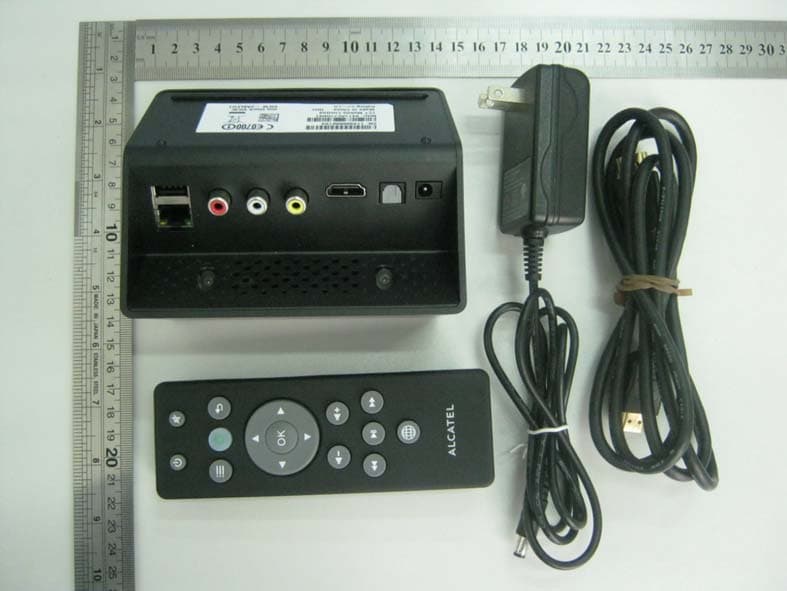
Click to zoom
Application Details
- Equipment Class
- DTS - Digital Transmission System
- Date of Grant
- Mar 27, 2012
- Application Purpose
- Original Equipment
- Date of Application
- Mar 27, 2012
- Equipment Note
- Smart TV Box
- Frequency Range
- 2412.00000000 - 2462.00000000
- Company
- TCT Mobile Limited
- Country
- China
Documents & Files
Document Text
Text extracted from the exhibit documents filed with the FCC. Open a document above to read the original.
Users Manual
ALCATEL onetouch VIEW INSTRUCTION Manufacturer: Huizhou TCL Mobile Communication Co., Ltd. Technical Service Hotline: 400 810 0588 Address: 70 Huifeng 4th Road , Zhongkai High - Tech Development Zone , Huizhou , Guangdong Province www.alcatelonetouch.com CONTENTS I Devices and accessories 01 II Images of onetouch VIEW Set-top Box 01 III IR remote controller 03 IV How to connect onetouch VIEW Set-top Box 04 V How to set up onetouch VIEW Set-top Box 05 VI How to operate the device 1 Turn on the device 05 2 Settings 06 3 Network functions 07 4 Local Video 09 5 Local Music 10 6 Local Picture 11 7 Application Management 12 8 Internet Video 12 9 Game 13 10 Alcatel app store 14 VII Trouble Shooting 15 VIII Caution 16 I. Devices and accessories Devices and accessories include: Alcatel onetouch VIEW Set-top Box, HDMI wire and adapter, and IR remote controller. Alcatel onetouch VIEW HDMI wire and adapter IR remote controller II. Images of Alcatel onetouch VIEW Set-top Box Back side Your TV, Smarter ! 01 Left side Right side 1 Power socket (5V DC In): for power supply through a 5V/2A adapter. 2 Optical fiber interface: for connection with external high-fidelity acoustic system. 3 HDMI (High-definition Multimedia Interface): to connect an onetouch VIEW Set-top Box with a TV set with an HDMI connector for the display of HD contents (remember to switch the TV to HDMI mode). 4 CVBS analogue video interface: to connect the CVBS port of Alcatel onetouch VIEW Set-top Box with the AV port of a TV set with the video connector (yellow) of the RCA cable (usually known as AV connectors) for the transmission of video signals from the TV. 5 L: left sound channel (analogue), usually the white AV connector, for the output of audio signals of the TV set. 6 R: right sound channel (analogue), usually the red AV connector, for the output of audio signals of the TV set. 7 ETHERNET: Internet interface, for access to the Internet to enable high-speed network access experience. 8 USB A: for connection with flash disks, mobile hard drives, wireless mice, wireless keyboards, and other devices with USB2.0 interfaces. 9 USB B: for connection with flash disks, mobile hard drives, wireless mice, wireless keyboards, and other devices with USB2.0 interfaces. 10 SD CARD slot: for the reading of information in SD cards Notes The device enables Internet con nection with an embedded Wi-Fi module, as well as a cable modem. III. IR remote controller 1 2 3 4 Your TV, Smarter ! 02-03 5 RETURN: return to the previous screen or menu. 6 OK: confirm the icon selected. 7 DIRECTION: including left, right, up, down keys. 8 VOLUME: for volume control. 9 MEDIA PLAY: including play, fast forward, fast backward and pause keys. 10 WEB: onetouch Internet surfing. IV. How to connect onetouch VIEW Set-top Box power source HDMI Out OPTICAL CVBS L R How to connect onetouch VIEW Set-top Box with the TV set V. How to set up onetouch VIEW Set-top Box 1 2 3 4 VI. How to operate the device 1 Turn on the device Turn on the device. You will see the welcome screen and the main menu in 40 seconds. Main menu options include local video, free video, games, applications, setup, application store, music, image and browser. Your TV, Smarter ! 04-05 2 Settings Setup icons Setup screen Set up wireless network connection Open Wi-Fi View and connect to wireless networks available. If the network selected is encrypted, you may need to enter your password or other IDs (you may need to contact your network operator for details). The Wi-Fi icon appears on the top right of the screen after the setup of Wi-Fi connection. Setup a wired network connection Enter the ETHERNET screen to automatically view and connect to wired networks. Other setups Administration applications Other setups include administration applications (installation and uninstallation), language and keyboard (language setup and keyboard setup), about the device (version) and privacy setups. 3 Network functions Network icons on the main screen Users may use the network functions to view news, watch video or play games on the Internet. Your TV, Smarter ! 06-07 Main screen of network functions (with various websites arranged by classes, including browsers, most-viewed, video, news, sports, bloggers, military, etc.) Google Chrome appears when the browser icon is opened. 4 Local Video The Local Video icon on the main screen. The device supports AVI, RMVB/RM, WMV, TS, MKV, MOV, M2TS, TP, MPEG, MPG, MP4, VOB, ISO, DAT, ASF and FLV formats. Local Video enables users to view 1080P HD videos with resolutions up to 1920*1080. Enter Local Video and it will search all the video formats that can be played in all the storage, such as U disk, SD card. When the "most-viewed” icon is opened, a number of portals and video sites, including sina.com, qq.com and Baidu appear. Select a video to play. The MEDIA PLAY supports a number of functions (fast forward, fast backward, pause, play and next). Your TV, Smarter ! 08-09 5 Local Music The Local Music icon on the main screen Music formats supported include MP3,WMA,WAV,ACC, FLAC and AC3. Local Music enables music playing while the user is surfing the Internet or using other functions. Click the Local Music icon, and this screen appears (with a number of options, including album, song, artist, add music, and now playing). This screen appears when a song is selected. 6 Local Picture The Picture icon on the main screen Image formats supported include: bmp, jpg and gif. Local Image allows the viewing of electronic albums. Click Local Image, and the submenu appears, each with folders of images. Select a folder and view the images in it. Your TV, Smarter ! 10-11 7 Application Management The Application Management icon on the main screen Onetouch VIEW is driven by Android 2.3. The screen allows application downloading and installation to experience all of the functions enabled by Android, including gaming, office work and social activities. 8 Online Video The Online Video icon on the main sc…
Text truncated - open the document above for the full version.
Cover Letter(s)
Date: 8 March, 2012 To: Federal Communications Commission, Authorization & Evaluation Division, 7435 Oakland Mills Road, Columbia, MD 21046 Re: TCT Mobile Limited FCC ID: RAD269 FCC Part 15C Certification Confidentiality Request Gentlemen: This letter is to comply with 47 CFR 0.457 and 0.459 pertaining to confidentiality material.TCT Mobile Limited requests that the following documents regarding this submission for FCC ID: RAD269 be kept confidential: Exhibit Type File Name Block Diagram CONF APPENDIX RAD269_Block Diagram.pdf Schematics CONF APPENDIX RAD269 _Schematics.pdf Operational Description CONF APPENDIX RAD269 _Operational Description.pdf Part list CONF APPENDIX RAD269 _BOM.pdf Those documents contain detailed system and equipment description and related information about the product which TCT Mobile Limited considers to be confidential proprietary, a custom design and, otherwise, not releasable to the general public. Since this design is a basis form which future technological products will evolve, TCT Mobile Limited considers this information would be of benefit to its competitors, and that the disclosure of the information in these documents would give competitors an unfair advantage in the market. Signatory Gong ZhiZhou TCT Mobile Limited
Cover Letter(s)
Date: 8 March, 2012 To: Federal Communications Commission, Authorization & Evaluation Division, 7435 Oakland Mills Road, Columbia, MD 21046 To Whom It May Concern: TCT Mobile Limited the undersigned, hereby authorizes Mr. Wu Xuewen from Shenzhen Morlab Communications Technology Co., Ltd., to act on the behalf of TCT Mobile Limited solely in matters relating to the application for an FCC equipment authorization for FCC ID: RAD269including the signing of documents in connection with this Application. Necessary acts carried out by Shenzhen Morlab Communications Technology Co., Ltd on our behalf of TCT Mobile Limited in connection with the Application shall have the same effect as acts of TCT Mobile Limited. TCT Mobile Limited also hereby certify that no party to this application is subject to a denial of benefits, including FCC benefits, pursuant to Section 5301 of the Anti-Drug Abuse Act of 1988, 21 U.S.C. 853(a). Thank you for your attention to this matter. Signatory Gong ZhiZhou TCT Mobile Limited
External Photos
External Photos
Test Setup Photos
Test Setup Photos 1. CE 2. RE 3. CSE
Contact Information
Applicant
Zhizhou Gong
Test Firm
Shenzhen Morlab Communications Technology Co.,LtdShu Luan
Technical Specifications
| # | Rule Parts | Frequency Range | Power Output |
|---|---|---|---|
| 1 | 15C | 2.41 GHz - 2.46 GHz | 15.30 mW |
Other Applications from TCT Mobile Limited

RAD558
Nov 15, 2015HSUPA/HSDPA/UMTS tribands / GSM quadbands/LTE 6-band mobile phone
Equipment Class
JBP - Part 15 Class B Computing Device Peripheral
RAD556
Sep 08, 2015CDMA 1X BC0/BC1/BC10 mobile phone
Equipment Class
PCE - PCS Licensed Transmitter held to ear
RAD552
Jun 20, 2015GSM Quadband / UMTS Triband mobile phone
Equipment Class
PCE - PCS Licensed Transmitter held to ear
RAD550
Jun 06, 2015HSDPA/HSUPA/HSPA+/UMTS quad band /GSM quad band/LTE 4 band mobile phone
Equipment Class
DSS - Part 15 Spread Spectrum Transmitter
RAD549
May 13, 2015WCDMA tri band / GSM quad band Moblie phone with BT, Wi-Fi functionality.
Equipment Class
DSS - Part 15 Spread Spectrum Transmitter