RAD400Tablet
TCT Mobile Limited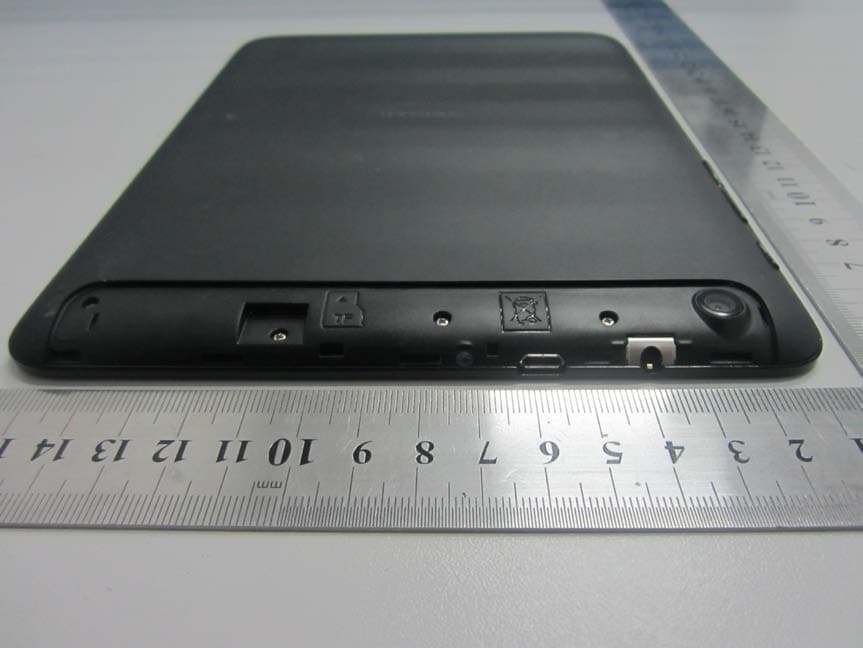
Click to zoom
Application Details
- Equipment Class
- JBC - Part 15 Class B Computing Device/Personal Computer
- Date of Grant
- Jul 07, 2013
- Application Purpose
- Original Equipment
- Date of Application
- Jul 07, 2013
- Equipment Note
- Tablet
- Company
- TCT Mobile Limited
- Country
- China
Documents & Files
Document Text
Text extracted from the exhibit documents filed with the FCC. Open a document above to read the original.
Users Manual
You have purchased a product which uses the open source (http://opensource.org/) programs mtd, msdosfs, netfilter/iptables and initrd in object code and other open source programs licensed under the GNU General Public License and Apache License. We will provide you with a complete copy of the corresponding source codes upon request within a period of three years from the distribution of the product by TCT. You may download the source codes from http://sourceforge.net/projects/alcatel/files/. The provision of the source code is free of charge from internet. 1 Table of Contents 1. Your device ........................................................................................................................................ 3 1.1 Appearance illustration ....................................................................................................... 3 1.2 Home screen ...................................................................................................................... 5 1.3 Apps and widgets ............................................................................................................... 7 1.4 Basic Operation .................................................................................................................. 8 2. Settings ............................................................................................................................................ 12 2.1 Device ............................................................................................................................... 12 2.2 Personal ............................................................................................................................ 13 2.3 System .............................................................................................................................. 13 3.Recovery ........................................................................................................................................ 15 SATEFY INFORMATION ..................................................................................................................... 16 This device meets applicable national SAR limits of 2.0 W/kg in EU and 1.6W/Kg in US. The specific maximum SAR values can be found on page 16 of this user guide. When carrying the device or using it while worn on your body, either use an approved accessory such as a holster or otherwise maintain a distance of 0 mm from the body to ensure compliance with RF exposure requirements. Note that the product may be transmitting even if you are not using it. PROTECT YOUR HEARING To prevent possible hearing damage, do not listen at high volume levels for long periods. 2 Exercise caution when holding your device near your ear while the loudspeaker is in use. 3 1. Your device 1.1 Appearance illustration a. Micro USB connector/ Battery charge interface b. Front camera c. Earphone interface d. Micro phone e. Power key f. Volume Up/Down g. Rear camera h. Built‐in speaker 4 5 Note: Please charge before first use. Normally, long press the Power key will power the pad on and the Home Screen will show up, but a battery icon will show instead of the Home Screen when the pad is lack of power, that indicates you should charge before use. Use only charger recommended by TCT Mobile Limited and its affiliates. 1.2 Home screen Your device includes five pages of Home screen giving you more space to add your own favorite apps, folders, and widgets for one-touch access. To switch between screens, sliding your finger to left or right. ● Lock/Unlock your screen Once your device is powered on, it shows a locked screen interface, which is set as default. Touch the locked icon, then a circle will shows around it. Touch and hold the locked icon , drag it to the lock icon at the right of the circle, home screen is unlocked. 6 ● Icons on your screen Icon Name Description Google search Touch it to access the Google search engine. Voice actions Use Voice Actions to watch a video, send email, set alarm, get directions, etc. All apps Touch to show all apps list interface. Back Go back to previous menu or screen. Home Return to home screen. Background program Press to view background program list. Wi-Fi Press to view Wi-Fi connection. 7 On the right of the screen bottom, there is a notification bar . A hidden menu will popup when you press the bar, which includes time, date, network connection and battery information, etc. For further operation, you can press setting. 1.3 Apps and widgets ● Apps The Applications (apps) list contains all pre-embedded and newly installed apps. To access the apps list, touch the all apps key from Home screen. ● Widgets Touch the Widgets tab at the top of all apps screen or slide left at All apps screen, you can switch to widgets interface. ● Get more apps Touch the Google play store icon to get more apps. ● Create and manage shortcut on desktop Touch and hold an icon on All Apps or widgets interface, it will jump to home screen automatically, drag it to the right place you want. Overlap icons together will build a folder. You can name the folder by touching the tap under the icons. 8 ● Remove apps icon from desktop Touch and hold the icon you want to delete from the desktop, drag it right over the " ", which appears right in the middle of the screen top. ● Uninstall apps Press to enter all Apps, then touch and hold the Apps icon you want to uninstall, drag it over the , which appears top-left in the desktop. 1.4 Basic Operation ● Power on your device Long press the Power key until the pad powers on. It will take some seconds before the screen lights up. ● Power off your device 1. Long press the Power key about 3 seconds until the options appear, select OK to power off your device. 2. Long press the Power key about 10 seconds to shut down your device. ● Stand-by mode Press Power key once to shut down the screen and the product enters stand-by mode. 9 Note: without operation, the product wil…
Text truncated - open the document above for the full version.
Cover Letter(s)
Date: June 25, 2013 To: Federal Communications Commission, Authorization & Evaluation Division, 7435 Oakland Mills Road, Columbia, MD 21046 To Whom It May Concern: TCT Mobile Limited the undersigned, hereby authorizes Mr. Ivy Zhu from Shenzhen Morlab Communications Technology Co., Ltd., to act on the behalf of TCT Mobile Limited solely in matters relating to the application for an FCC equipment authorization for FCC ID: RAD400 including the signing of documents in connection with this Application. Necessary acts carried out by Shenzhen Morlab Communications Technology Co., Ltd on our behalf of TCT Mobile Limited in connection with the Application shall have the same effect as acts of TCT Mobile Limited. TCT Mobile Limited also hereby certify that no party to this application is subject to a denial of benefits, including FCC benefits, pursuant to Section 5301 of the Anti-Drug Abuse Act of 1988, 21 U.S.C. 853(a). Thank you for your attention to this matter. Signatory Gong ZhiZhou Validation Project Manager TCT Mobile Limited
Cover Letter(s)
Date: 3 Jul, 2013 To: Federal Communications Commission, Authorization & Evaluation Division, 7435 Oakland Mills Road, Columbia, MD 21046 Re: TCT Mobile Limited FCC ID: RAD400 FCC Part 15B Certification FCC Part 15C Certification Confidentiality Request Gentlemen: This letter is to comply with 47 CFR 0.457 and 0.459 pertaining to confidentiality material.TCT Mobile Limited requests that the following documents regarding this submission for FCC ID: RAD400 be kept confidential: Exhibit Type File Name Block Diagram CONF APPENDIX RAD400_Block Diagram.pdf Schematics CONF APPENDIX RAD400 _Schematics.pdf Operational Description CONF APPENDIX RAD400 _Operational Description.pdf Part list CONF APPENDIX RAD400 _BOM.pdf Tune-Up-Procedure CONF APPENDIX RAD400 _Tune up procedure.pdf Those documents contain detailed system and equipment description and related information about the product which TCT Mobile Limited considers to be confidential proprietary, a custom design and, otherwise, not releasable to the general public. Since this design is a basis form which future technological products will evolve, TCT Mobile Limited considers this information would be of benefit to its competitors, and that the disclosure of the information in these documents would give competitors an unfair advantage in the market. Signatory Gong ZhiZhou TCT Mobile Limited
External Photos
External Photos 1. EUT full view with accessories 2. EUT rear view 3. EUT left side view 4. EUT right side view 5. EUT top view 6. EUT bottom view
Internal Photos
In ternal Photos 1. EUT uncover view 2. Mainboard front view with shielding 3. Mainboard rear view with shielding 4. Mainboard front view without shielding 5. Mainboard rear view without shielding 6. CPU chip view 7. BT/WIFI chip view 8. Wifi module 9. BT/WIFI antenna view 10. LCD screen view
Test Report
Report No.: SZ13050180E02 Page 2 of 17 TABLE OF CONTENTS 1. GENERAL INFORMATION .................................................................................................... 3 1.1 EUT Description ......................................................................................................................... 3 1.2 Test Standards and Results ........................................................................................................ 4 1.3 Facilities and Accreditations ...................................................................................................... 5 1.3.1 Facilities .................................................................................................................................... 5 1.3.2 Test Environment Conditions .................................................................................................... 5 1.3.3 Measurement Uncertainty ......................................................................................................... 5 2. TEST CONDITIONS SETTING............................................................................................... 6 2.1 Test Mode .................................................................................................................................... 6 2.2 Test Setup and Equipments List ................................................................................................ 7 2.2.1 Conducted Emission.................................................................................................................. 7 2.2.2 Radiated Emission ..................................................................................................................... 8 3. 47 CFR PART 15B REQUIREMENTS .................................................................................. 11 3.1 Conducted Emission ................................................................................................................. 11 3.1.1 Requirement ............................................................................................................................ 11 3.1.2 Test Description ...................................................................................................................... 11 3.1.3 Test Result ............................................................................................................................... 11 3.2 Radiated Emission .................................................................................................................... 14 3.2.1 Requirement ............................................................................................................................ 14 3.2.2 Test Description ...................................................................................................................... 14 3.2.3 Test Result ............................................................................................................................... 14 Change History Issue Date Reason for change 1.0 June 26, 2013 First edition Report No.: SZ13050180E02 Page 3 of 17 1. GENERAL INFORMATION 1.1 EUT Description EUT Type ........................Tablet Serial No. ........................(n.a., marked #1 by test site) Hardware Version .......... .V1.2 Software Version ............. Applicant ......................... Manufacturer ................... V114 TCT Mobile Limited 5F, C building, No. 232, Liang Jing Road ZhangJiang High-Tech Park, Pudong Area Shanghai, P.R. China. 201203 TCL COMMUNICATION TECHNOLOGY HOLDINGS LIMITED. 70 Huifeng 4rd, ZhongKai Hi-tech Development District, Huizhou, Guangdong 516006 P.R. China Modulation Type .............DSSS,FHSS Power supply ..................Battery Brand Name: ALCATEL Model No.: TLp041B2 Serial No.: (n.a. marked #1 by test site) Capacitance: 4150mAh Rated Voltage: 3.7V Charge Limit: 4.2V Ancillary Equipment 1 ... .AC Adapter (Charger for Battery) Brand Name: ALCATEL Model No.: one touch UC15US Serial No.: (n.a. marked #1 by test site) Rated Input: 100-240V, 500mA, 50/60Hz Rated Output: 5V, 2000mA Note: 1. There are two models for the EUT: ONE TOUCH T021 and ONE TOUCH TAB 8HD, they are identical with each other except the model name, thus they are considered to have the same EMC performance, only model ONE TOUCH T021 was tested in this report. 2. The EUT is a Tablet which is equipped with a T-Flash card slot, a Micro-USB port which can be connected to the ancillary equipments supplied by the manufacturer e.g. the USB Cable . 3. For a more detailed description, please refer to Specification or User’s Manual supplied by the applicant and/or manufacturer. Report No.: SZ13050180E02 Page 4 of 17 1.2 Test Standards and Results The objective of the report is to perform testing according to 47 CFR Part 15 Subpart B: No. Identity Document Title 1 47 CFR Part 15 Radio Frequency Devices Test detailed items/section required by FCC rules and results are as below: No. Section Description Result 1 15.107 Conducted Emission PASS 2 15.109 Radiated Emission PASS NOTE: The tests were performed according to the method of measurements prescribed in ANSI C63.4 2009. Report No.: SZ13050180E02 Page 5 of 17 1.3 Facilities and Accreditations 1.3.1 Facilities Shenzhen Morlab Communications Technology Co., Ltd. Morlab Laboratory is a testing organization accredited by China National Accreditation Service for Conformity Assessment (CNAS) according to ISO/IEC 17025. The accreditation certificate number is L3572. All measurement facilities used to collect the measurement data are located at FL.3, Building A, FeiYang Science Park, No.8 LongChang Road, Block 67, BaoAn District, ShenZhen, GuangDong Province, P. R. China 518101 . The test site is constructed in conformance with the requirements of ANSI C63.4(2009) and CISPR Publication 22(2010); the FCC registration number is 695796 . 1.3.2 Test Environment Conditions During the measurement, the environmental conditions were within the lis…
Text truncated - open the document above for the full version.
Test Setup Photos
Test Setup Photos 1. Conducted emission main’s port front view 2. Conducted emission main’s port side view 3. Radiated emission (9KHz-30MHz) 4. Radiated emission (30MHz-1GHz) 5. Radiated emission (above 1GHz)
Contact Information
Applicant
Zhizhou Gong
Technical Contact
Shenzhen Morlab Communications Technology Co.,LtdIvy Zhu
[email protected]+86-755-36698618
FL.3, Building A, FeiYang Science Park · ShenZhen, GuangDong Province · China
Test Firm
Shenzhen Morlab Communications Technology Co., LtdIvy zhu
Technical Specifications
| # | Rule Parts | Frequency Range | Power Output |
|---|---|---|---|
| 1 | 15B | - | - |
Other Applications from TCT Mobile Limited

RAD558
Nov 15, 2015HSUPA/HSDPA/UMTS tribands / GSM quadbands/LTE 6-band mobile phone
Equipment Class
JBP - Part 15 Class B Computing Device Peripheral
RAD556
Sep 08, 2015CDMA 1X BC0/BC1/BC10 mobile phone
Equipment Class
PCE - PCS Licensed Transmitter held to ear
RAD552
Jun 20, 2015GSM Quadband / UMTS Triband mobile phone
Equipment Class
PCE - PCS Licensed Transmitter held to ear
RAD550
Jun 06, 2015HSDPA/HSUPA/HSPA+/UMTS quad band /GSM quad band/LTE 4 band mobile phone
Equipment Class
DSS - Part 15 Spread Spectrum Transmitter
RAD549
May 13, 2015WCDMA tri band / GSM quad band Moblie phone with BT, Wi-Fi functionality.
Equipment Class
DSS - Part 15 Spread Spectrum Transmitter