RAD441WiFi video system
TCT Mobile Limited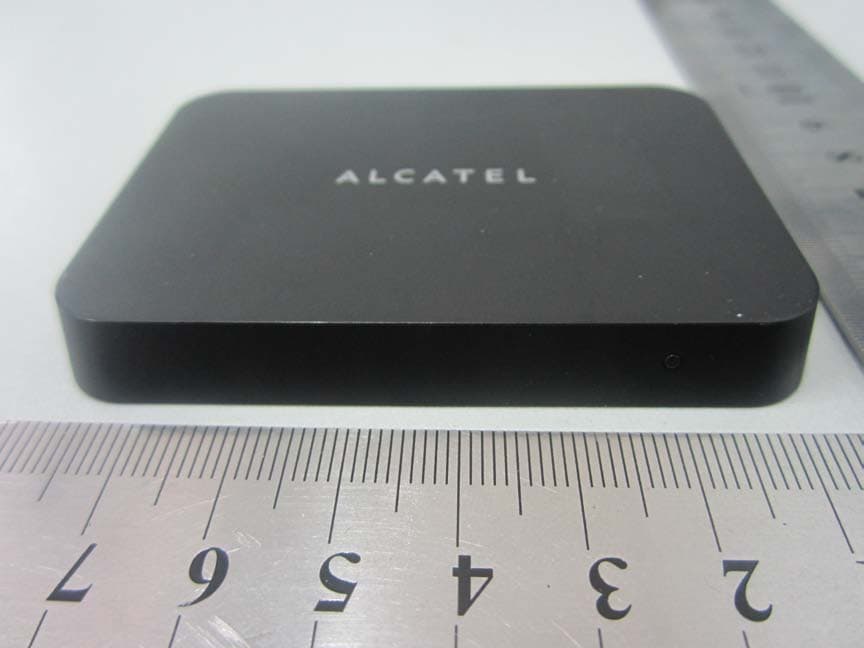
Click to zoom
Application Details
- Equipment Class
- DTS - Digital Transmission System
- Date of Grant
- Dec 11, 2013
- Application Purpose
- Original Equipment
- Date of Application
- Dec 11, 2013
- Equipment Note
- WiFi video system
- Frequency Range
- 2422.00000000 - 2452.00000000
- Company
- TCT Mobile Limited
- Country
- China
Documents & Files
Document Text
Text extracted from the exhibit documents filed with the FCC. Open a document above to read the original.
Users Manual
ONE TOUCH V101 USER MANUAL V101 About more help information and Frequently Asked Question please browse the website www.alcatelonetouch.com CJA18K001AAA Contents 1. YOUR DEVIDE ............................................... 3 What’s in the box .................................... 3 Appearance illustration ........................... 3 Installation ............................................... 4 2. QUICK START TO MIRROR .......................... 6 3. DISPLAY MEDIA FILES IN LNA ..................... 7 Install Software ....................................... 7 Set Wi-Fi network for your V101 ............. 7 Push media files to TV ............................ 8 4. UPGRADE ...................................................... 9 5. SAFETY AND USE ....................................... 11 PROTECT YOUR HEARING To prevent possible hearing damage, do not listen at high volume levels for long periods. Exercise caution when holding your device near your ear while the loud speaker is in use. 1. YOUR DEVIDE What’s in the box Appearance illustration A Indicator LED The LED will light when V101 starts up. B Micro USB Port Connect V101 to USB port of TV or charger(5V, 1A) using an USB cable C HDMI Port Connect V101 to the HDMI port of TV using an HDMI cable D Key Press the key when you need to debug V101 after connected with PC Installation Connect HDMI Cable: a) Connect one end of the HDMI cable to the back/side of your TV; b) Connect the other end of the cable to HDMI port on the back of V101; Connect USB Cable: a) Connect one end standard USB port of the USB cable to the back/side of your TV; b) Connect the Micro USB port of the USB cable to Micro port on the back of V101. Install TV Link tool a) Download TV Link tool from our web site http://support.alcatelonetouch.com; b) Cope TV Link tool to your mobile device then install it; c) Open TV Link tool on your mobile device; d) Click “search” icon, seconds later choose “V101_******” item to connect with V101, then you can the menu UI as below, you can set wireless network, upgrade, setting V101 and so on. Turn on your TV Turn on your TV and set to the input source of your TV as HDMI port which you plugged into T V. Touch to set Wi-Fi network Touch to upgrade Touch to adjust display scale Touch to change language Touch to choose your region Touch to see V101’s info Tips: post magic tape 2. QUICK START TO MIRROR TV will display the main UI after V100 be installed several seconds; Set your mobile device 1. click “Setting” -> “Display” -> “wireless display” -> “search”; 2. Please click “V101-****” item, then you can see the connection status on the UI. Seconds later you can see the screen of mobile device display on the TV; 3. When you don’t use it please disconnect on the mobile device follow below step: click “Setting” -> “Display” -> “wireless display” -> “V101-****”, choose “yes”, TV picture will return main UI after 20 seconds. Tips: a) The mobile devices(smart phone or tablet) connected with V101 should support Miracast function; b) Please unplug the USB port connected with TV if you don’t use V101 for a long time in order to avoid V101 too hot; c) V101 can connect with mobile device one to one o nl y, so please disconnect the current mobile device when you want to connect with another mobile device; d) The mobile device should be connect with Wi-Fi network firstly then connect with V101, otherwise mobile device maybe can’t access internet. 3. DISPLAY MEDIA FILES IN LNA Install Software Search and install Skifta software from Google Pl ay. Set Wi-Fi network for your V101 1. Open TV Link tool on your mobile device, click “search” icon, seconds later choose “V101_******” item to connect with V101, then you can the menu UI as below: 2. Choose “Access Point”: set Wi-Fi network SSID and password for V101, V101 will start to connect Wi-Fi network after chick “connect”, you can check connection info on TV. Push media files to TV 1. Open Skifta on your mobile device, choose the first item to enter the next UI, then choose a media source on list; 2. Choose the second item to enter the next UI, then choose a playback device on list; 3. Choose the third item to enter the next UI, then choose a media file from your mobile device, you can see the media file playing on TV and also can control this file by mobile device. 4. UPGRADE 1. Download new Firmware to your mobile device (smart phone or tablet) from our web site http://support.alcatelonetouch.com on “upgrade your software” page, record storage directory of new Firmware. 2. Open TV Link tool on your mobile device, click “search” icon, seconds later choose “V101_******” item to enter menu: 3. Click ”Upgrade” -> ”P2P Upgrade(Local)”, browse new Firmware storage directory, choose new Firmware then smart devices will upload Firmware to V101, you can see uploading process as below on smart devices and TV; 5. V101 will restart automatically to upgrade SW in several minutes, you can see upgrade process as below on TV. Don’t power off in the meanwhile otherwise V101 will be damaged! 5. SAFETY AND USE We recommend that you read this chapter carefully before using the Wi-Fi display Dongle. The manufacturer disclaims any liability for damage, which may result as a consequence of improper use of the Wi-Fi display Dongle or of use contrary to the instructions contained herein. Traffic Safety When driving, do not use the Wi-Fi display Dongle. When switched on, the Wi-Fi display Dongle emits electromagnetic waves that can interfere with the vehicle’s electronic systems such as ABS anti-lock brakes or airbags. To ensure that there is no problem: - Do not place the Wi-Fi display Dongle on top of the dashboard or within an airbag deployment area. - Check with your car dealer or the car manufacturer to make sure that the dashboard is adequately shielded from Dongle RF energy. Conditions of Use - Switch the Wi-Fi display Dongle off before boarding an aircraft. - Switch the Wi-Fi display Dongle off when you are in health…
Text truncated - open the document above for the full version.
Cover Letter(s)
Ad-HocCountry Code Cover Letter We, TCT Mobile Limited, declare that this EUT (FCC ID: RAD441) doesn’t have Ad Hoc Mode function on “non-US/Canada frequencies”. In addition, the frequency selection feature is disable by firmware for device marketed to the US/Canada. For DTS part of this device, only channel 1~11 will be used in North America. Country code selection is disabled. Should you have any questions or comments regarding this matter, please have my best attention. Sincerely yours, TCT Mobile Limited Te l : +86(0)2161460890 Fax: +86(0)2161460600 Email: [email protected]
Cover Letter(s)
Date: Dec 04, 2013 To: Federal Communications Commission, Authorization & Evaluation Division, 7435 Oakland Mills Road, Columbia, MD 21046 To Whom It May Concern: TCT Mobile Limited the undersigned, hereby authorizes Ms. Ivy Zhu from Shenzhen Morlab Communications Technology Co., Ltd., to act on the behalf of TCT Mobile Limited solely in matters relating to the application for an FCC equipment authorization for FCC ID: RAD441 including the signing of documents in connection with this Application. Necessary acts carried out by Shenzhen Morlab Communications Technology Co., Ltd on our behalf of TCT Mobile Limited in connection with the Application shall have the same effect as acts of TCT Mobile Limited. TCT Mobile Limited also hereby certify that no party to this application is subject to a denial of benefits, including FCC benefits, pursuant to Section 5301 of the Anti-Drug Abuse Act of 1988, 21 U.S.C. 853(a). Thank you for your attention to this matter. Signatory Gong ZhiZhou Validation Project Manager TCT Mobile Limited
Cover Letter(s)
Date: Dec 04, 2013 To: Federal Communications Commission, Authorization & Evaluation Division, 7435 Oakland Mills Road, Columbia, MD 21046 Re: TCT Mobile Limited FCC ID: RAD441 FCC Part 15C Certification Confidentiality Request Gentlemen: This letter is to comply with 47 CFR 0.457 and 0.459 pertaining to confidentiality material.TCT Mobile Limited requests that the following documents regarding this submission for FCC ID: RAD441 be kept confidential: Exhibit Type File Name Block Diagram Block Diagram.pdf Schematics Schematics.pdf Operational Description Operational Description.pdf Part list BOM.pdf Tune-Up-Procedure Tune up procedure.pdf Those documents contain detailed system and equipment description and related information about the product which TCT Mobile Limited considers to be confidential proprietary, a custom design and, otherwise, not releasable to the general public. Since this design is a basis form which future technological products will evolve, TCT Mobile Limited considers this information would be of benefit to its competitors, and that the disclosure of the information in these documents would give competitors an unfair advantage in the market. Signatory Gong ZhiZhou TCT Mobile Limited
External Photos
External Photos 1. EUT front view 2. EUT rear view 3. EUT left side view 4. EUT right side view 5. EUT top view 6. EUT bottom view 7. Accessory
ID Label/Location Info
FCC label and label location 1. Label 2. Label location Label location
Internal Photos
Internal Photos 1. EUT uncover view 2. Mainboard front view with shielding 3. Mainboard rear view 4. Mainboard front view without shielding 5. CPU chip view 6. WIFI chip view 7. WIFI antenna view
RF Exposure Info
Report No.: SZ13090040S01 Shenzhen Morlab Communications Technology Co., Ltd Phone: +86 (0) 755 36698555 Web site: http://www.morlab.cn/ Fax: +86 (0) 755 36698525 Email: [email protected] Page 2 of 8 DIRECTORY 1. TESTING LABORATORY .................................................................................................................... 3 1.1 IDENTIFICATION OF THE RESPONSIBLE TESTING LOCATION ................................................................... 3 1.2 ACCREDITATION CERTIFICATE .............................................................................................................. 3 2. TECHNICAL INFORMATION .............................................................................................................. 4 2.1 IDENTIFICATION OF APPLICANT ............................................................................................................. 4 2.2 IDENTIFICATION OF MANUFACTURER ..................................................................................................... 4 2.3 EQUIPMENT UNDER TEST (EUT) .......................................................................................................... 4 2.3.1 PHOTOGRAPHS OF THE EUT ............................................................................................................. 4 2.3.2 IDENTIFICATION OF ALL USED EUT ..................................................................................................... 5 2.4 APPLIED REFERENCE DOCUMENTS ...................................................................................................... 5 3. DEVICE CATEGORY AND RF EXPOSURE LIMIT ............................................................................... 6 4. MEASUREMENT OF CONDUCTED PEAK OUTPUT POWER. ........................................................... 7 5. RF EXPOSURE EVALUATION .............................................................................................................. 8 Change History Issue Date Reason for change 1.0 Nov. 29, 2013 First edition Report No.: SZ13090040S01 Shenzhen Morlab Communications Technology Co., Ltd Phone: +86 (0) 755 36698555 Web site: http://www.morlab.cn/ Fax: +86 (0) 755 36698525 Email: [email protected] Page 3 of 8 1. TESTING LABORATORY 1.1 Identification of the Responsible Testing Location Name: Shenzhen Morlab Communications Technology Co., Ltd. Morlab Laboratory Address: FL.3, Building A, FeiYang Science Park, No.8 LongChang Road, Block 67, BaoAn District, ShenZhen, GuangDong Province, P. R. China 518101 1.2 Accreditation Certificate Accredited Testing Laboratory: No. CNAS L3572 Report No.: SZ13090040S01 Shenzhen Morlab Communications Technology Co., Ltd Phone: +86 (0) 755 36698555 Web site: http://www.morlab.cn/ Fax: +86 (0) 755 36698525 Email: [email protected] Page 4 of 8 2. TECHNICAL INFORMATION Note: the Following data is based on the information by the applicant. 2.1 Identification of Applicant Company Name: TCT Mobile Limited Address: 5F, C building, No. 232, Liang Jing Road ZhangJiang High-Tech Park, Pudong Area Shanghai, P.R. China. 201203 2.2 Identification of Manufacturer Company Name: TCL COMMUNICATION TECHNOLOGY HOLDINGS LIMITED Address: 70 Huifeng 4rd,ZhongKai Hi-tech Development District , Huizhou, Guangdong 516006 P.R.China (TCL Mobile Communication Co.,LTD.Huizhou) 2.3 Equipment Under Test (EUT) Model Name: V101 Trade Name: Alcatel onetouch Brand Name: Alcatel onetouch Hardware Version: V3.0 Software Version: S1_B15001S_1110000_B10001S Frequency Bands: Wifi802.11B/G/N (2.4GHz) Modulation Mode: WIFI802.11B: DSSS; WIFI802.11G: OFDM WIFI 802.11N: OFDM; Antenna type: Fixed Internal Antenna Development Stage: Identical prototype 2.3.1 Photographs of the EUT Please refer to External Photo for the photographs of the EUT. Report No.: SZ13090040S01 Shenzhen Morlab Communications Technology Co., Ltd Phone: +86 (0) 755 36698555 Web site: http://www.morlab.cn/ Fax: +86 (0) 755 36698525 Email: [email protected] Page 5 of 8 2.3.2 Identification of all used EUT The EUT identity consists of numerical and letter characters, the letter character indicates the test sample, and the Following two numerical characters indicate the software version of the test sample. EUT Identity Hardware Version Software Version 1# V3.0 S1_B15001S_1110000_B10001S 2.4 Applied Reference Documents Leading reference documents for testing: No. Identity Document Title 1 47 CFR§2.1091 Radiofrequency Radiation Exposure Evaluation: mobile devices 2 KDB 447498 D01 V05r01 General RF Exposure Guidance Report No.: SZ13090040S01 Shenzhen Morlab Communications Technology Co., Ltd Phone: +86 (0) 755 36698555 Web site: http://www.morlab.cn/ Fax: +86 (0) 755 36698525 Email: [email protected] Page 6 of 8 3. Device Category and RF Exposure Limit Per user manual, this device is a set-top box with WiFi function. Based on 47CFR 2.1091, this device belongs to mobile device category with General Population/Uncontrolled exposure. Mobile Devices: 47CFR 2.1091(b) For purposes of this section, a mobile device is defined as a transmitting device designed to be used in other than fixed locations and to generally be used in such a way that a separation distance of at least 20 centimeters is normally maintained between the transmitter's radiating structure(s) and the body of the user or nearby persons. In this context, the term “fixed location” means that the device is physically secured at one location and is not able to be easily moved to another location. Transmitting devices designed to be used by consumers or workers that can be easily re-located, such as wireless devices associated with a personal computer, are considered to be mobile devices if they meet the 20 centimeter separation requirement. GENERAL POPULATION / UNCONTROLLED EXPOSURE The general population/uncontrolled exposure limits are applicable to situations in which the general public may be exposed or in which persons who are exposed as a consequence of their employment may not …
Text truncated - open the document above for the full version.
Test Report
SZ13090040W02 Page 2 of 76 DIRECTORY 1. GENERAL INFORMATION .................................................................................................... 3 1.1. EUT Description ....................................................................................................................... 3 1.2. Test Standards and Results ........................................................................................................ 4 1.3. Facilities and Accreditations ..................................................................................................... 5 2. 47 CFR PART 15C REQUIREMENTS .................................................................................... 6 2.1. Antenna requirement ................................................................................................................. 6 2.2. Peak Output Power.................................................................................................................... 6 2.3. Bandwidth ................................................................................................................................. 8 2.4. Conducted Spurious Emissions ............................................................................................... 17 2.5. Power spectral density (PSD) ................................................................................................. 29 2.6. Restricted Frequency Bands.................................................................................................... 38 2.7. Conducted Emission ............................................................................................................... 49 2.8. Radiated Emission................................................................................................................... 52 2.9. RF exposure evaluation ........................................................................................................... 76 Change History Issue Date Reason for change 1.0 November 29, 2013 First edition SZ13090040W02 Page 3 of 76 1. General Information 1.1. EUT Description EUT Type ............................. : Wifi Display Dongle Serial No. .............................. : (n.a, marked #1 by test site) Hardware Version ................. : V3.0 Software Version .................. : Applicant .............................. : Manufacturer ........................ : S1_B15001S_1110000_B10001S TCT Mobile Limited 5F, C building, No. 232, Liang Jing Road, ZhangJiang High-Tech Park, Pudong Area, Shanghai, P.R. China. 201203 TCL COMMUNICATION TECHNOLOGY HOLDINGS LIMITED 70 Huifeng 4rd, ZhongKai Hi-tech Development District ,Huizhou, Guangdong 516006 P.R.China (TCL Mobile Communication Co.,LTD.Huizhou) Frequency Range .................. : 802.11b/g/n-20MHz: 2.412GHz - 2.462GHz 802.11n-40MHz: 2.422GHz- 2.452GHz Channel Number................... : 802.11b/g/n-20MHz: 11 802.11n-40MHz: 7 Modulation Type .................. : DSSS (802.11b), OFDM (802.11g/n) Antenna Type ........................ : PIFA Antenna Antenna Gain ........................ : 2.0dBi Note 1: The EUT is Wifi Display Dongle, it contains WIFI Module operating at 2.4GHz ISM band; it supports 802.11b, 802.11g, 802.11n and they are all tested in this report. Note 2: For 802.11b/g/n-20MHz, the frequencies allocated is F (MHz) =2412+5*(n-1) (1<=n<=11). The lowest, middle, highest channel numbers of the EUT used and tested in this report are separately 1 (2412MHz), 6 (2437MHz) and 11 (2462MHz). For 802.11n-40MHz, the frequencies allocated is F (MHz) =2412+5*(n-1) (3<=n<=9). The lowest, middle, highest channel numbers of the EUT used and tested in this report are separately 3 (2422MHz), 6 (2437MHz) and 9 (2452MHz). Note 3: For a more detailed description, please refer to Specification or User’s Manual supplied by the applicant and/or manufacturer. Note 4: The antenna connector of EUT is designed with permanent attachment and no consideration of replacement. Note 5: For test purpose, the test laboratory supplied an adapter for power supply during the measurement. SZ13090040W02 Page 4 of 76 1.2. Test Standards and Results The objective of the report is to perform testing according to 47 CFR Part 15 Subpart C (Wi-Fi, 2.4GHz ISM band radiators) for the EUT FCC ID Certification: No. Identity Document Title 1 47 CFR Part 15 (10-1-12 Edition) Radio Frequency Devices Test detailed items/section required by FCC rules and results are as below: No. Section Description Result 1 15.203 Antenna Requirement PA S S 2 15.247(b) Peak Output Power PASS 3 15.247(a) Bandwidth PASS 4 15.247(d) Conducted Spurious Emission PASS 5 15.247(d) Restricted Frequency Bands PASS 6 15.207 Conducted Emission PASS 7 15.209 ,15.247(d) Radiated Emission PASS 8 15.247(e) Power spectral density (PSD) PASS 9 15.247(i), 1.1307&2.1093 RF exposure evaluation PA S S The tests of Conducted Emission and Radiated Emission were performed according to the method of measurements prescribed in ANSI C63.4 2009. These RF tests were performed according to the method of measurements prescribed in KDB558074 D01 v03r01 (04/09/2013). SZ13090040W02 Page 5 of 76 1.3. Facilities and Accreditations 1.3.1. Facilities Shenzhen Morlab Communications Technology Co., Ltd. Morlab Laboratory is a testing organization accredited by China National Accreditation Service for Conformity Assessment (CNAS) according to ISO/IEC 17025. The accreditation certificate number is L3572. All measurement facilities used to collect the measurement data are located at FL.1, Building A, FeiYang Science Park, Block 67, BaoAn District, Shenzhen, 518101 P. R. China. The test site is constructed in conformance with the requirements of ANSI C63.10 2009, ANSI C63.4 2009 and CISPR Publication 22; the FCC registration number is 695796. 1.3.2. Test Environment Conditions During the measurement, the environmental conditions were within the listed ranges: Temperature (°C): 15 - 35 Relative Humidity (%): 30 -60 Atmospheric Pressure (kPa): 8…
Text truncated - open the document above for the full version.
Test Setup Photos
Test Setup Photos 1. Conducted emission main’s port front view 2. Conducted emission main’s port side view 3. Radiated emission (9KHz-30MHz) 4. Radiated emission (30MHz-1GHz) 5. Radiated emission (above 1GHz) 6. Conducted emission antenna’s port
Contact Information
Applicant
Zhizhou Gong
Technical Contact
Shenzhen Morlab Communications Technology Co.,LtdIvy Zhu
[email protected]86-755-36698618
FL.3, Building A, FeiYang Science Park · ShenZhen, GuangDong Province · China
Test Firm
Shenzhen Morlab Communications Technology Co., LtdIvy zhu
Technical Specifications
| # | Rule Parts | Frequency Range | Power Output |
|---|---|---|---|
| 2 | 15C | 2.42 GHz - 2.45 GHz | 13.00 mW |
Other Applications from TCT Mobile Limited

RAD558
Nov 15, 2015HSUPA/HSDPA/UMTS tribands / GSM quadbands/LTE 6-band mobile phone
Equipment Class
JBP - Part 15 Class B Computing Device Peripheral
RAD556
Sep 08, 2015CDMA 1X BC0/BC1/BC10 mobile phone
Equipment Class
PCE - PCS Licensed Transmitter held to ear
RAD552
Jun 20, 2015GSM Quadband / UMTS Triband mobile phone
Equipment Class
PCE - PCS Licensed Transmitter held to ear
RAD550
Jun 06, 2015HSDPA/HSUPA/HSPA+/UMTS quad band /GSM quad band/LTE 4 band mobile phone
Equipment Class
DSS - Part 15 Spread Spectrum Transmitter
RAD549
May 13, 2015WCDMA tri band / GSM quad band Moblie phone with BT, Wi-Fi functionality.
Equipment Class
DSS - Part 15 Spread Spectrum Transmitter