RAD508TERRACE
TCT Mobile Limited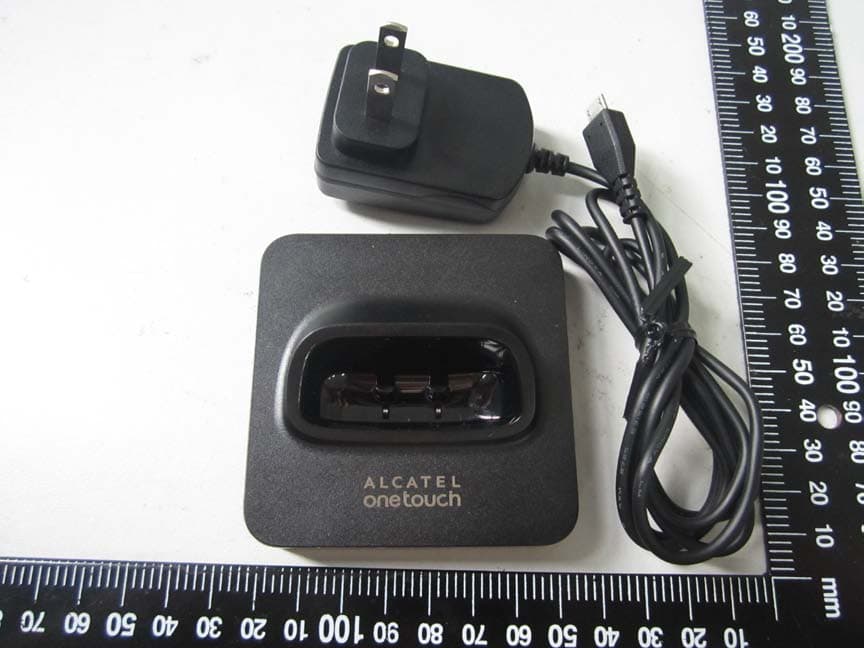
Click to zoom
Application Details
- Equipment Class
- PCE - PCS Licensed Transmitter held to ear
- Date of Grant
- May 08, 2014
- Application Purpose
- Original Equipment
- Date of Application
- May 08, 2014
- Equipment Note
- TERRACE
- Frequency Range
- 1850.20000000 - 1909.80000000
- Company
- TCT Mobile Limited
- Country
- China
Documents & Files
Document Text
Text extracted from the exhibit documents filed with the FCC. Open a document above to read the original.
Users Manual
1 F102G Quick Start Guide For more information about how to use the device, please go to www.alcatelonetouch.com to download complete user manual(English version only).Moreover, from the website you can also consult FAQ, realize software upgrade, etc (English version only). This product meets applicablenational SAR limits of 2.0 W/kg. When carrying the product or usingit whileworn on your body, eitheruse an approved accessory such asa holster or otherwise maintain a distance of 15 mm from the body toensure compliance with RF exposurerequirements. Note that the productmay be transmitting even if you arenot making a phone call. PROTECT YOUR HEARING To prevent possible hearing damage, do not listen athigh volume levels for long periods. Exercise cautionwhen holding your device near your ear while the loudspeakeris in use. 2 1YourDevice..................... Leftsoftkey Navigation key 2 Pick up/Send callMenu/Confirm an option Call logProfiles Voice MailCalendar Right soft key Write a message Power on/off keyAlarm End call 3 1.1Keys Confirman option (press the middle of the key) Pick up; Send a call In idle screen:Access call log (Redial) (press) Switch on/Switch off the telephone (press and hold) End call Return to idle screen Left softkey Right softkey Access your voicemail (press and hold) In Edit mode: - Press once to enterspace; Press and hold to enter zero In idle screen: - Press and hold to switch between 0, + ,P, W - Press to enter zero In Edit mode: - Press to access the symbols table - Press and hold to switch between multi-tap and predictive input method In idle screen: - Press and hold to lock the keypad - Press to enter * In idle screen: - Press: # - Press and hold: activate/deactivate silent mode In Edit mode: - Press to change input method 4 1.2 Mainscreenicons (1) Battery Call forwarding activated: your calls are forwarded Alarmorappointmentsprogrammed Levelofnetworkreception Voicemail message received Missed calls Roaming Silence mode: your phone does not ring, beep with the exception of the alarm SMSunread Flight mode (1)Theiconsand illustrations inthisguideareprovidedforinformation purposes only. 5 2Getting Start............. 2.1Set-up Removingandinstallingthebackcover Removingandinstallingthebattery InsertingandremovingtheSIMcard 6 Place the SIM card with the chip facing downwards and slide it into its housing. Make sure that it is correctly inserted. To remove the card, press it and slide it out. Charging the battery Connect the battery charger to your phone cradle(or phone) and mains socketrespectively. • Charging may take about 20 minutes to start if the battery isflat. • Be careful not to force the plug into the socket. • Make sure the battery is correctly inserted before connectingthe charger. • The mains socket must be near to the phone and easilyaccessible (avoid electric extension cables). • When using your device for the first time, charge thebattery fully (approximately 3 hours). You are advised to fullycharge the battery. • To reduce power consumption and energy waste, whenbattery is fully charged, disconnect your charger from theplug; reduce the backlight time, etc. The charge is complete when the animation stops. 7 2.2 Poweronyourphone Holddownthe keyuntilthe device powerson. If the deviceasks for the lock code, enter the lock code, and select OK. The factory setting for the lock code is11 22 . 2.3 Poweroffyourphone Hold down the key until the phone powers off. 3Calls........................... 3.1 Makinga call Dialthedesired number then press the key to place the call. If you make a mistake, you can delete the incorrect digits by pressing the right soft key. To hang up the call, press the key. Makinganemergencycall If your phone is covered by the network, dial emergency number and press the key to make an emergency call. This works even without a SIM card and without typing the PIN code. 3.2 Calling your voicemail (1) T o access your voicemail, hold down the key. 3.3Receivinga call When you receive an incoming call, press the key to talk, and then hang up using the key (1) Contact yournetworkoperatorto check service availability. 8 4Contacts............. Your phone features two phonebooks, the SIM phonebook and the smart phonebook which is integrated into the phone memory. 4.1 Consultingyourcontacts To access the Contacts from the main screen,pressthe key and select the contact from the list. 4.2 Adding a contact You can add a new contact to phone or SIM card by selecting“Add New”, enter the contact information and then press “save”. 4.3 Searching a contact You can press key to access Contacts list, then enter the first few letters or numbers of the contact name to search. 5Messages............ 5.1 Createmessage From the main menu select “Messages” to create text. You can typea message and you can also modify a predefinedmessage in Templates. While writing a message, select“Options” to access all of the messaging options. You can save your messages that you send often to Drafts. 9 Specific letters (accent) will increase the size of the SMS, this may cause multiple SMS to be sent to your recipient. 6Call log................. 6.1Access You can access the function to view up to20 numbers that you last called or attempted to call or the call you missed by using the following options: • Select Recent Callsfrom main men • Press the send key from Home screen 6.2Availableoptions When you press “Options”, you can have access to View, Call, Send Message, Save, Delete etc. 7Settings................. Select “Settings” from the main menu, and select the function of your choice in order to customize your telephone: Phone settings, Call settings,Network settings, Security, Restore etc. 7.1Phone settings Select “Phone settings” from “Settings” menu, you can set the display, language, time and date format, preferred input method etc. To set the device automatic lock the keypad after a certain time, select “Screen auto lock”, and set the time. 10 7.2 Call settings Select from t…
Text truncated - open the document above for the full version.
Cover Letter(s)
Date: 18 March, 2014 To: Federal Communications Commission, Authorization & Evaluation Division, 7435 Oakland Mills Road, Columbia, MD 21046 To Whom It May Concern: TCT Mobile Limited the undersigned, hereby authorizes Mrs Ivy Zhu from Shenzhen Morlab Communications Technology Co., Ltd., to act on the behalf of TCT Mobile Limited solely in matters relating to the application for an FCC equipment authorization for FCC ID: RAD508 including the signing of documents in connection with this Application. Necessary acts carried out by Shenzhen Morlab Communications Technology Co., Ltd on our behalf of TCT Mobile Limited in connection with the Application shall have the same effect as acts of TCT Mobile Limited. TCT Mobile Limited also hereby certify that no party to this application is subject to a denial of benefits, including FCC benefits, pursuant to Section 5301 of the Anti-Drug Abuse Act of 1988, 21 U.S.C. 853(a). Thank you for your attention to this matter. Signatory Gong ZhiZhou Validation Project Manager TCT Mobile Limited
Cover Letter(s)
Date: 18 March, 2014 To: Federal Communications Commission, Authorization & Evaluation Division, 7435 Oakland Mills Road, Columbia, MD 21046 Re: TCT Mobile Limited FCC ID: RAD508 Confidentiality Request Gentlemen: This letter is to comply with 47 CFR 0.457 and 0.459 pertaining to confidentiality material.TCT Mobile Limited requests that the following documents regarding this submission for FCC ID: RAD508 be kept confidential: Exhibit Type File Name Block Diagram Block Diagram.pdf Schematics Schematics.pdf Operational Description Operational Description.pdf Part list BOM.pdf Tune-Up-Procedure Tune up procedure.pdf Those documents contain detailed system and equipment description and related information about the product which TCT Mobile Limited considers to be confidential proprietary, a custom design and, otherwise, not releasable to the general public. Since this design is a basis form which future technological products will evolve, TCT Mobile Limited considers this information would be of benefit to its competitors, and that the disclosure of the information in these documents would give competitors an unfair advantage in the market. Signatory Gong ZhiZhou TCT Mobile Limited
External Photos
External Photos 1. EUT front view 2. EUT rear view 3. EUT left side view 4. EUT right side view 5. EUT top view 6. EUT bottom view 7. Accessories
ID Label/Location Info
FCC ID: RAD508 Label Label Location Label location
Internal Photos
Internal Photos 1. EUT uncover view 2. Mainboard front view with shielding 3. Mainboard rear view with shielding 4. Mainboard front view without shielding 5. Mainboard rear view without shielding 6. GSM chip view 7. GSM antenna view
RF Exposure Info
Report No.: SZ14030220S01 Shenzhen Morlab Communications Technology Co., Ltd Phone: +86 (0) 755 36698555 Web site: http://www.morlab.cn/ Fax: +86 (0) 755 36698525 Email: [email protected] Page 2 of 75 DIRECTORY 1. TESTING LABORATORY .................................................................................................................... 4 1.1 IDENTIFICATION OF THE RESPONSIBLE TESTING LOCATION ................................................................... 4 1.2 ACCREDITATION CERTIFICATE .............................................................................................................. 4 1.3 LIST OF TEST EQUIPMENTS .................................................................................................................. 4 2. TECHNICAL INFORMATION .............................................................................................................. 5 2.1 IDENTIFICATION OF APPLICANT ............................................................................................................. 5 2.2 IDENTIFICATION OF MANUFACTURER ..................................................................................................... 5 2.3 EQUIPMENT UNDER TEST (EUT) .......................................................................................................... 5 2.3.1 PHOTOGRAPHS OF THE EUT ............................................................................................................. 6 2.3.2 IDENTIFICATION OF ALL USED EUT ..................................................................................................... 6 2.4 APPLIED REFERENCE DOCUMENTS ...................................................................................................... 6 2.5 DEVICE CATEGORY AND SAR LIMITS .................................................................................................... 6 2.6 TEST ENVIRONMENT/CONDITIONS ........................................................................................................ 7 3. SPECIFIC ABSORPTION RATE (SAR) .............................................................................................. 8 3.1 INTRODUCTION .................................................................................................................................... 8 3.2 SAR DEFINITION .................................................................................................................................. 8 4. SAR MEASUREMENT SETUP ........................................................................................................... 9 4.1 THE MEASUREMENT SYSTEM ............................................................................................................... 9 4.2 PROBE ................................................................................................................................................ 9 4.3 PROBE CALIBRATION PROCESS ......................................................................................................... 11 4.3.1 DOSIMETRIC ASSESSMENT PROCEDURE .......................................................................................... 11 4.3.2 FREE SPACE ASSESSMENT PROCEDURE .......................................................................................... 11 4.3.3 TEMPERATURE ASSESSMENT PROCEDURE ....................................................................................... 11 4.4 PHANTOM .......................................................................................................................................... 12 4.5 DEVICE HOLDER ................................................................................................................................ 12 5. TISSUE SIMULATING LIQUIDS ........................................................................................................ 13 6. UNCERTAINTY ASSESSMENT ........................................................................................................ 15 Report No.: SZ14030220S01 Shenzhen Morlab Communications Technology Co., Ltd Phone: +86 (0) 755 36698555 Web site: http://www.morlab.cn/ Fax: +86 (0) 755 36698525 Email: [email protected] Page 3 of 75 6.1 UNCERTAINTY EVALUATION FOR EUT SAR TEST ..................................................................... 15 6.2 UNCERTAINTY FOR SYSTEM PERFORMANCE CHECK ............................................................. 16 7. SAR MEASUREMENT EVALUATION ............................................................................................... 18 7.1 SYSTEM SETUP .................................................................................................................................. 18 7.2 VALIDATION RESULTS ........................................................................................................................ 19 8. OPERATIONAL CONDITIONS DURING TEST ................................................................................ 20 8.1 INFORMATION ON THE TESTING ........................................................................................................... 20 8.2 BODY-WORN CONFIGURATIONS .......................................................................................................... 21 8.3 MEASUREMENT PROCEDURE .............................................................................................................. 21 8.4 DESCRIPTION OF INTERPOLATION/EXTRAPOLATION SCHEME ................................................................ 21 9. MEASUREMENT OF CONDUCTED PEAK OUTPUT POWER ........................................................ 23 10. TEST RESULTS LIST ...................................................................................................................... 24 ANNEX A GRAPH TEST RESULTS ........................................................................................................ 26 Change History Issue Date Reason for change 1.0 April 30, 2014 First edition Report No.: SZ140302…
Text truncated - open the document above for the full version.
RF Exposure Info
Report No.:SZ14030220S01 Shenzhen Morlab Communications Technology Co., Ltd. Phone: +86 (0) 755 36698555 Web site: http://www.morlab.cn/ Fax: +86 (0) 755 36698525 1. EUT Right Head Touch Cheek Position 2. EUT Right Head Tilt15 Position Report No.: SZ14030220S01 Shenzhen Morlab Communications Technology Co., Ltd Phone: +86 (0) 755 36698555 Web site: http://www.morlab.cn/ Fax: +86 (0) 755 36698525 Email: [email protected] Page 2 of 4 3. EUT Left Head Touch Cheek Position 4. EUT Left Head Tilt15 Position Report No.: SZ14030220S01 Shenzhen Morlab Communications Technology Co., Ltd Phone: +86 (0) 755 36698555 Web site: http://www.morlab.cn/ Fax: +86 (0) 755 36698525 Email: [email protected] Page 3 of 4 5. Back Side Position 10mm Report No.: SZ14030220S01 Shenzhen Morlab Communications Technology Co., Ltd Phone: +86 (0) 755 36698555 Web site: http://www.morlab.cn/ Fax: +86 (0) 755 36698525 Email: [email protected] Page 4 of 4 Liquid Level Photo Head Liquid Liquid depth: 15.1cm Liquid Level Photo Body Liquid Liquid depth :15.5cm
Test Report
Report No.: SZ14030220W02 Shenzhen Morlab Communications Technology Co., Ltd Phone: +86 (0) 755 36698555 Web site: http://www.morlab.cn/ Fax: +86 (0) 755 36698525 Email: [email protected] Page 2 of 42 TABLE OF CONTENTS 1. GENERAL INFORMATION ...................................................................................................................... 3 1.1 EUT DESCRIPTION .................................................................................................................................... 3 1.2 TEST STANDARDS AND RESULTS .............................................................................................................. 4 1.3 FACILITIES AND ACCREDITATIONS ............................................................................................................. 5 2. 47 CFR PART 2, PART 22H & 24E REQUIREMENTS .......................................................................... 6 2.1 CONDUCTED RF OUTPUT POWER ............................................................................................................. 6 2.2 PEAK TO AVERAGE RADIO ....................................................................................................................... 11 2.3 99% OCCUPIED BANDWIDTH ................................................................................................................... 14 2.4 FREQUENCY STABILITY ............................................................................................................................ 18 2.5 CONDUCTED OUT OF BAND EMISSIONS ................................................................................................... 20 2.6 BAND EDGE ............................................................................................................................................. 27 2.7 TRANSMITTER RADIATED POWER (EIRP/ERP) ....................................................................................... 30 2.8 RADIATED OUT OF BAND EMISSIONS ....................................................................................................... 34 Change History Issue Date Reason for change 1.0 Apr 30, 2014 First edition Report No.: SZ14030220W02 Shenzhen Morlab Communications Technology Co., Ltd Phone: +86 (0) 755 36698555 Web site: http://www.morlab.cn/ Fax: +86 (0) 755 36698525 Email: [email protected] Page 3 of 42 1. GENERAL INFORMATION 1.1 EUT Description EUT Type ............................. : TERRACE Serial No. ............................. : (n.a, marked #1 by test site) Hardware Version ................ : V1.3 Software Version .................. : Applicant .............................. : Manufacturer ........................ : V1.3 TCT Mobile Limited 5F, C building, No. 232, Liang Jing Road ZhangJiang High-Tech Park, Pudong Area Shanghai, P.R. China. 201203 TCL COMMUNICATION TECHNOLOGY HOLDINGS LIMITED 70 Huifeng 4rd,ZhongKai Hi-tech Development District ,Huizhou, Guangdong 516006 P.R.China (TCL Mobile Communication Co.,LTD.Huizhou) Frequency Range ................ : GSM 850MHz: Tx: 824.20 - 848.80MHz (at intervals of 200kHz); Rx: 869.20 - 893.80MHz (at intervals of 200kHz) GSM 1900MHz: Tx: 1850.20 - 1909.80MHz (at intervals of 200kHz); Rx: 1930.20 - 1989.80MHz (at intervals of 200kHz) Modulation Type ................... : GSM Mode with GMSK Modulation Antenna Type ....................... : PIFA Antenna Emission Designators .......... : GSM 850:243KGXW,GSM 1900:245KGXW Note 1: The transmitter (Tx) frequency arrangement of the Cellular 850MHz band used by the EUT can be represented with the formula F(n)=824.2+0.2*(n-128), 128<=n<=251; the lowest, middle, highest channel numbers (ARFCHs) used and tested in this report are separately 128 (824.2MHz), 190 (836.6MHz) and 251 (848.8MHz). Note 2: The transmitter (Tx) frequency arrangement of the PCS 1900MHz band used by the EUT can be represented with the formula F(n)=1850.2+0.2*(n-512), 512<=n<=810; the lowest, middle and highest channel numbers (ARFCHs) used and tested in this report are separately 512 (1850.2MHz), 661 (1880.0MHz) and 810 (1909.8MHz). Note 3: For a more detailed description, please refer to Specification or User’s Manual supplied by the applicant and/or manufacturer. Report No.: SZ14030220W02 Shenzhen Morlab Communications Technology Co., Ltd Phone: +86 (0) 755 36698555 Web site: http://www.morlab.cn/ Fax: +86 (0) 755 36698525 Email: [email protected] Page 4 of 42 1.2 Test Standards and Results The objective of the report is to perform testing according to 47 CFR Part 2, Part 22 and Part 24 for the EUT FCC ID Certification: No. Identity Document Title 1 47 CFR Part 2 (10-1-13 Edition) Frequency Allocations and Radio Treaty Matters; General Rules and Regulations 2 47 CFR Part 22 (10-1-13 Edition) Public Mobile Services 3 47 CFR Part 24 (10-1-13 Edition) Personal Communications Services Test detailed items/section required by FCC rules and results are as below: No. Section Description Result 1 2.1046 Conducted RF Output Power PASS 2. 24.232(d) Peak to average radio PASS 2 2.1049,22.917 24.238 99% Occupied Bandwidth PASS 3 2.1055,22.355 24.235 Frequency Stability PASS 4 2.1051,2.1057 22.917,24.238, Conducted Out of Band Emissions PASS 5 2.1051,2.1057 22.917,24.238 Band Edge PASS 6 22.913,24.232 Transmitter Radiated Power (EIPR/ERP) PASS 7 2.1053,2.1057 22.917,24.238 Radiated Out of Band Emissions PASS NOTE:Measurement method according to TIA/EIA 603.D-2010 Report No.: SZ14030220W02 Shenzhen Morlab Communications Technology Co., Ltd Phone: +86 (0) 755 36698555 Web site: http://www.morlab.cn/ Fax: +86 (0) 755 36698525 Email: [email protected] Page 5 of 42 1.3 Facilities and Accreditations 1.3.1 Facilities All measurement facilities used to collect the measurement data are located at FL.1, Building A, FeiYang Science Park, No.8 LongChang Road,Block 67, BaoAn District, ShenZhen, GuangDong Province,P. R. China 518101. The test site is constructed in conformance with the requirements of ANSI C63.7, ANSI C63.4 and C…
Text truncated - open the document above for the full version.
Test Setup Photos
Test Setup Photos 1. Conducted Spurious Emission 2. Radiated Spurious Emission
Contact Information
Applicant
Zhizhou Gong
Technical Contact
Shenzhen Morlab Communications Technology Co.,LtdIvy Zhu
[email protected]86-755-36698618
FL.3, Building A, FeiYang Science Park · ShenZhen, GuangDong Province · China
Test Firm
Shenzhen Morlab Communications Technology Co., LtdIvy zhu
Technical Specifications
| # | Rule Parts | Frequency Range | Power Output | Emission | Tolerance |
|---|---|---|---|---|---|
| 2 | 24E | 1.85 GHz - 1.91 GHz | 1.556 W | 245KGXW | 0.025 ppm |
Other Applications from TCT Mobile Limited

RAD558
Nov 15, 2015HSUPA/HSDPA/UMTS tribands / GSM quadbands/LTE 6-band mobile phone
Equipment Class
JBP - Part 15 Class B Computing Device Peripheral
RAD556
Sep 08, 2015CDMA 1X BC0/BC1/BC10 mobile phone
Equipment Class
PCE - PCS Licensed Transmitter held to ear
RAD552
Jun 20, 2015GSM Quadband / UMTS Triband mobile phone
Equipment Class
PCE - PCS Licensed Transmitter held to ear
RAD550
Jun 06, 2015HSDPA/HSUPA/HSPA+/UMTS quad band /GSM quad band/LTE 4 band mobile phone
Equipment Class
DSS - Part 15 Spread Spectrum Transmitter
RAD549
May 13, 2015WCDMA tri band / GSM quad band Moblie phone with BT, Wi-Fi functionality.
Equipment Class
DSS - Part 15 Spread Spectrum Transmitter